


Data is the foundation of modern enterprise analytics. But the platform behind it matters just as much as the data itself. You need something that handles petabyte-scale workloads, powers real-time analytics and doesn’t turn your ML pipelines into a maintenance nightmare. There are several platforms out there, but two really stand out for this: Azure Synapse and Databricks. Both are popular, powerful and live in the cloud, but that’s where a lot of the similarity ends. To choose between them, you need to know what each one does best. Databricks is basically Apache Spark supercharged for the cloud. It’s built around the “Lakehouse” concept, which combines the benefits of data lakes and data warehouses. On the flip side, Azure Synapse Analytics is Microsoft’s all-in-one data analytics service. It combines data warehousing, big data processing, data integration and data exploration in one place on Azure.
A note before we compare them: Microsoft is now focusing its analytics investments on Microsoft Fabric, its new unified analytics platform. They’ve already retired Synapse Data Explorer and stopped supporting new projects for Synapse Link for Cosmos DB. Their R&D efforts are now centered on Fabric. Azure Synapse isn’t being phased out; your existing SQL pools, Spark pools, and pipelines will keep running. But if you’re building a new analytics stack from scratch, you should consider Fabric. This article focuses on Synapse as it stands today, with that context in mind.
In this article, we will deep dive into an in-depth comparison between Azure Synapse vs Databricks, diving into their features, architectures, ecosystem integration, data processing engines, machine learning features, security, governance, developer experience, pricing breakdown and more.
Let’s dive right in!
What is Databricks?
Databricks originated from research at the University of California, Berkeley’s AMP Lab and is built on Apache Spark—a fast, open source engine for large‐scale data processing. Founded by the creators of Apache Spark (Ali Ghodsi, Andy Konwinski, Ion Stoica, Matei Zaharia, Patrick Wendell, Reynold Xin and Arsalan Tavakoli-Shiraji), Databricks was established to address enterprise challenges by simplifying complex deployments, enforcing code consistency and providing dedicated support that standalone Spark environments lacked.
So, what is Databricks? Databricks is a unified platform for data engineering, machine learning and analytics. It fuses the flexibility of data lakes with the performance of data warehouses into a “lakehouse” architecture, enabling organizations to manage both raw and curated data seamlessly.
Databricks features
Databricks offers a range of features and tools for all your data needs, which includes:
- Data Lakehouse architecture: Databricks seamlessly combines the scalability of data lakes with the structure and performance of data warehouses to enable efficient management of both raw and curated data.
- Delta Lake: Databricks also has Delta Lake, which is like a supercharged data lake with ACID transactions, making sure your data is reliable and consistent.
- Unified workspace: Databricks offers a collaborative environment where data engineers, scientists and analysts can work together on projects.
- Databricks notebooks: Databricks has interactive notebooks that support multiple languages (Python, R, Scala and SQL) for code development, data visualization and documentation.
- Apache Spark integration: Databricks is built on Apache Spark, which delivers efficient, distributed processing of large-scale datasets for both batch and streaming applications.
- Scalability and flexibility: Databricks can scales compute resources based on workload demands, optimizing performance while controlling costs.
- ETL and data processing tools: Databricks has robust capabilities for building, scheduling and monitoring data pipelines and workflows.
- Machine Learning and AI: Databricks support the entire machine learning lifecycle—from building and training models to deploying them. It also includes MLflow for tracking experiments and managing models.
- Real-time data processing: Databricks leverages Spark Structured Streaming to process and analyze streaming data in real time.
- Data visualization: Databricks connects seamlessly with popular data visualization tools. Users can create interactive dashboards and data visualizations.
- Security and compliance: Databricks implements enterprise-grade security features including role-based access control, data encryption (at rest and in transit) and auditing to meet regulatory requirements.
- Governance with Unity Catalog: Databricks has Unity Catalog built-in, which provides a centralized, unified governance solution for managing data and AI assets across the platform.
- Multi-cloud support: Databricks is available on major cloud platforms such as Azure, AWS and Google Cloud.
- Generative AI capabilities: Databricks offers tools for integrating generative AI applications, allowing businesses to leverage advanced AI capabilities within their data workflows.
…and many more features!
What is Databricks used for?
Databricks is commonly used for:
- Big data processing at scale: Databricks leverages Apache Spark’s distributed architecture to process petabyte-scale datasets efficiently
- End-to-end MLOps: Databricks streamlines the complete ML lifecycle—from data ingestion and feature engineering to model deployment and monitoring
- Data pipeline orchestration: Databricks offers comprehensive tools for designing, orchestrating and automating data pipelines, whether for batch processing or real-time
- Collaborative data science: Databricks provides a unified, interactive workspace featuring collaborative notebooks that support multiple programming languages (Python, R, Scala and SQL)
- Generative AI workloads: Databricks supports modern AI workflows by enabling the training, fine‐tuning and deployment of generative models, including large language models (LLMs), retrieval-augmented generation (RAG) systems and more.
What makes Databricks stand out is its ability to handle diverse workloads in one place—eliminating the need for separate systems and streamlining your data operations.
What is Azure Synapse Analytics?
Azure Synapse Analytics evolved from Microsoft’s early cloud data warehousing solutions. It was initially launched as Azure SQL Data Warehouse (SQL DW) in 2016 and designed to overcome the limitations of traditional, siloed storage and compute architectures by decoupling these resources. Microsoft’s vision was to unify enterprise data warehousing with big data analytics into a single, integrated platform—ultimately formalized as Microsoft Azure Synapse Analytics.
So, what is Microsoft Azure Synapse Analytics? Microsoft Azure Synapse Analytics is a comprehensive, cloud-native analytics service that combines enterprise data warehousing, big data analytics, data integration and data exploration within one unified environment. It enables organizations to analyze vast amounts of data using both serverless and dedicated (provisioned) resource models, effectively catering to diverse analytical workloads.
Azure Synapse is designed to streamline the processes of ingesting, preparing, managing and serving data for business intelligence (BI) and machine learning (ML) applications.
Azure Synapse Analytics uses a distributed query engine for T-SQL, enabling robust data warehousing and data virtualization scenarios. It offers both serverless and dedicated resource models and it leverages Azure Data Lake Storage Gen2 for scalable, secure data storage. The service also deeply integrates Apache Spark for big data processing, data preparation, data engineering, ETL and machine learning tasks.
On top of that, Azure Synapse Analytics comes with built in Synapse Studio, a built‑in, web‑based workspace that provides a single environment for data preparation, data management, data exploration, enterprise data warehousing, big data analytics and AI tasks.
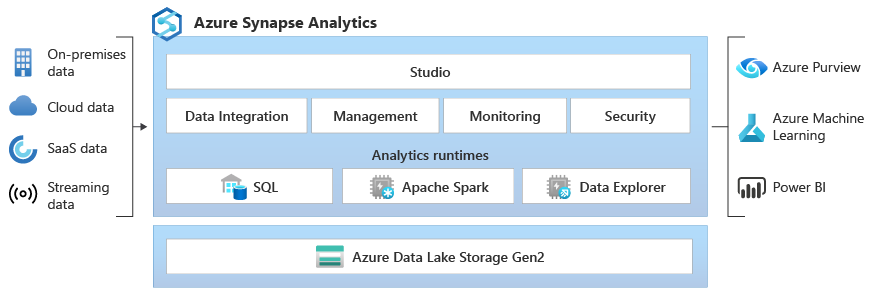
Microsoft Azure Synapse features
Microsoft Azure Synapse Analytics offers a bunch of features and tools for all your data needs, including:
1. Unified workspace (Synapse Studio): Microsoft Azure Synapse Analytics provides a single interface (Synapse Studio) for data ingestion, preparation, exploration, warehousing and big data analytics.
2. Multiple compute models: Microsoft Azure Synapse Analytics offers Dedicated SQL pools for predictable, high‑performance queries, Serverless SQL pools for on‑demand, ad hoc analytics and Apache Spark pools for big data workloads.
3. Massively Parallel Processing (MPP): Microsoft Azure Synapse Analytics utilizes an MPP architecture to distribute query processing across numerous compute nodes, enabling rapid analysis of petabyte‑scale datasets.
4. Apache Spark integration: Microsoft Azure Synapse Analytics natively integrates with Apache Spark which provides scalable processing for big data, interactive analytics, data engineering and machine learning workloads.
5. Data integration capabilities: Microsoft Azure Synapse Analytics includes native data pipelines—powered by the same integration runtime as Azure Data Factory—to support seamless ETL/ELT operations.
6. Security and compliance: Microsoft Azure Synapse Analytics features advanced security features:
- Dynamic data masking
- Column‑ and row‑level security
- Transparent Data Encryption (TDE) for data at rest
- Integration with Microsoft Entra ID (formerly Azure Active Directory) for authentication and role‑based access control
Also, it offers features like Virtual Network Service Endpoints and Private Link for powerful, secure connectivity.
7. Interoperability with the Azure ecosystem: Microsoft Azure Synapse Analytics integrates deeply with Azure services like Azure Data Lake Storage, Power BI, Azure Machine Learning and various other Azure services (like Azure Data Explorer, Logic Apps and more).
8. Language flexibility: Microsoft Azure Synapse Analytics supports multiple languages and query engines (T‑SQL, Python, Scala, .Net and Apache Spark SQL) to suit varied developer and analyst preferences.
…and many more features that extend its capabilities even further.
What is Azure Synapse Analytics used for?
Microsoft Azure Synapse Analytics is commonly used in the following scenarios:
- Enterprise data warehousing: Microsoft Azure Synapse Analytics provides Dedicated SQL Pools that utilize a massively parallel processing (MPP) architecture to execute complex OLAP queries, perform aggregations and support dimensional modeling on large, structured datasets
- Big data analytics and data lake exploration: Microsoft Azure Synapse Analytics provides Serverless SQL Pools allow users to query external data stored in Azure Data Lake Storage Gen2 directly, while Apache Spark pools provide scalable processing for unstructured or semi‑structured data formats (Parquet, CSV, JSON)
- Data integration and orchestration: Microsoft Azure Synapse Analytics includes built‑in data pipelines (inherited from Azure Data Factory) to perform ETL/ELT operations, thereby efficiently ingesting, transforming and moving data from heterogeneous sources into a centralized analytics environment
- Advanced analytics and Machine Learning: Microsoft Azure Synapse Analytics supports integrated Apache Spark environments that allow data scientists to develop, train and deploy machine learning models using languages such as Python, Scala and Spark SQL directly on large datasets
- Unified query experience and multi‑modal data processing: Microsoft Azure Synapse Analytics offers a unified workspace (Synapse Studio) where users can seamlessly execute queries alongside execute Spark jobs for big data analytics within the same environment—eliminating the need for data movement between separate systems
- Cost‑efficient, scalable analytics: Microsoft Azure Synapse Analytics decouples compute from storage, enabling independent scaling of resources, dynamic provisioning and the ability to pause compute clusters to optimize performance and cost based on workload demand
Check out this video on Microsoft Azure Synapse Analytics for a complete overview of its capabilities and features.
Now that we’ve introduced both Databricks and Microsoft Azure Synapse Analytics, let’s dive into our detailed comparison of these two powerful titans.
Azure Synapse vs Databricks—head-to-head feature showdown
Short on time? Here’s a brief overview of the main differences between Azure Synapse vs Databricks!
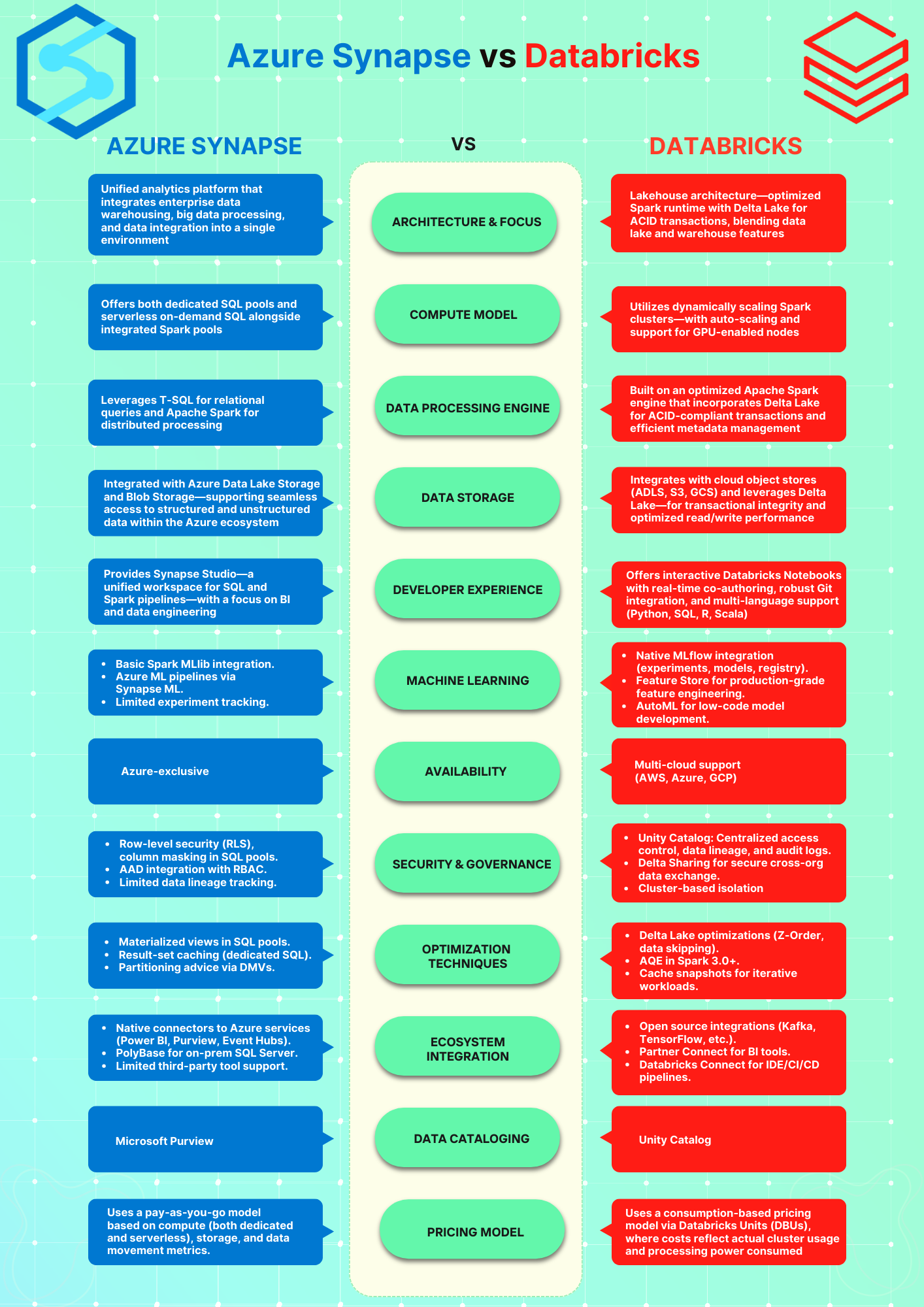
Finally, let’s dive deeper into the comparison between Azure Synapse vs Databricks.
What is the difference between Databricks and Azure Synapse Analytics?
Let’s deep dive into the top ten key features to compare Azure Synapse Analytics and Databricks, helping you select the perfect platform for your requirements.
1️⃣ Azure Synapse vs Databricks—Architecture breakdown
Azure Synapse architecture
Azure Synapse Analytics integrates data warehousing, big data analytics, data integration and enterprise-grade data governance into a unified platform. Its architecture is engineered for high performance, scalability and flexibility by decoupling compute and storage—enabling independent scaling and optimized cost management.
Here is a detailed breakdown of its architectural components and internal workings. But before we dive into the inner workings, let’s briefly review the core architectural components that Azure Synapse Analytics provides.
Core architectural components
1. Azure Synapse SQL (dedicated and serverless SQL pools): Azure Synapse SQL is the engine for both traditional data warehousing and on-demand query processing:
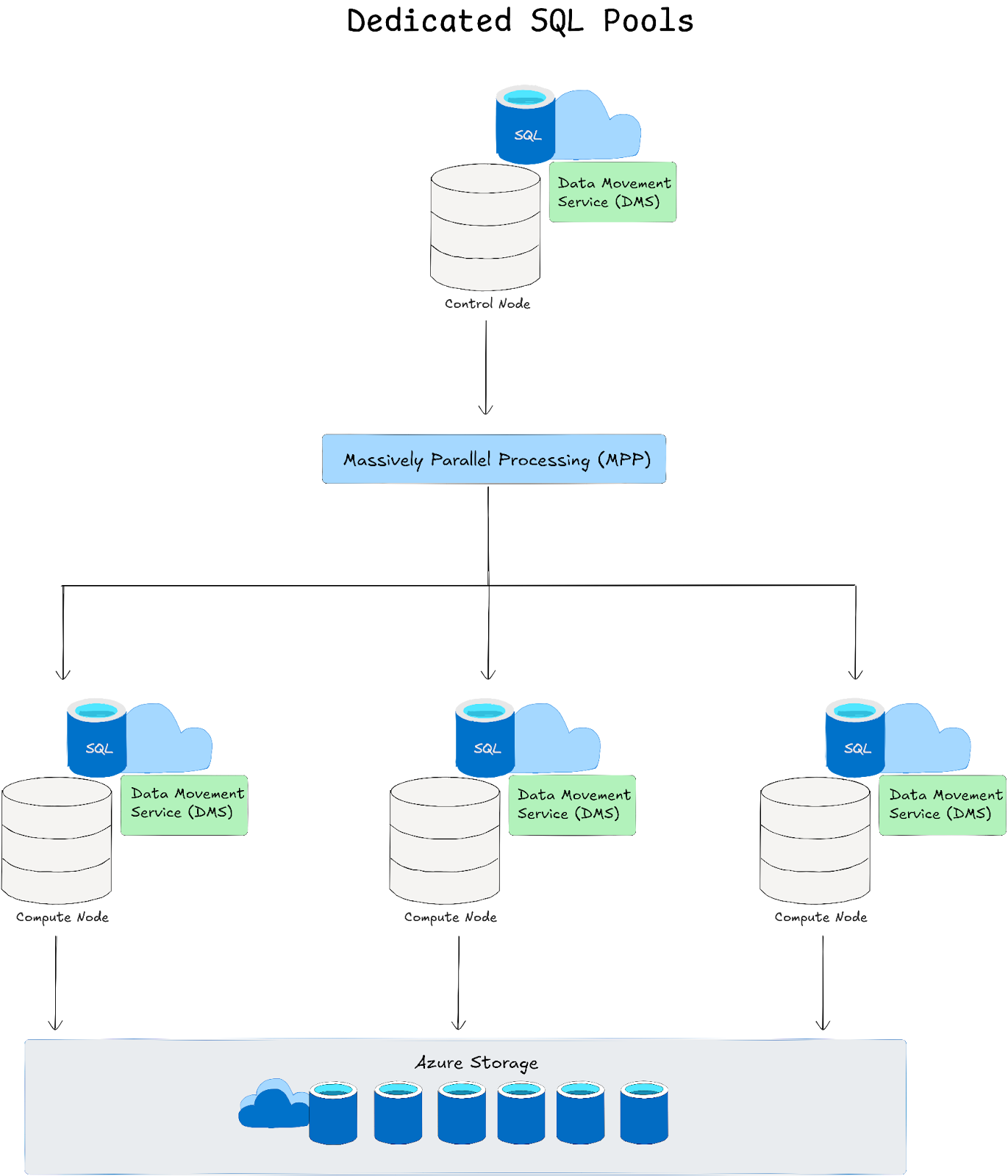
a. Dedicated SQL Pools: Dedicated SQL Pools are provisioned with dedicated compute resources measured in Data Warehousing Units (DWUs) and leverage a Massively Parallel Processing (MPP) architecture where:
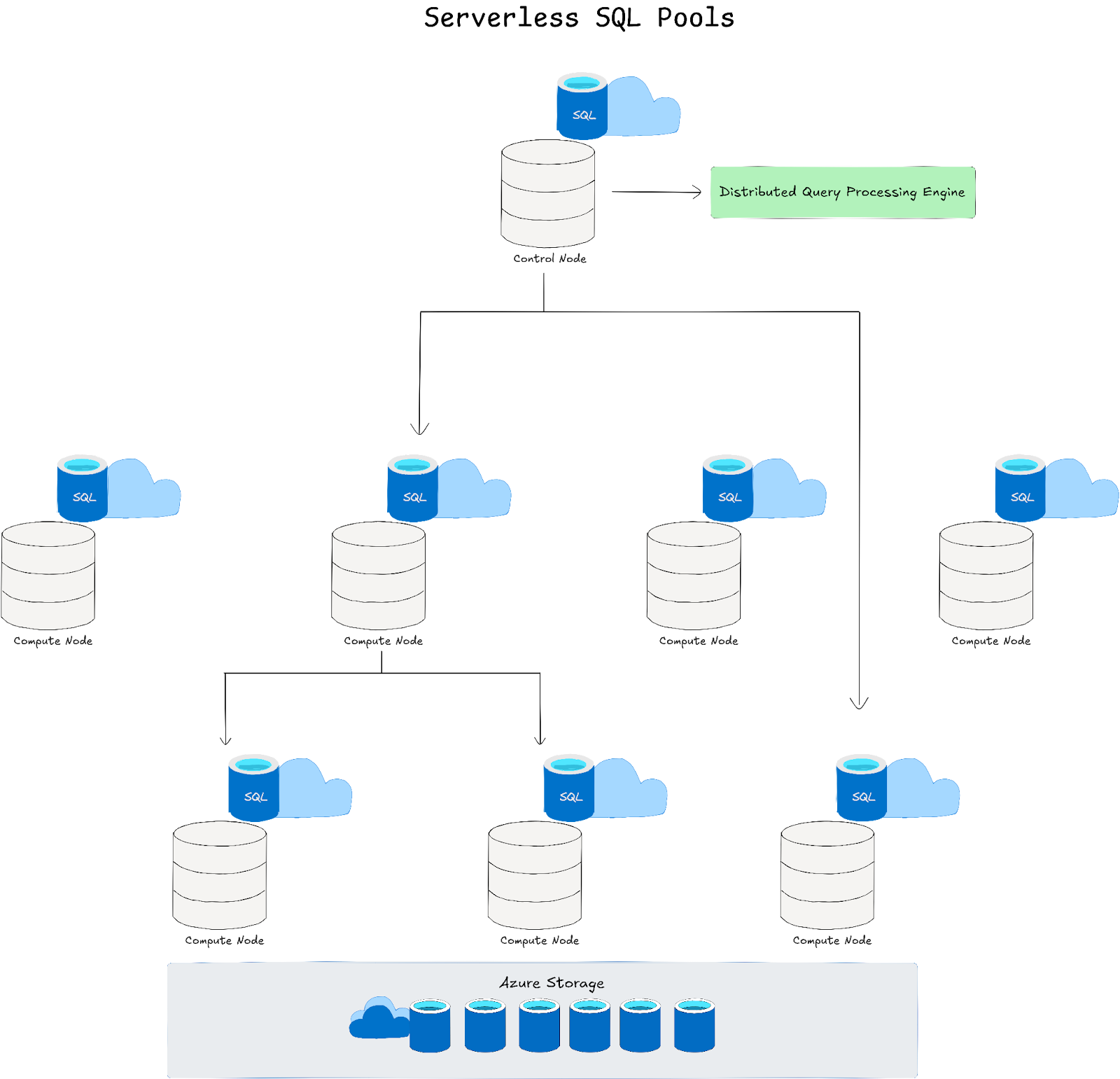
➥ Control node: Acts as the entry point that receives T-SQL queries, parses and optimizes them before decomposing them into smaller, parallel tasks
➥ Compute nodes and distributions: Data is horizontally partitioned—by default into 60 distributions—using methods such as hash, round robin, or replication. Each compute node concurrently processes its assigned distribution(s)
➥ Data Movement Service (DMS): When a query requires data from multiple distributions (for joins or aggregations), DMS efficiently shuffles data between compute nodes to assemble the final result
b. Serverless SQL pools: Serverless SQL pools provide on‑demand query capabilities directly over data stored in Azure Data Lake Storage or Blob Storage. They employ a distributed query processing (DQP) engine that automatically breaks complex queries into tasks executed across compute resources—dynamically scaling without the need for pre‑provisioned infrastructure.
2. Apache Spark pools:
Azure Synapse integrates an Apache Spark engine as a first‑class component for big data processing, machine learning and data transformation. The Spark pools:
- Support multiple languages (Python, Scala, SQL, .NET and R).
- Offer auto‑scaling and dynamic allocation to reduce cluster management overhead.
- Seamlessly share data with Azure Synapse SQL and ADLS Gen2, enabling integrated analytics workflows.
3. Data integration (Synapse Pipelines) Azure Synapse integrates the capabilities of Azure Data Factory within its workspace, allowing you to build and orchestrate ETL/ELT workflows that can:
- Ingest data from various different sources (over 90 different sources).
- Transform and move data between storage (Azure Data Lake Storage Gen2) and compute layers (SQL or Apache Spark).
- Automate data workflows with triggers, control flow activities and monitoring built into a unified experience.
4. Data storage – Azure Data Lake Storage Gen2 (ADLS Gen2):
Azure Synapse Analytics uses ADLS Gen2 as its underlying storage layer, which offers:
- Hierarchical file system semantics.
- Scalability and high throughput for both structured and unstructured data.
- Seamless integration with both SQL and Apache Spark engines—enabling direct querying of formats such as Parquet, CSV, JSON and TSV.
5. Azure Synapse Studio:
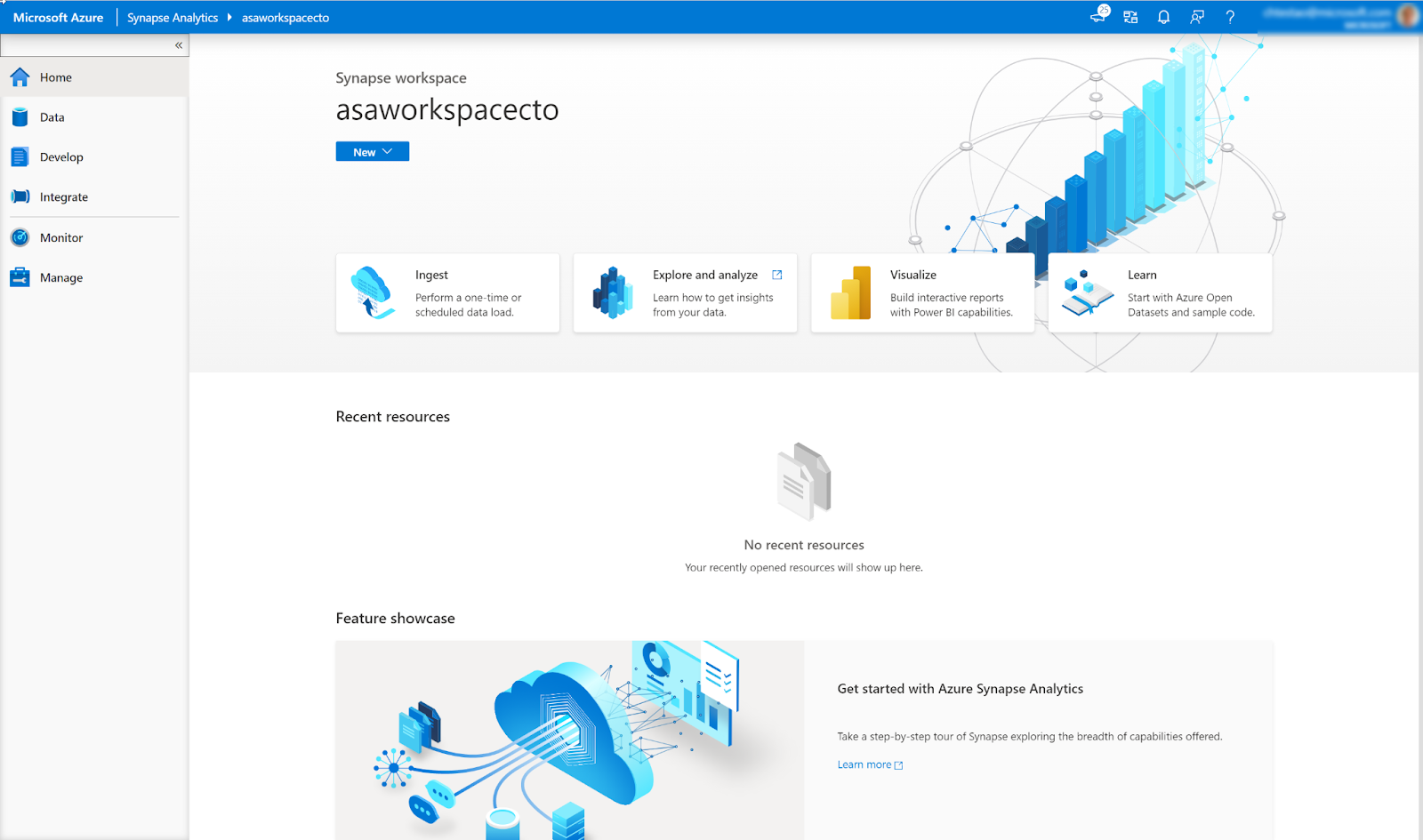
Azure Synapse Studio is the unified web-based interface that serves as the development and management environment for the entire Synapse workspace. It offers:
- Integrated authoring tools for SQL scripts, Spark notebooks and pipelines.
- Monitoring dashboards that display resource usage and query performance across SQL, Apache Spark and Data Explorer.
- Role‑based access controls integrated with Azure Active Directory for secure collaboration.
Here is how the overall Azure Synapse Analytics works:
➥ Control Node orchestration: First, whenever a user submits a query (via T‑SQL or notebooks), the control node handles query parsing, optimization and task decomposition. It formulates an execution plan by analyzing data distribution, available indexes and workload characteristics.
➥ Compute Node processing and data distribution: In a dedicated SQL pool, once the control node generates the execution plan, it dispatches multiple parallel tasks to compute nodes. Each compute node processes its local partitioned data (i.e., its distribution) concurrently, leveraging MPP to minimize latency on large datasets.
➥ Data Movement Service (DMS): Now, for operations that require data from different distributions (such as joins, aggregations, or orderings), DMS shuffles data efficiently between compute nodes, ensuring that intermediate results are properly aligned for final result assembly.
➥ Serverless Distributed Query Processing (DQP): In the serverless SQL model, the query engine automatically decomposes a submitted query into multiple independent tasks executed over a pool of transient compute resources. This abstraction removes the burden of infrastructure management from the user while ensuring that the query scales to meet demand.
Azure Synapse Analytics’ architectural design not only maximizes performance for large-scale analytics but also ensures that both data engineers and data scientists have the tools they need in a secure, manageable and highly scalable environment.
Now, let’s move on to Databricks’ architecture.
Databricks architecture
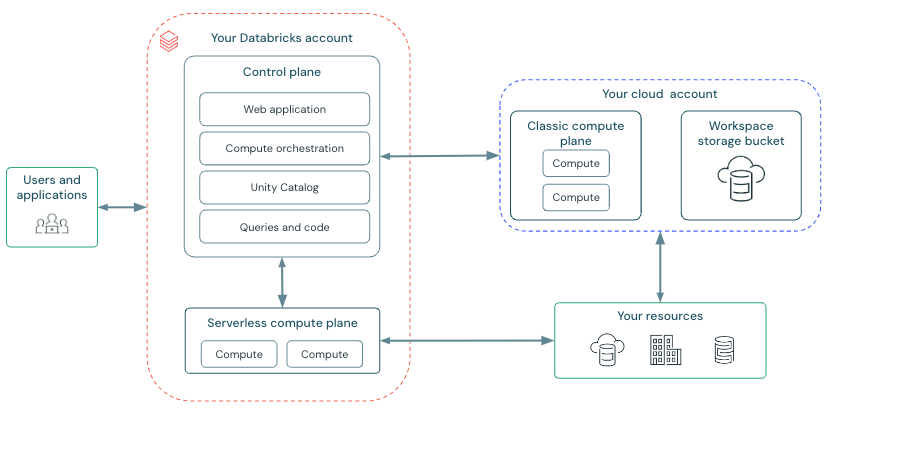
Databricks is built on Apache Spark which is designed to run seamlessly on major cloud providers—including Microsoft Azure, Amazon Web Services (AWS) and Google Cloud Platform (GCP). Its architecture decouples compute from storage, enabling elastic scalability, robust security and streamlined operations. The layered Databricks architecture integrates several core components:
a. Control plane:
Control plane is fully managed by Databricks and is responsible for all orchestration and administrative tasks, which includes:
- Cluster management and job scheduling: Orchestrates the provisioning, monitoring, auto‑scaling and lifecycle management of clusters, as well as scheduling batch and streaming jobs.
- User authentication and authorization: Integrates with enterprise identity providers (e.g., Azure Active Directory, AWS IAM, Google Identity) and supports multi‑factor authentication and role‑based access control.
- Metadata and workspace management: Manages Databricks notebooks, job metadata, cluster configurations and system logs while providing a web‑based collaborative workspace.
- Configuration and security policies: Enforces centralized security controls, compliance measures, auditing and network security configurations (such as IP access lists and VPC/VNet peering).
Because the control plane is decoupled from user-managed resources, it abstracts infrastructure complexities and allows users to focus solely on their analytics workloads.
b. Compute plane:
Compute plane is where data processing and analytics tasks are executed. Databricks supports two primary deployment modes:
- Serverless compute plane: In this mode, Databricks fully manages compute resources—automatically provisioning and scaling clusters on demand.
- Classic compute (User-managed clusters): In this mode, clusters run within the user’s cloud account, offering enhanced control over configuration, network isolation and compliance. Workspaces can be configured with dedicated virtual networks to meet strict security and regulatory requirements.
Both modes leverage the underlying Apache Spark engine.
c. Workspace storage and data abstraction:
Each Databricks workspace is integrated with cloud-native storage services, such as an S3 bucket for AWS or Azure Blob Storage for Azure and Google Cloud Storage for Google Cloud Platform (GCP). This storage is utilized for operational data, including notebooks, job run details and logs. The Databricks File System (DBFS) serves as an abstraction layer that allows users to interact with data stored in these buckets seamlessly. It supports various data formats and provides a unified interface for data access.
Check out this article to learn more in-depth about Databricks architecture.
2️⃣ Azure Synapse vs Databricks—Ecosystem integration and cloud deployment
Now that we’ve covered the architecture and components of Azure Synapse vs Databricks, let’s take a closer look at how they work with other tools and services and how easy they are to deploy.
Azure Synapse ecosystem integration and cloud deployment
Azure Synapse lives entirely in the Microsoft Azure ecosystem. Its design leverages a broad suite of native integrations that streamline analytics and data management:
1. Native connectivity:
2. Unified development environment:
You also get access to a unified portal—Synapse Studio—that lets you build ETL pipelines(via Synapse Pipelines), write queries on both Dedicated SQL Pools (provisioned compute) and serverless SQL pools (on-demand query execution), as well as develop Apache Spark jobs in multiple languages (Python, Scala, SQL, etc.).
3. Integrated security and governance:
Synapse leverages Microsoft Entra ID (formerly Azure Active Directory) for identity management, supports Virtual Network (VNet) integration and enforces security policies consistently across the platform.
Every part of Synapse is built to plug directly into other Azure services, so your data moves smoothly from storage to analysis without extra configuration steps.
☁️ For Azure Synapse deployment ☁️
Azure Synapse Analytics is offered exclusively as a fully managed PaaS within Microsoft Azure.
➥ Azure-first deployment: As a fully managed Azure PaaS, deploying Synapse is simple. Microsoft handles much of the operational overhead—including scaling, backups, patching and infrastructure management.
➥ Flexible compute options: Choose from dedicated SQL pools for high-performance, predictable workloads or serverless SQL pools that bill per query. In addition, integrated Apache Spark pools empower data science and machine learning workloads within the same environment.
➥ Consistent performance and compliance: Because every component is natively built for Azure, you benefit from consistent performance characteristics, unified monitoring and a cohesive security model aligned with other Azure cloud services.
Databricks ecosystem integration and cloud deployment
Databricks is designed as a multi-cloud SaaS platform that is purpose-built for big data processing and advanced analytics, with a strong foundation in Apache Spark and Delta Lake.
➥ Multi-cloud & open architecture: Databricks is available on Microsoft Azure, Amazon Web Services (AWS) and Google Cloud Platform (GCP), due to this it allows organizations to avoid vendor lock-in. Despite its multi-cloud nature, each deployment is optimized to leverage the native storage and security features of its host environment).
➥ Built around Apache Spark & Delta Lake: Databricks extends Apache Spark with Delta Lake—a storage layer that brings ACID transactions, schema enforcement and time travel to big data workloads.
➥ Integrated data science & ML ecosystem: Databricks seamlessly integrates with MLflow and supports popular libraries, streamlining the development, tracking and deployment of machine learning models. It also includes features like the Databricks ML Runtime, AutoML, Feature Store, Model Serving and many more tools to smooth out ML development. Databricks has also introduced Unity Catalog, which further improves data governance across data and AI assets.
➥ Notebooks & third-party integrations: Databricks’ collaborative notebook environment supports multiple languages (Python, Scala, SQL and R) and integrates with version control systems enabling efficient team collaboration and CI/CD practices.
☁️ For Databricks deployment ☁️
Databricks platform is a managed service that works across multiple clouds. You can set up Databricks clusters on Azure, AWS, or Google Cloud Platform (GCP). Databricks takes care of the underlying infrastructure for you. This means you’ve got flexibility—it’s easier to avoid being tied to one vendor or use different cloud regions. Databricks scales your clusters automatically based on your workload. Pricing is simple: it’s based on Databricks Units tied to how much computing power you actually use. That way, you only pay for what you need.
TL;DR: Synapse is the right call if you’re fully committed to Azure and want deep native integration with Microsoft services. Databricks makes more sense if you need multi-cloud flexibility, a stronger open-source foundation or a best-in-class Spark environment.
3️⃣ Azure Synapse vs Databricks—Data processing engines
Azure Synapse Analytics and Databricks are both highly capable platforms when it comes to data processing. But while they share some similarities, their underlying architectures, strengths and use cases are actually quite different. Let’s take a closer look at what sets the data processing engine in Azure Synapse apart from Databricks.
Azure Synapse data processing engine
Azure Synapse Analytics distinguishes itself by offering a dual-engine architecture, providing specialized engines for different analytical needs. This is a core differentiator from Databricks’ single-engine approach. Synapse offers:
1. Azure Synapse SQL engine
Azure Synapse SQL engine is designed for data warehousing workloads and excels at processing structured data using SQL. It comprises two distinct pool types:
a. Dedicated SQL Pools (formerly SQL Data Warehouse):
Dedicated SQL Pool leverages a Massively Parallel Processing (MPP) architecture. This architecture is fundamental to their performance and scalability for large-scale data warehousing. Here is the architecture breakdown:
➥ Control node: Acts as the brain, responsible for query optimization, distribution and overall orchestration. It receives the SQL query, parses it and generates an execution plan.
➥ Compute nodes: These are the workhorses. The control node distributes query execution tasks to multiple compute nodes, which operate in parallel. Each compute node has its own dedicated CPU, memory and storage.
➥ Data Movement Service (DMS): A critical component for MPP. When a query requires data from different compute nodes, DMS efficiently shuffles data between nodes. This data shuffling is optimized to minimize network latency and maximize parallelism.
➥ Distributed Query Engine (DQE): The engine on each compute node executes its assigned portion of the query against the locally stored data.
b. Serverless SQL pools:
Serverless SQL Pool executes your queries on-demand. Here is the architecture breakdown:
➥ Metadata-driven querying: Serverless SQL Pools don’t require pre-provisioned compute. Instead, they dynamically allocate compute resources based on the incoming query. They rely on metadata about your data in ADLS Gen2 (schema, data types, file formats).
➥ Control node orchestration: Similar to Dedicated Pools, a control node parses and optimizes the query. But, instead of dispatching to dedicated compute nodes, it leverages a pool of transient compute resources managed by Azure.
➥ Stateless compute: Compute resources are ephemeral and automatically scaled up or down based on query demands. You only pay for the data processed by your queries.
2. Apache Spark pools
Azure Synapse also provides integrated Apache Spark pools, allowing you to leverage the power of Apache Spark for big data processing, machine learning and real-time analytics within the Synapse ecosystem.
A significant advantage of Synapse is its unified data access and management. Both SQL and Spark engines are tightly integrated with Azure Data Lake Storage Gen2. This architecture offers:
- Data resides in a single, scalable data lake (ADLS Gen2), eliminating data silos and simplifying data governance.
- Data can be seamlessly processed and accessed by both SQL and Spark engines without complex data movement or duplication.
- Azure Synapse Analytics provides a unified metadata catalog across both engines, enhancing data discovery and lineage.
Databricks data processing engine
Databricks takes a single-engine approach, built entirely around Apache Spark. However, Databricks is far from “just” vanilla Apache Spark. It delivers a highly optimized and managed Spark runtime that significantly enhances performance, reliability and ease of use.
Databricks Runtime: Beyond open source Spark
Databricks Runtime is the core differentiator of the Databricks platform. It’s a performance-optimized runtime engine built on top of Apache Spark, incorporating proprietary enhancements and optimizations. Here are some key optimizations in Databricks Runtime:
➥ Photon engine (vectorized query engine): Databricks Photon is a native vectorized query engine written in C++ that dramatically accelerates SQL and Dataframe workloads. Photon processes data in columnar format, leveraging vectorized execution to process batches of data simultaneously, leading to significant performance gains (often orders of magnitude faster than standard Spark SQL for certain workloads). Photon is particularly effective for analytical queries with aggregations, filtering and joins. It automatically integrates with existing Spark APIs and workloads, often requiring no code changes to benefit.
➥ Optimized Spark execution engine: Beyond Databricks Photon, the Databricks Runtime includes various other optimizations to the core Spark engine, including:
-
- Improved query optimizer
- Adaptive query execution
- Enhanced shuffle performance
- Caching enhancements
➥ Delta Lake integration: Databricks is the creator of Delta Lake, an open-source storage layer built on top of data lakes. Delta Lake is deeply integrated into the Databricks Runtime, providing:
-
- ACID transactions
- Schema evolution
- Time travel (Data versioning)
- Unified batch and streaming data processing
- Data governance and reliability
TL;DR:
Here’s a table summarizing the key technical differences:
| Feature | Azure Synapse Analytics | Databricks |
| Engine architecture | Dual Engine: SQL Engine (Dedicated & Serverless), Spark | Single Engine: Optimized Apache Spark (Databricks Runtime) |
| SQL engine focus | Data Warehousing, Structured Analytics, SQL Workloads | Relies on Photon (Optimized Spark SQL) |
| Spark focus | Big Data Processing, ML, Integration within Synapse | Core Focus, Highly Optimized Runtime, Data Science, Real-time |
| Optimization focus | Specialized SQL Engine, Integrated Spark | Deeply Optimized Apache Spark Runtime |
| Cloud strategy | Azure-Centric, Deep Azure Integration | Multi-Cloud (AWS, Azure, GCP), Cloud-Agnostic Design |
| Storage layer | Azure Data Lake Storage Gen2 (Native) | Delta Lake over cloud object storage |
| Primary workload | Data Warehousing, Enterprise BI, Broad Analytics | Data Science, Machine Learning, Real-time, High-Performance Spark |
4️⃣ Azure Synapse vs Databricks—SQL capabilities and data warehousing
Azure Synapse Analytics and Databricks are two powerful platforms widely used for SQL-based querying and data warehousing, but they have distinct architectures, features and use cases. Here is a detailed comparison of their SQL and data warehousing capabilities.
But before we dive in lets dive briefly into its architectural foundations:
Azure Synapse is a unified analytics service that integrates enterprise data warehousing with big data and Spark analytics. Its architecture brings together several key components within a single workspace.
➥ Dedicated SQL pool (MPP engine):
Dedicated SQL pool is designed for large-scale data warehousing, the dedicated SQL pool employs a massively parallel processing (MPP) architecture. Data is distributed across compute nodes using strategies such as hash distribution, round-robin, or replication. It provides full T‑SQL support, advanced join strategies, aggregations, window functions and columnstore indexing for high-speed queries.
➥ Serverless SQL pool:
For ad hoc querying over data stored in Azure Data Lake Storage Gen2, the serverless SQL pool allows on-demand query processing without the need for pre-provisioned compute, making it ideal for exploratory analytics and intermittent workloads.
Databricks is built atop Apache Spark and embodies the “lakehouse” paradigm—a unified platform that merges data lake flexibility with data warehousing reliability:
➥ Spark SQL and Delta Lake:
SQL endpoints in Databricks run on Spark SQL, leveraging the Catalyst optimizer to transform ANSI SQL into efficient distributed execution plans. The underlying Delta Lake layer provides ACID transactions, schema enforcement, time travel and data skipping—features that ensure reliable and performant operations even over a data lake.
➥ Cluster management and tuning:
Unlike Synapse’s managed SQL pools, optimal performance in Databricks often requires manual tuning of cluster configurations (such as executor memory and parallelism) to match workload characteristics.
Azure Synapse SQL capabilities
➥ Full T‑SQL support: Azure Synapse’s dedicated SQL pools use T-SQL as their query language. The engine is optimized with cost-based query optimization techniques, supporting features like advanced join strategies, aggregations and window functions.
➥ Indexing & distribution: Columnstore indexes (often clustered) and data distribution strategies help accelerate scan and join operations on large, partitioned tables. PolyBase allows external table definitions over data stored in Azure Blob or Data Lake Storage, enabling seamless querying of both internal and external data sources.
➥ Workload management: Databricks has built-in workload management and resource classes which allow fine-tuning of concurrency and query performance, which is crucial in high-concurrency, enterprise-scale data warehousing environments.
Databricks SQL capabilities
➥ Catalyst optimizer: Databricks leverages Spark SQL’s Catalyst optimizer, which applies rule-based and cost-based optimizations to transform logical plans into highly optimized physical execution plans. Techniques like predicate pushdown, dynamic partition pruning and vectorized reading are essential in improving query performance.
➥ Delta Lake enhancements: Delta Lake’s transaction log ensures ACID properties and supports optimizations such as data skipping and Z-order clustering, which are critical for performance when dealing with large, frequently updated datasets.
➥ Cluster tuning: Unlike Synapse’s managed SQL pools, achieving optimal performance in Databricks often requires careful tuning of cluster configurations (executor memory, parallelism) to match the workload’s characteristics.
Azure Synapse data warehousing capabilities
➥ Purpose-built MPP data warehouse: The dedicated SQL pool is architected to serve as a high-performance data warehouse. Its design ensures predictable performance with enterprise features such as query result caching, concurrency scaling and integrated data distribution.
➥ Separation of compute and storage: Synapse allows independent scaling by decoupling compute (provisioned via SQL pools) from storage (typically in Azure Data Lake Storage Gen2), which is vital for managing cost and performance in data warehousing workloads.
➥ Enterprise security & governance: Synapse offers dynamic data masking, row-level security and Azure Active Directory (AAD) integration. Its connection with Azure Purview enhances data lineage and governance.
Databricks data warehousing capabilities
➥ Delta Lake as the foundation: Delta Lake redefines data warehousing by enabling a “warehouse on a data lake”, supporting schema evolution, time travel and ACID transactions atop scalable storage.
➥ Unified analytics: Databricks SQL Analytics provides interactive SQL querying and dashboarding, bridging big data processing with BI workflows.
➥ Workload versatility: Databricks excels in hybrid workloads combining SQL querying with advanced analytics, data science and machine learning. However, for ultra-low-latency, high-concurrency scenarios typical of traditional MPP warehouses, additional tuning (e.g., caching, partitioning) is required.
TL;DR: Synapse is the better choice for traditional data warehousing. It offers strong T-SQL support, enterprise-grade workload management and tight Azure integration. Databricks is better for teams that want a unified lakehouse for SQL, ML and big data in one platform.
5️⃣ Azure Synapse vs Databricks—Machine Learning and analytics
Azure Synapse vs Databricks both support machine learning, but they approach it differently.
Azure Synapse Machine Learning and analytics
Azure Synapse handles machine learning mainly through integrations, not as a full native end-to-end ML platform. Synapse ML helps you build scalable ML pipelines for tasks like text analytics and document processing. For more serious model training and deployment, you typically connect Synapse with Azure Machine Learning. That adds extra setup, including managed endpoints for production workflows.
For analytics, Synapse gives you dedicated and serverless SQL pools for structured querying, Apache Spark for big data and tight Power BI integration for visualization. For teams already deep in the Microsoft ecosystem, the connection between Synapse, Azure ML and Power BI feels fairly smooth.
Databricks Machine Learning and analytics
Databricks brings Mosaic AI, a full end-to-end ML platform built directly into the product. It covers:
- Data prep and feature engineering with a built-in Feature Store
- Model training with support for TensorFlow, PyTorch, Ray and other major frameworks
- Pre-configured GPU clusters for compute-intensive training
- MLflow for experiment tracking and model registry
- Model Serving for low-latency inference, including LLM serving
- AutoML for rapid model iteration
Analytics runs on the optimized Spark engine with Databricks SQL for interactive queries, collaborative notebooks in Python, R and Scala and built-in visualization. The platform scales across clouds and isn’t tied to any single ecosystem.
| Features | Azure Synapse | Databricks |
| ML core | Synapse ML + Azure ML integration | Mosaic AI (end-to-end ML) |
| Frameworks | Apache Spark ML, limited deep learning | TensorFlow, PyTorch, Ray |
| Feature store | None | Built-in, reusable accorss models |
| Model serving | via Azure ML (separate setup required) | Mosaic AI Model Serving, includes LLMs |
| Analytics | SQL pools + Apache Spark, Power BI integration | Optimized Spark + SQL, collaborative |
Databricks wins on machine learning with a slick, all-in-one setup and broader framework and tool support. Azure Synapse shines in analytics if you’re hooked on Power BI and Microsoft’s ecosystem. Pick based on your priorities.
6️⃣ Azure Synapse vs Databricks—Scalability and resource management
When you’re working with data, you need systems that can grow when your work gets bigger and shrink when it gets smaller. This is scalability. Both Azure Synapse Analytics and Databricks are powerful cloud-based platforms designed for big data processing and analytics, but they approach scalability and resource management in distinct ways.
Azure Synapse: Pools and explicit control
Azure Synapse Analytics provides a unified analytics service that includes data warehousing, integration and big data processing. Its scalability and resource management methodology are distinguished by granular control and a unified management interface within Synapse Studio.
Dedicated SQL pools:
In Synapse Dedicated SQL Pools data is distributed across compute nodes, allowing for parallel query processing across vast datasets.
➥ Scalability in Dedicated SQL Pools is measured in Data Warehouse Units (DWUs) or the newer Compute Data Warehouse Units (cDWUs). These units abstractly represent compute, memory and IO resources. Scaling up or down is achieved by adjusting the DWU/cDWU setting—increasing them provides more compute power for faster query performance and handling larger workloads.
➥ You can manually scale DWUs/cDWUs via the Azure portal, Azure CLI, or programmatically to match workload demands. Also, Dedicated SQL Pools offer elasticity —the ability to pause the compute pool when not in use, significantly reducing costs and resume it quickly when needed.
➥ Synapse Dedicated SQL Pools include robust Workload Management features. You can define Workload Classifiers to categorize incoming queries based on user, importance, or source. Workload Groups then allocate resources (CPU, memory, concurrency) to these classifications, ensuring performance predictability and preventing resource contention between different types of workloads or users.
Serverless SQL pools:
Synapse Serverless SQL Pools provide a truly serverless query engine for data lake exploration and ad-hoc analysis.
➥ You don’t provision or manage any infrastructure. Serverless SQL Pools automatically scale based on query complexity and data volume. The cost is based on data processed by your queries, not on compute uptime.
➥ The cost model for Synapse Serverless SQL Pools requires attention. Inefficient queries that process large amounts of data can become expensive. Optimizing queries and data formats becomes important for cost management.
➥ You have less direct control over the underlying compute resources. Serverless SQL Pools prioritize ease of use and automatic scaling for data exploration and reporting rather than fine-grained performance tuning of the compute infrastructure itself.
Apache Spark pools:
Synapse Apache Spark Pools provide a managed Apache Spark environment integrated within Synapse Analytics.
➥ Spark Pools utilize the standard Spark architecture with a driver node and worker nodes (executors). Scaling involves increasing the number of executors within the defined cluster node limits.
➥ You configure autoscaling by setting minimum and maximum node counts for the Spark cluster. You can also define parameters like idle time before scaling down and choose between aggressive or conservative scaling behaviors to optimize for cost or performance.
➥ Synapse Spark Pools allow you to choose different Azure Virtual Machine instance types optimized for various Spark workloads, such as memory-optimized instances for data-intensive tasks or compute-optimized instances for CPU-bound computations.
Databricks: Dynamic cluster management
Databricks is a platform deeply rooted in Apache Spark. Its scalability and resource management are centered around dynamic clusters and intelligent performance optimizations.
Spark clusters:
Databricks clusters are the core compute unit and are built upon Apache Spark. They are designed for dynamic autoscaling to efficiently handle fluctuating workloads.
➥ You define a minimum and maximum number of worker nodes when creating a Databricks cluster. The platform automatically scales the cluster up or down in real-time based on the current processing demand.
➥ Databricks offers distinct cluster types: Interactive Clusters are designed for interactive development, data exploration in notebooks and collaborative work. Job Clusters are optimized for running automated, production-ready jobs. Job clusters can be configured to terminate automatically after job completion, further optimizing costs.
➥ Databricks provides access to a vast selection of instance types across major cloud providers (Azure, AWS, GCP). You can choose highly specialized instances optimized for memory, compute, GPU acceleration and storage, tailoring the cluster infrastructure precisely to the needs of your Spark workloads.
A key differentiator in Databricks’ resource management is the Photon engine—a vectorized, native-code execution engine compatible with the Apache Spark API. It’s designed to significantly accelerate query performance, particularly for larger datasets and complex operations. Photon indirectly optimizes resource utilization and reduces costs by shortening compute times. This makes Databricks more cost-effective for demanding Spark workloads.
On top of that, Databricks also offers workload management features to control resource allocation and ensure fairness within a Databricks Workspace. This includes the Fair Scheduler in Spark to manage resource sharing between jobs and Cluster Policies which allow users to enforce constraints on cluster configurations.
| Feature | Azure Synapse Analytics | Databricks |
| Primary workload focus | Broad analytics (DW, integration, exploration, some DS/ML) | Spark-centric (Data engineering, data science, Machine Learning) |
| Scaling mechanism | Pools (Dedicated SQL, serverless SQL, Spark) | Dynamic autoscaling clusters (Spark) |
| Resource units | DWUs/cDWUs (Dedicated SQL), Data processed (Serverless SQL), vCores/Memory (Spark pools) | Worker nodes (Spark clusters), instance types |
| Control level | Granular (Dedicated pools), automatic (Serverless) | Highly dynamic and configurable |
| Workload isolation | Workload management (Classifiers, groups) in dedicated SQL | Fair scheduler, cluster policies |
Choose Azure Synapse if:
- Your primary need is a robust data warehouse with predictable performance
- You need a single platform combining warehousing, integration and data exploration
- You’re deeply invested in the Azure ecosystem
- You need granular SQL workload management and prioritization
Choose Databricks if:
- Your workloads are primarily Spark-based (data engineering, data science, ML)
- You need highly dynamic autoscaling for fluctuating Spark workloads
- Spark performance optimization is critical and you want Photon’s acceleration
- You need multi-cloud flexibility
- Cost optimization for Spark workloads is a major focus
7️⃣ Azure Synapse vs Databricks—Real-time streaming and data ingestion
Azure Synapse and Databricks both support real‑time streaming and data ingestion—but they approach the challenge from distinct architectural and operational standpoints.
Azure Synapse streaming ingestion
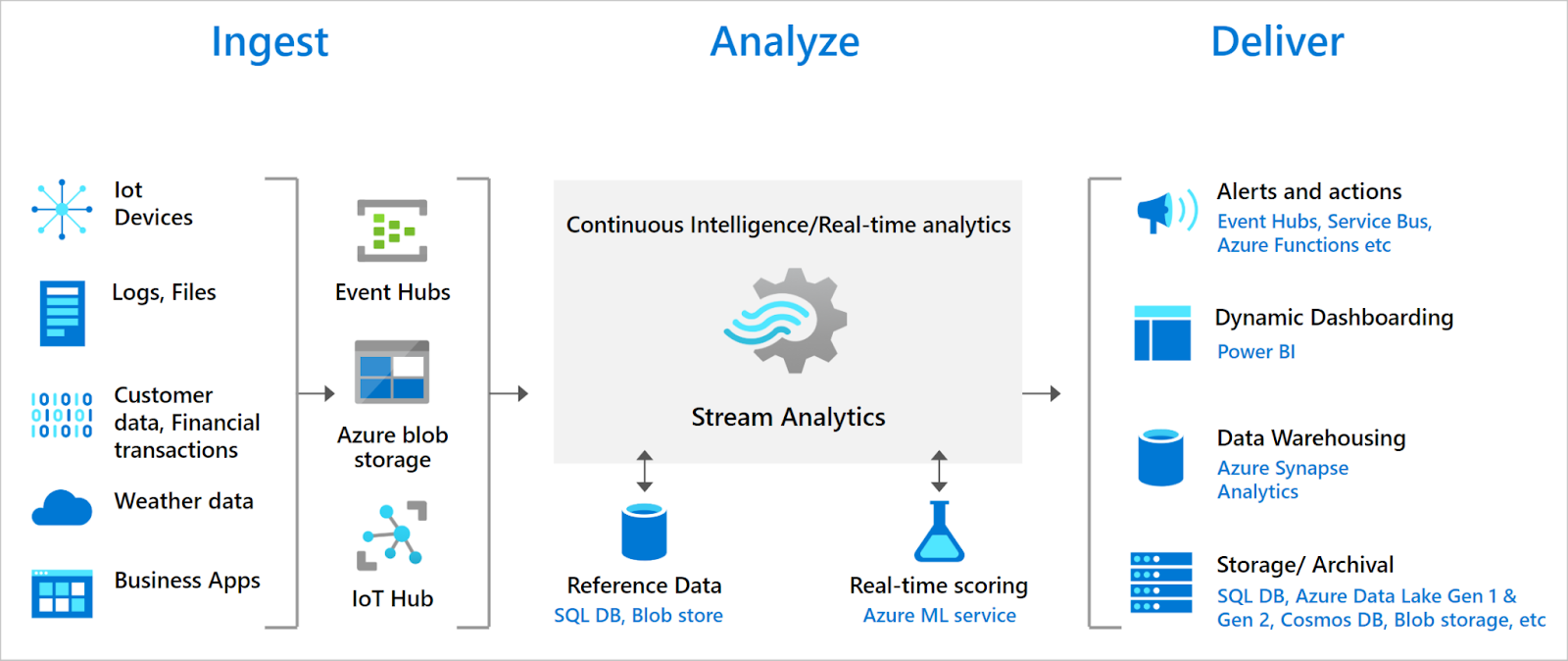
Azure Synapse is primarily architected as a unified analytics service that excels in large‑scale data warehousing and batch processing. It integrates with tools such as Azure Data Factory and Azure Stream Analytics for orchestrating data ingestion workflows. Although Synapse offers Apache Spark pools that support Spark Structured Streaming, these pools are generally optimized for batch and ad‑hoc processing rather than continuous, low‑latency streaming. In practice, real‑time ingestion in Synapse is typically managed via Synapse Pipelines or by leveraging external services (such as Azure Stream Analytics (ASA)) to feed data into dedicated or serverless SQL pools for near‑real‑time querying. This model is ideal when streaming is just one component of a broader enterprise analytics strategy that leverages the full Azure ecosystem.
Databricks Streaming ingestion
Databricks is built on Apache Spark and Delta Lake and its real‑time streaming capabilities are centered on Spark Structured Streaming. Databricks supports conventional micro‑batch processing as well as continuous processing modes—with configurable trigger intervals (down to 500 ms in continuous mode, noting that continuous processing is still evolving in some contexts)—to achieve near‑real‑time performance. The integration with Delta Lake introduces robust ACID transactional guarantees, time travel and schema evolution, which are essential for managing streaming data reliably. Furthermore, Databricks offers additional features that streamline real‑time ingestion:
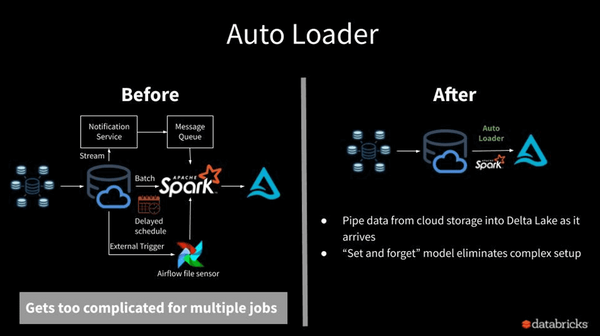
1. Databricks Auto Loader:
Databricks Auto Loader watches your cloud storage (e.g. Azure Blob Storage or ADLS) for new files and loads them incrementally. It maintains an internal state to avoid re‑processing files and offers configuration options such as file notification and incremental directory listing, thereby simplifying ingestion from data lakes.
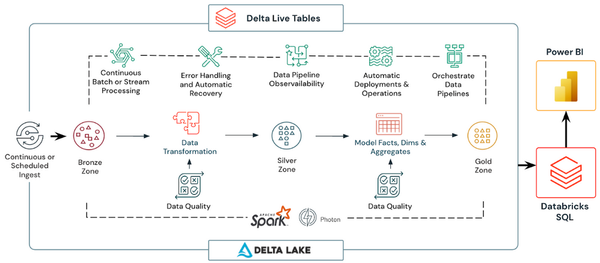
2. Delta Live Tables (DLT):
Delta Live Tables (DLT) provide a managed framework for building streaming pipelines with built‑in support for schema evolution, data quality checks and automated checkpointing. DLT runs continuous or triggered streaming jobs on Delta Lake, leveraging Structured Streaming under the hood to simplify operational management and enhance pipeline reliability.
TL;DR:
So if you work entirely within the Azure ecosystem and prefer an integrated, managed approach where real‑time ingestion is orchestrated alongside broader data warehousing and batch analytics, then Azure Synapse is a strong candidate. However, if your use case demands advanced streaming ingestion with flexibility in handling diverse data formats, low‑latency continuous processing and enriched features such as Auto Loader and Delta Live Tables, then Databricks offers a more specialized solution.
8️⃣ Azure Synapse vs Databricks—Security, governance and data cataloging
Now let’s deep dive into the security, governance & data cataloging of Azure Synapse vs Databricks.
Azure Synapse security
Azure Synapse provides robust security by leveraging Azure’s advanced network controls and identity management infrastructure:
➥ Network security: You can deploy Azure Synapse into a managed Virtual Network (VNet) with private endpoints, ensuring data stays within a secure perimeter. Firewall rules allow you to restrict access and public network access to Synapse Studio can be disabled for enhanced isolation.
➥ Data encryption: Data at rest is safeguarded with 256‑bit AES encryption, typically implemented via Transparent Data Encryption (TDE) in Dedicated SQL Pools, with support for customer-managed keys in Azure Key Vault. Data in transit is encrypted using TLS v1.2 or higher, adhering to modern security standards.
➥ Identity and access management: Azure Synapse integrates seamlessly with Microsoft Entra ID (formerly Azure Active Directory) for centralized identity management and implements role-based access control (RBAC). It also supports advanced features like row-level security (RLS) and column-level security (CLS) in Dedicated SQL Pools for granular access control.
➥ Threat monitoring: Integration with Microsoft Defender for Cloud provides real-time activity monitoring, detecting threats such as SQL injection attempts, anomalous access patterns and authentication failures.
➥ Compliance: Azure Synapse aligns with standards like GDPR, HIPAA and SOC 2, supported by comprehensive audit logging and compliance certifications.
Databricks security
Databricks implements security using multiple layers. A key component is Unity Catalog, which centralizes governance and enforces fine‑grained permissions at the catalog, schema, table and column levels. Databricks supports integration with external identity providers, ensuring that access is consistently managed. Data is encrypted at rest using server‑side encryption—with the option for customer-managed keys—and in transit via TLS. On top of that, you can integrate security features provided by various cloud services in Databricks.
Azure Synapse governance
Azure Synapse Analytics achieves enterprise-grade governance through integration with Microsoft Purview.
Purview scans and classifies data assets in your Synapse workspace, automatically registering metadata, lineage and classification details. Synapse’s native data discovery and classification capabilities in dedicated SQL pools add another layer of sensitive data identification and audit logging.
Databricks governance
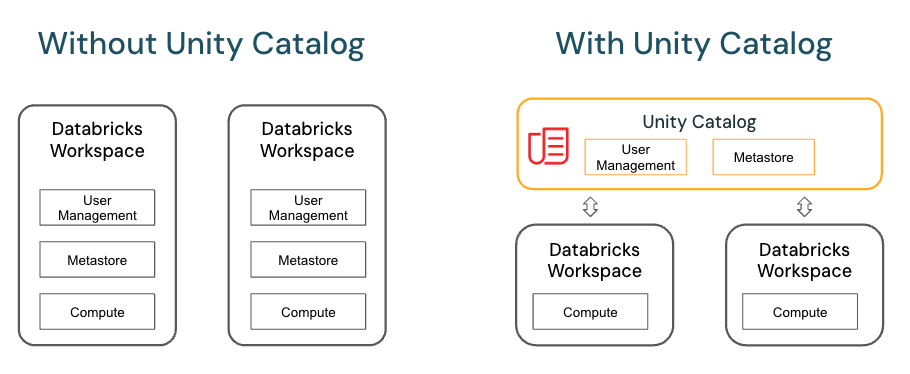
Unity Catalog is Databricks’ native governance layer and data catalog. It manages Delta tables, views, files, volumes and ML models in a hierarchical namespace (catalogs => schemas => tables/views). Unity Catalog provides:
- Granular permission controls down to the row and column level
- Automated data lineage tracking across pipelines, notebooks and dashboards
- Detailed audit logs for regulatory compliance
- Uniform governance across multi-cloud deployments
Data cataloging comparison
Synapse relies on its native metadata management plus Microsoft Purview for enterprise-wide cataloging. Purview aggregates assets from Synapse and other sources into a centralized, searchable catalog spanning the organization.
Databricks uses Unity Catalog as its native catalog, automatically collecting metadata for all data assets in the lakehouse. The hierarchical namespace provides consistent searchability, and lineage tracking gives clear visibility into data flows and transformations over time.
9️⃣ Azure Synapse vs Databricks—Developer experience and notebooks
Now let’s deep dive intothe technical comparison between Azure Synapse Analytics and Databricks focused on their developer experience and notebooks capabilities.
Azure Synapse developer experience & notebooks
Synapse Studio provides a web-based notebook experience supporting PySpark (Python), Scala, Spark SQL, .NET (C#) and SparkR in one interface. The editor uses the Monaco engine (the same engine behind VS Code), giving you IntelliSense, code completion, syntax highlighting and error markers.
Synapse notebooks support Git integration with Azure DevOps or GitHub, but collaboration is largely file-based rather than real-time co-authoring. Changes are versioned, but simultaneous editing isn’t as fluid as modern collaborative IDEs. Notebooks integrate with Spark pools and can be embedded within pipelines for orchestration.
If you’re already in the Azure and SQL ecosystem and want an integrated experience without context-switching, Synapse Studio delivers that.
Databricks developer experience and notebooks
Databricks is known for its notebook environment. It supports real-time co-authoring across Python, SQL, Scala and R—multiple people editing the same notebook simultaneously.
The workspace includes:
- Databricks Assistant: AI-powered code suggestions, query optimization hints and inline documentation
- Advanced debugging: Step-through debugging, inline error highlighting and “go to definition” navigation
- Native Git integration via Databricks Repos: Branching, pull requests and CI/CD workflows directly from the workspace
- Interactive visual output: Inline charts, widgets and visualizations that make exploratory data analysis faster
- Databricks Asset Bundles (DABs): Infrastructure-as-code tooling for deploying and managing notebooks, jobs and pipelines programmatically
If your team is doing iterative data science or engineering work that requires real collaboration, Databricks notebooks are the better environment.
Bottom line: Synapse Notebooks work well for Azure-centric SQL and Spark workflows where deep collaboration isn’t the priority. Databricks Notebooks win for teams doing intensive, collaborative data science and engineering work.
Azure Synapse vs Databricks—Pricing breakdown
Finally, we have reached the end of the article. Now, let’s deep dive into the pricing breakdown between Azure Synapse and Databricks.
Note: All prices below are estimates in US dollars. Actual costs vary based on your enterprise agreement, purchase timing, region and currency. Always verify against the official pricing pages before committing to a budget.
Azure Synapse pricing breakdown
Azure Synapse’s pricing model is modular. You pay separately for data integration, compute pools, storage and analytics services. Here’s the full breakdown.
1) Pre-purchase plans
If your Synapse usage is predictable, pre-purchase plans can lower costs. Microsoft says you can save up to 28% versus pay-as-you-go. You buy Azure Synapse Analytics Commit Units, or SCUs, as prepaid blocks of consumption. These SCUs apply to most Synapse services, but not storage. They are valid for 12 months.
| Tier | Synapse Commit Units (SCUs) | Discount | Price |
| 1 | 5,000 | 6% | $4,700 |
| 2 | 10,000 | 8% | $9,200 |
| 3 | 24,000 | 11% | $21,360 |
| 4 | 60,000 | 16% | $50,400 |
| 5 | 150,000 | 22% | $117,000 |
| 6 | 360,000 | 28% | $259,200 |
SCUs can be used across Synapse services at their respective retail prices. Once exhausted (or once the 12-month term ends) you revert to standard rates.
2) Data integration: pipelines and data flows
a) Data pipelines
Synapse Pipelines orchestrate extract, transform and load (ETL) and extract, load and transform (ELT) workflows. Billing covers orchestration activity runs and integration runtime hours. Execution time is charged by the minute, rounded up to the nearest one.
| Type | Azure hosted managed VNET | Azure hosted | Self-hosted |
| Orchestration activity run | $1.00 per 1,000 runs | $1.00 per 1,000 runs | $1.50 per 1,000 runs |
| Data movement | $0.25/DIU-hour | $0.25/DIU-hour | $0.10/hour |
| Pipeline activity integration runtime (up to 50 concurrent activities) | $1.00/hour ($0.005/hour effective) | $0.005/hour | $0.002/hour |
| Pipeline activity external integration runtime (up to 800 concurrent activities) | $1.00/hour ($0.00025/hour effective) | $0.00025/hour | $0.0001/hour |
Data egress out of an Azure data center incurs separate outbound data transfer charges.
b) Data flows
Data Flows provide a visual, code-free interface for building complex transformations at scale. Costs are based on cluster execution and debugging time, measured in vCore-hours. Minimum cluster size is 8 vCores. Execution and debugging are billed per minute, rounded up.
| Type | Price per vCore-hour |
| Basic | $0.257 |
| Standard | $0.325 |
c) Operation charges
Pipeline operations like creating, reading, updating, deleting and monitoring are charged after the free tier.
| Type | Free tier | Price after free tier |
| Data pipeline operations | First 1 million per month | $0.25 per 50,000 operations |
3) Data warehousing
a) Serverless SQL pool
The serverless pool lets you query data directly from Azure Data Lake Storage using T-SQL, with no upfront provisioning. You pay only for what each query processes.
| Type | Price |
| Serverless | $5.00 per TB of data processed |
Billing rules:
- DDL statements (metadata-only) don’t incur charges
- Each query carries a minimum charge of 10 MB
- Data processed is rounded up to the nearest 1 MB
- Storage costs for Azure Data Lake Storage itself are billed separately
b) Dedicated SQL pool (pay-as-you-go)
Dedicated pools provision reserved compute for high-concurrency, latency-sensitive workloads. You scale compute using Data Warehousing Units (DWUs), from DW100c up to DW30000c.
Note: DWUs are billed at the highest compute size reached during a given hour, for the full hour, regardless of how many minutes the pool actually ran at that level. Scaling from DW100c to DW500c at minute 30 means the entire hour is billed at the DW500c rate. Pausing mid-hour still incurs a charge for that hour.
The table below uses East US 2 pay-as-you-go rates. Monthly figures assume continuous 730-hour operation. Remember that, pausing the pool during off-hours dramatically reduces costs.
| Service level | DWU | Hourly price | Monthly price (730 hrs) |
| DW100c | 100 | $1.20 | $876 |
| DW200c | 200 | $2.40 | $1,752 |
| DW300c | 300 | $3.60 | $2,628 |
| DW400c | 400 | $4.80 | $3,504 |
| DW500c | 500 | $6.00 | $4,380 |
| DW1000c | 1,000 | $12.00 | $8,760 |
| DW1500c | 1,500 | $18.00 | $13,140 |
| DW2000c | 2,000 | $24.00 | $17,520 |
| DW2500c | 2,500 | $30.00 | $21,900 |
| DW3000c | 3,000 | $36.00 | $26,280 |
| DW5000c | 5,000 | $60.00 | $43,800 |
| DW6000c | 6,000 | $72.00 | $52,560 |
| DW7500c | 7,500 | $90.00 | $65,700 |
| DW10000c | 10,000 | $120.00 | $87,600 |
| DW15000c | 15,000 | $180.00 | $131,400 |
| DW30000c | 30,000 | $360.00 | $262,800 |
c) Dedicated SQL pool (reserved capacity)
Committing to reserved capacity cuts costs significantly. One-year reservations save approximately 37% and three-year reservations save approximately 65% against pay-as-you-go rates.
| Service level | DWU | 1-year reserved (monthly, ~37% savings) | 3-year reserved (monthly, ~65% savings) |
| DW100c | 100 | $552 | $307 |
| DW200c | 200 | $1,104 | $613 |
| DW300c | 300 | $1,656 | $920 |
| DW400c | 400 | $2,208 | $1,226 |
| DW500c | 500 | $2,760 | $1,533 |
| DW1000c | 1,000 | $5,519 | $3,066 |
| DW1500c | 1,500 | $8,279 | $4,599 |
| DW2000c | 2,000 | $11,038 | $6,132 |
| DW2500c | 2,500 | $13,798 | $7,665 |
| DW3000c | 3,000 | $16,557 | $9,198 |
| DW5000c | 5,000 | $27,596 | $15,331 |
| DW6000c | 6,000 | $33,115 | $18,397 |
| DW7500c | 7,500 | $41,394 | $22,996 |
| DW10000c | 10,000 | $55,192 | $30,661 |
| DW15000c | 15,000 | $82,787 | $45,992 |
| DW30000c | 30,000 | $165,575 | $91,984 |
d) Data storage, snapshots, disaster recovery and threat detection
Beyond compute, dedicated pools carry these additional charges:
| Type | Price |
| Data storage and snapshots | $23.00/TB/month |
| Geo-redundant disaster recovery | From $0.057/GB/month |
| Microsoft Defender for SQL | $0.02/node/month |
Data storage and snapshots: Storage billing covers your data warehouse size plus seven days of incremental snapshots. Storage transactions are not billed.
Geo-redundant disaster recovery: This replicates your pool to a secondary Azure region for business continuity. Storage transactions are excluded from billing.
Microsoft Defender for SQL: Provides anomalous activity detection and SQL threat intelligence. Each protected SQL Database server counts as one node. A 60-day free trial is available. See the Microsoft Defender for Cloud pricing page for current details.
4) Big data analytics: Apache Spark pools
Spark pools handle data engineering, data preparation and machine learning at scale. Billing is per vCore-hour, prorated by the minute and rounded up.
| Type | Price per vCore-hour |
| Memory-optimized | $0.143 |
| GPU-accelerated | $0.150 |
Memory-optimized pools handle most general-purpose Spark workloads. GPU-accelerated pools are designed for compute-intensive tasks; primarily deep learning and ML model training. Always enable auto-pause during development; idle Spark clusters accumulate charges even without active queries.
5) Log and telemetry analytics: Azure Synapse Data Explorer
Azure Synapse Data Explorer is purpose-built for interactive analysis of time-series, log and telemetry data. Compute and storage scale independently.
| Type | Price |
| Compute | $0.219/vCore-hour |
| Standard LRS data stored | $23.04/TB/month |
| Data Management (DM) service | Included (billed at 0.5 units of the Data Explorer compute meter) |
Billing is rounded up to the nearest minute.
6) Azure Synapse Link
Azure Synapse Link removes the need for ETL pipelines by bridging operational data stores directly to Synapse analytics.
a) Azure Synapse Link for SQL
Moves data from Azure SQL Database or SQL Server automatically, without ETL overhead.
| Type | Price |
| Azure Synapse Link for SQL | $0.25/vCore-hour |
b) Azure Synapse Link for Cosmos DB
Pricing is based on analytical storage transactions within Azure Cosmos DB. See the Azure Cosmos DB pricing page for current rates.
c) Azure Synapse Link for Dataverse
Included with Microsoft Power Platform and select Microsoft 365 licenses. See Microsoft’s licensing overview for specifics.
Databricks pricing breakdown
Databricks uses a consumption-based model built on a single internal currency: the Databricks Unit (DBU). Databricks gives you two separate bills.
Bill 1—Databricks DBU charges: This is the Databricks platform fee, billed per second of cluster usage. The per-DBU rate varies by workload type, edition tier and cloud provider.
Bill 2—Cloud infrastructure charges: Your cloud provider (AWS, Azure or Google Cloud Platform (GCP)) bills you separately for the virtual machines (VMs) running your clusters, plus storage and network egress. This bill has nothing to do with DBUs.
Teams that only look at the Databricks pricing calculator and ignore their cloud infrastructure bill routinely underestimate total spend by 50–200%. The only exception is serverless compute, where Databricks bundles the VM cost into the DBU rate; so you only receive the one Databricks bill for that workload type.
The basic cost formula:
DBUs consumed × DBU rate = Databricks cost
Plus: cloud provider VM + storage + egress charges (except for serverless workloads)
DBU rates shift based on:
- Cloud provider and region: AWS, Azure and GCP carry different rates, and rates vary by region within each cloud
- Edition tier: Standard, Premium and Enterprise, with each tier unlocking more features at a higher per-DBU rate
- Compute type: All-Purpose, Jobs, SQL or Serverless compute each carry distinct rates and this difference is enormous (more on that below)
- Committed use: Pre-purchasing Databricks Commit Units (DBCUs) for one or three years can save up to 37% on DBU rates
Standard tier retirement on Azure: Microsoft stated that Azure Databricks Standard tier is being phased out. New Standard workspaces stopped being supported on April 1, 2026. All existing Standard-tier workspaces will automatically migrate to Premium by October 1, 2026. Teams on Standard should expect a minimum 35% increase in DBU rates after migration. So make sure to plan it accordingly.
Azure tier mapping note: On Azure, the “Premium” tier corresponds to the “Enterprise” tier on AWS and GCP. Databricks positions Azure Databricks as a first-party Microsoft service with unified billing and support, which is why the tier naming differs.
Free trial
Databricks offers a 14-day free trial on AWS, Azure and GCP. The trial gives full access to Apache Spark, MLflow, Delta Lake and Unity Catalog without upfront cost. The cloud provider still bills for underlying infrastructure during the trial.
The Community Edition provides a permanently free, limited environment, a small Spark cluster plus collaborative notebooks which is suitable for learning and basic experimentation.
1) Jobs compute
Jobs compute runs automated, non-interactive workloads like extract, transform and load (ETL) pipelines. Clusters spin up when the job starts and terminate when it finishes. The per-DBU rate here is far lower than All-Purpose compute for the same instance resources—this is the most important cost-optimization lever in Databricks.
a) Classic/Classic Photon clusters
| Plan | AWS (US East) | Azure (US East) | GCP |
| Standard | ~$0.10/DBU | ~$0.15/DBU | ~$0.10/DBU |
| Premium | ~$0.15/DBU | ~$0.30/DBU | ~$0.15/DBU |
| Enterprise | ~$0.20/DBU | N/A (Premium = Enterprise on Azure) | — |
b) Serverless jobs
Serverless Jobs bundles the underlying compute cost into the DBU rate. No separate VM bill from your cloud provider.
| Plan | AWS (US East) | Azure (US East) | GCP |
| Premium | ~$0.20/DBU | ~$0.30/DBU | ~$0.20/DBU |
| Enterprise | ~$0.20/DBU | N/A | — |
2) Delta Live Tables (DLT)
Delta Live Tables (DLT) simplifies building reliable streaming and batch data pipelines using SQL or Python on auto-scaling Apache Spark. DLT consumes Jobs Compute DBUs and comes in three tiers based on features.
a) DLT Core
Basic streaming and batch pipelines in SQL or Python.
| Plan | AWS (US East) | Azure (US East) | GCP |
| Premium | $0.20/DBU | $0.30/DBU | $0.20/DBU |
| Enterprise | $0.20/DBU | N/A | — |
b) DLT Pro
Adds Change Data Capture (CDC) handling.
| Plan | AWS (US East) | Azure (US East) | GCP |
| Premium | $0.25/DBU | $0.38/DBU | $0.25/DBU |
| Enterprise | $0.36/DBU | N/A | — |
c) DLT Advanced
Includes data quality expectations and pipeline monitoring.
| Plan | AWS (US East) | Azure (US East) | GCP |
| Premium | $0.36/DBU | $0.54/DBU | $0.36/DBU |
| Enterprise | $0.54/DBU | N/A | — |
Note: Materialized Views and Streaming Tables in Databricks SQL are billed at DLT Serverless rates using Automated Serverless SKUs.
3) Databricks SQL
Databricks SQL delivers high-performance interactive analytics directly on lakehouse data. It comes in three warehouse types.
SQL Classic provides basic SQL querying on a self-managed warehouse. You pay separately for the cloud VMs.
SQL Pro adds Photon acceleration, fine-grained access controls and more advanced SQL capabilities on a self-managed warehouse. VM costs are still separate.
SQL Serverless is the fully managed option; compute scales instantly, VM costs are bundled into the DBU rate, and you don’t manage any cluster infrastructure.
AWS (US East, N. Virginia)
| Warehouse type | Premium | Enterprise |
| SQL Classic | $0.22/DBU | $0.22/DBU |
| SQL Pro | $0.55/DBU | $0.55/DBU |
| SQL Serverless (VM cost included) | $0.70/DBU | $0.70/DBU |
Azure (US East)
Azure Databricks SQL is available on Premium only (Premium = Enterprise on Azure).
| Warehouse type | Premium |
| SQL Classic | $0.22/DBU |
| SQL Pro | $0.55/DBU |
| SQL Serverless (VM cost included) | $0.70/DBU |
GCP
| Warehouse type | Premium |
| SQL Classic | $0.22/DBU |
| SQL Pro | $0.69/DBU |
| SQL Serverless (VM cost included) | $0.88/DBU |
4) Data science and machine learning
Databricks supports the full ML lifecycle (collaborative notebooks, MLflow experiment tracking, Delta Lake integration and model deployment) on All-Purpose clusters. All-Purpose compute has the highest DBU rate in the platform, which reflects its interactive, always-available nature.
The cost gap between All-Purpose and Jobs compute is not trivial. Running the same transformation interactively instead of as a scheduled job can cost 3 – 4× more in DBUs. Any workload that doesn’t need real-time human interaction belongs on Jobs Compute.
Classic All-Purpose / Classic Photon clusters
| Plan | AWS (US East) | Azure (US East) | GCP |
| Standard | $0.40/DBU | $0.40/DBU | $0.40/DBU |
| Premium | $0.55/DBU | $0.55/DBU | $0.55/DBU |
| Enterprise | $0.65/DBU | N/A | — |
Serverless All-Purpose compute
Serverless All-Purpose bundles VM costs into the DBU price. Rates are higher than classic clusters to cover infrastructure management.
| Plan | AWS (US East) | Azure (US East) | GCP |
| Premium | ~$0.75/DBU (VM included) | ~$0.95/DBU (VM included) | ~$0.75/DBU (VM included) |
| Enterprise | ~$0.95/DBU (VM included) | N/A | — |
Serverless All-Purpose rates are subject to promotional discounts from time to time. Verify current rates on the official Databricks pricing page before budgeting.
5) Model serving
Databricks Model Serving enables low-latency, auto-scaling deployment of machine learning models for real-time inference. Pricing includes the underlying cloud instance costs within the DBU rate.
a) Model serving and feature serving
| Plan | AWS (US East) | Azure (US East) | GCP |
| Premium | $0.07/DBU (VM included) | $0.07/DBU (VM included) | $0.088/DBU (VM included) |
| Enterprise | $0.07/DBU (VM included) | N/A | — |
b) GPU model serving
| Plan | AWS (US East) | Azure (US East) | GCP |
| Premium | $0.07/DBU (VM included) | $0.07/DBU (VM included) | — |
| Enterprise | $0.07/DBU (VM included) | N/A | — |
Important: The actual cost of GPU model serving depends heavily on the GPU instance type selected (for example, NVIDIA A100 vs T4 instances). These DBU rates apply a multiplier to the underlying instance’s raw DBU consumption, so total hourly charges vary significantly by instance type. Use the Databricks pricing calculator to model real costs for your specific serving configuration.
Committed use discounts
Both platforms offer meaningful discounts for upfront commitments.
For Azure Synapse, the pre-purchase SCU plans described above deliver up to 28% savings. Dedicated SQL pool reserved capacity offers up to 37% (one-year) or 65% (three-year) savings on compute.
For Databricks on Azure, you can pre-purchase Databricks Commit Units (DBCUs) for one or three years, saving up to 37% on pay-as-you-go DBU rates. DBCUs normalize usage across workloads and tiers into a single purchase, drawing down at the individual DBU’s retail price until exhausted or the term ends.
Use the Azure pricing calculator to estimate Synapse costs and the Databricks pricing calculator to estimate Databricks costs. Neither tool gives you the full picture on its own. You also need to account for cloud VM costs, storage, and egress charges. Add those to the platform-level DBU or DWU costs to get a realistic total.
For a more in-depth look at Databricks cost optimization, see our dedicated Databricks pricing guide.
Azure Synapse vs Databricks—Pros and cons
Azure Synapse pros and cons:
Azure Synapse pros:
- Microsoft Azure Synapse Analytics offers deep integration with the Azure ecosystem and robust enterprise security features.
- Microsoft Azure Synapse Analytics delivers full T-SQL support
- Microsoft Azure Synapse Analytics provides high-performance data warehousing via Dedicated SQL Pools that scale to petabytes of data.
- Microsoft Azure Synapse Analytics includes cost-effective, serverless SQL Pools for ad hoc querying and efficient data lake exploration.
- Microsoft Azure Synapse Analytics features a unified Synapse Studio that centralizes management of SQL scripts, notebooks, data pipelines and integration with Power BI.
- Microsoft Azure Synapse Analytics offers Data Explorer for efficient log and telemetry analytics, enhancing monitoring and troubleshooting.
- Microsoft Azure Synapse Analytics leverages Azure Active Directory, role-based access and data encryption, the service helps you manage sensitive data in line with various standards like GDPR and HIPAA.
Azure Synapse cons:
- Microsoft Azure Synapse Analytics incorporates Apache Spark integration; however, its Apache Spark environment is not as optimized as Databricks’ offering.
- Microsoft Azure Synapse Analytics focuses primarily on the Azure ecosystem, providing less multi-cloud flexibility compared to Databricks.
- Microsoft Azure Synapse Analytics delivers less advanced machine learning and real-time streaming capabilities when compared with Databricks.
- Microsoft Azure Synapse Analytics notebook environment lacks automatic versioning, which can complicate collaboration and code tracking.
- Microsoft Azure Synapse Analytics can be more complex to navigate, presenting a steeper learning curve for new users.
- Microsoft Azure Synapse Analytics serverless SQL Pools may experience performance limitations under heavy or unpredictable workloads.
- Microsoft Azure Synapse Analytics has some limits on file sizes and certain table operations. If you work with extremely large files or specific data types, you might have to adjust your workflow or partition your data more carefully.
- Microsoft Azure Synapse Analytics has a complex pricing model that requires careful monitoring to manage costs effectively.
Databricks pros and cons:
Databricks pros:
- Databricks implements Lakehouse architecture with Delta Lake, providing ACID transactions, schema enforcement and time travel for data reliability.
- Databricks integrates MLflow natively for model tracking, experiment management and streamlined MLOps.
- Databricks supports multi-cloud deployments (AWS, Azure, Google Cloud).
- Databricks provides a notebook environment with real-time co-authoring and automatic versioning, enhancing collaborative development.
- Databricks utilizes the Photon engine to accelerate SQL query performance through vectorized processing.
- Databricks offers advanced real-time streaming and incremental data ingestion capabilities via structured streaming and Delta Lake.
- Databricks supports multiple programming languages (Python, R, Scala, SQL) with seamless integration and interactive visualization tools.
- Databricks features automated cluster management and auto-scaling, optimizing resource utilization and reducing operational overhead.
Databricks cons:
- Databricks centers on Apache Spark; non-Spark workloads require additional integration work or custom connectors.
- Databricks lacks native support for traditional SQL data warehousing (e.g., T-SQL) compared to dedicated SQL DW platforms.
- Databricks cost models are variable and can be unpredictable due to dynamic cluster scaling and on-demand compute usage.
- Databricks demands deep technical expertise in Apache Spark tuning and cluster optimization for peak performance.
- Databricks may require custom solutions for integrating legacy systems and non-Spark-specific data pipelines.
- Databricks has less out-of-the-box support for OLTP workloads and other transactional scenarios.
Further reading
- Azure Synapse analytics documentation
- Databricks documentation
- Databricks competitors: 13 best alternatives to try
- Databricks pricing 101
- Intro to Databricks – What is Databricks
- Tutorial – Databricks platform architecture
- Getting started in Azure Synapse Analytics | Azure fundamentals
- Why you should look at Azure Synapse Analytics!
Save up to 50% on your Databricks spend in a few minutes!
Conclusion
And that’s a wrap! Microsoft Azure Synapse Analytics and Databricks address different aspects of modern data architectures with highly specialized capabilities. Azure Synapse Analytics is an all-in-one analytics platform that combines dedicated SQL pools, serverless SQL pools and Apache Spark pools. All of these components work under a single governance and interface smoothly with other Azure services, making Synapse a good choice for modernizing legacy data warehouse systems and handling structured and semi-structured data.
In contrast, Databricks, built on Apache Spark, focuses on data engineering and data science. Its key feature is Delta Lake, a storage layer that offers robust ACID transaction guarantees, enforces schemas and provides time travel capabilities on data lakes. Databricks also provides a flexible and collaborative Notebook environment. Furthermore, Databricks can be easily deployed across multiple clouds, including AWS, Azure and GCP. Additionally, it integrates MLflow, allowing for comprehensive management of the machine learning lifecycle, from rapid experimentation to production deployment.
In this article, we have coverd:
- What is Databricks?
- What is Microsoft Azure Synapse Analytics?
- What Is the difference between Databricks and Azure Synapse Analytics?
- Azure Synapse vs Databricks—Architecture breakdown
- Azure Synapse vs Databricks—Ecosystem integration & cloud deployment
- Azure Synapse vs Databricks—Data processing engines
- Azure Synapse vs Databricks—SQL capabilities & data warehousing
- Azure Synapse vs Databricks—Machine Learning and analytics
- Azure Synapse vs Databricks—Scalability & resource management
- Azure Synapse vs Databricks—Real-time streaming & data ingestion
- Azure Synapse vs Databricks—Security, governance & data cataloging
- Azure Synapse vs Databricks—Developer experience & notebooks
- Azure Synapse vs Databricks—Pricing breakdown
… and more!!!
FAQs
What is Databricks used for?
Databricks is a unified data analytics platform built on Apache Spark for large-scale data processing, ETL, machine learning and real-time analytics. It uses Delta Lake for ACID-compliant data lakes and provides collaborative notebooks, Mosaic AI for end-to-end ML and Lakeflow for data pipeline orchestration.
Is Azure Synapse better than Databricks?
They serve different roles. Synapse integrates data warehousing, big data and data integration into one Azure-native service, which is perfect for SQL-heavy analytics and BI. Databricks excels in Spark-based workloads, ML and real-time processing. The right choice depends on your workload profile and ecosystem.
What is the difference between Databricks and Azure Synapse Analytics?
Databricks optimizes for Apache Spark workloads and collaborative ML, using Delta Lake for unstructured and streaming data. Azure Synapse provides a unified experience for enterprise data warehousing, ETL and big data analytics with native SQL support, serverless and dedicated compute options and deep Azure integration.
What is the alternative of Azure Synapse?
Snowflake, Google BigQuery, AWS Redshift and Microsoft Fabric. Each with distinct strengths in cost, scalability and ecosystem integration. For new Azure projects, Fabric is increasingly the recommended path.
What is equivalent to Databricks in AWS?
Amazon EMR is the closest managed Apache Spark service. AWS Glue offers serverless ETL. Databricks itself is also available on AWS as a managed service.
Is Databricks good for analytics?
Yes. Databricks SQL with Photon delivers high-performance interactive analytics on the lakehouse. Combined with collaborative notebooks and Delta Lake optimizations, it handles both ad hoc exploration and production dashboarding effectively.
Is Azure Synapse an analytics?
Azure Synapse Analytics is a comprehensive analytics service that unifies data warehousing and big data analytics. It’s designed for enterprise-scale analytics combining SQL, Apache Spark and data integration features.
What is Azure Synapse Analytics used for?
Azure Synapse is used for end-to-end analytics—from ingesting and preparing data with integrated pipelines to querying massive datasets with both SQL and Apache Spark. It supports interactive BI, advanced data integration and scalable data warehousing.
Is Azure Synapse Analytics an ETL tool?
Not solely. While Synapse Pipelines provide robust ETL/ELT capabilities, Synapse is a full analytics platform combining data warehousing, big data processing and BI features. Think of pipelines as one capability in a broader platform.
What are the main components of Azure Synapse Analytics?
- Synapse SQL (dedicated and serverless SQL pools) for data warehousing and querying
- Apache Spark pools for big data processing and ML
- Synapse Pipelines for ETL/ELT workflow orchestration
- Synapse Studio as the unified development and management interface
- Integration with Microsoft Purview for governance and lineage
What is Synapse used for?
Synapse is used to integrate, process and analyze large volumes of data across data warehouses, data lakes and real-time streams—all within a unified platform that supports BI and ML workloads.
Which SQL is used in Azure Synapse Analytics?
Azure Synapse primarily uses Transact-SQL (T-SQL) for its SQL-based analytics, extended to support scalable querying across both structured and semi-structured data.
Pramit Marattha
Pramit Marattha is a technical content writer and strategist with 5+ years of experience covering AI, data engineering, data cloud platforms and open source technologies. He turns complex technical concepts into clear, useful content for engineers and developers.







