


Databricks pricing can catch teams off guard. The platform has a consumption-based model at its core; you pay for Databricks Units (DBUs). But that’s only half the bill. Your cloud provider (AWS, Azure, or Google Cloud) charges you separately for the underlying virtual machines, storage and networking. Knowing both sides of that cost structure is what this guide is for.
Databricks, now officially called the Databricks Data Intelligence Platform, brings together data engineering, data science, machine learning and SQL analytics in one place. It’s built on Apache Spark and uses Delta Lake as its open source storage foundation. Its adoption has grown massively, which means more teams are now grappling with the “what does this actually cost?” question.
In this article, we will cover how the Databricks pricing model works, including what DBUs are, what drives DBU consumption, how costs break down across AWS, Azure and GCP, and what the Databricks pricing calculator can (and can’t) do for you and a whole lot more!
Databricks architecture: A quick primer before pricing
Before we dive into the core Databricks pricing, let’s take a moment to understand its architecture first.
Databricks provides a unified platform for data engineering, data science, machine learning and analytics workloads, all built on top of Apache Spark. Here’s what powers it:
Delta Lake
Delta Lake is an open source storage layer that adds ACID transactions, schema enforcement, time travel and scalable metadata handling to cloud object stores like Amazon S3, Azure Data Lake Storage and Google Cloud Storage. It stores data as Parquet files with a transaction log that enables ACID guarantees. Delta Lake is the default table format in Databricks and is fully compatible with Apache Spark APIs. It unifies batch and streaming workloads on the same data copy.
Photon Engine
Photon is Databricks’ high-performance, vectorized query engine written in C++. It accelerates SQL and DataFrame workloads by taking advantage of modern CPU architecture, delivering significant speed improvements over the standard Spark runtime for analytical queries. Photon is always enabled on serverless compute, SQL warehouses and serverless Lakeflow Spark Declarative Pipelines. You’ll sometimes see references to “Delta Engine” in older Databricks documentation — Photon is the specific execution engine within that broader umbrella.
Unity Catalog
Unity Catalog provides centralized governance for all your data, analytics and AI assets across workspaces and clouds. It handles access control, data lineage and discovery. Unity Catalog is included in the Premium and Enterprise tiers (more on tiers below).
Unified workspace
All components are accessed through a single cloud-hosted workspace interface, where data engineers, data scientists and analysts can work on the same data without switching tools or platforms.
How the Databricks pricing model works
Databricks uses a pay-as-you-go model. There are no upfront costs and no mandatory long-term contracts on the on-demand plan. You pay per second of compute usage, which means a 30-minute job costs exactly half what a 60-minute job of the same type would.
The core billing currency is the Databricks Unit (DBU). But here’s the critical point: your total Databricks bill has two distinct components.
- DBU charges paid to Databricks for platform usage
- Cloud infrastructure charges paid directly to your cloud provider (AWS, Azure or GCP) for the underlying virtual machines, storage and network egress
Infrastructure costs routinely account for 50 to 70 percent of total Databricks spend. Many teams focus only on the DBU bill and get surprised by the other half. Budget for both from day one.
What is a DBU?
A Databricks Unit (DBU) is a normalized unit of compute capacity, consumed per hour of workload execution. It abstracts over the differences in instance types and cloud providers, so a “General Purpose” workload delivers comparable value on AWS, Azure or GCP even though the underlying VMs differ.
The cost formula is straightforward:
Databricks DBU consumed x Databricks DBU Rate = Total CostDBU consumption is metered per second and summed across all active cluster nodes (driver + workers). A cluster with 4 worker nodes and 1 driver node, each consuming 2 DBUs per hour, burns 10 DBUs per hour total.
Six factors that affect your DBU rate
Not all DBUs cost the same. The per-DBU dollar rate varies across these six dimensions:
- Cloud provider: AWS, Azure and GCP have slightly different list prices for equivalent DBU types.
- Region: Databricks pricing varies by cloud region. US East (N. Virginia on AWS) is typically the lowest-cost reference region.
- Subscription tier: Premium and Enterprise tiers carry higher per-DBU rates than the now-retired Standard tier. More on this below.
- Instance type: The VM family (memory-optimized, compute-optimized, GPU, etc.) determines how many DBUs that node type consumes per hour.
- Compute type: Jobs Compute, All-Purpose Compute, SQL warehouses and serverless each carry different DBU rates, sometimes varying by 3x or more for the same instance type.
- Committed use: Pre-purchasing DBU commitments unlocks discounts. Larger commitments yield greater discounts, and commitments can be applied across clouds.
Key Databricks products—How does Databricks pricing work?
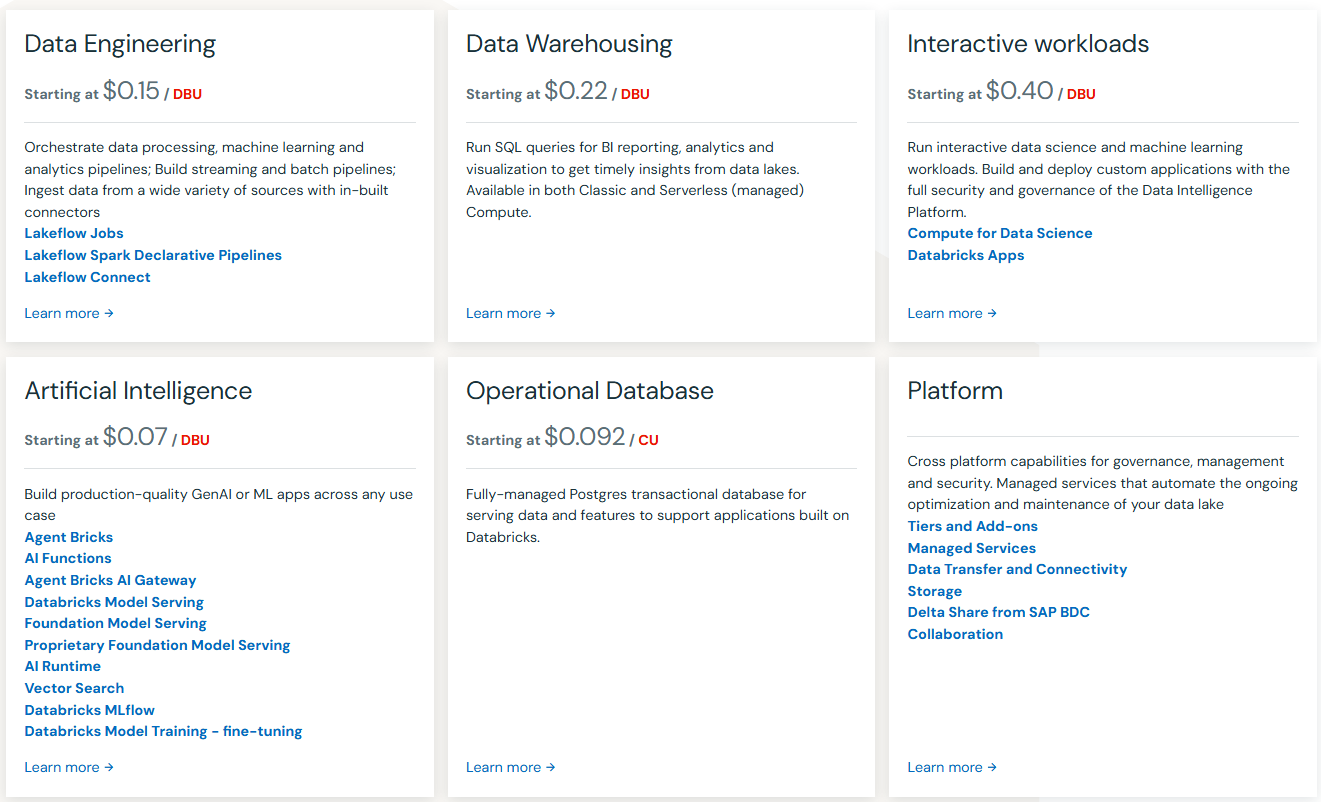
Databricks provides multiple products on its Lakehouse Platform for different data workloads. Each product has usage measured in Databricks DBUs consumed, which, when multiplied by the Databricks DBU cost, provides the final Databricks cost.
Here is a breakdown of major Databricks products and how they are priced:
Databricks subscription tiers: What’s changed in 2026
Databricks has three subscription tiers: Standard, Premium and Enterprise. But the tier landscape has changed significantly as of late 2025 and 2026.
Standard tier (retired)
The Standard tier reached end of life on AWS and GCP in October 2025. All remaining Standard workspaces on those clouds were automatically upgraded to Premium. New Standard workspace creation was blocked on Azure starting April 1, 2026, and all remaining Azure Standard workspaces will be automatically upgraded to Premium by October 1, 2026. If you’re still on Standard on Azure, plan your migration now.
Premium tier
Premium is the baseline tier for all new Databricks deployments. It includes Unity Catalog, Databricks SQL workspaces, role-based access control, audit logging, serverless compute and the full Mosaic AI product suite. Most production workloads run on Premium.
Enterprise tier
Enterprise adds advanced compliance certifications, enhanced security controls, dedicated support and SLA guarantees. Pricing is negotiated directly with Databricks sales and is not publicly listed. Enterprise rates are approximately 15 to 25 percent higher than Premium for equivalent compute types.
Note: On Azure, the Premium tier is a first-party Microsoft service billed through your Azure account. The Azure Premium tier corresponds functionally to the Enterprise tier on AWS and GCP. Azure does not offer a separate “Enterprise” DBU plan in the pricing tables; the Premium tier on Azure already includes Enterprise-equivalent governance features.
| Tier | Status (2026) | Features | Pricing |
|---|---|---|---|
| Standard | Retired (AWS/GCP Oct 2025; Azure Oct 2026) | Core Spark, basic notebooks | Legacy only |
| Premium | Default for new deployments | Unity Catalog, RBAC, SQL, serverless, Mosaic AI | Published (varies by compute type) |
| Enterprise | Contact sales | Full compliance certifications, dedicated support, SLA | Custom / negotiated |
Databricks free offerings
14-day free trial
Databricks offers a 14-day free trial with access to the full platform, including data engineering, data science, machine learning tools and Mosaic AI. The trial is available on AWS, Azure and GCP. During the trial you can:
- Ingest data from hundreds of sources
- Build data pipelines using a declarative approach
- Access serverless and classic compute
- Explore Databricks SQL, Delta Lake and generative AI capabilities
Note: The Databricks trial is free, but your cloud provider may charge you for any resources used during the trial period.
Databricks Free Edition
Databricks also recently announced a Free Edition, no credit card or corporate email is required; just sign up and you’re ready to go.
Databricks Free Edition is an excellent starting point for individuals looking to get hands-on experience with Databricks without any cost. But, it comes with limitations on computational power, storage and features compared to the paid editions.
Now that we’ve got a solid grasp of the Databricks free offerings, let’s take a closer look at their paid pricing model and see how it all works.
AWS Databricks pricing (US East, N. Virginia region)
All prices below are Databricks’ list prices for the US East (N. Virginia) region. Cloud infrastructure costs from AWS (EC2, S3, network egress) are billed separately by AWS and are not reflected here. Enterprise pricing is custom and negotiated; the figures below represent published list prices where available.
1. Lakeflow Jobs (formerly Workflows)
Lakeflow Jobs handles scheduled and automated data engineering pipelines. This is the most cost-efficient compute type for production ETL and batch workloads.
| Product | Plan | Sub-product / SKU | List price |
|---|---|---|---|
| Lakeflow Jobs | Premium | Classic Jobs / Classic Jobs with Photon | $0.15 per DBU |
| Lakeflow Jobs | Enterprise | Classic Jobs / Classic Jobs with Photon | $0.20 per DBU |
| Lakeflow Jobs | Premium | Serverless | $0.35 per DBU |
| Lakeflow Jobs | Enterprise | Serverless | $0.45 per DBU |
2. Lakeflow Spark Declarative Pipelines (Formerly Delta Live Tables)
Lakeflow Spark Declarative Pipelines is the product previously known as Delta Live Tables (DLT). It handles streaming and batch data pipeline orchestration with built-in data quality controls.
| Product | Plan | Sub-product / SKU | List price |
|---|---|---|---|
| Lakeflow Spark Declarative Pipelines | Premium | Serverless | $0.35 per DBU |
| Lakeflow Spark Declarative Pipelines | Premium | Classic Core | $0.20 per DBU |
| Lakeflow Spark Declarative Pipelines | Premium | Classic Pro | $0.25 per DBU |
| Lakeflow Spark Declarative Pipelines | Premium | Classic Advanced | $0.36 per DBU |
| Lakeflow Spark Declarative Pipelines | Enterprise | Serverless | $0.45 per DBU |
| Lakeflow Spark Declarative Pipelines | Enterprise | Classic Core | $0.20 per DBU |
| Lakeflow Spark Declarative Pipelines | Enterprise | Classic Pro | $0.25 per DBU |
| Lakeflow Spark Declarative Pipelines | Enterprise | Classic Advanced | $0.36 per DBU |
3. Lakeflow Connect
Lakeflow Connect provides managed connectors for ingesting data from external sources, plus Zerobus Ingest, a serverless, push-based API that writes event data directly to Unity Catalog Delta tables, bypassing message bus infrastructure.
| Product | Plan | Sub-product / SKU | List price |
|---|---|---|---|
| Lakeflow Connect | Premium | Managed Connectors | $0.35 per DBU |
| Lakeflow Connect | Premium | Zerobus Ingest | $0.050 per GB |
| Lakeflow Connect | Enterprise | Managed Connectors | $0.45 per DBU |
| Lakeflow Connect | Enterprise | Zerobus Ingest | $0.064 per GB |
4. Databricks SQL
Databricks SQL provides SQL warehouse compute for BI queries and analytical workloads on the lakehouse. SQL Classic runs on clusters in your cloud account (you pay AWS separately for the VMs). SQL Serverless runs on Databricks’ managed infrastructure.
| Product | Plan | Sub-product / SKU | List price |
|---|---|---|---|
| Databricks SQL | Premium | SQL Classic | $0.22 per DBU |
| Databricks SQL | Premium | SQL Pro | $0.55 per DBU |
| Databricks SQL | Premium | SQL Serverless | $0.70 per DBU |
| Databricks SQL | Enterprise | SQL Classic | $0.22 per DBU |
| Databricks SQL | Enterprise | SQL Pro | $0.55 per DBU |
| Databricks SQL | Enterprise | SQL Serverless | $0.70 per DBU |
5. Lakebase (Operational database)
Lakebase is Databricks’ PostgreSQL-compatible operational database, designed for data apps and AI agents. It supports autoscaling and scale-to-zero. Billing is based on capacity units (CU-hours) rather than DBUs for compute, plus a per-GB storage charge.
| Product | Plan | Sub-product / SKU | List price |
|---|---|---|---|
| Lakebase | Premium | Compute with autoscaling | $0.0092 per CU-hour* |
| Lakebase | Premium | Database storage | $0.345 per GB-month |
| Lakebase | Enterprise | Compute with autoscaling | $0.111 per CU-hour |
| Lakebase | Enterprise | Database storage | $0.345 per GB-month |
Note: *The Premium Lakebase compute rate reflects the indicative pricing published during the public preview period. Verify the current rate on the official Databricks Lakebase pricing page before budgeting.
6. Compute for Data Science
All-Purpose Compute (also called interactive compute) powers notebooks, ad hoc exploration and collaborative development. It carries the highest per-DBU rate of any compute type. Serverless compute for data science removes the need to provision and manage clusters.
| Product | Plan | Sub-product / SKU | List price |
|---|---|---|---|
| Compute for Data Science | Premium | Classic All-Purpose Compute | $0.55 per DBU |
| Compute for Data Science | Premium | Serverless | $0.75 per DBU |
| Compute for Data Science | Enterprise | Classic All-Purpose Compute | $0.65 per DBU |
| Compute for Data Science | Enterprise | Serverless | $0.95 per DBU |
7. Databricks Apps
Databricks Apps lets you build and deploy secure data and AI applications directly on the lakehouse, with built-in governance.
| Product | Plan | Sub-product / SKU | List price |
|---|---|---|---|
| Databricks Apps | Premium | App capacity | $0.75 per DBU |
| Databricks Apps | Enterprise | App capacity | $0.95 per DBU |
8. Databricks AI
The AI product suite covers agent frameworks, model serving, vector search, foundation model APIs, evaluation tools and AI runtime compute. Pricing varies by product and usage model.
a. Agent Bricks
| Product | Plan | Sub-product / SKU | List price |
|---|---|---|---|
| Agent Bricks | Premium / Enterprise | Knowledge Assistant | $0.150 per answer |
| Agent Bricks | Premium / Enterprise | Supervisor Agent | $0.070 per DBU |
b. AI Functions
| Product | Plan | Sub-product / SKU | List price |
|---|---|---|---|
| AI Functions | Premium / Enterprise | AI Parse Document | $0.070 per DBU |
| AI Functions | Premium / Enterprise | AI Extract | $0.070 per DBU |
| AI Functions | Premium / Enterprise | AI Classify | $0.070 per DBU |
c. AI Gateway
| Product | Plan | Sub-product / SKU | List price |
|---|---|---|---|
| AI Gateway | Premium / Enterprise | AI Guardrails | $1.50 per million tokens |
| AI Gateway | Premium / Enterprise | Inference Tables | $0.50 per GB |
| AI Gateway | Premium / Enterprise | Usage Tracking | $0.100 per GB |
d. Databricks Model Serving
| Product | Plan | Sub-product / SKU | List price |
|---|---|---|---|
| Model Serving | Premium / Enterprise | CPU Serving | $0.070 per DBU |
| Model Serving | Premium / Enterprise | GPU Serving | $0.070 per DBU |
e. Foundation Model Serving
Foundation Model Serving provides APIs for Databricks’ open source models (such as DBRX) and supports provisioned throughput and batch inference. Token pricing applies different rates to input and output tokens.
| Product | Plan | Sub-product / SKU | List price |
|---|---|---|---|
| Foundation Model Serving | Premium / Enterprise | Per-token — input tokens | $0.50 per million tokens |
| Foundation Model Serving | Premium / Enterprise | Per-token — output tokens | $1.50 per million tokens |
| Foundation Model Serving | Premium / Enterprise | Provisioned Throughput | $6.00 per hour |
| Foundation Model Serving | Premium / Enterprise | Batch Inference | $6.00 per hour |
f. AI Runtime (GPU compute)
| Product | Plan | Sub-product / SKU | List price |
|---|---|---|---|
| AI Runtime | Premium / Enterprise | A10 On Demand | $2.50 per DBU |
| AI Runtime | Premium / Enterprise | H100 On Demand | $7.00 per DBU |
g. Vector Search
| Product | Plan | Sub-product / SKU | List price |
|---|---|---|---|
| Vector Search | Premium / Enterprise | Standard — Compute | $0.28 per hour |
| Vector Search | Premium / Enterprise | Standard — Storage (first 30 GB free) | $0.230 per GB-month |
| Vector Search | Premium / Enterprise | Storage Optimized — Compute | $1.28 per hour |
| Vector Search | Premium / Enterprise | Storage Optimized — Storage | $0.046 per GB-month |
h. Agent Evaluation (Powered by MLflow)
| Product | Plan | Sub-product / SKU | List price |
|---|---|---|---|
| Agent Evaluation | Premium / Enterprise | Evaluation — input tokens | $0.15 per million tokens |
| Agent Evaluation | Premium / Enterprise | Evaluation — output tokens | $0.60 per million tokens |
| Agent Evaluation | Premium / Enterprise | Synthetic Data | $0.35 per question |
i. Model Training
| Product | Plan | Sub-product / SKU | List price |
|---|---|---|---|
| Model Training | >Premium / Enterprise | Fine-tuning | $0.65 per DBU |
| Model Training | Premium / Enterprise | Forecasting | $0.65 per DBU |
9. Managed Services
| Product | Plan | Sub-product / SKU | List price |
|---|---|---|---|
| Managed Services | Premium | Data Quality Monitoring | $0.35 per DBU |
| Managed Services | Premium | Predictive Optimization | $0.35 per DBU |
| Managed Services | Premium | Fine-Grained Access Control (FGAC) | $0.35 per DBU |
| Managed Services | Premium | Data Classification | $0.35 per DBU |
| Managed Services | Enterprise | Data Quality Monitoring | $0.45 per DBU |
| Managed Services | Enterprise | Predictive Optimization | $0.45 per DBU |
| Managed Services | Enterprise | Fine-Grained Access Control (FGAC) | $0.45 per DBU |
| Managed Services | Enterprise | Data Classification | $0.45 per DBU |
10. Data Transfer
Databricks data transfer pricing is published separately. See the Databricks Data Transfer Pricing document on the official Databricks pricing page for current per-GB egress and cross-region transfer rates.
11. Storage
Databricks charges a storage fee (measured in Databricks Storage Units, or DSUs) for managed storage associated with the platform.
| Product | Plan | Sub-product / SKU | List price |
|---|---|---|---|
| Storage | Premium / Enterprise | Managed storage | $0.023 per DSU |
AWS pricing summary (US East, N. Virginia — Premium tier starting rates)
| Product | Compute type | Starting list price |
|---|---|---|
| Lakeflow Jobs | Classic Jobs | $0.15 per DBU |
| Lakeflow Jobs | Serverless | $0.35 per DBU |
| Lakeflow Spark Declarative Pipelines | Classic Core | $0.20 per DBU |
| Lakeflow Spark Declarative Pipelines | Serverless | $0.35 per DBU |
| Lakeflow Connect | Managed Connectors | $0.35 per DBU |
| Lakeflow Connect | Zerobus Ingest | $0.050 per GB |
| Databricks SQL | SQL Classic | $0.22 per DBU |
| Databricks SQL | SQL Serverless | $0.70 per DBU |
| Lakebase | Compute with autoscaling | $0.0092 per CU-hour* |
| Compute for Data Science | Classic All-Purpose | $0.55 per DBU |
| Compute for Data Science | Serverless | $0.75 per DBU |
| Databricks Apps | App capacity | $0.75 per DBU |
| Foundation Model Serving | Per token (input) | $0.50 per million tokens |
| AI Runtime | H100 On Demand | $7.00 per DBU |
| Managed Services | Data Quality Monitoring | $0.35 per DBU |
| Storage | Managed storage | $0.023 per DSU |
Azure Databricks pricing (US East region)
Azure Databricks is a first-party Microsoft service. Pricing is set by Microsoft and billed through your Azure account. The Azure Premium tier is functionally equivalent to the Enterprise tier on AWS and GCP, so you’ll see only a single “Premium” plan in Azure pricing tables. Underlying Azure VM costs are billed separately through your Azure subscription.
Note: Azure Databricks Standard tier is being retired. New Standard workspace creation was blocked as of April 1, 2026, and all remaining Standard workspaces will be automatically upgraded to Premium by October 1, 2026.
1. Lakeflow Jobs
| Product | Plan | Sub-product / SKU | List price |
|---|---|---|---|
| Lakeflow Jobs | Premium | Classic Jobs / Classic Jobs with Photon | $0.30 per DBU |
| Lakeflow Jobs | Premium | Serverless | >$0.45 per DBU |
2. Lakeflow Spark Declarative Pipelines
| Product | Plan | Sub-product / SKU | List price |
|---|---|---|---|
| Lakeflow Spark Declarative Pipelines | Premium | Serverless | $0.45 per DBU |
| Lakeflow Spark Declarative Pipelines | Premium | Classic Core | $0.30 per DBU |
| Lakeflow Spark Declarative Pipelines | Premium | Classic Pro | $0.38 per DBU |
| Lakeflow Spark Declarative Pipelines | Premium | Classic Advanced | $0.54 per DBU |
3. Lakeflow Connect
| Product | Plan | Sub-product / SKU | List price |
|---|---|---|---|
| Lakeflow Connect | Premium | Managed Connectors | $0.45 per DBU |
| Lakeflow Connect | Premium | Zerobus Ingest | $0.064 per GB |
4. Databricks SQL
| Product | Plan | Sub-product / SKU | List price |
|---|---|---|---|
| Databricks SQL | Premium | SQL Classic | $0.22 per DBU |
| Databricks SQL | Premium | SQL Pro | $0.55 per DBU |
| Databricks SQL | Premium | SQL Serverless | $0.70 per DBU |
5. Lakebase
| Product | Plan | Sub-product / SKU | List price |
|---|---|---|---|
| Lakebase | Premium | Compute with autoscaling | $0.111 per CU-hour |
| Lakebase | Premium | Database storage | $0.390 per GB-month |
6. Compute for Data Science
| Product | Plan | Sub-product / SKU | List price |
|---|---|---|---|
| Compute for Data Science | Premium | Classic All-Purpose Compute | $0.55 per DBU |
| Compute for Data Science | Premium | Serverless | $0.95 per DBU |
7. Databricks Apps
| Product | Plan | Sub-product / SKU | List price |
|---|---|---|---|
| Databricks Apps | Premium | App capacity | $0.95 per DBU |
8. AI products (Azure)
| Product | Plan | Sub-product / SKU | List price |
|---|---|---|---|
| Agent Bricks | Premium | Knowledge Assistant | $0.150 per answer |
| Agent Bricks | Premium | Supervisor Agent | $0.070 per DBU |
| AI Functions | Premium | AI Parse Document / AI Extract / AI Classify | $0.070 per DBU each |
| AI Gateway | Premium | AI Guardrails | $1.50 per million tokens |
| AI Gateway | Premium | Inference Tables | $0.50 per GB |
| AI Gateway | Premium | Usage Tracking | $0.100 per GB |
| Model Serving | Premium | CPU and GPU Serving | $0.070 per DBU |
| Foundation Model Serving | Premium | Per-token — input tokens | $0.50 per million tokens |
| Foundation Model Serving | Premium | Per-token — output tokens | $1.50 per million tokens |
| Foundation Model Serving | Premium | Provisioned Throughput | $6.00 per hour |
| Foundation Model Serving | Premium | Batch Inference | $6.00 per hour |
| AI Runtime | Premium | A10 On Demand | $4.90 per DBU |
| AI Runtime | Premium | H100 On Demand | $7.00 per DBU |
| Vector Search | Premium | Standard — Compute | $0.28 per hour |
| Vector Search | Premium | Standard — Storage (first 30 GB free) | $0.260 per GB-month |
| Vector Search | Premium | Storage Optimized — Compute | $1.28 per hour |
| Vector Search | Premium | Storage Optimized — Storage | $0.052 per GB-month |
| Agent Evaluation | Premium | Evaluation — input tokens | $0.15 per million tokens |
| Agent Evaluation | Premium | Evaluation — output tokens | >$0.60 per million tokens |
| Agent Evaluation | Premium | Synthetic Data | $0.35 per question |
| Model Training | Premium | Fine-tuning | $0.65 per DBU |
| Model Training | Premium | Forecasting | $0.65 per DBU |
9. Managed Services (Azure)
| Product | Plan | Sub-product / SKU | List price |
|---|---|---|---|
| Managed Services | Premium | Data Quality Monitoring | $0.45 per DBU |
| Managed Services | Premium | Predictive Optimization | $0.45 per DBU |
| Managed Services | Premium | Fine-Grained Access Control (FGAC) | $0.45 per DBU |
| Managed Services | Premium | Data Classification | $0.45 per DBU |
10. Storage (Azure)
| Product | Plan | Sub-product / SKU | List price |
|---|---|---|---|
| Storage | Premium | Managed storage | $0.026 per DSU |
Azure pricing summary (US East — Premium tier starting rates)
| Product | Compute type | List price |
|---|---|---|
| Lakeflow Jobs | Classic Jobs | $0.30 per DBU |
| Lakeflow Jobs | Serverless | $0.45 per DBU |
| Lakeflow Spark Declarative Pipelines | Classic Core | $0.30 per DBU |
| Lakeflow Spark Declarative Pipelines | Serverless | $0.45 per DBU |
| Lakeflow Connect | Managed Connectors | $0.45 per DBU |
| Databricks SQL | SQL Classic | $0.22 per DBU |
| Databricks SQL | SQL Serverless | $0.70 per DBU |
| Lakebase | Compute with autoscaling | $0.111 per CU-hour |
| Compute for Data Science | Classic All-Purpose | $0.55 per DBU |
| Compute for Data Science | Serverless | $0.95 per DBU |
| Databricks Apps | App capacity | $0.95 per DBU |
| AI Runtime | A10 On Demand | $4.90 per DBU |
| Managed Services | Data Quality Monitoring | $0.45 per DBU |
| Storage | Managed storage | $0.026 per DSU |
GCP Databricks pricing (US Virginia region)
GCP follows the same DBU billing model as AWS, with rates generally matching AWS in the reference US region. Standard tier was retired on GCP in October 2025, and Premium is now the baseline. Not all Databricks products are available on GCP — notably, Lakebase and AI Runtime (GPU) are not currently supported on GCP.
GCP pricing — selected products (US Virginia)
| Product | Plan | Sub-product / SKU | List price |
|---|---|---|---|
| Lakeflow Jobs | Premium | Classic Jobs | $0.15 per DBU |
| Lakeflow Jobs | Premium | Serverless | $0.35 per DBU |
| Lakeflow Jobs | Enterprise | Classic Jobs | $0.20 per DBU |
| Lakeflow Jobs | Enterprise | Serverless | $0.45 per DBU |
| Lakeflow Spark Declarative Pipelines | Premium | Serverless | $0.35 per DBU |
| Lakeflow Spark Declarative Pipelines | Premium | Classic Core | $0.20 per DBU |
| Lakeflow Spark Declarative Pipelines | Premium | Classic Pro | $0.25 per DBU |
| Lakeflow Spark Declarative Pipelines | Premium | Classic Advanced | $0.36 per DBU |
| Lakeflow Spark Declarative Pipelines | Enterprise | Serverless | $0.45 per DBU |
| Lakeflow Spark Declarative Pipelines | Enterprise | Classic Core | $0.20 per DBU |
| Lakeflow Spark Declarative Pipelines | Enterprise | Classic Pro | $0.25 per DBU |
| Lakeflow Spark Declarative Pipelines | Enterprise | Classic Advanced | $0.36 per DBU |
| Lakeflow Connect | Premium | Managed Connectors | $0.35 per DBU |
| Lakeflow Connect | Enterprise | Managed Connectors | $0.45 per DBU |
| Databricks SQL | Premium | SQL Classic | $0.22 per DBU |
| Databricks SQL | Premium | SQL Pro | $0.55 per DBU |
| Databricks SQL | Premium | SQL Serverless | $0.70 per DBU |
| Databricks SQL | Enterprise | SQL Classic | $0.22 per DBU |
| Databricks SQL | Enterprise | SQL Pro | $0.55 per DBU |
| Databricks SQL | Enterprise | SQL Serverless | $0.70 per DBU |
| Lakebase | N/A | Not available on GCP | — |
| Compute for Data Science | Premium | Classic All-Purpose Compute | $0.55 per DBU |
| Compute for Data Science | Premium | Serverless | $0.75 per DBU |
| Compute for Data Science | Enterprise | Classic All-Purpose Compute | $0.65 per DBU |
| Compute for Data Science | Enterprise | Serverless | $0.95 per DBU |
| Databricks Apps | Premium | App capacity | $0.75 per DBU |
| Databricks Apps | Enterprise | App capacity | $0.95 per DBU |
| AI Runtime | N/A | Not available on GCP | — |
| Vector Search | Premium / Enterprise | Standard — Compute | $0.28 per hour |
| Vector Search | Premium / Enterprise | Standard — Storage (first 30 GB free) | $0.230 per GB-month |
| Vector Search | Premium / Enterprise | Storage Optimized — Compute | $1.28 per hour |
| Vector Search | Premium / Enterprise | Storage Optimized — Storage | $0.046 per GB-month |
| Agent Evaluation | Premium / Enterprise | >Evaluation — input tokens | $0.15 per million tokens |
| Agent Evaluation | Premium / Enterprise | Evaluation — output tokens | $0.60 per million tokens |
| Agent Evaluation | Premium / Enterprise | Synthetic Data | $0.35 per question |
| Model Training | Premium / Enterprise | Forecasting | $0.65 per DBU |
| Managed Services | Premium | Data Quality Monitoring, Predictive Optimization, FGAC, Data Classification | $0.35 per DBU each |
| Managed Services | Enterprise | Data Quality Monitoring, Predictive Optimization, FGAC, Data Classification | $0.45 per DBU each |
| Storage | Premium / Enterprise | Managed storage | $0.023 per DSU |
What actually drives your Databricks costs
While DBUs provide a standardized usage measure, total DBUs depend on data and workload specifics. The key factors that drive DBU usage are:
Data volume
Larger datasets require more compute passes to process, which increases the total DBU consumption per job. A 10 TB dataset takes proportionally longer to process than a 1 TB dataset on the same cluster.
Data complexity
Complex transformations, multi-way joins, iterative ML algorithms and highly nested data structures all require more compute cycles per unit of data, pushing DBU consumption higher than simpler workloads of the same data size.
Data velocity (for streaming)
For streaming workloads on Lakeflow Spark Declarative Pipelines or Auto Loader, higher ingestion throughput means the engine needs more resources to keep up, which translates directly to more DBUs consumed per unit of time.
Beyond data characteristics, cluster configuration is often the biggest lever. Using All-Purpose Compute for jobs that belong on Jobs Compute can cost 2 to 3 times more for the same workload. Idle clusters left running between jobs are another major source of unnecessary spend; auto-termination after 10 to 15 minutes of inactivity alone can cut monthly costs by 20 to 30 percent.
Now that we’ve covered most of the Databricks cost and pricing aspects, it’s worth mentioning that there’s actually a tool for calculating Databricks cost—Databricks pricing calculator.
Using DBU calculator to estimate Databricks costs
To simplify estimating Databricks costs, Databricks provides the Databricks DBU Calculator which is a very handy tool. It lets you model hypothetical workloads based on parameters like:
- Enterprise
- Compute type (Jobs, All-Purpose, SQL, Serverless, etc.)
- Cloud provider (AWS, Azure or GCP)
- Cloud region
- VM instance type and cluster size
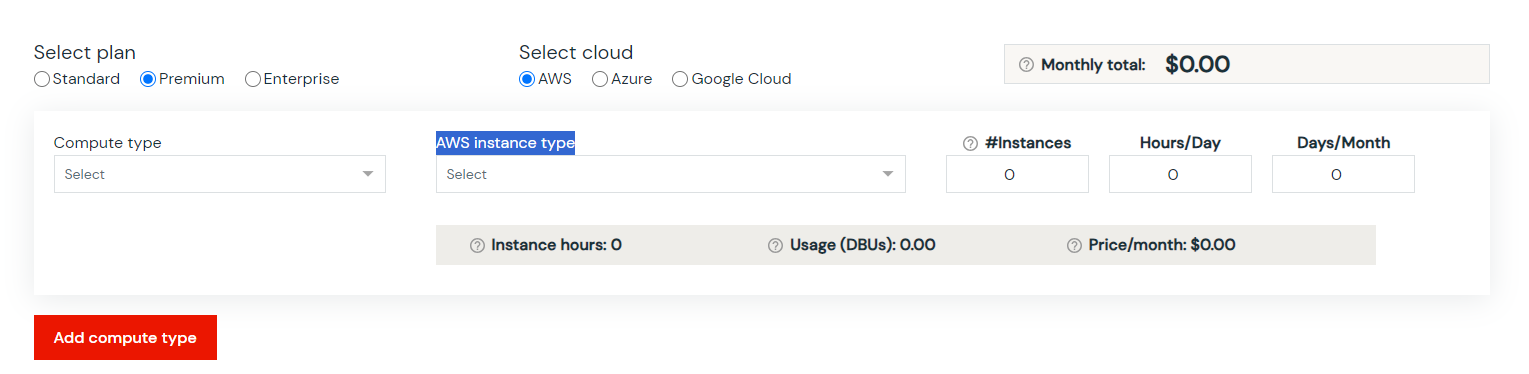
The calculator outputs estimated DBU consumption and cost per day and per month based on your inputs. It’s a useful starting point, but keep two limitations in mind.
First, the calculator only shows DBU costs. Cloud infrastructure costs (EC2, Azure VMs, Compute Engine VMs, storage, egress) are not included. For a realistic total cost of ownership, you need to add those figures separately. Infrastructure often adds 50 to 100 percent on top of your DBU bill.
Second, the calculator works best when you already have a reasonable estimate of your workload parameters. If you’re pre-production, treat calculator outputs as order-of-magnitude estimates rather than precise budgets.
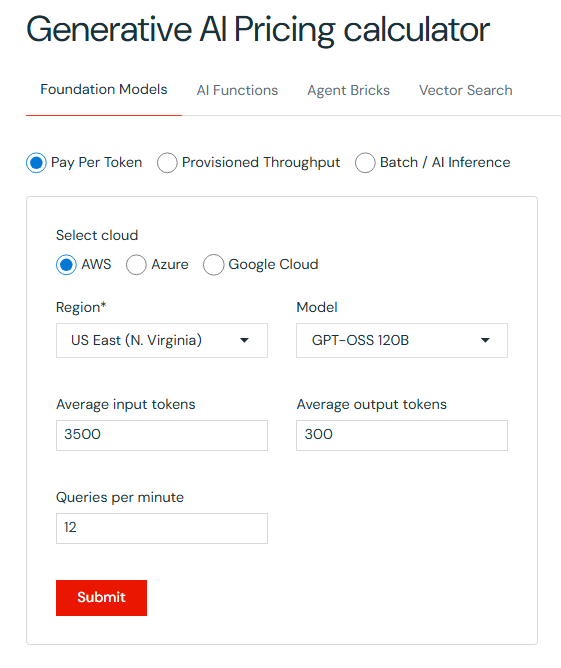
Databricks also offers a Generative AI Pricing Calculator at databricks.com/product/pricing/genai-pricing-calculator for modeling AI workloads specifically
Databricks pricing and billing challenges
Databricks’ flexibility comes with some real billing pain points. Here’s where teams tend to run into trouble:
Dual-billing complexity
Two separate bills (one from Databricks, one from your cloud provider) make it harder to get a complete picture of total cost. You need to reconcile both to understand what you’re actually spending. Without tooling that pulls both data sources together, this is largely a manual process.
Lack of native spending controls
Databricks doesn’t offer robust built-in budget alerts or hard spending limits. Teams typically rely on cloud-provider cost alerts and third-party FinOps tools to catch overages before they become surprises.
Granular cost attribution is hard
Attributing Databricks spend to specific business units, teams or products requires tagging clusters and jobs consistently and then correlating that tagging data across both the Databricks billing logs and cloud provider bills. Without a deliberate tagging strategy, this becomes nearly impossible at scale.
All-Purpose Compute overuse
This is the most common cost problem teams face. Interactive clusters left running between sessions or used for production jobs that should be on Jobs Compute can waste 40 percent or more of total Databricks spend. The fix is straightforward — enforce auto-termination, use Jobs Compute for automated pipelines, and review which workloads are running on All-Purpose Compute weekly.
Standard tier migration costs (Azure teams)
Azure teams still on the Standard tier will see minimum 35 percent DBU rate increases when they migrate to Premium. Budget for this and plan the migration before October 2026 to avoid a forced, unplanned cost increase.
Note: Databricks pricing changes frequently. Always verify rates on the official Databricks pricing page before budgeting or signing a contract.
Save up to 50% on your Databricks spend in a few minutes!
Conclusion
And that’s a wrap! Databricks pricing is more straightforward than it looks once you understand the two-part bill (DBUs plus cloud infrastructure) and how compute type selection affects rates.
In this article, we covered:
- What DBUs are and how the cost formula works
- Why your total Databricks bill has two components: DBU charges and cloud infrastructure charges
- The Standard tier retirement timeline for AWS, GCP and Azure
- The full product pricing breakdown for AWS, Azure and GCP
- The role of the Photon engine and how compute type selection affects DBU consumption
- How to use the Databricks pricing calculator and its limitations
- Common billing challenges and how teams get tripped up
…and so much more!
At first glance, navigating Databricks pricing might seem daunting at first, given its range of products and cloud options. However, understanding its cost structure, particularly the Databricks Units (DBU) cost, is critical for avoiding surprises and keeping analytical operations within budget.
FAQs
What is Databricks pricing based on?
Databricks uses a pay-as-you-go model based on Databricks Units (DBUs). You’re charged for the compute capacity your workloads consume, billed per second of usage. On top of DBU charges, you also pay your cloud provider (AWS, Azure or GCP) separately for the underlying virtual machines, storage and network egress.
What is a DBU?
A Databricks Unit (DBU) is a normalized unit of compute capacity consumed per hour of workload execution. It abstracts over differences in instance types and cloud providers. A cluster running 5 nodes, each consuming 2 DBUs per hour, burns 10 DBUs per hour total.
How do you calculate total Databricks cost?
Total Databricks cost = (DBUs consumed x DBU hourly rate) + cloud infrastructure costs. The DBU rate varies by compute type, tier, cloud provider and region. Infrastructure costs are billed separately by your cloud provider and routinely equal 50 to 100 percent of your DBU bill.
What factors affect the DBU rate?
Six factors affect what you pay per DBU: cloud provider, cloud region, subscription tier (Premium or Enterprise), VM instance type, compute type (Jobs, All-Purpose, SQL, Serverless) and whether you’re on on-demand or committed-use pricing.
What factors drive DBU consumption?
The volume of data processed, the complexity of transformations and algorithms, data velocity for streaming workloads, cluster size and how long clusters run all affect total DBU consumption.
What’s the difference between Premium and Enterprise?
Premium is the default tier for new deployments and includes Unity Catalog, RBAC, SQL Warehouses, serverless compute and the full Mosaic AI suite. Enterprise adds enhanced compliance certifications, dedicated support and custom SLAs. Enterprise pricing is negotiated directly with Databricks and is approximately 15 to 25 percent higher than Premium for equivalent compute types.
Is the Standard tier still available?
Standard has been retired on AWS and GCP as of October 2025. All Standard workspaces on those clouds were automatically upgraded to Premium. On Azure, new Standard workspace creation was blocked as of April 1, 2026, and all remaining Standard workspaces will be automatically upgraded to Premium by October 1, 2026.
What does the Databricks free trial offer?
Databricks offers a 14-day free trial with access to the full platform on AWS, Azure and GCP. DBU charges during the trial are covered by Databricks for serverless compute. Your cloud provider may charge for classic compute resources used during the trial period.
What is the Databricks Free Edition?
The Free Edition is a no-cost, no-credit-card-required version of Databricks aimed at individuals learning the platform. It offers hands-on access to notebooks, Spark, Delta Lake and basic SQL, with limits on compute and storage compared to paid tiers.
What is the Databricks Community Edition?
The Community Edition was a legacy free offering that predates the current Free Edition. Databricks has since moved to the Free Edition model for learners. If you’re starting fresh, use the Free Edition at databricks.com/learn/free-edition.
How does serverless compute affect cost?
Serverless compute carries a higher per-DBU rate (typically $0.35 to $0.95 per DBU depending on product and tier) compared to classic compute. The trade-off is that serverless auto-scales to zero, so you pay nothing when workloads aren’t running. For bursty or infrequent workloads, serverless often wins on total cost. For steady, continuous workloads, classic compute on reserved instances usually costs less.
Are committed-use discounts available?
Yes. Databricks Committed Use Contracts (formerly called Databricks Commit Units or DCUs) let you pre-purchase DBU capacity at discounted rates. The larger the commitment, the greater the discount. Commitments can be applied across AWS, Azure and GCP workloads within the same account.
How much can spot instances save?
Spot instances (called Preemptible VMs on GCP and Spot VMs on Azure) can reduce your cloud infrastructure costs by 60 to 80 percent compared to on-demand VM pricing. For batch ETL jobs and training workloads that can tolerate interruptions, configuring worker nodes to use spot instances is one of the most effective cost reduction tactics available.
What is Databricks Model Serving?
Databricks Model Serving lets you deploy machine learning models as low-latency, auto-scaling inference endpoints. Billing is DBU-based and tied to the compute profile (CPU vs. GPU) and endpoint concurrency. CPU and GPU serving both list at $0.070 per DBU for standard model serving, while Foundation Model Serving and AI Runtime GPU compute carry different rates.
What is Delta Lake?
Delta Lake is an open-source storage layer that adds ACID transactions, schema enforcement, time travel and scalable metadata handling to cloud object stores like Amazon S3, Azure Data Lake Storage and Google Cloud Storage. It’s the default table format for Databricks and is governed by the Linux Foundation.
What is the Photon engine?
Photon is Databricks’ vectorized query engine, written in C++. It accelerates SQL and DataFrame workloads by taking advantage of modern CPU architecture. Photon is always enabled on serverless compute, SQL warehouses and serverless Lakeflow Spark Declarative Pipelines. You may see it referenced under the older “Delta Engine” umbrella in earlier Databricks documentation.
What is Lakebase?
Lakebase is Databricks’ PostgreSQL-compatible operational database, designed for data apps and AI agents on the lakehouse. It supports autoscaling, scale-to-zero, branching and instant restore. Billing is based on capacity units (CU-hours) for compute plus a per-GB monthly storage charge, rather than DBUs.
What is Zerobus Ingest?
Zerobus Ingest is a serverless, push-based ingestion API that writes event data directly into Unity Catalog-managed Delta tables, bypassing message bus infrastructure like Kafka. It’s part of Lakeflow Connect and is generally available on AWS and Azure. GCP support was listed as coming soon at time of publication.
Why is Databricks pricing so confusing?
A few things compound: the dual-billing structure (Databricks DBU charges plus cloud infrastructure), the number of compute types with different rates, the deprecation of the Standard tier, and the fact that Databricks’ own pricing calculator only covers DBU costs, not infrastructure. Once you understand the two-part bill and the impact of compute type selection, most of the confusion clears up.
Is Databricks free on AWS?
No. You pay DBU charges to Databricks and EC2 infrastructure costs to AWS separately. Databricks offers a 14-day free trial and a Free Edition for learners, but production workloads incur both sets of costs.
How does pricing vary between AWS, Azure and GCP?
DBU rates are generally similar across AWS and GCP for equivalent compute types, with AWS often cited as the most cost-competitive option. Azure rates are set by Microsoft and billed through Azure accounts. Infrastructure costs vary more significantly across clouds depending on the VM families used and whether you take advantage of reserved instances or committed use discounts on the cloud provider side.
What is the Databricks pricing calculator?
The Databricks pricing calculator at databricks.com/product/pricing/product-pricing/instance-types lets you model DBU costs for different workload configurations. You can specify tier, compute type, cloud provider, region and instance type to get estimated daily and monthly DBU costs. It doesn’t include cloud infrastructure costs, so add those separately for a complete cost model.
Pramit Marattha
Pramit Marattha is a technical content writer and strategist with 5+ years of experience covering AI, data engineering, data cloud platforms and open source technologies. He turns complex technical concepts into clear, useful content for engineers and developers.







