


Databricks is a leading unified analytics platform that simplifies the complexities of big data processing and machine learning. Built on the foundation of Apache Spark, it provides a collaborative environment for data scientists, engineers and business analysts to work together easily. As more people use Databricks for their data needs, understanding its pricing model is extremely crucial for effective budgeting and cost management. Databricks uses a simple, pay-as-you-go pricing model—you only pay for the resources you use. These costs are measured in Databricks Units (DBUs). Having a pricing calculator is a must to navigate these costs smoothly. It helps you estimate expenses based on how much you’ll use the platform, making it easier to plan your spending and allocate resources.
In this article, we will explore the top 5 best Databricks pricing calculator tools to help you select the optimal one for your needs. These Databricks pricing calculators are freely available and can help you estimate your Databricks costs for varying configurations and workloads.
Databricks pricing model 101
Databricks charges through a pay-as-you-go model where you pay only for the resources your workloads consume. That consumption is measured in DBUs. It is simple enough on paper. But in practice, though, there’s a catch most teams miss on their first bill.
You actually get two separate bills.
One comes from Databricks for DBU usage. The other comes from your cloud provider for the underlying compute infrastructure: virtual machines, storage and networking. Both are mandatory, and neither includes the other (except with Serverless compute, which we’ll explain shortly). Cloud infrastructure charges commonly account for 50 to 70 percent of total Databricks spend. Budget roughly $2 to $3 in total spend for every $1 on your Databricks DBU invoice.
This dual-billing structure is the single most common budgeting mistake we see teams make. A pricing calculator that only shows DBU costs is giving you less than half the picture.
Each job or workload on Databricks uses a certain amount of Databricks DBUs based on cluster size, instance type and workload type. Since Databricks supports multiple cloud providers (Azure, AWS and Google Cloud) the exact DBU rates and cost structures vary across these environments.
What is a DBU in Databricks?
A Databricks Unit (DBU) is a unit of processing power in the Databricks environment. You can think of it as an internal currency Databricks uses to measure compute consumption across different instance types, workload types and cloud providers. Rather than pricing each virtual machine configuration separately, DBUs create a consistent abstraction layer across AWS, Azure and GCP.
DBU usage is metered at per-second granularity, expressed as a rate per hour. A workload running for 30 minutes consumes exactly half the hourly DBU cost. This per-second billing is a genuine advantage over platforms that round up to the nearest hour.
The formula for calculating your Databricks platform cost is:
DBU rate * DBUs per node-hour * number of nodes * hours running = Databricks platform cost
Your cloud provider then bills separately for the VMs underneath.
Note: DBU rates are not one-size-fits-all. The same cluster running the same data can cost dramatically different amounts depending on which compute type you select.
Key factors affecting Databricks DBU costs
Here are several factors that influence the costs associated with using Databricks:
1. Compute type: The biggest cost lever
The compute type you choose has more impact on your DBU costs than cluster size or region, often by a wide margin. Databricks offers four main compute types:
- All-purpose compute for interactive notebook development and exploration; approximately $0.40 to $0.55 per DBU
- Jobs compute for automated batch pipelines and scheduled ETL; approximately $0.15 per DBU
- SQL compute (Warehouses) for BI queries and SQL analytics; rates vary by warehouse size and tier
- Serverless compute for fully managed, infrastructure-inclusive workloads; DBU rates are higher per unit but include the cloud VM cost and eliminate idle cluster charges
The gap between All-Purpose and Jobs Compute is 3 to 4 times for the same workload. Teams that run production pipelines on All-Purpose clusters because it’s convenient are routinely paying 3x more than necessary. Moving those workloads to Jobs Compute is typically the highest-return optimization available, and it requires zero code changes.
2. Pricing tier
Databricks offers three tiers: Standard, Premium and Enterprise.
One major 2026 update: the Standard tier is being retired across all cloud providers. AWS and GCP completed this transition in October 2025, with all Standard workspaces automatically upgraded to Premium. On Azure, new Standard-tier workspace creation was blocked as of April 1, 2026, and all remaining Standard workspaces will be automatically upgraded to Premium by October 1, 2026. Teams on Azure’s Standard tier should expect a minimum 35 percent increase in DBU rates for interactive workloads after the upgrade.
Most organizations now operate on Premium or Enterprise. Premium includes Unity Catalog, Databricks SQL Workspace and enhanced security features. Enterprise adds advanced compliance, audit logging and governance capabilities, at a cost approximately 25 percent higher than Premium for equivalent compute.
3. Cloud provider and region
DBU rates differ between AWS, Azure and GCP due to their underlying infrastructure cost differences. Azure DBU rates typically run 10 to 20 percent higher than AWS or GCP. AWS is currently the most cost-competitive platform and offers the widest Databricks feature set. GCP pricing follows a structure similar to AWS, though feature availability varies by region.
The cloud region you deploy to also affects cost. Pricing differs between, for example, US East and Europe West on any given provider.
4. Cluster size and instance type
The number of worker nodes multiplies your per-node DBU consumption directly. A cluster with 10 worker nodes at 0.5 DBUs per node per hour, plus a driver node at the same rate, consumes 5.5 DBUs per hour total. The instance type you choose (CPU-optimized, memory-optimized, GPU-accelerated) determines the DBU rate per node.
5. Storage
Databricks integrates with cloud object storage: Amazon S3, Azure Blob Storage (ADLS) and Google Cloud Storage (GCS). Storage costs appear on your cloud provider bill, not your Databricks invoice. Vector Search indexes and select managed storage layers also consume Databricks Storage Units (DSUs), which are billed separately from DBUs.
6. Network egress
Transferring data between cloud regions incurs additional egress charges from your cloud provider. Cross-cloud transfers are particularly expensive and worth minimizing.
7. Photon acceleration
Photon is Databricks’ vectorized query engine that delivers 3 to 8 times query performance improvement for compatible SQL and ETL workloads. It carries a higher DBU rate (roughly 33 percent more than standard Jobs Compute on AWS) but can reduce total runtime enough to lower overall cost for heavy workloads.
Databricks products and their pricing categories
The range of Databricks products varies based on the workload and services used. Here’s a brief breakdown of key product categories:
1. Workflows and streaming
Databricks workflows is the managed orchestration service for multi-task pipelines covering ETL, analytics and ML. It uses Jobs Compute DBU rates, making it one of the more cost-efficient ways to run production pipelines.
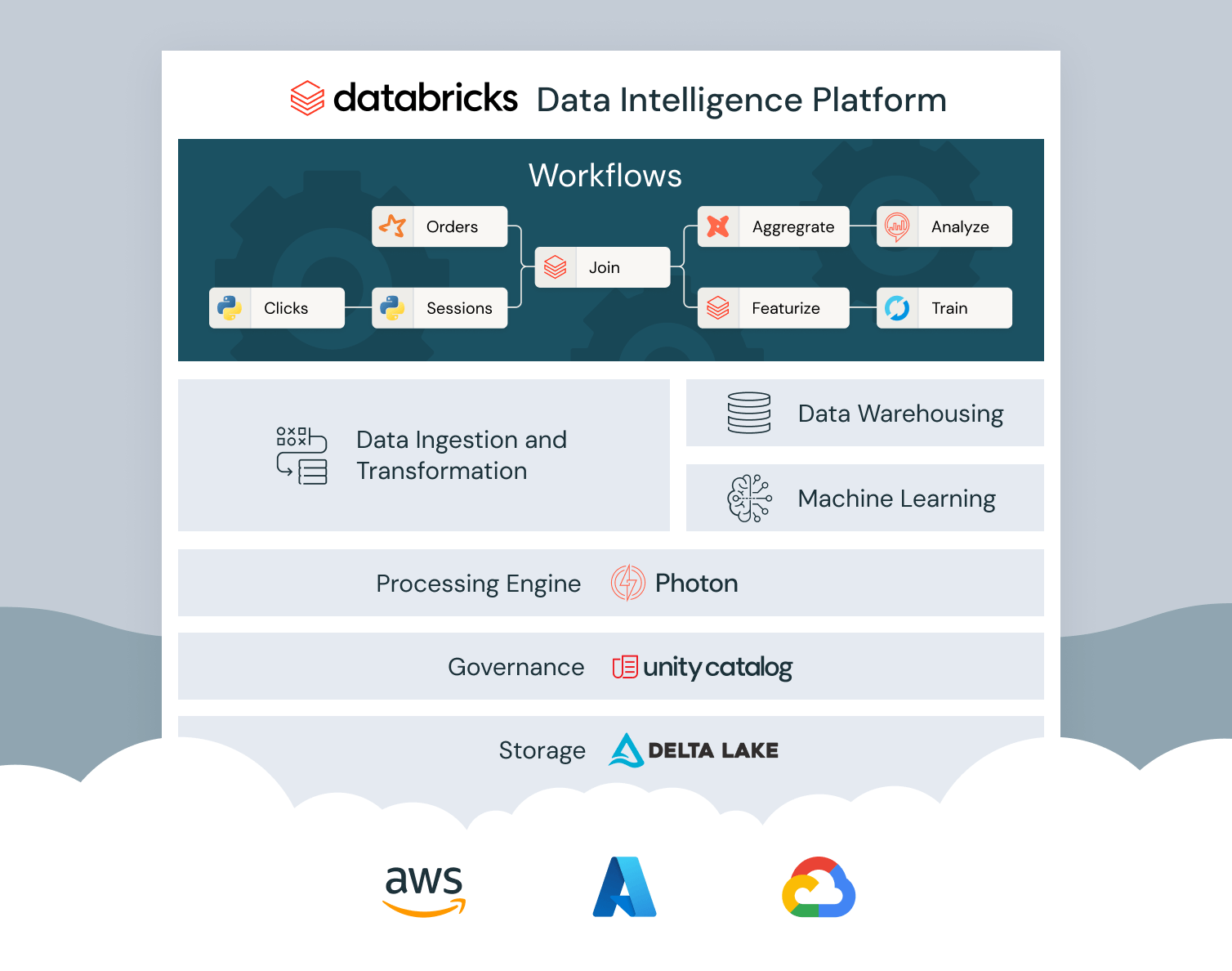
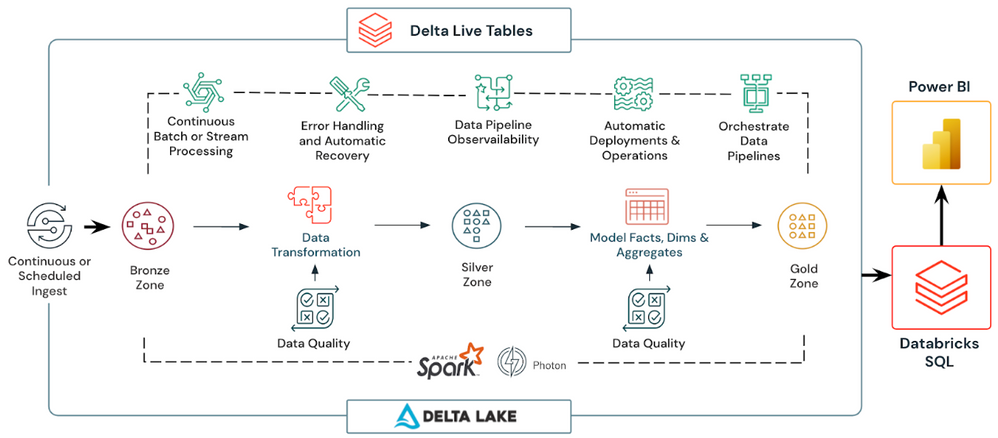
Delta Live Tables(DLT) is the declarative ETL framework for building reliable data pipelines using SQL or Python. DLT consumes Jobs Compute DBUs and handles cluster management, monitoring and data quality automatically.
2. Data warehousing
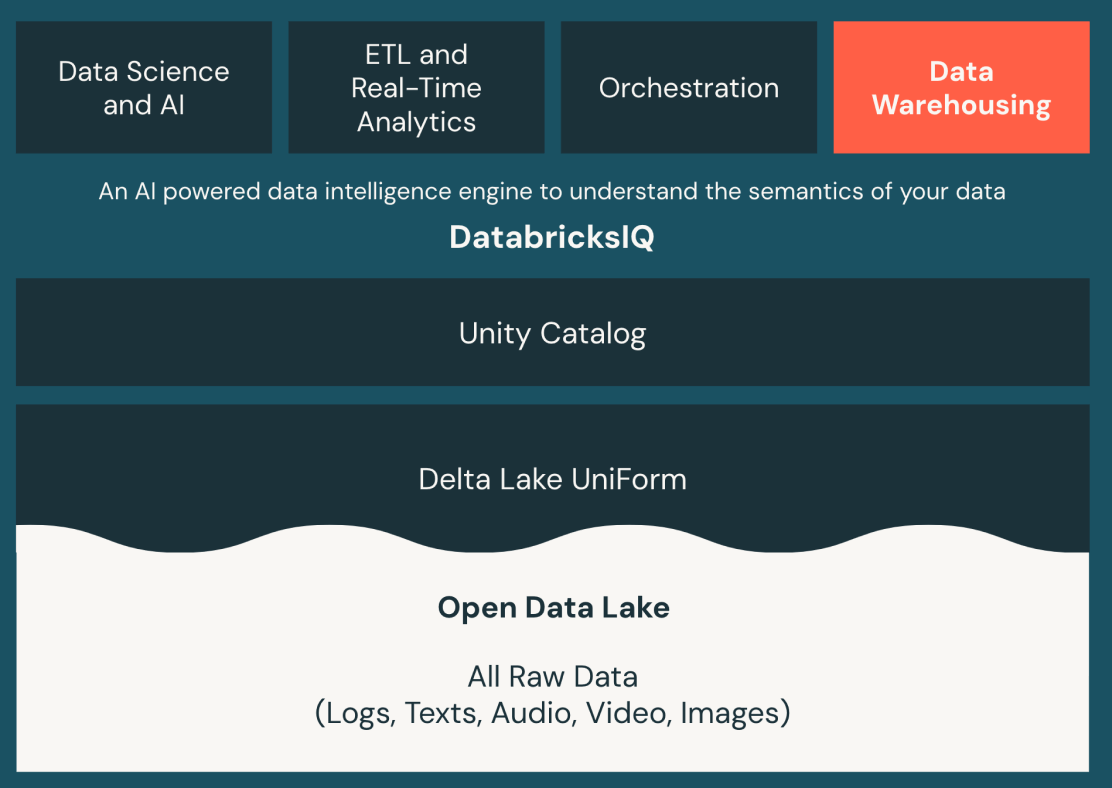
Databricks SQL brings data warehousing capabilities to the data lakehouse. It supports ANSI SQL, a built-in SQL editor and dashboarding. SQL Serverless warehouses bundle VM costs into the DBU rate and scale to zero between queries, which can reduce total cost for bursty workloads compared to always-on provisioned warehouses.
3. Data science and Machine Learning
All-purpose compute powers interactive model development, notebook exploration and testing. It’s the most expensive compute type per DBU. Reserve it for when interactive development actually requires a running cluster, and move automated training jobs to Jobs Compute.
4. Generative AI
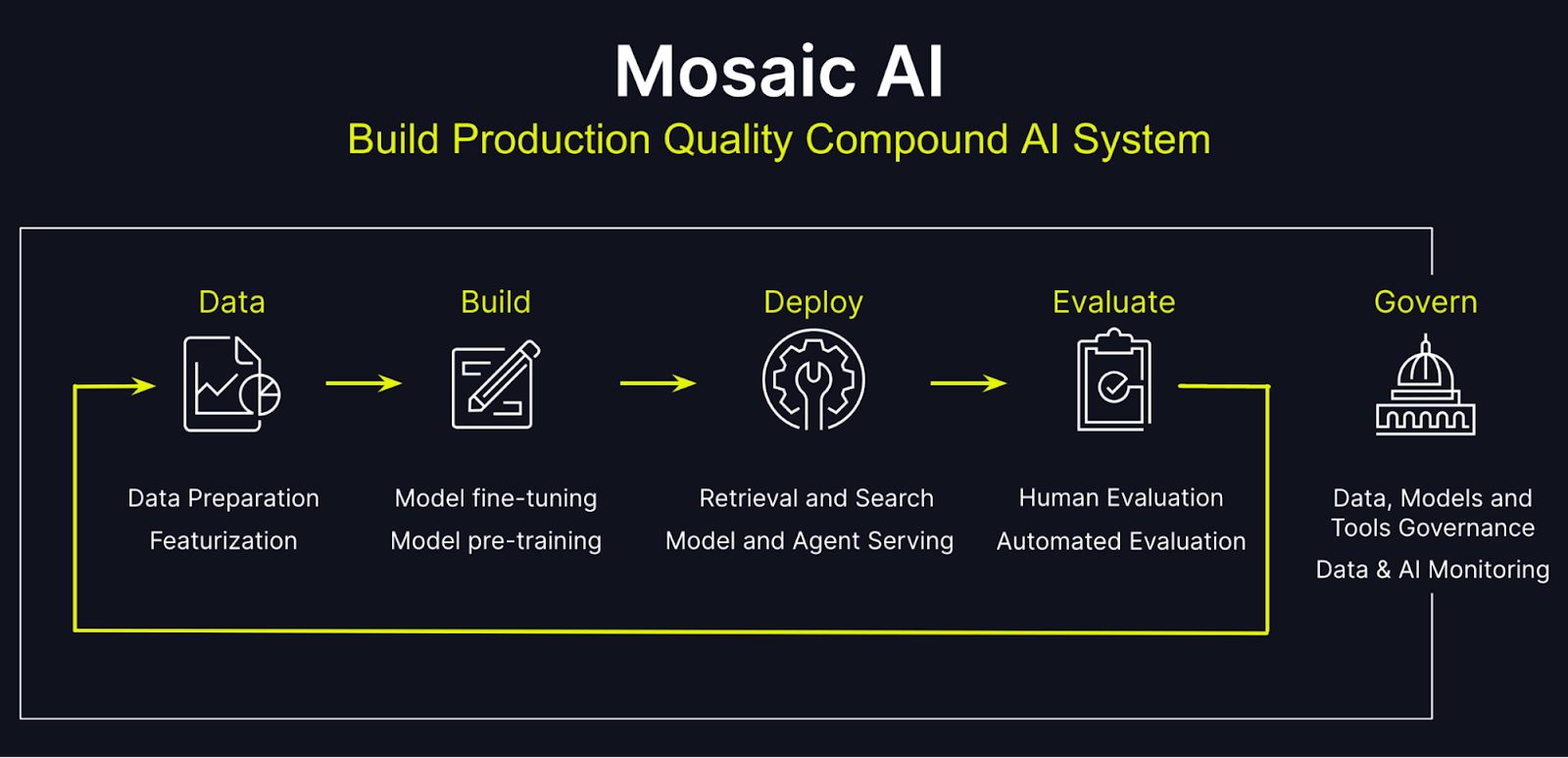
Mosaic AI Gateway: Centralized service for governing and monitoring access to generative AI models. Provides features like permission and rate limiting, payload logging, usage tracking, AI guardrails and traffic routing.
Mosaic AI Model Serving: Unified interface to deploy, govern and query AI models as REST APIs. Automatically scales to meet demand changes. Supports custom models, foundation models and external models.
Mosaic AI Vector Search: A tool that enhances search capabilities by utilizing vector embeddings, improving the accuracy of search results in generative AI applications.
Mosaic AI Agent Evaluation: A framework for assessing the performance of AI agents in various tasks, ensuring they meet desired benchmarks before deployment.
Mosaic AI Foundation Model Serving: Optimized serving of state-of-the-art open models with pay-per-token pricing and provisioned throughput options.
Online Tables (Preview): Stores and serves large language model outputs efficiently for interactive applications.
5. Platform management
- Tiers: Include Databricks Workspace (the core environment), Performance (optimized compute resources), Governance and Manageability (tools for managing data access) and Enterprise Security (enhanced security features).
- Add-ons: Such as Enhanced Security and Compliance options that provide additional layers of protection for sensitive data.
- Lakehouse monitoring: Tools for monitoring the health and performance of the Lakehouse environment.
- Predictive optimization: Features that optimize resource allocation based on usage patterns.
- Fine-Grained Access Control (FGAC): Provides detailed permissions management for single-user clusters to ensure secure data access.
Data Transfer and Connectivity: Solutions that facilitate seamless integration with various data sources, enabling efficient data ingestion and processing across cloud environments.
How to choose the right Databricks cost calculator tools
Not all calculators give you the same depth of information. Here are some factors to think about when choosing a Databricks cost calculator:
Accuracy and up-to-date rates. Databricks updates pricing periodically, and the Standard tier retirement has changed rate assumptions for many teams. A calculator using stale tier data will give you misleading estimates.
Coverage of both bills. A calculator that only estimates DBU costs is incomplete. Look for tools that also factor in cloud provider infrastructure costs, or that clearly tell you they’re showing only one component.
Compute type granularity. Can you model All-Purpose vs. Jobs vs. Serverless compute separately? This distinction drives the largest cost differences.
Workload pattern modeling. Can you input batch vs. streaming jobs, different cluster sizes at different times of day and auto-scaling behavior?
Integration with your environment. If you’re already using a cloud cost management platform, a calculator that connects to your actual spend data will be more accurate than one requiring manual input.
Top 5 tools for Databricks pricing calculator
Databricks is a powerful data analytics platform utilized by companies for its scalable computing capabilities across multiple cloud providers. Estimating the costs of running Databricks workloads, however, can be complex—especially with varying cloud services, configurations and usage models. Fortunately, there are tools available to simplify the process. Below is a list of five essential pricing calculators, including Databricks’ official tools and third-party options for comprehensive cost management.
1. Databricks official pricing calculator
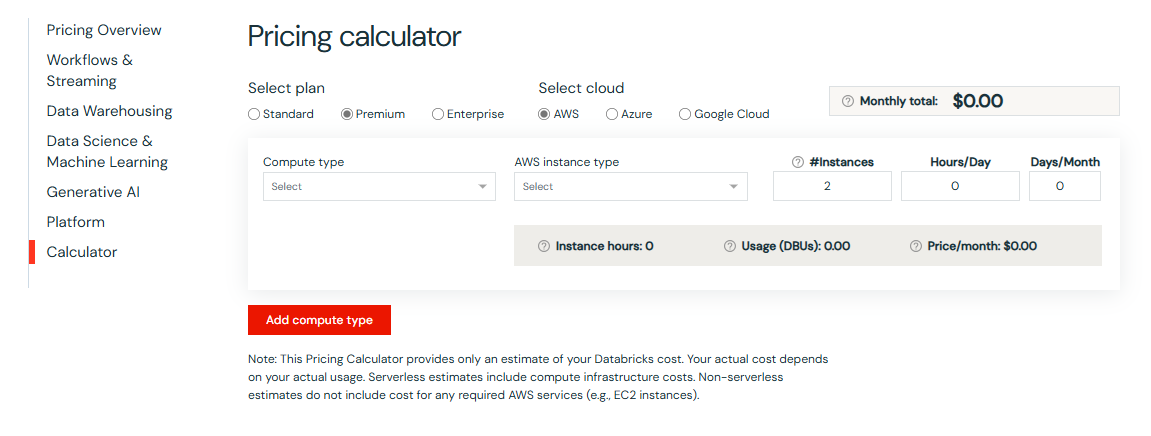
Databricks provides an official pricing calculator to help users estimate the cost of running Databricks workloads on Azure, AWS and Google Cloud. The Databricks pricing calculator allows users to input various parameters, such as the Databricks plan (Standard, Premium, or Enterprise), compute type, instance size and cloud region, to generate an accurate estimate of their Databricks expenses. These are the most authoritative sources for DBU rates, maintained directly by Databricks and updated when pricing changes.
Where to find it:
AWS pricing: https://www.databricks.com/product/aws-pricing
Azure pricing: https://www.databricks.com/product/azure-pricing
Google Cloud pricing: https://www.databricks.com/product/gcp-pricing
How to use it:
To use the Databricks pricing calculator, follow these steps:
- Navigate to the calculator for your cloud provider
- Select your pricing tier (Premium or Enterprise; Standard is being retired)
- Choose your compute type (Jobs, All-Purpose, SQL or Serverless)
- Select your instance type and cluster size
- Specify your cloud region
- Adjust expected hours of usage per day or month
- Review estimated DBU consumption and associated daily or monthly cost
The Databricks pricing calculator will provide an estimate of the Databricks Units (DBUs) consumed, their cost and the total daily/monthly expenses.
Key features:
- Supports all three major cloud platforms
- Covers all current compute types including Serverless
- Provides daily and monthly cost estimates
- Reflects current DBU rates directly from Databricks
Pros:
- Official tool provided by Databricks
- Free to use
- Accurate estimates based on your specific workload
- Easy to use and understand
Cons:
- Limited to Databricks usage only, does not include cloud provider infrastructure costs (VMs, storage, egress)
- Doesn’t model usage patterns over time or alert you when you’re using a more expensive compute type where a cheaper one would work
- Requires some knowledge of Databricks and cloud computing to use effectively
2. Azure Databricks pricing calculator (for Azure Databricks)
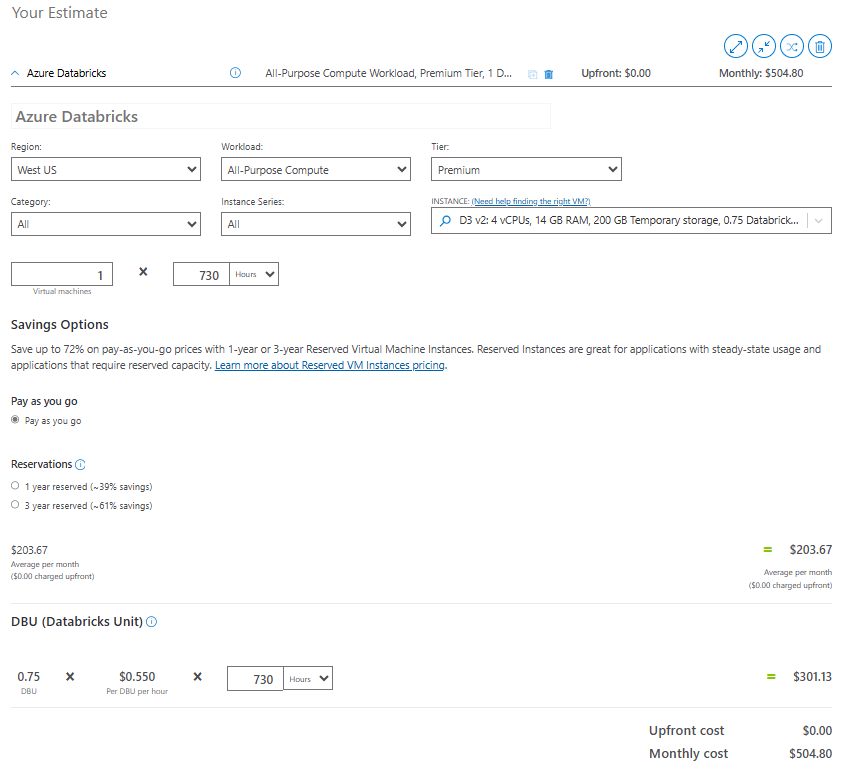
Azure Databricks pricing calculator is a tool provided by Microsoft to estimate the costs associated with running Databricks on the Azure cloud platform. It allows users to input various parameters such as compute type, instance size and Azure region to get an accurate estimate of their Azure Databricks expenses.
Where to find it:
How to use it:
- Visit the Azure Pricing Calculator page
- Search for “Azure Databricks” in the service catalog
- Select your Azure region, tier and workload type
- Configure instance type and estimated usage hours
- Add related Azure services (storage accounts, networking) to the same estimate
- Review the combined monthly cost projection
Key features:
- Integrates Databricks and Azure infrastructure in a single estimate
- Covers regional pricing variations across Azure’s global footprint
- Allows modeling of related services like Azure Data Lake Storage Gen2 (ADLS Gen2)
- Provides committed-use discounts (up to 37 percent off for 3-year Databricks Commit Units)
Pros:
- Seamless integration with the Azure ecosystem
- Accurate estimates based on your specific workload
- Easy to use and understand
- Perfect for users already within the Azure cloud ecosystem
Cons:
- Limited to Azure infrastructure; cannot estimate non-Azure Databricks costs
- Can be overwhelming for users unfamiliar with Azure’s pricing structure
- Requires some knowledge of Databricks and Azure computing to use effectively
Worth noting: As of April 1, 2026, new Standard-tier Azure Databricks workspaces can no longer be created. If you’re modeling costs for an existing Standard-tier workspace, use the Premium tier rates for any planning that extends past October 2026, when the automatic upgrade takes effect.
3. AWS pricing calculator for Databricks (for Databricks on AWS)
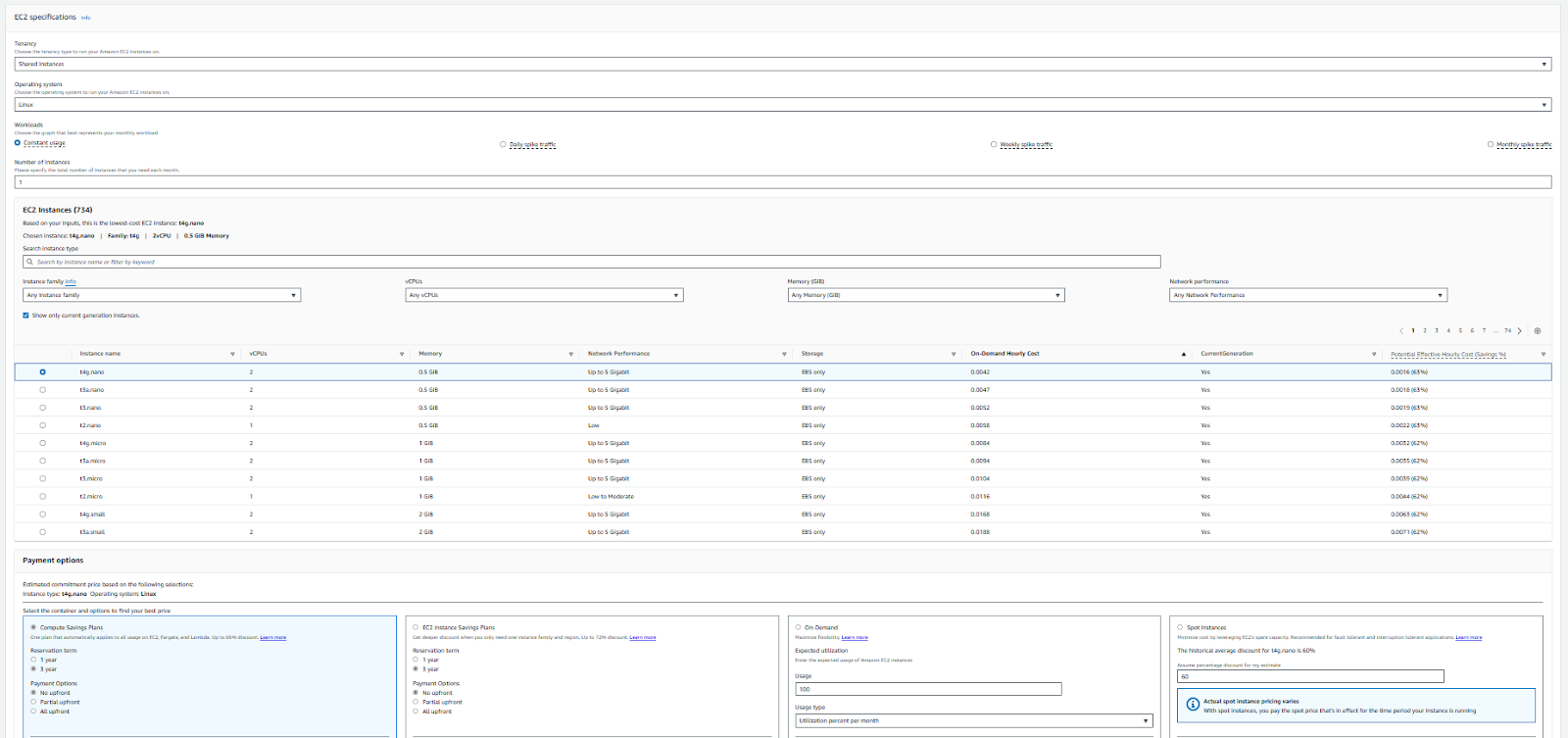
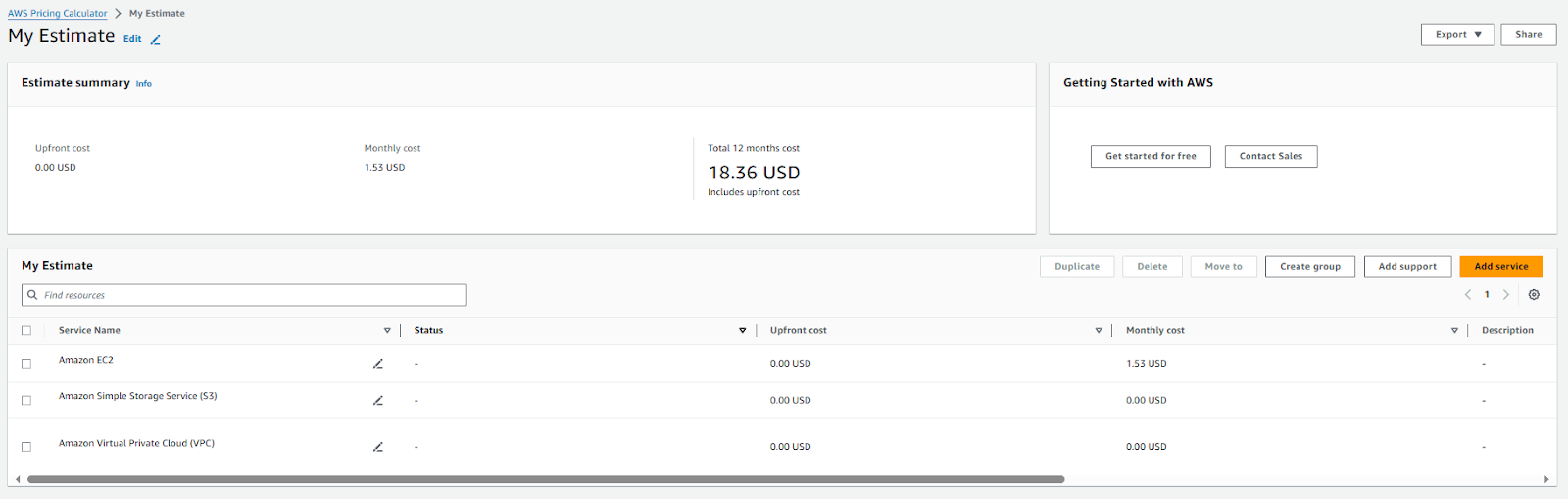
There’s no dedicated AWS-specific Databricks calculator. Getting a complete cost estimate for Databricks on AWS requires combining two tools: the Databricks official calculator for DBU costs and the AWS Pricing Calculator for underlying infrastructure.
Infrastructure components to factor in for AWS Databricks:
- EC2 instances for cluster worker and driver nodes (on-demand or Spot)
- S3 for data lake storage
- VPC data transfer and networking charges
Where to find it:
How to use them together:
To calculate the cost, follow these steps:
- Start with the Databricks calculator, selecting AWS as your provider
- Choose your tier (Premium or Enterprise), compute type and instance type
- Set your AWS region and expected usage hours
- Note the estimated DBU cost
- Open the AWS Pricing Calculator and add the EC2 instance type your cluster uses
- Add S3 storage, data transfer and any other AWS services your Databricks workloads depend on
- Combine both estimates for your total projected cost
Key features:
- Detailed, granular AWS infrastructure pricing for any EC2 instance type
- Regional pricing for all AWS services
- Supports Savings Plans and Reserved Instance modeling for EC2 cost reduction
- Spot instance pricing available (60 to 90 percent below on-demand for fault-tolerant workloads)
Pros:
- Provides a comprehensive cost model by combining Databricks DBU costs with AWS infrastructure costs
- Useful for estimating the cost of multiple AWS services in conjunction with Databricks, allowing you to build a more complete cost model
Cons:
- Requires two separate calculators, one for DBUs and one for AWS services
- Some manual effort is required to estimate the complete cost across the AWS services used by Databricks
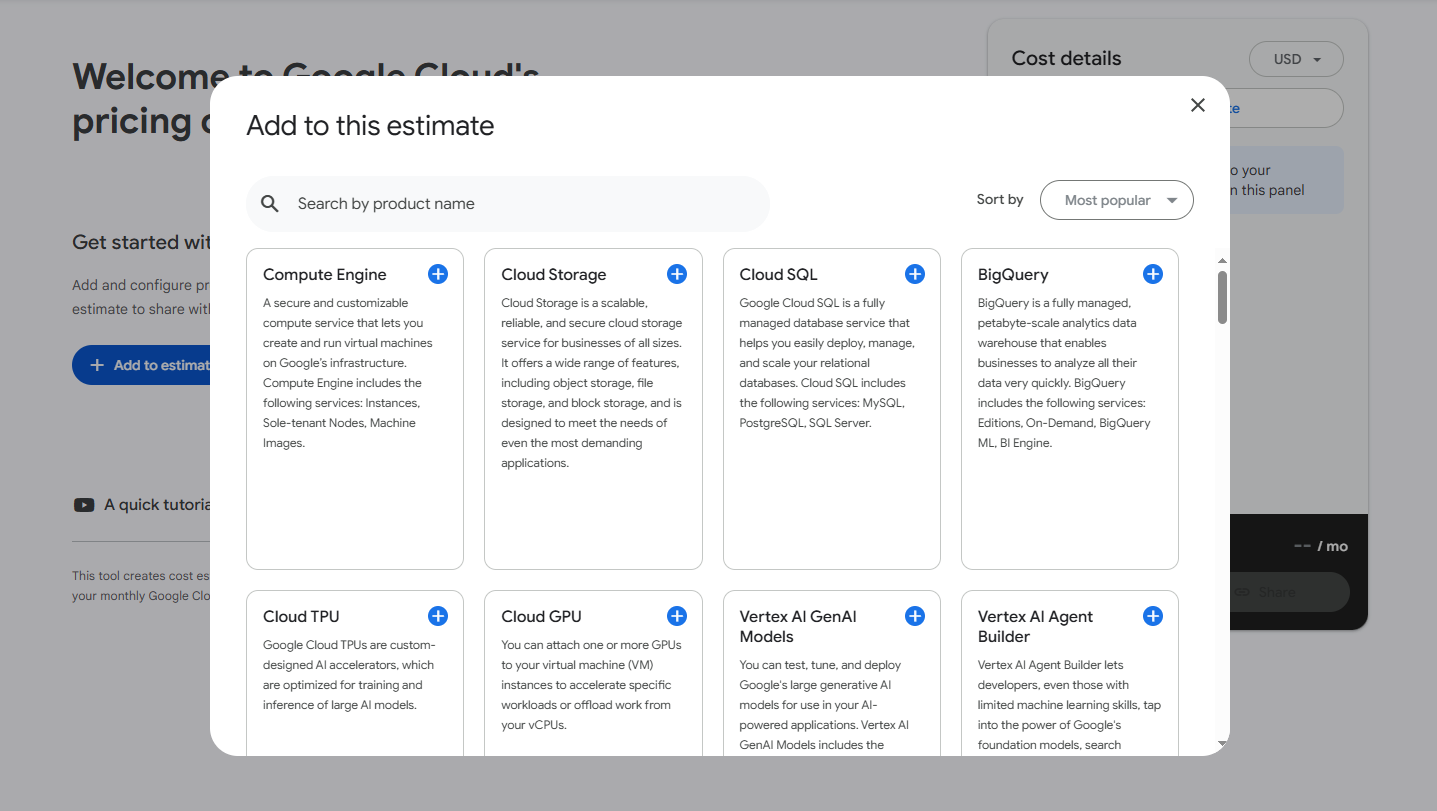
4. Google Cloud pricing calculator for Databricks (For Databricks on Google Cloud)
Like AWS, there’s no dedicated GCP-specific Databricks pricing calculator. The same two-calculator approach applies: use the Databricks official calculator for DBU costs and the Google Cloud Pricing Calculator for infrastructure.
Databricks on Google Cloud Platform (GCP) is built on a unified architecture that leverages Google Kubernetes Engine (GKE) for containerized deployments, providing scalability and flexibility. The architecture consists of a Control Plane managed by Databricks, which handles user management and job scheduling, while the Compute Plane utilizes GKE to deploy and manage clusters that process data. Data is stored in Google Cloud Storage (GCS), with tight integration to BigQuery for analytics and the Google Cloud AI Platform for machine learning. This setup allows users to perform ETL processes, build machine learning models and conduct collaborative data science in a secure environment, supported by Google Cloud Identity for access management and compliance.
How to use it:
To calculate the cost, follow these steps:
- Access the Databricks Pricing Calculator and select Google Cloud as the cloud provider
- Choose the appropriate Databricks edition (Standard, Premium, or Enterprise) based on your requirements
- Select the compute type and Google Cloud instance type that best fits your workload
- Specify the Google Cloud region where you plan to deploy Databricks
- Adjust other parameters as needed to reflect your actual data and pipeline requirements.
- Review the estimated costs, including Databricks Units (DBUs) consumed, their associated cost and the total daily and monthly expenses
- Use the Google Cloud Pricing Calculator to estimate costs for additional Google Cloud services used in conjunction with Databricks, such as Compute Engine instances, Cloud Storage, Cloud Identity/Access Management and VPC-related charges
Where to find them:
Key features:
- Covers all Compute Engine instance types and regional pricing
- Supports Committed Use Discount modeling for GCP infrastructure cost reduction
- Covers Cloud Storage, GKE and networking in a single estimate
Pros:
- Supports estimation of both Databricks-specific (DBU) costs and GCP infrastructure costs
- Google Cloud Pricing Calculator allows for flexible configuration of multiple services
Cons:
- No dedicated Databricks-branded pricing tool for GCP; requires combining two separate cost estimations
- Manual effort is needed to combine the DBU costs and the Google Cloud infrastructure
5. Third-Party Databricks pricing calculator
Besides the official Databricks cost calculators, some other tools out there can help you estimate Databricks costs. Although these tools might not explicitly label themselves as “Databricks pricing calculators”, they can still help you in determining your Databricks costs and offer strategies for reducing them. Using these tools can help you estimate costs and potentially save a significant amount. Here are a few examples:
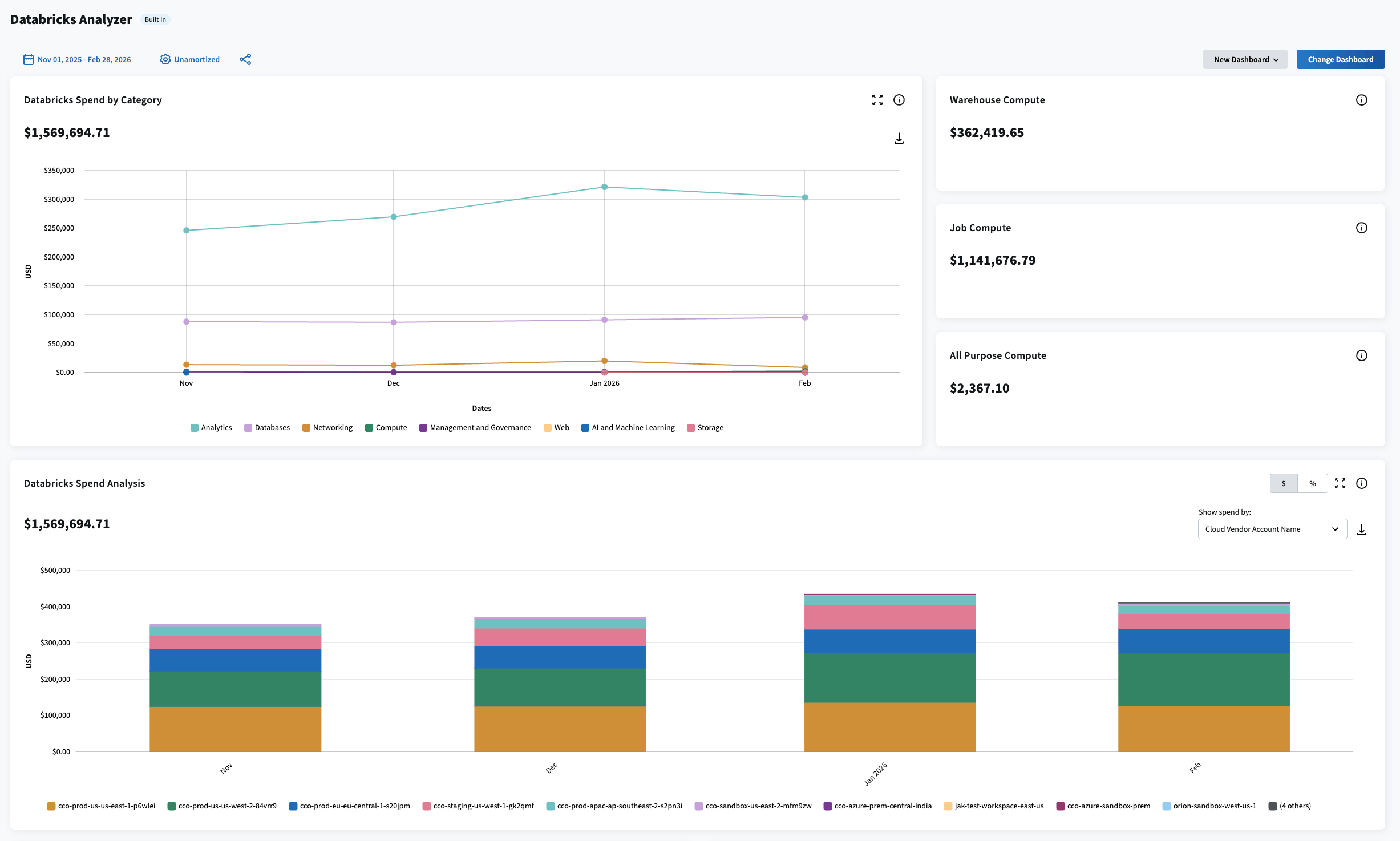
a. Flexera One—Data Cloud Optimization (Formerly Chaos Genius, now part of Flexera)
Flexera One—Data Cloud Optimization provides FinOps and cloud cost intelligence capabilities that now include what was previously Chaos Genius‘s DataOps observability platform for Databricks and Snowflake environments. For Databricks specifically, it offers:
- Granular visibility and forecasting: Drill into Databricks spend by job, cluster or resource using pre-built and custom dashboards. Set budgets by team, product or project, and forecast end-of-period spend.
- Cost allocation: Allocate Databricks spend across teams, projects and business units using rule-based dimensions, tags & billing centers.
- Anomaly detection and alerts: Detect anomalies in Databricks spend, with rule-based dimensions to group costs and route alerts to the teams that own them.
- Automated recommendations: Surface idle compute and oversized instances with specific right-sizing actions for each.
b. KopiCloud
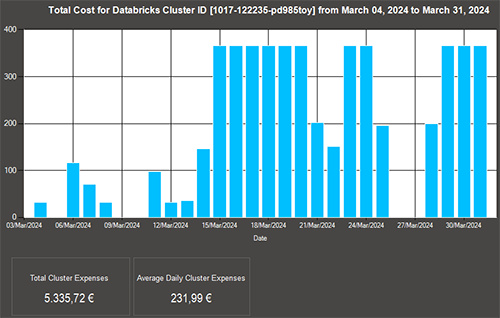
KopiCloud is a cloud cost management platform with Databricks cost optimization capabilities. It provides daily and monthly cost reports, cost allocation by owner and custom reporting options. It’s a practical option for teams that want straightforward reporting without a heavy implementation footprint.
Pros of third-party tools generally:
- Visibility into actual spend, not just estimates
- Granular cost allocation across teams, projects and workloads
- Optimization recommendations based on real usage patterns
- Continuous monitoring rather than point-in-time estimation
Cons to consider:
- Most require a subscription or usage-based fee
- Some platforms need a significant initial setup to pull in Databricks workspace data
- Accuracy depends on how well the platform maps to your actual environment configuration
A note on cost optimization
Whichever Databricks pricing calculator you use, these are the highest-return adjustments most teams can make once they have visibility into their spend:
Switch production pipelines from All-Purpose to Jobs Compute. This alone cuts DBU costs 3 to 4 times for the affected workloads with no code changes
Configure auto-termination on all interactive clusters. Idle clusters left running overnight or over weekends commonly waste 20 to 30 percent of monthly compute spend
Use spot instances for fault-tolerant batch jobs. AWS Spot, Azure Spot VMs and GCP Preemptible VMs cost 60 to 90 percent less than on-demand pricing for the underlying infrastructure
Commit if your usage is predictable. Databricks Commit Units (DCUs) offer 1 to 3 year pre-purchase discounts. Azure offers up to 37 percent off on-demand DBU rates for a 3-year commitment
Further reading
- Official Databricks pricing calculator
- Databricks pricing 101 article
- Azure Databricks pricing guide
- AWS pricing guide
- Azure pricing guide
- Google Cloud pricing guide
Save up to 50% on your Databricks spend in a few minutes!
Conclusion
That’s a wrap. You should now know that choosing the right tool for estimating Databricks costs is key to saving cost and planning resources. Whether you use the native pricing calculator or go with a third-party solution like Chaos Genius and others, it’s helpful to understand what drives Databricks DBU consumption—things like cluster setups, data amounts and workload types. This can really help you stay on top of your Databricks expenses.
In this article, we have covered:
- How the Databricks pricing model works, including the two-bill structure
- What DBUs are and how they’re measured
- Key factors affecting DBU costs, including the compute type gap
- The 2026 Standard tier retirement timeline
- Available Databricks products and their pricing categories
- How to choose the right calculator for your needs
- Five tools for estimating and managing Databricks costs
… and so much more!
Want to learn more? Reach out for a chat
FAQs
How do you calculate the total cost of Databricks?
Total cost = (Databricks DBU cost) + (cloud provider infrastructure cost). For Serverless compute, cloud infrastructure cost is included in the DBU rate. For classic clusters, the two are billed separately. Budget $2 to $3 in total spend for every $1 on your Databricks invoice.
What is a DBU in Databricks?
A Databricks Unit (DBU) is a normalized measure of processing capability. Databricks uses DBUs to price compute consumption consistently across different instance types, cloud providers and workload types. DBUs are billed at per-second granularity, expressed as a rate per hour.
How much does a DBU cost?
It varies significantly by compute type and tier. Jobs Compute runs at approximately $0.15 per DBU. All-Purpose Compute runs at approximately $0.40 to $0.55 per DBU. SQL Serverless can reach $0.70 per DBU or higher on Azure Enterprise tier. Rates also vary by cloud provider and region. Always check the official Databricks pricing pages for current figures before budgeting, as rates are subject to change.
Does Databricks charge per query?
No. Databricks charges for the DBU consumption of the cluster running your queries. If a SQL warehouse is running and idle between queries, you’re still paying for the cluster time unless you’re on Serverless, which scales to zero between queries.
Is Databricks Community Edition still available?
Yes, the Community Edition remains available for learning purposes. It provides limited compute resources at no charge and is suitable for experimentation, but it’s not appropriate for production workloads.
What’s the difference in pricing between AWS, Azure and GCP for Databricks?
AWS is generally the most cost-competitive platform for Databricks and offers the broadest feature availability. Azure DBU rates typically run 10 to 20 percent higher than AWS, though the deeper Microsoft ecosystem integration can justify that for organizations already invested in the Microsoft stack. GCP pricing follows a structure similar to AWS with some regional variations.
What happened to the Databricks Standard tier?
Databricks retired the Standard tier on AWS and GCP in October 2025. On Azure, new Standard-tier workspace creation was blocked as of April 1, 2026, and all remaining Standard workspaces will be automatically upgraded to Premium by October 1, 2026.
How can I reduce my Databricks costs?
To reduce Databricks costs, follow these steps: switch production workloads from All-Purpose Compute to Jobs Compute, enable auto-termination on all interactive clusters and use spot instances for fault-tolerant batch jobs. Together, these three changes can reduce total spend by 40% to 60% for many teams.
Pramit Marattha
Pramit Marattha is a technical content writer and strategist with 5+ years of experience covering AI, data engineering, data cloud platforms and open source technologies. He turns complex technical concepts into clear, useful content for engineers and developers.







