


Over the past few years, the surge in AI and ML technologies has been extraordinarily remarkable, largely driven by the availability of vast datasets, powerful computing resources and advanced algorithms. A significant breakthrough in this field is the development of large language models (LLMs), which have significantly enhanced natural language processing capabilities. But note that deploying these complex models at scale presents significant challenges, including the need for specialized hardware and substantial computational resources. That’s precisely the problem Databricks Model Serving (now officially called Mosaic AI Model Serving) is built to solve. Announced as generally available back in 2023 and substantially expanded since, it provides a serverless, managed infrastructure for deploying and operating AI models at scale, integrated directly into the Databricks Data Intelligence Platform.
In this guide, we cover everything you need to know: what the service is, how it’s priced, its real limitations, and a complete step-by-step walkthrough for deploying an LLM using it.
Note on naming: Databricks rebranded this service to “Mosaic AI Model Serving” following its MosaicML acquisition. You’ll still see “Databricks Model Serving” used widely in older docs and community content. They refer to the same product, and we use both terms throughout this article.
What is Model Serving?
Deploying a trained ML model is a different problem from training one. Training runs in batch, has predictable resource needs and can tolerate minutes or hours of latency. Serving needs to handle unpredictable request spikes, stay under 50–100ms latency budgets and keep multiple model versions running concurrently for staged rollouts.
Traditionally, teams solved this by standing up dedicated Kubernetes clusters, writing custom model wrappers and managing their own autoscaling policies. Not all ML engineers want to operate distributed systems; nor should they have to.
Mosaic AI Model Serving integrates directly with the Databricks MLflow Model Registry. Because MLflow tracks model versions across the full lifecycle, from experimentation to staging to production, you can promote a version to serving without copying artifacts or rebuilding pipelines. The registry handles versioning, dependency resolution and rollback. Serving handles the actual inference infrastructure.
Simplified ML deployments through Databricks Model Serving
Each model you deploy becomes a REST API endpoint. That endpoint auto-scales in response to traffic, handles failover internally and exposes a consistent query interface regardless of whether the underlying model is a custom PyTorch model, a fine-tuned transformer or a third-party foundation model hosted outside Databricks.
The unified interface is the practical benefit here. Instead of maintaining separate serving stacks for different model types, your team manages everything through one UI and one API.
Is Databricks Model Serving serverless?
Yes, Databricks Model Serving is a serverless offering. For CPU-based custom models, the experience is fully serverless: no infrastructure to provision, automatic scaling to zero when idle and pay-per-use billing. For GPU-based endpoints using provisioned throughput, you’re reserving dedicated GPU capacity, which means you pay for that capacity continuously. Provisioned throughput gives you guaranteed latency and capacity for production workloads, while pay-per-token mode (also available for foundation models) is better suited for experimentation.
What are the key features of Databricks Model Serving?
Databricks Model Serving offers a comprehensive suite of features that streamline the deployment and management of AI models, enhancing operational efficiency and performance.
- Serverless deployment with no management overhead. You don’t provision VMs, configure Kubernetes or patch container images. Databricks handles all of that. For teams that want to move fast, this matters more than it might sound.
- High availability and automated failover. Endpoints are designed for production SLAs. Databricks handles failover and recovery automatically, which keeps downtime minimal without requiring on-call intervention for infrastructure events.
- Unified deployment across model types. Custom models, open-source checkpoints, fine-tuned variants and third-party foundation models through Foundation Model APIs all deploy through the same interface. There’s no separate pipeline for each category.
- Centralized management and governance. All deployed endpoints — including external models — are visible and manageable from one place. You can set rate limits, configure access control and monitor quality metrics without context-switching between tools.
- Automatic scaling. Endpoints scale up under load and scale down to zero when idle (for CPU endpoints). GPU endpoints using provisioned throughput can also autoscale, though that process takes longer than CPU autoscaling. Either way, you’re not manually adjusting replica counts.
- Integration with Feature Store and Vector Search. For real-time models that depend on live feature data, Mosaic AI Model Serving integrates with Databricks Online Feature Stores (now powered by Lakebase) and Databricks Vector Search. This makes it straightforward to build endpoints that pull fresh features at inference time rather than relying on stale training-time snapshots.
- Pay-as-you-go cost model. CPU endpoints and pay-per-token foundation model endpoints bill based on actual usage. Provisioned throughput endpoints bill based on reserved capacity. Both approaches avoid the “always-on cluster” cost model that made traditional model serving expensive for variable workloads.
What are the hurdles in building real-time ML systems?
Real-time machine learning (ML) systems are revolutionizing how businesses operate—enabling immediate predictions and actions based on live data. Applications like chatbots, fraud detection and personalized recommendations rely on these systems to deliver instant, accurate responses, thereby improving customer experiences, increasing revenue and limiting risk.
However, building and maintaining real-time ML systems presents several significant challenges:
- Latency and throughput requirements. A recommendation model that takes 500ms to respond feels broken. Fraud detection that misses a transaction because it was waiting on a slow feature lookup is actively harmful. Real-time systems need to respond in milliseconds and handle thousands of concurrent requests, which requires hardware and software purpose-built for inference, not training.
- Scalable serving infrastructure. Traffic isn’t flat. An e-commerce model might see 10x normal load during a sale. The serving infrastructure needs to absorb that spike, and then scale back down to avoid burning money during quiet periods.
- Real-time feature engineering. Features need to reflect the current state of the world, not the state at training time. That means stream processing, low-latency databases and careful consistency guarantees. Getting this wrong produces subtle bugs: your model gets stale features and makes predictions as if time had stopped.
- Monitoring and drift detection. A deployed model degrades silently. Input distributions shift, labels drift, downstream systems change. Without active monitoring, you won’t know until something breaks in a way users can see. Setting up fine-grained, real-time monitoring is non-trivial because you need to track both input data quality and prediction quality simultaneously.
- Automated deployment and CI/CD pipelines. Manual deployments introduce risk. The moment you’re copying model weights by hand or running deployment scripts that aren’t version-controlled, you’ve created a reliability problem. Real-time ML systems need CI/CD pipelines that treat model artifacts as first-class deployment units.
- Model retraining and versioning. Retraining needs to happen on a schedule or in response to detected drift, and it needs to happen without taking the current model offline. You also need rollback capability: if a newly trained model is worse than the previous one, you should be able to revert in seconds, not hours.
- Data quality and governance. Real-time inference pipelines consume data from multiple upstream sources. Any of those sources can produce malformed, delayed or adversarial inputs. Validation at the model endpoint level is your last line of defense.
- Integration with existing systems. Most enterprises don’t get to build greenfield. The new ML system needs to fit into existing authentication, logging, billing and monitoring infrastructure, which rarely has native ML support.
Databricks addresses most of these challenges by providing integrated tooling within the same platform where data lives, which avoids the integration work you’d otherwise do yourself.
Databricks Model Serving pricing
Pricing depends on your cloud provider, region and plan tier. As of 2026, the Standard tier is being retired (already sunset on AWS and GCP, with Azure following in October 2026). Most organizations are now on Premium or Enterprise.
AWS pricing (US East — N. Virginia)
| Plan | Model serving and feature serving | GPU model serving |
| Premium | $0.070 per DBU (includes cloud instance cost) | $0.070 per DBU |
| Enterprise | >$0.070 per DBU (includes cloud instance cost) | $0.070 per DBU |
Azure pricing (US East region)
| Plan | Model serving and feature serving | GPU model serving |
| Premium | $0.070 per DBU (includes cloud instance cost) | $0.070 per DBU |
| Enterprise | $0.070 per DBU (includes cloud instance cost) | $0.070 per DBU |
GCP pricing
| Plan | Model serving and feature serving | GPU model serving |
| Premium | $0.070 per DBU (includes cloud instance cost) | $0.070 per DBU |
| Enterprise | $0.070 per DBU (includes cloud instance cost) | $0.070 per DBU |
GPU model serving DBU rates
| Instance size | GPU configuration | DBUs/hour |
| Small | T4 or equivalent | 10.48 |
| Medium | A10G x 1 GPU or equivalent | 20.00 |
| Medium 4X | A10G x 4 GPU or equivalent | 112.00 |
| Medium 8X | A10G x 8 GPU or equivalent | 290.80 |
| Large 8X 40GB | A100 40GB x 8 GPU or equivalent | 538.40 |
| Large 8X 80GB | A100 80GB x 8 GPU or equivalent | 628.00 |
A few things worth keeping in mind. First, GPU autoscaling works differently from CPU autoscaling: GPU endpoints take longer to scale up, so if you have latency-sensitive workloads with unpredictable spikes, provisioned throughput is the safer choice. Second, pricing changes. Always verify current rates at the Databricks pricing page before estimating costs.
How to enable Model Serving for your Databricks workspace?
To use Databricks Model Serving, serverless compute must be enabled in your workspace. This process requires account admin access. Here’s a step-by-step guide to make sure your workspace is ready for Model Serving.
Step 1—Check if serverless compute is already enabled
If your Databricks account was created after March 28, 2022, serverless compute is likely enabled by default. You can verify this in the account console.
Step 2—Access the account console
Log in as an account admin and navigate to the account console settings in your workspace.
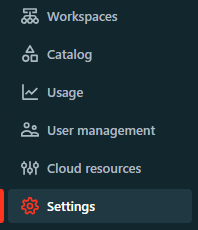
Step 3—Enable serverless compute
In the account console, open the “Feature Enablement” tab. If serverless compute hasn’t been enabled yet, you’ll see a banner prompting you to accept additional terms and conditions. Read through them and click “Accept.”
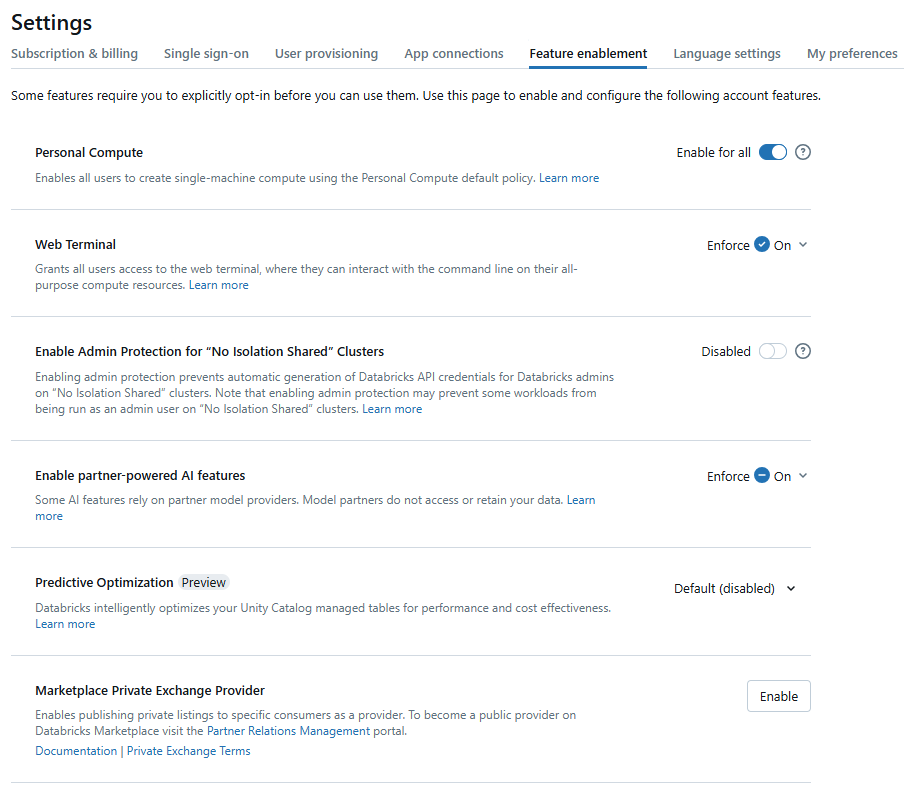
Step 4—Confirm enablement
Once you accept the terms, serverless compute is active. No further configuration is required before creating your first serving endpoint.
Step-by-step guide to deploying LLMs using Databricks Model Serving
Deploying large language models (LLMs) using Databricks Model Serving is straightforward. Here are the steps on how you can do that:
Prerequisites
Before starting, confirm the following:
- Model Serving is enabled in your workspace (see above)
- Your model is registered in the Unity Catalog or the Workspace Model Registry (Unity Catalog is strongly recommended)
- You have the necessary permissions on the registered models
- Your environment is running MLflow 3.x (MLflow 3 is the current major version and introduces important changes to how models are tracked and logged; older versions such as 1.29+ still work for basic logging, but you’ll miss key observability and governance features)
Step 1—Log in to your Databricks workspace
Navigate to the Databricks login page, enter your credentials and open your workspace.
Step 2—Enable Model Serving
Follow the steps that we covered earlier to enable Databricks Model Serving. As a reminder:
- Your account admin needs to read and accept the terms and conditions for enabling serverless compute in the account console.
If your account was created after March 28, 2022, serverless compute is enabled by default.
- As an account admin, go to the “Feature Enablement” tab of the account console settings page.
- Accept the additional terms as prompted.
Step 3—Register your model
You need to first register your model before you proceed to the next step. You can register pre-trained, open-source, or fine-tuned models to Databricks MLflow, which can be done using the Databricks MLflow APIs or the Databricks MLflow user interface. Here’s how to do it:
Using Databricks MLflow API:
First—Import necessary libraries
import mlflow

import numpy as np

from transformers import pipeline
Second—Set registry to Unity Catalog (recommended)
mlflow.set_registry_uri("databricks-unity-catalog")
Third—Define your model and tokenizer via a pipeline
model_name = "<model_name>"

pad_token_id = <token_id>

text_generation_pipeline = pipeline(

   "text-generation",

    model=model_name,

    pad_token_id=pad_token_id,

    device_map="auto"

)
Fourth—Define the components dict for mlflow.transformers.log_model
components = {

    "model": text_generation_pipeline.model,

    "tokenizer": text_generation_pipeline.tokenizer,
}
Fifth—Define inference config
inference_config = {

    "max_new_tokens": 75,

   "temperature": 0.1,

}
>Sixth—Define input example (matches the llm/v1/completions schema)
input_example = {"prompt": "Explain Databricks Model Serving", "max_tokens": 75}
Seventh—Generate a sample output to infer the model signature
sample_output = text_generation_pipeline(

    "Explain Databricks Model Serving",

    max_new_tokens=75,

    temperature=0.1,

)

signature = mlflow.models.infer_signature(

    model_input=["Explain Databricks Model Serving"],

    model_output=[sample_output[0]["generated_text"]],

)
Eighth—Set task metadata
metadata = {"task": "llm/v1/completions"}
Ninth—Log and register the model
artifact_path = "<artifact_path>"

registered_model_name = "<catalog>.<schema>.<model_name>"


with mlflow.start_run():

    mlflow.transformers.log_model(

        transformers_model=components,

        artifact_path=artifact_path,

        signature=signature,

        registered_model_name=registered_model_name,

        input_example=input_example,

        metadata=metadata,

    )
Using MLflow UI:
There are two ways to register a model in the Workspace Model Registry: register an existing model that has been logged to Databricks MLflow, or create and register a new, empty model and then assign a previously logged model to it.
1. Create a new registered model and assign a logged run
First—Create a new registered model
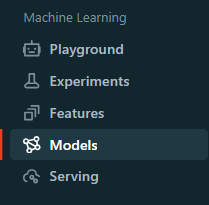
In the Databricks workspace, click the Models icon in the sidebar to navigate to the registered models page. Click Create Model, enter a name for the new model and click Create.
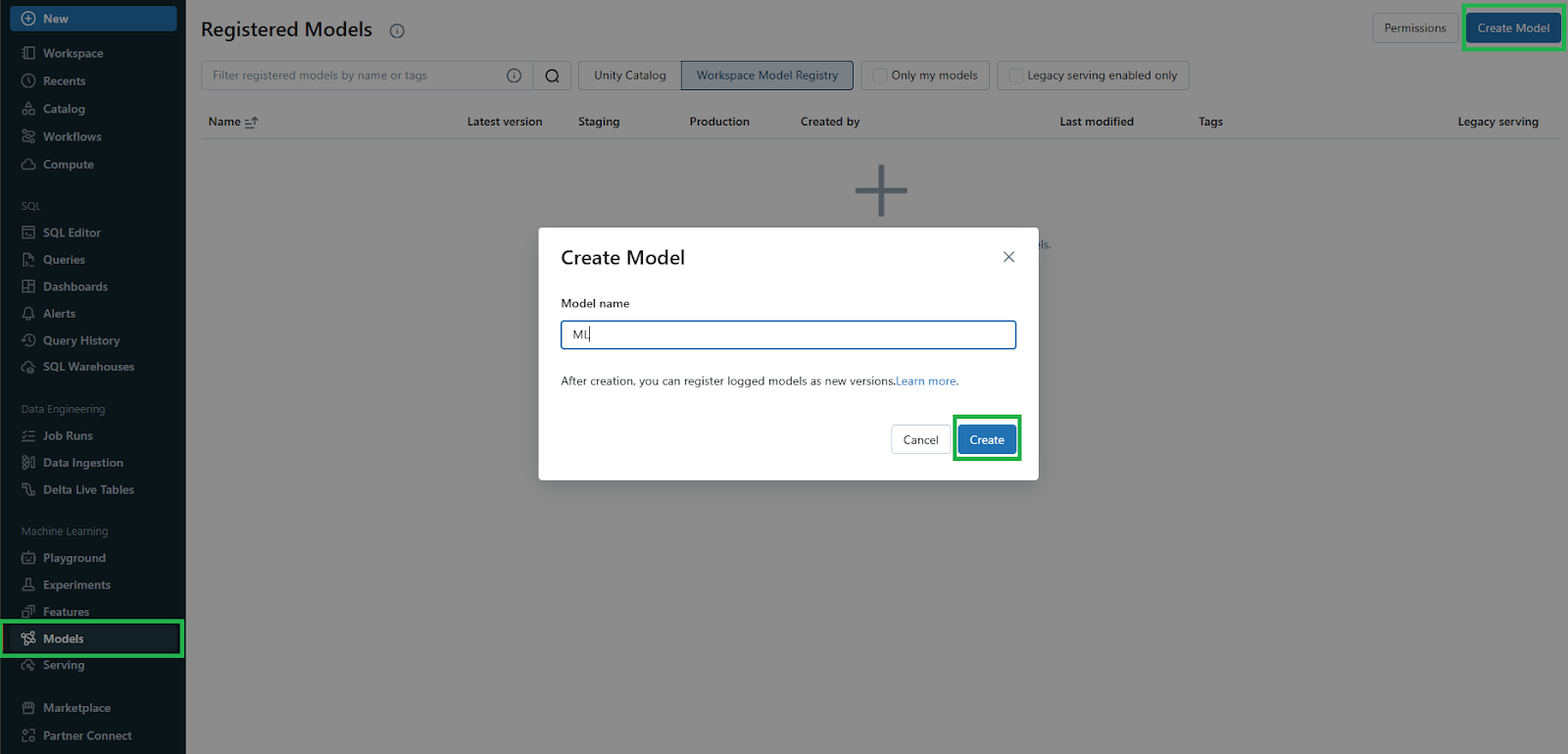
Second—Identify the Databricks MLflow run
Now, in the workspace, locate the Databricks MLflow run containing the model you want to assign to the newly created registered model. Click the Experiment icon in the notebook’s right sidebar to open the Experiment Runs sidebar.
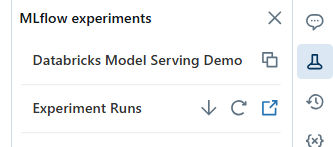
Third—Navigate to the MLflow run page
In the Experiment Runs sidebar, click the External Link icon next to the date of the run to open the Databricks MLflow Run page, displaying the run details.
Fourth—Select the Model Artifact
In the Artifacts section of the Databricks MLflow Run page, click the directory named after your model.
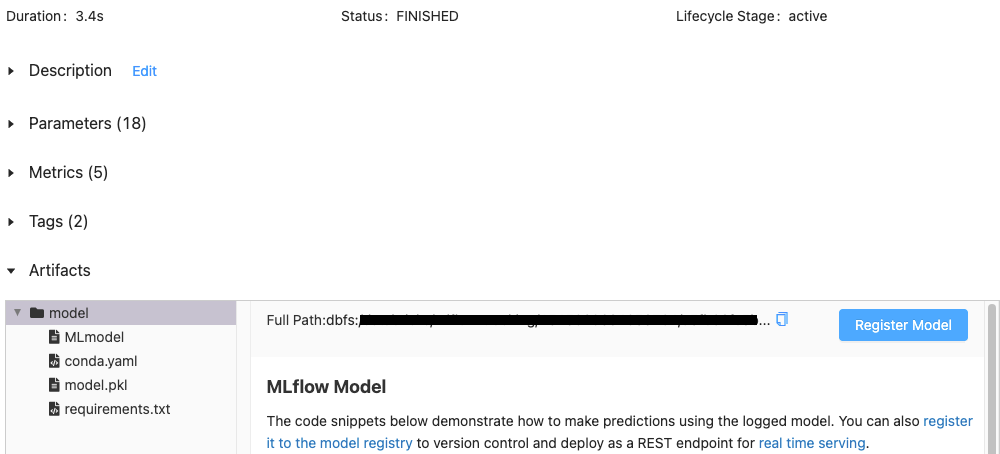
Fifth—Register the Logged Model
Click the Register Model button on the right. In the Register Model dialog, select the name of the model you created in Step 1 from the drop-down menu and click Register.
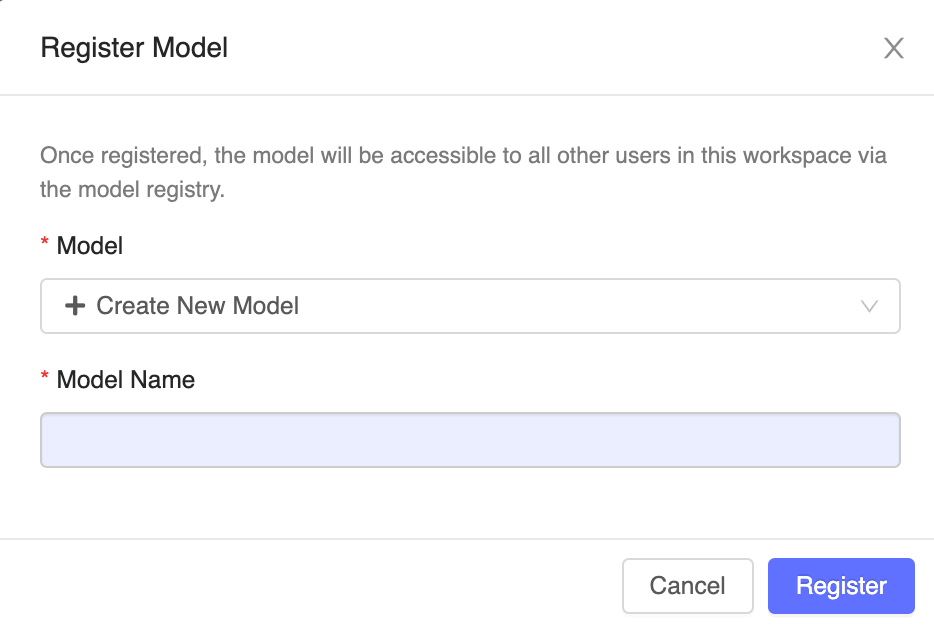
Sixth—Complete the assignment
This action registers the model with the specified name, copies the model into a secure location managed by the Workspace Model Registry and creates a new model version.
After registration, the Register Model button changes to a link to the new registered model version. You can now access this model from the Models tab in the sidebar or through the Databricks MLflow Run UI.
2. Register directly from a logged run
First—Identify the Databricks MLflow Run
Just as we covered in the earlier step, head over to your Databricks workspace and locate the Databricks MLflow run containing the model you want to register. Click the Experiment icon in the notebook’s right sidebar to open the Experiment Runs sidebar.
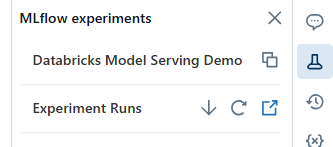
Second—Navigate to the Databricks MLflow run page
In the Experiment Runs sidebar, click the External Link icon next to the date of the run. This opens the MLflow Run page, which displays details of the run including parameters, metrics, tags and a list of artifacts.
Third—Select the Model Artifact
In the Artifacts section of the Databricks MLflow Run page, click the directory named after your model.
Fourth—Register the Model
Click the Register Model button on the right. In the dialog box, click in the Model field and choose one of the following options:
- Create New Model: Enter a model name, such as scikit-learn-power-forecasting.
- Select an Existing Model: Choose an existing model from the drop-down menu.
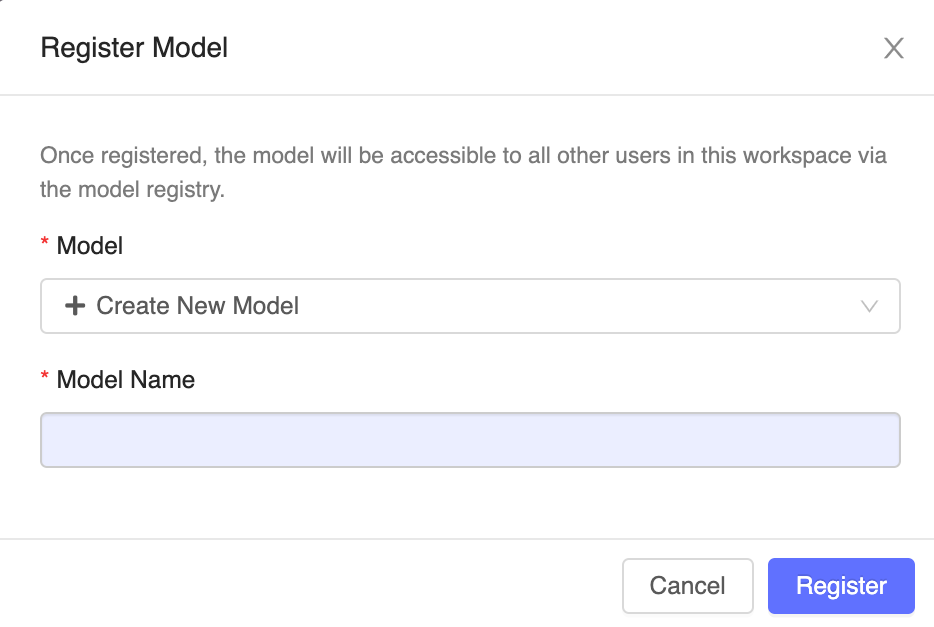
Fifth—Complete the registration
Click Register. If you select Create New Model, this action will create a new registered model with the specified name and a new version of the model in the Workspace Model Registry. If you select an existing model, a new version of the chosen model will be registered.
Sixth—Access the registered Model
After registration, the Register Model button changes to a link to the new registered model version. Click the link to open the new model version in the Workspace Model Registry UI.
You can also access the model from the Models tab in the sidebar.
Step 4—Accessing the Serving UI
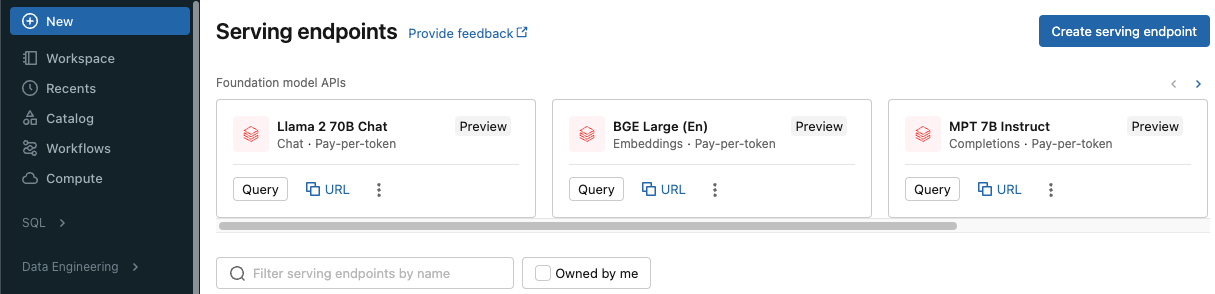
Navigate to the Serving tab in the Databricks sidebar and click “Create Serving Endpoint“. Databricks Model Serving is directly integrated with the Databricks Unity Catalog, allowing you to deploy machine learning models across multiple workspaces and manage all your data and AI assets in a centralized location. This integration streamlines the process of deploying and governing models, providing a unified interface for all your data and AI needs. On top of that, you can also serve models externally or from the model registry.
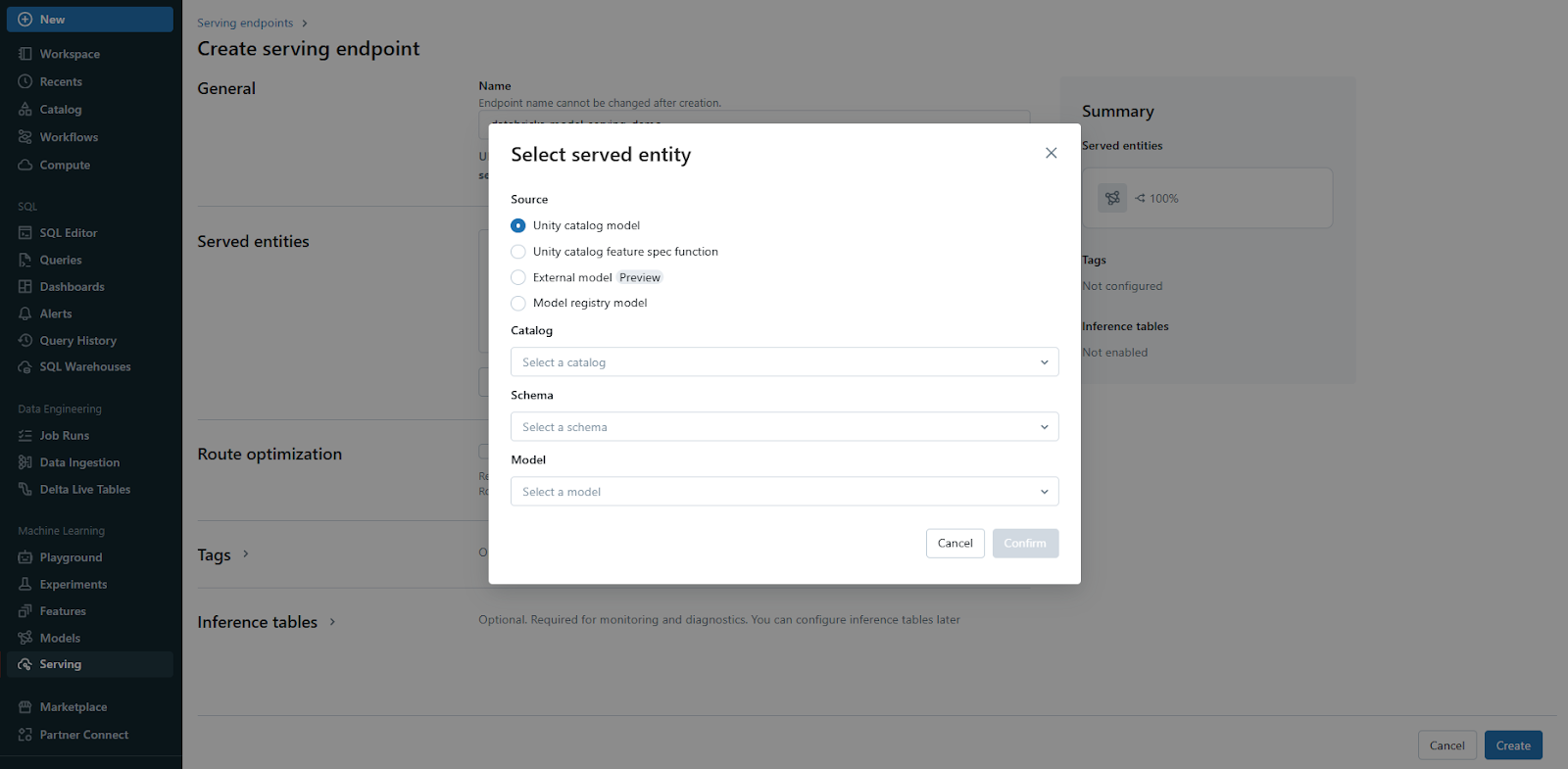
Step 5—Configure the endpoint
Choose the appropriate compute type (CPU or GPU) and configure the model serving endpoint for optimized performance.
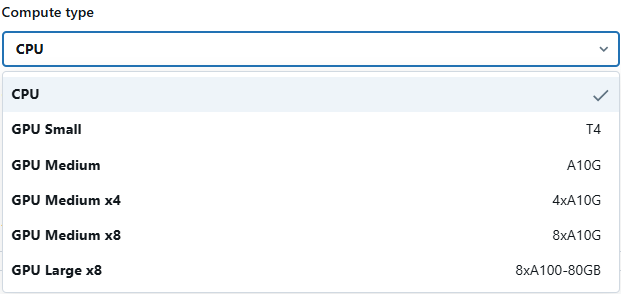
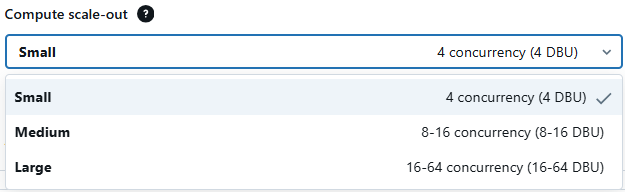
Databricks Model Serving also provides optimal model serving for select large language models, denoted by the purple lightning indicator in the UI. This feature allows you to deploy LLMs with 5 to 10 times reduced latency and costs. Using optimized LLM serving requires no additional work—simply provide the model and Databricks will handle the rest to ensure the model is served with optimal performance.
Step 6—Query the endpoint
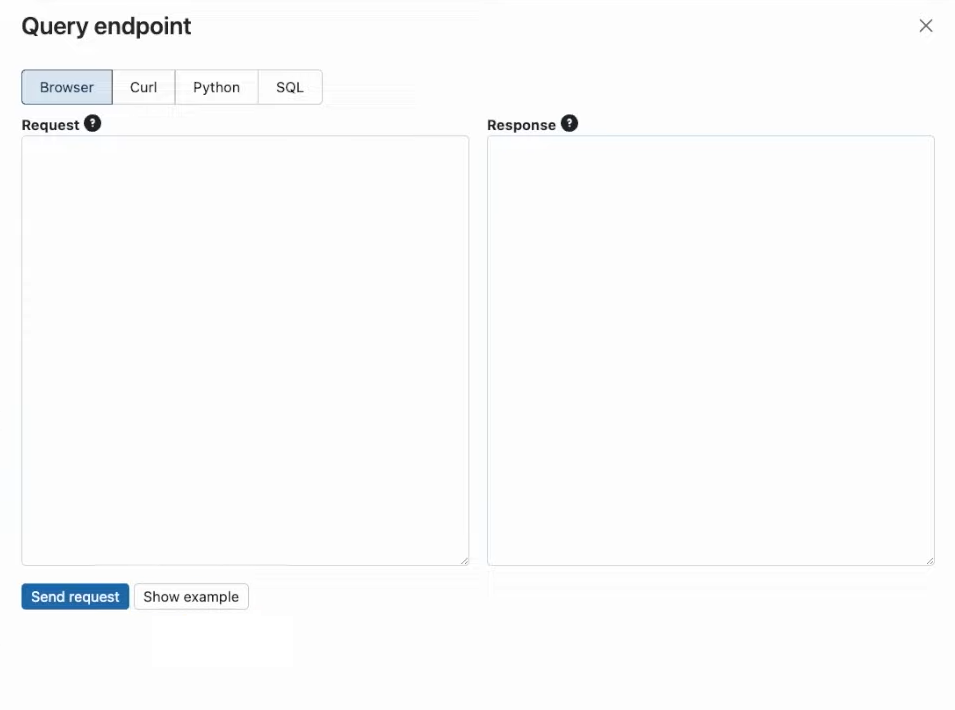
When your endpoint is ready to use, you can easily query it using the REST API to make sure everything is working as expected. You can then leverage the power of the newly deployed LLM in your website or application through the API. This integration comes with the added benefit of automatically scaling to meet traffic patterns, ensuring consistent performance regardless of demand.

Step 7—Log model requests and responses
To log model requests and responses, you can easily enable logging with just one click. Databricks allows you to log these interactions to a Delta table managed by the Databricks Unity Catalog. This integration enables you to use existing data tools to query and analyze your data.

Step 8—Enable model monitoring
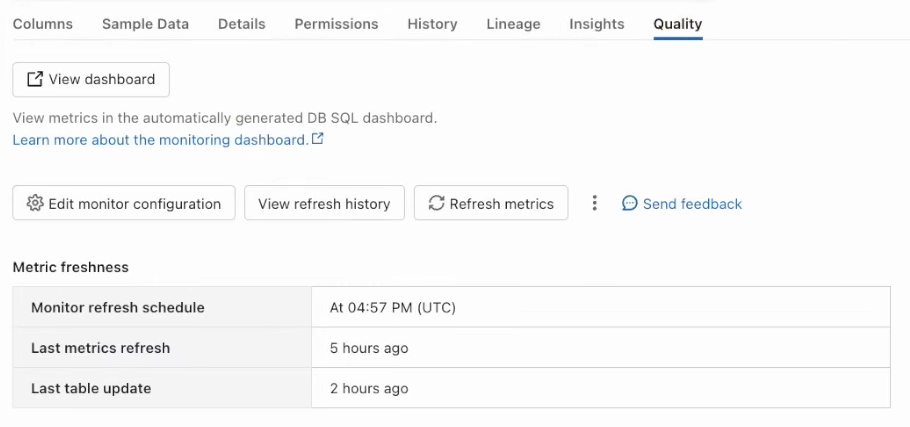
Finally, you can enable model monitoring to track performance and detect drifts. Databricks Model Serving allows you to compute specific metrics for large language models (LLMs) such as toxicity and perplexity. This comprehensive monitoring capability helps ensure that your models remain accurate and reliable over time, enabling you to detect and address any issues promptly.
Advanced LLM deployment patterns
Databricks Model Serving facilitates advanced patterns that improve model performance, contextual relevance and control beyond simple LLM deployment. Retrieval Augmented Generation (RAG) and fine-tuning are two well-known methods.
1. Retrieval Augmented Generation (RAG)
RAG combines a language model with a real-time retrieval step. Instead of relying entirely on the model’s parametric knowledge, you pull relevant documents from an index at query time, add them to the prompt and let the model synthesize a grounded response. This is especially useful for proprietary or frequently updated knowledge that the base model wasn’t trained on.
A typical RAG pipeline on Databricks works like this:
- Data pipeline: Pre-process and chunk source documents, then create vector embeddings using Databricks Foundation Model APIs (for example, the GTE or BGE embedding models). Store the embeddings in a Databricks Vector Search index
- Retrieval: At query time, the user’s question is embedded and used to retrieve the top-k semantically similar chunks from the Vector Search index
- Augmentation: The retrieved chunks are combined with the original question using a prompt template to create an augmented prompt with supporting context
- Generation: The augmented prompt is passed to an LLM endpoint (such as DBRX Instruct, Llama 4 or an external model) to generate a grounded response
RAG reduces hallucinations by supplying the model with factual context at inference time. It doesn’t change how the model behaves; it changes what information the model has access to.
2. Fine-tuning
Fine-tuning adapts a pre-trained model to a specific task, domain or style by continuing training on a smaller, curated dataset. The Databricks Foundation Model Training API supports three approaches:
- Instruction fine-tuning: Training on prompt-response pairs to teach the model to follow specific instructions or perform well on a particular task
- Chat completion fine-tuning: Training on multi-turn conversation data to improve dialogue coherence
- Continued pre-training: Training on additional unstructured domain text to deepen knowledge without changing the model’s general capabilities
Fine-tuning and RAG address different problems. RAG helps when you need the model to access information it doesn’t have. Fine-tuning helps when you need the model to behave differently, in a particular style, with domain-specific terminology or on a specific task type. Used together, they can produce better results than either approach alone.
What are the limitations of Databricks Model Serving?
Here are some of the key limitations of Databricks Model Serving to keep in mind:
1. Resource and payload limits (custom models and AI agents)
| Feature | Limit |
| Payload size (custom models) | 16 MB per request |
| Payload size (AI agent endpoints) | 4 MB per request |
| Request/response logging | Requests over 1 MB are not logged |
| Queries per second (QPS), default | 200 per workspace; enable route optimization for higher throughput |
| QPS with route optimization | Up to 300,000 per workspace |
| Model execution duration | 297 seconds per request |
| CPU endpoint model memory | 4 GB per endpoint |
| GPU endpoint model memory | Depends on GPU type and workload size |
| Provisioned concurrency | 200 per model and per workspace (can be increased via account team) |
| Overhead latency (standard) | Under 50 milliseconds |
| Overhead latency (route optimized) | Under 20 milliseconds |
| Init scripts | Not supported |
2. Foundation Model API rate limits (pay-per-token)
The rate limiting model for pay-per-token endpoints has changed significantly. It’s no longer based on simple per-model queries-per-second limits. Limits are now token-based, enforced separately for input and output:
- Input tokens per minute (ITPM): Controls the number of prompt tokens processed per 60-second window
- Output tokens per minute (OTPM): Controls the number of generated tokens per 60-second window
- Queries per hour: An additional query-count cap applied per workspace
The specific ITPM/OTPM limits vary by model and workspace tier. Because these limits are dynamic and model-specific, check the current limits in the Foundation Model APIs rate limits documentation rather than relying on cached figures.
For production workloads, Databricks recommends provisioned throughput endpoints rather than pay-per-token. Pay-per-token is a multi-tenant service which can cause latency spikes when the pool is under heavy load.
3. Access control and networking
Serving endpoints respect workspace-level access control and networking rules like IP allowlists and PrivateLink. There’s an important distinction here:
- PrivateLink IS supported for provisioned throughput endpoints and custom model endpoints
- PrivateLink is NOT supported by default for external model endpoints (such as those proxying to OpenAI or Azure OpenAI); support is evaluated and implemented per region
4. Init scripts
Init scripts are not supported on serving endpoints. If your model requires custom runtime setup, you’ll need to package that into the model artifact itself using MLflow’s dependency management (via requirements.txt and conda.yaml).
5. Foundation Model API governance
- Data processing location—As part of providing the Foundation Model APIs, Databricks may process your data outside of the region and cloud provider where your data originated.
- Governance settings—For Foundation Model APIs endpoints, only workspace admins can change governance settings, such as rate limits. Here is how you can change the rate limit:
Step 1—Open the Serving UI
Log in to your Databricks workspace and navigate to the Serving UI. On the left sidebar, click on “Workspace” and then find and click on “Serving” to open the Serving UI.
Step 2—Locate your serving endpoints
Now, within the Serving UI, you will see a list of serving endpoints available in your workspace. Identify the Foundation Model APIs endpoint for which you want to change the rate limits.
Step 3—View endpoint details
Next to the Foundation Model APIs endpoint you want to edit, click on the kebab menu (three vertical dots) to open a dropdown menu. From the dropdown menu, select “View details“.
Step 4—Change rate limit
On the endpoint details page, find the kebab menu on the upper-right side of the page. Click on the kebab menu to open the dropdown menu and select “Change rate limit” from the dropdown options.
8. Region availability
Core Model Serving
- Asia Pacific (Seoul)
- EU (London)
- EU (Paris)
- South America (São Paulo)
- US West (Northern California)
Foundation Model APIs (provisioned throughput)
- Asia Pacific (Seoul)
- Asia Pacific (Singapore)
- EU (London)
- EU (Paris)
- South America (São Paulo)
- US West (Northern California)
Foundation Model APIs (pay-per-token)
- Asia Pacific (Tokyo)
- Asia Pacific (Seoul)
- Asia Pacific (Mumbai)
- Asia Pacific (Singapore)
- Asia Pacific (Sydney)
- Canada (Central)
- EU (Frankfurt)
- EU (Ireland)
- EU (London)
- EU (Paris)
- South America (São Paulo)
External Models
- Asia Pacific (Seoul)
- EU (London)
- EU (Paris)
- South America (São Paulo)
Advantages of using Databricks Model Serving for LLM deployment
Deploying Large Language Models (LLMs) using Databricks model serving offers several significant advantages, making it a powerful platform for this purpose:
1. Simplifies the ease of deployment
Databricks Model Serving simplifies the deployment of large language models (LLMs). Instead of writing complex libraries for model optimization, you can focus on integrating the LLM into your applications seamlessly.
2. Automatic scalable
The platform scales endpoints up and down based on traffic, CPU autoscaling to zero when idle. You pay for what you use and don’t over-provision for peak load.
3. Security
Served models run in isolated compute environments. Resources terminate when an endpoint scales to zero or is deleted. Data in transit and at rest is encrypted. Access control inherits from Unity Catalog.
4. Deep MLflow integration
Databricks Model Serving integrates natively with the Databricks MLflow Model Registry. This integration allows for fast and straightforward deployment of models, leveraging MLflow’s capabilities to manage the model lifecycle from experimentation to production.
5. Performance
Performance optimizations are built into Databricks Model Serving, reducing latency and cost significantly. These optimizations can lead to performance improvements of 3-5x, making the deployment of LLMs more efficient and cost-effective.
6. Compliance
Databricks meets the compliance needs of highly regulated industries by implementing several controls. This is particularly important for industries such as finance, healthcare and government, where regulatory compliance is non-negotiable.
Further reading
- Model serving with Databricks
- Deploy custom models
- Databricks Foundation Model APIs
- Foundation Model APIs rate limits and quotas
- Provisioned throughput Foundation Model APIs
- External models in Databricks Model Serving
- Manage model lifecycle in Unity Catalog
- Monitor model quality and endpoint health
- MLflow 3 on Databricks
- Databricks Unity Catalog 101
Save up to 50% on your Databricks spend in a few minutes!
Conclusion
Databricks Model Serving simplifies AI model deployment and management, offering a scalable, high-performance and cost-effective solution. Its seamless interaction with Databricks tools, as well as support for custom, pre-trained and external models, make it an excellent alternative for enterprises aiming to speed up AI and ML adoption.
In this article, we have covered:
- What is Model Serving?
- What is Databricks Model Serving?
- Is the Databricks Model Serving Serverless?
- What are the hurdles in building real-time Machine Learning systems?
- Databricks Model Serving pricing
- Why use Databricks Model Serving?
- How to enable model serving for your Databricks workspace?
- Step-by-step guide to deploy Large Language Models using Databricks Model Serving
- What are the limitations of Databricks Model Serving?
…and so much more!
FAQs
What is Databricks Model Serving?
Mosaic AI Model Serving (previously Databricks Model Serving) is a unified, serverless service for deploying, governing, querying and monitoring AI models as REST API endpoints on the Databricks platform.
Is Databricks Model Serving serverless?
In short, yes. CPU endpoints are fully serverless and scale to zero. GPU endpoints using provisioned throughput reserve dedicated capacity for guaranteed performance, which means you pay for that capacity even when idle.
What’s the difference between pay-per-token and provisioned throughput?
Pay-per-token is a shared multi-tenant endpoint. It’s good for experimentation and low-volume use but can have variable latency under load. Provisioned throughput reserves dedicated capacity and provides guaranteed performance. Databricks recommends provisioned throughput for production workloads.
What are the key limitations of Databricks Model Serving?
The main constraints are: 16 MB payload limit per request (4 MB for AI agents), 200 QPS default per workspace (can be increased), 297-second model execution limit, 4 GB CPU endpoint memory and no init script support. Foundation Model API rate limits are now token-based (ITPM/OTPM) rather than simple per-model QPS limits.
Can I deploy custom models?
Yes. Any Python model logged in MLflow format — scikit-learn, XGBoost, PyTorch, HuggingFace Transformers and others — can be deployed as a custom model endpoint. You can also use MLflow’s pyfunc flavor to wrap arbitrary Python code.
How do I enable Model Serving?
As an account admin, navigate to the account console, open the Feature Enablement tab and accept the serverless compute terms. Accounts created after March 28, 2022 typically have serverless compute enabled by default.
Can I log requests and responses?
Yes. Enable inference tables from the endpoint configuration UI. Requests and responses are logged to a Delta table in Unity Catalog. Requests over 1 MB are not logged.
How do I change rate limits for Foundation Model API endpoints?
Only workspace admins can change rate limits. Go to the endpoint details in the Serving UI, click the kebab menu in the upper right and select “Change rate limit.”
Can I serve multiple models behind a single endpoint?
Yes. Databricks supports traffic splitting between multiple model versions on a single endpoint, which is useful for A/B testing or staged rollouts.
Does Databricks Model Serving support PrivateLink?
Partially. PrivateLink is supported for provisioned throughput endpoints and custom model endpoints. It’s not supported by default for external model endpoints (such as those pointing to OpenAI). Per-region availability applies.
Can I deploy external models like OpenAI GPT-4?
Yes, through the External Models feature. You can configure a Databricks endpoint that proxies to an external model provider, which lets you apply Databricks governance and monitoring controls to third-party models.
In which regions is Databricks Model Serving available?
Core Model Serving: Asia Pacific (Seoul), EU (London), EU (Paris), South America (São Paulo), US West (Northern California). Foundation Model APIs provisioned throughput adds Asia Pacific (Singapore). Foundation Model APIs pay-per-token adds Asia Pacific (Tokyo, Mumbai, Sydney), Canada (Central), EU (Frankfurt, Ireland). Always verify current availability in the Databricks documentation for your cloud provider, as availability expands regularly.
What MLflow version should I use?
MLflow 3.x is the current major version and is recommended for new deployments. It introduces the LoggedModel concept for richer cross-workspace model tracking and integrates deeply with Unity Catalog governance workflows. While earlier versions (1.29+) still work for basic logging and registration, MLflow 3 is where active development is focused.
How does monitoring work for LLM endpoints?
Mosaic AI Model Serving includes built-in monitoring for LLM-specific metrics like toxicity and perplexity, plus standard infrastructure metrics (QPS, latency, error rate). For deeper quality evaluation using LLM-as-a-judge, use Mosaic AI Agent Evaluation, which integrates with serving endpoints.
What happened to legacy MLflow Model Serving?
Legacy MLflow Model Serving reached end-of-life on September 15, 2025. New endpoints can no longer be created with the legacy experience. If you’re still running legacy endpoints, migrate to Mosaic AI Model Serving by registering your models to Unity Catalog and creating new serving endpoints through the current interface. The endpoint URL format also changed: new endpoints use /serving-endpoints/ in the path instead of /model/.
Pramit Marattha
Pramit Marattha is a technical content writer and strategist with 5+ years of experience covering AI, data engineering, data cloud platforms and open source technologies. He turns complex technical concepts into clear, useful content for engineers and developers.







