


Going through thousands of PDFs, research reports and internal documents manually to find a specific answer is slow, error-prone and does not scale. When you scale that up to an enterprise volume with thousands of documents refreshed daily, it becomes a major issue. It is not just inefficient; it is impossible. When you add the complexities of dealing with sensitive information, it gets even harder.
But now, in the age of artificial intelligence, things are different. Now users can simply ask a question in plain natural language and get a straight answer with sources in just a few seconds. If you are fully invested in Snowflake, there’s good news: Snowflake released a big new feature last year called Snowflake Cortex Search. It is a fully managed hybrid search engine that combines semantic search with keyword retrieval, giving you a production-ready foundation for retrieval augmented generation (RAG) pipelines without having to manage embedding models or infrastructure yourself.
And with Snowflake Cortex Knowledge Extensions (CKEs), they take it a step further. Snowflake CKEs are Cortex Search Services packaged and distributed through the Snowflake Marketplace, via private listings or via organizational listings. This allows consumers to plug a live, pre-indexed search service directly into their AI applications without ever accessing the underlying source data.
In this article, we’ll cover everything you need to know about Snowflake Cortex Knowledge Extensions, including what they are, how they differ from a standard Snowflake Cortex Search Service, how the provider and consumer workflows look end-to-end and the limitations worth knowing before you build on top of them.
What are Snowflake Cortex Knowledge Extensions (CKEs)?
A Snowflake Cortex Knowledge Extension is, at its core, a Cortex Search Service that can be packaged and shared on the Snowflake Marketplace or via private or organizational listings. It can be used in a RAG architecture to integrate licensed and proprietary content into Cortex AI applications.
Snowflake Cortex Knowledge Extensions are basically a pre-indexed, search-ready knowledge base that a provider hosts and maintains in their own Snowflake account, then distributes as a marketplace product. And once a consumer installs it, they get access to a fully indexed, semantically searchable knowledge base; all without ever receiving the raw source data, without running extract, transform, load (ETL) jobs and without managing an index. The knowledge lives in the provider’s account. The consumer’s queries are routed to it, results come back and the source content never crosses the account boundary.
Here are some key features of Snowflake Cortex Knowledge Extensions:
- Powered by Snowflake Cortex Search Service — Snowflake Cortex Knowledge Extension is a Cortex Search Service under the hood. It uses Snowflake’s hybrid vector + keyword engine to index text and serve semantic search.
- Fully managed by Snowflake — Indexing, serving and cross-region replication are all handled by Snowflake’s infrastructure. Providers don’t need to deploy or maintain separate infrastructure for search (like embedding models or search clusters).
- Snowflake Marketplace-native distribution — Snowflake Cortex Knowledge Extensions are packaged as a data product in Snowflake Marketplace (or as a private share). Consumers “install” it into their accounts. Snowflake handles all the plumbing to share the data securely. No separate developer portals, no custom API integrations.
- Zero-ETL for consumers — Consumers do not copy, transform or store the provider’s source data. They install the listing, and the service becomes available directly in their account schema.
- RAG-ready out of the box — Snowflake Cortex Knowledge Extensions return chunked, semantically ranked results that slot directly into a prompt context window. The provider controls chunking, attributes and source URL columns, so consumers get structured results they can pass to a large language model (LLM) without preprocessing.
- Seamless integration with Cortex Agents and Cortex Analyst — You can wire Snowflake Cortex Knowledge Extensions into Snowflake Cortex Agent. You can also register Snowflake CKE’s Cortex Search service as an agent tool within Snowflake Intelligence, making it immediately available for natural-language Q&A.
- No infrastructure management for consumers — Consumers query the provider-hosted service. There is no index to maintain, no warehouse size to tune for indexing and no embedding model to manage on the consumer side.
- No consumer-side storage costs for source data — Consumers pay for query compute (and for access to the CKE if it is not free), but they do not store the underlying corpus. Providers pay to host the Snowflake Cortex Search Service in their account, including indexing, servicing and replication to other regions.
- Column-level and row-level security at the provider side — Providers control what data gets indexed and what attribute columns are exposed. The Snowflake Cortex Search Service’s security model runs with the owner’s rights on the provider side, so consumers can only access what the provider has chosen to index and surface.
- Incremental index refresh — Providers configure a TARGET_LAG on Snowflake Cortex Search Service. Snowflake incrementally refreshes the index as the underlying table is updated, so the Snowflake Cortex Knowledge Extensions stay current without a full reindex.
- Content protection — Providers can limit the percentage of indexed content that can be returned to consumers within a rolling 24-hour period, set by a threshold. The threshold is not applied at the individual document level, but rather across the entire corpus of indexed content.
- Trial support — A provider can offer a limited free trial access to their Snowflake CKE so users can test it before committing to paying for it.
- Management and analytics — The Snowflake Provider Studio in Snowsight shows query counts per listing, giving providers basic usage telemetry.
- Monetization options — Snowflake Cortex Knowledge Extensions can be monetized using the on-platform Snowflake Marketplace Monetization capability via subscriptions or through off-platform monetization (custom contracts, direct billing).
- Citations and attribution — To make sure Snowflake Cortex Knowledge Extension is providing citations, when you configure the Snowflake Cortex Search Service, include a SOURCE_URL column that points to the source of the document in the indexed columns. This can be used by LLMs or Snowflake Intelligence to provide clear attribution and hyperlinks back to the source material.
What is the difference between a Cortex Search Service and a Cortex Knowledge Extension?
A Snowflake Cortex Search Service is a private, account-scoped search index. You create it, you own it, you query it. It lives in a database and schema in your Snowflake account and access is governed by standard Snowflake role-based access control (RBAC). You can share it internally across roles, use it in Streamlit apps or Cortex Agents and query it (via SQL, the Python API or the REST API). It is your infrastructure, serving your data to your users.
A Snowflake Cortex Knowledge Extension is what that Cortex Search Service becomes when you publish it to the Snowflake Marketplace (or a private/org listing). From a technical standpoint, it is the same object – the same SQL data definition language (DDL), the same hybrid retrieval mechanism, the same attribute columns. What changes is the distribution layer? Once shared via Snowflake Marketplace listing, the service becomes installable by external consumers (or internal consumers in an organizational listing). Those consumers get a reference to the service in their own account, but the underlying index and source data remain in the provider’s account.
The table below breaks down their key differences:
Table 1: Difference between Snowflake Cortex Search Service vs Snowflake Cortex Knowledge Extension
| Snowflake Cortex Search Service | 🔮 | Snowflake Cortex Knowledge Extensions |
| Snowflake Cortex Search Service is an in-house search engine for our data. It is mainly used as RAG (LLM chatbots) and enterprise search on private data | Top use cases | Snowflake Cortex Knowledge Extensions are designed for retrieval augmented generation using licensed or curated content (news, research, books, technical docs). Basically, Snowflake Cortex Knowledge Extensions let us add domain-specific knowledge to our chatbots without building it ourselves |
| Snowflake Cortex Search indexes our own Snowflake tables. We can pick which table or view (and columns) to index. Snowflake ingests and embeds the text from those columns | Source data access | Snowflake Cortex Knowledge Extensions are built by a provider on third-party content. The provider uploads text (articles, market research, etc.) to their account and creates a Snowflake Cortex Search Service on it. Once published, Snowflake CKE is essentially a pre-built search index over that provider’s content, which we can query as a “knowledge base” |
| Single Snowflake account | Main scope | Multi-account via Snowflake Marketplace or listing |
| You (in-account) | Infrastructure ownership | Provider manages; consumer uses |
| Provides hybrid semantic search + keyword search. Snowflake builds a combined vector + text index, so queries return fuzzy, contextually relevant results. It auto-refreshes (based on table changes and target lag) and supports multi-index setups. We can tune it even further | Core capabilities | Offers the same search tech under the hood (the consumer queries it exactly like a Snowflake Cortex Search Service). In other words, Snowflake CKE has all the search capabilities of a normal service (semantic ranking, multi-index) because it is a search service. The difference is that Snowflake Cortex Knowledge Extensions usage comes with Snowflake marketplace-related controls |
| Not applicable | Monetization | Subscription or off-platform billing |
| Not applicable | Content protection | Provider-controlled threshold |
| Not applicable. A regular search service is not sold on Snowflake Marketplace | Marketplace features | Built for commerce. Providers can monetize Snowflake Cortex Knowledge Extensions via Snowflake subscriptions or external billing. They can offer trial versions of the extension to let users try before buying |
| Account-level monitoring | Analytics | Provider Studio analytics dashboard |
Snowflake Cortex Search Service is a private tool. Snowflake Cortex Knowledge Extensions offers the same functionality but is packaged and distributed via Snowflake’s data-sharing infrastructure, such as a Snowflake Marketplace listing.
How Snowflake Cortex Knowledge Extensions work
The architecture of Snowflake Cortex Knowledge Extensions is cleaner than it sounds. There are two sides to it: the provider builds and hosts; the consumer installs and queries.
Provider-side flow
- The provider ingests text data (articles, reports, documentation, etc.) into a Snowflake table in their account, with at minimum one TEXT or VARCHAR column holding the content to be indexed
- The provider creates a Snowflake Cortex Search Service on top of that table, defining the search column, attribute columns (for filtering and citation), the refresh lag, the virtual warehouse and optionally the embedding model
- The provider publishes this Cortex Search Service to the Snowflake Marketplace as a listing of type “Knowledge Extension.” This creates the Snowflake CKE that consumers can discover and install
Consumer-side flow
- The consumer finds the Snowflake Cortex Knowledge Extensions on the Snowflake Marketplace, reviews the description, sample queries and attribute schema, then clicks GET to install it into a target database in their account
- The installed Snowflake Cortex Knowledge Extensions appears as a Snowflake Cortex Search Service object in the consumer’s account; the same interface as any local service
- The consumer points their chatbot, AI agent, Streamlit app or analytics pipeline at the installed service using SQL or the Cortex Agent API
When a prompt is given to the Cortex AI application integrated with Snowflake Cortex Knowledge Extensions, the prompt is passed on to the Snowflake CKE to get relevant knowledge by performing a semantic search. The relevant knowledge is given back to the Cortex AI application’s LLM and reasoned over before returning an answer back to the user with citations and attribution. The consumer never touches the provider’s raw data. They interact with search results. The provider’s table, schema and raw records are completely opaque to the consumer side.
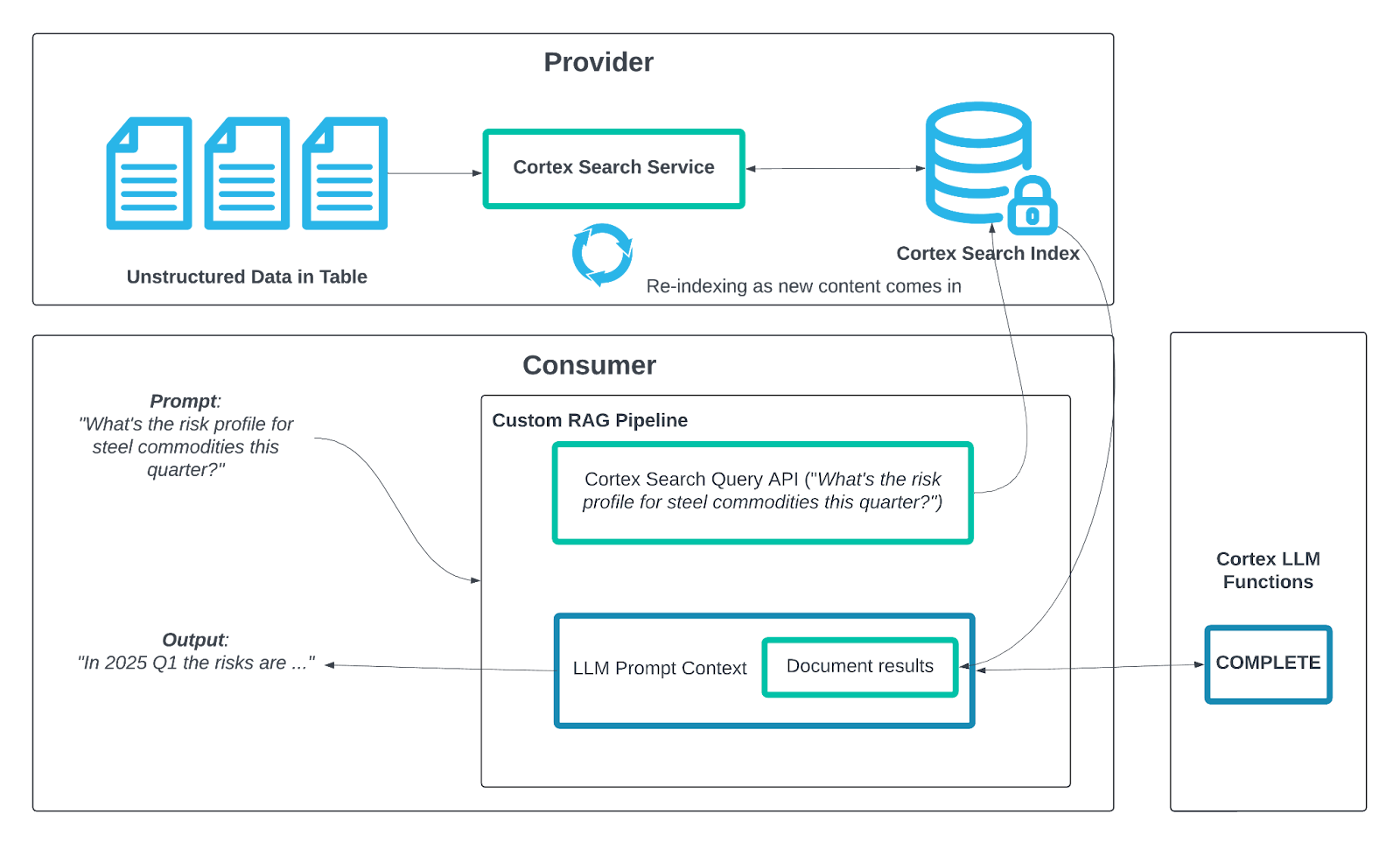
Figure 1: Snowflake Cortex Knowledge Extensions architecture (Source: Snowflake)
What is happening under the hood
Snowflake Cortex Search uses a mix of keyword-based retrieval and dense vector search to find what you are looking for. These two approaches run at the same time, and their results are combined to give you a ranked list. This way, Snowflake can handle both specific keyword searches and more general conceptual queries without needing separate setups. The embedding model that turns your content into vectors runs entirely on Snowflake’s infrastructure. Snowflake uses snowflake-arctic-embed-l-v2.0 by default, but providers can specify a different model at service creation time.
Just keep in mind that switching models later means you will have to rebuild the index. To keep your search results up to date, you can make use of TARGET_LAG to control how often the index is refreshed. If you set TARGET_LAG = “1 hour”, Snowflake will refresh the search index within one hour of changes to the source table. The good news is that this refresh is incremental, so only the changed rows are reprocessed.
How to create, publish and use Snowflake Cortex Knowledge Extensions?
Let us dive into the complete workflow for building and distributing Snowflake Cortex Knowledge Extensions. First, we will cover the provider workflow, which includes creating the underlying Snowflake Cortex Search Service, registering as a Marketplace provider and publishing the listing. Then, we will look at the consumer workflow, which involves installing and querying the extension.
Prerequisites and setups:
General requirements for both sides:
- A Snowflake account on a supported cloud region (AWS, Azure or GCP) where Snowflake Cortex Search is available
- Snowflake Enterprise Edition or higher is required on the provider side to access Snowflake Marketplace provider features
Provider-side requirements:
- Snowflake Enterprise Edition or higher is required. Snowflake Marketplace provider features and data-sharing capabilities are not available on Standard Edition accounts
- An active Snowflake Marketplace provider profile approved through Provider Studio (covered in Step 7)
- A role with CREATE DATABASE, CREATE SCHEMA, CREATE TABLE, CREATE CORTEX SEARCH SERVICE and CREATE DATA EXCHANGE LISTING privileges. The role must also hold the CORTEX_USER database role on any database whose objects the Snowflake Cortex Search Service reads from
- Snowflake Marketplace provider profile approved (submit via Provider Studio)
- A source Snowflake table containing at least one TEXT or VARCHAR column to be embedded and indexed by Snowflake Cortex Search
- A virtual warehouse (X-Small or larger) for building the search index
- Snowflake Cortex Search Service must be enabled for the account
- Snowflake Cortex Search Service must reside in the same database that is shared via the Snowflake Marketplace listing
- Snowflake Change tracking must be enabled on every source table referenced by the service’s defining query (covered in Step 4)
Consumer-side requirements:
- A Snowflake account on any edition in a supported region
- ACCOUNTADMIN role or a role that has been explicitly granted the IMPORT SHARE privilege, is required to install Snowflake Marketplace listing
- Sufficient Snowflake credits for query compute (you pay for search query execution, not provider storage)
- Optionally, a virtual warehouse for running downstream SNOWFLAKE.CORTEX.COMPLETE() or AI_COMPLETE calls or additional analytical queries on top of the search results
Part A—Provider workflow (creating the knowledge extension)
Here are the steps we follow as the data provider:
Step 1—Log in to Snowflake Snowsight
Sign in to your Snowflake account at https://app.snowflake.com. Open Snowflake Snowsight and authenticate with your provider account. You will primarily work in SQL Worksheets and Provider Studio, located under the Data Products section of the left navigation panel.
Before executing any SQL, confirm that your active role has CREATE DATABASE, CREATE WAREHOUSE and CREATE SCHEMA privileges. You can verify your current role and its grants by running:
SELECT CURRENT_ROLE();
SHOW GRANTS TO ROLE <your_role>;
If you need to switch roles, use USE ROLE <role_name>; before proceeding.
Step 2—Create the database, schema and warehouse
Set up the core Snowflake objects in which your Snowflake Cortex Knowledge Extensions will live in. Using a dedicated warehouse for the Snowflake Cortex Search Service keeps the indexing workload isolated from your other operational queries.
Create a dedicated warehouse for indexing:
CREATE WAREHOUSE IF NOT EXISTS movies_cke_wh
WITH WAREHOUSE_SIZE = ‘SMALL’
AUTO_SUSPEND = 60
AUTO_RESUME = TRUE;
Create the database and schema:
CREATE DATABASE IF NOT EXISTS movies_cke_db;
CREATE SCHEMA IF NOT EXISTS movies_cke_db.movie_data;
Set the active context:
USE WAREHOUSE movies_cke_wh;
USE DATABASE movies_cke_db;
USE SCHEMA movie_data;
💡 Sizing guide : A SMALL warehouse is the right starting point for a corpus of this size. If you are indexing hundreds of thousands of records, scale up to MEDIUM or LARGE to reduce the initial index build time. You can scale the warehouse back down after the index finishes building, since serving queries is much lighter than indexing.
Step 3—Prepare and load sample data into a Snowflake table
Create a table to hold the content you want indexed. We are using a movie database for this guide. It is simple and easy to understand, making it perfect for testing search results. Each row represents a movie, including a brief description and a full synopsis. In a production scenario, your rows could be sections of documents, knowledge base entries or research summaries.
CREATE TABLE movies (
movie_id INTEGER PRIMARY KEY AUTOINCREMENT,
title VARCHAR(500),
description TEXT,
synopsis TEXT,
genre VARCHAR(100),
release_year INT,
director VARCHAR(200),
rating VARCHAR(10)
);
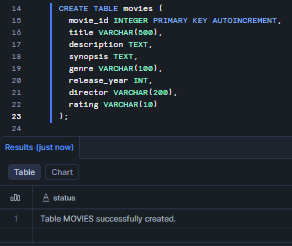
Figure 2: Creating the movies table with an auto-incrementing primary key and structured metadata columns
Now, insert some sample data. Download a dataset from Huggingface (or any source you prefer). To follow along, download it in your browser using this link ⇒ Movies Dataset
From that dataset, select ten movies that span multiple genres. This diverse set gives Snowflake Cortex Search’s hybrid retrieval engine a broad range of topics to work with because it combines dense vector search (semantic search) with sparse keyword matching.
INSERT INTO movies (title, description, synopsis, genre, release_year, director, rating)
VALUES
(‘Oppenheimer’,
‘The story of American scientist J. Robert Oppenheimer and his role in the development of the atomic bomb.’,
‘During World War II, Lt. Gen. Leslie Groves Jr. appoints physicist J. Robert Oppenheimer to work on the top-secret Manhattan Project. Oppenheimer and a team of scientists spend years developing and designing the atomic bomb. Their work comes to fruition on July 16, 1945, as they witness the world’s first nuclear explosion, forever changing the course of history. The film intercuts this story with Oppenheimer’s 1954 security hearing, where political rivals attempt to strip him of his security clearance and a 1959 Senate confirmation hearing for Lewis Strauss.’,
‘Historical Drama’, 2023, ‘Christopher Nolan’, ‘R’),
(‘Interstellar’,
‘When Earth becomes uninhabitable in the future, a farmer and ex-NASA pilot is tasked to pilot a spacecraft to find a new planet for humans.’,
‘In Earth’s future, a global crop blight and second Dust Bowl are slowly rendering the planet uninhabitable. Professor Brand, a brilliant NASA physicist, is working on plans to save humankind by transporting Earth’s population to a new home via a wormhole. But first, Brand must send former NASA pilot Cooper and a team of researchers through the wormhole and across the galaxy to find out which of three planets could be mankind’s new home. Cooper must choose between seeing his children again and the future of humanity.’,
‘Science Fiction’, 2014, ‘Christopher Nolan’, ‘PG-13’),
(‘Sound of Freedom’,
‘The incredible true story of a former government agent turned vigilante who embarks on a dangerous mission to rescue hundreds of children from sex traffickers.’,
‘After rescuing a boy from ruthless child traffickers, federal agent Tim Ballard learns the boy’s sister is still captive and decides to embark on a dangerous mission to save her. With time running out, he quits his job and journeys deep into the Colombian jungle, putting his life on the line to free her from a fate worse than death. Based on the true story of Tim Ballard and Operation Underground Railroad.’,
‘Action Thriller’, 2023, ‘Alejandro Monteverde’, ‘PG-13’),
(‘The Dark Knight’,
‘When the menace known as the Joker wreaks havoc and chaos on the people of Gotham, Batman must accept one of the greatest psychological and physical tests of his ability to fight injustice.’,
‘With the help of allies Lt. Jim Gordon and District Attorney Harvey Dent, Batman sets out to dismantle the remaining criminal organizations that plague Gotham City. But the trio prove effective only until the Clown Prince of Crime, a madman known as the Joker, begins terrorizing Gotham. He leaves Batman and Gotham itself, in a moral crisis—forcing difficult choices about justice, sacrifice and the cost of maintaining order in a corrupt world.’,
‘Action’, 2008, ‘Christopher Nolan’, ‘PG-13’),
(‘Inception’,
‘A thief who steals corporate secrets through the use of dream-sharing technology is given the inverse task of planting an idea into the mind of a C.E.O.’,
‘Dom Cobb is a skilled thief who specializes in extracting information from inside the subconscious during the dream state. He is offered a chance to have his criminal history erased if he can perform inception—planting an idea rather than stealing one. Cobb assembles a team and enters multiple layers of dreams nested within each other, with each layer deeper and more unstable than the last. As the mission progresses, projections from Cobb’s own subconscious begin to threaten the entire operation.’,
‘Science Fiction’, 2010, ‘Christopher Nolan’, ‘PG-13’),
(‘Parasite’,
‘Greed and class discrimination threaten the newly formed symbiotic relationship between the wealthy Park family and the destitute Kim family.’,
‘All four members of the Kim family are unemployed. The eldest son Ki-woo is introduced to a wealthy family, the Parks and begins tutoring their daughter. He then recommends his sister as an art therapist, his father as a driver and his mother as a housekeeper—each time concealing the family connection. The two families become entangled in an increasingly dark way, culminating in a shocking sequence of violence that exposes the raw consequences of inequality.’,
‘Thriller’, 2019, ‘Bong Joon-ho’, ‘R’),
(‘Dune: Part Two’,
‘Paul Atreides unites with Chani and the Fremen while seeking revenge against the conspirators who destroyed his family.’,
‘Paul Atreides continues his journey among the Fremen of Arrakis, the desert planet that is the only source of the most valuable substance in the universe—spice. As Paul embraces his role among the Fremen and falls deeply for Chani, he must navigate between his destiny as a messianic figure and his own humanity. Meanwhile, the Harkonnen empire consolidates power and Paul prepares to launch a holy war that will consume the known universe, even as he questions whether the prophecy surrounding him is liberation or manipulation.’,
‘Science Fiction’, 2024, ‘Denis Villeneuve’, ‘PG-13’),
(‘Everything Everywhere All at Once’,
‘An aging Chinese immigrant is swept up in an insane adventure in which she alone can save existence by exploring other universes connecting with the lives she could have lived.’,
‘Evelyn Wang, a Chinese-American laundromat owner facing an IRS audit, discovers she can access the skills and memories of her parallel universe selves. She learns that a powerful being called Jobu Tupaki is threatening to destroy all existence by pulling everything into a nihilistic everything bagel. Evelyn must use her newfound abilities across multiple universes to stop Jobu—and comes to understand that the threat is deeply personal and rooted in her relationship with her daughter Joy.’,
‘Action Comedy’, 2022, ‘Daniel Kwan, Daniel Scheinert’, ‘R’),
(‘The Shawshank Redemption’,
‘Two imprisoned men bond over a number of years, finding solace and eventual redemption through acts of common decency.’,
‘Andy Dufresne, a banker, is sentenced to life in Shawshank State Penitentiary for the murders of his wife and her lover, despite his claims of innocence. Over the following two decades, he befriends a fellow prisoner and black market entrepreneur named Ellis “Red” Redding and becomes influential within the prison, using his banking skills to win the trust of the warden while planning his escape. The film explores themes of hope, institutional corruption and the enduring capacity for human resilience.’,
‘Drama’, 1994, ‘Frank Darabont’, ‘R’),
(‘Avengers: Endgame’,
‘After the devastating events of Infinity War, the universe is in ruins. The remaining Avengers must do whatever it takes to undo Thanos’s actions before it’s too late.’,
‘Following Thanos’s snap that wiped out half of all life in the universe, the surviving Avengers scatter and grieve. Five years later, Scott Lang emerges from the Quantum Realm with a plan: use quantum time travel to gather the six Infinity Stones from the past and undo the snap. The team splits across time periods in a desperate heist across history. Their efforts succeed but trigger a final confrontation with Thanos from the past—who arrives in the present with his full army to prevent the restoration of life.’,
‘Action’, 2019, ‘Anthony Russo, Joe Russo’, ‘PG-13’);
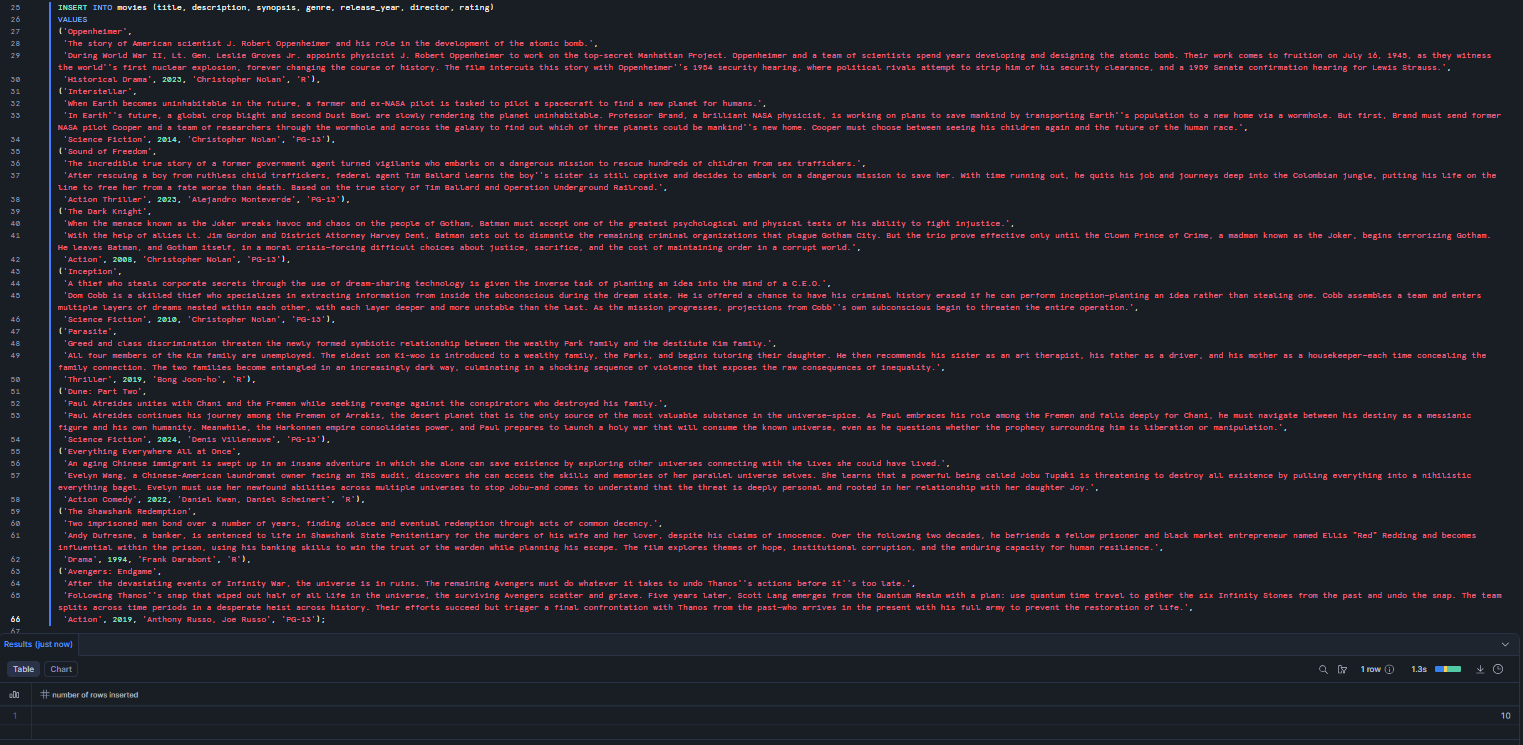
Figure 3: Inserting ten sample movie records spanning multiple genres into the movies table
Now verify that all ten rows loaded correctly:
SELECT movie_id, title, description, genre, release_year, director
FROM movies
ORDER BY movie_id;
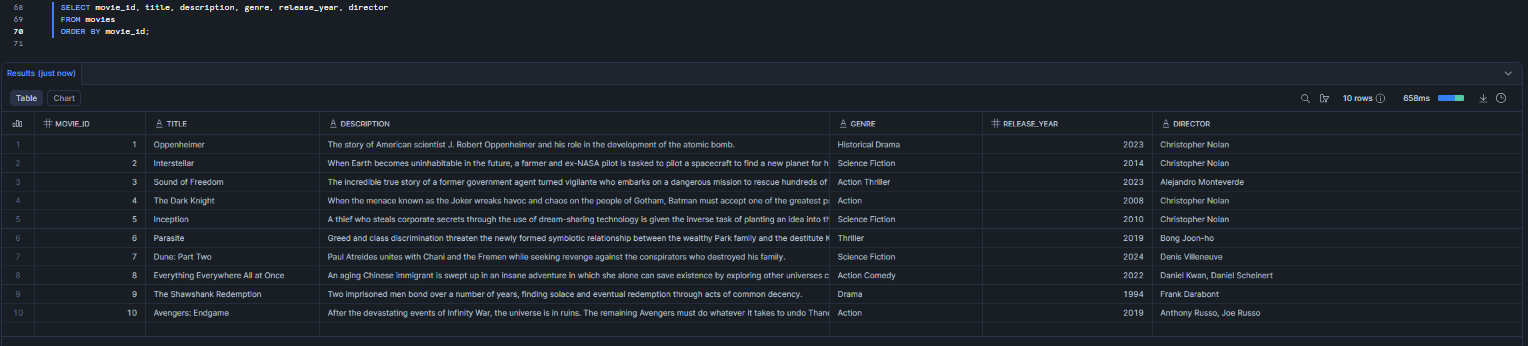
Figure 4: Verifying all ten movie rows are present and correctly ordered by movie_id
You should see all ten rows, with movie_id values 1 through 10 auto-assigned by the AUTOINCREMENT sequence.
Step 4—Enable Snowflake change tracking on the source table
This step is critical and is frequently skipped in tutorials. Snowflake Cortex Search Service requires change tracking to be enabled on the source table to perform incremental index refreshes. Without Snowflake change tracking, Snowflake cannot identify which rows changed between refresh cycles, which forces a full reindex on every TARGET_LAG interval. This is significantly slower and more expensive as your table grows.
To enable Snowflake change tracking, execute the following command:
ALTER TABLE movies SET CHANGE_TRACKING = TRUE;
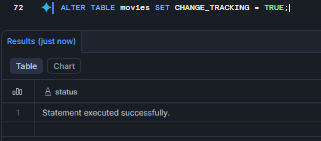
Figure 5: Enabling change tracking on the movies table to support incremental Cortex Search index refreshes
Snowflake will automatically enable it when you create the service if your role owns the table, but it is good practice to set it explicitly.
Step 5—Create Snowflake Cortex Search Service
This is a crucial step. Now, with the source data loaded and change tracking enabled, you can now create the Snowflake Cortex Search Service. Snowflake will build a hybrid search index over the specified text column and make all other declared columns available as filterable result attributes.
CREATE CORTEX SEARCH SERVICE movies_search_service
ON synopsis
ATTRIBUTES title, description, genre, release_year, director, rating
WAREHOUSE = movies_cke_wh
TARGET_LAG = ‘1 hour’
AS (
SELECT
movie_id,
title,
description,
synopsis,
genre,
release_year,
director,
rating
FROM movies
);
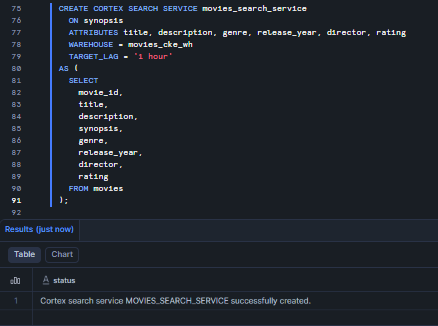
Figure 6: Creating the movies_search_service Cortex Search Service with hybrid indexing on the synopsis column
Here is what each parameter does:
- ON synopsis clause is what Snowflake embeds and indexes for search. It is what gets searched when you look for something, using both semantic search and BM25 keyword matching
- ATTRIBUTES clause includes things like title, description and genre. These travel with each result and can be used to filter, but they do not impact the ranking
- We are using the movies_cke_wh warehouse for both the initial index build and every subsequent incremental refreshes
- TARGET_LAG is set to 1 hour, which means the index will reflect changes to the source table within an hour. You can adjust this to be as short as 1 minute or as long as 7 days
- AS (SELECT …) clause is where you define the source query. This is where you can join tables, apply filters or calculate new columns before indexing the data
Note: Snowflake uses snowflake-arctic-embed-m-v1.5 as the embedding model by default. The embedding model cannot be changed after the service is created. If you want a different model, you will need to drop and recreate the service. If you want to pin a specific model upfront, add EMBEDDING_MODEL = ‘snowflake-arctic-embed-l-v2.0’ before the AS clause.
The initial index build starts immediately after the CREATE completes. For ten rows, this takes seconds. For a table with millions of rows, it will take 10 to 30 minutes.
Step 6—Verify the service and run test queries
Once the CREATE statement executes, indexing starts in the background. Check the status:
First, check that the service was created:
SHOW CORTEX SEARCH SERVICES;

Figure 7: Listing all Snowflake Cortex Search Services in the current schema, showing status, warehouse and target lag—Snowflake Cortex Knowledge Extensions (Snowflake CKE)
SHOW CORTEX SEARCH SERVICES lists every Snowflake Cortex Search Service in the current schema and displays their status, the warehouse they are bound to, target lag and creation timestamp. Confirm that movies_search_service appears in the output.
Then, describe the service to check the indexing state:
DESCRIBE CORTEX SEARCH SERVICE movies_search_service;

Figure 8: Describing movies_search_service to inspect its indexing_state, search column and attribute columns
Look at the indexing_state column. It moves through INDEXING ⇒ ACTIVE. If you see SUSPENDED, check indexing_error for the cause. Main culprits of this very issue might be missing CORTEX_USER database role, change tracking not enabled on the source table or a warehouse that is too small.
If the service is suspended, resume indexing with the following command:
ALTER CORTEX SEARCH SERVICE movies_search_service RESUME INDEXING;
Next, let us run a semantic test query.
Once indexing_state is ACTIVE, validate the index with SNOWFLAKE.CORTEX.SEARCH_PREVIEW:
SELECT PARSE_JSON(
SNOWFLAKE.CORTEX.SEARCH_PREVIEW(
‘movies_search_service’,
‘{
“query”: “space exploration and survival in the future”,
“columns”: [“title”, “synopsis”, “genre”, “director”],
“limit”: 3
}’
)
)[‘results’] AS results;
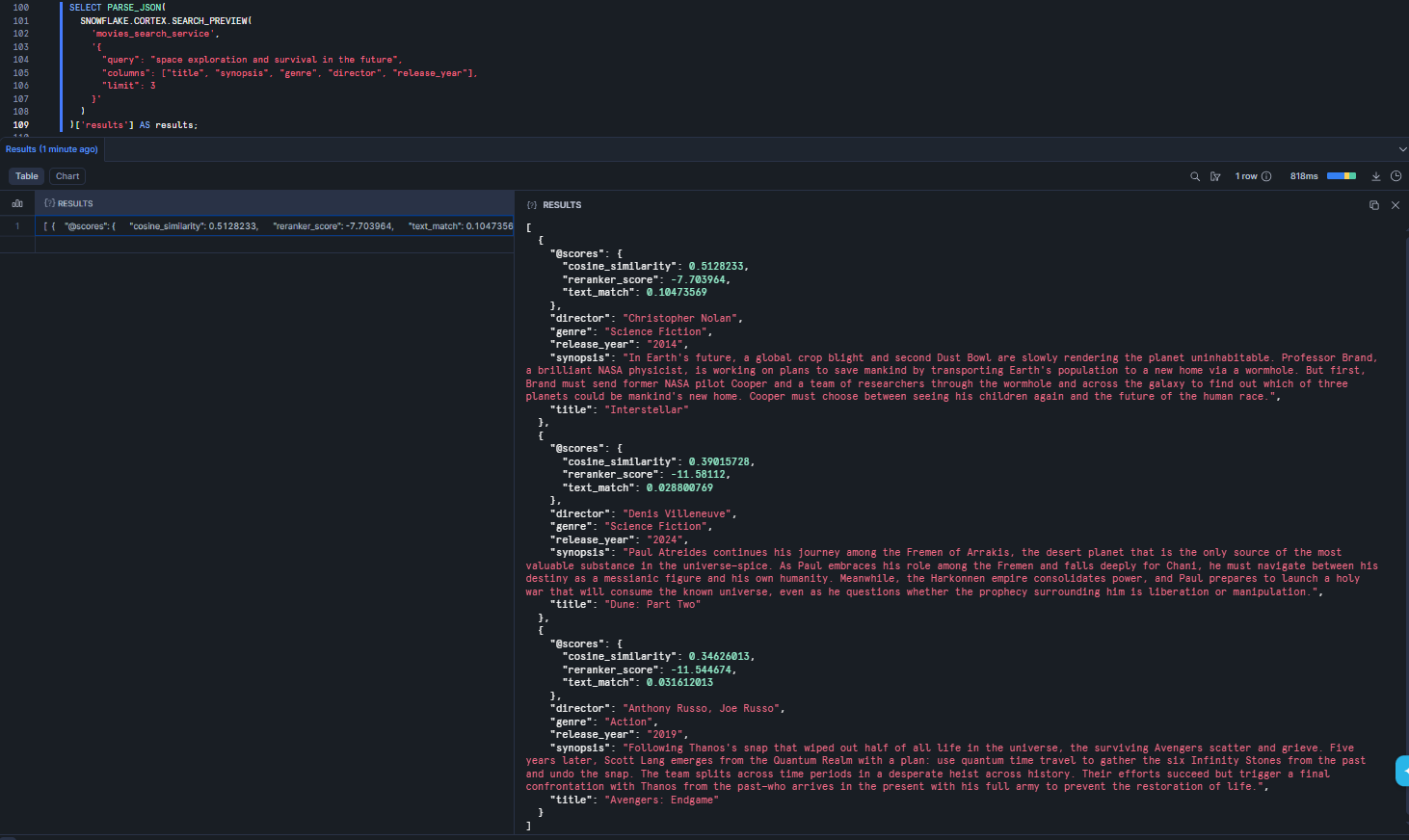
Figure 9: Semantic test query returning ranked results for ‘space exploration and survival in the future’
This should display Interstellar, Dune: Part Two and possibly Avengers: Endgame, since all three involve near-future or science fiction themes around survival and exploration. The PARSE_JSON(…)[”results”] wrapper extracts just the ranked results array from the JSON response.
Then, run a filtered query:
SELECT PARSE_JSON(
SNOWFLAKE.CORTEX.SEARCH_PREVIEW(
‘movies_search_service’,
‘{
“query”: “multiverse exploration across parallel lives and alternate realities”,
“columns”: [“title”, “synopsis”, “director”, “release_year”],
“filter”: {“@eq”: {“genre”: “Action Comedy”}},
“limit”: 3
}’
)
)[‘results’] AS results;
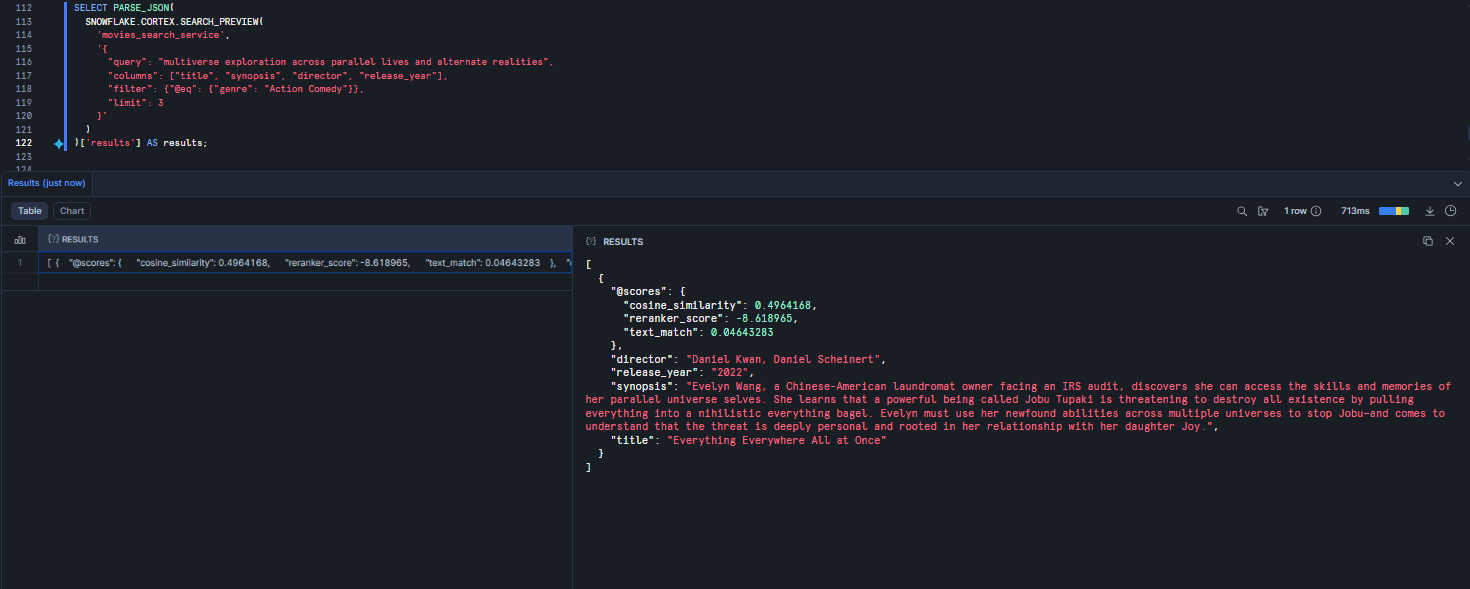
Figure 10: Genre-filtered query restricting results to Action Comedy
Now, with the @eq filter applied to the genre attribute, results are restricted exclusively to rows where genre = ‘Action Comedy’. This returns Everything Everywhere All at Once. The filter parameter accepts Snowflake’s Cortex Search JSON filter syntax, which supports equality (@eq), inequality (@ne), range operators (@gte, @lte) and logical combinators (@and, @ or, @not). This filtering behavior is the primary mechanism for scoping results in a production RAG pipeline.
Finally, now let us inspect indexed rows. To do so, you can use CORTEX_SEARCH_DATA_SCAN to inspect the actual indexed rows and confirm all 10 movies were picked up:
SELECT *
FROM TABLE(
CORTEX_SEARCH_DATA_SCAN(
SERVICE_NAME => ‘movies_search_service’
)
);
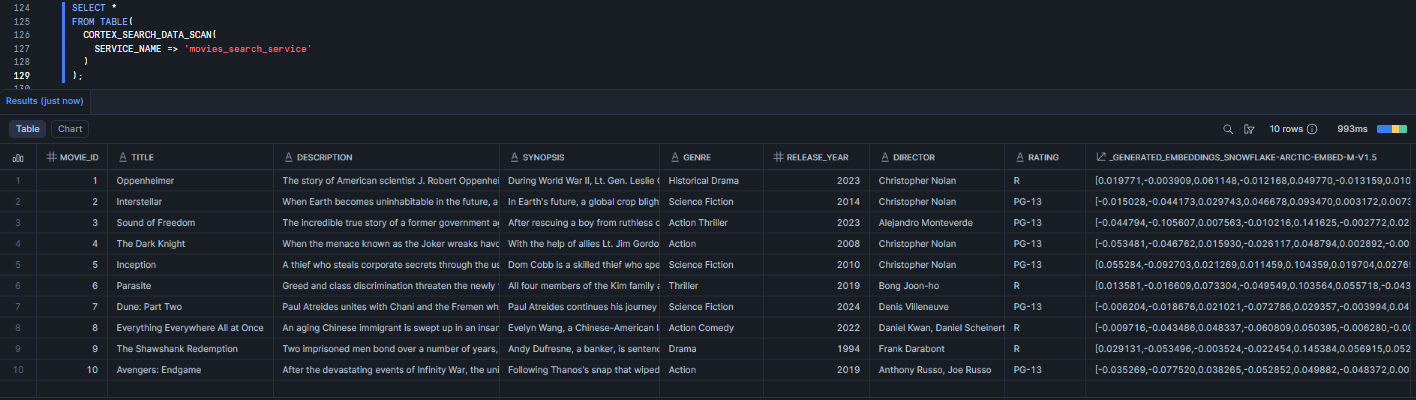
Figure 11: Scanning all indexed rows via CORTEX_SEARCH_DATA_SCAN to confirm all ten movies are indexed with populated embeddings
CORTEX_SEARCH_DATA_SCAN is a table function that returns every row in the index, including a generated EMBEDDING column containing the dense vector representation of each indexed text. If all ten movies are present and the embedding column is populated (non-null ARRAY values), the service is fully functional.
⚠️ Important: SEARCH_PREVIEW and CORTEX_SEARCH_DATA_SCAN are diagnostic tools intended exclusively for development and testing. Never use either function in production query paths. Both operate outside the optimized serving layer and have significantly higher latency than the REST API or Cortex Agent integrations used in production.
Manage the service lifecycle:
To force an immediate index refresh without waiting for the next TARGET_LAG cycle:
ALTER CORTEX SEARCH SERVICE movie_search_service REFRESH;
To suspend and resume the indexing and serving layers independently:
— Suspend indexing only
ALTER CORTEX SEARCH SERVICE movie_search_service SUSPEND INDEXING;
— Suspend serving only
ALTER CORTEX SEARCH SERVICE movie_search_service SUSPEND SERVING;
— Resume everything
ALTER CORTEX SEARCH SERVICE movie_search_service RESUME;
Step 7—Register as a Snowflake Marketplace provider and access Provider Studio
If you have not already registered as a Snowflake Marketplace provider, you must complete this registration before you can create a listing. Provider registration requires approval from Snowflake and typically takes 1 to 2 business days.
In Snowflake Snowsight, navigate to Snowflake Marketplace ⇒ Provider Studio.
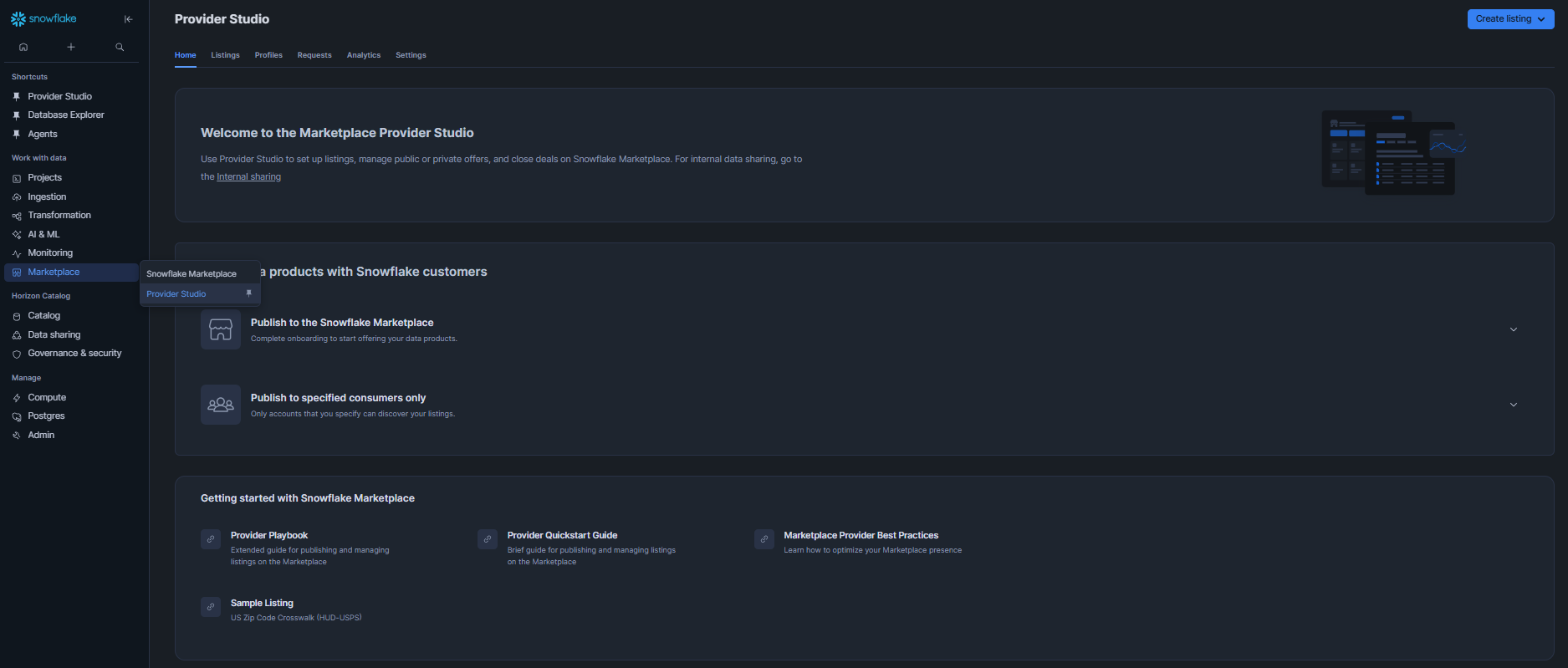
Figure 12: Navigating to Provider Studio under Data Products in Snowflake Snowsight left navigation panel
In Provider Studio, select Profiles from the top navigation. To create a new provider profile, click + Profile, which opens the profile creation dialog.
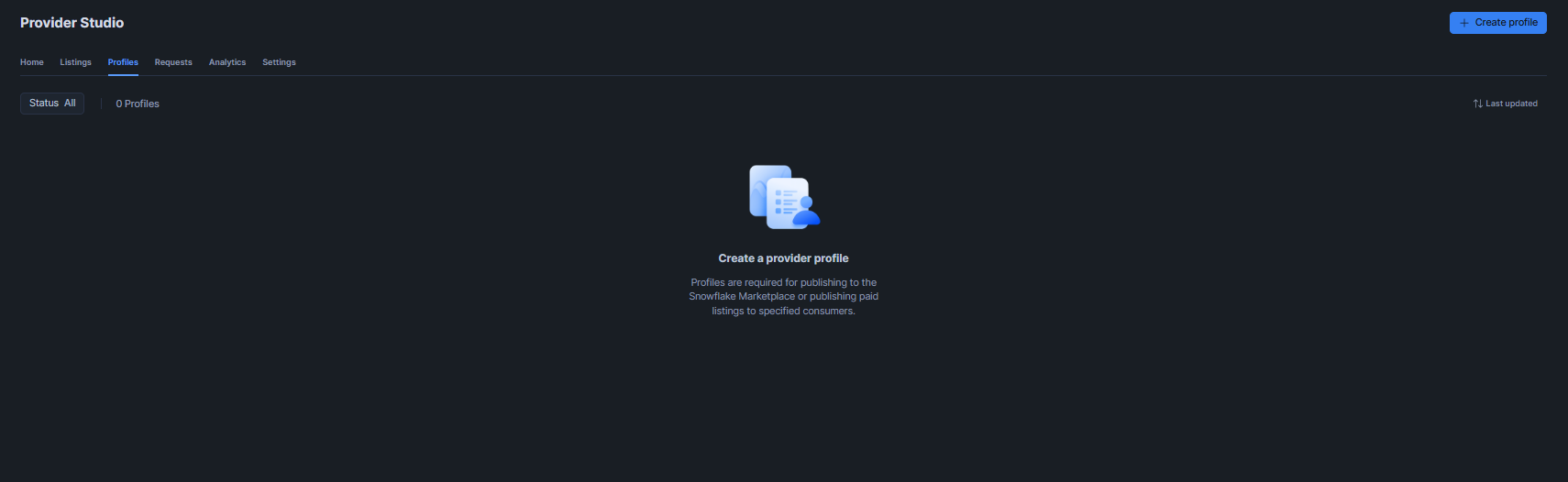
Figure 13: Accessing the Profiles section and clicking + Profile to open the provider registration dialog
Fill in all required fields in the Create Profile dialog (like company name, display name, website and a brief description of your data offerings). Select Next to review and confirm your profile details before submitting for approval.
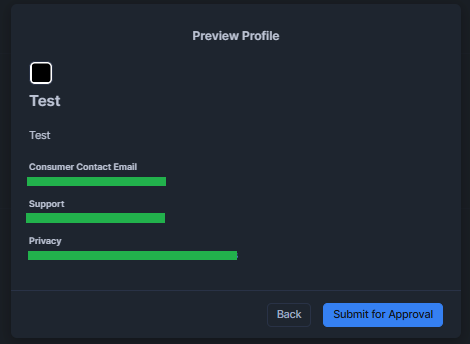
Figure 14: Filling in the required fields in the Create Profile dialog before submitting for approval
Once your profile is approved, Provider Studio becomes your central hub for creating and managing all Snowflake Marketplace listings, monitoring query analytics and reviewing consumer activity.
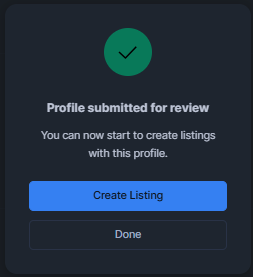
Figure 15: Reviewing and submitting the Provider Profile details
Step 8—Create a new Knowledge Extension listing in Snowflake Provider Studio
Now head back to Provider Studio, create the Snowflake Marketplace listing that will surface your Snowflake Cortex Search Service to consumers.
Navigate to Provider Studio and select Create Listing ⇒ Snowflake Marketplace.
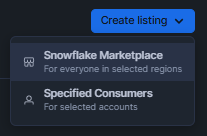
Figure 16: Selecting Create Listing and choosing the Snowflake Marketplace distribution channel
Enter a title for the listing (for example, Movies Knowledge Base or Movies CKE Listing) and save it.
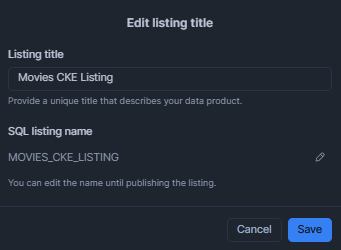
Figure 17: Entering the listing title and saving the initial listing draft in Provider Studio
Under Data product, click Add data product and attach movies_search_service. Snowflake automatically includes the secure share tied to this service’s database and schema.
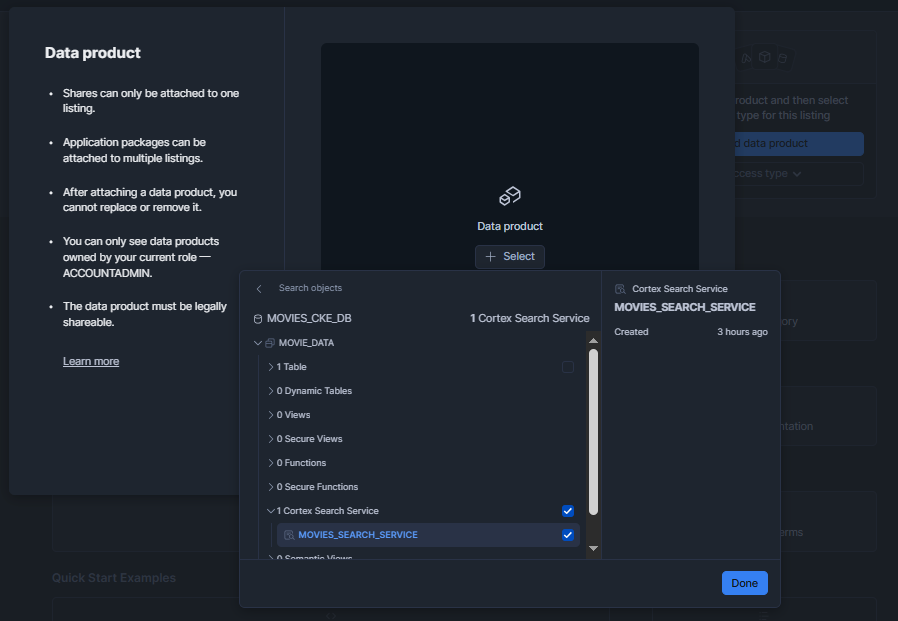
Figure 18: Attaching movies_search_service as the data product for the Snowflake Cortex Knowledge Extensions listing via the Add data product dialog
Set the Access Type. Choose Free to make the extension available at no charge or paid to monetize it through Snowflake Marketplace subscriptions. Paid listings go through an additional billing confirmation step on the consumer side at install time.
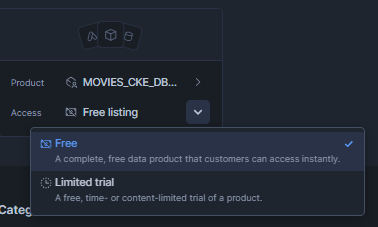
Figure 19: Setting the listing access type to Free or Paid in the Provider Studio listing configuration
To offer a time-limited free trial for a paid listing, select the Limited trial option:
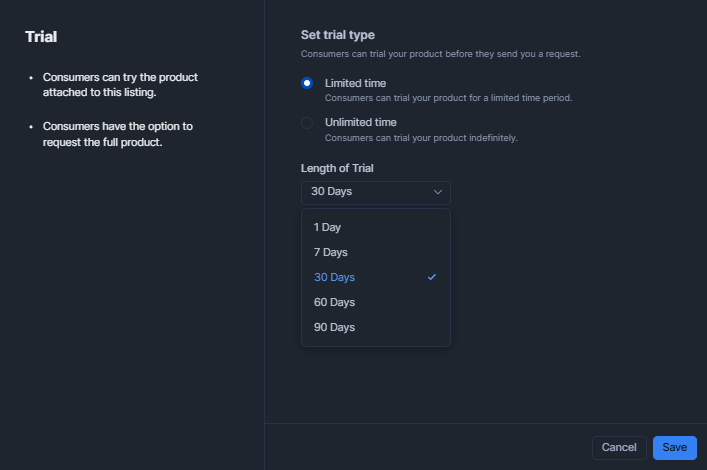
Figure 20: Enabling a Limited Trial option to allow consumers to evaluate the listing before committing to a paid plan—Snowflake Cortex Knowledge Extensions (Snowflake CKE)
Navigate to the Categories section. In the listing type dropdown, select Snowflake Cortex Knowledge Extension. This classification tag is what makes the listing discoverable in the CKE-specific filter in the Snowflake Marketplace search interface and it is also what enables the CKE-specific capabilities on the consumer side.
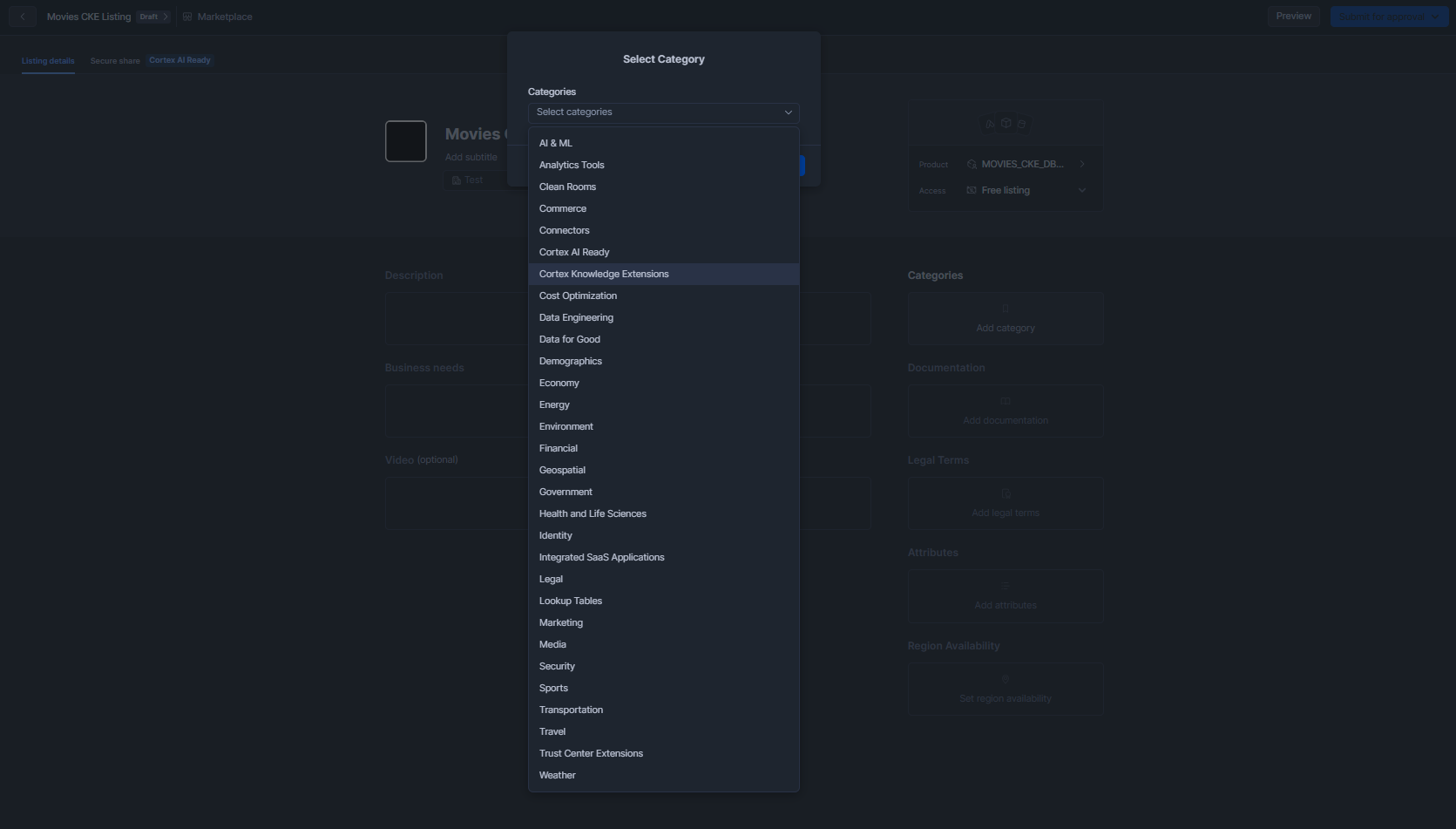
Figure 21: Selecting ‘Cortex Knowledge Extension’ from the Listing type dropdown in the Categories section
In the Attributes section, complete the metadata fields: Update frequency (how often the index is refreshed), Geographic coverage, Geographic granularity, Time range (the temporal span of the data) and any additional custom attributes relevant to your dataset.
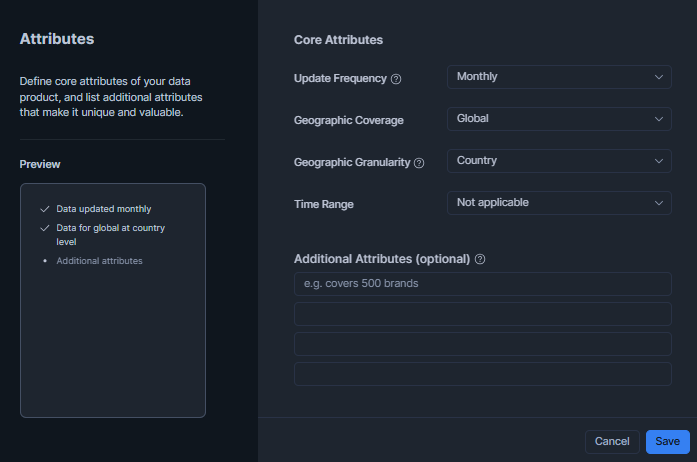
Figure 22: Configuring listing attributes including update frequency, geographic coverage and time range
On the main listing page, add a Description and Business Needs section tailored to your content domain. These fields are the primary text consumers see on the listing detail page.
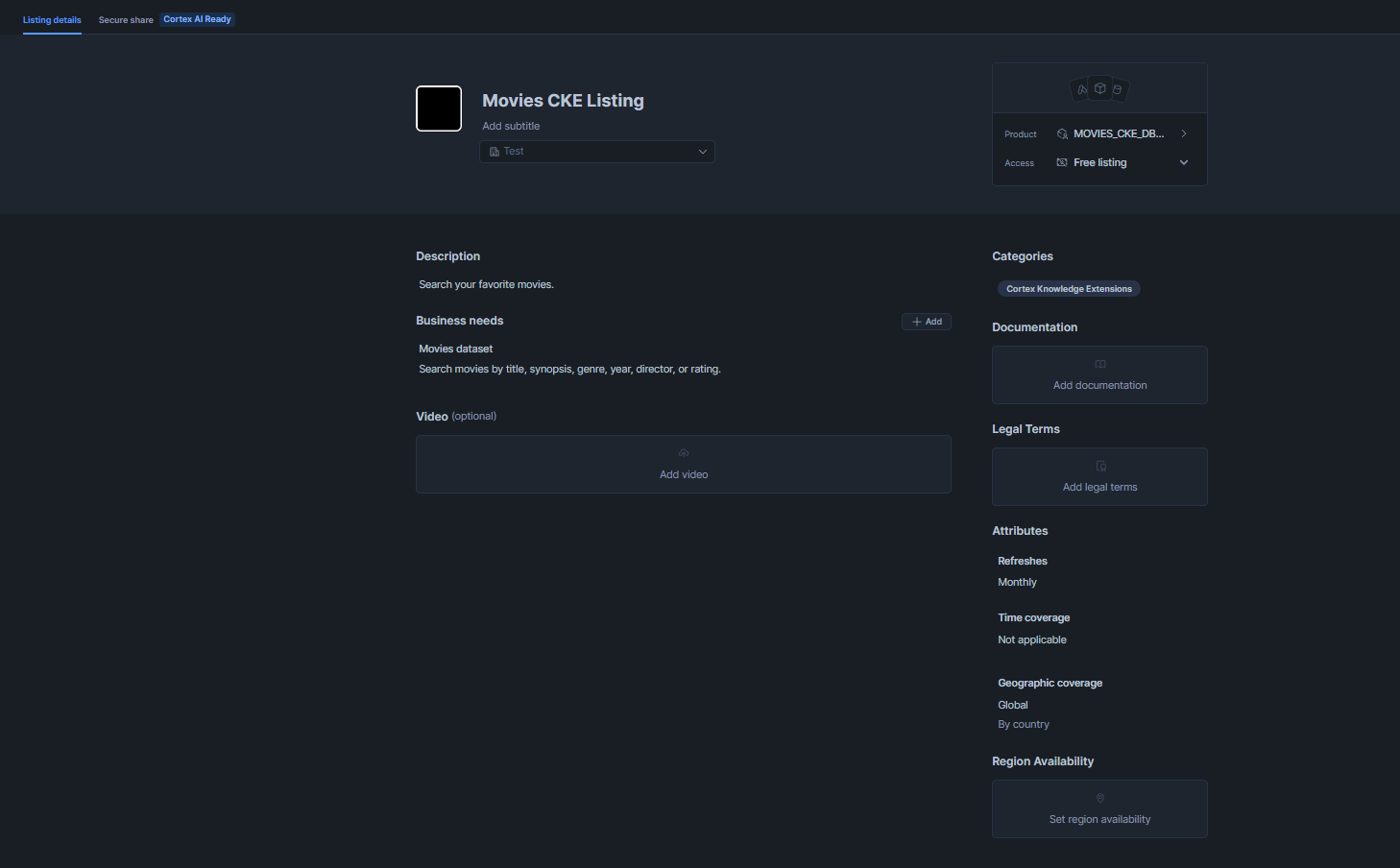
Figure 23: Adding the listing description and business needs text on the main listing detail page
At the bottom of the listing page, review the Region Availability settings. Leave this set to All Regions so that Snowflake automatically replicates the shared data to every region where Snowflake Cortex Search is available.
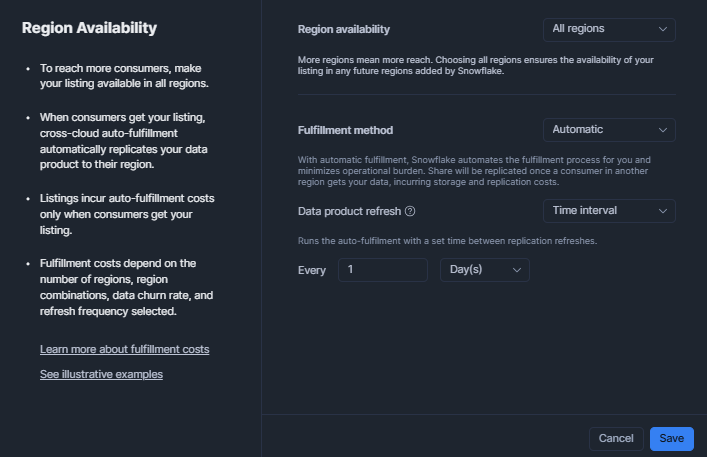
Figure 24: Reviewing region availability settings and confirming all regions are selected for auto-replication
Step 9—Enable content protection (optional but strongly recommended for paid Snowflake Cortex Knowledge Extensions)
Content protection caps the volume of indexed corpus that any single consumer can retrieve within a rolling 24-hour window, expressed as a fraction of your total indexed corpus. This prevents bulk extraction of your proprietary data via repeated high-limit queries. Content protection is configured at the listing level via a YAML manifest embedded in the listing definition (not on the Snowflake Cortex Search Service itself).
The YAML structure for content protection is:
$$
cke_content_protection:
enable: true
threshold: 0.2
$$
The threshold value is expressed as a fraction of the total indexed corpus. A value of 0.2 means a consumer can retrieve at most 20% of all indexed rows within any rolling 24-hour window. Once a consumer account hits this threshold, subsequent queries return a content-protection error until the 24-hour window resets. You can set this between 0.0 (no protection, effectively disabled) and 1.0 (100% of corpus retrievable; equivalent to no restriction). A value of 0.1 to 0.3 is typical for commercial Snowflake Cortex Knowledge Extensions.
Step 10—Configure governance and publishing settings
Snowflake Provider Studio may present additional governance settings, including the legal agreement that consumers must accept before installing the listing. You can either attach the standard Snowflake Data Marketplace Agreement or upload a custom legal document. Select the appropriate option and save.
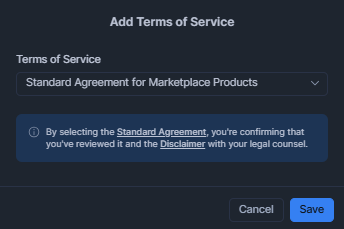
Figure 25: Selecting the legal agreement type (Standard Marketplace Agreement or custom terms) in the governance settings
To confirm the listing is fully and correctly configured, run:
DESCRIBE LISTING movie_cke_listing;

Figure 26: Running DESCRIBE LISTING to verify the listing’s data product, access type, regions and status before publishing
Step 11—Publish the Cortex Knowledge Extension
Once everything is configured and verified, click Submit for approval in Provider Studio to initiate the Snowflake Marketplace review process. Snowflake performs a content review and typically approves listings within 1 to 3 business days.

Figure 27: Publishing the Cortex Knowledge Extensions listing
After the listing is approved and goes live, monitor its performance via Provider Studio ⇒ Home ⇒ Analytics. This dashboard shows query counts per listing over time, consumer installation counts and error rates.
At this point, the Snowflake Cortex Search Service is officially published as a Cortex Knowledge Extension. Any eligible Snowflake account in a supported region can now discover, install and query it.
Phase B—Consumer Workflow (installing and using the knowledge extension)
Now, let’s go over the steps on how to actually install and use the Snowflake Cortex Knowledge Extensions.
Step 1—Sign in to Snowflake Snowsight
Sign in to your Snowflake account at https://app.snowflake.com. You will need either the ACCOUNTADMIN role or a role that has been granted the IMPORT SHARE privilege to install the Snowflake Marketplace listing.
Step 2—Search and Install the Snowflake Cortex Knowledge Extensions from Snowflake Marketplace
In Snowflake Snowsight, navigate to Snowflake Marketplace.
Use the search bar to find Snowflake Cortex Knowledge Extensions by name, provider or the Cortex Knowledge Extension category filter. The listing detail page displays the description, the attribute schema (so you know what columns you can filter on), sample queries, pricing model and trial terms.
Click Get to begin the installation flow.
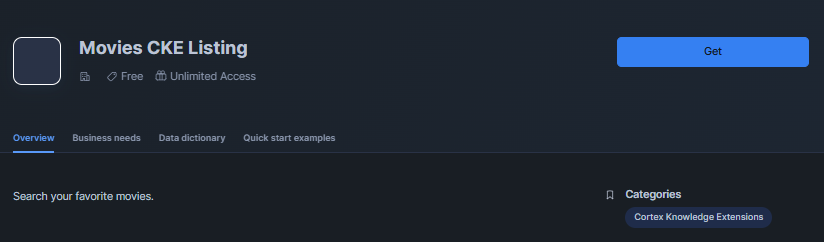
Figure 28: Clicking ‘Get’ on the CKE listing detail page in Snowflake Marketplace to start the installation—Snowflake Cortex Knowledge Extensions (Snowflake CKE)
In the installation dialog, choose a target database name. This is the name of the read-only shared database that Snowflake will provision in your account to expose the provider’s Cortex Search Service. If you are following this walkthrough, a name such as MOVIE_CKE_CONSUMER is appropriate and descriptive.
Click Get again in the confirmation dialog. Snowflake provisions the shared database and schema in your account. You will see a confirmation screen and can navigate to the database immediately.
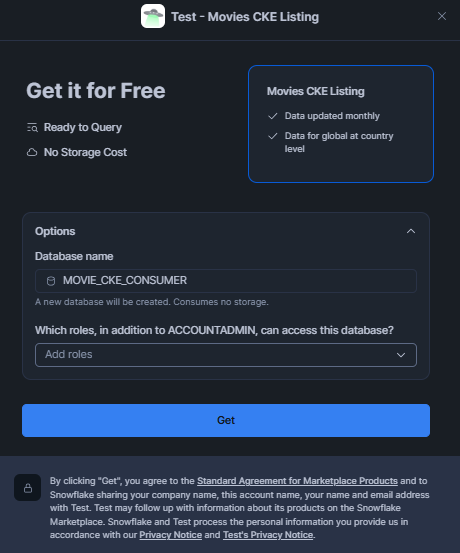
Figure 29: Confirming the installation dialog and viewing the provisioned shared database in the consumer account—Snowflake Cortex Knowledge Extensions (Snowflake CKE)
If the listing is paid and has no active trial, you will be routed through a subscription or billing confirmation step before the database is provisioned.
Step 3—Verify the installed Snowflake Cortex Search Service is accessible
Open a SQL Worksheet and set the context to the installed database and schema:
USE DATABASE MOVIE_CKE_CONSUMER;
USE SCHEMA MOVIE_CKE_CONSUMER.shared;
SHOW CORTEX SEARCH SERVICES;

Figure 30: Running SHOW CORTEX SEARCH SERVICES in the installed consumer database to confirm the service is visible—Snowflake Cortex Knowledge Extensions (Snowflake CKE)
The output lists the service name, creation date, search column, attribute columns and current status. Take note of the exact fully qualified service name (MOVIE_CKE_CONSUMER.movie_data.MOVIES_SEARCH_SERVICE) as you will reference it in every downstream query.
Describe the service to inspect its full configuration:
DESCRIBE CORTEX SEARCH SERVICE MOVIE_CKE_CONSUMER.shared.MOVIES_SEARCH_SERVICE;

Figure 31: Describing the installed Cortex Search Service—Snowflake Cortex Knowledge Extensions (Snowflake CKE)
The output includes search_column, attribute_columns, indexing_status, target_lag and the embedding_model the provider used. This metadata tells you exactly what you can query and filter on.
Run a test query to confirm the service is responding:
SELECT PARSE_JSON(
SNOWFLAKE.CORTEX.SEARCH_PREVIEW(
‘MOVIE_CKE_CONSUMER.shared.MOVIES_SEARCH_SERVICE’,
‘{
“query”: “space exploration survival story”,
“columns”: [“title”, “synopsis”, “genre”, “release_year”],
“limit”: 3
}’
)
)[‘results’] AS results;
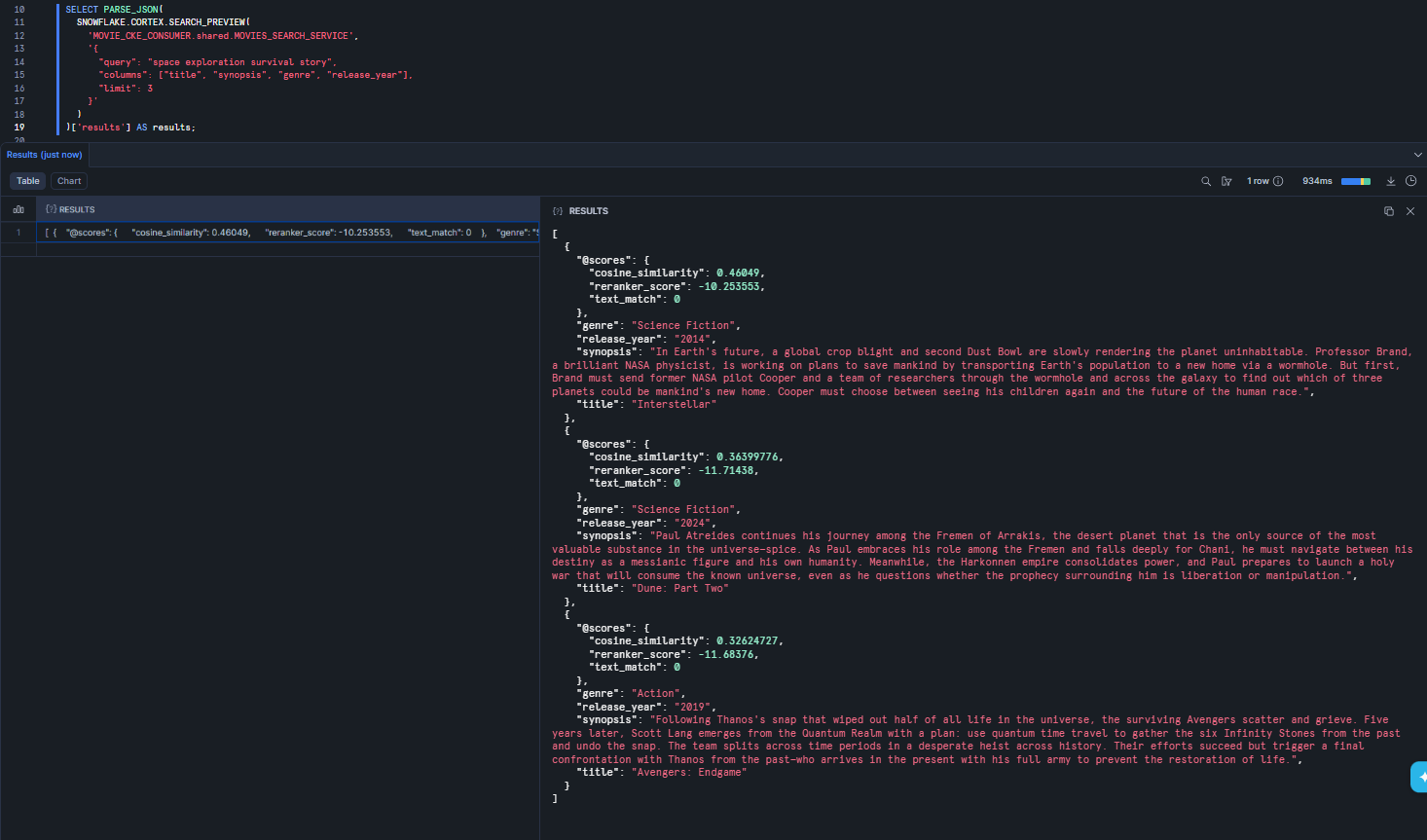
Figure 32: Running a test search query from the consumer account to confirm the installed service is active and returning results—Snowflake Cortex Knowledge Extensions (Snowflake CKE)
You should get back a JSON array of result objects. If the query returns an error or empty results, check that the service status is ACTIVE in the DESCRIBE output; it may still be initializing after installation.
If you see a SUSPEND status, the service has been suspended by the provider. You cannot resume a Snowflake CKE’s service from the consumer side. That is entirely within the provider’s control.
Step 4—Integrate the Knowledge Extension into an AI agent or RAG pipeline
The most powerful use of Snowflake Cortex Knowledge Extensions is wiring it into a Cortex Agent or a full retrieval augmented generation (RAG) pipeline using CORTEX.COMPLETE(). The pattern is: retrieve relevant context with the search service, then pass that context to a large language model (LLM) to generate a grounded, citation-aware response.
Here is a minimal but complete RAG implementation in SQL, built around the movie Snowflake CKE:
SET user_question = ‘What are some good movies about war and historical conflict?’;
WITH search_results AS (
SELECT
PARSE_JSON(
SNOWFLAKE.CORTEX.SEARCH_PREVIEW(
‘MOVIE_CKE_CONSUMER.shared.MOVIES_SEARCH_SERVICE’,
‘{
“query”: “‘ || $user_question || ‘”,
“columns”: [“title”, “synopsis”, “genre”, “director”, “release_year”],
“limit”: 5
}’
)
)[‘results’] AS results
),
context AS (
SELECT LISTAGG(
‘Title: ‘ || r.value[‘title’]::STRING || ‘ (‘ || r.value[‘release_year’]::STRING || ‘)’ ||
‘\nSynopsis: ‘ || r.value[‘synopsis’]::STRING,
‘\n\n’
) AS context_text
FROM search_results, LATERAL FLATTEN(input => results) r
)
SELECT SNOWFLAKE.CORTEX.COMPLETE(
‘claude-3-5-sonnet’,
CONCAT(
‘You are a movie recommendation assistant. Based only on the movies listed below, answer the user’s question.\n\n’,
‘Movies:\n’, context_text, ‘\n\n’,
‘Question: ‘, $user_question
)
) AS answer
FROM context;
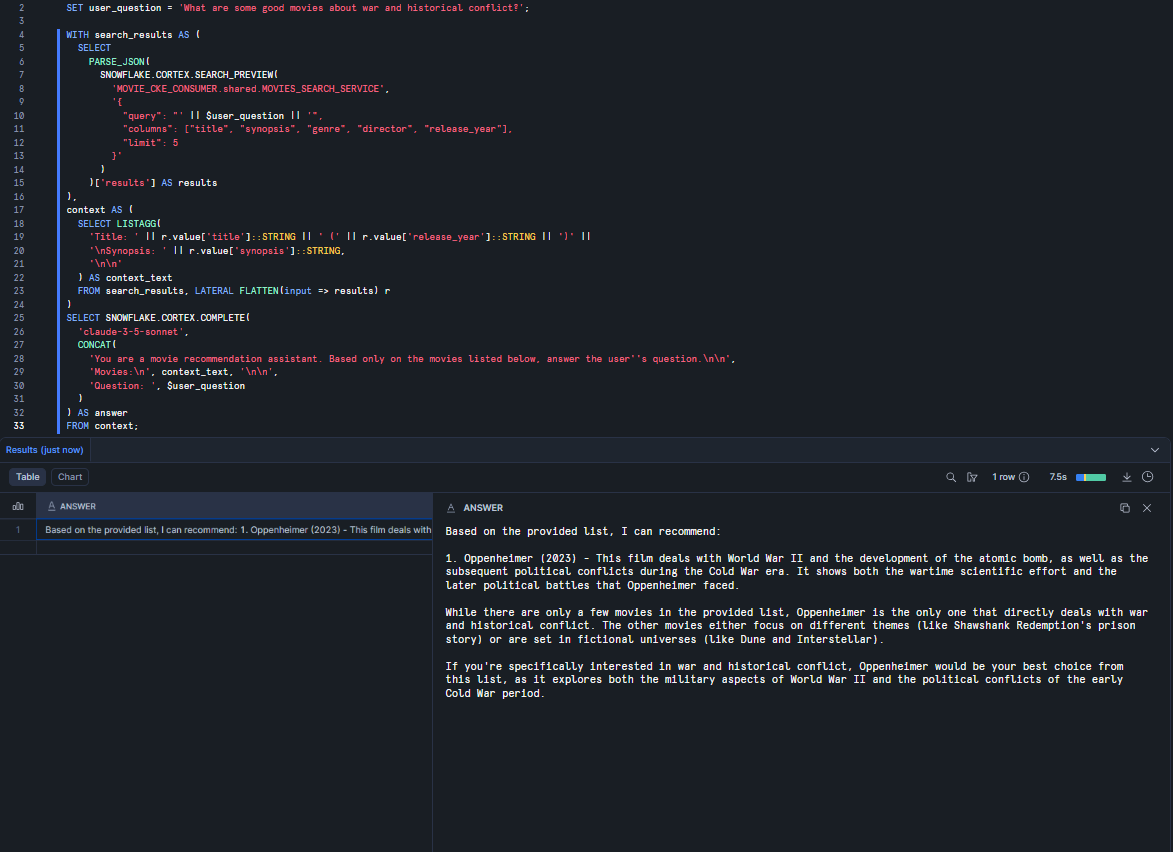
Figure 33: Executing the full three-step SQL RAG pipeline: search ⇒ context assembly ⇒ LLM completion with CORTEX.COMPLETE—Snowflake Cortex Knowledge Extensions (Snowflake CKE)
Now that everything is working, note that the configuration is hard-coded. You have two options: build a Streamlit application for a smoother experience or use Snowflake Intelligence. In this guide, we will use Snowflake Intelligence.
First, create Snowflake cortex agents. To do that, go to the AI & ML section and click Agent, as shown below.
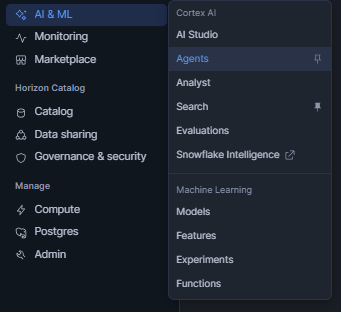
Figure 34: Navigating to AI & ML ⇒ Agents in Snowsight to begin creating a new Snowflake Cortex Agent—Snowflake Cortex Knowledge Extensions (Snowflake CKE)
The Agent acts as the orchestration layer. It routes user questions to the appropriate tools (including your Snowflake Cortex Search Service) and assembles a cited, grounded response.
Click Create agent in the top-right corner. Select the database and schema where the agent will be stored and provide a meaningful name for the agent.
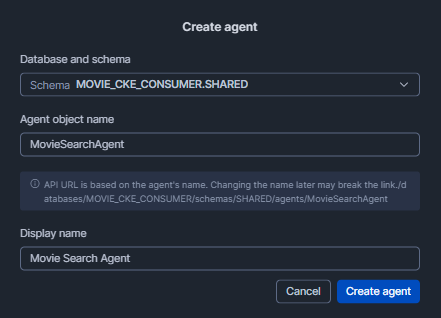
Figure 35: Creating a new agent by specifying the target database, schema and agent name in the creation dialog—Snowflake Cortex Knowledge Extensions (Snowflake CKE)
Once the agent is created, navigate to its Tools tab. Click + Add and select Snowflake Cortex Search Service as the tool type.
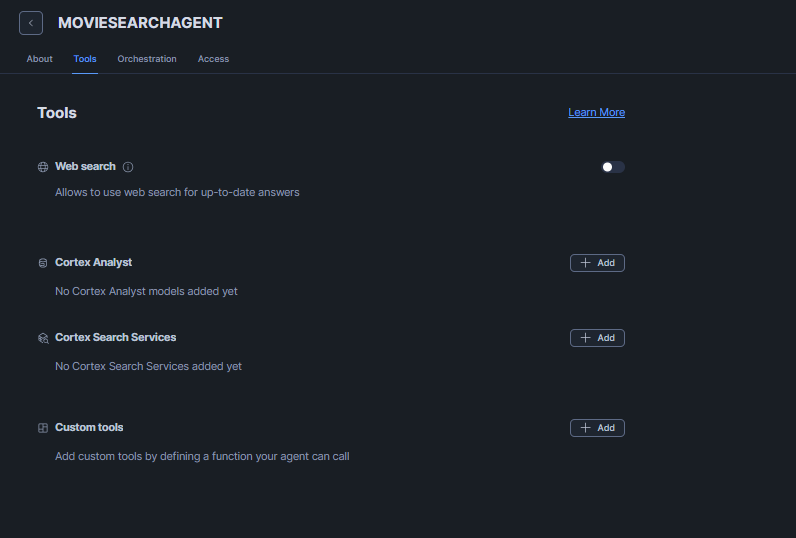
Figure 36: Opening the Tools tab and clicking + Add to configure a Cortex Search Service tool for the agent—Snowflake Cortex Knowledge Extensions (Snowflake CKE)
Select the database (MOVIE_CKE_CONSUMER) and schema. Choose movies_search_service from the service dropdown. Provide a tool name (for example, Movie_Search), set the ID column to movie_id and the title column to title. Click Add to save the tool.
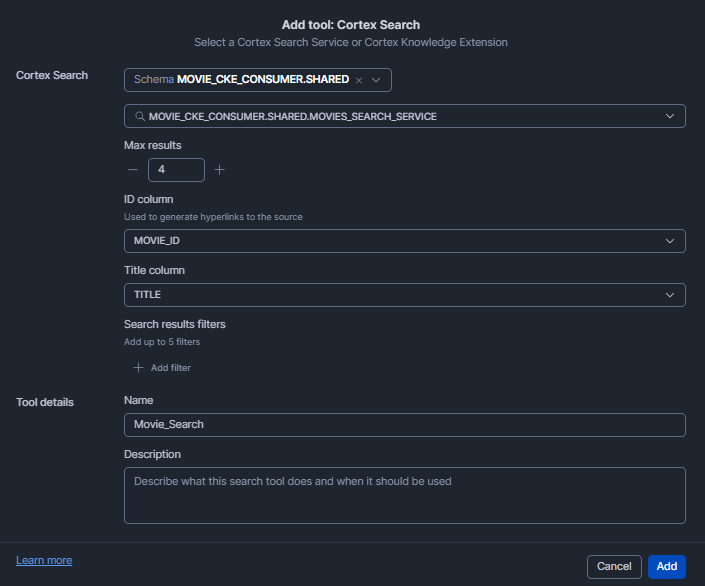
Figure 37: Selecting movies_search_service and configuring the Movie_Search tool with ID and title columns—Snowflake Cortex Knowledge Extensions (Snowflake CKE)
Once all tools are configured, the Tools section of the agent should reflect the added service:
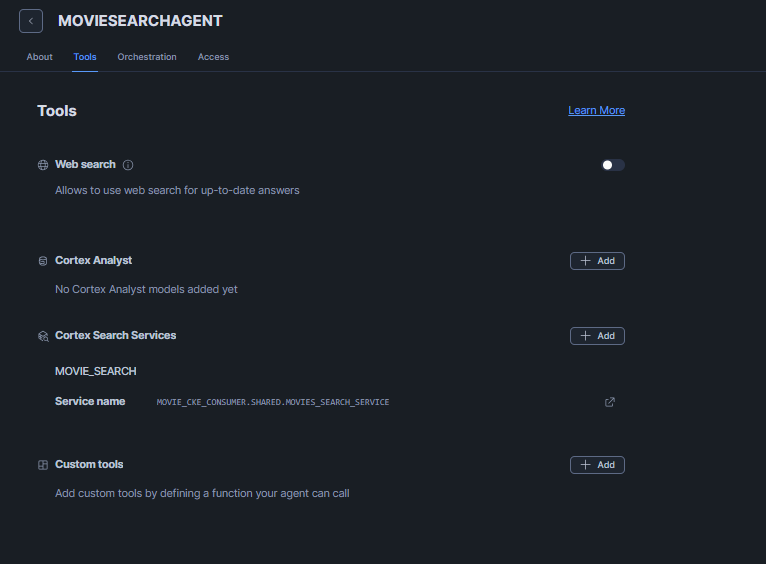
Figure 38: Viewing the completed Tools section of the agent with the Movie_Search Cortex Search Service tool listed—Snowflake Cortex Knowledge Extensions (Snowflake CKE)
Click Save to finalize the agent configuration. You’re done.
To interact with the agent conversationally, navigate to AI & ML ⇒ Snowflake Intelligence (or go directly to ai.snowflake.com). In the Agent section, select the agent you just created.
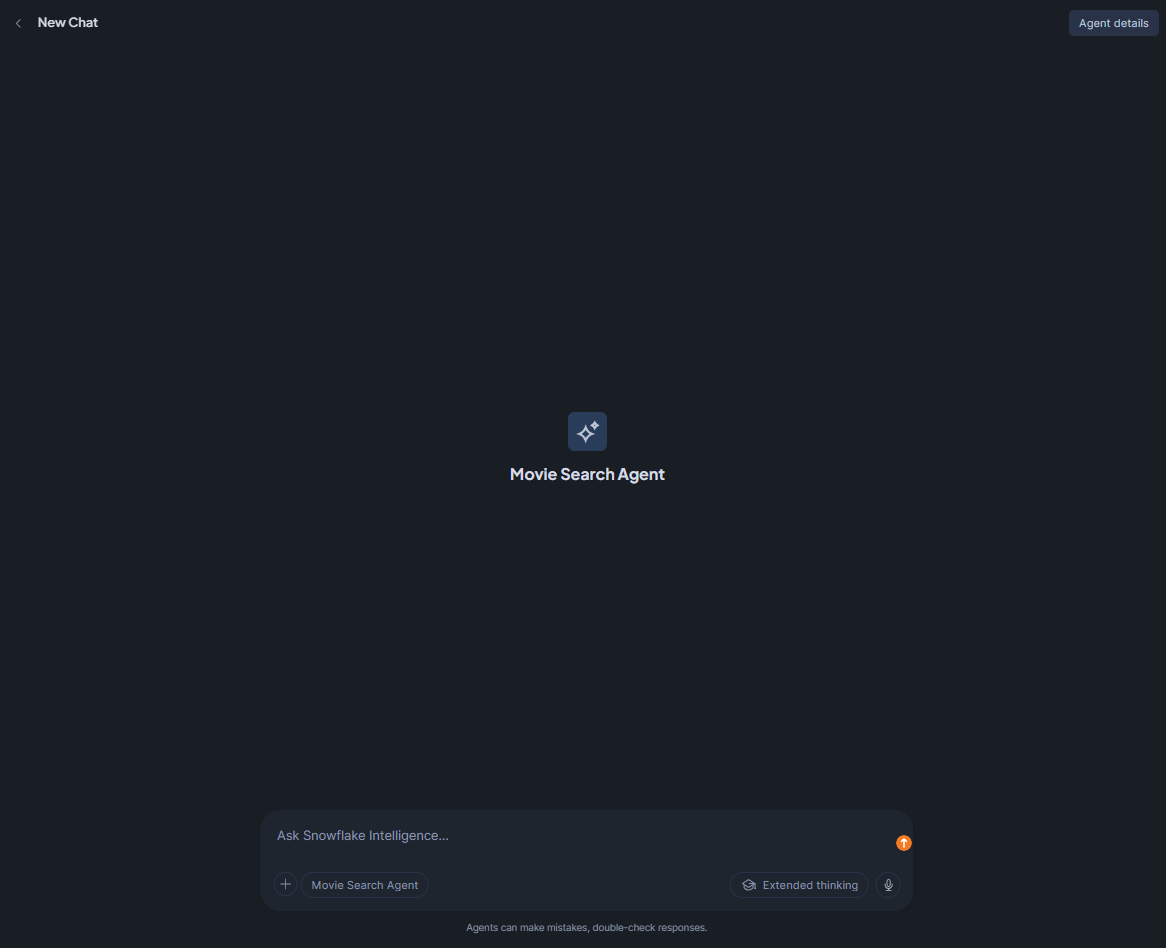
Figure 39: Selecting the configured Movie Search Agent in the Snowflake Intelligence interface—Snowflake Cortex Knowledge Extensions (Snowflake CKE)
You can now ask natural-language questions. For example, try:
What are some good movies about war and historical conflict?
Snowflake Intelligence will route the query to Snowflake Cortex Search Service, retrieve relevant movies, pass them to the large language model (LLM) and return a cited answer with links back to the source records.
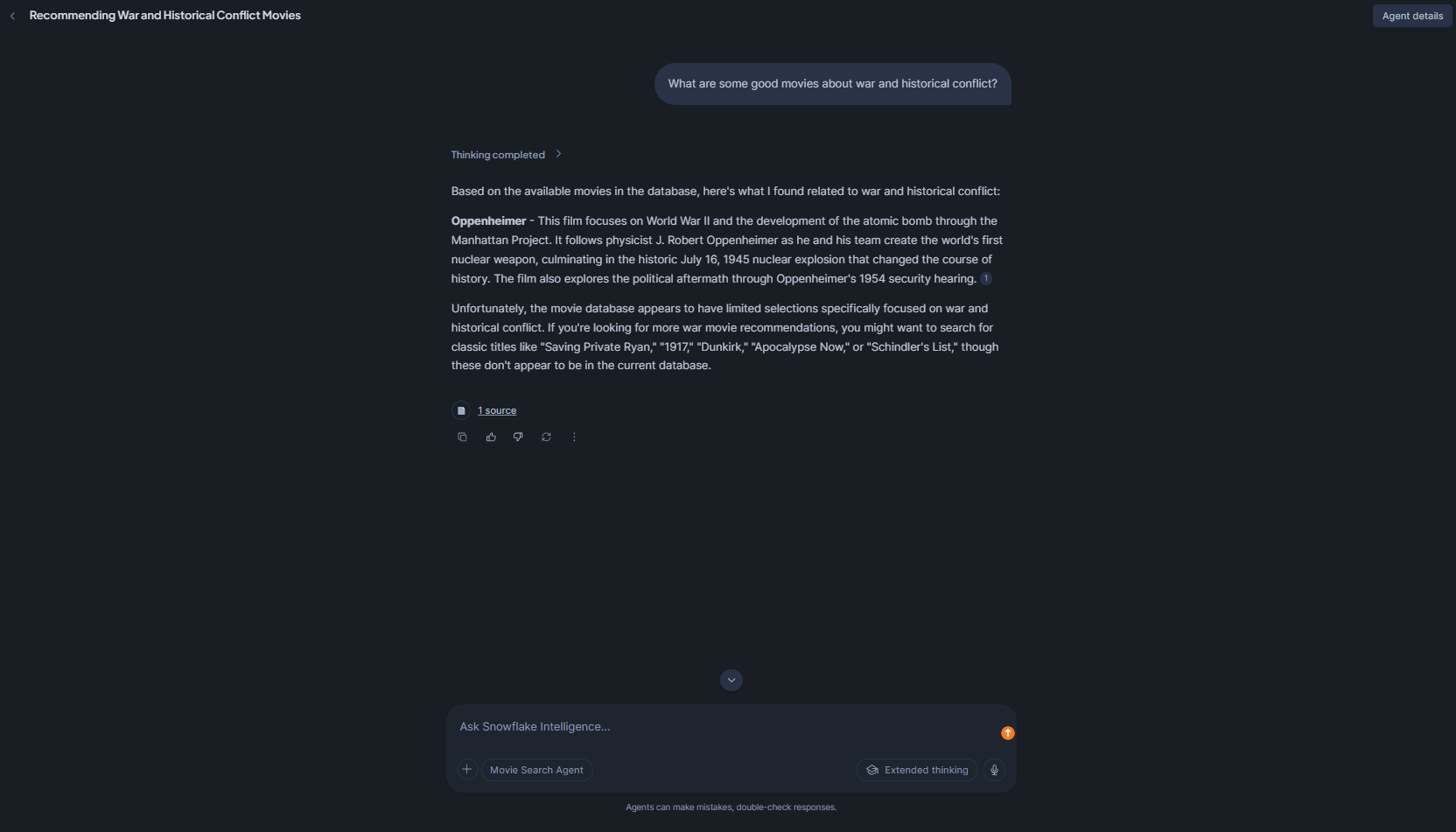
Figure 40: Snowflake Intelligence returning cited movie recommendations with source links for a war and historical conflict query—Snowflake Cortex Knowledge Extensions (Snowflake CKE)
Step 5—Monitor usage and manage the installed extension
Consumers can monitor their Snowflake CKE query activity through standard Snowflake account-level query history (INFORMATION_SCHEMA.QUERY_HISTORY or the Query History page in Snowflake Snowsight). Watch for error messages indicating the content protection daily retrieval limit has been reached. If your application hits this limit, you must wait for the 24-hour rolling window to reset before queries will succeed again; there is no consumer-side mechanism to override the limit.
To check the current indexing status of the installed service at any time:
DESCRIBE CORTEX SEARCH SERVICE <your_installed_db>.shared.<service_name>;
If the indexing status is suspended, you can resume it with:
ALTER CORTEX SEARCH SERVICE <service_name> RESUME INDEXING;
⚠️ Important
Consumers cannot execute ALTER CORTEX SEARCH SERVICE commands against a shared Snowflake CKE. All service-level operations (like including suspending, resuming and refreshing the index) are exclusively controlled by the provider. If the service becomes suspended or unavailable, contact the listing provider directly through Snowflake Marketplace messaging.
Also, if the provider deletes the Cortex Search Service or revokes the underlying share, the installed CKE in your account will become inaccessible. Build appropriate error handling in your applications to carefully handle service unavailability.
Limitations of Snowflake Cortex Knowledge Extensions
Snowflake Cortex Knowledge Extensions are powerful, but they also have some real constraints worth knowing before you build around them.
1) Text and unstructured content only
Snowflake Cortex Search is built for text and structured columns (it supports TEXT/VARCHAR). If your knowledge is in images, structured tabular data, audio or video, Snowflake Cortex Knowledge Extensions will not index it. You will need to preprocess that content into text before it can be indexed. Providers working with complex document formats should plan for a preprocessing pipeline (using Snowflake AI_EXTRACT, external optical character recognition (OCR) tools or custom chunking scripts) before the content reaches the Snowflake Cortex Search layer.
2) No raw data access for consumers
Consumers interact with search results (chunks and their attributes) but cannot query the underlying source tables. This is intentional (it is the whole point of the content protection model), but it means consumers cannot do custom aggregations, full-text exports or any analysis beyond what the search interface exposes. If you need structured analytics on the provider’s content, CKEs are not the right product. You would need a standard data share or a native app.
3) Usage-based billing for Snowflake Cortex Knowledge Extensions is not supported
You cannot bill consumers per-query at the Marketplace level. Monetization is subscription-based or off-platform. If you need metered, consumption-based billing, you will need to handle that outside of Snowflake’s built-in mechanisms.
4) Regional availability limitations
Snowflake Cortex Knowledge Extensions are available wherever Cortex Search is available. If a consumer’s account is in a region where Cortex Search is not supported, they cannot use the Snowflake CKE. Providers can use auto-fulfillment to replicate to supported consumer regions, but regions without Cortex Search support at all are out of scope. Check the Snowflake Cortex Search Regional Availability documentation for the current list of supported regions.
5) Content protection is corpus-wide, not per-document
The cke_content_protection threshold applies across the entire indexed corpus within a 24-hour rolling window. Providers cannot protect individual documents or categories of content more aggressively than others. If the threshold is hit, all queries are blocked—not just queries that would retrieve sensitive material.
6) No support for advanced customizations beyond standard Snowflake Cortex Search configurations
Snowflake Cortex Knowledge Extensions use the same Cortex Search configuration options as private services, but consumers cannot customize the index behavior – no custom reranking, no hybrid weight tuning, no custom tokenization. What the provider configures is what the consumer gets.
7) Warehouse cost for providers
Consumers do not pay for the index, but providers cover the cost of the Snowflake Cortex Search Service infrastructure. This includes indexing compute, serving compute and cross-region replication if auto-fulfillment is on. For big datasets that need frequent updates, these costs can add up. So, it is a good idea to plan your warehouse size and TARGET_LAG carefully. One approach is to use a smaller warehouse with a longer TARGET_LAG for datasets that do not change much and save the bigger warehouses for high-frequency indexing. Also, keep in mind that you are charged for serving compute per search query, so if consumers are searching a lot, that will show up as a significant cost for providers. Factor that into your pricing model if you are monetizing.
8) Limited to the Snowflake ecosystem
CKEs work within the Snowflake cloud. They cannot natively serve search outside Snowflake (no public REST API, only Snowflake SQL/AI functions). If a consumer is not on Snowflake, they cannot use it.
9) No consumer-side index customization
Consumers cannot add their own documents to a provider’s CKE, rerank results using custom models or modify the attribute schema. The search behavior is entirely determined by the provider. 
10) Snowflake Marketplace listing review latency
Public listings on the Snowflake Marketplace go through a review process before they become visible to all users. Plan for this when scheduling launches. Private listings are available immediately after publishing to targeted accounts, so if you are working on a controlled beta with known customers, use private listings to avoid review delays.
11) No versioning or rollback for consumers
If a provider updates their underlying Snowflake Cortex Search Service (like changes the chunking strategy, modifies attribute columns or updates the corpus), consumers get the updated version automatically. There is no way for a consumer to pin to a specific version of a CKE.
12) Cloning is not supported
Snowflake Cortex Search Services or Snowflake Cortex Extensions cannot be cloned. If you need a copy of a service for testing or backup purposes, you will need to recreate it from scratch.
13) Disabling serving breaks consumer applications
This one deserves emphasis. When customers use your Cortex Knowledge Extension, be careful when disabling serving of Snowflake Cortex Search Service, as that will break customers’ applications. If you need to do maintenance or rebuild your service, coordinate with consumers and communicate downtime in advance.
Snowflake Cortex Knowledge Extensions have their limits, but they are still handy for many things.
Conclusion
And that’s a wrap. Snowflake Cortex Knowledge Extensions are a genuinely practical addition to the Snowflake Artificial Intelligence (AI) ecosystem. They solve a key problem: sharing a knowledge base that is searchable and AI-ready without exposing your raw data. The solution is straightforward and fits smoothly into existing Snowflake workflows. Providers can monetize their content assets through the Snowflake Marketplace, which many customers can access. This marketplace offers built-in protection for your content and takes care of the infrastructure, so you do not have to. For consumers, it is a big plus – you can quickly add licensed knowledge from third parties to your pipelines. It is fast and easy, with no need to scrape or set up complicated ingestion pipelines. Snowflake Cortex Knowledge Extensions are especially useful for organizations with high-quality text content, like news outlets or research firms, that want to share their content with developers on Snowflake while keeping everything safe and secure.
In this article, we have covered:
- What Snowflake Cortex Knowledge Extensions are
- Difference between a Cortex Search Service and a Cortex Knowledge Extension
- How Snowflake Cortex Knowledge Extensions work
- How to create, publish and use Snowflake Cortex Knowledge Extensions
- Limitations of Snowflake Cortex Knowledge Extensions
… and so much more!
Flexera are not affiliated or endorsed by Snowflake, Inc.
FAQs
What are Snowflake Cortex Knowledge Extensions?
Snowflake Cortex Knowledge Extensions are Cortex Search Services packaged and distributed via the Snowflake Marketplace, private listings or organizational listings. They let providers share indexed, semantically searchable text knowledge with consumers, who can integrate it into RAG pipelines and AI agents without accessing the raw source data.
How do I enable content protection in Snowflake Cortex Knowledge Extensions?
Content protection is configured at the listing level via the cke_content_protection field in the listing manifest SQL. Set enable: true and specify a threshold value between 0 and 1 (0.2 for 20%). This limits each consumer to retrieving at most that percentage of the total indexed corpus within a rolling 24-hour window.
What is the difference between a Cortex Search Service and a Cortex Knowledge Extension?
Snowflake Cortex Search Service is the underlying search engine we build on our data. Snowflake Cortex Knowledge Extension is that service packaged as a Snowflake Marketplace listing. In short, every Snowflake CKE is a Cortex Search Service, but only those that are shared/published become CKEs. The CKE adds metadata, security sharing and marketplace features on top of the core service.
Do consumers get access to the provider’s raw data when they install Snowflake Cortex Knowledge Extensions?
No. Consumers only interact with the search index. They receive query results (text snippets and any attribute columns) returned by the index. The actual provider tables and raw data stay in the provider’s account. Snowflake CKE provides a semantic view of the content, not the raw dataset.
What Snowflake account edition is required to install and use Snowflake Cortex Knowledge Extensions as a consumer?
Any Snowflake edition will do for consuming a CKE. There is no special edition required on the consumer side. The main requirement is that the account is in a region that supports Snowflake Marketplace / Snowflake Cortex. Privileges to import or get shared data (IMPORT SHARE or ACCOUNTADMIN) are needed, but the edition (Standard, Enterprise…) is not a blocker.
How does a provider control who can access their Snowflake Cortex Knowledge Extensions listing?
It is pretty straightforward. For public listings, access is open to all Snowflake Marketplace users (subject to any subscription or payment requirements). Private listings are more restricted – providers choose which Snowflake accounts can see and install them. Organizational listings are only available within the provider’s own Snowflake organization. Plus, content protection gives providers an extra way to cap usage.
What happens to a consumer’s installed Snowflake Cortex Knowledge Extensions if the provider deletes or modifies the underlying Snowflake Cortex Search Service?
If the provider disables or drops the Cortex Search Service, the consumer CKE breaks immediately; queries will start failing. If the provider updates the service (adds more data, changes index settings), the consumer automatically sees the updated index on the next query (there is no version rollback available). In other words, removing the service cuts off access; modifying it simply changes what future searches return.
Can I combine multiple Snowflake Cortex Knowledge Extensions in a single RAG query?
Yes, within a Cortex Agent. You can configure multiple Snowflake Cortex Knowledge Extensions as tools in a single agent, and the agent will route queries to the appropriate Snowflake CKE based on the question. For direct SQL or Python RAG pipelines, you would query each CKE separately and merge the results in your application layer before constructing the LLM prompt.
Is there a cost to consumers for querying a Snowflake Cortex Knowledge Extension?
Consumers pay for the compute they use to query it. Each search runs on a Snowflake warehouse, so it consumes credits like any other query. If the Snowflake CKE is paid (not free), consumers also pay the provider via the Snowflake Marketplace subscription or purchase. But there is no extra per-query fee charged by Snowflake for using CKE beyond the warehouse cost.
Can a provider update the knowledge base content in a published Snowflake Cortex Knowledge Extensions?
Yes. Providers can simply insert or update rows in the source table. The Cortex Search Service will pick up new or changed documents on its refresh schedule (configured by TARGET_LAG). If indexing was paused, we can ALTER CORTEX SEARCH SERVICE … RESUME INDEXING. In short, keeping a CKE up-to-date means updating the table and letting the service re-index; no need to republish the listing. The updated content will then be searchable by consumers.
Pramit Marattha
Pramit Marattha is a technical content writer and strategist with 5+ years of experience covering AI, data engineering, data cloud platforms and open source technologies. He turns complex technical concepts into clear, useful content for engineers and developers.







