


Snowflake’s virtual warehouses have been the compute backbone of its cloud data platform since day one. They are the compute engine that powers everything you do in Snowflake. The question is, what if this engine could be even more powerful? What if it could handle more workloads at the same time? Recently, Snowflake introduced Gen2 standard warehouses, its next-gen warehouse with faster hardware and intelligent software improvements. Gen2 warehouse delivers enhanced performance through improvements to delete, update and merge operations, along with more efficient table scan operations and better overall query processing. Snowflake claims that Gen2 offers approximately ~2.1x faster performance for core analytics compared to Gen1 warehouses.
In this article, we break down everything you need to know about Snowflake Gen2 warehouses: what they are, how they work, how to create them, the performance and cost numbers and practical implementation strategies.
So, let’s get into it.
What is a Snowflake Gen2 warehouse?
The Generation 2 standard warehouse (Gen2) is Snowflake’s upgraded version (the “next generation”) of the current standard Snowflake virtual warehouse, focused on improving performance for analytics and data engineering workloads. It is not a new type of warehouse – it remains a standard warehouse (not Snowpark-Optimized Warehouse) – but it runs on upgraded hardware and query-engine improvements.
According to Snowflake:
“Generation 2 standard warehouse (Gen2) is an updated version (‘the next generation’) of the current standard Snowflake virtual warehouse, focused on improving performance for analytics and data engineering workloads”.
Snowflake Gen2 warehouses bring several key improvements to the table:
1. Upgraded CPU architecture
Gen2 uses newer CPU chips, specifically AWS Graviton3 (Arm Neoverse V1 architecture) on AWS C7g instances, with higher single-core performance. The new CPUs offer higher instructions-per-cycle (IPC) and support wider SIMD (single instruction, multiple data) instructions: 256-bit SVE (Scalable Vector Extensions) vs 128-bit NEON on Gen1 instances.
2. Faster memory and cache
Snowflake Gen2 warehouse uses DDR5 memory, which delivers roughly 50% more bandwidth than the DDR4 in Gen1 hardware. Each core also gets a larger L2 cache (2 MiB per core on Gen2 vs 1 MiB on Gen1), reducing data-fetch delays. Due to this faster memory and bigger caches, Snowflake Gen2 warehouses can read and process large data blocks more quickly.
3. Optimized query engine
Behind the scenes, Snowflake has tuned the execution engine specifically for Gen2. The scheduler dispatches more tasks in parallel, keeping CPUs busier. The engine includes targeted optimizations for table scans, joins, aggregations and DML (INSERT, UPDATE, DELETE, MERGE) operations.
4. Full standard Warehouse compatibility
Here’s the best part, Snowflake Gen2 maintains complete SQL and behavioral compatibility with existing standard warehouses. Your existing queries, applications and integrations work without modification.
5. Better concurrency
Snowflake Gen2 warehouse handles highly concurrent workloads more efficiently. Its hardware and improved scheduler can support more simultaneous queries or threads before contention becomes a bottleneck.
6. Analytics-first focus
Snowflake Gen2 warehouse is targeted for data analytics and engineering workloads (heavy queries, ETL) rather than transactional workloads. It accelerates batch queries, large scans and transformations. Small interactive queries or extremely low-latency tasks may not see as dramatic gains.
How to create a Snowflake Gen2 warehouse: Step-by-step SQL guide
You can’t just check a box in the Snowflake Snowsight UI, at least not yet. You have to use SQL.
To create a Gen2 warehouse, you use the same command as for a standard warehouse but with the RESOURCE_CONSTRAINT parameter set to STANDARD_GEN_2.
Here’s the basic syntax to create a Snowflake Gen2 warehouse:
CREATE OR REPLACE WAREHOUSE demo_snowflake_gen2_wh
	RESOURCE_CONSTRAINT = 'STANDARD_GEN_2';
The above statement creates a new Snowflake Gen2 warehouse with default settings (XS by default).
Note: that if you omit the RESOURCE_CONSTRAINT clause entirely, Snowflake will create a Gen1 warehouse by default.
You can also explicitly choose Snowflake warehouse size and other options. For example, to create a medium-sized Snowflake Gen2 warehouse:
CREATE OR REPLACE WAREHOUSE demo_snowflake_gen2_small_wh
	WAREHOUSE_SIZE = MEDIUM
	 RESOURCE_CONSTRAINT = STANDARD_GEN_2;
Here you can see, this makes a SMALL warehouse under Snowflake Gen2 warehouse. (The Snowflake WAREHOUSE_SIZE setting works the same as in a standard (Gen1) warehouse).
If you already have a Gen1 warehouse and want to convert it to a Snowflake Gen2 warehouse, you can use Snowflake ALTER WAREHOUSE with SET RESOURCE_CONSTRAINT.
ALTER WAREHOUSE demo_gen1_wh SUSPEND;
ALTER WAREHOUSE demo_gen1_wh SET RESOURCE_CONSTRAINT = STANDARD_GEN_2;
ALTER WAREHOUSE demo_gen1_wh RESUME;
Note: that you should always suspend the warehouse before converting it to a Snowflake Gen2 warehouse.
All in all, the key is the RESOURCE_CONSTRAINT clause. Setting it to STANDARD_GEN_2 makes a warehouse Gen2 and you can do that at creation or via an ALTER statement.
A few things to keep in mind; we will cover this in the limitations section, but still note it down:
⚠️ Snowflake Gen2 warehouse cannot be created using the Snowflake web UI (Snowflake Snowsight) or the classic console. You must use the above command.
⚠️ If you omit RESOURCE_CONSTRAINT, Snowflake creates a Gen1 (legacy) warehouse by default.
⚠️ Snowflake Gen2 warehouses apply only to standard warehouses. You cannot use STANDARD_GEN_2 on Snowpark‑optimized warehouses (which use the MEMORY_X constraints; we will cover this later in the example section).
⚠️ Snowflake Gen2 warehouses are available only in sizes up to 4X‑Large. X5L and X6L are not supported yet.
Snowflake Gen2 warehouse architecture: Hardware and software components
So, what’s powering these performance gains? It’s a mix of hardware and software upgrades. Here’s a high-level look at what’s under the hood:
Hardware upgrades
- New compute instances. Specifically, on the Amazon Web Services (AWS) platform, Snowflake Gen2 warehouse uses C7g instances (c7g.2xlarge) powered by the latest Arm-based Graviton3 CPUs. Each C7g.2xlarge node has 8 vCPUs (ARM Neoverse V1 cores) and about 15 GB of RAM. (In contrast, Gen1 used older C6g or other instance types). The Graviton3 delivers roughly 50% higher IPC (instructions per cycle) than the Graviton2 in Gen1.
- ARM Architecture and SIMD. The CPUs in Snowflake Gen2 warehouse are ARM architecture (aarch64) with support for ARMv8.4 features like SVE (Scalable Vector Extensions). Notably, Gen2 cores have 256-bit SIMD registers (SVE), roughly double the 128-bit NEON SIMD on Gen1. Each CPU instruction can operate on twice as many data elements in parallel. (For example, columnar scan operations can process twice the data per cycle). The CPU cores are based on Arm’s Neoverse V1 design, whereas Gen1 used Neoverse N1.
- Memory and cache. Snowflake Gen2 warehouses use DDR5 memory with ~50% more bandwidth than the DDR4 memory used in Gen1 instances. Each core has a larger L2 cache on Gen2: about 2 MiB per core vs 1 MiB per core on Gen1.
- Storage. Each compute node includes local SSD storage (hundreds of gigabytes) used for caching intermediate data, staging and spill (same as Gen1), but backed by faster CPU and memory.
Software upgrades
Aside from the physical capability of the new hardware, Snowflake has included sophisticated software optimizations tailored to Snowflake Gen2 warehouses.
- Query engine improvements. Snowflake has optimized its execution engine for the new hardware. The scheduler is more aggressive and can launch more parallel threads to keep all CPU cores busy. The engine pipelines are tuned for Gen2: for example, DML (DELETE, UPDATE, MERGE) operations can run more efficiently and full table scans and joins are accelerated. In short, the query executor has “smarter parallelism” and better algorithms that take advantage of the faster CPUs, memory and wider SIMD units.
- I/O and caching optimizations. Because Snowflake Gen2 warehouse has faster CPUs, Snowflake has adjusted its I/O mechanisms. Data movement between storage and compute is optimized so that the CPUs remain fed with data. Larger caches and memory bandwidth also reduce the need to fetch data from remote storage. The effect is that heavy operations like large joins or aggregations can run more smoothly with fewer stalls.

Snowflake Gen1 vs Snowflake Gen2 warehouse: Complete technical comparison
To see the performance improvements you need to know the tech differences between Gen1 and Snowflake Gen2 warehouses. The main differences are in the core infrastructure and how Snowflake’s engine works with it.
The table below compares the key specs.
| Snowflake Gen1 warehouse | Snowflake Gen2 warehouse | |
| AWS Arm Neoverse N1 (Graviton2) | CPU architecture | AWS Arm Neoverse V1 (Graviton3) |
| 128-bit NEON per core | SIMD instructions | 256-bit SVE per core |
| 1 MiB/core | L2 cache per core | 2 MiB/core |
| DDR4-3200 | Memory type | DDR5-4800 (~50% higher bandwidth) |
| Baseline | DML and scan performance | DML up to 4.4x faster; scans ~30-40% faster |
| Moderate, may queue under heavy load | Concurrency | Higher throughput via smarter scheduling |
| Full (create/manage in UI) | Snowsight UI support | Not yet supported—SQL only |
| AWS, Azure, GCP | Cloud provider support | AWS, Azure, GCP |
| Up to X6LARGE | Max warehouse size | Up to X4LARGE (X5LARGE/X6LARGE not supported) |
| Yes (in unsupported regions) | Default for new accounts | Yes (in all supported regions, for orgs after mid-2025) |
Snowflake Gen2 warehouse performance breakdown
How much faster is Gen2 in practice compared to Gen1? In this section, we’re comparing Snowflake Gen2 warehouses to the original Gen1 ones. We’re using the TPC-DS sample dataset to run realistic analytics queries on a LARGE warehouse. To see the difference, we’ll create a Gen1 warehouse and a Snowflake Gen2 warehouse, run the same queries on each and note the performance differences. Snowflake says Gen2 is significantly faster ( ~2.1× faster for core analytics). Our goal here is to show where those speed gains come from in practice, such as during table scans, joins, aggregations, concurrency and so on.
Warehouse configuration (Gen1 vs Gen2)
First, we create two identical warehouses that differ only by generation. We set the Snowflake WAREHOUSE_SIZE to LARGE and specify the RESOURCE_CONSTRAINT to select between Gen1 or Gen2.
To create Snowflake Gen2 warehouse:
CREATE OR REPLACE WAREHOUSE demo_gen2_wh_large
	WAREHOUSE_SIZE = 'LARGE'
	RESOURCE_CONSTRAINT = STANDARD_GEN_2;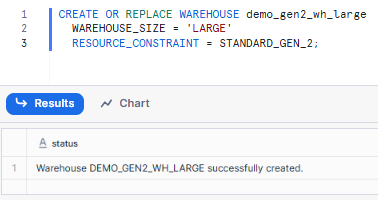
To create a Gen1 warehouse, you just omit that parameter, as it’s the default.
CREATE OR REPLACE WAREHOUSE demo_gen1_wh_large
	WAREHOUSE_SIZE = 'LARGE';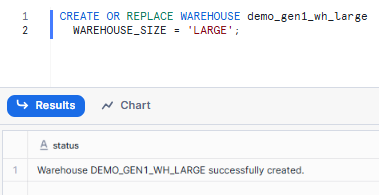
Use these warehouses for querying. They’re both in the AWS us-west-2 region (where Gen2 is available). Just switch between them using USE WAREHOUSE before each query to compare how long they take to run.
Query preparation
To get clean performance numbers, we took a few preparation steps before running each query on each warehouse. This helps isolate raw execution performance.
1. Disable the query Cache
First, you need to disable the query cache at the session level. (Disabling caching ensures raw performance is measured). To do so:
ALTER SESSION SET use_cached_result = false;2. Restart and select the warehouse
Suspend and resume the warehouse to clear its cache and then select it for use. Replace [warehouse_name] with either demo_gen1_wh_large or demo_gen2_wh_large.
ALTER WAREHOUSE [warehouse_name] SUSPEND;
ALTER WAREHOUSE [warehouse_name] RESUME;
USE WAREHOUSE [warehouse_name];
3. Specify the target schema
Point the session to the correct TPC-DS dataset.
USE SCHEMA snowflake_sample_data.tpcds_sf10Tcl;Query 1—Yearly store sales by state
- To test: Scan + Join + GroupBy on a large fact table.
- Final goal: Exercise full-table scans, filtering by year and grouping by a dimension.
Using the TPC-DS dataset, we write a query that joins STORE_SALES with DATE_DIM and STORE, filtering by year and grouping by state:
Snowflake Gen1 warehouse
USE SCHEMA snowflake_sample_data.tpcds_sf10Tcl;

SELECT
	d.d_year,
	s.s_state,
	 SUM(ss.ss_sales_price) AS total_sales
FROM SNOWFLAKE_SAMPLE_DATA.TPCDS_SF10TCL.STORE_SALES ss
JOIN SNOWFLAKE_SAMPLE_DATA.TPCDS_SF10TCL.DATE_DIM d
	 ON ss.ss_sold_date_sk = d.d_date_sk
JOIN SNOWFLAKE_SAMPLE_DATA.TPCDS_SF10TCL.STORE s
	 ON ss.ss_store_sk = s.s_store_sk
WHERE d.d_year BETWEEN 2001 AND 2003
GROUP BY d.d_year, s.s_state
ORDER BY d.d_year, s.s_state;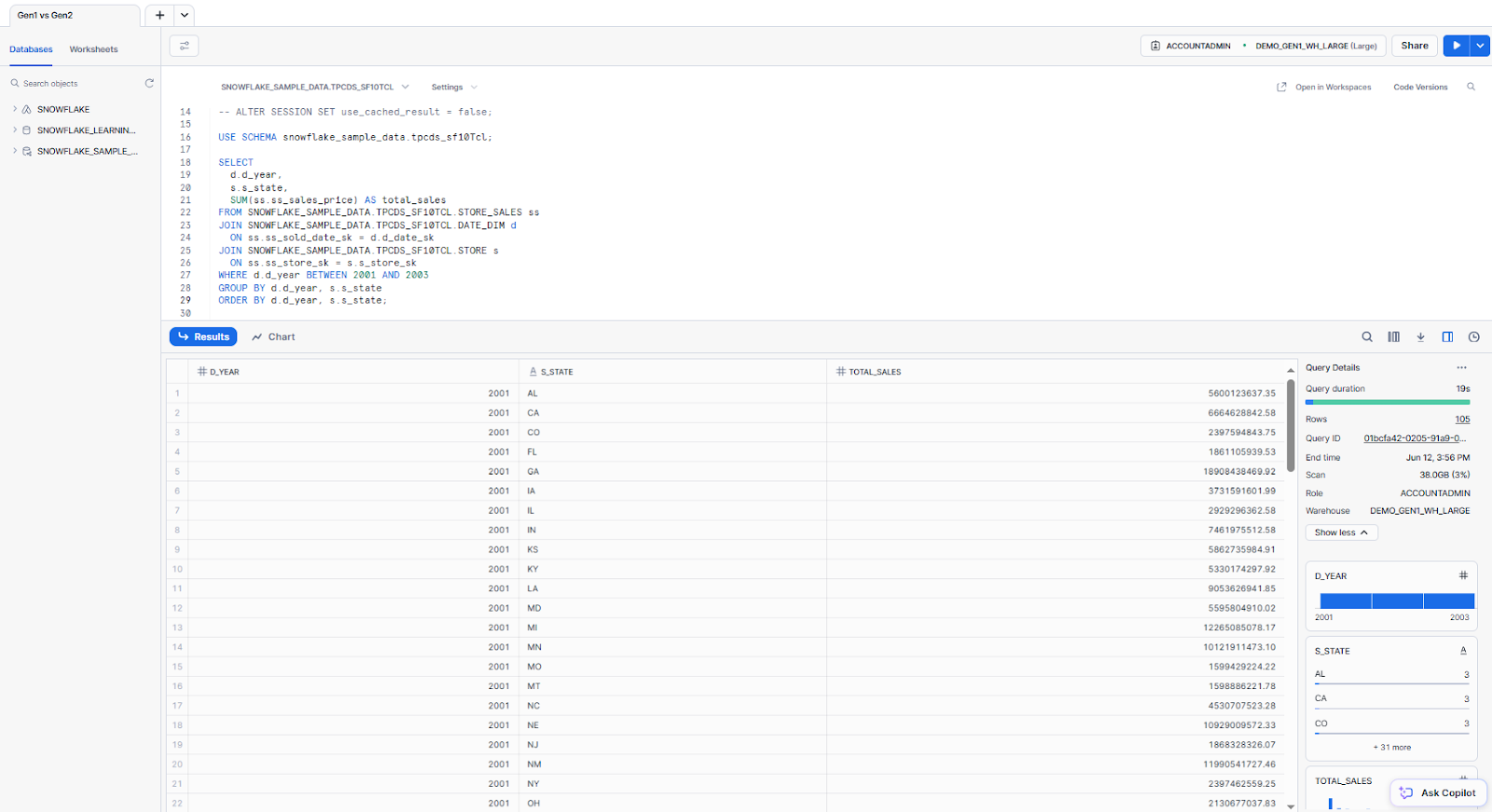
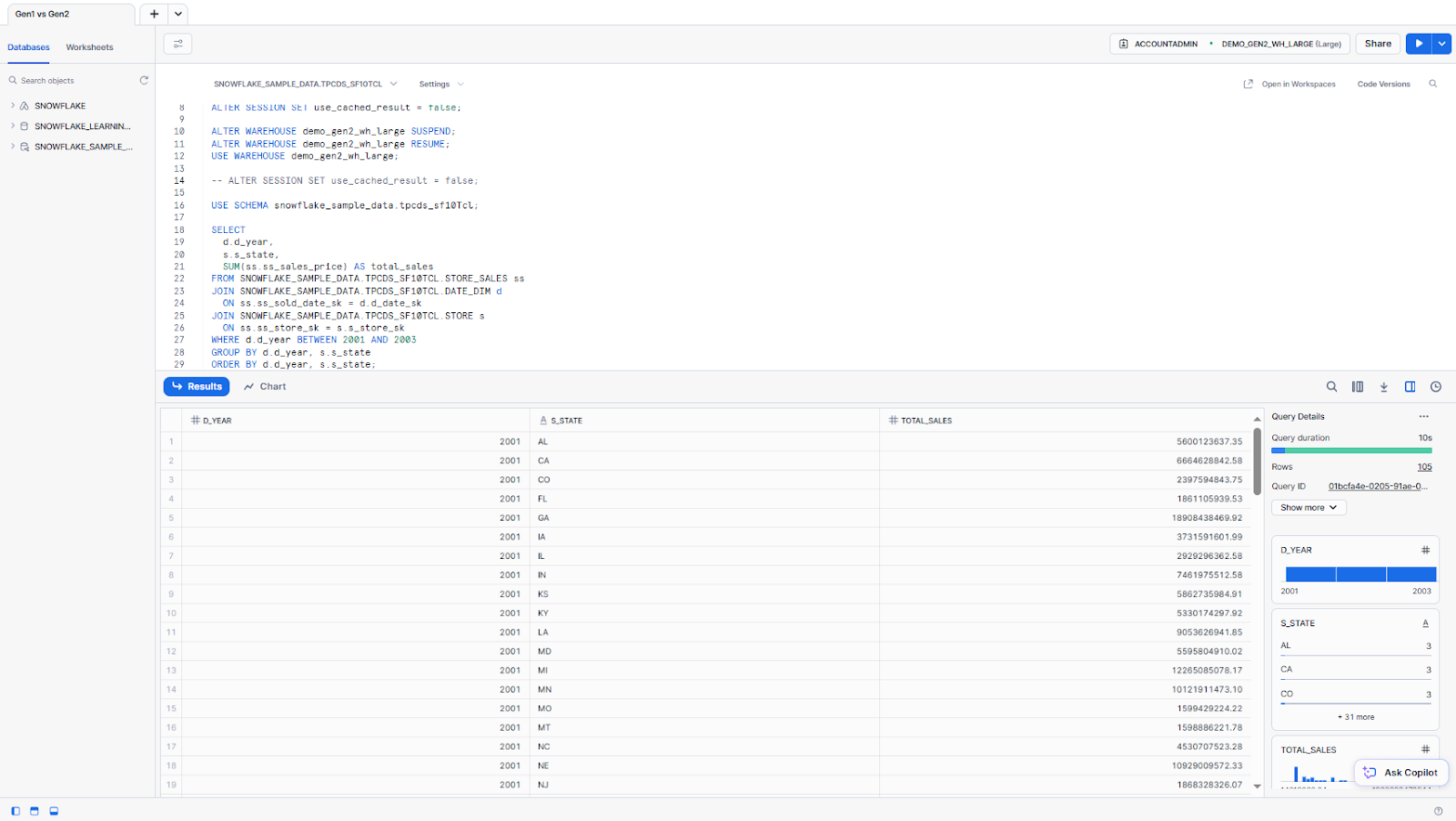
Snowflake Gen2 warehouse
We use the same query as above for testing.
Performance comparison
We conducted several runs to get the real final performance breakdown.
| Run ⚡ | Snowflake Gen1 warehouse | Snowflake Gen2 warehouse | Improvement |
| 1 | 19s | 10s | 47.4% |
| 2 | 8.8s | 7.9s | 10.2% |
| 3 | 8.3s | 7.0s | 15.7% |
| 4 | 8.3s | 6.7s | 19.3% |
| Average | 11.1s | 7.9s | 28.8% |
The first run shows the most dramatic improvement (47.4%), likely due to Gen2’s more efficient cold-start performance. Subsequent runs show consistent but smaller gains as both warehouses benefit from warming effects. On average, the Snowflake Gen2 warehouse was about 3.2 seconds faster.
Snowflake query profile summary: Gen1 vs Snowflake Gen2 warehouse
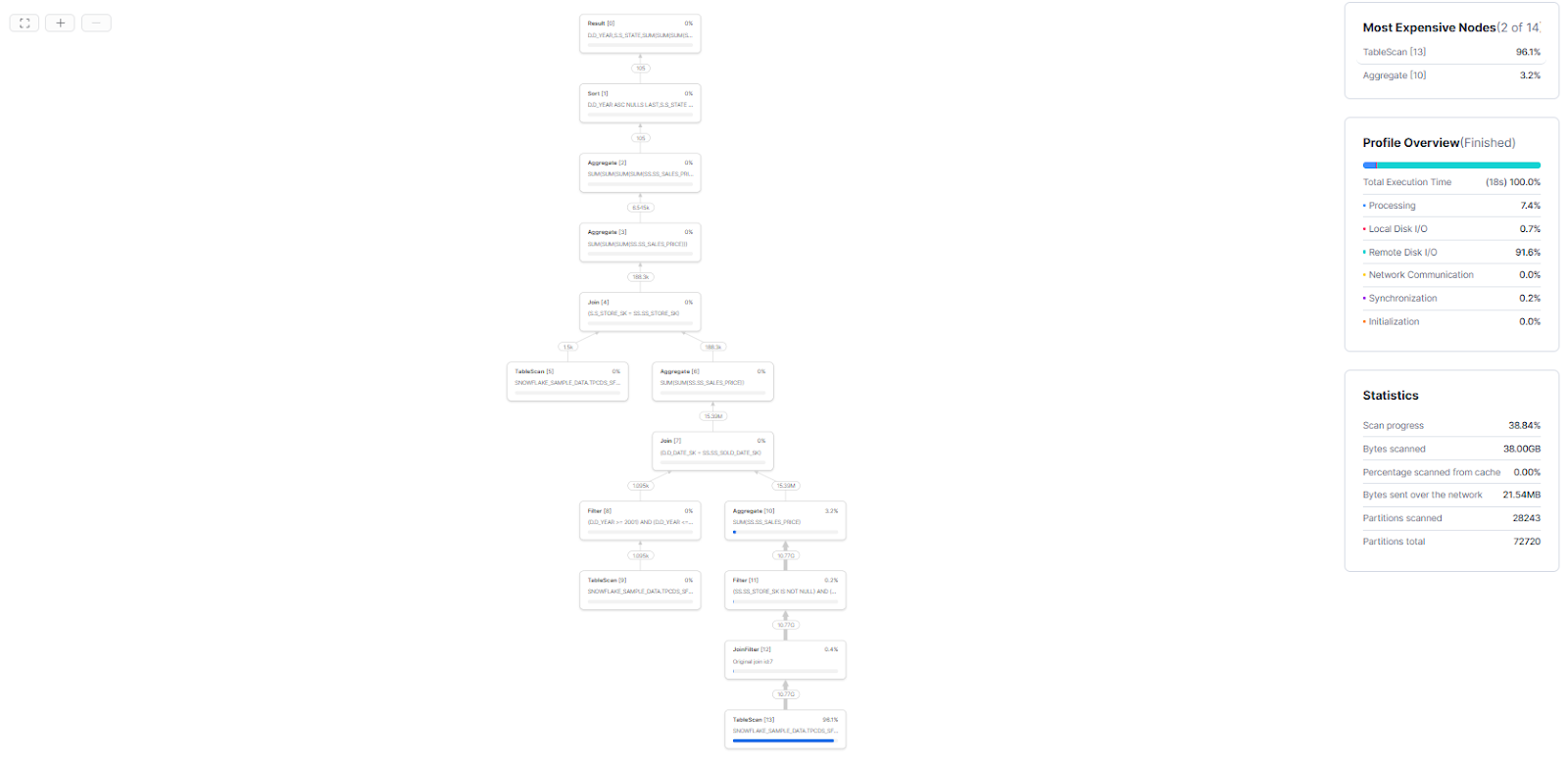
Here is the Snowflake query profile for this query on Snowflake Gen1 vs Snowflake Gen2 warehouse for the very first run.
Snowflake Gen1 warehouse query profile:
Snowflake Gen2 warehouse query profile:
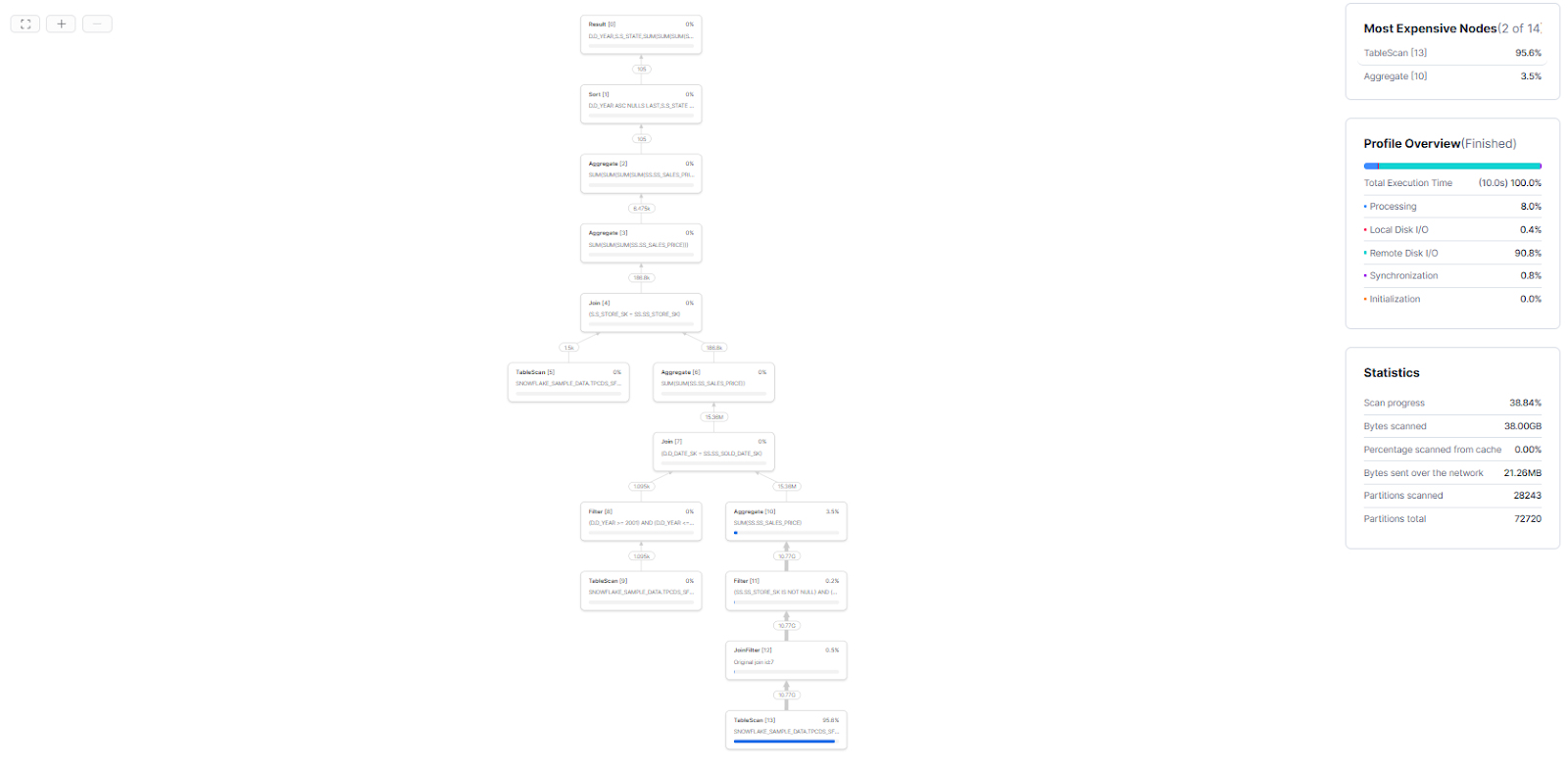
⏱️ Execution time: Gen1 ran in 19 s vs Gen2 in 10 s (47% faster on Gen2)
⚙️ Operator breakdown:
- TableScan: 96.1% (Gen1) → 95.6% (Gen2)
- Aggregate: 3.2% (Gen1) → 3.5% (Gen2)
Resource consumption:
- Processing time: 7.4% → 8.0%
- Local disk I/O: 0.7% → 0.4%
- Remote disk I/O: 91.6% → 90.8%
- Synchronization: 0.2% → 0.8%
Scan metrics (identical across both):
- Progress: 38.84%
- Data scanned: 38.00 GB, 0% from cache
- Network transfer: 21.54 MB → 21.26 MB
- Partitions: 28243 scanned of 72720 total
Analysis: Gen2 delivers approximately half the execution time of Gen1 while maintaining similar I/O and compute distribution patterns. The performance gain is primarily attributed to improved hardware efficiency rather than algorithmic changes.
Query 2—Category sales trend
To test: Join 3 tables + aggregation with range filter.
Final goal: Test multi-table joins and filtering.
Snowflake Gen1 warehouse
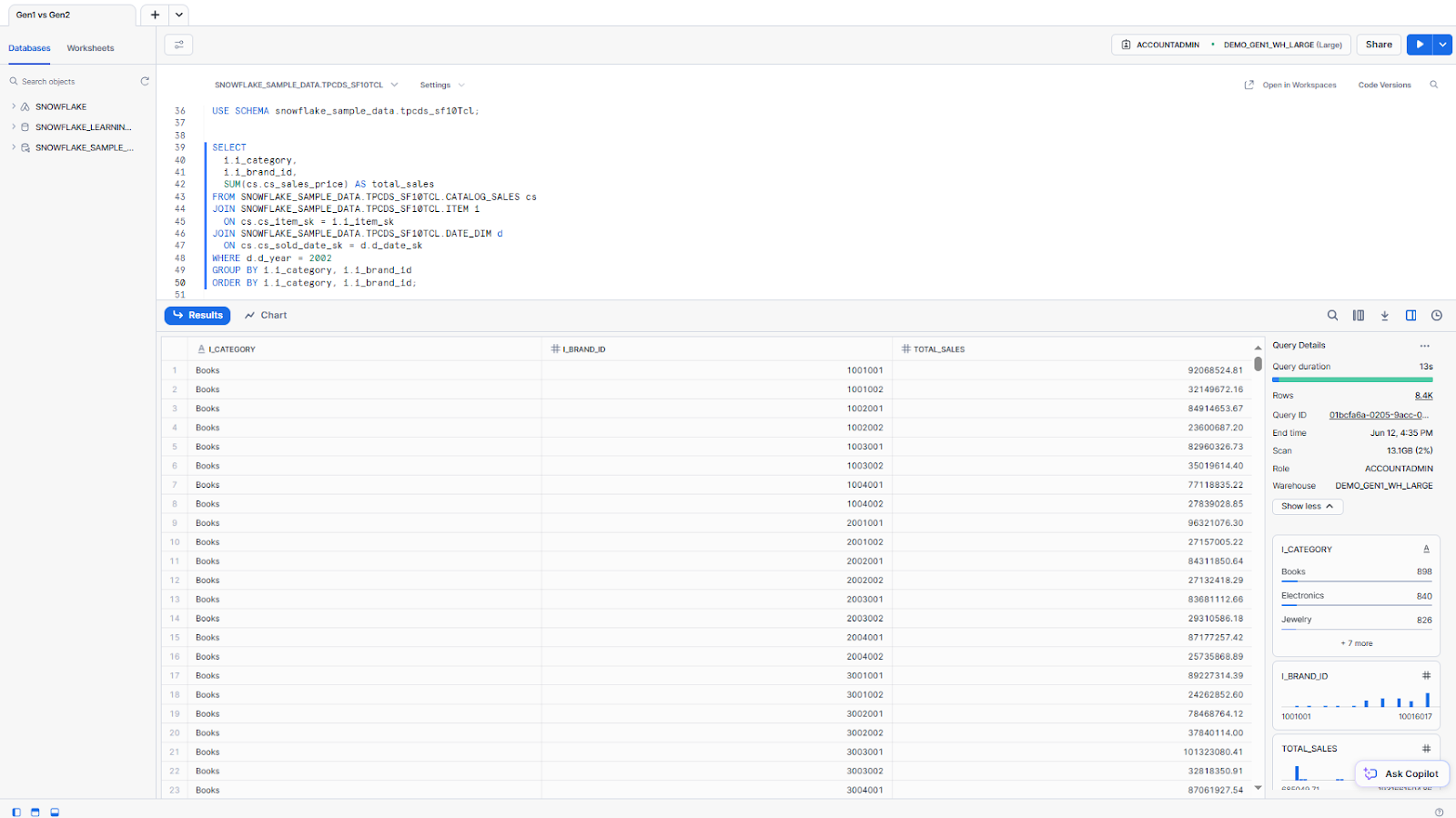
Here, we join CATALOG_SALES with ITEM and DATE_DIM to sum sales for a specific year by item category and brand.
-- Query to sum catalog sales by category and brand ID
SELECT
	 i.i_category,
	i.i_brand_id,
	 SUM(cs.cs_sales_price) AS total_sales
FROM SNOWFLAKE_SAMPLE_DATA.TPCDS_SF10TCL.CATALOG_SALES cs
JOIN SNOWFLAKE_SAMPLE_DATA.TPCDS_SF10TCL.ITEM i
	ON cs.cs_item_sk = i.i_item_sk
JOIN SNOWFLAKE_SAMPLE_DATA.TPCDS_SF10TCL.DATE_DIM d
	 ON cs.cs_sold_date_sk = d.d_date_sk
WHERE d.d_year = 2002
GROUP BY i.i_category, i.i_brand_id
ORDER BY i.i_category, i.i_brand_id;
Snowflake Gen2 warehouse
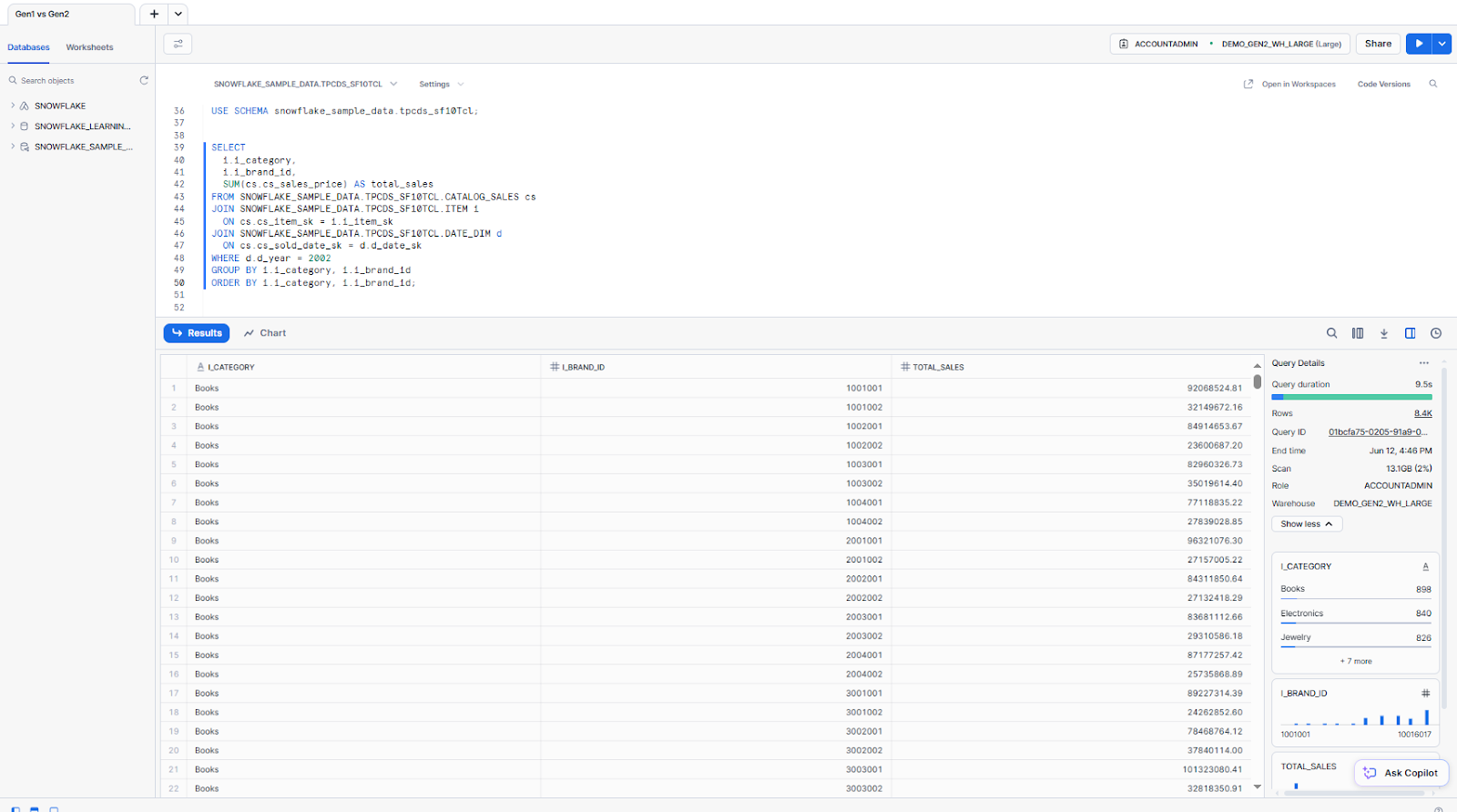
We use the same query as above for testing.
| Run ⚡ | Snowflake Gen1 warehouse | Snowflake Gen2 warehouse | Improvement |
| 1 | 13s | 9.5s | 26.9% |
| 2 | 12s | 8s | 33.3% |
| 3 | 11s | 7.8s | 29.1% |
| 4 | 11s | 7.8s | 29.1% |
| Average | 11.75s | 8.275s | 29.5% |
Again, Gen2 is faster by about 30% (and 3.475 seconds faster). Because this query involves more joining and aggregation, the performance gain isn’t just from faster scans. Gen2’s architecture, with wider SIMD lanes and higher memory bandwidth, helps with joins and aggregations, too.
Snowflake query profile summary: Gen1 vs Snowflake Gen2 warehouse
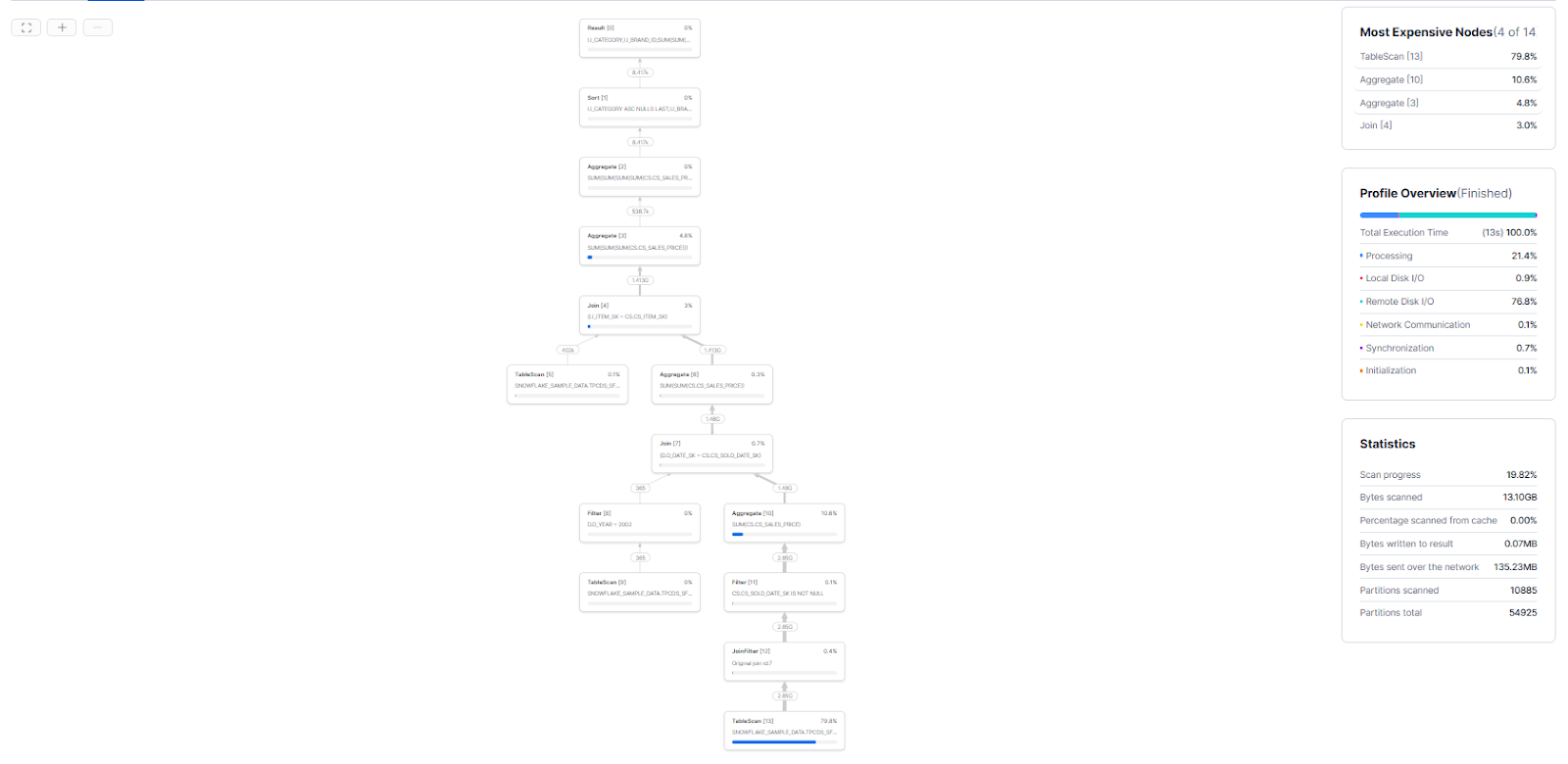
Here is the Snowflake query profile for this query on Snowflake Gen1 vs. Snowflake Gen2 warehouse for the very first run.
Snowflake Gen1 warehouse query profile:
Snowflake Gen2 warehouse query profile:
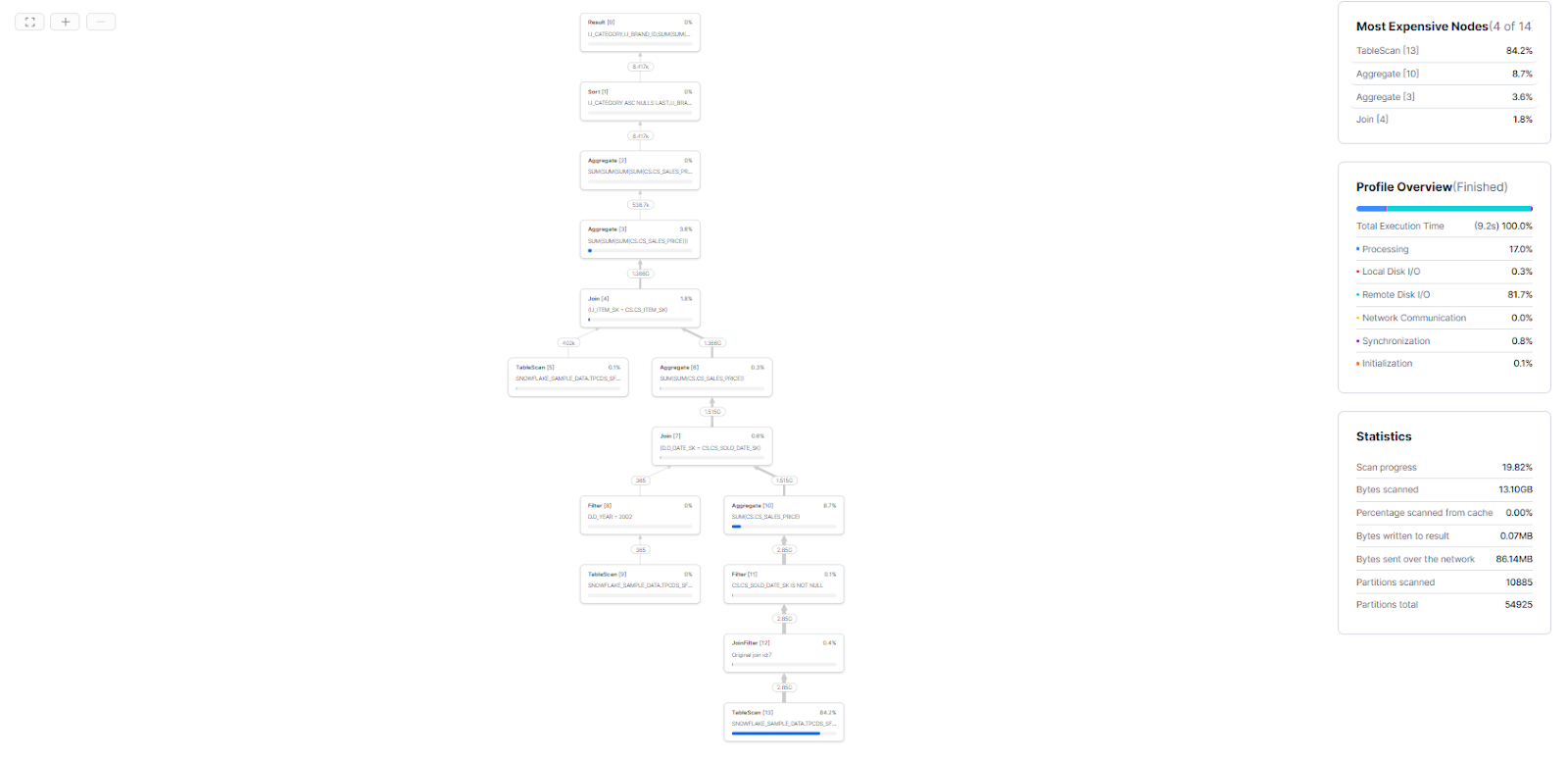
⏱️ Execution time: Gen1 ran in 13 s vs Gen2 in 9.2 s (≈ 29% faster on Gen2)
⚙️ Operator breakdown
- TableScan: 79.8% → 84.2%
- Aggregate [10]: 10.6% → 8.7%
- Aggregate [3]: 4.8% → 3.6%
- Join: 3.0% → 1.8%
Resource consumption
- Processing: 21.4% → 17.0%
- Local disk I/O: 0.9% → 0.3%
- Remote disk I/O: 76.8% → 81.7%
- Network communication: 0.1% → 0.0%
- Synchronization: 0.7% → 0.8%
- Initialization: 0.1% → 0.1%
Scan metrics (identical across both)
- Progress: 19.82%
- Data scanned: 13.10 GB, 0% from cache
- Bytes written to result: 0.07 MB
- Network transfer: 135.23 MB → 86.14 MB
- Partitions: 10885 scanned of 54925 total
Analysis: Snowflake Gen2 warehouse cuts runtime by almost a third, shifts more work into remote I/O and table scan and reduces network traffic and local I/O while keeping scan volume constant.
Query 3—Store vs catalog sales per item
To test: Aggregations + joining subqueries.
Final goal: Compare separate fact tables joined at the aggregated level.
Snowflake Gen1 warehouse
Let’s dive into a final example where we first aggregate STORE_SALES and CATALOG_SALES by item (using subqueries), then perform a full join. This query mimics a realistic report that compares two channels.
-- Query combining store and catalog sales by item ID and category
WITH store_totals AS (
	SELECT
		i.i_item_id,
		i.i_category,
		 SUM(ss.ss_sales_price) AS store_sales
	FROM SNOWFLAKE_SAMPLE_DATA.TPCDS_SF10TCL.STORE_SALES ss
	 JOIN SNOWFLAKE_SAMPLE_DATA.TPCDS_SF10TCL.ITEM i
		ON ss.ss_item_sk = i.i_item_sk
	GROUP BY i.i_item_id, i.i_category
),
catalog_totals AS (
	 SELECT
		 i.i_item_id,
		 i.i_category,
		SUM(cs.cs_sales_price) AS catalog_sales
	 FROM SNOWFLAKE_SAMPLE_DATA.TPCDS_SF10TCL.CATALOG_SALES cs
	JOIN SNOWFLAKE_SAMPLE_DATA.TPCDS_SF10TCL.ITEM i
		 ON cs.cs_item_sk = i.i_item_sk
	 GROUP BY i.i_item_id, i.i_category
)
SELECT
	COALESCE(s.i_item_id, c.i_item_id) AS item_id,
	COALESCE(s.i_category, c.i_category) AS category,
	 s.store_sales,
	 c.catalog_sales
FROM store_totals s
FULL OUTER JOIN catalog_totals c
	 ON s.i_item_id = c.i_item_id
ORDER BY item_id;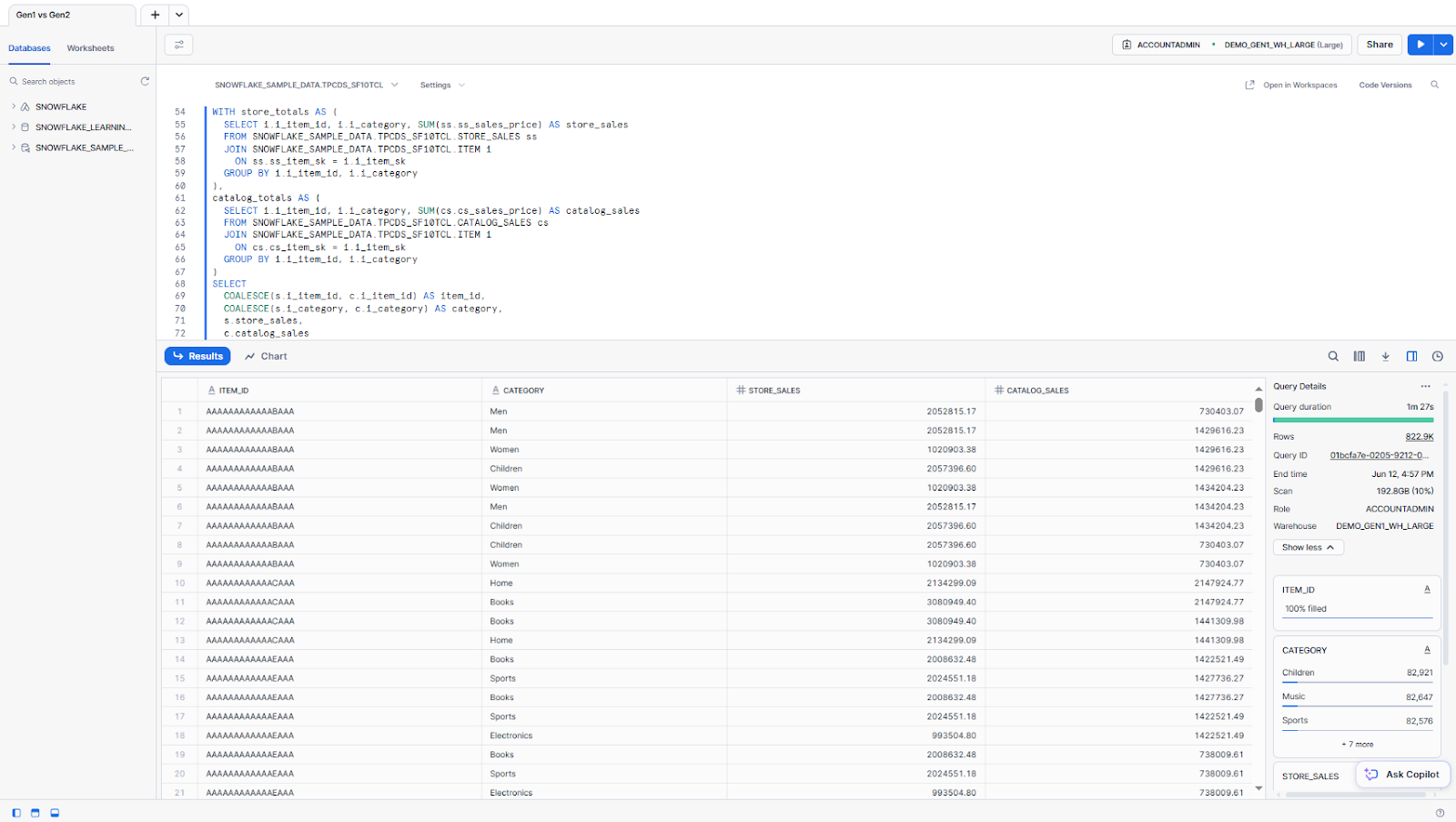
Snowflake Gen2 warehouse
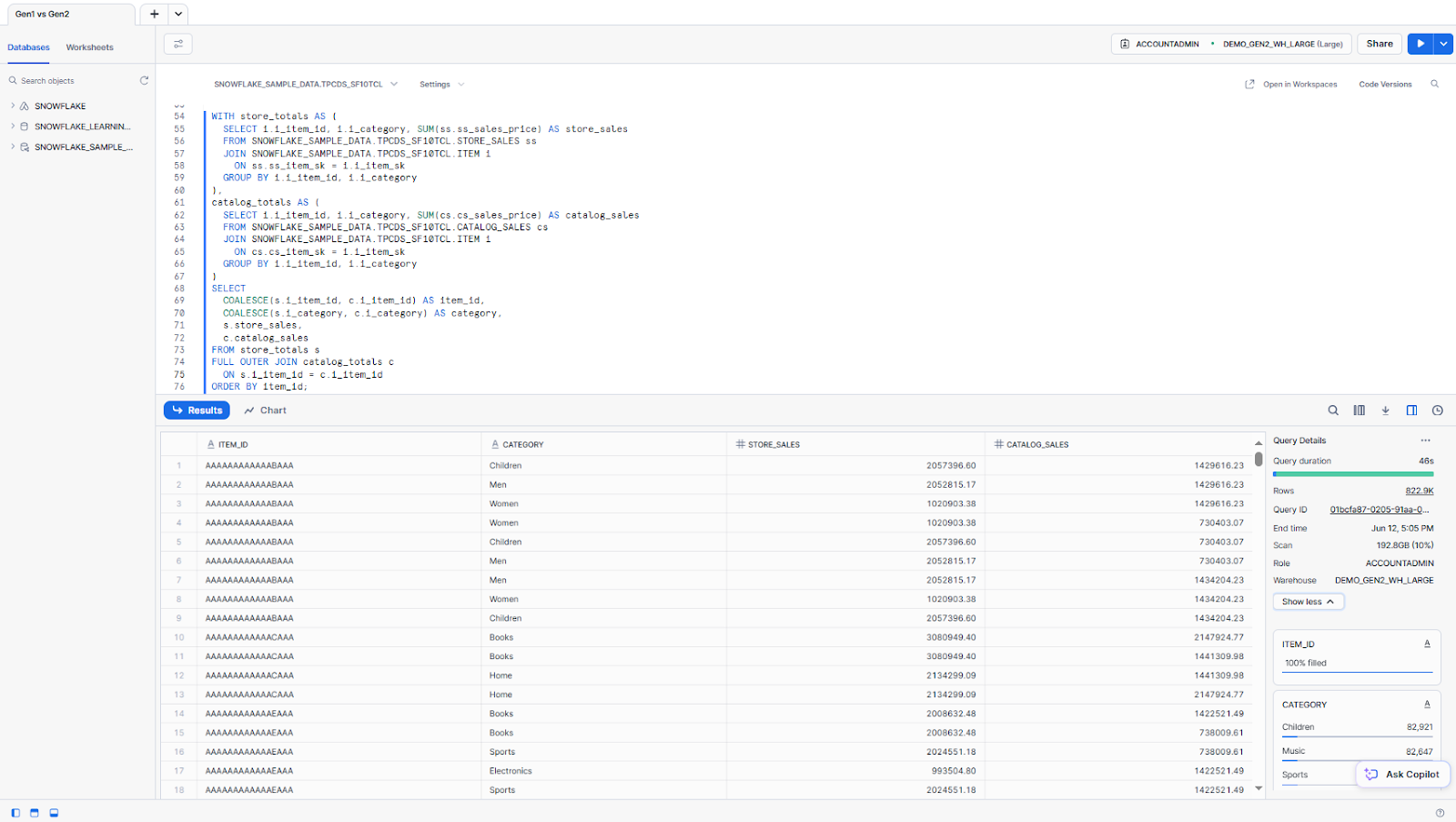
We use the same query as above for testing.
| Run ⚡ | Snowflake Gen1 warehouse | Snowflake Gen2 warehouse | Improvement |
| 1 | 1m 27s | 46s | 47.1% |
| 2 | 51s | 43s | 15.7% |
| 3 | 48s | 36s | 25.0% |
| 4 | 48s | 36s | 25.0% |
| Average | 58.5s | 40.25s | 31.2% |
On this more complex query, the cold-run improvement is again dramatic (47.1%). The average improvement settles around 31%. On average, the Snowflake Gen2 warehouse was about 18.25 seconds faster.
This query performs two large aggregations before joining the results, stressing the warehouse’s ability to handle compute-intensive work. Gen2’s hardware is better suited for this, executing both the subqueries and the final join more efficiently.
Note: that full joins and full scans can stress memory and I/O intensive workloads.
Snowflake query profile summary: Gen1 vs Snowflake Gen2 warehouse
Here is the Snowflake query profile for this query on Snowflake Gen1 vs. Snowflake Gen2 warehouse for the very first run.
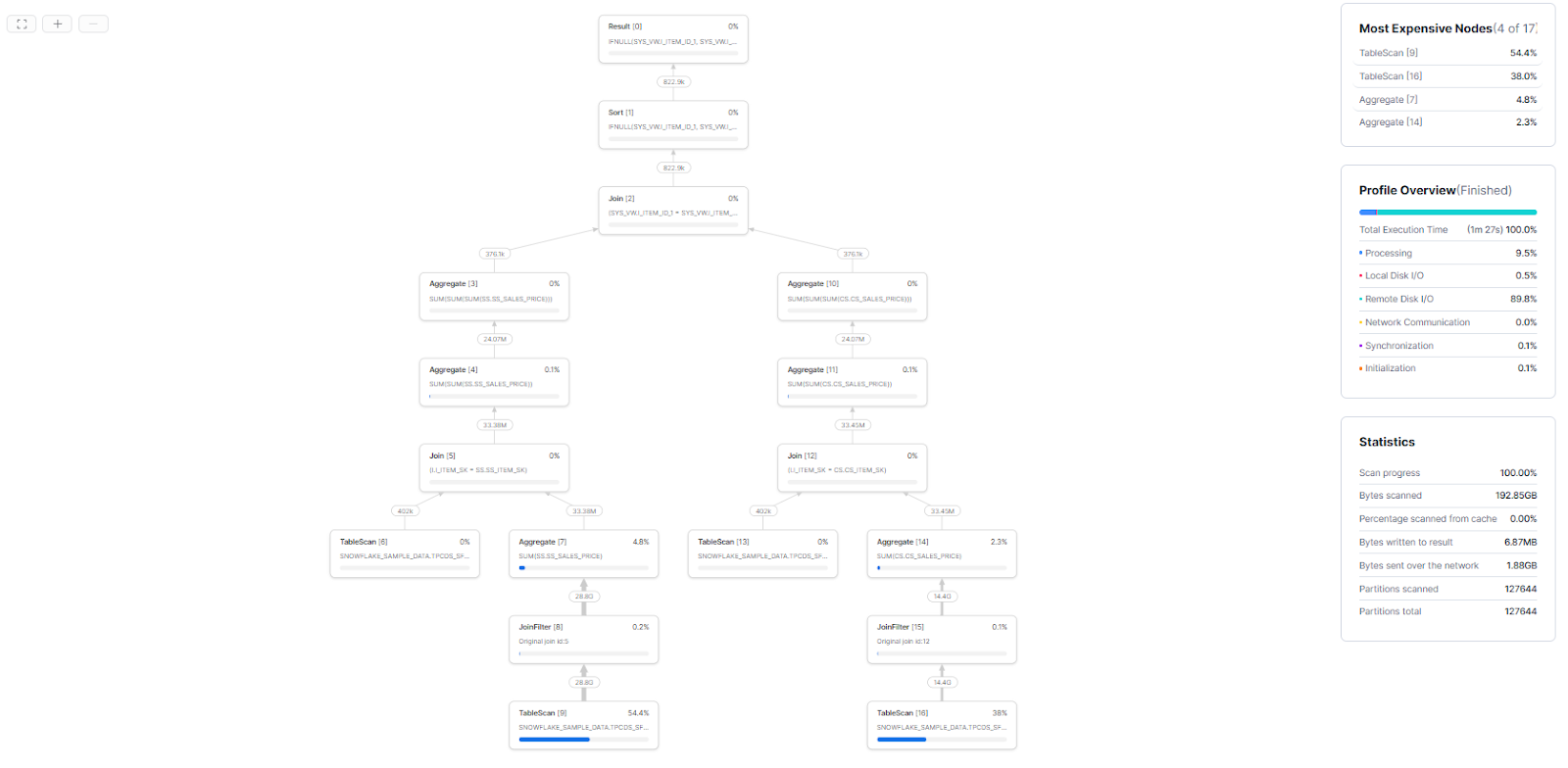
Snowflake Gen1 warehouse query profile:
Snowflake Gen2 warehouse query profile:
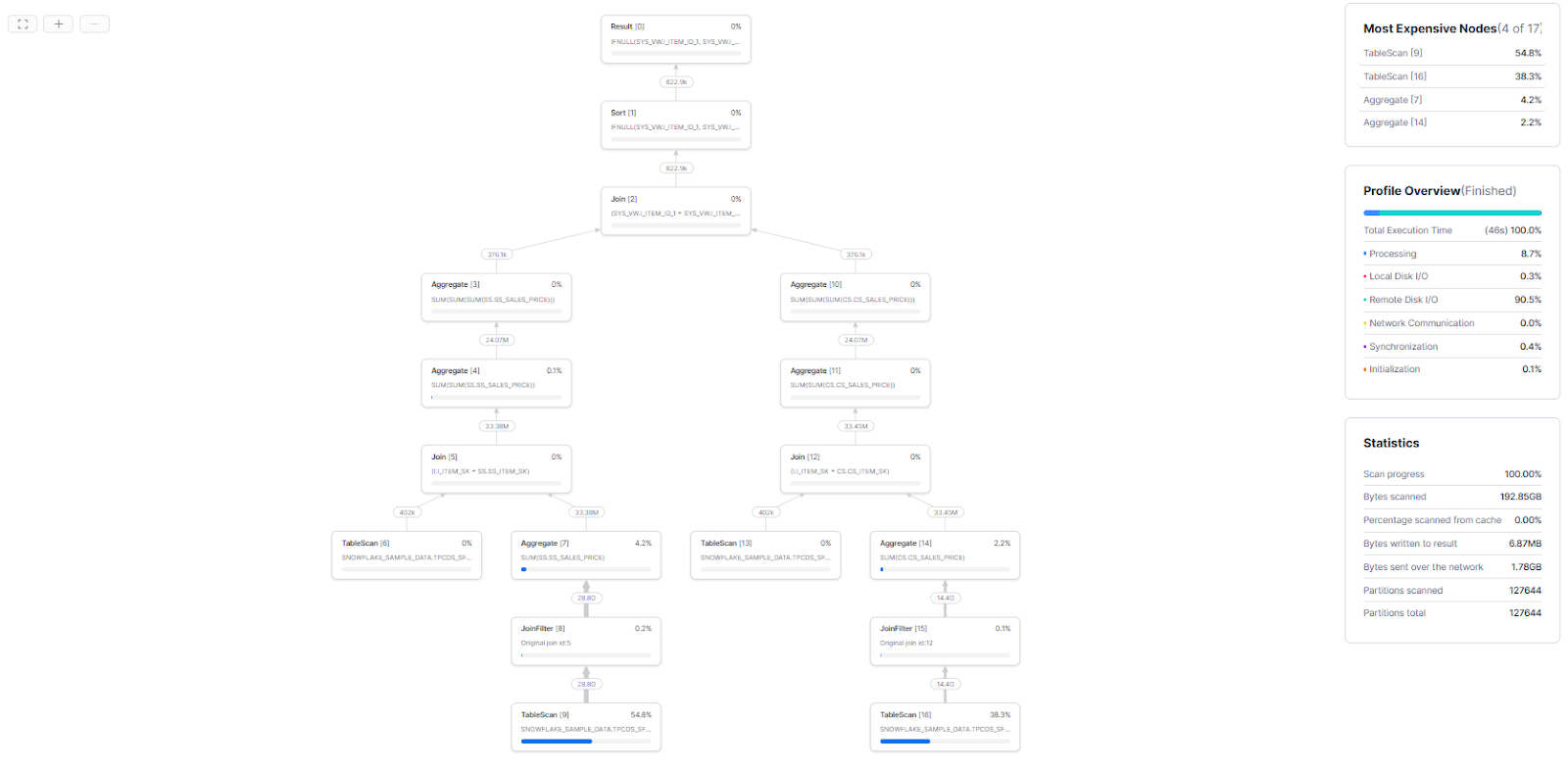
⏱️ Execution time: Gen1 ran in 1 m 27 s vs Gen2 in 46 s (≈ 47% faster on Gen2)
⚙️ Operator breakdown
- TableScan [9]: 54.4% → 54.8%
- TableScan [16]: 38.0% → 38.3%
- Aggregate [7]: 4.8% → 4.2%
- Aggregate [14]: 2.3% → 2.2%
Resource consumption
- Processing: 9.5% → 8.7%
- Local disk I/O: 0.5% → 0.3%
- Remote disk I/O: 89.8% → 90.5%
- Synchronization: 0.1% → 0.4%
- Initialization: 0.1% → 0.1%
- Network communication: 0.0% → 0.0%
Scan metrics (identical volumes)
- Progress: 100.00%
- Data scanned: 192.85 GB, 0.00% from cache
- Bytes written to result: 6.87 MB
- Bytes sent over network: 1.88 GB → 1.78 GB
- Partitions: 127644 scanned of 127644 total
Analysis: You can see that Snowflake Gen2 warehouse cuts runtime by nearly half, shifts a touch more work to remote I/O and table scan and trims network traffic while scan volume stays constant.
Expected performance observations
For all queries above, Snowflake Gen2 warehouses show lower execution time than Gen1. In general:
- Consistent gains: Gen2 consistently outperformed Gen1 by 28-47% on first cold runs, settling to 15-31% improvements on warm runs
- Average improvement: Approximately 30% across workload types, with scan-heavy queries seeing the largest gains
- Concurrency and throughput: Gen2 can handle more simultaneous query threads, maintaining higher throughput with less queuing under load
- SQL semantics: Completely identical on both generations. No query rewrites needed
- Memory allocation: A standard Gen2 warehouse has memory equivalent to what Snowpark’s MEMORY_1X provides. This doesn’t affect typical analytics queries, but very memory-intensive sorts or joins could spill differently
All in all, Snowflake’s own tests report up to ~2.1x faster core analytics across a broader workload mix than our three queries. Our results follow that pattern: if Gen1 takes X seconds, Gen2 often takes roughly X/2 for the same query on a cold run.
Cost breakdown of Snowflake Gen2 warehouse
Snowflake Gen2 warehouses use more powerful hardware, so they consume more Snowflake credits per hour. The official Snowflake Service Consumption Table lists the Snowflake Credit cost for Snowflake Gen2 warehouses on AWS and Azure as follows:
| Warehouse size | Gen1 credits/hour | Gen2 credits/hour (AWS, ~1.35x Gen1) | Gen2 credits/hour (Azure, ~1.25x Gen1) | Gen2 credits/hour (GCP, ~1.35x Gen1) |
| X-Small | 1 | 1.35 | 1.25 | 1.35 |
| Small | 2 | 2.70 | 2.50 | 2.70 |
| Medium | 4 | 5.40 | 5.00 | 5.40 |
| Large | 8 | 10.80 | 10.00 | 10.80 |
| X-Large | 16 | 21.60 | 20.00 | 21.60 |
| 2X-Large | 32 | 43.20 | 40.00 | 43.20 |
| 3X-Large | 64 | 86.40 | 80.00 | 86.40 |
| 4X-Large | 128 | 172.80 | 160.00 | 172.80 |
| 5X-Large | 256 | N/A | N/A | N/A |
| 6X-Large | 512 | N/A | N/A | N/A |
Note: Snowflake Gen2 warehouse is not available for 5X-LARGE and 6X-LARGE.
Snowflake Gen2 warehouse offers better performance but at a higher Snowflake Credit cost burn.
Drawbacks and limitations of Snowflake Gen2 warehouse
Snowflake Gen2 warehouse has its benefits, but be aware that there are some limitations.
⚠️ No Snowflake Snowsight UI support
Currently, you cannot create or alter a Snowflake Gen2 warehouse via the Snowflake web interface (Snowflake Snowsight). The GENERATION = ‘2’ or RESOURCE_CONSTRAINT = STANDARD_GEN_2 settings must be applied via SQL.
⚠️ Not supported on 5X-LARGE or 6X-LARGE
Snowflake Gen2 warehouses only go up to X4 (4XL). The two largest Gen1 Snowflake warehouse sizes (5XL and 6XL) are not available for Gen2. If you try to set a warehouse to X5 or X6 with STANDARD_GEN_2, Snowflake will reject it. In practice, if you need that scale, you would instead use a multi-cluster Snowflake Gen2 warehouse, or stick with a Gen1 5XL/6XL if absolutely necessary.
⚠️ Regional exceptions
While Snowflake Gen2 warehouse is now broadly available across AWS, Azure and GCP, a small number of regions are still unsupported. Check Snowflake’s current region availability documentation before planning your deployment. If you use cross-region replication for disaster recovery, your secondary region must also support Gen2; otherwise, Gen2 warehouses may fail to resume after failover.
⚠️ Higher cost per second for light workloads
As we have already mentioned above, Snowflake Gen2 warehouse charges more Snowflake credits per second. For very short or light queries, Gen1 might actually cost slightly less. If a query finishes in under a second anyway, Gen2’s faster execution does not actually save you anything, but you still pay the premium rate.
⚠️ RESOURCE_CONSTRAINT not visible in INFORMATION_SCHEMA
The RESOURCE_CONSTRAINT setting (Gen1 vs Gen2) doesn’t appear in INFORMATION_SCHEMA views. To check the generation of a warehouse, use SHOW WAREHOUSES and look at the resource_constraint column.
⚠️ No Snowpark-optimized warehouse support
Snowflake Gen2 warehouse applies only to standard warehouses. You cannot use RESOURCE_CONSTRAINT = STANDARD_GEN_2 on a Snowpark-optimized warehouse (those use MEMORY_* constraints). Conversely, you can’t directly convert a Snowpark-optimized warehouse to Gen2 because the memory models differ. (Snowflake’s docs show a procedure to handle this via changing the resource constraint to MEMORY_1X when switching to Snowpark-Optimized Warehouse mode).
Optimizing your use of Snowflake Gen2 warehouse
To get the best results with Snowflake Gen2 warehouse (and to control costs), apply the usual warehouse best practices – and a few Gen2-specific tips:
1. Auto-suspend and auto-resume
Set a short Snowflake AUTO_SUSPEND timeout so idle warehouses stop automatically. Gen2 spins up slightly faster than Gen1, so you can afford to suspend sooner. Enable Snowflake AUTO_RESUME=TRUE so queries auto-start the warehouse when needed.
2. Turn on Snowflake Query Acceleration Service
For very long-running queries, consider enabling Snowflake Query Acceleration Service (ENABLE_QUERY_ACCELERATION = TRUE). This serverless feature can speed up massive scans or joins (at extra per-second cost). Enable it via:
ALTER WAREHOUSE ....
	SET ENABLE_QUERY_ACCELERATION = true;
It may help Gen2 queries complete even faster, though most Gen2 speedups come from the warehouse itself.
3. Use resource monitors
Assign a Snowflake RESOURCE_MONITOR to the warehouse to cap and track Snowflake credit consumption. Resource monitors can trigger alerts or suspend warehouses when a spending threshold is reached. It is useful for Gen2 (more expensive) to avoid runaway bills.
CREATE RESOURCE MONITOR gen2_monitor
WITH CREDIT_QUOTA = 1000
TRIGGERS ON 75 PERCENT DO NOTIFY
				 ON 90 PERCENT DO NOTIFY
				 ON 100 PERCENT DO SUSPEND;

ALTER WAREHOUSE demo_gen2_wh
SET RESOURCE_MONITOR = 'gen2_monitor';
4. Set statement timeouts
To prevent exceedingly long or runaway queries, set the STATEMENT_TIMEOUT_IN_SECONDS parameter at the session or warehouse level.
ALTER WAREHOUSE demo_gen2_wh
SET STATEMENT_QUEUED_TIMEOUT_IN_SECONDS = 600, -- 10 minutes
		 STATEMENT_TIMEOUT_IN_SECONDS = 3600; -- 1 hour
5. Use Snowflake QUERY_HISTORY and Snowflake query profiles for monitoring
Snowflake provides built-in tools for monitoring and optimizing warehouse usage.
Snowflake Snowsight Dashboards offer a visual overview of Snowflake usage and performance.
Snowflake QUERY_HISTORY provides a detailed log of all executed queries, including SQL statements, user information, execution times and status. It allows for filtering and searching based on various criteria (time range, user, role, warehouse, status) and is extremely valuable for identifying long-running queries or performance bottlenecks.
SELECT QUERY_ID, WAREHOUSE_SIZE, EXECUTION_TIME, CREDITS_USED
FROM TABLE(INFORMATION_SCHEMA.QUERY_HISTORY())
WHERE WAREHOUSE_NAME = 'DEMO_GEN2_WH'
ORDER BY START_TIME DESC
LIMIT 100;
Query Profile tool offers a comprehensive report and visual insight into query execution. It presents a Directed Acyclic Graph (DAG) of the query plan, detailing execution time, operator specifics, data flow and resource usage (CPU, disk I/O).
6. Name warehouses descriptively
A general best practice includes a generation and purpose in warehouse names.
CREATE WAREHOUSE analytics_gen2_medium
WITH WAREHOUSE_SIZE = 'MEDIUM'
RESOURCE_CONSTRAINT = 'STANDARD_GEN_2';
7. Start with a smaller warehouse size
When initially deploying or optimizing a workload, it is often recommended to start with a smaller warehouse size and incrementally increase it as needed based on performance observations.
8. Maximize result caching
Snowflake caches query results for 24 hours. Identical queries within that window return cached results without consuming credits. To maximize cache hits, standardize query patterns, avoid unnecessary columns in SELECT and maintain consistent whitespace and capitalization.
9. Leverage Snowflake MVs
Snowflake Materialized views can significantly improve query performance for frequently executed queries that involve complex computations or large datasets. They pre-compute and store results, reducing the need for repeated, resource-intensive operations.
10. Utilize search optimization service
For tables where specific rows are frequently accessed via equality conditions, Snowflake’s search optimization service can provide substantial performance gains.
Put these practices into action and you’ll unlock Gen2’s full potential with minimal waste.
Which workloads benefit most from Snowflake Gen2 warehouse?
SnowflakeGen2 warehouses shine on compute-intensive analytical workloads. Workloads that benefit most include:
- Large joins and aggregations. Complex joins between big tables or GROUP BY aggregations benefit from Gen2’s faster CPUs, SIMD and memory bandwidth. The wider SIMD registers help crunch through millions of rows in parallel.
- Wide table scans and filters. Queries that scan many rows (especially with filters on columns) run faster because Gen2 can prefetch and process large blocks quickly.
- Sorting and window functions. Operations that require sorting large datasets (e.g. ORDER BY or window functions) take advantage of Gen2’s memory and compute speed.
- Complex transformations. ETL-like transformations (heavy calculations, data type conversions, compression/decompression) run faster on Gen2 hardware.
- High concurrency. Workloads with many concurrent queries or threads can keep more CPU cores busy. Gen2’s scheduler and multiple cores support higher concurrency before saturating.
- Computationally expensive functions. Using CPU-intensive UDFs or complex functions (regexes, math functions, machine learning libraries) sees big gains thanks to the improved CPU architecture.
All in all, any CPU-bound, data-heavy query will run noticeably better on Snowflake Gen2 warehouse. If a workload is mostly disk or I/O bound (small queries, metadata operations, etc), the speedup will be less dramatic.
Practical examples of Snowflake Gen2 warehouse
Understanding the theory is one thing; putting it into practice is another. Here are some practical SQL examples to help you create, modify and manage Snowflake Gen2 warehouses.
Example 1—Upgrading Snowflake Gen1 warehouse to Snowflake Gen2 warehouse
If you have an existing Gen1 standard warehouse and want to upgrade it to Gen2, you can do so using the Snowflake ALTER WAREHOUSE command. A crucial step here is to suspend the warehouse first, as this allows Snowflake to re-provision the underlying hardware to the new generation’s specifications.
ALTER WAREHOUSE old_wh SUSPEND;
ALTER WAREHOUSE old_wh SET RESOURCE_CONSTRAINT = STANDARD_GEN_2;
ALTER WAREHOUSE old_wh RESUME;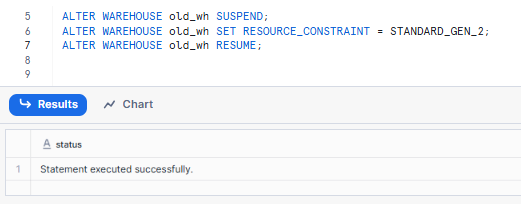
Example 2—Setting up a default-sized Snowflake Gen2 warehouse
When creating a new warehouse, if you do not specify a WAREHOUSE_SIZE, it defaults to XSMALL. To create a Snowflake Gen2 warehouse with this default size, you only need to specify the RESOURCE_CONSTRAINT.
CREATE OR REPLACE WAREHOUSE next_generation_default_size
	RESOURCE_CONSTRAINT = STANDARD_GEN_2;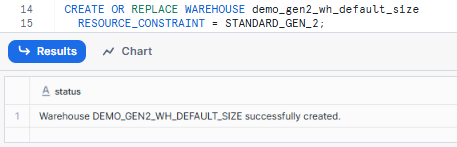

Example 3—Creating a custom-sized Snowflake Gen2 warehouse
You can specify a custom warehouse size (SMALL, MEDIUM, LARGE, etc) when creating a Snowflake Gen2 warehouse, just as you would with a Gen1 warehouse.
CREATE OR REPLACE WAREHOUSE demo_gen2_wh_size_small
	RESOURCE_CONSTRAINT = STANDARD_GEN_2
	WAREHOUSE_SIZE = SMALL;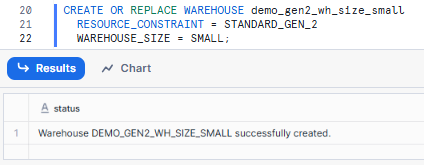

Example 4—Converting Snowflake Gen2 warehouse to Snowpark-optimized warehouse
While Gen2 is an enhancement to the standard warehouse, it is not compatible with Snowpark-Optimized Warehouse types. However, you can convert a Gen2 standard warehouse to a Snowpark-Optimized Warehouse by changing both the WAREHOUSE_TYPE and RESOURCE_CONSTRAINT. This also requires suspending the warehouse first.
Note: that Snowpark-optimized warehouses have their own specific RESOURCE_CONSTRAINT values related to memory capacity (MEMORY_1X, MEMORY_16X).
CREATE OR REPLACE WAREHOUSE gen2_to_sp
	RESOURCE_CONSTRAINT = STANDARD_GEN_2;
ALTER WAREHOUSE gen2_to_sp SUSPEND;
ALTER WAREHOUSE gen2_to_sp
	SET WAREHOUSE_TYPE = 'SNOWPARK-OPTIMIZED',
			RESOURCE_CONSTRAINT = MEMORY_1X;
ALTER WAREHOUSE gen2_to_sp RESUME;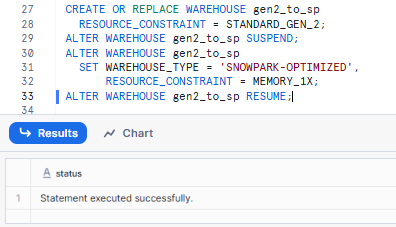
As you can see here, we first created a Snowflake Gen2 warehouse named gen2_to_sp. Then, we suspended and altered it to the type SNOWPARK-OPTIMIZED with a compatible memory setting (MEMORY_1X). (Snowpark-Optimized Warehouses cannot use Gen2, so we must switch the type).

Save up to 30% on your Snowflake spend in a few minutes!
Conclusion
And that’s a wrap! Snowflake Gen2 warehouses are a powerful upgrade for analytics and data engineering workloads. Snowflake Gen2 warehouse can process numerous queries far quicker than their Gen1 counterparts by upgrading to faster ARM CPUs, DDR5 memory and a tweaked query engine. In exchange, they burn more Snowflake credits per second. Deciding whether to use Gen2 depends on your workload: for large, compute-heavy queries, the speedups often outweigh the cost increase. But for smaller or highly concurrent workloads, it’s worth testing to ensure cost-effectiveness.
In this article, we have covered:
- What is a Snowflake Gen2 warehouse?
- How do you create a Snowflake Gen2 warehouse?
- Architecture overview of Snowflake Gen2 warehouse
- What is the difference between Snowflake Gen1 and Snowflake Gen2 warehouse?
- Performance breakdown of Snowflake Gen2 warehouse
- Cost breakdown of Snowflake Gen2 warehouse
- Drawbacks and limitations of Snowflake Gen2 warehouse
- Optimizing your use of Snowflake Gen2 warehouse
- Workloads that benefit most from Snowflake Gen2 warehouse
- Practical examples of Snowflake Gen2 warehouse
…and much more!
FAQs
What is Snowflake Gen2 warehouse?
Snowflake Gen2 warehouse is the next-generation standard virtual warehouse. It uses upgraded hardware (Graviton3 CPUs, DDR5 memory, larger CPU caches) and query-engine optimizations to accelerate analytics and DML workloads. It’s still a STANDARD warehouse type, just running on better hardware. Create one using GENERATION = ‘2’ or RESOURCE_CONSTRAINT = STANDARD_GEN_2 in SQL.
Which cloud providers and regions support Gen2?
As of November 2025, Gen2 is generally available across AWS, Azure and GCP. It’s available in most regions, with some exceptions. Check Snowflake’s official region availability documentation for the current list of unsupported regions, as this list is shrinking.
Can I use Snowflake Gen2 warehouses via the Snowsight web UI?
No. Gen2 warehouses must be created and managed via SQL. The GENERATION and RESOURCE_CONSTRAINT settings are not yet exposed in Snowsight.
Do Snowflake Gen2 warehouses cost more?
Yes, at a higher per-second rate: ~1.35x Gen1 on AWS, ~1.25x on Azure and ~1.35x Gen1 on GCP. But because Gen2 queries often finish faster, many workloads end up using the same or fewer total credits. Always benchmark your specific jobs before assuming the cost goes up.
Can I resize a Gen2 warehouse to any size?
Gen2 supports XSMALL through 4XLARGE. X5LARGE and X6LARGE are not supported. Attempting to set those sizes with STANDARD_GEN_2 will return an error.
Is Gen2 status visible in INFORMATION_SCHEMA?
No. INFORMATION_SCHEMA views do not expose the RESOURCE_CONSTRAINT setting. Use SHOW WAREHOUSES and look at the resource_constraint column to see the generation.
Can I use Gen2 with multi-cluster warehouses?
Yes. Gen2 applies per cluster, so a multi-cluster Gen2 warehouse runs all its clusters on Gen2 hardware. Auto-scaling works the same way as Gen1.
Does Gen2 change storage or billing for data?
No. Gen2 only affects compute (warehouse) billing. Your tables, databases and cloud storage are unaffected. Storage billing is unchanged.
What workloads shouldn’t use Gen2?
Very light point queries, metadata-only operations or extremely short-lived queries may not benefit enough to justify the higher credit rate. Also, Snowpark-optimized warehouses are not yet available as Gen2.
How do I check if a warehouse is Gen1 or Gen2?
Run SHOW WAREHOUSES LIKE ‘<name>’ and check the resource_constraint column. It shows STANDARD_GEN_1 or STANDARD_GEN_2.
Will Snowflake keep Gen1 warehouses around?
Yes. Gen1 still exists and can be used. Snowflake hasn’t removed it. You can run a mix of Gen1 and Gen2 in the same account. That said, Gen2 is now the default for new organizations in supported regions, so the direction of travel is clear.
Are there any SQL or transaction limitations on Gen2?
No. Gen2 behaves like a normal Standard warehouse for all supported SQL. All transactions, concurrency levels and features work identically, with the exceptions noted above (no Snowpark-optimized support, no X5/X6 sizes).
If I use cross-region replication, do I need to worry about Gen2?
Yes. If you replicate databases across regions, confirm Gen2 is supported in the target region. A Gen2 warehouse may fail to resume in a secondary region that doesn’t support Gen2. Test your DR setup before relying on it.
Pramit Marattha
Pramit Marattha is a technical content writer and strategist with 5+ years of experience covering AI, data engineering, data cloud platforms and open source technologies. He turns complex technical concepts into clear, useful content for engineers and developers.







