


Snowflake stored procedures are named, callable units of procedural logic that let you bundle and store application logic directly inside Snowflake. They go well beyond a simple sequence of SQL commands. They give you branching, looping and error handling, all within a single callable routine. Once a stored procedure is created, you can call it as many times as you need, keeping your operations consistent and maintainable.
In this article, we’ll dive deep into Snowflake stored procedures, covering everything from basic definitions to advanced features and components. We’ll provide hands-on steps for creating Snowflake stored procedures in both Snowflake Scripting (SQL) and JavaScript. Plus, we’ll highlight the practicalities of calling these stored procedures in Snowflake.
Let’s dive in!
What are Snowflake stored procedures?
A Snowflake stored procedure is a set of logic you can call directly from SQL. Its main job is to perform database operations by executing multiple SQL statements in sequence, with control flow, variable management and exception handling fully baked in.
Stored procedures can run with privileges determined by the EXECUTE AS clause, which defaults to the procedure’s owner role rather than the caller’s role. That makes them useful for delegating controlled access without handing out broad privileges.
Common use cases include automating repetitive tasks (like purging records older than a given date), orchestrating multi-step data pipelines and encapsulating complex business logic that doesn’t belong in ad-hoc queries.
Supported languages for Snowflake stored procedures
Snowflake supports several programming languages for writing the logic of Snowflake stored procedures. These languages include:
- Java (using the Snowpark API)
- Python (using the Snowpark API)
- Scala (using the Snowpark API)
- Snowflake Scripting (SQL)
- JavaScript
Your choice depends on your team’s familiarity with the language, your existing codebase and which libraries or capabilities you need. In this article, we focus on Snowflake Scripting and JavaScript in depth.
Note: For Java, Python and Scala (Snowpark), the procedure syntax requires additional clauses like RUNTIME_VERSION, PACKAGES and HANDLER that aren’t needed for Snowflake Scripting or JavaScript inline handlers.
Snowflake stored procedure syntax: complete overview
The general pattern for creating a stored procedure looks like this:
CREATE OR REPLACE PROCEDURE <name> ( [ <arg_name> <arg_data_type> [ DEFAULT <default_value> ] ] [,...] )

RETURNS <result_data_type>

LANGUAGE { SQL | JAVASCRIPT | JAVA | PYTHON | SCALA }

[ EXECUTE AS { CALLER | OWNER } ]

AS

$$

  <procedure_body>

$$;
Here’s what each clause does:
- <name>: The procedure name. Must be a valid Snowflake identifier. If you need spaces or special characters, wrap it in double quotes.
- ( [ <arg_name> <arg_data_type> ] [,…] ): Input parameters. Can be zero or more. Parameters can have default values, making them optional at call time.
- RETURNS <result_data_type>: The SQL data type of the return value. Every CREATE PROCEDURE must include a RETURNS clause, even if the procedure doesn’t return anything meaningful.
- LANGUAGE: Specifies the handler language. For Snowflake Scripting, this is SQL (and is actually optional—SQL is the default). For inline JavaScript, use JAVASCRIPT. Java, Python and Scala require additional clauses.
- EXECUTE AS { CALLER | OWNER }: Controls which role’s privileges the procedure runs with. Defaults to OWNER.
- <procedure_body>: The actual logic. For SQL and JavaScript, you write this inline between $$ delimiters (or single quotes). For Java, Python and Scala, you typically reference a handler class and method via the HANDLER clause.
Anatomy of a Snowflake stored procedure
Stored procedures in Snowflake are powerful tools that allow developers to encapsulate a series of SQL statements into a single callable routine. This not only promotes code reusability but also enhances the efficiency of SQL operations.
Basic CREATE PROCEDURE syntax
The CREATE PROCEDURE command is used to define a new stored procedure in Snowflake. This command allows you to specify the name of the procedure, its parameters and the body of the procedure, which contains the logic to be executed when the procedure is called.
For example:
CREATE OR REPLACE PROCEDURE sample_snowflake_stored_procedure()
	 RETURNS STRING
	 LANGUAGE JAVASCRIPT
	EXECUTE AS CALLER
	 AS '
	 return "Hello from the snowflake stored procedure!";
	 ';
Overview of other stored procedure commands
1) Snowflake stored procedure syntax—ALTER PROCEDURE
The ALTER PROCEDURE command is used to modify an existing stored procedure. While you can’t change the body of the procedure directly with this command, you can use it to change the comment associated with the procedure or to set the owner.
For example:
Suppose you have a procedure named sample_snowflake_stored_procedure. To change its comment:
ALTER PROCEDURE sample_snowflake_stored_procedure() SET COMMENT = 'Updated comment for the snowflake stored procedure';
2) Snowflake stored procedure syntax—SHOW PROCEDURES
The SHOW PROCEDURES command provides a list of Snowflake stored procedures in the current or specified schema or database.
For example:
To list all Snowflake stored procedures:
SHOW PROCEDURES;
To list all procedures in a specific schema, say SCHEMA_STORED_PROCEDURE:
SHOW PROCEDURES IN SCHEMA SCHEMA_STORED_PROCEDURE;3) Snowflake stored procedure syntax—DESCRIBE PROCEDURE
The DESCRIBE PROCEDURE command provides detailed information about a specific stored procedure, including its parameters, return type and body.
For example:
To describe the sample_snowflake_stored_procedure:
DESCRIBE PROCEDURE sample_snowflake_stored_procedure();
4) Snowflake stored procedure syntax—CALL PROCEDURE
The CALL command is used to execute or invoke Snowflake stored procedures. You need to specify the procedure name and provide any required arguments.
For example:
Suppose you have a procedure named sample_snowflake_stored_procedure that accepts a name parameter. To call this procedure:
CALL sample_snowflake_stored_procedure();
This would execute the sample_snowflake_stored_procedure procedure.
5) Snowflake stored procedure syntax—DROP PROCEDURE
The DROP PROCEDURE command is used to delete an existing stored procedure from the database. It’s essential to be certain about the procedure’s redundancy before executing this command.
For example:
To drop the sample_snowflake_stored_procedure :
DROP PROCEDURE IF EXISTS sample_snowflake_stored_procedure();The IF EXISTS clause ensures that no error is thrown if the procedure doesn’t exist.

Snowflake stored procedures naming conventions
While Snowflake doesn’t enforce strict naming conventions, it’s a best practice to adopt a consistent and descriptive naming pattern, which gurantees clarity and aids in easier management and invocation of procedures in the future.
Specifying return types in Snowflake stored procedures
When creating a stored procedure in Snowflake, it’s essential to specify the type of value it will return. This is done using the RETURNS keyword followed by the desired data type.
The return type ensures that the procedure produces the expected output, which can then be used or processed further. Common return types include STRING, NUMBER, FLOAT, BOOLEAN and various others.
Here are some common Snowflake stored procedures return types in JavaScript with examples:
1) Snowflake stored procedures return types—STRING
A Snowflake stored procedure can return a text value or string.
For example:
CREATE OR REPLACE PROCEDURE return_string_example()
	RETURNS STRING
	LANGUAGE JAVASCRIPT
	 AS '
	 return "Hello from the Snowflake stored procedure!";
	 ';

CALL return_string_example();
When called, this Snowflake stored procedure will return the string “Hello from the Snowflake stored procedure!”.
2) Snowflake stored procedures return types—FLOAT
If you’re working with numeric values and wish to retain them as numbers, you can use the FLOAT data type.
For example:
CREATE OR REPLACE PROCEDURE return_float_example()
	RETURNS FLOAT
	 LANGUAGE JAVASCRIPT
	EXECUTE AS CALLER
	 AS '
	 return 42.0;
	 ';

CALL return_float_example();
This procedure will return the number 42 when called.

3) Snowflake stored procedures return types—BOOLEAN
Boolean return types are useful for procedures that evaluate conditions and return either TRUE or FALSE.
For example:
CREATE OR REPLACE PROCEDURE is_even(num FLOAT)
	 RETURNS BOOLEAN
	LANGUAGE JAVASCRIPT
	 AS '
	 return (NUM % 2 === 0);
	';

CALL is_even(42);
For this procedure, if you call it with an even number (e.g., CALL is_even(42);), it will return TRUE. If you call it with an odd number, it will return FALSE.
4) Snowflake stored procedures return types— VARIANTS, OBJECTS and ARRAYS
Snowflake also supports more complex data types like VARIANT, OBJECT and ARRAY. These are especially useful when working with semi-structured data or when you need to return multiple values.
For example (Returning an ARRAY):
CREATE OR REPLACE PROCEDURE return_array_example()
	RETURNS ARRAY
	 LANGUAGE JAVASCRIPT
	EXECUTE AS CALLER
	 AS '
	 return [1, 2, 3, 4, 5];
	';

CALL return_array_example();
This procedure will return an array of numbers from 1 to 5.

To learn more, Check out this list of all Data Type Mappings Between SQL and Handler Languages
Caller’s rights vs owner’s rights in Snowflake stored pocedures
Whenever a Snowflake stored procedure is executed, it runs with either the Caller’s Rights or the Owner’s Rights, but not both simultaneously.
- Caller’s rights: The procedure runs with the privileges of whoever called it. It can access the caller’s session variables and current session context. If the caller lacks access to a table the procedure references, the call fails.
- Owner’s rights: The procedure runs with the privileges of the role that owns it. This is the default. It lets the owner delegate specific tasks to other roles without granting those roles direct access to underlying objects.
Caller’s / Owner’s rights
When creating a stored procedure, you can specify whether it should run with Caller’s Rights or Owner’s Rights using the EXECUTE AS clause:
CREATE PROCEDURE procedure_name()
LANGUAGE SQL
EXECUTE AS [CALLER | OWNER]
AS $$
-- Procedure code here
$$;
Caller’s / Owner’s Rights—Snowflake stored procedures code example
Let’s consider a simple example to demonstrate the difference between Caller’s and Owner’s Rights:
Suppose we have two roles in Snowflake: ROLE_1 and ROLE_2. Both roles have different privileges on a database named CLASSROOM and its STUDENTS table.
Scenario 1: Using Owner’s Rights
CREATE OR REPLACE PROCEDURE snowflake_stored_procedure_1()
RETURNS VARCHAR
LANGUAGE SQL
EXECUTE AS OWNER
AS
$$
DECLARE
		result VARCHAR;
BEGIN
		SELECT COUNT(*) INTO result FROM STUDENTS;
		RETURN result;
END;
$$;
Even if ROLE_2 does not have the privilege to view all data in the STUDENTS table, it can still execute the procedure if ROLE_1 (the owner) grants it the necessary privileges.
Scenario 2: Using Caller’s Rights
CREATE OR REPLACE PROCEDURE snowflake_stored_procedure_2()
RETURNS VARCHAR
LANGUAGE SQL
EXECUTE AS CALLER
AS
$$
DECLARE
		 result VARCHAR;
BEGIN
		 SELECT COUNT(*) INTO result FROM STUDENTS;
		 RETURN result;
END;
$$;
Here, if ROLE_2 does not have the necessary privileges on the STUDENTS table, it won’t be able to execute the procedure, even if ROLE_1 grants it the usage privilege.
Choosing between them
The decision to use Caller’s or Owner’s Rights depends on the specific requirements:
- Owner’s Rights: Choose this if you want to delegate tasks to another user or role, allowing them to run with the owner’s privileges. It is useful when you want to provide limited access without granting broader privileges.
- Caller’s Rights: Opt for this when the Snowflake stored procedure should operate only on objects that the caller owns or has the required privileges on. It is ideal when the procedure needs to use the caller’s environment, such as session variables.
Check out this documentation to learn more in-depth about Caller’s / Owner’s Rights.
Invoking Snowflake stored procedures
Stored procedures in Snowflake can be invoked using the CALL command. However, before you can call a stored procedure, you must ensure that your role has the USAGE privilege for that specific procedure.
Syntax:
CALL procedure_name(argument1, argument2, ...);Privileges:
To invoke a stored procedure, the role you’re using must have the USAGE privilege. If you lack this privilege, you’ll encounter an authorization error.
Anonymous procedures:
Snowflake also supports anonymous procedures, which are procedures without a name. These can be both created and called using the CALL command. Notably, you don’t need a role with CREATE PROCEDURE schema privileges to work with anonymous procedures.
Specifying arguments
Stored procedures can accept multiple arguments. These arguments can be specified either by their name or their position.
For example:
Consider a stored procedure designed to concatenate three strings:
CREATE OR REPLACE PROCEDURE concatenate_strings(
		str1 VARCHAR,
		 str2 VARCHAR,
		str3 VARCHAR)
	 RETURNS VARCHAR
	LANGUAGE SQL
	AS
	$$
	BEGIN
		 RETURN str1 || str2 || str3;
	 END;
	 $$;
Calling by name:
Arguments can be specified by their name, allowing flexibility in the order of specification.
CALL concatenate_strings(
	str1 => 'Hello there',
	 str3 => 'Snowflake stored procedure!',
	str2 => ' from ');
Calling by position:
Alternatively, you can specify arguments based on their position in the procedure definition.
CALL concatenate_strings('Hello', ' from ', 'Snowflake stored procedure!');
A few things you need to keep in mind:
- Pick one style and stick to it. Do not mix name-based and positional arguments in the same call.
- Don’t wrap argument names in double quotes when calling by name
- If two procedures share a name but have different argument signatures, calling by name can help Snowflake resolve which one to run
Advanced invocation techniques
Expressions as Arguments:
Snowflake allows the use of general expressions as arguments. For instance:
CALL sample_procedure(3 * 7.14::FLOAT);Subqueries as Arguments:
You can also use subqueries as arguments:
CALL sample_procedure(SELECT AVG(price) FROM products);Snowflake stored procedures limitations:
- Only one stored procedure can be called per CALL statement.
- Stored procedure calls cannot be part of an expression or combined with other calls in a single statement.
- While you can’t use a stored procedure call as part of an SQL expression, within a stored procedure, you can invoke another stored procedure or even call the procedure recursively.
Note: Recursive or nested calls can lead to exceeding the maximum allowed stack depth. It’s crucial to be cautious when nesting calls or using recursion to avoid potential stack overflow errors.
Creating Snowflake stored procedures with Snowflake Scripting—each component explained
1) Variables in Snowflake stored procedures
What are variables in Snowflake stored procedures?
Snowflake variables are a named object that can hold a value of a specific data type. The value held in a variable can change during the execution of a stored procedure. Variables are used in Snowflake stored procedures to store results that can be referenced multiple times within the Snowflake stored procedure.
Unlike regular programming languages, variables in Snowflake scripting (SQL) do not need to be declared before they are used. However, it is considered a good practice to declare all variables at the beginning of the Snowflake stored procedure. Declaring variables makes the code more readable and helps avoid any kind of bugs in future.
Key facts:
- Variables can hold values of any Snowflake data type like NUMBER, VARCHAR, DATE, etc.
- Variables are local to the stored procedure in which they are declared.
- Variable values persist only for the duration of stored procedure execution. Once the procedure finishes execution, the values are lost.
- Variables can be used anywhere in the stored procedure.
Declaring Snowflake variables in Snowflake stored procedures
It is highly recommended to declare all the variables before using them in a stored procedure. Declaring variables explicitly specifies the name and data type which makes the code more readable.
Note: If you can set an initial value using the DEFAULT keyword and Snowflake will automatically determine the variable’s data type.
You can declare a Snowflake variables:
By declaration in the DECLARE Section
DECLARE
	 variable_name data_type;
	 variable_name DEFAULT <expression>;
	variable_name data_type DEFAULT <expression>;
For example:
DECLARE
	total_sales NUMBER(38,2);
	 total_sales DEFAULT 100.00;
	total_sales NUMBER(38,2) DEFAULT 100.00;
By declaration in the BEGIN…END Section
In the BEGIN…END section of the body, variables need to be introduced by the LET command when declaring them.
BEGIN
	 LET variable_name := <expression>;
	 LET variable_name DEFAULT <expression>;
	LET variable_name data_type := <expression>;
	LET variable_name data_type DEFAULT <expression>;
END;
For example:
BEGIN
	LET total_sales := 100.00;
	LET total_sales DEFAULT 100.00;
	 LET total_sales NUMBER(38,2) := 100.00;
	LET total_sales NUMBER(38,2) DEFAULT 100.00;
END;
Assigning values to variables in Snowflake stored procedures
Once a variable is declared, you can assign a value to it using the “:=” operator. You can also use other variables in the expression to compute the value.
Syntax Overview:
variable_name := expression;For example:
DECLARE
	 net_profit NUMBER(38, 2) DEFAULT 0.0;
BEGIN
	 LET revenue NUMBER(38, 2) := 200.00;
	 LET expenses NUMBER(38, 2) DEFAULT 50.00;

	net_profit := revenue - expenses;

	 RETURN net_profit;
END;
Full code:
CREATE OR REPLACE PROCEDURE calculate_net_profit()
	RETURNS FLOAT
	 LANGUAGE SQL
AS
$$
DECLARE
	net_profit NUMBER(38, 2) DEFAULT 0.0;
BEGIN
	LET revenue NUMBER(38, 2) := 200.00;
	LET expenses NUMBER(38, 2) DEFAULT 50.00;

	 net_profit := revenue - expenses;

	RETURN net_profit;
END;
$$;

-- Call the stored procedure to calculate net profit
CALL calculate_net_profit();
Variable binding in SQL statements
Variables can be used in SQL statements by prefixing them with a colon (:).
For example:
DELETE FROM CUSTOMERS WHERE CUSTOMER_ID = :customer_id;If the variable represents an object name, use the IDENTIFIER keyword:
DELETE FROM IDENTIFIER(:table_name) WHERE ID = :record_id;Using the INTO clause to assign SQL results to variables
You can use the INTO clause to assign the result of a SQL query to a variable.
Syntax overview:
SELECT expression1, expression2 INTO :variable1, :variable2 FROM table WHERE condition;For example:
DECLARE
	 employee_id INTEGER;
	 employee_name VARCHAR;
BEGIN
	SELECT id, name INTO :employee_id, :employee_name FROM EMPLOYEES WHERE id = 1;
	RETURN employee_id || ' ' || employee_name;
END;
Variable scope in Snowflake Stored Procedures
In Snowflake stored procedures with nested blocks, variables are scoped to the block in which they are declared. Snowflake searches for variables starting from the innermost block and moving outward.
For example:
DECLARE
	 my_var NUMBER(38, 2) := 5;
BEGIN
	DECLARE
		 my_var NUMBER(38, 2) := 7;
	 -- Here, my_var is 7
	 END;
-- Here, my_var is 5
END;
Full code:
CREATE OR REPLACE PROCEDURE variable_scope_example()
	RETURNS STRING
	LANGUAGE SQL
AS
$$
DECLARE
	 result_string STRING DEFAULT '';
	 my_var NUMBER(38, 2) := 5;
BEGIN
	-- Outer block
	result_string := result_string || 'Outer block my_var: ' || my_var || 'n';

	DECLARE
		 my_var NUMBER(38, 2) := 7;
	 BEGIN
		-- Inner block
		result_string := result_string || 'Inner block my_var: ' || my_var || 'n';
	END;

	-- Outer block again
	result_string := result_string || 'After inner block, outer block my_var: ' || my_var;

	RETURN result_string;
END;
$$;

CALL variable_scope_example();
2) Cursor declarations in Snowflake stored procedure
Cursor in Snowflake stored procedures acts as a control structure that enables traversal over the records in a database. Think of it as a pointer to one row in a set of rows. It’s like an iterator in programming languages, allowing you to loop through a set of rows from a query result set, processing one row at a time.
Working with Cursors in Snowflake stored procedures
The process of working with cursors in Snowflake stored procedures can be broken down into a series of steps:
- Declaration: Before a cursor can be used, it must be declared. This involves naming the cursor and associating it with a SELECT statement.
- Opening: Once declared, a cursor needs to be opened using the OPEN command. This step is crucial as the associated query isn’t executed until the cursor is opened.
- Fetching: After opening the cursor, you can retrieve rows from it using the FETCH command. Each FETCH operation retrieves a single row from the result set.
- Closing: After all rows have been fetched, the cursor should be closed using the CLOSE command to free up resources.
Setting up the data for the examples
Before diving into the cursor operations, let’s set up some sample data:
CREATE OR REPLACE TABLE books (book_id INTEGER, title STRING, price NUMBER(12, 2));
INSERT INTO books (book_id, title, price) VALUES
	 (1, 'The Great Gatsby', 15.99),
	(2, 'Moby Dick', 12.49),
	(3, 'Pride and Prejudice', 9.99);
Declaring a Cursor
You can declare a cursor in the Snowflake stored procedure either in the DECLARE section or within the BEGIN … END block of a stored procedure. Here are some examples:
Using the DECLARE section
-- Stored Procedure with Cursor Declaration using DECLARE
CREATE OR REPLACE PROCEDURE cursor_declare_example()
	RETURNS STRING
	LANGUAGE SQL
AS
$$
DECLARE
	 c1 CURSOR FOR SELECT title, price FROM books WHERE price > 10;
	result_string STRING DEFAULT '';
BEGIN
	 -- Sample operations with c1 can be added here
	 RETURN result_string;
END;
$$;
-- Call the stored procedure
CALL cursor_declare_example();
Using the BEGIN … END block
CREATE OR REPLACE PROCEDURE cursor_begin_end_example()
	RETURNS STRING
	LANGUAGE SQL
AS
$$
DECLARE
	 result_string STRING DEFAULT '';
BEGIN
	LET c2 CURSOR FOR SELECT title FROM books WHERE price <= 10;
	 -- Sample operations with c2 can be added here
	 RETURN result_string;
END;
$$;
-- Call the stored procedure
CALL cursor_begin_end_example();
Using Bind parameters
You can also use bind parameters in the cursor declaration and bind them when opening the cursor:
CREATE OR REPLACE TABLE invoices (id INTEGER, price NUMBER(12, 2));

INSERT INTO invoices (id, price) VALUES
	 (1, 21.11),
	(2, 25.22),
	 (3, 29.99),
	(4, 35.50);
-- Stored Procedure with Bind Parameters in Cursor Declaration
CREATE OR REPLACE PROCEDURE bind_parameters_example()
	RETURNS INTEGER
	 LANGUAGE SQL
AS
$$
DECLARE
	id INTEGER DEFAULT 0;
	 min_price NUMBER(13,2) DEFAULT 22.00;
	max_price NUMBER(13,2) DEFAULT 33.00;
	 c1 CURSOR FOR SELECT id FROM invoices WHERE price > ? AND price < ?;
BEGIN
	OPEN c1 USING (min_price, max_price);
	 FETCH c1 INTO id;
	RETURN id;
END;
$$;
CALL bind_parameters_example();
Opening a Cursor
To execute the query and load the results into the cursor, you need to open it using the OPEN command:
OPEN c1;Fetching data with Cursor
To fetch data from the cursor, use the FETCH command:
FETCH c1 INTO variable_for_column_value;Closing a Cursor
Once you’re done fetching the data, it’s good practice to close the cursor:
CLOSE c1;Complete example—summing prices using Snowflake cursor
Here’s a complete example that sums the prices of books from two rows:
CREATE OR REPLACE TABLE books (title STRING, price FLOAT);

-- Insert some sample data into the table
INSERT INTO books VALUES ('Great Gatsby', 25.0), ('Mockingbird', 15.5), ('Pride + Prejudice', 12.25);

-- Create a stored procedure that uses a cursor to sum the prices of two books
CREATE OR REPLACE PROCEDURE calculate_total_price()
	RETURNS FLOAT
	 LANGUAGE SQL
AS
$$
DECLARE
		row_price FLOAT;
		total_price FLOAT;
		c1 CURSOR FOR SELECT price FROM books;
BEGIN
		 row_price := 0.0;
		total_price := 0.0;
		 OPEN c1;
		 FETCH c1 INTO row_price;
		 total_price := total_price + row_price;
		FETCH c1 INTO row_price;
		total_price := total_price + row_price;
		 CLOSE c1;
		RETURN total_price;
END;
$$;

-- Call the stored procedure to see the results
CALL calculate_total_price();
Troubleshooting:
Symptom: Cursor Skips Rows
Possible Cause: You might have executed FETCH inside a FOR <record> IN <cursor> loop, which automatically fetches the next row.
Solution: Remove any redundant FETCH commands inside the loop.
Symptom: Unexpected NULL Values
Possible Cause: If you have an odd number of rows and you execute an extra FETCH inside the loop, you’ll get NULL values.
Solution: Again, remove any redundant FETCH commands inside the loop.
3) Branching construct (IF-ELSE and CASE) in Snowflake stored procedure
Snowflake stored procedures offer a robust set of branching constructs that allow developers to control the flow of execution based on specific conditions.
IF Statement
The IF statement in Snowflake is a conditional branching mechanism that allows specific code blocks to be executed based on whether a given condition is true or false.
Syntax:
IF (condition) THEN
		-- statements to execute if condition is true
ELSEIF (another_condition) THEN
		-- statements to execute if another_condition is true
ELSE
		 -- statements to execute if no conditions are met
END IF;
For example:
Let’s consider a scenario where we want to determine the category of a product based on its price:
CREATE OR REPLACE PROCEDURE product_category(price FLOAT)
	 RETURNS VARCHAR
	LANGUAGE SQL
AS
$$
	DECLARE
		 category VARCHAR;
	BEGIN
		 IF (price < 50) THEN
			category := 'Budget';
		 ELSEIF (price >= 50 AND price < 150) THEN
			category := 'Mid-range';
		ELSE
			category := 'Premium';
		END IF;
		 RETURN category;
	 END;
$$
;
CASE Statement
The CASE statement in Snowflake provides a way to perform conditional logic based on specific values or conditions.
Searched CASE statement:
This form of the CASE statement evaluates multiple conditions and returns a value when the first condition is met.
Syntax:
CASE
		WHEN condition1 THEN
				-- statements for condition1
		WHEN condition2 THEN
				-- statements for condition2
		ELSE
				-- default statements
END;
For example:
Let’s determine the shipping cost based on the weight of a package:
CREATE OR REPLACE PROCEDURE shipping_cost(weight FLOAT)
	RETURNS FLOAT
	 LANGUAGE SQL
AS
$$
	 DECLARE
		cost FLOAT;
	 BEGIN
		CASE
			WHEN weight <= 1 THEN
				cost := 5.0;
			WHEN weight > 1 AND weight <= 5 THEN
				cost := 10.0;
			 ELSE
				 cost := 20.0;
		END;
		RETURN cost;
	END;
$$
;

CALL shipping_cost(1.1);
Simple CASE statement:
This form evaluates a single expression against multiple values.
Syntax:
CASE expression
		WHEN value1 THEN
				-- statements for value1
		WHEN value2 THEN
				-- statements for value2
		ELSE
				-- default statements
END;
For example:
Let’s categorize a student’s performance based on their grade:
CREATE OR REPLACE PROCEDURE student_performance(grade CHAR)
	 RETURNS VARCHAR
	LANGUAGE SQL
AS
$$
	DECLARE
		 performance VARCHAR;
	 BEGIN
		CASE grade
			WHEN 'A' THEN
				 performance := 'Excellent';
			WHEN 'B' THEN
				 performance := 'Good';
			 WHEN 'C' THEN
				performance := 'Average';
			 ELSE
				 performance := 'Needs Improvement';
		END;
		RETURN performance;
	 END;
$$
;


CALL student_performance('B');

4) Looping in Snowflake stored procedure
Looping is a fundamental concept in programming, allowing for a set of instructions to be executed repeatedly based on a condition or a set number of times. Snowflake Stored Procedures support various looping constructs, each with its unique characteristics and use cases.
Snowflake Scripting supports the following types of loops:
- FOR Loop in Snowflake Stored Procedures
- WHILE Loop in Snowflake Stored Procedures
- REPEAT Loop in Snowflake Stored Procedures
- LOOP in Snowflake Stored Procedures
FOR Loop in Snowflake stored procedures
The FOR loop in Snowflake is designed to iterate a set number of times, making it ideal for situations where the number of iterations is known beforehand.
Syntax:
FOR counter_variable IN [REVERSE] start TO end DO
		 statement;
END FOR;
Points to be noted:
- The loop will iterate from the start value to the end value.
- The optional REVERSE keyword allows the loop to iterate in reverse order.
- The loop counter is independent of any variable declared outside the loop with the same name.
Example: Sum of first N natural numbers
CREATE OR REPLACE PROCEDURE sum_of_n_numbers(n INTEGER)
	 RETURNS INTEGER
	LANGUAGE SQL
AS
$$
	DECLARE
		 sum INTEGER DEFAULT 0;
	 BEGIN
		FOR i IN 1 TO n DO
			sum := sum + i;
		 END FOR;
		 RETURN sum;
	END;
$$
;
To call this procedure:
-- Calling the procedure
CALL sum_of_n_numbers(5); 
WHILE Loop in Snowflake stored procedures
The WHILE loop is condition-based, meaning it will continue to iterate as long as a specified condition remains true.
Syntax:
WHILE (condition) DO
		statement;
END WHILE;
Points to be noted:
- The loop will continue as long as the condition evaluates to TRUE.
- It’s essential to ensure that the condition eventually becomes FALSE; otherwise, an infinite loop can occur.
Example: Factorial of a Number
CREATE OR REPLACE PROCEDURE factorial(n INTEGER)
RETURNS INTEGER
LANGUAGE SQL
AS
$$
DECLARE
		result INTEGER;		-- Stores the factorial result.
BEGIN
		result := 1;
		WHILE (n > 1) DO
				 result := result * n;
				n := n - 1;
		 END WHILE;
		 RETURN result;
END;
$$
;
To call this procedure:
-- Calling the procedure
CALL factorial(5);	 -- Returns 120
REPEAT Loop in Snowflake stored procedures
The REPEAT loop, akin to the DO-WHILE loop in other languages, will always execute at least once before checking its condition.
Syntax:
REPEAT
		 statement;
UNTIL (condition)
END REPEAT;
Points to be noted:
- The loop will continue until the condition becomes TRUE.
- The condition is checked after the loop’s body has executed.
Example: Counting digits in a number
CREATE OR REPLACE PROCEDURE count_digits(num INTEGER)
RETURNS INTEGER
LANGUAGE SQL
AS
$$
DECLARE
		 count INTEGER DEFAULT 0;
BEGIN
		REPEAT
				count := count + 1;
				 num := num / 10;
		 UNTIL (num = 0)
		END REPEAT;
		 RETURN count;
END;
$$
;
To call this procedure:
-- Calling the procedure
CALL count_digits(12345);	 -- Returns 5
LOOP in Snowflake stored procedures
The LOOP construct is the most basic loop in Snowflake, requiring an explicit exit condition using the BREAK command.
Syntax:
LOOP
		 statement;
		 IF (exit_condition) THEN
				 BREAK;
		 END IF;
END LOOP;
Points to be noted:
- The loop will continue indefinitely unless a BREAK command is executed.
- It’s essential to provide an exit condition to prevent infinite loops.
Example: Generating a Fibonacci series
CREATE OR REPLACE PROCEDURE fibonacci_series(n INTEGER)
	RETURNS VARCHAR
	 LANGUAGE SQL
AS
$$
	 DECLARE
		a INTEGER DEFAULT 0;
		b INTEGER DEFAULT 1;
		next INTEGER;
		 series VARCHAR DEFAULT '0, 1';
	 BEGIN
		LOOP
			next := a + b;
			IF next > n THEN
				 BREAK;
			 END IF;
			series := series || ', ' || next::VARCHAR;
			a := b;
			 b := next;
		 END LOOP;
		RETURN series;
	END;
$$
;
To call this procedure:
-- Calling the procedure
CALL fibonacci_series(100);	 -- Returns "0, 1, 1, 2, 3, 5, 8, 13, 21, 34, 55, 89"
5). RESULTSETs in Snowflake stored procedure
RESULTSET in Snowflake is a data type that allows users to store and manipulate the result set of a SELECT statement within Snowflake stored procedures. This powerful feature provides flexibility in handling query results, whether you want to return them as a table or iterate over them using cursors.
What is RESULTSET ?
A RESULTSET in Snowflake is a pointer to the result set of a query. Unlike traditional variables that store single values, a RESULTSET can hold multiple rows of data. This makes it particularly useful for procedures that need to work with or return multiple rows of data.
Syntax
Declaring a RESULTSET
A RESULTSET can be declared in two main ways:
1) Using the DECLARE section:
DECLARE
		 result_name RESULTSET DEFAULT (query);
2) Within the BEGIN…END block:
BEGIN
		 LET result_name := (query);
END;
Accessing Data from a RESULTSET
Once the RESULTSET is declared, the data in a RESULTSET can be accessed in two primary ways:
Returning as a Table: By using the TABLE() function, the data in the RESULTSET can be returned as a table.
RETURN TABLE(result_name);Using a Cursor: A cursor can be used to iterate over the rows in a RESULTSET.
LET cursor_name CURSOR FOR result_name;Practical examples of RESULTSETs in Snowflake stored procedure
Returning Data as a Table
Consider a scenario where you have a table named EMPLOYEES and you want to return all employee names with their IDs. Here’s how you can use a RESULTSET:
CREATE TABLE IF NOT EXISTS EMPLOYEES (
		 ID NUMBER PRIMARY KEY,
		 EMP_NAME VARCHAR
);
-- Insert sample data into EMPLOYEES table
INSERT INTO EMPLOYEES (ID, EMP_NAME) VALUES (1, 'Chaos'), (2, 'Genius');
-- Create the stored procedure to fetch employees
CREATE OR REPLACE PROCEDURE fetch_employees()
RETURNS TABLE(ID NUMBER, NAME VARCHAR)
LANGUAGE SQL
AS
$$
		 DECLARE
				emp_data RESULTSET DEFAULT (SELECT ID, EMP_NAME FROM EMPLOYEES);
		BEGIN
				 RETURN TABLE(emp_data);
		END;
$$
;
-- Calling the procedure
CALL fetch_employees();

Using a cursor with RESULTSET
If you wish to iterate over the rows of a RESULTSET, you can use a cursor. Here’s an example that fetches the names of employees and appends a prefix “Mr./Ms.” based on some criteria:
CREATE OR REPLACE PROCEDURE prefix_employees()
RETURNS TABLE(NAME VARCHAR)
LANGUAGE SQL
AS
$$
		DECLARE
				 emp_data RESULTSET DEFAULT (SELECT EMP_NAME FROM EMPLOYEES);
				 cur CURSOR FOR emp_data;
				 name VARCHAR;
				prefixed_name VARCHAR;
		BEGIN
				 OPEN cur;
				LOOP
						FETCH cur INTO name;
						IF name LIKE '%a' THEN
								prefixed_name = 'Ms. ' || name;
						 ELSE
								 prefixed_name = 'Mr. ' || name;
						END IF;
						 INSERT INTO result_table VALUES (prefixed_name);
				 END LOOP;
				CLOSE cur;
				RETURN TABLE(result_table);
		 END;
$$
;
What is the difference between RESULTSET vs CURSOR?
Both give you access to query results, but they serve different purposes:
- Iteration: Cursors are designed for row-by-row processing. A RESULTSET is better suited for storing and returning full result sets.
- Execution timing: The query assigned to a RESULTSET executes immediately on assignment. For a cursor, the query runs only when you call OPEN.
- Bind variables: Cursors support binding variables (via OPEN … USING); RESULTSET doesn’t.
6) Handling exceptions in Snowflake stored procedures
Exceptions are inevitable when working with stored procedures in Snowflake. They occur when a piece of code encounters an issue that it cannot resolve during execution. Snowflake offers robust features for declaring, raising and handling exceptions in stored procedures.
Declaring an exception
In Snowflake, you can declare your own exceptions in the DECLARE section of a stored procedure. The syntax for declaring an exception is as follows:
Syntax:
DECLARE
exception_name EXCEPTION (exception_number, 'exception_message');- exception_name: The name you give to the exception.
- exception_number: A unique identifier for the exception, ranging from -20000 to -20999.
- exception_message: A text description of the exception.
Here’s a simple example:
DECLARE
	 DIVIDE_BY_ZERO_EXCEPTION EXCEPTION (-20001, 'Division by zero is not allowed.');
Raising an exception
Once an exception is declared, you can raise it manually using the RAISE command. The syntax is:
Syntax:
RAISE exception_name;Here’s a simple example:
Here’s a code snippet that raises a custom exception:
CREATE OR REPLACE PROCEDURE raise_custom_exception()
RETURNS STRING
LANGUAGE SQL
AS
$$
	 DECLARE
		DIVIDE_BY_ZERO_EXCEPTION EXCEPTION (-20001, 'Division by zero is not allowed.');
	BEGIN
		 RAISE DIVIDE_BY_ZERO_EXCEPTION;
	END;
$$;
Catching an exception
Snowflake allows you to catch exceptions using the EXCEPTION block. The syntax is:
Syntax:
BEGIN
	 -- code
EXCEPTION
	 WHEN exception_name THEN
		 -- handle exception
END;
Here’s a simple example:
Here’s how you can catch a custom exception:
CREATE OR REPLACE PROCEDURE catch_custom_exception()
RETURNS STRING
LANGUAGE SQL
AS
$$
	 DECLARE
		DIVIDE_BY_ZERO_EXCEPTION EXCEPTION (-20001, 'Division by zero is not allowed.');
	BEGIN
		 RAISE DIVIDE_BY_ZERO_EXCEPTION;
	EXCEPTION
		 WHEN DIVIDE_BY_ZERO_EXCEPTION THEN
			 RETURN 'Caught a division by zero exception';
	END;
$$;
Built-in exception variables
Inside an exception handler, Snowflake populates three variables automatically:
- SQLCODE — the exception number
- SQLERRM — the error message
- SQLSTATE — a 5-character status code
Here’s a simple example:
EXCEPTION
	WHEN DIVIDE_BY_ZERO_EXCEPTION THEN
		RETURN SQLSTATE || ':' || SQLCODE || ':' || SQLERRM;
Built-in exceptions
Snowflake has predefined exceptions like STATEMENT_ERROR, EXPRESSION_ERROR and OTHER. These can be used alongside custom exceptions.
Here’s a simple example:
EXCEPTION
	WHEN STATEMENT_ERROR THEN
		 RETURN 'Statement Error Occurred';
	 WHEN OTHER THEN
		RETURN 'An unknown error occurred';
Advanced exception handling
You can also handle multiple exceptions using OR and even raise the same exception within an exception handler using RAISE without arguments.
Here’s a simple example:
EXCEPTION
	 WHEN DIVIDE_BY_ZERO_EXCEPTION OR STATEMENT_ERROR THEN
		-- Capture details
		RAISE;	-- Re-raise the caught exception
7) EXECUTE IMMEDIATE in Snowflake stored procedures
EXECUTE IMMEDIATE command allows for the dynamic execution of SQL statements that are formulated as string literals. This can include:
- A single SQL statement
- A stored procedure call
- A control-flow statement
- A block
Syntax:
EXECUTE IMMEDIATE '<SQL_statement>';Executing SQL statements using EXECUTE IMMEDIATE
To execute a simple SQL query, you can use EXECUTE IMMEDIATE as follows:
EXECUTE IMMEDIATE 'SELECT AVG(salary) FROM employee_data';
This will execute the SQL query encapsulated within the string, calculating the average salary from the employee_data table.
Invoking stored procedures with EXECUTE IMMEDIATE
Stored procedures can also be invoked dynamically using EXECUTE IMMEDIATE. Here’s how:
Syntax:
EXECUTE IMMEDIATE 'CALL procedure_name()';Here’s a simple example:
EXECUTE IMMEDIATE 'CALL calculate_bonus()';
As you can see, the Snowflake stored procedure named calculate_bonus() will be invoked when the EXECUTE IMMEDIATE statement is executed.
Running an anonymous block
If you’re using Snowsight, you can run anonymous blocks directly. However, in SnowSQL or the classic web interface, you’ll need to use EXECUTE IMMEDIATE.
EXECUTE IMMEDIATE
$$
	DECLARE
		 total_sales FLOAT;
	 BEGIN
		total_sales := 2;
		 RETURN total_sales * 2;
	END;
$$;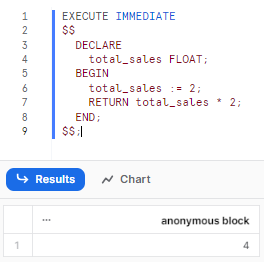
This anonymous block immediately calculates total_sales and returns it.
Using the USING clause
The USING clause allows you to pass variables into the SQL statement being executed.
Syntax:
EXECUTE IMMEDIATE '<SQL_query>' USING (variable1, variable2, ...);Here’s a simple example:
CREATE OR REPLACE PROCEDURE filter_data()
	RETURNS STRING
	LANGUAGE SQL
AS
$$
	DECLARE
		 sql_text VARCHAR DEFAULT 'DELETE FROM orders WHERE order_date = ?';
		target_date DATE DEFAULT '2022-01-01';
	BEGIN
		 EXECUTE IMMEDIATE sql_text USING (target_date);
		RETURN 'Data deleted for ' || target_date;
	END;
$$;
You can see that the stored procedure deletes orders for a specific date, passed as a variable.
Step-by-step guide to create Snowflake stored procedures in JavaScript
Snowflake’s support for JavaScript as a stored procedure language opens up a world of possibilities for developers familiar with the language. This step will walk you through the process of creating Snowflake stored procedures using Snowflake JavaScript, ensuring you have a comprehensive understanding of each step.
Note: While Snowflake primarily uses SQL for stored procedures, it also supports JavaScript, offering greater flexibility and functionality.
Prerequisites
- A Snowflake account with the necessary privileges
- Basic knowledge of SQL and JavaScript
Creating your first Snowflake JavaScript stored procedure
Step 1—Setting up the procedure
Start by defining the procedure using the CREATE PROCEDURE statement. Specify the name, return type and language.
CREATE OR REPLACE PROCEDURE sample_procedure()
	RETURNS STRING
	LANGUAGE JAVASCRIPT
	 EXECUTE AS CALLER
	AS
	$$
	 // JavaScript code goes here
	 $$
;
Step 2—Adding JavaScript logic
Within the $$ delimiters, you can write your JavaScript code. For this example, let’s create a simple procedure that returns a greeting.
var greeting = "Hello there from Snowflake JavaScript!";
return greeting;
Step 3—Calling the procedure
Invoke the stored procedure using the CALL statement:
CALL sample_procedure();
Passing parameters in Snowflake JavaScript stored procedure
Stored procedures often require input parameters to perform operations. Let’s explore how to pass and use parameters in our Snowflake JavaScript stored procedure.
Step 1—Define the parameters
When creating the procedure, specify the parameters and their data types:
CREATE OR REPLACE PROCEDURE greet_user(name STRING)
	RETURNS STRING
	LANGUAGE JAVASCRIPT
	 EXECUTE AS CALLER
	AS
	$$
		var greeting = "Hello, " + NAME + "! Welcome to Snowflake!";
		return greeting;
	$$
;
Step 2—Calling the procedure with parameters
Invoke the procedure, passing the necessary arguments:
CALL greet_user('Chaos Genius');
Working with Snowflake functions
You can execute SQL statements within your JavaScript stored procedure using Snowflake’s built-in JavaScript functions.
Step 1—Using snowflake.execute()
To run a SQL statement, use the snowflake.execute() function. For instance, to fetch data from a table:
var resultSet = snowflake.execute({sqlText: "SELECT * FROM my_table"});Step 2—Processing the results
You can iterate over the result set and process the data:
while (resultSet.next()) {
		var data = resultSet.getColumnValue(1);
		 // Process data
}
Error handling
JavaScript’s try..catch construct allows you to handle errors gracefully in your stored procedures.
try {
		// Code that might throw an exception
} catch(err) {
		 return "An error occurred: " + err;
}
Debugging and logging
Debugging is crucial for identifying issues in your Snowflake JavaScript stored procedures. Use console.log() to print messages, which can be viewed in Snowflake’s history:
console.log("This is a debug message.");Here’s a simple example:
CREATE TABLE my_table (
		 id INT AUTOINCREMENT PRIMARY KEY,
		data VARCHAR
);

-- Populate the table with sample data
INSERT INTO my_table (data) VALUES ('Sample Data 1'), ('Sample Data 2'), ('Sample Data 3');

CREATE OR REPLACE PROCEDURE fetch_and_process_data()
		 RETURNS STRING
		 LANGUAGE JAVASCRIPT
		EXECUTE AS CALLER
AS
$$
try {
		// Step 1--Using snowflake.execute()
		var resultSet = snowflake.execute({sqlText: "SELECT * FROM my_table"});

		 // Step 2--Processing the Results
		var output = "";
		while (resultSet.next()) {
				var data = resultSet.getColumnValue(1);
				 output += data + ", "; // Process data
		 }

		// Debugging and Logging
		console.log("Data fetched and processed.");

		 return output;

} catch(err) {
		 return "An error occurred: " + err;
}
$$;

-- Calling the stored procedure to fetch and process data
CALL fetch_and_process_data();
Check out this in-depth playlist by Data Engineering Simplified to learn everything about Snowflake stored procedures, from basic to advanced.
Best practices for creating Snowflake stored procedures
Modularity. Break complex procedures into smaller, reusable units. A procedure that does one thing well is easier to test and maintain than a monolith that does everything.
Error handling. Always add exception blocks. Silent failures are worse than noisy ones. Log errors somewhere queryable.
Comments. Comment your code; especially for non-obvious logic or workarounds. Future you (or a teammate) will thank you.
Set-based operations over loops. Row-by-row processing inside a loop is often orders of magnitude slower than an equivalent INSERT … SELECT or MERGE. Reach for set-based SQL first.
Security. Use EXECUTE AS CALLER when the procedure should operate only on objects the caller has access to. Use EXECUTE AS OWNER when delegating specific, controlled tasks. Avoid EXECUTE IMMEDIATE with string concatenation from untrusted input.
Parameter handling. In Snowflake Scripting, parameters are read-only. Copy them to local variables before modifying.
Performance notes and optimization strategies
To optimize database operations and control resource consumption, it is essential to comprehend the performance characteristics of Snowflake stored procedures.
General performance notes
- Stored procedures, especially those written in Snowpark languages (Python, Java, Scala), incur a small compilation and setup cost on their first call in a session. Subsequent calls often benefit from caching, reducing this overhead. JavaScript and Snowflake Scripting procedures generally have faster initial startup times compared to Snowpark.
- Snowflake Scripting runs inside the SQL engine and adds little orchestration overhead for SQL-heavy flows. Use it when you mainly sequence SQL statements.
- For Snowpark procedures, there can be a slight network latency due to the communication between the Snowpark client (where the UDF/procedure code might be prepared) and the Snowflake warehouse. However, Snowflake’s architecture minimizes this by executing the code directly on the virtual warehouse.
Language-Specific Performance Considerations
- Snowflake Scripting (SQL):
- Snowflake Scripting is designed to be very efficient for orchestrating SQL statements. Its native integration with Snowflake’s execution engine allows for minimal context switching.
- While Snowflake Scripting supports loops, heavily transactional or large data operations performed row-by-row within loops can be significantly slower than equivalent set-based SQL operations. Prioritizing INSERT … SELECT, UPDATE … FROM and other set-based DML is always recommended for performance.
- JavaScript:
- Minimize the number of
snowflake.execute()calls. Build multi-row or multi-step queries server-side and run them in one call. Do not callsnowflake.execute()inside tight loops for thousands of rows. - Remember the API is synchronous. You do not get client-side asynchronous threads inside stored procedures. Keep the JS body focused on control flow, not row processing.
- Minimize the number of
- Snowpark (Python, Java, Scala):
- avor DataFrame transformations that stay lazy. Only call materializing actions (
collect(),to_pandas(),to_pandas_batches()) when the result set is small enough to fit memory. Useto_pandas_batches()for chunked materialization. - Use Snowpark for compute that is hard to express in SQL, for safe use of third-party libraries, or for machine learning where you need local Python tooling. But profile your code. Snowflake added a built-in profiler for Snowpark Python to find hotspots and CPU-bound parts. Use it.
- avor DataFrame transformations that stay lazy. Only call materializing actions (
Optimization Strategies
- Favor set-based SQL. Rewrite row-by-row loops into set operations (
INSERT ... SELECT,MERGE,UPDATE ... FROM) for large datasets. - Minimize cross-language context switches. For JavaScript or Snowpark, reduce the number of
execute/statementcalls by consolidating SQL or using table-driven processing. - Use temporary/staging tables for multi-step pipelines instead of passing large datasets back and forth between client code and SQL. Temporary tables let the engine reuse metadata and cache.
- Be cautious with
EXECUTE IMMEDIATE. Dynamic SQL is powerful but you lose some compile-time optimization opportunities. Use it only when necessary and ensure the generated SQL is optimized. For long-running dynamic flows, validate performance by examining the generated query plan. - Control and understand caching. Disable result cache for fair benchmarking with
ALTER SESSION SET USE_CACHED_RESULT = FALSE;and re-enable afterwards. Remember result cache, metadata cache and warehouse cache are separate layers. Warehouse suspension can clear local caches. - Right-size compute. Increase warehouse size to get more disk/CPU per query. For concurrency spikes, use multi-cluster warehouses. Consider enabling Query Acceleration Service for workloads with long, I/O heavy queries. Monitor cost vs speed trade-offs.
- Monitor and profile. Use Snowsight Query History,
QUERY_HISTORYtable functions and the query profile to see each statement the procedure runs and its breakdown. Each internal SQL executed by a stored procedure shows up in query history with associated metrics. Use those to find hotspots. - Batch I/O / Dataframe pushes. For Snowpark Python, prefer DataFrame transformations and
writeoperations and avoidto_pandas()except on small datasets. For large transfers,to_pandas_batches()is the safer pattern.
Save up to 30% on your Snowflake spend in a few minutes!
Conclusion
And that’s a wrap! Snowflake stored procedures serve as a powerful tool, allowing users to seamlessly integrate procedural code that executes SQL. Beyond just being a sequence of SQL statements, these procedures offer a dynamic environment where branching and looping come to life through programmatic constructs. Their true strength lies in their reusability, ensuring that once a procedure is crafted, it can be invoked repeatedly, guaranteeing consistent and efficient operations every time.
In this article, we covered:
- What stored procedures are and when to use them
- The full syntax and supported languages
- How caller’s rights and owner’s rights work
- How to declare and use variables, cursors and RESULTSETs
- Branching and looping constructs
- Exception handling
- EXECUTE IMMEDIATE for dynamic SQL
- Step-by-step JavaScript stored procedure creation
- Performance considerations and optimization strategies
… and so much more!
FAQs
What are Snowflake stored procedures?
Stored procedures in Snowflake are reusable, named database objects containing procedural logic and one or more SQL statements. They’re compiled at runtime on first call in a session; not pre-compiled like in some traditional relational databases.
Do Snowflake databases support stored procedures?
Yes. Snowflake supports creating and executing stored procedures.
Why use stored procedures in Snowflake?
They let you perform branching, looping and error handling inside Snowflake, automate repetitive multi-step operations and delegate controlled access to data without granting broad privileges.
Are there naming conventions for Snowflake stored procedures?
Snowflake doesn’t enforce a naming convention beyond requiring valid identifiers. That said, consistent, descriptive names make procedures easier to manage, especially since Snowflake supports overloading (same name, different argument types). Since stored procedures support overloading, the argument list is part of their full identity.
Can I write stored procedures in JavaScript within Snowflake?
Yes. Snowflake supports JavaScript as an inline handler language with its own API (snowflake.execute(), snowflake.createStatement(), etc.) for running SQL from within JavaScript code.
How do I create a stored procedure in Snowflake?
Use CREATE PROCEDURE to define it and CALL to execute it.
What’s the difference between stored procedures and UDFs in Snowflake?
Stored procedures support multiple SQL statements, DDL/DML operations, transactions and procedural logic, and they’re invoked with CALL. User-defined functions (UDFs) must return a value and are designed to be called inline within SQL expressions. UDFs only support SELECT-type logic; no DDL or DML.
Are there risks with nested calls or recursion in Snowflake stored procedures?
Yes. Snowflake’s current maximum stack depth for nested stored procedure calls is 16, including the top-level call. That limit can be lower if individual procedures in the chain consume significant resources. Design recursive or deeply nested procedures with care.
What languages are supported for writing stored procedures in Snowflake?
Snowflake supports Java, Python and Scala (via the Snowpark application programming interface, or API), Snowflake Scripting (SQL) and JavaScript.
How do I specify arguments when calling a stored procedure?
Arguments can be passed by name (arg_name => value) or by position. You must use one style consistently within a single CALL. Note that mixing the two isn’t allowed. Snowflake also supports default parameter values, so optional arguments can be omitted if a default is defined.
Is there a way to write anonymous procedures in Snowflake?
Yes. Snowflake supports anonymous procedures via CALL (WITH … CALL …). They don’t require CREATE PROCEDURE schema privileges and are discarded after execution—useful for one-off automation.
Can I return a table from a Snowflake stored procedure?
Yes, for Snowflake Scripting procedures. Use RETURNS TABLE (…) in the procedure definition and return data with RETURN TABLE(resultset_variable). JavaScript stored procedures return a single scalar value. If you need to surface tabular data from a JS procedure, one workaround is to populate a temporary table inside the procedure and query it separately after the call.
Pramit Marattha
Pramit Marattha is a technical content writer and strategist with 5+ years of experience covering AI, data engineering, data cloud platforms and open source technologies. He turns complex technical concepts into clear, useful content for engineers and developers.







