



Databricks Lakehouse workspace is powerful, but it’s not built for everyone. It is geared more towards data engineers, scientists, machine learning professionals and data experts who need fine-grained control over compute clusters, pipeline orchestration, model serving, and governance. That depth is a feature for them. But for business users like finance analysts who just want to check quarterly numbers or sales managers who need to see pipeline coverage, it is overkill. They do not want to spend time setting up complex configurations or writing SQL code. They want answers, fast. That is exactly the problem Databricks One was built to solve.
Databricks One was officially introduced at the Databricks Data + AI Summit in June 2025. It is a no-code, streamlined consumption layer built on top of the Databricks Data Intelligence Platform. Instead of exposing the full technical stack, it gives business users a clean, intuitive home for data and AI, with just the dashboards, conversational analytics (Databricks Genie), apps and smart search features they need. No exposure to configuration hassle. Databricks One brings all the power of the Lakehouse to non-technical users without the complexity. And it is currently available to all Databricks customers at no additional cost.
In this article, we will cover what Databricks One is, how it works under the hood, how to enable and configure it, what its limitations are and everything a technical administrator or architect needs to know before rolling it out to business teams.
What is Databricks One?
Databricks created the Databricks One interface to make it easy for business users to access data and AI. The traditional Databricks workspace is quite tech-heavy. It exposes users to low-level platform elements such as Databricks cluster configuration, a complete Databricks notebook IDE, Jobs, Lakeflow pipelines, SQL Warehouses, the Databricks Unity Catalog explorer, MLflow tracking, Databricks model serving and many other platform features. That workspace is mainly targeted towards data engineers, data scientists, ML experts and data experts, but it can overwhelm casual business users.
Most organizations have far more business users than engineers. Finance teams need revenue dashboards. Marketing needs campaign attribution reports. Sales ops needs pipeline analysis. None of those users needs to understand what is running under the hood or write a line of SQL. As Databricks puts it, “most business users don’t have the time, skills or desire to work in a technical environment“.
Databricks One is the answer to that. It is a simplified interface available to all Databricks users, designed specifically for consuming the assets that data teams build. It gives users a single, intuitive entry point to interact with data and AI in Databricks without touching Databricks clusters, queries, models or notebooks.
Figure 1: Databricks One (Source: Databricks)
What is Databricks One designed for?
Databricks One is designed for the following:
- Fast, self-service consumption of key performance indicators (KPIs), metrics and reports via Databricks AI/BI Dashboards
- Natural language querying of governed enterprise data via Databricks Genie (no SQL required)
- Interaction with custom-built data and AI powered workflows via Databricks Apps
- Personalized asset discovery through a “For you” home feed tailored to each user’s activity
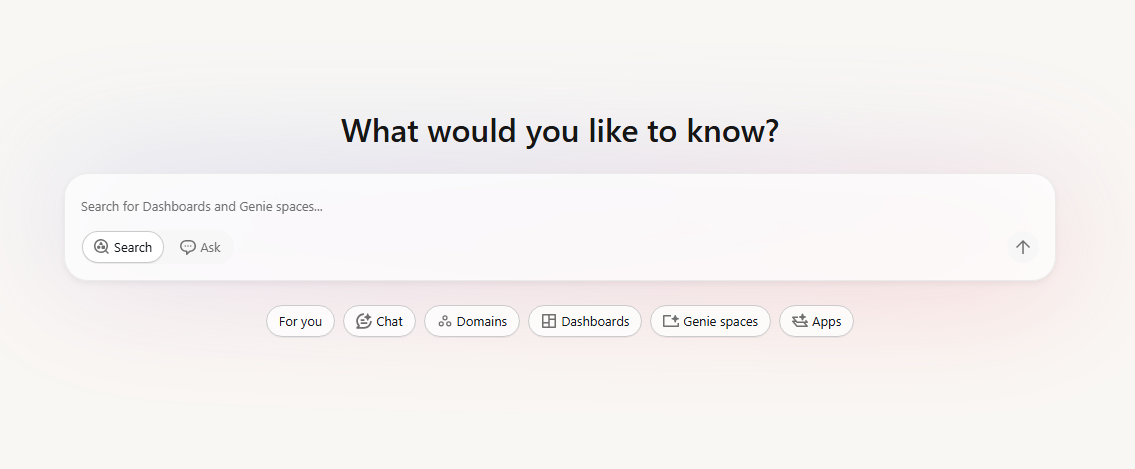
Figure 2: Databricks One interface
Who is Databricks One for?
Databricks One is specifically for business analysts, finance teams, marketing analysts, sales operations, product managers, executives and other non-technical users who need data insights without involving the engineering team every time. If a user’s workflow ends at consuming a dashboard or asking a data question, Databricks One is the right interface for them.
Availability and pricing breakdown of Databricks One
Databricks One is not a paid add-on. It is included at no additional charge for all customers of the Databricks Data Intelligence Platform. At launch, Databricks announced that Databricks One would roll out free to all clients on the Data Intelligence Platform.
Databricks One exists at two scopes:
- Workspace-level – Scoped to a single Databricks workspace (generally available (GA) as of March 2026)
- Account-level (Beta) – A unified view across all workspaces in your Databricks account (currently in public beta)
Workspace-level Databricks One is fully generally available (GA), while account-level Databricks One is in public beta. The account-level Databricks One (sometimes called “Account-level One”) provides a single unified view across all workspaces in your Databricks account. With account-level One, a user can browse assets shared from any workspace they have access to, without manually switching workspaces. We will cover both below.
Get more value from your Databricks spend
See how you can get up to 30% savings on Databricks through smarter optimization.
Databricks One vs the standard Databricks Lakehouse workspace
Now, let’s dive into the main differences between Databricks One vs the Databricks Lakehouse.
Let’s get one thing straight before we dive into the differences. Databricks One is NOT a separate data platform. It is a consumption-focused interface layered on top of the Databricks Lakehouse. The Lakehouse is the backend. Databricks One is the business-user front end.
The standard Databricks Lakehouse workspace surfaces the full technical stack. Once you are inside it, you have access to:
- Databricks Cluster and compute configuration
- Databricks Job and pipeline authoring (Lakeflow)
- Databricks Notebook authoring (Python, Scala, SQL, R)
- Machine learning tools (MLflow tracking, Databricks model registry, experiments)
- Databricks SQL editor and schema explorer
- Databricks workspace file system (home directories, Repos, libraries)
- Catalog Explorer for browsing all Unity Catalog objects
- Administrative menus for networking, libraries, monitoring and workspace settings
It is built for data engineers, scientists and advanced analysts. For business users, it is far more than they need.
Databricks One takes a different approach entirely. Databricks One trims that surface down for business users. The home experience centers on search, Databricks Genie chat, “For you” recommendations, domain-based browsing and shared assets. There are no Databricks clusters to configure, no notebook editor, no jobs or pipelines menu. Consumer-only users can view and run Databricks dashboards, Databricks Genie spaces and Databricks Apps shared with them… BUT they cannot create new workspace objects, and they cannot see SQL warehouses or Query History.
The simplest way to frame it is that in the Lakehouse workspace, we create and govern data products. In Databricks One, we distribute and consume them. Both run on the same platform and operate under the same Unity Catalog governance and access controls.
We break down the main differences below.
User interface. Databricks One is a consumption-focused, simplified interface. The classic workspace is a full interactive development environment. Navigation in Databricks One is limited to search, For You, Databricks Dashboards, Databricks Genie spaces and Databricks Apps. The classic UI gives you Data, Compute, Jobs, Dev Tools and more.
Functionality. Databricks One provides no development tools at all. Business users do not see notebooks, code editors, or cluster settings. They see only BI assets. In the standard Databricks workspace, you can create and edit notebooks, run code, configure jobs, manage tables and so on.
Common use case. Databricks One is for self-service insight consumption. A finance analyst or ops manager can start pulling answers immediately without involving an engineer. The classic workspace is for engineering workflows: data pipelines, machine learning, data modeling and script-based analytics.
Governance. Both interfaces sit on Databricks Unity Catalog. In the standard workspace, you can browse catalog objects directly. In Databricks One, governance is invisible by design. Users only see assets they have been explicitly granted access to. Databricks Row level and Databricks column level security policies enforced in Databricks Unity Catalog apply automatically when assets are consumed.
Sharing. In the classic workspace, engineers and analysts create dashboards, queries and Genie spaces. In Databricks One, all assets are pre-shared. Business users don’t publish anything. They only see what has been explicitly shared with them or with a group they belong to. They can, however, mark assets as favorites for faster access.
Entitlements. Entitlements are additive, and that is the key to understanding how the two interfaces work together. Users with only Consumer access land on Databricks One by default; they have no path into the classic UI. Users who also have Workspace access or Databricks SQL access get both interfaces and can switch between them via the app switcher in the upper-right corner. They can also navigate directly to Databricks One by appending /one to their workspace URL.
Table 1: Entitlements and UI access
| 🔮 | Databricks One UI | Classic (Lakehouse) UI |
| Databricks Consumer access | Yes | No |
| Databricks Workspace access | Yes | Yes |
| Databricks SQL access | Yes | Yes |
Consumer-only users see only Databricks One. The classic UI is not accessible to them at all. Users with workspace access or Databricks SQL access can move between both interfaces as needed.
Here is the full comparison between the standard Databricks workspace vs Databricks One.
Table 2: Standard Databricks Lakehouse workspace vs Databricks One
| 🔮 | Standard Lakehouse workspace | Databricks One |
| Target user | Data engineers, data scientists, ML practitioners | Business users, analysts, executives |
| Databricks Notebook authoring | Yes (Python, Scala, R, SQL) | No |
| Databricks Cluster/compute management | Full access | Hidden; no exposure |
| SQL warehouse visibility | Full (create, start, monitor) | Not visible in UI; eligibility to use via third-party BI tools (Power BI, Tableau) if granted |
| Query History | Visible | Not visible |
| Job and pipeline orchestration | Full (Lakeflow, Jobs UI) | No |
| MLflow experiments and models | Full access | No |
| Databricks AI/BI Dashboards | Publish and consume | Consume only (published dashboards) |
| Databricks Genie Spaces | Create, configure, and use | Use only (spaces must be pre-built) |
| Chat (Genie in Agent mode) | N/A | Available (Beta) |
| Databricks Apps | Build and use | Use only |
| Catalog Explorer | Full (browse all Databricks Unity Catalog objects) | No direct access |
| Object creation | Yes (tables, views, schemas, etc.) | No |
| Asset discovery | Via Catalog Explorer | Personalized “For You” feed (recent, favorites, shared, trending) |
| Entitlement required | Workspace access or Databricks SQL access | Consumer access (read-only) |
| Licensing cost | Standard Databricks licensing | No additional license fees |
Databricks One—core key features and capabilities
Databricks One delivers a no-code interface that lets business teams pull insights from the Lakehouse without involving engineers. We break down its core features below.
1) No-code business UI (Databricks One UI)
Databricks One interface is a clean, web-based application. It has a search bar at the top (with Ask mode for Databricks Genie chat and Search mode for assets), and tiles or sections for Chat, Dashboards, Genie spaces, Databricks Apps and an optional “For you” pane for personalized content. No SQL, no code. Point-and-click all the way.
Figure 3: Databricks One main navigation and search interface
2) Chat (a full-screen conversational interface)
Chat provides a unified, full-screen interface for asking data questions in natural language. It uses Databricks Genie in Agent mode, leveraging existing dashboards, queries and Genie spaces to answer questions using all available data. Note that Chat requires the user to have CAN USE permission on a SQL warehouse. It is also still in Beta and must be enabled by a workspace admin.
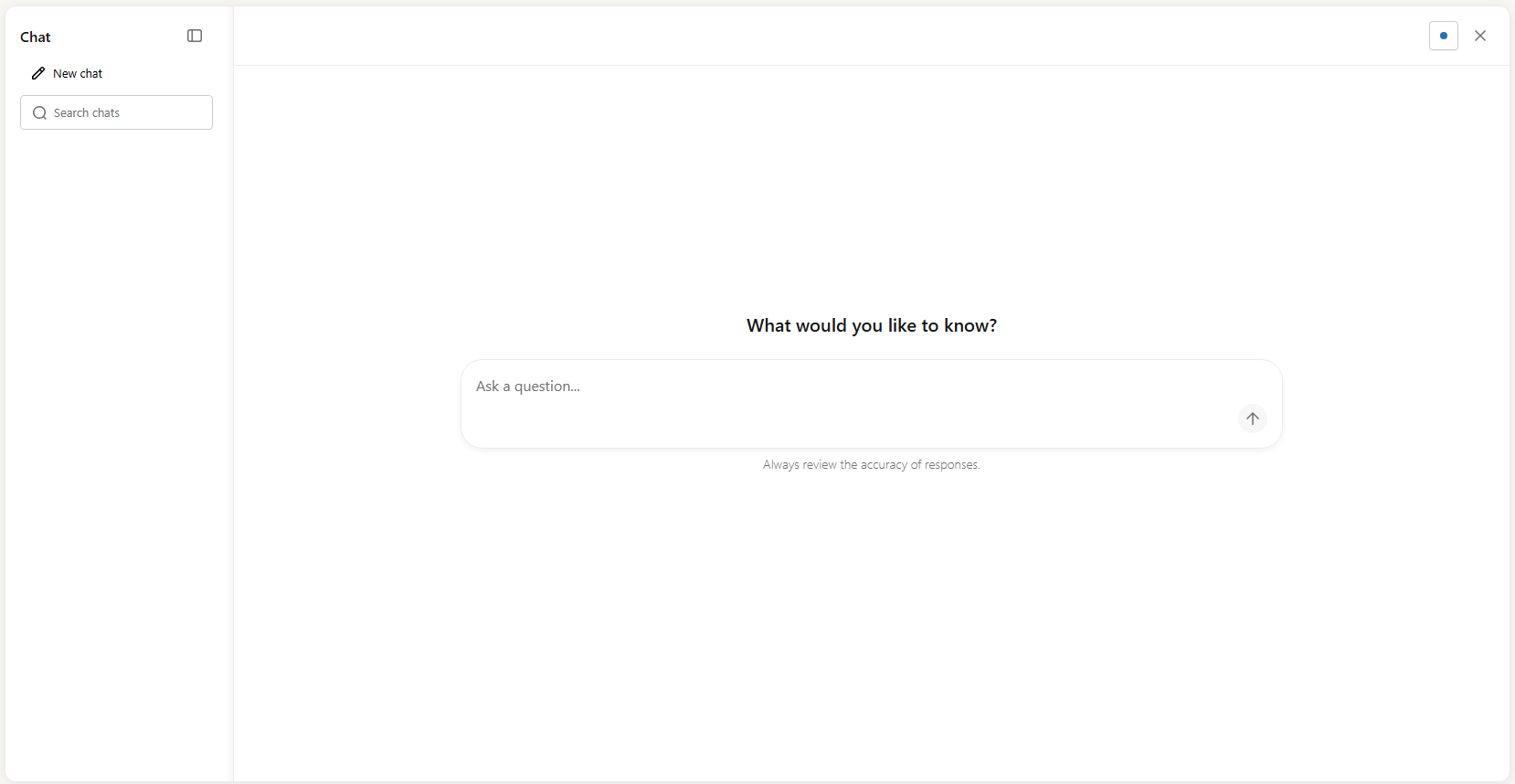
Figure 4: Databricks Chat full-screen conversational chat window—Databricks One
3) Databricks AI/BI dashboards (data intelligence dashboards)
Databricks AI/BI dashboards are the main reporting surface in Databricks One. Business users can view and interact with them to track key performance indicators (KPIs) and analyze metrics. These dashboards are authored in the Lakehouse workspace UI using Databricks SQL and then published for consumer access.
What makes them “AI/BI” is that they go beyond static charts, allowing users to apply filters, drill down into data and use advanced analytics widgets like forecasting and key-driver analysis. When you publish a dashboard, Databricks automatically generates a companion Databricks Genie space based on the dashboard’s datasets and visualizations. This means users can switch between viewing the dashboard and asking follow-up questions in natural language via the Ask Genie button.
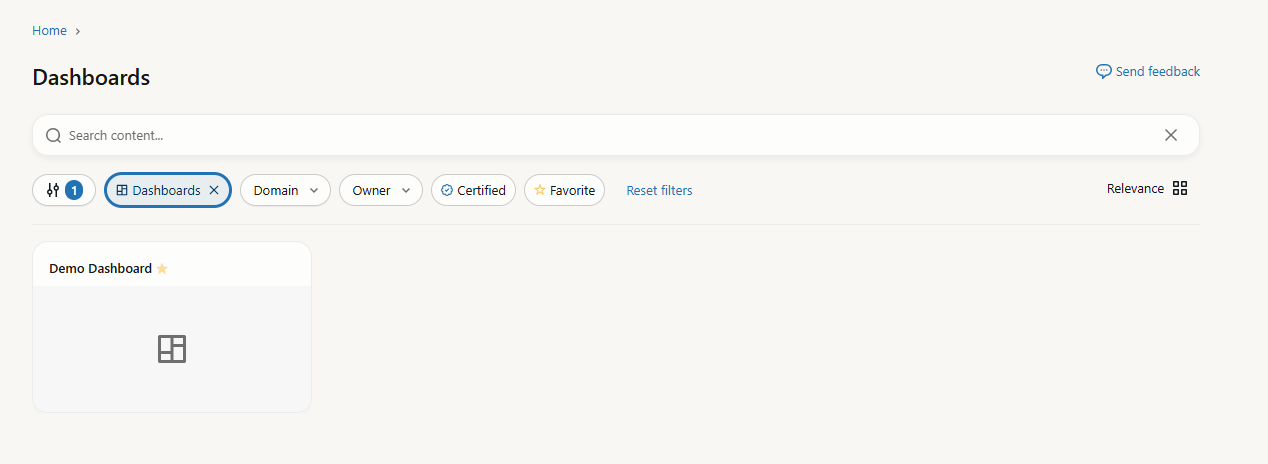
Figure 5: Interactive Databricks AI/BI dashboard view—Databricks One
4) Databricks Genie (conversational analytics)
Databricks Genie is the natural language query interface in Databricks One. Users click Ask or Chat, type a question (or pick a suggested example), and Databricks Genie translates it into a SQL query, runs it against the configured warehouse, and returns results as text, tables or charts.

Figure 6: Databricks Genie natural language query interface—Databricks One
Behind the scenes, Databricks Genie works against a curated Genie space, a configured knowledge base that data engineers or analysts set up. The space defines which tables Genie can query, sample SQL patterns and plain-language instructions. Compute credentials are embedded by the space author, so business users never need to select or start a warehouse themselves. Databricks Unity Catalog still enforces each user’s data access permissions at query time. Two users asking the same question in the same Databricks Genie space may get different results based on their respective SELECT privileges on the underlying data.
5) Databricks Apps
Business users can launch custom-built Databricks Apps directly from Databricks One. A Databricks App is a custom-made application a data or engineering team builds and deploys inside Databricks, combining dashboards, multi-step workflows, ML model outputs and interactive controls into one interface. From a consumer’s perspective, they just open the app and use it.
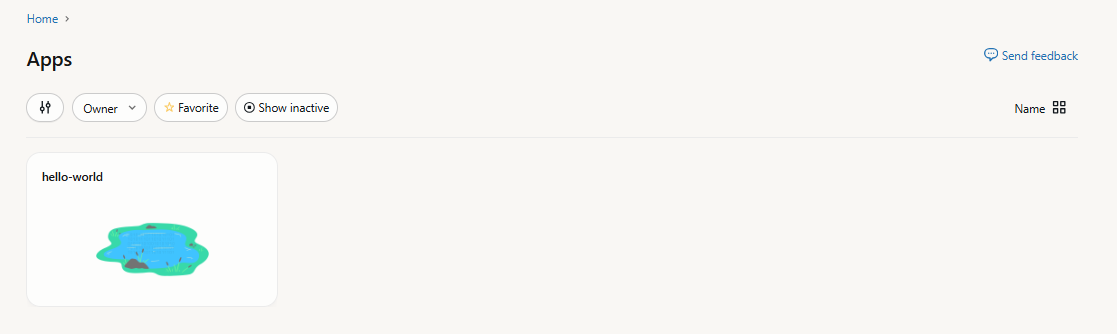
Figure 7: Databricks App interface—Databricks One
6) Domains and content discovery
Content is organized into Domains, which are collections of dashboards, Genie spaces and Databricks apps grouped by business context. This is worth calling out as a distinct feature because it is genuinely useful. Instead of searching by asset name, users can browse by domain, like “Customer 360“, “Marketing Campaign” or “Sales Performance” and find everything relevant to their work area at once.

Figure 8: Domains content discovery—Databricks One
7) Asset search and personalized discovery
The “For you” section on the Databricks One home page shows personalized asset recommendations based on your activity and the activity of other users in your workspace, including recently opened assets, favorites, assets recently shared with you and trending content. This section is currently in Beta.
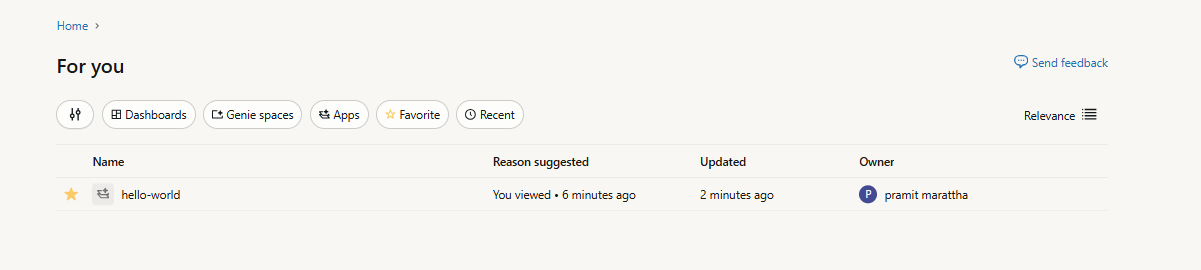
Figure 9: Personalized asset recommendation feed—Databricks One
And beyond “For you”, certified and favorited content is now boosted in search rankings in Databricks One. Search filters let users narrow results by asset type (dashboards or Databricks Genie spaces), owner, certification status, domain and last modified date.
8) Governance via Databricks Unity Catalog
Databricks One is built directly on Databricks Unity Catalog, Databricks’ central metadata and governance layer. All permissions, Databricks row level security (RLS) and Databricks column level security (CLS) masking configured in Unity Catalog apply automatically to everything users see in Databricks One. Administrators do not need a separate governance configuration for the One interface; it inherits everything from the existing governance model, including fine-grained object-level permissions and attribute-based access control policies.
9) Role and entitlement controls
Databricks One enforces strict role separation. Databricks Consumer access is a workspace entitlement that provides a streamlined, read-only experience for business users. Users with only consumer access cannot create new objects, cannot view SQL warehouses or Query History in the UI, and cannot manage compute, even if permissions on compute and data have been granted elsewhere.
Users with Workspace or Databricks SQL entitlements can still author and manage content in the Lakehouse workspace, then switch back to Databricks One for consumption.
10) Separation of consumption and authoring
In Databricks One, consumption is fully separated from development. If a consumer user tries to access an asset they are not authorized to view, it simply does not appear in their view. The behind-the-scenes infrastructure is safely hidden.
If a user has view-only rights, the asset opens in Databricks One. If they have authoring privileges, they can click “Edit Draft” to open the asset in the Lakehouse workspace UI. That boundary between consumption and authoring is clean and deliberate.
11) Integration with Databricks Lakehouse assets and pipelines
Everything in Databricks One is built on the same underlying assets that engineers create. Dashboards come from Lakehouse tables and queries written by SQL analysts. Genie spaces draw on Databricks Unity Catalog tables authored by data teams. When a user runs a query through One (via a dashboard or Genie) the computation runs on the Databricks platform, typically on a Databricks SQL warehouse (serverless or classic). Results display directly in the Databricks One UI.
12) Shareability and distribution
Data teams can publish and share dashboards with individuals, groups or entire accounts. Genie spaces can be shared at the workspace level by granting specific users or groups access. Shared assets automatically appear in the One home page for those users (assuming they have the right entitlements). Databricks One leverages the existing Databricks sharing model to distribute content to business teams.
How Databricks One integrates with the Databricks platform (architecture breakdown)
Now that you understand the features, let’s look at how Databricks One works under the hood.
Databricks One provides a streamlined interface with access to curated Databricks AI/BI dashboards, Genie spaces and Databricks Apps. It does not expose the full workspace. It shows only what’s been prepared and published for consumption. Drafts are not visible to consumers.
The architecture of Databricks One follows the same two-plane model Databricks has always used: a control plane managed by Databricks and a compute plane that runs either in your cloud account (classic mode) or in a Databricks-managed environment (serverless mode). The web application, including the Databricks One UI, lives in the control plane.
Databricks One UI layer
At the top of the stack, the Databricks One UI is a web application served from the control plane. It is a filtered, consumer-scoped view of the workspace, not a separate product.
The interface strips out the engineering surface. On the landing page, you get a search bar for finding shared assets. When you switch to “Ask” mode, that same search bar routes your question to a selected Genie space. Below the search bar, a “For you” section shows personalized recommendations based on your activity. You can also filter by asset type, owner, certification status or domain.
Users with only the Databricks consumer access entitlement land directly in Databricks One after login. Users with workspace access or Databricks SQL access can switch between the Databricks One UI and the standard Lakehouse workspace UI via the app switcher. Databricks One is also accessible directly by appending /one to your workspace URL (for example, https://<your-workspace-url>/one?o=<workspace-id>). At the account level (currently in Beta), a separate unified view is accessible at https://accounts.cloud.databricks.com/one.
Databricks Genie and Genie Spaces
Genie is the natural language query interface embedded in Databricks One. Genie spaces act as curated knowledge bases. A Genie space is configured by data engineers, analysts or workspace admins. Authors can select multiple (up to 30) Unity Catalog tables or views per space, add sample SQL queries and write plain-language instructions. They can also annotate tables and columns in the space’s knowledge store with synonyms, join hints and domain-specific context. These knowledge store annotations are space-local: they do not overwrite existing Databricks Unity Catalog metadata.
When a user submits a question in a Genie space, the system performs the following actions:
- Parses the natural language prompt
- Pulls relevant context from the knowledge store (space-level instructions, sample SQL, SQL functions and join specs)
- Pulls Unity Catalog table metadata (column names, descriptions, primary/foreign key relationships)
- Filters column names and descriptions based on relevance to the query
- Uses chat history from the current conversation as additional context
- Generates a SQL query and executes it on the configured SQL warehouse
- Returns the result set along with an auto-generated summary or visualization
Databricks Genie spaces require a pro or serverless SQL warehouse specifically. They do not run on general-purpose compute clusters. Generated queries are always read-only; Genie does not issue write operations.
Throughout this entire process, Databricks Unity Catalog enforces data access control, but there is a nuance here. End users do not need CAN USE permission on the warehouse to run Genie queries; the author’s compute credentials handle that. But, Databricks Unity Catalog still enforces each viewer’s data permissions at query time. Every user must hold at least SELECT privileges on the Unity Catalog data objects in the space. Two users asking the same question in the same Databricks Genie space may get different result sets based on their respective data permissions.
Databricks AI/BI dashboards
Databricks AI/BI dashboards are visual reports built in Databricks SQL, surfaced as consumable assets in Databricks One. Business users can interact with charts and apply filters without touching any SQL or schema.
All dashboards point at tables registered in Databricks Unity Catalog, so all Databricks row level security and Databricks column masking policies are enforced automatically. The SQL rendering is invisible to consumers; they see charts and filters, not queries. If you have edit rights, you can hit Edit on a dashboard to pop into the classic dashboard editor.
When you publish a dashboard, Databricks automatically generates a companion Databricks Genie space based on the dashboard’s datasets and visualizations. Viewers can then click Ask Genie to ask follow-up questions in natural language against the same dataset. Companion Genie spaces do not appear in the workspace file browser. They are generated and managed automatically, and update when the dashboard is republished.
Databricks Apps
Databricks Apps are custom web applications that run on the Databricks platform itself. They let developers build interactive tools using familiar Python or Node frameworks. The cool part is that these apps run serverless on Databricks. You do not need to provision separate servers; Databricks handles the deployment.
In Databricks One, apps are listed under a “Browse Apps” section. Users can launch an app directly from One, though apps open in their own UI. Databricks Apps run in Databricks’ serverless layer and use Unity Catalog, so they automatically respect your data governance policies.
Databricks Unity Catalog (governance plane)
At the core of Databricks One’s architecture is Unity Catalog. Databricks Unity Catalog is the metadata and governance layer that underpins everything in Databricks One. It manages object-level permissions (USAGE, SELECT) across catalogs, schemas, tables and views. It handles column level masking, Databricks row level security, lineage tracking and audit logging. Governance extends beyond Delta Lake tables to other open formats.
Every data access event triggered through Databricks One, whether a Genie query execution, a dashboard render or an app data call, generates an audit log entry captured in Unity Catalog’s system tables. These events are first-class entries in the same audit trail that data engineering workloads produce; Databricks One consumption events are not treated differently.
Query lineage from Genie and dashboard activity feeds into Databricks Unity Catalog’s lineage graph, giving data teams full visibility into how business users are consuming governed data assets.
Compute and execution planes
Databricks Genie queries and dashboard datasets execute on SQL warehouses. Because the space or dashboard author’s compute credentials are embedded at configuration time, consumers never have to select, start or configure compute themselves. Serverless SQL warehouses are the recommended choice for Genie given their fast cold-start characteristics and automatic scaling.
Databricks Apps run on a separate managed compute service (also serverless) that is isolated from SQL warehouses. Databricks Apps are long-lived, always-on compute for web UIs, whereas SQL warehouses spin up only per query.
Data plane (storage)
All data queried by Databricks One comes from the same underlying cloud storage as any Databricks Lakehouse workload. Managed tables in Databricks Unity Catalog live in your cloud storage (Amazon Web Services/AWS, Azure platform or Google Cloud Platform) in Delta Lake format. External tables (also governed by Unity Catalog) point at data in your storage too. There is no separate storage tier for Databricks consumer access.
Control plane and application program interfaces (APIs)
The control plane hosts the orchestration and APIs behind Databricks One. This control plane includes the Genie Conversation API (for querying via chatbot or custom apps) and the Genie Management API (for automating space creation), as well as Databricks REST APIs for dashboards and apps. All these endpoints use the standard Databricks auth model (OAuth tokens or service principals) and check Unity Catalog and workspace permissions. In practice, administrators can even script the publishing of dashboards or Genie spaces via these APIs as part of continuous integration/continuous deployment (CI/CD).
Security, identity and integration
Databricks One relies on your identity management setup. Databricks supports external identity providers via OpenID Connect (OIDC)/single sign-on (SSO). You typically sync your corporate users and groups into Databricks via System for Cross-domain Identity Management (SCIM) provisioning. Those users and groups appear in Databricks Unity Catalog and workspace access control lists (ACLs), so you can assign SELECT or USAGE permissions in Catalog and view/edit rights in One. Service principals (machine identities) are also supported for programmatic access.
Also, Databricks Unity Catalog enforces access at query time based on the user’s identity. If a Genie space is using viewer credentials, the executing SQL query runs as the actual user, so all row and column policies apply. This means user A and user B might see different results from the same dashboard or question depending on their group membership. (If the space uses embedded author credentials, then everyone sees the same view of the data … useful for open, non-sensitive dashboards).
Finally, every interaction is logged and tracked. Databricks pipes all query events into its audit logs and Databricks Unity Catalog system tables. The unified audit trail and lineage graph include Databricks One activities just like any other Databricks workload.
Now putting it all together, a typical user action flows like this:
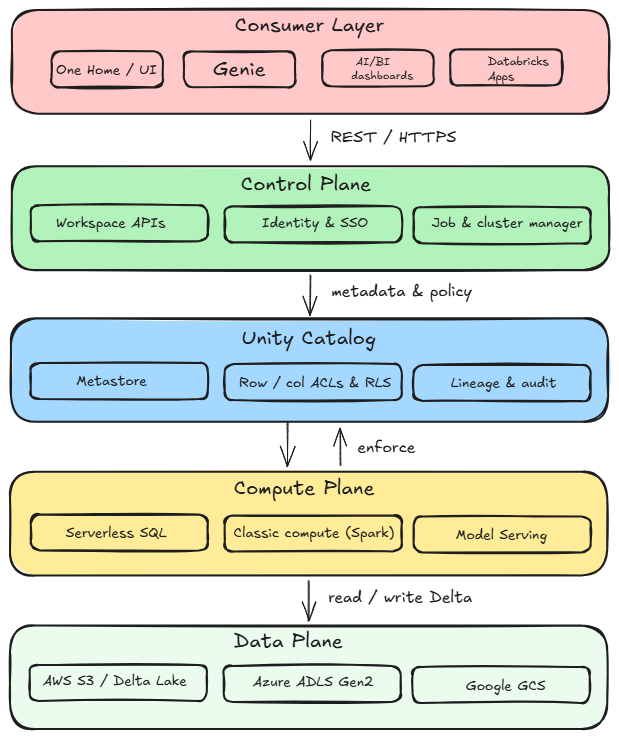
Figure 10: Databricks One architecture breakdown
🔮 User opens Databricks One (workspace-level or account-level) and clicks on a Genie space, Dashboard or Databricks App. Databricks One checks your permissions and shows the asset.
🔮 User asks a question (Natural Language question). Databricks One UI sends the question to Genie in the chosen space. Databricks Genie consults the space’s metadata (knowledge store) and Unity Catalog metadata for relevant table/column descriptions and joins to interpret intent.
🔮 Genie generates SQL or other action. If Genie finds an answer, it creates a SQL query (or a sequence of SQL statements via inspect mode). That SQL is sent to a Databricks SQL warehouse or compute cluster using the credentials of the space’s author. The query is read-only.
🔮 Compute executes the query. The SQL warehouse (serverless or provisioned) spins up compute nodes, reads the relevant Delta tables from the customer’s S3/ADLS/GCS storage, and runs the query. All row filters and column masks from Unity Catalog are applied, so only permitted data is returned.
🔮 Once finished, the result set is sent back to the Databricks One UI. The UI then displays the answer as a table or visualization (or a chart refresh in a dashboard). The user sees the output (and a brief generated summary) in One, with no raw SQL exposed.
Databricks One is NOT a separate platform or system. It is an alternate front end on top of the Databricks stack. It ties into Databricks Unity Catalog for governance, uses the same data and compute resources as the rest of the platform, and presents a curated UI. The entire experience is designed so non-technical users can talk to their data while data teams still own the lakes, models and pipelines.
Databricks One scope levels
Databricks One operates at two levels of scope: workspace-level and account-level.
1) Workspace-level Databricks One
This is the default deployment. In each Databricks workspace, Databricks One is already enabled by default on Premium plan workspaces. No special toggle is needed. Any user who logs in with the Databricks consumer access entitlement will land on the Databricks One home page instead of the classic UI. They see only the assets (Databricks dashboards, Databricks Apps, Databricks Genie spaces) that have been shared with them within that workspace.
So who can access it?
Any user in the workspace can use Databricks One, but what they see depends on their entitlements. A user with only Databricks Consumer access will automatically see the Databricks One UI (and will not see the workspace menus or Databricks notebook environment). A user with Workspace or SQL access entitlements can choose between One and the standard Lakehouse UI using the app switcher in the top-right (or by using the /one URL path). And note that entitlements are additive, meaning giving someone “Workspace access” automatically overrides their simplified view.
A brief table of workspace entitlements vs UI access:
Table 3: Entitlements and UI access
| 🔮 | Databricks One UI | Classic (Lakehouse) UI |
| Databricks Consumer access | Yes | No |
| Databricks Workspace access | Yes | Yes |
| Databricks SQL access | Yes | Yes |
Databricks Consumer access users get the Databricks One UI and cannot see the classic UI at all. Workspace or SQL entitlements (these are developer roles) give access to both UIs.
2) Account-level Databricks One
Databricks also offers an account-level One (currently in beta). Account-level Databricks One is a unified analytics view across all workspaces in your Databricks account. It appears as an option for account administrators and users to view in addition to the workspace-level experience. Account-level One lets users discover and access shared assets from any workspace, as long as the assets have been explicitly shared to them. In effect, it provides a global search and browse across your entire organization’s Databricks environment.
Features of account-level Databricks One:
- Shows a feed of recent and trending assets from the entire account, not just one workspace, with recommendations based on your activity across all workspaces
- The search bar looks through all shared dashboards, Databricks Genie spaces and apps across every workspace you have access to, meaning results respect permissions and you will only see assets you are entitled to
- Favorites marked in account-level view are global across workspaces
- Databricks Chat and Databricks Genie spaces accessible across workspaces for natural language data questions
- A workspace switcher that lets users select “Account-level” to access the unified view
So who can access it?
Account-level One is enabled by default on Premium-tier accounts. It can be toggled on or off by an account admin via the Account Console’s Databricks Previews page if needed. Once enabled, any workspace user in the account can access it (though again, they only see what has been shared to them). Users can open account-level One from the Databricks account landing page, via appending /one to the workspace URL (https://accounts.cloud.databricks.com/one), or by switching their workspace selector to “Account-level” in the UI.
Who sees what?
All users on the account can use account-level One, but it does not give new permissions. If a sales dashboard is shared only with user A in the Sales workspace, then user A will see it in account-level One. User B, who wasn’t shared, will not see it. Account-level One simply unifies access points; it does not override the Databricks Unity Catalog ACLs or workspace ACLs.
Step-by-step guide to enable and use Databricks One (workspace-level)
Prerequisite:
- You must be a Databricks workspace admin (or have equivalent privileges) to manage entitlements
- Your workspace should be on Premium (or above) SKU, with Databricks Unity Catalog enabled. Unity Catalog is highly recommended, as it powers the semantic layer for Genie and secure data access. If UC is not enabled, you can still use One, but advanced features like Databricks row level security, column masking and domain organization will not work
- Decide your entitlements strategy: determine which users will be Consumers (view-only, business users) and which will have Workspace access or SQL access (authors and developers). A user must have Databricks Consumer access as their sole entitlement to land on the Databricks One UI
- Note that Genie spaces have compute credentials embedded by the space author, so Consumer users do not need CAN USE on a SQL warehouse to run Genie queries. However, if you are enabling the Chat feature, Consumer users do need CAN USE on at least one Pro or Serverless SQL warehouse
Step 1—Log in to the Databricks workspace
Go to your Databricks workspace URL and sign in as a workspace admin. Confirm you can access the user menu in the top-right corner.
Step 2—Open Databricks Previews
In the user menu (upper-right corner, where your username appears), click Databricks Previews. In modern workspaces, Databricks One is generally available and typically already on. If it is not on and needs toggling, you would switch it on here.
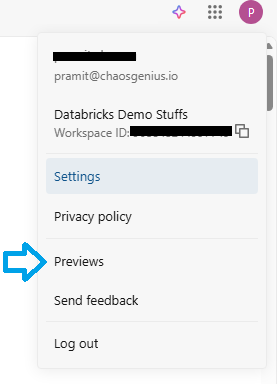
Figure 11: Enabling Databricks One from the workspace Databricks previews menu
Step 3—Enable Databricks One for the workspace
In the Databricks Previews list, find Databricks One. Flip the toggle to “On”. This activates the Databricks One UI for this workspace for all users (subject to entitlements). You do not need to install anything or wait; the service becomes available immediately.
Step 4—Configure user entitlements
Now assign the Databricks consumer access role to the appropriate users/groups. Navigate to Settings > Identity and access > Users (or Groups). For each user or group you want to restrict to the Databricks One consumer experience, assign only the consumer access entitlement. Remove workspace access and Databricks SQL access from that user or group.

Figure 12: Enabling the Databricks consumer access entitlement—Databricks One
Grant consumer access to those users, and only consumer access. They will then land on One and see only Databricks One UI. For your analyst or developer groups, grant them Databricks SQL or workspace access entitlement (these groups will still be able to switch to One if needed).
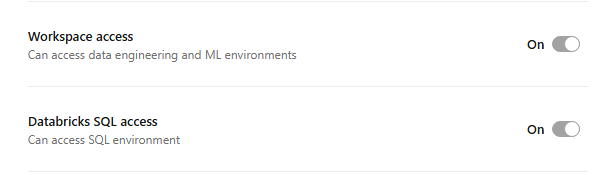
Figure 13: Configuring workspace and Databricks SQL access for technical teams—Databricks One
Remember that entitlements are additive. So if you add consumer to someone who already has workspace access, they will still default to the classic UI. If you want someone to truly be a One-only user, remove any workspace/SQL entitlements from them.
Whenever a user is added to a workspace, they are automatically added to the system users group, which typically has workspace access or Databricks SQL access entitlements. To streamline consumer onboarding at scale, use the “Change default workspace access to consumer access” feature in Settings > Advanced > Access control.
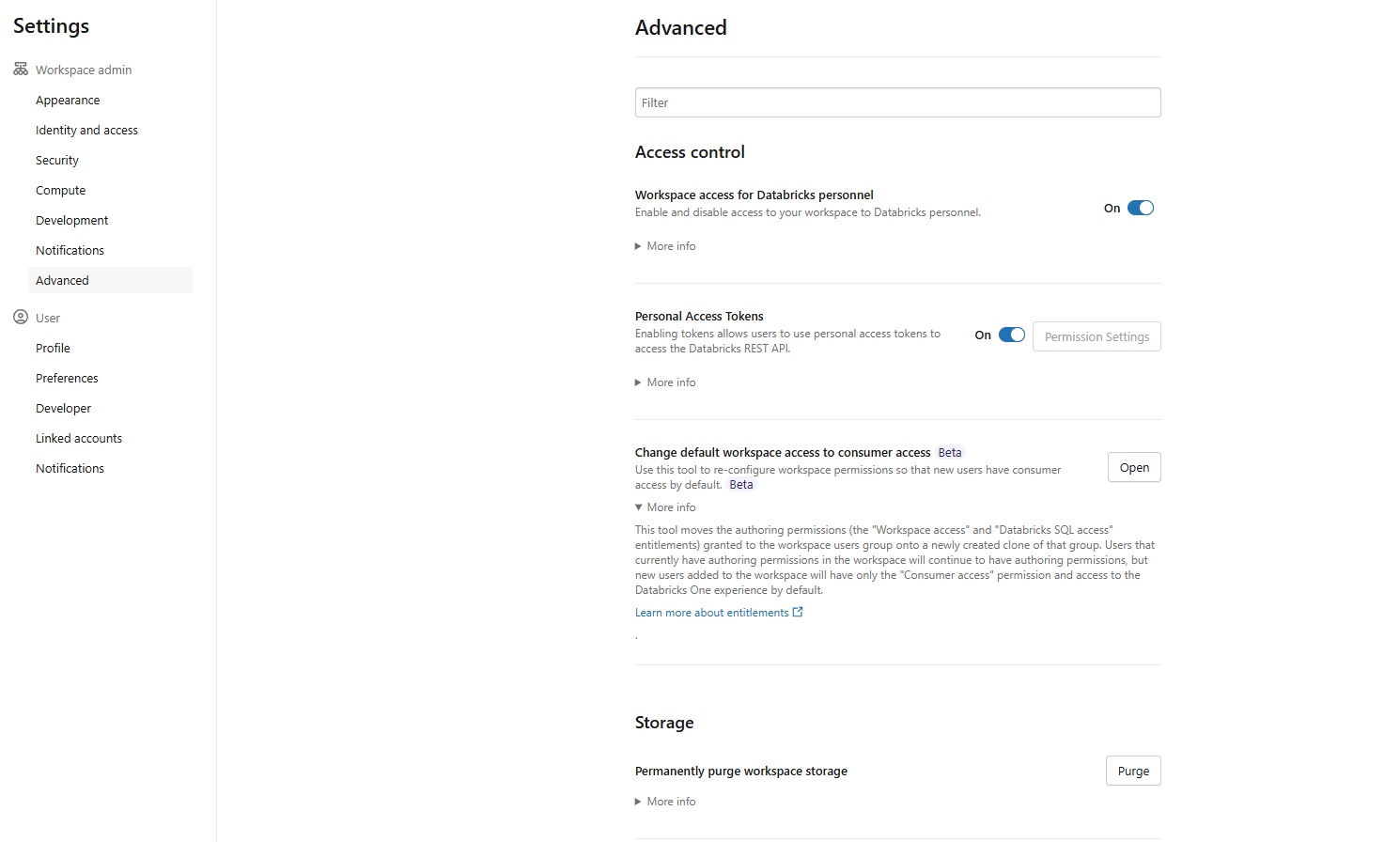
Figure 14: Accessing advanced settings to change default workspace permissions—Databricks One
This clones the existing users group, moves existing users into the clone to preserve their current access and sets the default for new users to consumer access only.
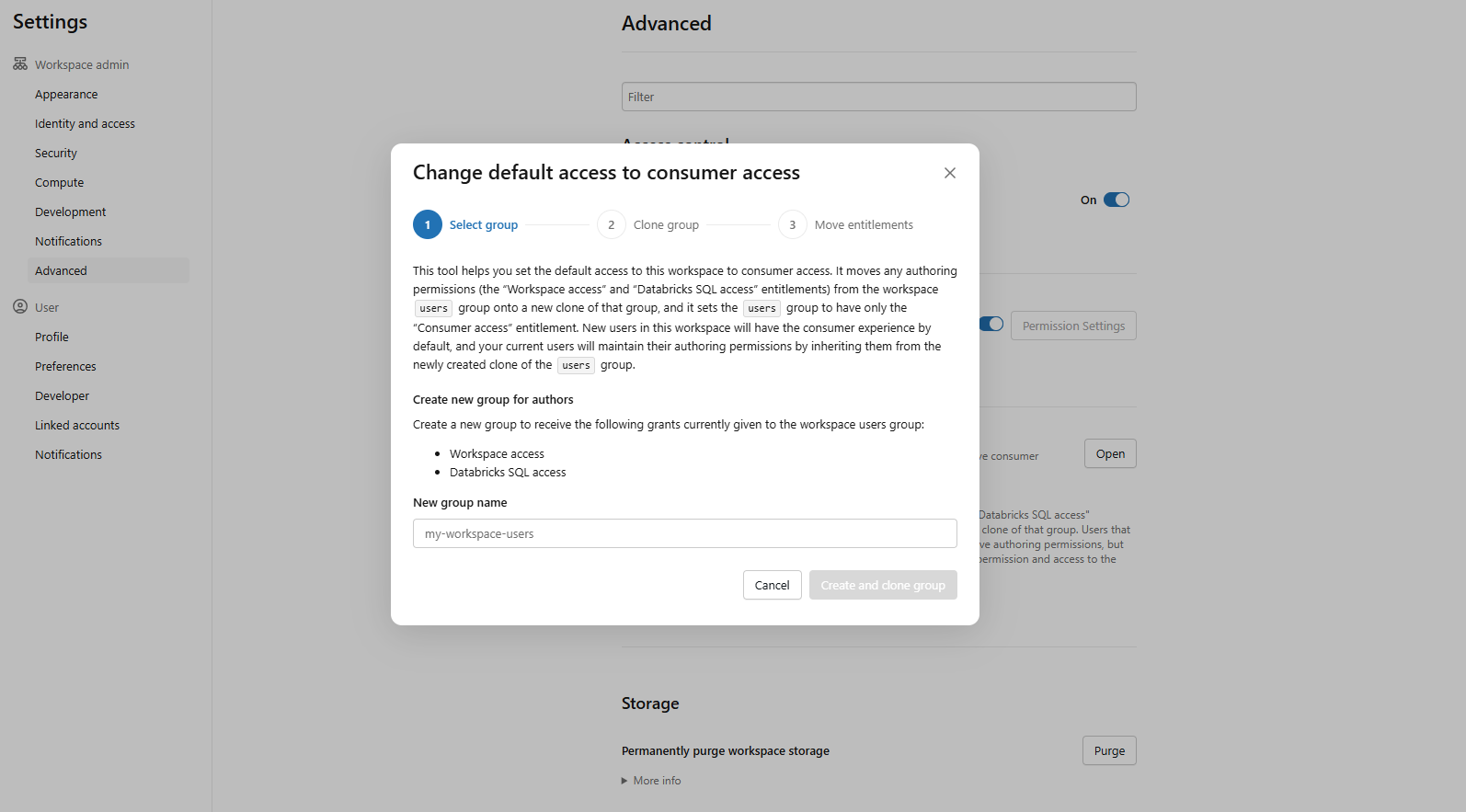
Figure 15: Confirming consumer access as the default role for new users—Databricks One
Step 5—Grant SQL warehouse usage (for Genie Chat)
If your consumers will use the Chat feature (the full-screen conversational interface powered by Genie in Agent mode), they need CAN USE on at least one SQL warehouse. Go to the warehouse’s Permissions and add the relevant users or groups with CAN USE. Without this, Chat will return a permission error.
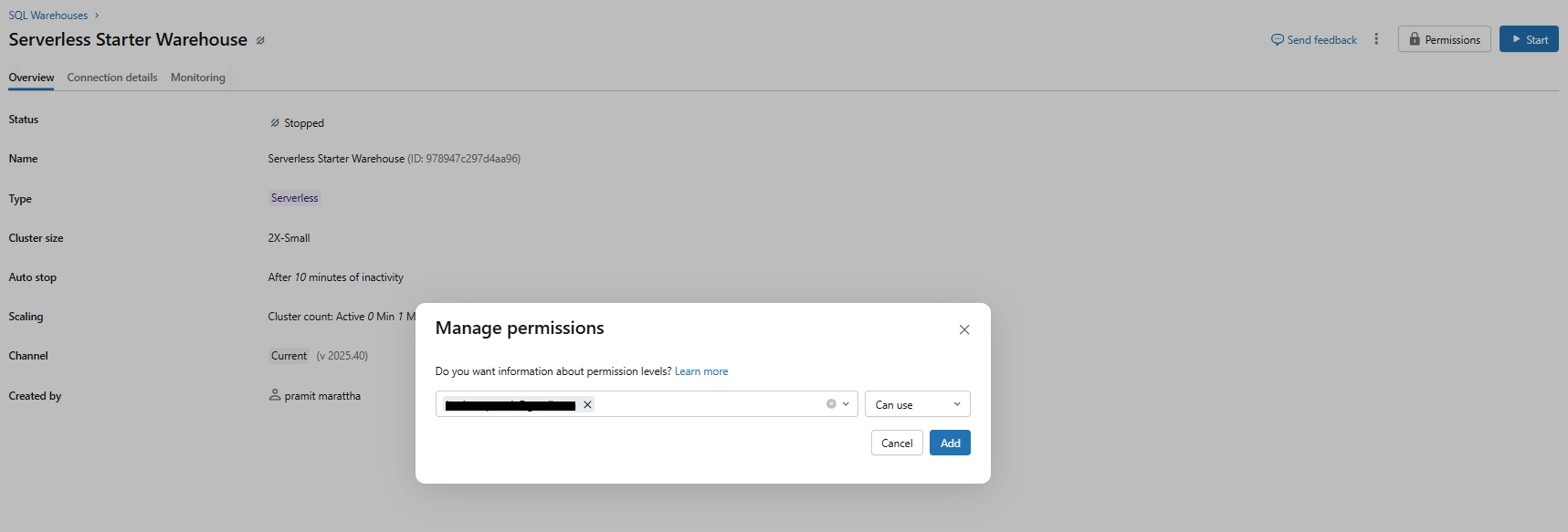
Figure 16: Granting users CAN USE permissions on a SQL warehouse—Databricks One
Note that this is specifically for Chat. Standalone Genie spaces use compute credentials embedded by the space author, so consumers do not need warehouse permissions to ask questions there.
Step 6—Publish and share assets from authoring workspaces
In the standard Lakehouse workspace UI, authors publish dashboards and Genie spaces and share them with the appropriate consumer users or groups.
For dashboards, go to Share > add the consumer user/group > set permission to CAN VIEW or CAN RUN.
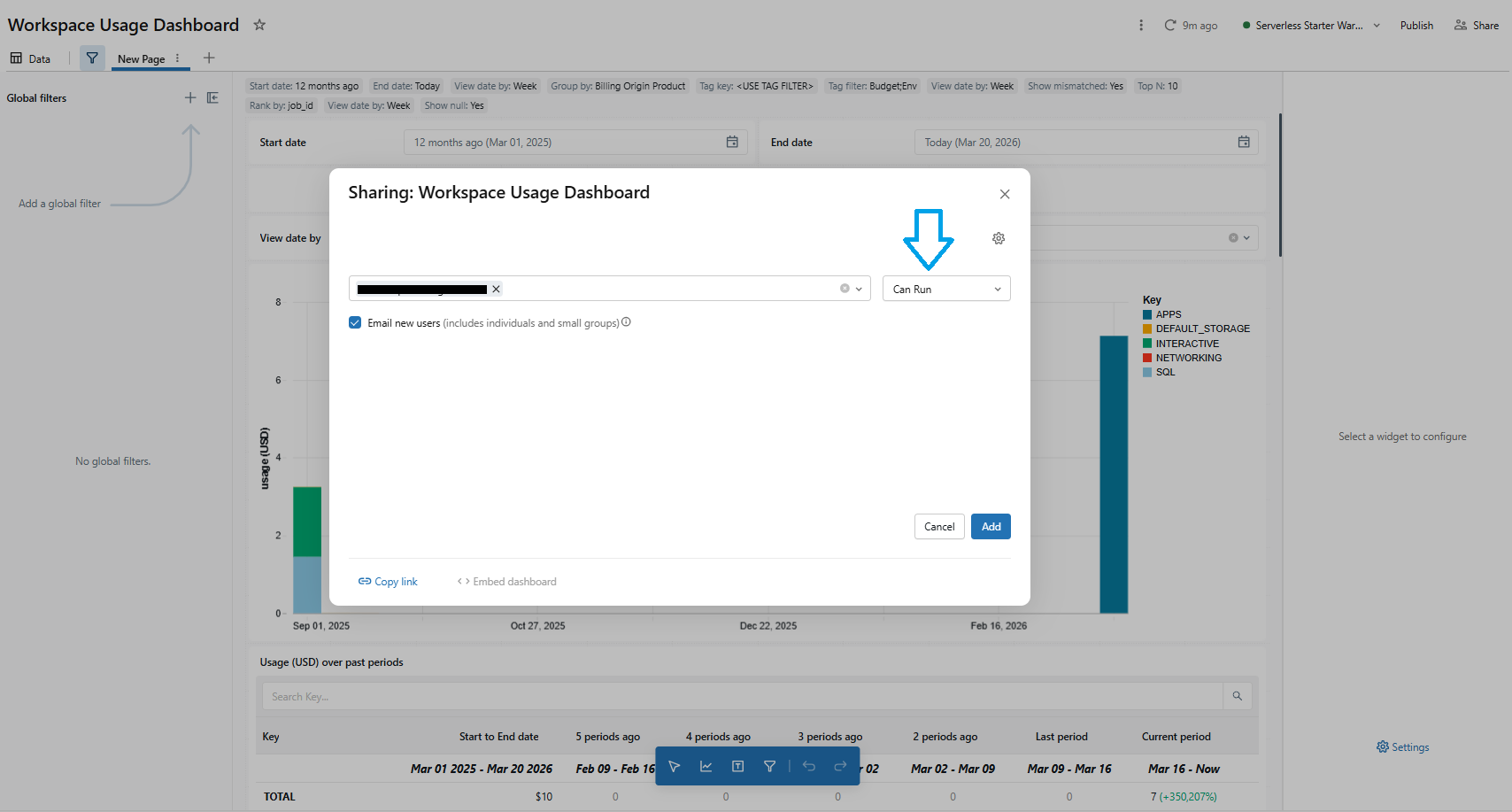
Figure 17: Setting dashboard share permissions to CAN VIEW or CAN RUN—Databricks One
For Databricks Genie spaces, go to Share > add the Consumer user/group > set permission to CAN RUN (allows querying without editing the space configuration).
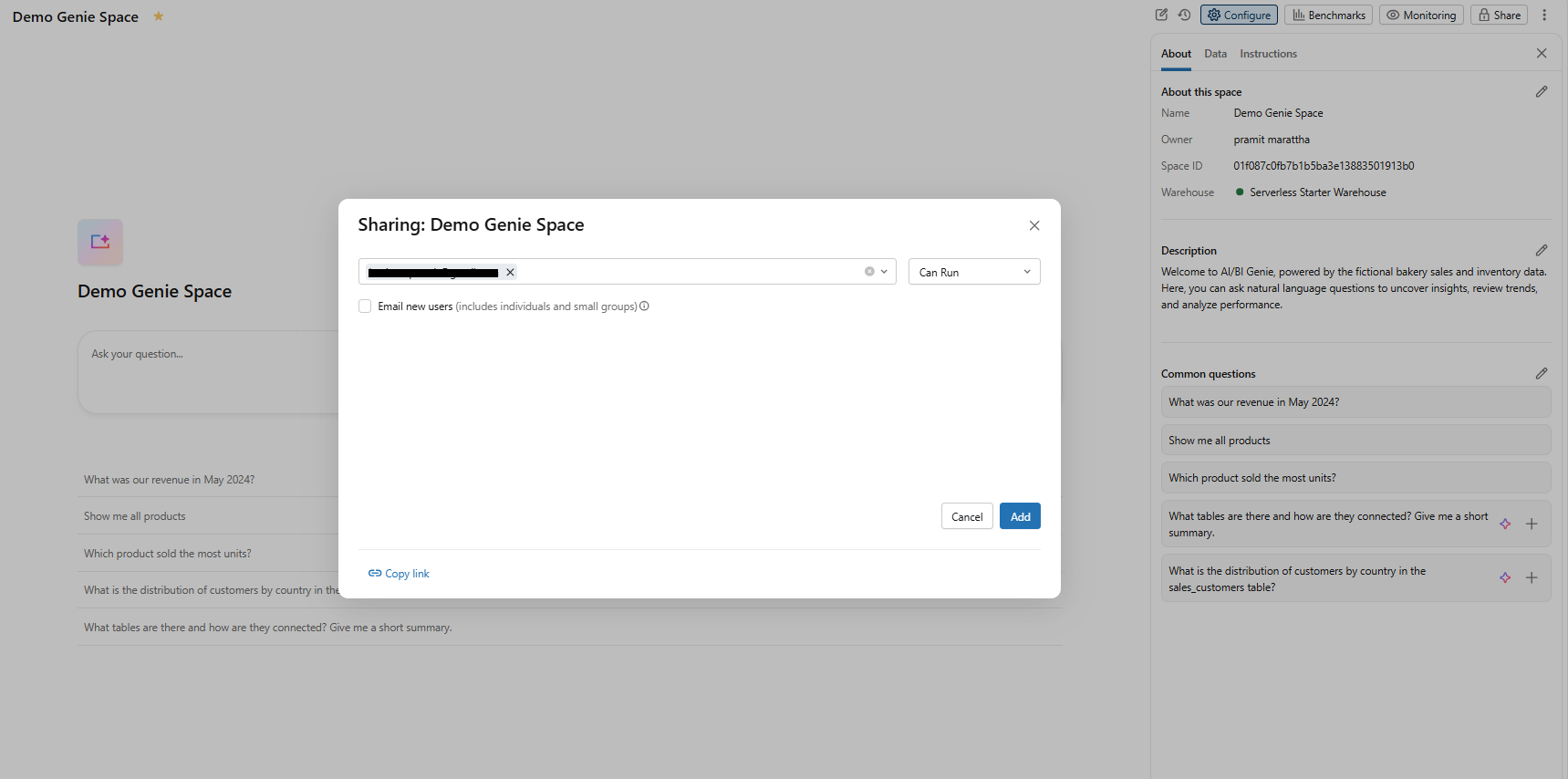
Figure 18: Sharing a Databricks Genie space with consumer groups using CAN RUN permissions—Databricks One
For Databricks Apps, go to Permissions > add the consumer user/group > set permission to CAN USE.
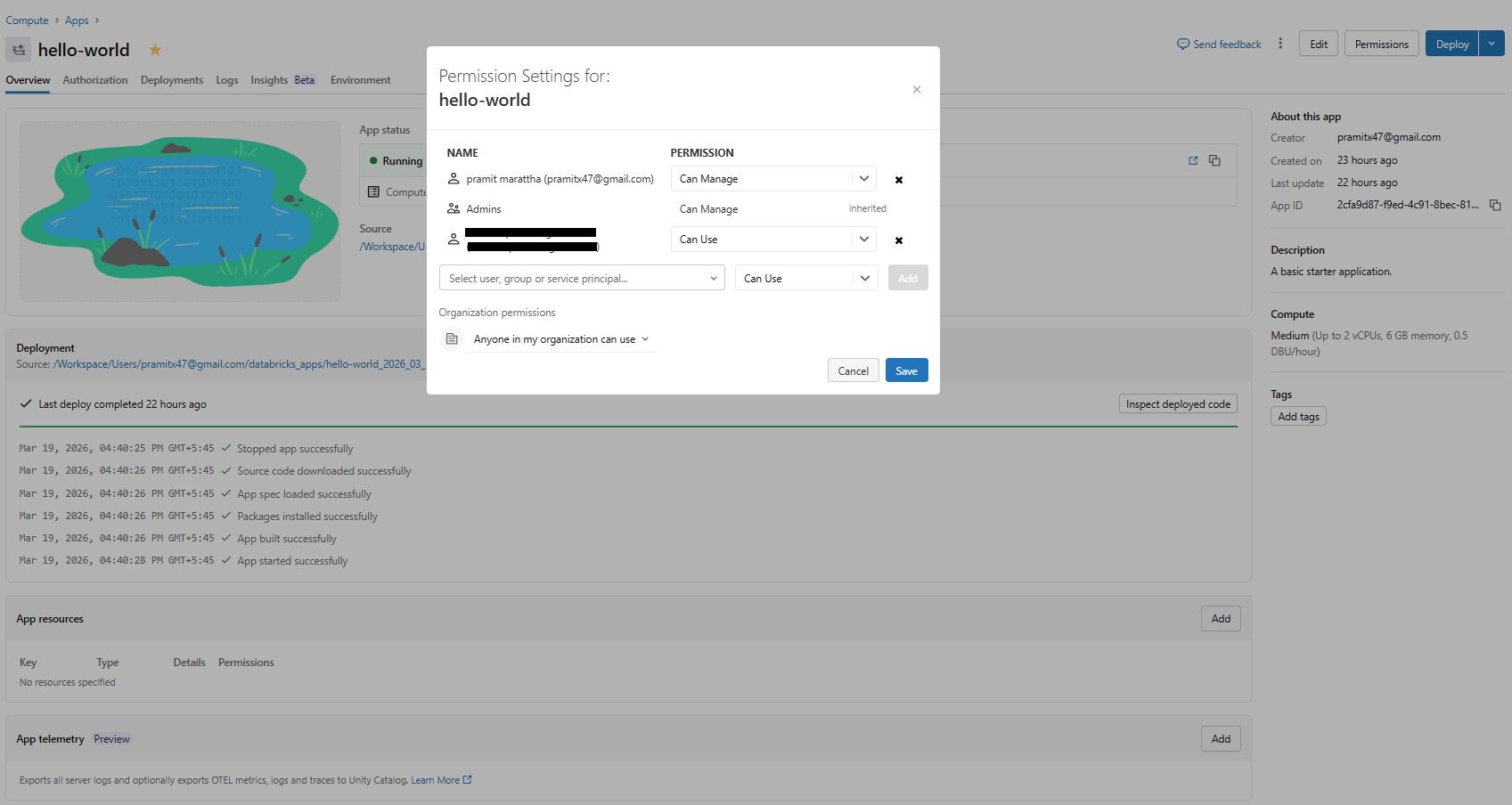
Figure 19: Granting consumer user/groups CAN USE permissions for Databricks Apps—Databricks One
Use Databricks Unity Catalog folder structure and ACLs to control access. A practical approach is to put all published assets in a common folder and share that folder with your consumer group.
Step 7—Validate the consumer experience
Log in as a Databricks consumer access user (or use a private/incognito session). Confirm the user lands on the Databricks One home page, not the standard workspace UI. Check that shared dashboards and Genie spaces appear in the home page recommendations or listing pages.
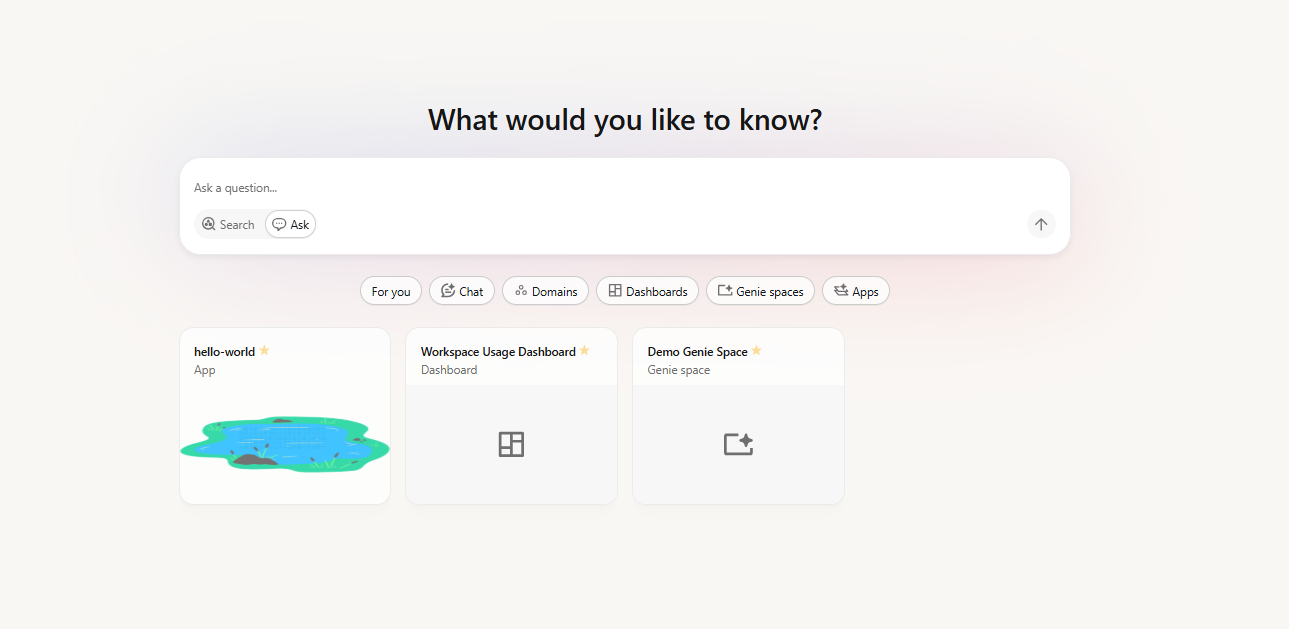
Figure 20: Databricks One interface
Try Ask to confirm Databricks Genie chat works with a natural language question.
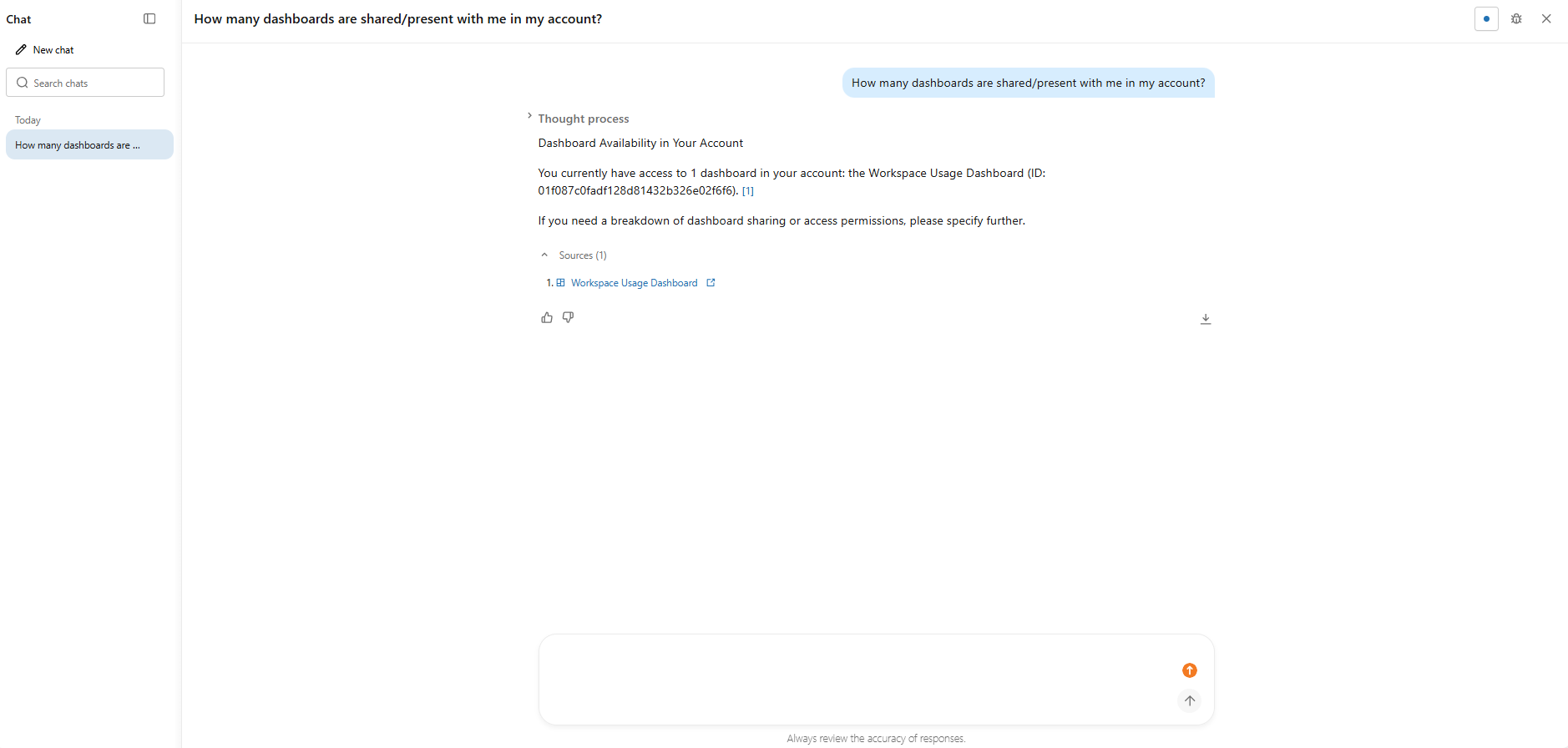
Figure 21: Testing natural language queries in the Genie chat interface—Databricks One
Verify that the app switcher is not visible (since Databricks consumer access users cannot switch to the Lakehouse workspace UI).
Any asset you want business users to see must be shared with them (either individually or via a group) in the workspace.
See Databricks docs on sharing dashboards for more details.
Step 8—Test and troubleshoot
If a consumer does not see an asset, check that it was properly shared with them. If Chat is not giving answers, verify that SQL warehouse CAN USE permission is set. Use the Databricks admin audit logs to check for access denials.
Step-by-step guide to enable Databricks One (account-level)
Enabling account-level Databricks One is done in the account console rather than the workspace. Here is how:
Prerequisite:
- Account admin access to the Databricks account console
- Confirm your account is on the Premium tier
- Review your legal, security and compliance posture for metadata aggregation behavior, as account-level Databricks One sends asset identifiers, titles and usage signals to U.S.-based Databricks services
- All workspaces should ideally have Databricks Unity Catalog enabled for consistent governance
Step 1—Log in to the Databricks workspace
As an account admin, go to accounts.cloud.databricks.com and sign in. Make sure you have the Account Admin role.
Step 2—Access the workspace previews page
In the left sidebar of the account console, click Databricks Previews to see account-level preview features.
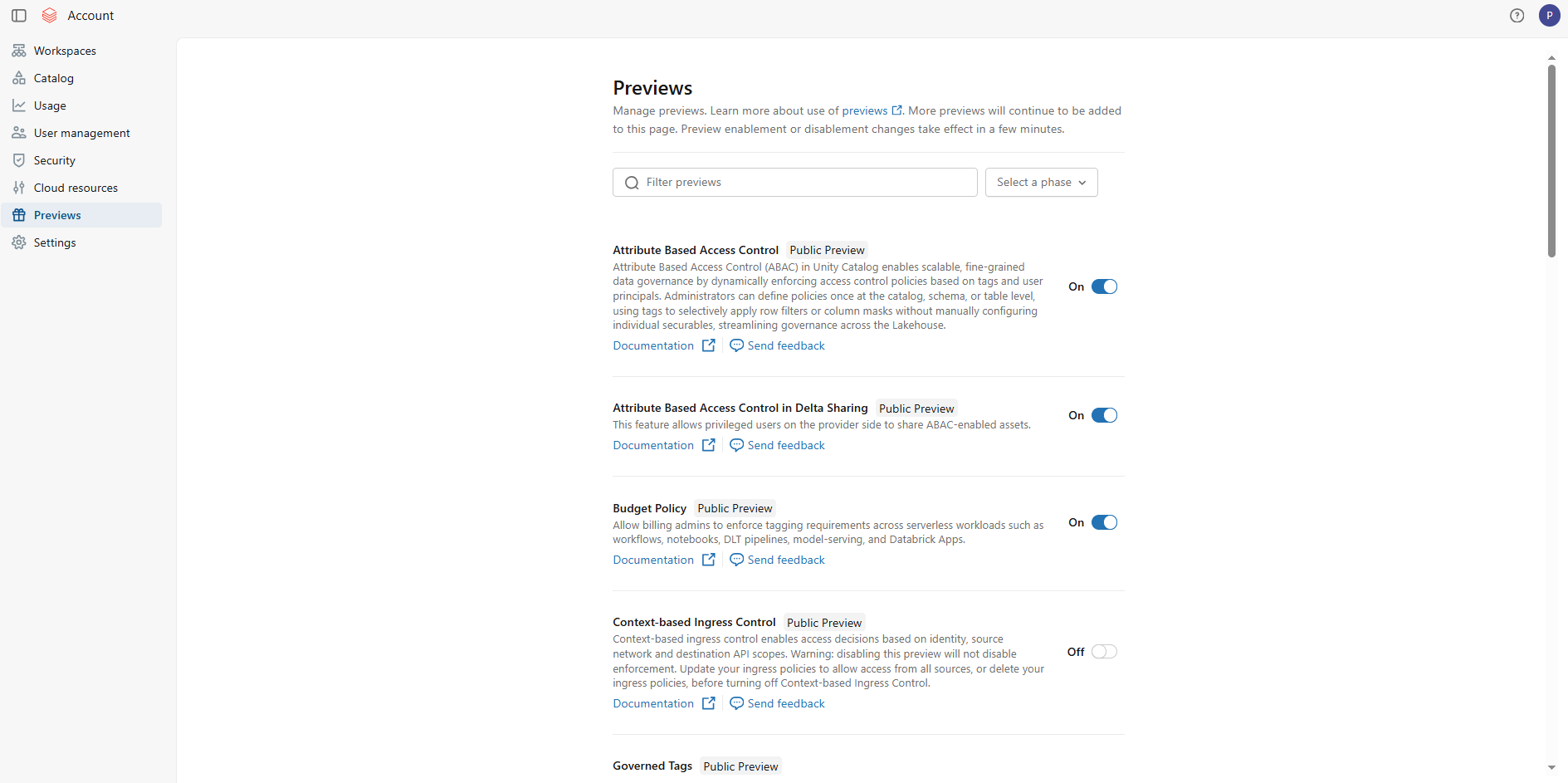
Figure 22: Locating the Databricks previews menu in the account console sidebar—Databricks One
Step 3—Enable account-level Databricks One
In Databricks Previews, search for Databricks One Account-level. Turn the toggle on to enable the beta. (On Premium accounts this is usually on by default anyway).
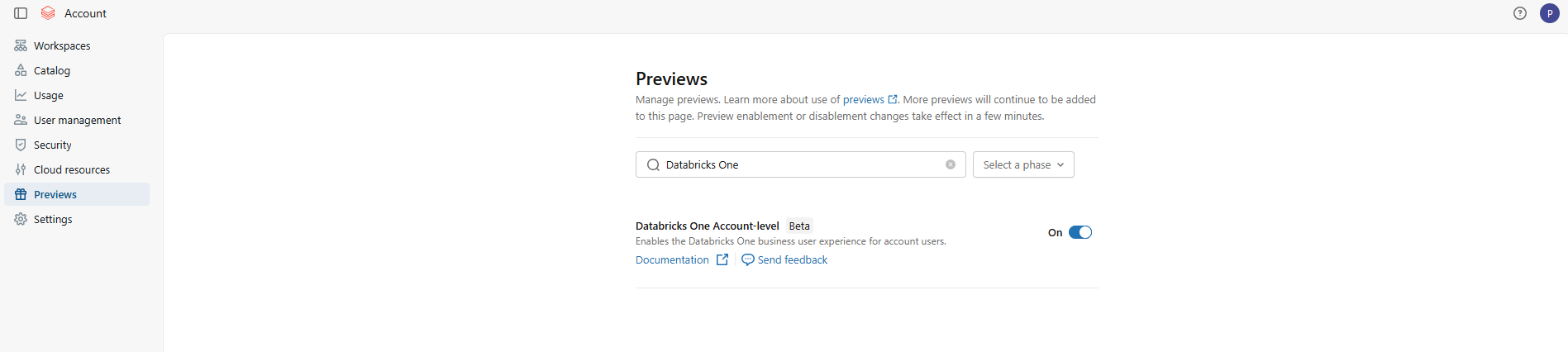
Figure 23: Toggling account-level Databricks One access on or off—Databricks One
Step 4—Confirm compliance and data handling
Account-level Databricks One aggregates metadata including asset identifiers, titles and usage signals to power cross-workspace search and recommendations. This aggregation happens at the Databricks control plane level. For customers in regulated industries (financial services, healthcare, public sector), verify that cross-workspace metadata aggregation is permissible under applicable data residency and sovereignty policies before enabling.
Step 5—Configure cross-workspace sharing patterns
For assets to appear in the account-level view, they must first be shared with the relevant users or groups at the workspace level. Account-level Databricks One aggregates what’s already been shared; it does not create new sharing pathways. Coordinate with workspace owners to confirm that assets intended for cross-workspace discovery have appropriate sharing and Databricks Unity Catalog permissions in place.
Step 6—Access the account-level One console
You can go directly to https://accounts.cloud.databricks.com/one
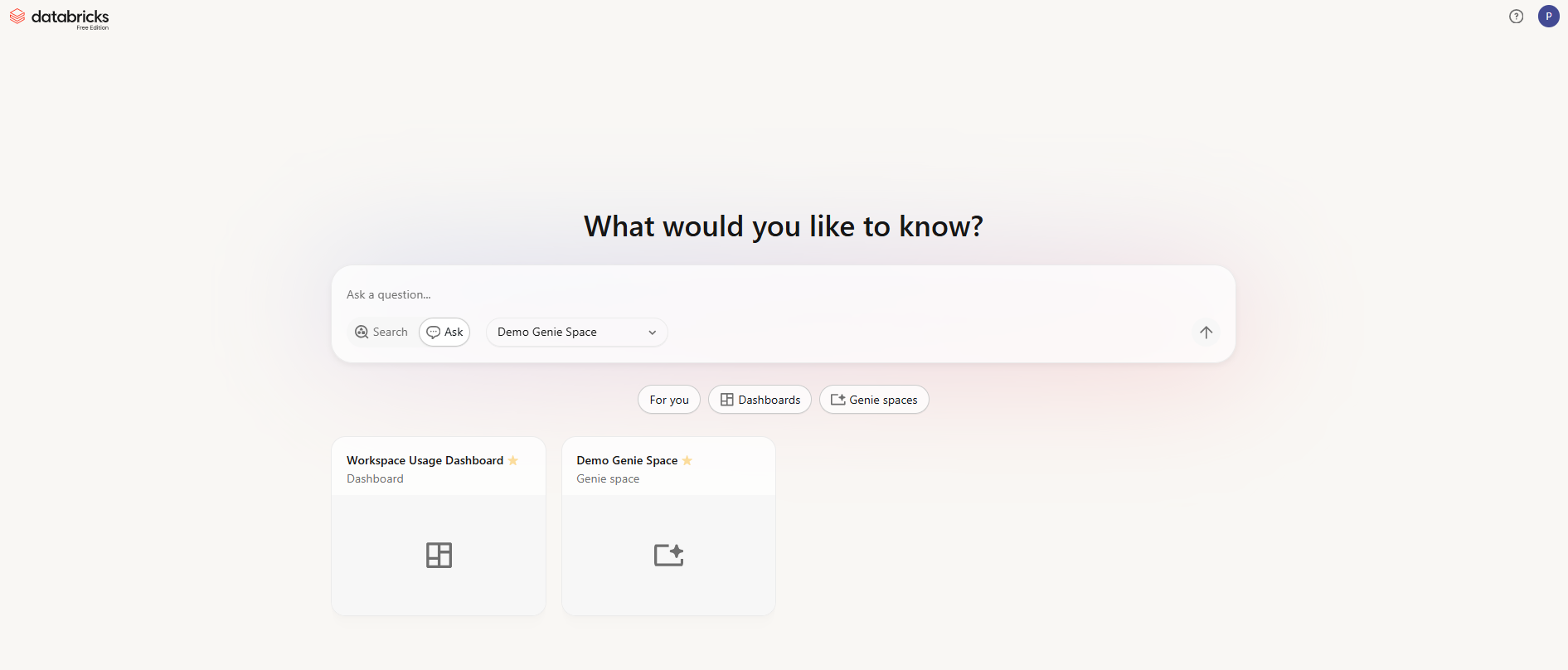
Figure 24: Databricks One interface
Step 7—Test it out and troubleshoot
Once enabled, try using account-level One as a normal user. Log in and switch to account-level view. You should see a landing page showing “For you” recommendations from across workspaces. Try the search bar to find dashboards from any workspace (subject to sharing). Open a cross-workspace dashboard or Genie space and confirm it works. If an asset is missing, check that it was shared at the account-level. If a permission error comes up, make sure that the user was registered in the account and had the right share. Use the account console’s Databricks IAM (Databricks IAM Identity Management) or the workspace’s Unity Catalog to adjust permissions.
Limitations of Databricks One
Databricks One simplifies analytics for business users significantly, but there are real limitations to be aware of before you roll it out.
1) Consumer users are read-only
Any user with only the Consumer access entitlement can view and run dashboards, apps and Genie spaces, but cannot create or edit them.
2) BI tools and warehouses
Consumer users can be granted access to SQL warehouses for third-party BI tools (Power BI, Tableau, etc.), but they cannot see the warehouses or Query History in the Databricks One UI itself.
3) Entitlement constraints
Entitlements are additive. A user only gets the pure Databricks One experience if Consumer access is their sole entitlement. The system users group by default has Workspace access and Databricks SQL access; you must remove those or use the “Change default workspace access” flow if you want new users to land on One.
4) Databricks Genie space limits
Each Databricks Genie space can include up to 30 tables or views. If you need more, create multiple spaces or pre-join tables into views. Note that the limit was increased from 25 to 30 in early 2026.
5) Compute requirements
Databricks Genie spaces require a pro or serverless SQL warehouse. If the space has no attached warehouse or the author’s embedded credentials are invalid, Genie will not execute queries. The Chat feature additionally requires consumers to have CAN USE on a SQL warehouse.
6) Throughput limits (Chat and API)
Databricks Genie chat interface has built-in rate limits. Each workspace can handle up to 20 questions per minute across all Genie spaces when accessed via the Databricks UI. Via the public Genie API free tier (Public Preview), it is further limited to a best-effort five questions per minute per workspace across all Genie spaces. If you anticipate heavy usage (for example, embedding Genie in a high-traffic app), you may need to coordinate with Databricks account team for higher quotas.
7) Conversation and result limits
Each Databricks Genie space can hold up to 10,000 conversations, with up to 10,000 messages each. These are unlikely to be hit in normal use, but they exist.
8) Partner-powered AI features
Databricks Genie relies on partner AI powered services, which must be enabled at the account and workspace levels. If your organization hasn’t enabled these features, the Genie and Chat buttons will be inactive.
9) Account-level is still beta
The unified account-level Databricks One UI is currently in Beta. Minor bugs or evolving behavior compared to the GA workspace-level experience should be expected.
10) Cross-workspace query costs
When using account-level One, any actual data query still executes in the original workspace’s compute and incurs normal compute charges. Account-level One centralizes discovery; it does not merge compute billing.
11) Databricks Unity Catalog required
While Databricks One itself (the UI) will appear in any workspace, its most powerful features do require Databricks Unity Catalog for data. The Databricks Genie conversational analytics requires all data sources to be governed in Unity Catalog. Similarly, advanced sharing (like account-level dashboards or RLS) depends on UC. If Unity Catalog is not enabled in a workspace, you can still view simple, shared dashboards, but you won’t have the full governed layer.
12) Workspace plan requirement
Finally, Databricks consumer access and other entitlements are only available on Premium-tier workspaces. Databricks One is not available on the Standard plan.
Here are the key takeaways of Databricks One:
- Databricks One is free and built into the Databricks Data Intelligence Platform
- It transforms the Databricks experience for non-technical users, surfacing only dashboards, apps and AI chat
- It relies on Unity Catalog for security—row/column filters and ACLs still apply
- It comes in two scopes: workspace-level (GA) and account-level (Beta, cross-workspace)
- Enabling it requires toggling on in Previews and ensuring business users have only Consumer access as their entitlement
- Genie spaces embed compute credentials from the author, so consumers do not need warehouse permissions—but they do need SELECT privileges on the underlying data
- It is not a replacement for the classic workspace. Data teams continue to build and publish as before; Databricks One provides the consumption layer on top
Conclusion
And that’s a wrap! Databricks One is a big step toward making data and AI accessible across an organization. It provides a clean, consumer-friendly interface on top of the full Lakehouse platform, so non-technical teams can get the insights they need without waiting for engineering to get involved.
In this article, we have covered:
- What Databricks One is
- The value Databricks One offers
- Differences between Databricks One and the standard Lakehouse workspace
- Key features and capabilities of Databricks One
- Architecture breakdown of Databricks One
- Databricks One levels breakdown
- Step-by-step guide to enable and use Databricks One (workspace-level)
- Step-by-step guide to enable Databricks One (account-level)
… and so much more!
Save up to 50% on your Databricks spend in a few minutes!
FAQs
What is Databricks One?
Databricks One is a simplified user interface for business users on the Databricks platform. It provides a single, consumer-style entry point to interact with data and AI assets (dashboards, conversational analytics and apps) without requiring knowledge of Databricks clusters, Databricks notebooks or coding. It is essentially a view-only portal built on top of your Databricks Lakehouse.
How does Databricks One differ from the classic Databricks workspace?
The classic Lakehouse workspace UI exposes the full platform toolsets: Databricks notebooks, Databricks clusters, jobs, pipelines, Databricks models, SQL warehouses and more. Databricks One hides all of that and shows only shared dashboards, Databricks Genie spaces and Apps in a clean, read-only consumer interface. Entitlements govern which experience a user sees.
Is Databricks One an additional paid product?
No. Databricks One is included at no extra cost for all customers of the Databricks Data Intelligence Platform. It is part of your subscription.
When was Databricks One announced and when did it reach GA?
Databricks One was introduced at the Databricks Data + AI Summit in June 2025. The workspace-level experience reached general availability in early 2026. As of early 2026, account-level One is still in Beta.
Does Databricks One require Databricks Unity Catalog?
Yes. Databricks Unity Catalog is the unified governance layer that Databricks One relies on. Any data table or view you query through One must be registered in Unity Catalog. Databricks Genie Spaces and dashboards in One assume you have a Unity Catalog metastore for your data. Also, Unity Catalog policies (row filters, column masks) automatically apply to all One queries. In practice, Databricks recommends enabling Unity Catalog for best results with Databricks One.
What is the difference between Consumer access, Workspace access and Databricks SQL access entitlements?
Databricks Consumer access, Workspace access and Databricks SQL access entitlements control what UI a user sees. A user with Consumer access only is restricted to the Databricks One UI (view/run only). Workspace access (the standard workspace entitlement) or Databricks SQL access entitle the user to the full classic workspace (Databricks notebooks, Databricks SQL editor) as well as the Databricks One UI. Note that entitlements are additive. If someone has both Workspace and Consumer access, they still see the classic UI.
Can Databricks Consumer access users run Genie queries without CAN USE on a SQL warehouse?
Yes, for Genie spaces. Genie space compute credentials are embedded by the space author, so Consumer users do not need CAN USE on a warehouse to run Genie queries. However, if your consumers are using the Chat feature (Genie in Agent mode), they do need CAN USE on at least one Pro or Serverless SQL warehouse. Also, consumers still need SELECT privileges on the Unity Catalog data objects used in the Genie space.
How does Databricks One enforce data security and governance?
Through Databricks Unity Catalog. Every query executed through a Genie space or dashboard render is subject to Unity Catalog object-level permissions, column masks and row filters. Consumers can only access data objects they have been explicitly granted SELECT access to. Access events are logged in Unity Catalog’s audit tables.
What are the known limits for Genie API usage?
The free-tier Genie conversational API is throttled to prevent abuse. In the UI, Genie is limited to 20 questions per minute per workspace (across all spaces). Via the public API (beta free tier), it is further limited to roughly ~5 questions per minute per workspace. Also note space limits: each Genie Space can include at most 30 tables/views. And each Genie Space can support up to 10,000 conversation threads with up to 10,000 messages each. If you hit these limits, Genie will reject new questions until you slow down or paginate.
What is a Genie Space and how does it differ from Genie?
Genie is the name of the natural language analytics feature. A Genie Space is a configured instance of Genie.
What is the Genie Knowledge Store?
The knowledge store is a collection of curated semantic definitions that improves Genie’s understanding of data and increases response accuracy. All knowledge store configurations are scoped to the Genie space and do not affect Unity Catalog metadata or other Databricks assets.
How do Databricks Apps differ from dashboards and Genie Spaces?
Databricks Apps are full-fledged interactive applications that can embed charts, forms, and other components. A dashboard is usually just a static grid of charts with filters, and a Genie Space is a chat interface.
Can Databricks One be used with data stored in Azure Data Lake Storage, Amazon S3 and Google Cloud Storage?
Yes. Databricks One reads from the same Delta tables in your cloud storage as the rest of the platform (S3 on AWS, ADLS Gen2 on Azure and GCS on GCP). There is no separate data tier for consumer access.
How does Databricks One handle Databricks Row level and Databricks Column Level Security for Genie-generated queries?
Databricks One uses the same mechanism as any Databricks query. Databricks Unity Catalog row filters and column masks are applied at query time. If your dashboard/share is set to run as the viewer, then when Genie generates SQL and runs it, the results are already filtered. If the dashboard/share was using publisher credentials, then the publisher’s view (with possibly broader access) is what’s returned. The bottom line: any RLS/CLS policies you set in Unity Catalog are enforced on Genie’s output.
What happens if a Consumer access user tries to access an asset they do not have permission to view?
They simply will not see it. In Databricks One, assets that are not shared with a user are invisible to them. If someone tries to paste a direct link to an unshared dashboard, they will get a permission error. Databricks One strictly enforces the same ACLs as the rest of the platform. So users only see dashboards, apps, and spaces that have been explicitly shared with them or with a group they belong to.
Can Databricks One be used with third-party BI tools like Power BI or Tableau?
Yes. Databricks One is just an interface layer. It does not affect your ability to connect external BI tools. If a user has CAN USE on a SQL warehouse and SELECT on the underlying tables, they can use Power BI software, Tableau software or any BI tool with a Spark or SQL connector. In fact, the consumer access role makes users eligible to be granted SELECT on data and CAN USE on a warehouse for external BI use.
Pramit Marattha
Pramit Marattha is a technical content writer and strategist with 5+ years of experience covering AI, data engineering, data cloud platforms and open source technologies. He turns complex technical concepts into clear, useful content for engineers and developers.







