


Databricks’ unified lakehouse architecture has revolutionized the data analytics and warehousing landscape, streamlining data management while enhancing performance and scalability for data processing operations. Core to this innovation is Databricks SQL, which is a powerful and intelligent data warehouse powered by DatabricksIQ, the Data Intelligence Engine that recognizes the uniqueness of your data. Databricks SQL democratizes analytics for both technical and business users. There are several distinct types of Databricks SQL warehouses available: Serverless, Pro and Classic—each tailored to specific use cases and performance demands.
In this article, we will cover everything you need to know about different types of Databricks SQL warehouses, including Serverless, Pro and Classic Databricks SQL warehouses.
What is Databricks SQL?
Databricks SQL is a data warehousing solution built on the Databricks lakehouse platform. It gives data engineers, analysts and business users a unified environment to run SQL queries, build dashboards and explore large datasets without managing separate warehousing infrastructure.
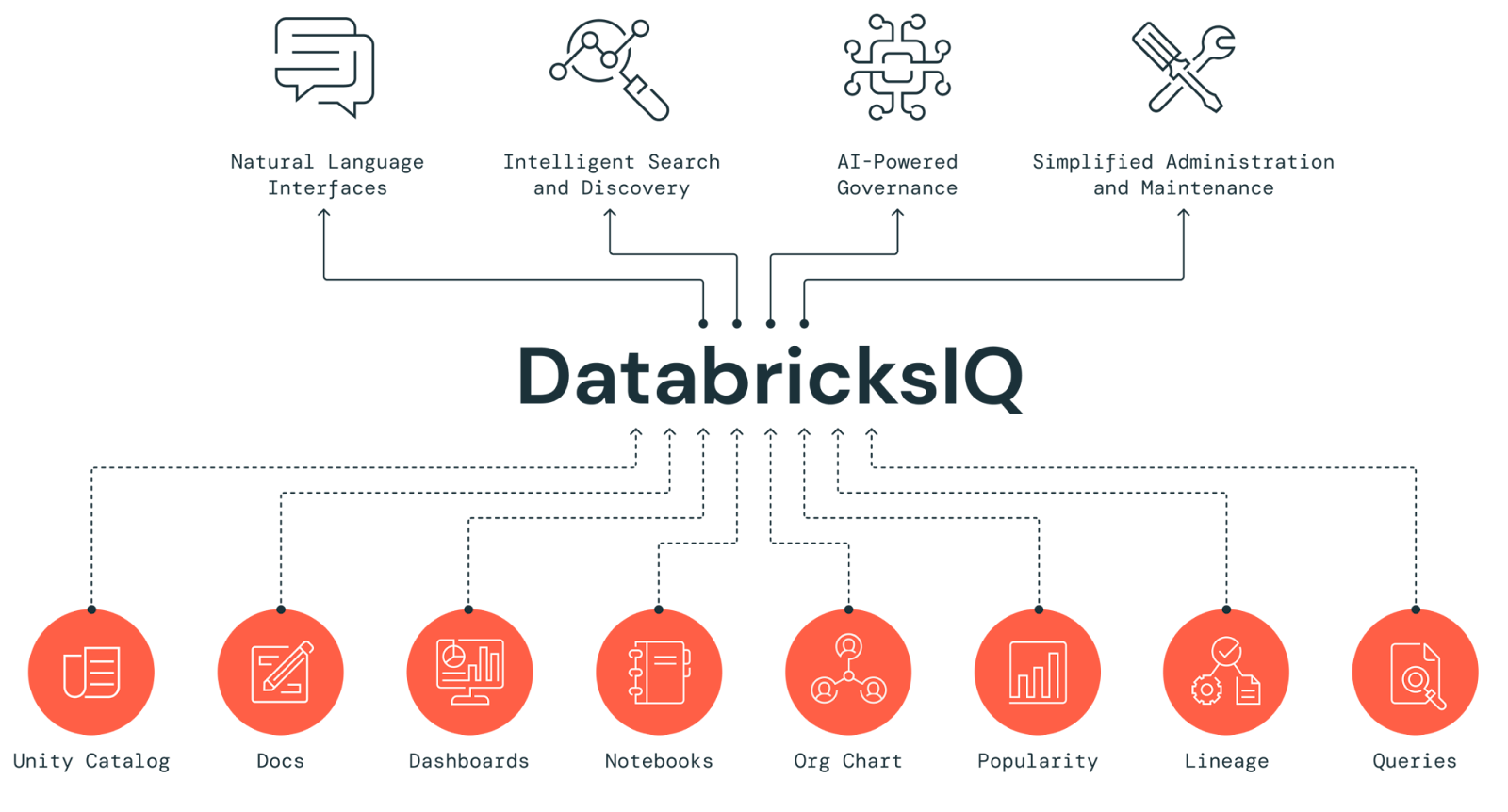
At its core, Databricks SQL is powered by DatabricksIQ, Databricks’ Data Intelligence Engine. DatabricksIQ handles query optimization, workload management and performance tuning automatically, so your team can focus on getting insights rather than tuning infrastructure.
Key features of Databricks SQL
1. Lakehouse architecture
Databricks SQL runs on Delta Lake, which means storage and compute are decoupled. You’re not locked into a proprietary format, and you get ACID transaction guarantees on your data lake by default.
2. DatabricksIQ
This is the intelligence layer that powers automatic query optimization and workload management across Databricks SQL.
3. Serverless compute
Databricks SQL supports serverless compute, which automatically provisions and scales resources on a per-query basis. No cluster management required on your end.
4. Predictive I/O
Predictive I/O is a suite of performance features that speeds up selective scan operations in SQL queries. It reduces the volume of data read during query execution, which translates directly to faster results and lower cost. Available on Serverless and Pro warehouses only.
5. Predictive Optimizations
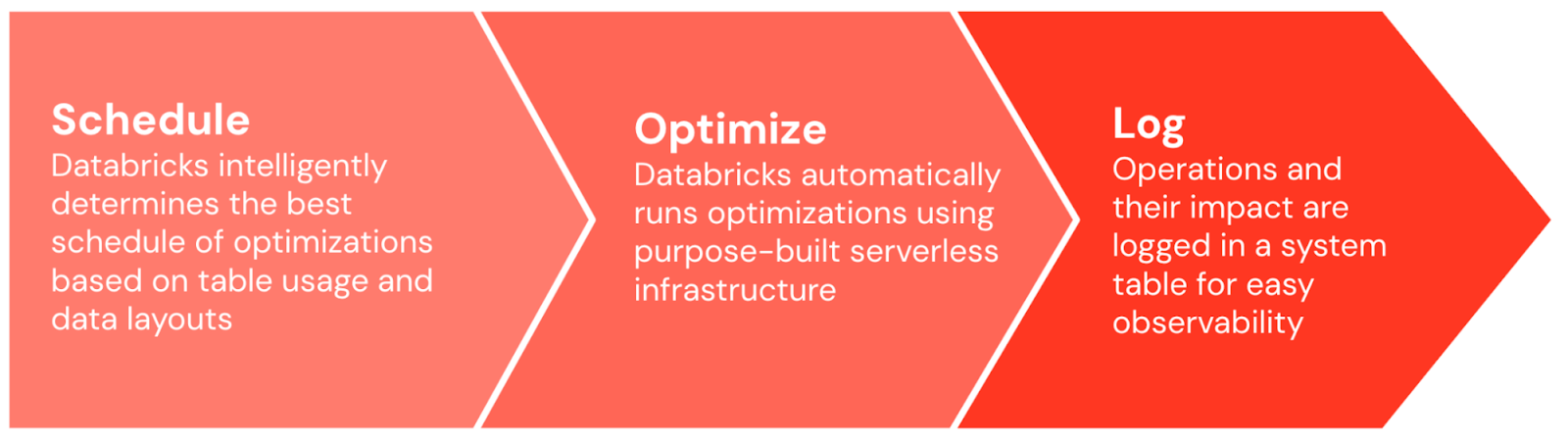
This is a distinct Delta Lake feature (not to be confused with Predictive I/O) that automatically runs OPTIMIZE, VACUUM and ANALYZE operations on your Delta tables. It prevents the gradual performance degradation that happens when table maintenance is neglected. In 2025, Databricks made Automatic Statistics Management generally available as part of this feature, eliminating the need to run ANALYZE commands manually.
6. Intelligent Workload Management (IWM)
IWM is an AI-powered autoscaling system exclusive to Serverless SQL warehouses. It uses machine learning models to predict the compute requirements of each incoming query, then dynamically provisions resources. The key difference from the threshold-based autoscaling used by Pro and Classic warehouses is that IWM responds to workload demands in near real-time rather than applying static rules.
7. Unified Governance via Unity Catalog
Databricks SQL integrates with Unity Catalog, giving you centralized governance, fine-grained access control and consistent data security across your entire lakehouse.
8. Up to 12x better price/performance
Databricks benchmarks its SQL offering at up to 12x better price/performance compared to traditional data warehouses, primarily through the Photon engine and the serverless compute model.
9. Photon engine
Photon is Databricks’ native vectorized query engine. It accelerates SQL and DataFrame workloads significantly, particularly for large-scale aggregations and joins. Every SQL warehouse type includes Photon.

10. Integration with BI Tools
Databricks SQL seamlessly connects with business intelligence tools like Power BI, Tableau and Looker, enabling straightforward data visualization and reporting.
For more details, see What makes Databricks SQL stand out.
What are the benefits of Databricks SQL?
Databricks SQL offers a wide range of benefits. Here are some of the key benefits of using Databricks SQL:
- No infrastructure management. Serverless compute handles provisioning, scaling and patching automatically
- Unified governance. Databricks Unity Catalog provides a single governance model across all your data assets, not just the warehouse
- Works with your existing tools. Databricks SQL integrates smoothly with popular tools such as Fivetran for data ingestion, dbt for data transformation and business intelligence platforms like Power BI, Tableau and Looker
- Eliminates data silos. Since Databricks SQL runs on the same lakehouse as your ML and engineering workloads, you’re querying the same data your data scientists and engineers use
- Straightforward data ingestion. You can import data from cloud storage and SaaS applications and transform it in place using built-in ETL features or external tools like dbt
For more details, see Key Benefits of Databricks SQL.
What is a SQL warehouse in Databricks?
Databricks SQL warehouse is a compute resource that allows users to query and explore data efficiently using SQL. It’s essentially a cluster optimized for running SQL queries, providing the computational power needed to process large datasets quickly and efficiently.
Types of Databricks SQL Warehouse
Databricks offers three types of SQL warehouses:
- Serverless Databricks SQL warehouse
- Pro Databricks SQL warehouse
- Classic Databricks SQL warehouse
Each of these types has its own characteristics and use cases, which we’ll explore in detail in the following sections.
1. Serverless Databricks SQL warehouses
Serverless SQL warehouses are the latest addition to the Databricks SQL lineup and they’re quickly becoming the recommended option for most use cases. But what exactly are they?
Serverless Databricks SQL warehouses provide a fully managed environment where compute resources are automatically scaled based on demand. This type of SQL warehouse eliminates the need for users to manage infrastructure, allowing them to focus on data analysis.
Here are some of the key features of Serverless Databricks SQL warehouses:
- Databricks Serverless SQL warehouses can start up in a matter of seconds (typically 2-6 seconds), compared to minutes for other types.
- Databricks Serverless SQL warehouses can quickly add or remove compute resources based on query demand, optimizing both performance and cost.
- Databricks takes care of all the underlying infrastructure, including capacity management, patching and upgrades.
- Databricks Serverless SQL warehouses can admit queries closer to the hardware’s limitations, maximizing resource utilization.
- Databricks Serverless SQL warehouses automatically provision and scale the resources as needed, preventing over-provisioning and reducing idle times, resulting in a cheaper total cost of ownership.
- Databricks Serverless SQL warehouses can access data from any supported region, regardless of where the warehouse is located.
Performance capabilities
Serverless Databricks SQL warehouses support all of Databricks SQL’s advanced performance features, like:
Databricks photon engine is a high-performance, vectorized query engine designed to significantly accelerate the execution of SQL and DataFrame workloads.
Predictive I/O is a suite of features for speeding up selective scan operations in SQL queries. It can accelerate data reads and updates, delivering significant performance improvements for data processing tasks.
Intelligent Workload Management (IWM) is a set of features that optimizes the performance and cost-effectiveness of serverless SQL warehouses by dynamically managing resources based on real-time workload demands. Utilizing AI-powered predictions, IWM analyzes incoming queries to allocate the appropriate compute resources quickly. It automatically scales resources up or down as needed, monitors query queues and optimizes resource utilization to enhance overall system performance while minimizing costs.
2. Pro Databricks SQL warehouse
Pro Databricks SQL warehouses are the middle ground between serverless and classic warehouses. They offer more control over the underlying infrastructure while still providing advanced performance features.
Unlike Serverless Databricks SQL warehouses, Pro Databricks SQL warehouses operate within the user’s cloud account, providing greater control over the networking and compute environment. But this means they take longer to start up (typically around 4 minutes) and don’t scale as dynamically as serverless warehouses.
Here are some of the key features of Pro Databricks SQL warehouses:
- Pro Databricks SQL warehouses allow you to connect to databases in your network or on-premises, enabling hybrid architectures.
- Pro Databricks SQL warehouses give you more control over the underlying infrastructure, which can be super-efficient for compliance or specific performance tuning needs.
- Administrators can configure settings such as Databricks cluster size and auto-stop features to optimize performance based on specific use cases.
- Pro Databricks SQL warehouses are not as dynamic as Databricks SQL Serverless warehouses but still offer auto scaling capabilities.
Performance capabilities
Pro Databricks SQL warehouses support only two of the three Databricks SQL’s advanced performance features, like:
Pro Databricks SQL warehouses do not support Intelligent Workload Management, which means they’re less responsive to rapidly changing query demands compared to serverless warehouses.
3. Classic Databricks SQL warehouse
Classic Databricks SQL warehouses are the original offering from Databricks. While they’re still supported, they offer the most basic type, providing essential SQL querying capabilities without some of the advanced features found in Serverless and Pro Databricks SQL warehouses.
Like Pro Databricks SQL warehouses, Classic Databricks SQL warehouses run in your own cloud account. They have similar startup times to Pro warehouses (around 4 minutes) and offer the least dynamic scaling capabilities.
Here are some of the key features of Classic Databricks SQL warehouses:
- Basic functionality: Classic warehouses provide the essential SQL query capabilities.
- Familiar model: Classic Databricks SQL warehouses may feel more familiar to those coming from traditional data warehouses.
- Manual resource management: Classic Databricks SQL warehouses give users complete control over the setup of compute resources.
- Stable environment: Classic Databricks SQL warehouses offer a consistent performance profile for predictable workloads.
- Legacy support: Classic Databricks SQL warehouses are useful for supporting older workflows that haven’t been optimized for newer warehouse types.
Performance capabilities
Classic Databricks SQL warehouses support only one of the advanced performance features:
Classic Databricks SQL warehouses do not support Predictive IO or Intelligent Workload Management, which means they offer the least optimized performance among the three warehouse types.
Performance comparison—Serverless vs pro vs classic Databricks SQL warehouses
To help you understand the differences between the three warehouse types, let’s compare them across various performance and operational factors:
| Serverless | Pro | Classic | |
| Photon Engine | ✅ | ✅ | ✅ |
| Predictive I/O | ✅ | ✅ | ❌ |
| Intelligent Workload Management | ✅ | ❌ | ❌ |
| Startup time | 2-6 seconds | ~4 minutes | ~4 minutes |
| Autoscaling | AI-powered (IWM), near-instant | Reactive, cluster-based | Reactive, cluster-based |
| Auto-stop default | 10 minutes | 45 minutes | 45 minutes |
| Compute location | Databricks account | Your cloud account | Your cloud account |
| Supported workloads | ETL, BI, exploratory analysis | Custom networking, hybrid architectures | Basic SQL exploration, legacy workloads |
| Approx. DBU price (AWS, US) | $0.70/DBU (infra included) | $0.55/DBU (+ cloud infra cost) | $0.22/DBU (+ cloud infra cost) |
As you can see clearly, Serverless Databricks SQL warehouse offers the most advanced features and the best performance, especially for workloads with variable demands. Pro Databricks SQL warehouses are a good middle ground, offering advanced features with more control over the infrastructure. Classic Databricks SQL warehouses, while still useful in certain scenarios, offer the most basic functionality and performance.
Check out this article to understand the pricing structure of Databricks SQL.
Databricks SQL availability region
Below is the list of regions where Databricks SQL warehouses are available:
1. AWS regions:
- US East (Northern Virginia)
- US East (Ohio)
- US West (Oregon)
- US West (California)
- Canada (Central)
- EU (Frankfurt)
- EU (France)
- EU (Ireland)
- EU (London)
- South America (São Paulo)
- Asia Pacific (Mumbai)
- Asia Pacific (Seoul)
- Asia Pacific (Singapore)
- Asia Pacific (Sydney)
- Asia Pacific (Tokyo)
2. Azure regions:
- US East
- US East 2
- US West
- US West 2
- US West 3
- US Central
- US North Central
- US South Central
- US West Central
- US Gov Virginia
- US Gov Arizona
- Canada Central
- Canada East
- North Europe
- West Europe
- France Central
- Germany West Central
- Australia East
- Australia Central 2
- Australia Central
- Australia Southeast
- UK South
- UK West
- Norway East
- Sweden Central
- Switzerland North
- Switzerland West
- Brazil South
- South Africa North
- CN East 2
- CN East 3
- CN North 2
- CN North 3
- Asia East
- Asia Southeast
- UAE North
- Korea Central
- India Central
- India South
- India West
- Japan East
- Japan West
3. Google Cloud regions:
- Asia Pacific (Singapore)
- Asia Pacific (Tokyo)
- Australia (Sydney)
- EU (Belgium)
- EU (England)
- EU (Frankfurt)
- US (Iowa)
- US (South Carolina)
- US (Virginia)
- US (Oregon)
- US (Nevada)
- Canada (Quebec)
- India (Mumbai)
What is the default SQL warehouse in Databricks?
The default SQL warehouse type in Databricks depends on several factors, including your region and how you’re creating the warehouse. Here’s a breakdown:
For workspaces in regions that support Serverless SQL:
- Using the UI: Serverless is the default
- Using the SQL Warehouses API with default parameters: Classic is the default. To use Serverless via API, set enable_serverless_compute to true and warehouse_type to pro
- If the workspace uses a legacy external Hive metastore: Serverless isn’t supported. The default is Pro in the UI and Classic via the API
For workspaces in regions that do not support Serverless:
- Using the UI: Pro is the default
- Using the API: Classic is the default
Databricks updates these defaults as the product evolves, so check the official documentation for your specific cloud and region.
Step-by-step guide to creating a Databricks SQL warehouse
Now that we understand the different types of SQL warehouses in Databricks, let’s walk through the process of creating one. We’ll use the Databricks UI, but you can also follow these steps using the API or other tools.
Prerequisites
Before you start, make sure you have:
- Databricks workspace
- Appropriate permissions (workspace admin or user with unrestricted Databricks cluster creation permissions)
- If you are creating a serverless warehouse, make sure your region supports it and you’ve completed any required steps to enable Databricks serverless SQL warehouses
Step 1—Log in to Databricks
First, log in to your Databricks workspace. You should land on the homepage of your Databricks environment.
Step 2—Navigate to SQL warehouses section
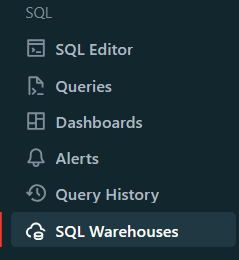
In the sidebar, click on “SQL Warehouses“. This will take you to the SQL warehouses management page.
Step 3—Click on “Create SQL warehouse“
Look for the “Create SQL Warehouse” button, typically located in the upper right corner of the page. Click on it to start the creation process.

Step 4—Configure basic Databricks SQL warehouse settings
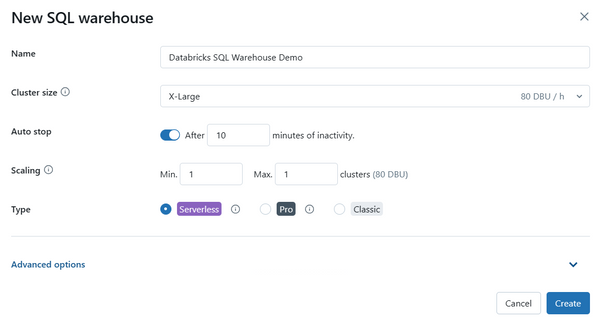
In the creation form, you’ll need to configure several basic settings:
- Name: Give your warehouse a descriptive name so you can identify it later
- Cluster size: Represents the driver node size and worker node count. The default is X-Large. Larger sizes run queries faster but cost more. Databricks recommends starting with a larger size and scaling down if needed, rather than starting small and scaling up
- Auto stop:
-
- Serverless: default is 10 minutes idle (minimum 5 minutes via UI)
- Pro and classic: default is 45 minutes idle (minimum 10 minutes)
- Scaling: Set minimum and maximum cluster count. Default is 1 minimum and 1 maximum. Databricks recommends approximately 1 cluster per 10 concurrent queries
- Type: Choose Serverless, pro or classic.
Serverless is typically the recommended option for most use cases.
Step 5—Configure advanced Databricks SQL warehouse settings
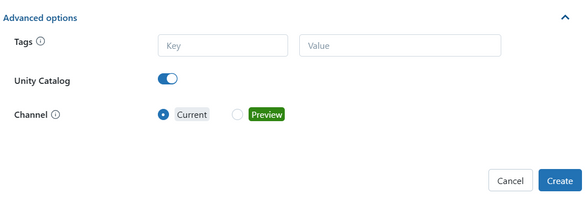
Expand the “Advanced Options” section to configure additional settings, like:
- Tags: Add key-value tags for resource tracking and cost allocation
- Unity Catalog: Toggle this on if Unity Catalog is enabled in your workspace
- Channel: Choose between the current stable channel and the preview channel. The preview channel lets you test new features before they’re generally available, but Databricks doesn’t recommend it for production workloads
Preview Channel lets you test out new features (not recommended for production workloads)
Step 6—Create Databricks SQL warehouse
Once you have configured all the settings, click the “Create” button at the end of the form. Databricks will then provision your new SQL warehouse.
After you’ve created your warehouse, you can take control of it by starting or stopping it, tweaking its settings, or setting permissions.
What is the difference between cluster and SQL warehouse in Databricks?
Both Databricks clusters and Databricks SQL warehouses give you compute power to process data. But they’re not exactly the same. Knowing how they differ can help you pick the one that’s best for you.
Check out this table that breaks down the main differences:
| Databricks clusters | Databricks SQL warehouse |
| Databricks Clusters is a general-purpose compute for running a wide range of workloads including batch processing, streaming, machine learning and SQL queries. | Databricks SQL warehouse is optimized for running interactive SQL queries and BI workloads, providing high performance and scalability for data warehousing. |
| Databricks Clusters provide isolated, customizable virtual environments with dedicated resources for running Apache Spark jobs, supporting diverse workloads and applications. | Databricks SQL warehouse offers scalable SQL compute resources that are decoupled from storage, tailored specifically for SQL workloads and optimized for query performance and cost efficiency. |
| Databricks Clusters are versatile and can be used for ETL, data processing, streaming and iterative development tasks, allowing customization in terms of node types, libraries and resources. | Databricks SQL warehouses are specifically designed to handle high-concurrency SQL queries, with features like the Photon engine and Predictive IO for enhanced query performance and efficient resource utilization. |
| Databricks Clusters support both auto-scaling and manual scaling based on workload demands, making them flexible for varied compute needs. | Databricks SQL warehouse, especially the Serverless option, auto-scale rapidly to meet workload demands, ensuring optimal performance for SQL queries with minimal manual intervention. |
| Databricks Clusters can be secured with granular access controls and integrated with secure networking configurations, suitable for environments requiring strong isolation and custom security setups. | Databricks SQL warehouse integrate deeply with Unity Catalog for centralized governance, data discovery and security, providing a streamlined solution for data governance and audit trails. |
| Databricks Clusters typically take a few minutes to start up, depending on their configuration and resource allocation, but offer a broad range of customization options. | Databricks SQL warehouse, particularly Serverless, offer fast startup times (2-6 seconds), making them ideal for on-demand SQL querying and BI workloads where responsiveness is critical, while Pro and Classic have longer startup times (~4 minutes). |
| Databricks Clusters are ideal for complex data engineering tasks, machine learning model training and large-scale data processing, with the ability to handle both batch and streaming data. | SQL Warehouses are tailored for business intelligence, reporting and real-time analytics, ensuring that SQL queries run efficiently with optimized resource management for cost-effective operations. |
Save up to 50% on your Databricks spend in a few minutes!
Conclusion
Databricks SQL Warehouses offer a versatile and scalable solution for running SQL queries on large datasets. No matter if you choose Serverless, Pro, or Classic, knowing what each type can and can’t do helps you make smart choices that fit your needs.
- Serverless is the default for good reason. It starts in seconds, scales automatically with IWM and handles variable workloads more cost-effectively than the other types. Start here for most use cases
- Pro is for specific scenarios: regions where Serverless isn’t available, or workloads that require custom networking to connect to on-premises or VPC resources
- Classic provides entry-level performance. It works for basic data exploration and existing legacy configurations, but it’s not the right choice for new deployments
When you pick the right SQL Warehouse type, you can streamline your data workflows, reduce costs and get more done.
In this article, we have covered:
- What is Databricks SQL?
- What are the benefits of Databricks SQL?
- What is a SQL warehouse in Databricks?
- SQL warehouse types in Databricks
- Performance showdown—Serverless vs. pro vs. classic Databricks SQL warehouses
- What is the default SQL warehouse in Databricks?
- Step-by-step guide to creating a Databricks SQL warehouse
- Difference between a cluster and a SQL warehouse in Databricks
… and more!!
FAQs
What is a SQL warehouse in Databricks?
A SQL warehouse is a compute resource optimized for running SQL queries on data stored in your Databricks lakehouse. It handles query execution, result caching and concurrent user management for analytical workloads and BI tool integrations.
What is the startup time for a Databricks SQL warehouse?
Serverless warehouses start in approximately 2 to 6 seconds. Pro and Classic warehouses typically take around 4 minutes because they provision VMs in your cloud account from scratch.
What is a Databricks Serverless SQL warehouse?
A Serverless SQL warehouse is a fully managed compute resource where Databricks handles infrastructure provisioning, patching and scaling. Compute runs in Databricks’ account rather than yours, enabling near-instant startup and AI-powered autoscaling through IWM.
How do I create a SQL warehouse in Databricks?
Log into your workspace, navigate to SQL Warehouses in the sidebar, click Create SQL warehouse, configure your size, auto-stop, scaling and warehouse type, then click Create.
What are the benefits of Databricks Serverless SQL?
Serverless gives you fast startup (2 to 6 seconds), AI-powered autoscaling via IWM, reduced infrastructure management overhead and support for all three Databricks SQL performance features: Photon, Predictive I/O and IWM. For variable or bursty workloads, it typically has a lower total cost of ownership than Pro or Classic.
What’s the difference between a Databricks cluster and a SQL warehouse?
Clusters support multiple languages (Python, Scala, R, SQL) and are designed for general-purpose workloads like ETL and ML training. SQL warehouses are SQL-only and optimized for analytics, BI and high-concurrency query workloads. SQL warehouses also integrate more deeply with Unity Catalog for governance.
Do Serverless and Classic SQL warehouses differ significantly?
Yes, significantly. Serverless warehouses start in seconds, scale with AI-powered IWM and support Photon, Predictive I/O and IWM. Classic warehouses take approximately 4 minutes to start, use reactive cluster-based autoscaling and support only Photon. Classic runs in your cloud account; Serverless runs in Databricks’ account.
What is the default SQL warehouse type in Databricks?
In regions that support Serverless and when using the UI, Serverless is the default. Through the API, Classic is the default unless you explicitly set enable_serverless_compute to true and warehouse_type to pro. In regions without Serverless support, Pro is the UI default and Classic is the API default.
Can I connect BI tools to Databricks SQL warehouses?
Yes. Databricks SQL warehouses connect to Tableau, Power BI, Looker and other BI platforms through JDBC/ODBC connectors.
How does pricing work for Databricks SQL warehouses?
All three types use Databricks Unit (DBU)-based pricing. On AWS (US regions), Serverless costs approximately $0.70 per DBU (cloud infrastructure included), Pro costs approximately $0.55 per DBU (plus your cloud VM costs) and Classic costs approximately $0.22 per DBU (plus cloud VM costs). Serverless’s higher per-DBU rate is often offset by its ability to scale to zero between queries, so you’re not paying for idle compute.
Can I use Databricks SQL warehouses for real-time analytics?
Yes. Databricks SQL supports streaming data ingestion, so you can run near-real-time analytics on continuously updated data.
How does Unity Catalog integrate with SQL warehouses?
Unity Catalog provides centralized data governance for SQL warehouses, handling access control, data lineage and security policies across your entire lakehouse. All three warehouse types support Unity Catalog. Note that SQL warehouses do not support credential passthrough, so Databricks recommends Unity Catalog as the governance model for warehouse deployments.
Can I use custom libraries with a SQL warehouse?
SQL warehouses don’t support installing custom libraries the way clusters do. You can create user-defined functions (UDFs) within SQL, but you can’t add external Python packages or Jar files to a warehouse environment. If you need custom libraries, use a cluster.
How do I monitor the performance of my Databricks SQL warehouse?
Databricks provides a monitoring tab on each warehouse with metrics including query duration, queue depth and cluster utilization. The Peak Queued Queries metric is particularly useful for deciding if you need a larger cluster size or more clusters. The Query History page also lets you analyze historical query performance and spot bottlenecks.
Does Classic warehouse support autoscaling?
Yes, though it’s reactive rather than AI-powered. Classic uses the same cluster-based autoscaling logic as Pro: it adds clusters based on estimated query processing time and scales down after 15 consecutive minutes of low load. This is substantially less responsive than Serverless’s IWM-based autoscaling.
When should I use Pro instead of Serverless?
Use Pro when Serverless isn’t available in your region or when you need custom networking, such as connecting to on-premises databases or resources within your private VPC. Outside those specific scenarios, Serverless is the better default.
What is Predictive I/O and how does it differ from Predictive Optimization?
They’re two distinct features that are easy to confuse. Predictive I/O is a SQL warehouse performance feature that reduces the volume of data read during selective scan operations in SQL queries, speeding up query execution. Predictive Optimization is a separate Delta Lake feature that automatically runs maintenance operations (OPTIMIZE, VACUUM, ANALYZE) on your Delta tables to prevent gradual performance degradation. Predictive I/O is a query-time optimization; Predictive Optimization is a table-maintenance feature.
Is Classic warehouse being phased out?
Databricks hasn’t announced a formal deprecation timeline for Classic warehouses, but the platform clearly steers teams toward Serverless as the default and positions Classic as entry-level. If you’re on Classic warehouses today, it’s worth evaluating a migration to Serverless, particularly if your workloads are variable or your team cares about cold-start latency.
Pramit Marattha
Pramit Marattha is a technical content writer and strategist with 5+ years of experience covering AI, data engineering, data cloud platforms and open source technologies. He turns complex technical concepts into clear, useful content for engineers and developers.







