
Databricks and Snowflake are central to analytics, AI, machine learning, and data engineering work. The data cloud infrastructure behind those workloads has become an important part of the modern technology estate. As organizations expand AI initiatives and platform usage increases, data cloud costs can become harder to manage without workload-level visibility. Organizations can see the total charge, but they cannot easily explain what caused it, who owns it, or what action should be taken.
Flexera One Data Cloud Optimization, or DCO, helps teams analyze Databricks and Snowflake spend at a more detailed level. It brings data cloud usage into Flexera One, so teams can connect spend to cost allocation, budgeting, forecasting, anomaly detection, and optimization workflows.
Why data cloud spend is difficult to manage
Databricks and Snowflake costs are shaped by environments that are constantly evolving through pricing models, new services, and workload utilization patterns. The FinOps Foundation’s State of FinOps 2026 research highlights data cloud platforms as a growing priority for FinOps teams managing expanding SaaS, PaaS, and technology spend.
The difficulty comes down to how these platforms are built and billed:
- Consumption changes quickly: Spend rises and falls based on queries, jobs, workloads, storage, and compute utilization.
- Compute is shared: Clusters, warehouses, and jobs may support many teams or applications at once.
- Billing units are abstracted: Databricks uses DBUs and Snowflake uses credits, which can be hard to translate into business value.
- Serverless usage can be harder to track: Some compute runs inside the data platform, which can’t be analyzed with cloud cost tools alone.
- Native dashboards make cost analysis difficult at scale: Platform dashboards provide visibility, but they do not always support allocation, budget tracking, anomaly detection, and optimization.
The questions customers are asking
Customer conversations about data cloud costs usually start with practical questions. These questions are centered around understanding usage, assigning ownership, managing budgets, and deciding where optimization should start.
- What is driving our Databricks and Snowflake spend?
- Who owns that spend?
- How do we track data cloud spend against budgets?
- How do we catch unexpected changes before they become larger budget issues?
- Where can we reduce waste or rightsize resources?
How DCO answers common data cloud cost questions
What is driving our Databricks and Snowflake spend?
If purchased through a cloud marketplace, customers see Databricks or Snowflake as a single charge in their cloud bill, but the bill does not show enough detail to explain the source of the spend. The cost may come from different workspaces, warehouses, clusters, jobs, storage, credit usage, or serverless compute consumption.
DCO breaks data cloud spend across detailed usage dimensions, so FinOps, finance, data, and engineering teams can identify which services and workloads are driving cost.
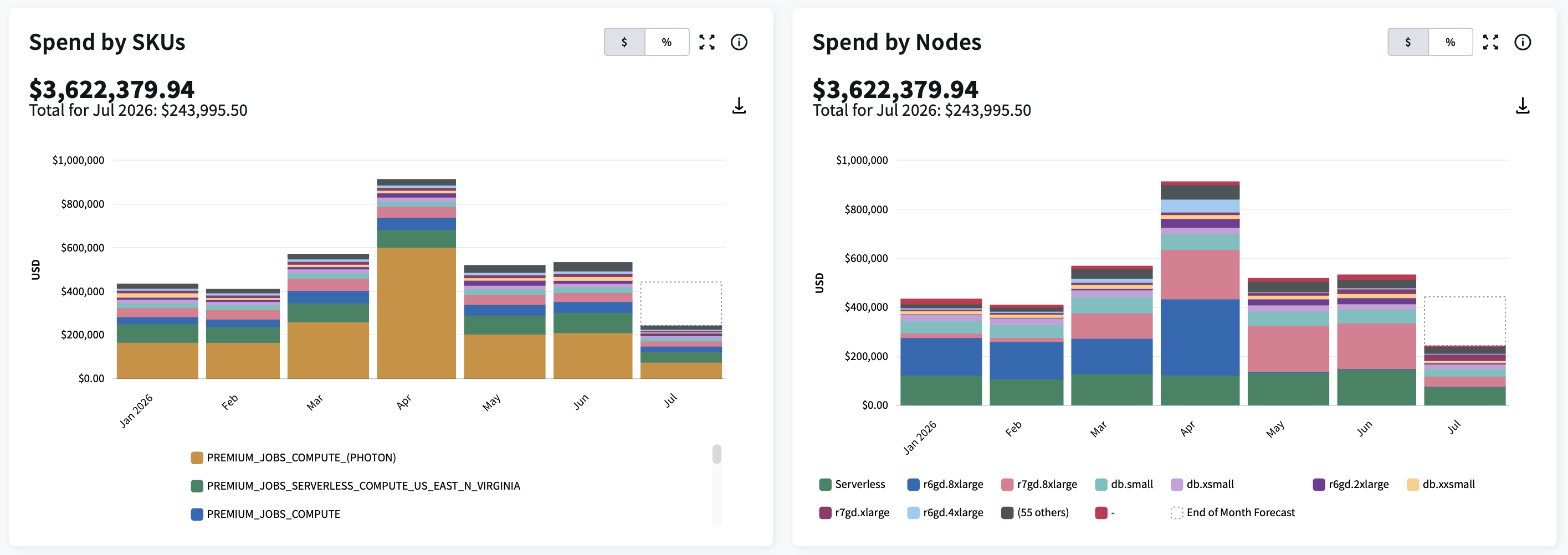
Databricks spend by workspace, SKU, node, cluster, warehouse, or job cluster.
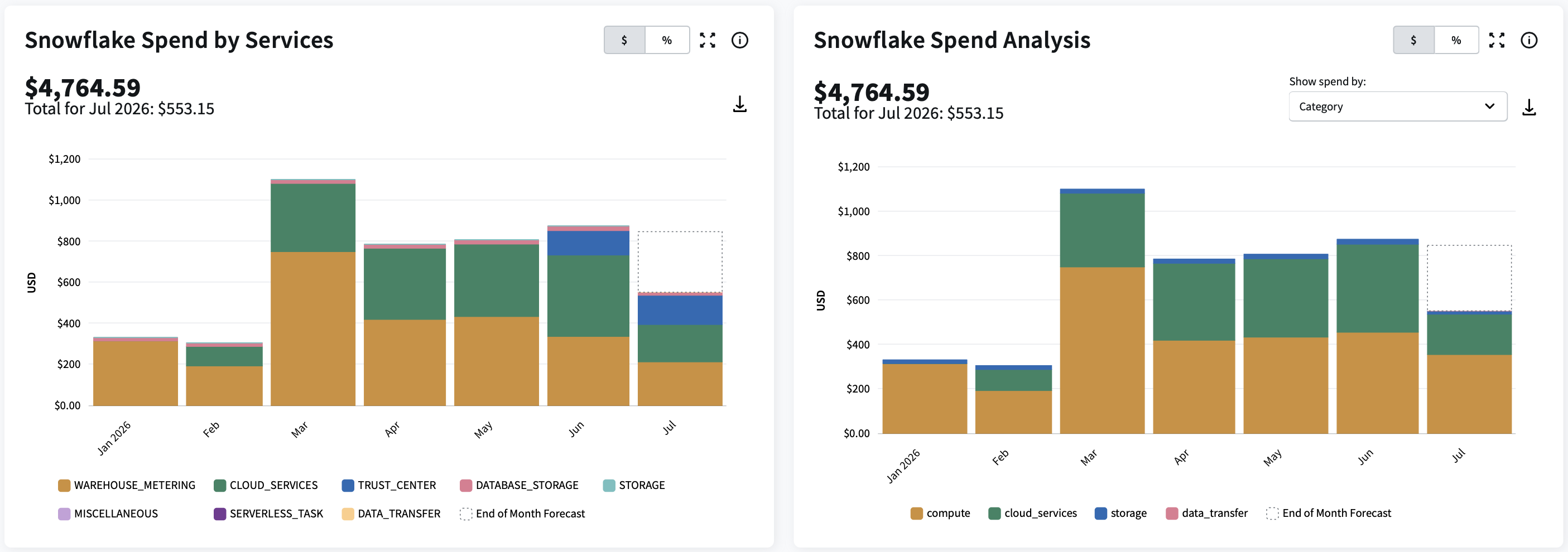
Snowflake spend by usage category, warehouse, storage, or credit consumption.
DCO also allows users to export detailed spend analysis to PDF. The export includes cost and usage breakdowns across Databricks and Snowflake dimensions, including credits and DBU consumption, making it easier to share consistent spend reporting with finance, engineering, and business stakeholders.
Who owns this spend?
After teams understand what is driving spend, they need to allocate costs to the right business units, projects, teams, products, customers, or cost centers. Without ownership, data cloud costs are difficult to include in showback, chargeback, and accountability reports.
DCO helps teams use data cloud cost and usage data inside Flexera One allocation workflows. This helps organizations connect Databricks and Snowflake spend to the owners responsible for the resources, even when tagging is incomplete.
How do we track data cloud spend against budgets?
Organizations manage cloud, Databricks, and Snowflake budgets in separate tools. That makes it difficult to compare spend against plan across platforms or understand how data cloud costs affect the broader technology budget.
DCO helps organizations move from reactive cost reviews to proactive data cloud cost management. Teams can track Databricks and Snowflake spend against budgets, forecast future costs, and monitor spending trends over time, helping them improve budget accuracy and maintain greater financial control.
How do we catch unexpected changes early?
Data cloud costs can change quickly when workloads scale, teams launch new jobs, storage grows, or usage patterns shift. If teams only review costs after the month closes, budget issues may not be visible until after the spend has already occurred.
DCO connects Databricks and Snowflake spend to Flexera One anomaly detection so teams can identify unusual cost patterns earlier and investigate the workloads or resources behind the change.
Where can we reduce waste or rightsize resources?
Visibility and allocation help explain data cloud costs, but optimization requires action. Customers need to know which clusters are idle, which warehouses are oversized, underutilized, or configured in a way that drives unnecessary compute costs.
Flexera One uses DCO usage data to surface rightsizing recommendations for Databricks (Snowflake coming soon). These recommendations help teams identify specific resources that can be adjusted, along with suggested actions and estimated savings.
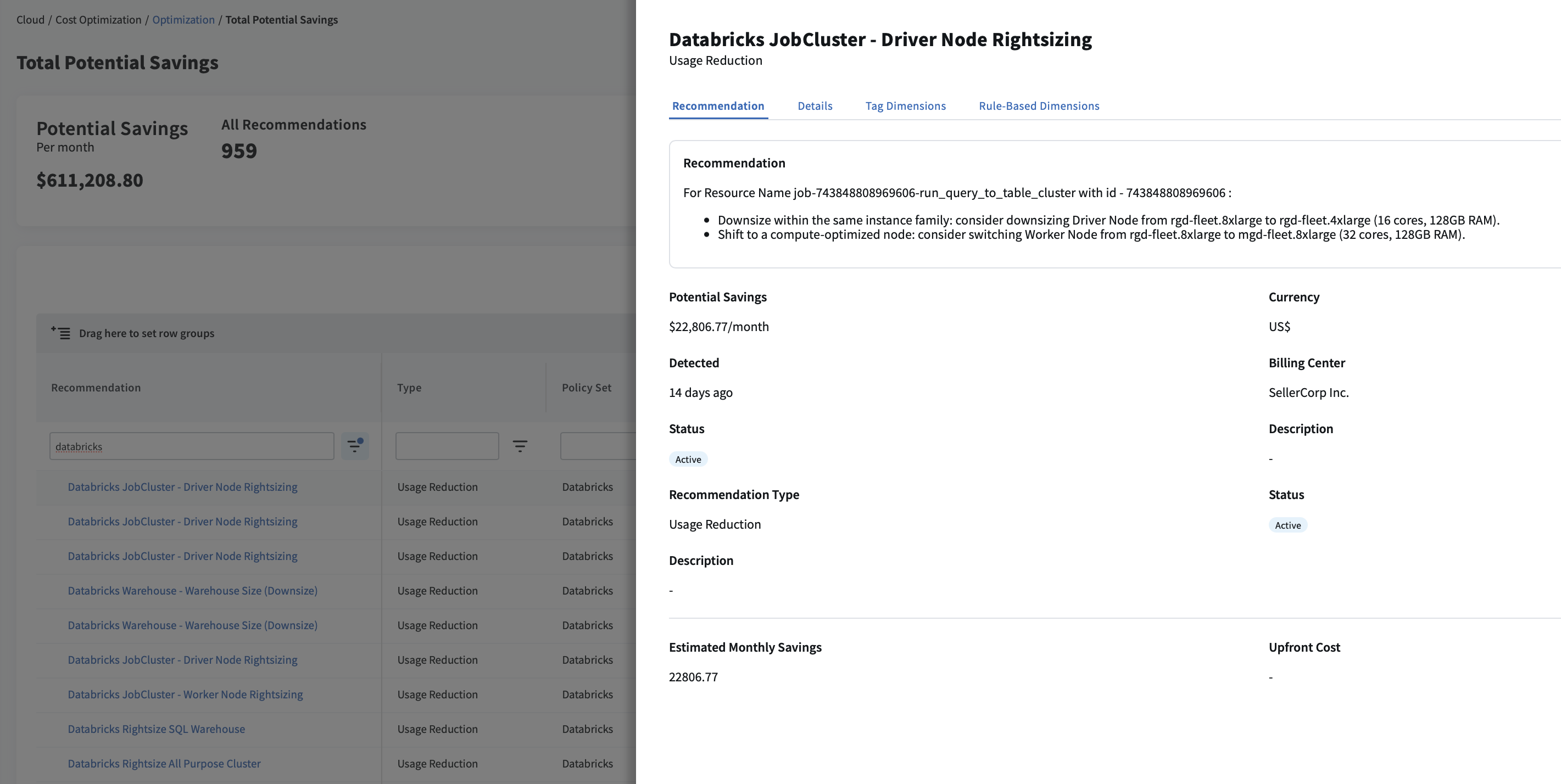
Applying DCO to Flexera’s own Databricks environment
Flexera has used DCO recommendations in its own Databricks environment. In one internal optimization effort, Flexera implemented 43 Databricks recommendations in under 10 days and is tracking roughly $816K in annualized DBU savings.
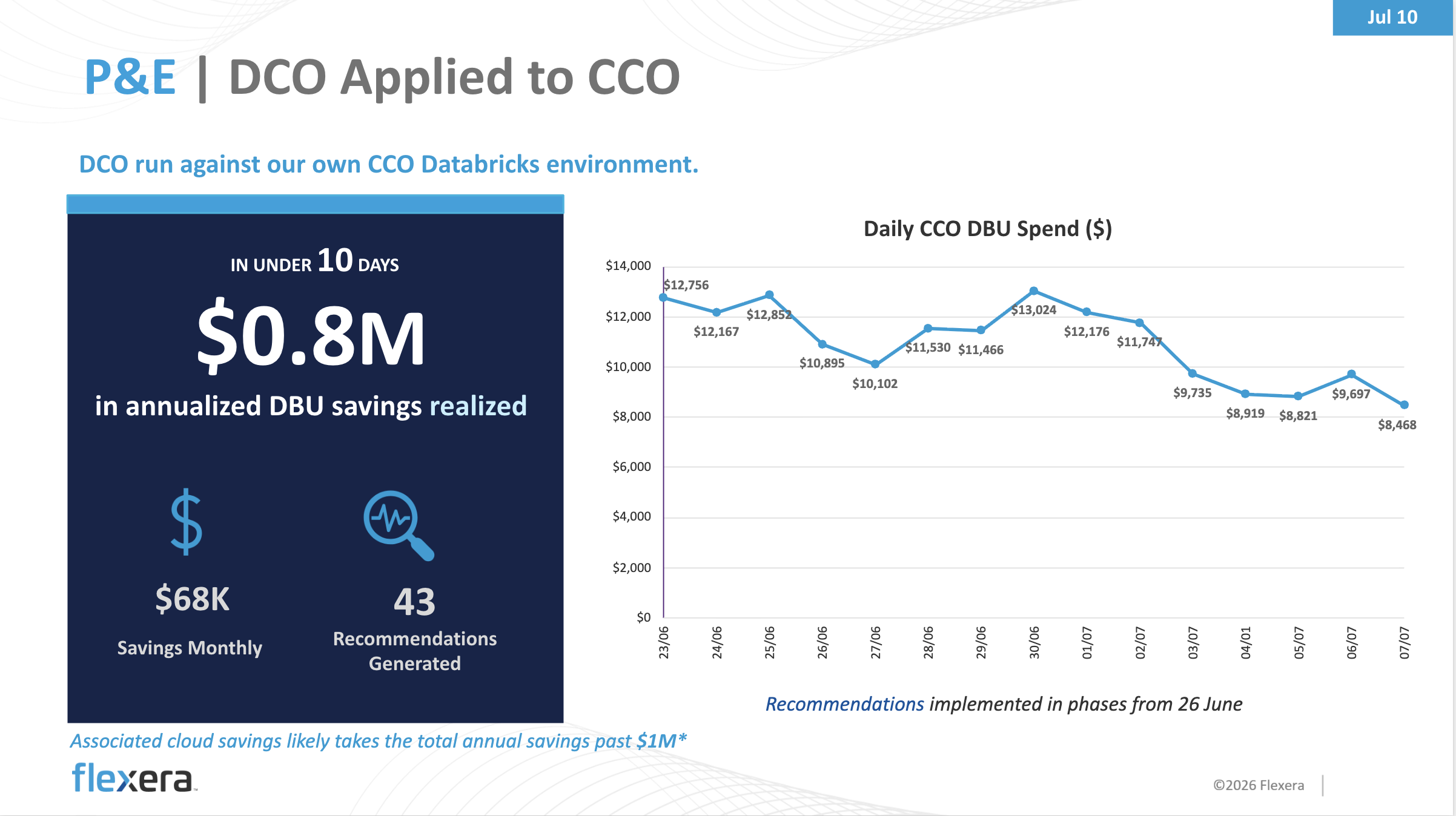
The value of a single-platform approach
Organizations do not manage Databricks and Snowflake in isolation. Data cloud costs sit within a mix of technology investments. Flexera One brings these areas together in a single platform, helping organizations analyze data cloud spend alongside cloud infrastructure, Kubernetes, and AI costs.
AI initiatives introduce new layers of spend across infrastructure, data platforms, models and applications. Understanding how those costs relate to one another is becoming increasingly important for driving business value. Flexera One provides a common foundation for allocation, budgeting, forecasting, anomaly detection and optimization, helping organizations make decisions with greater context and confidence.
Flexera are not affiliated or endorsed by Snowflake, Inc.
Alexa Abbruscato
Alexa Abbruscato is a Senior Product Marketing Manager for Flexera.