Webinar
How to improve cloud cost visibility and control: FinOps best practices for data cloud platforms
Overview
Data cloud platforms like Databricks and Snowflake have transformed how organisations manage data—but they've also introduced a new category of cost that traditional FinOps practices weren't designed to handle. Credits, DBUs, warehouses, clusters, and serverless compute all follow different consumption models, making it harder to see where money is going and who's accountable.
In this on-demand webinar, Flexera's Nathan Stevens and Denis Duri break down the mechanics of data cloud cost management—covering how Databricks and Snowflake pricing works, why costs spiral without the right visibility, and what FinOps teams need to do differently when optimising data platforms versus traditional cloud compute.
You'll learn how to structure cost data for decision-making and take action on workload-level inefficiencies, including:
- How Databricks DBU pricing works across classic and serverless compute modes—and why the distinction matters for cost control
- Why Snowflake and Databricks require different optimization approaches, and where traditional FinOps techniques still apply
- How to detect anomalies, allocate costs by team, and forecast data cloud spend using Flexera's FinOps platform
This session is designed for FinOps practitioners, cloud engineers, data platform teams, and finance stakeholders who need to extend their cost governance to data cloud platforms before spend gets ahead of them.
Speakers

Denis Duri
Principal Solution Architect (FinOps)
Flexera

Nathan Stevens
Senior Director, Solutions Engineering (APAC)
Flexera
Key takeaways for FinOps practitioners, data platform teams, and finance stakeholders
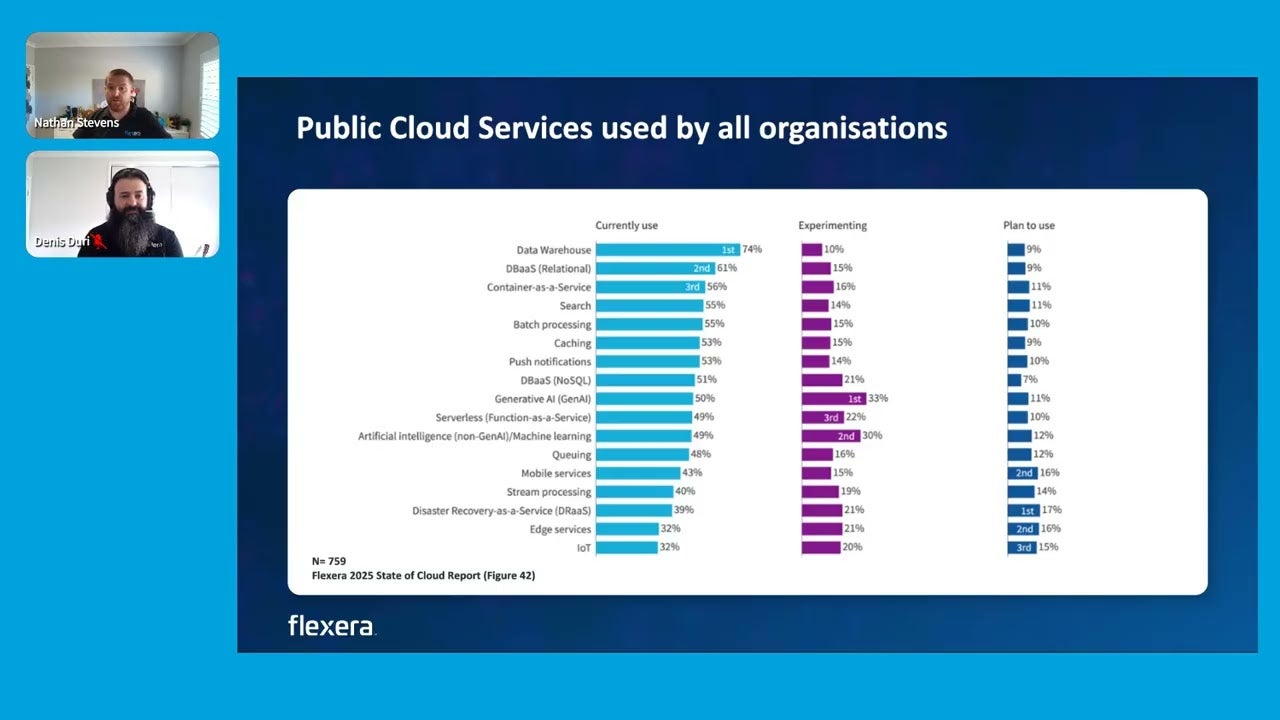
- Data cloud platforms are the fastest-growing blind spot in FinOps. 74% of organizations already use data warehouse solutions, yet only 35–38% manage those platforms as part of FinOps today—a gap that's closing fast, with nearly 70% expecting to manage them within 12 months.
- Traditional cloud optimization doesn't translate directly. Databricks and Snowflake use consumption currencies (DBUs, credits) that behave differently from VM-based compute—meaning rightsizing and reservation strategies need to be rethought for data platforms.
- The difference between classic and serverless compute in Databricks can be a 10x cost difference. An idle classic cluster running 24/7 can cost ~$15,000/year for a workload that would cost ~$1,250/year when properly optimized—or ~$1,278/year on serverless.
- Reducing DBU cost in Databricks can inadvertently increase cloud infrastructure cost. In classic mode, platform spend and cloud VM spend are separate—optimising one without the other can shift costs rather than reduce them.
- Anomaly detection is critical because data cloud cost spikes are often invisible until the invoice arrives. Failing jobs that retry indefinitely, uncontrolled parallel queries, and over-provisioned clusters can all cause sudden spikes that are hard to trace without granular visibility.
- Cost allocation in data cloud requires usage-level inputs. Shared clusters and warehouses mean one team's workload can affect another's cost—without workload-level visibility, fair chargeback is impossible.
- Flexera's CCO platform is bringing data cloud visibility and optimization to market this year. Granular DBU and credit-level visibility, workload-level cost allocation, ML-driven forecasting, and anomaly detection—aligned with how AWS and Azure cost management already works.
Data cloud costs are harder to manage than traditional cloud
Why data cloud platforms create a new category of FinOps challenge
Data cloud costs follow consumption models that traditional FinOps frameworks weren't built for. Platforms like Databricks and Snowflake use credits, DBUs, warehouses, and clusters instead of familiar compute-storage-network breakdowns. Each platform has its own pricing mechanics—Snowflake operates more like SaaS (credit-based, managed compute), while Databricks behaves more like PaaS (with underlying cloud infrastructure costs in classic mode). This means FinOps teams need to understand a completely different set of cost levers.
Outcome: Teams who understand the consumption model can avoid applying the wrong optimisation techniques and focus on the levers that actually reduce cost.
Why Databricks costs can spiral without workload-level visibility
In Databricks, cost depends on the workload type, compute mode, and cloud infrastructure—not just usage volume. A single workload can run on serverless, classic compute, or a SQL warehouse—each with different DBU rates and infrastructure implications. In classic mode, spinning up clusters incurs both DBU costs and separate AWS/Azure/GCP compute costs. If clusters are left idle, or jobs retry without guardrails, costs accumulate invisibly. The webinar walks through a real scenario: the same Lake Flow job costs ~$1,248/year when optimised, ~$15,000/year with an idle cluster, and ~$1,278/year on serverless.
Outcome: Workload-to-compute mapping and idle resource governance can prevent 10x cost overruns—even before advanced optimisation.
Why Snowflake and Databricks need different FinOps approaches
Snowflake's managed-service model means traditional VM rightsizing doesn't apply—but Databricks classic mode still requires it. Snowflake optimisation centres on consumption governance, workload engineering, and commercial commitment alignment. Databricks sits between IaaS and SaaS depending on the service—classic compute still requires cloud-level tuning (node family, autoscaling, runtime), while serverless removes that burden entirely. Treating both platforms the same way leads to misallocated effort and missed savings.
Outcome: Applying the right FinOps framework to each platform avoids wasted effort and targets the cost levers that actually move the needle.
Why cost allocation breaks down in shared data environments
Shared clusters and warehouses mean one team's query performance can directly affect another team's cost. In data cloud environments, multiple business functions often share the same compute resources. Long-running or poorly bounded queries consume capacity that other teams are paying for. Without workload-level usage data, cost allocation becomes guesswork—and chargeback conversations stall.
Outcome: Granular usage inputs enable fair, defensible cost allocation—making teams accountable for their own data cloud consumption, just as they are for public cloud today.
Why anomaly detection prevents bill shock in data cloud
Data cloud cost spikes are often caused by invisible operational failures—not intentional usage increases. Failing jobs that retry indefinitely, parallel workloads spinning up uncontrolled clusters, and over-provisioned warehouses can all cause sudden cost spikes. Without real-time anomaly detection, these issues are often only discovered when the invoice arrives. Flexera's platform is designed to automatically flag these anomalies so teams can investigate and respond before budgets are impacted.
Outcome: Proactive anomaly management replaces month-end surprises with real-time cost governance.
Why data cloud cost management matters now
- 74% of organizations use data warehouse solutions today—yet most lack FinOps-grade visibility into those platforms. (Source: Flexera 2026 State of the Cloud Report), Flexera's 2026 State of the Cloud Report
- Wasted cloud spend has risen to 29% after five years of decline, reflecting growing cost complexity from AI and new IaaS/PaaS services—including data cloud platforms. (Source: Flexera 2026 State of the Cloud Report)Flexera's 2026 State of the Cloud Report
- Cloud spend has increased 47% in the last three years, with SaaS up 51%—and data cloud platforms are a significant and growing contributor. Flexera's 2026 State of the Cloud Report
- 35–38% of FinOps teams already manage data cloud platforms, with nearly 70% expecting to within the next 12 months. Flexera’s 2025 state of ITAM report
- Real-world case studies show 15–30% cost savings when data cloud visibility and optimization are applied. Flexera's 2026 State of the Cloud Report
Frequently asked questions
A data cloud platform is a cloud-native service for data ingestion, storage, and analytics—examples include Databricks, Snowflake, Google BigQuery, Amazon Redshift, and Microsoft Fabric. These platforms use consumption-based pricing (credits, DBUs) that differs from traditional compute. With 74% of organizations already using data warehouse solutions and nearly 70% of FinOps teams expecting to manage them within 12 months, extending cost governance to data cloud is becoming essential.
Databricks pricing is based on Databricks Units (DBUs), which vary by workload type (e.g., Lake Flow, SQL warehouses, ML pipelines) and compute mode (classic or serverless). In classic mode, you also pay separately for the underlying cloud VM costs—meaning platform and infrastructure costs must be managed together. Serverless bundles both into a single DBU rate, offering more predictability but at a higher per-unit cost.
Data cloud costs spiral due to elastic consumption-based compute, complex currency models, shared resources across teams, and a lack of workload-level visibility. Idle clusters, failing jobs that retry without guardrails, and over-provisioned warehouses are common culprits. Without granular cost breakdowns, these inefficiencies often go undetected until the monthly invoice arrives.
Snowflake operates more like SaaS—you consume credits and don't manage underlying infrastructure. Optimization focuses on consumption governance and workload engineering. Databricks behaves more like PaaS—in classic mode, you manage cloud VMs alongside DBU costs, so traditional cloud tuning (node selection, autoscaling) still applies. The webinar maps both platforms on a FinOps spectrum to help teams apply the right approach.
Flexera's Cloud Cost Optimization (CCO) platform is bringing data cloud capabilities to market in 2026, starting with Databricks. This includes granular DBU and credit-level visibility, workload and warehouse cost breakdowns, cost allocation by team, ML-driven budget forecasting, and automated anomaly detection—extending the same FinOps governance model that already covers AWS, Azure, and GCP.
Transcript
Nathan Stevens [00:04 - 00:51]
Hello, and welcome, everybody. We're just gonna give about twenty to thirty seconds for everyone to join, navigate their way through Goldcast, and get comfortable for the next thirty minutes.
Thanks for those that have rejoined on time as well. Looks like we're gonna have a great session today.
Fantastic. Alright.
So thank you everybody for joining us today. My name is Nathan Stephens.
I look after the solution engineering team here in APAC. And joining me today from the start of the session is mister Denny Jurey, who heads up our solution architecture space for FinOps.
Welcome, Denny.
Denis Duri [00:51 - 00:53]
Thank you very much, Nathan.
Nathan Stevens [00:53 - 25:49]
So today, we're gonna focus a little specific down the rabbit hole, so to speak, on data cloud optimisation or data platform as it's known, or data platform, depending on which piece of literature you're actually reading. So Denny's going to join me, we're going to talk throughout this session today, and it would be great as well if you have any questions, as usual, please put them in the Q and A chat.
If you go into the messages, we'll try to manage both of those, and Ash in the background will help navigate some of the questions that do come through, as well as this will be recorded. So if you do want to share this with colleagues after the event, it is recorded for their viewing pleasure.
All right, so just to recap, since last year, moving into this year now, we have done seven of these great webinar series. So we're running out of room on this slide to give a bit of a summary of each of these, but Ash will put in, in a second, some links to all of these so you can watch them on replay, on demand in case you've missed any of these in the past seven months.
So we're going to keep on going, and into the next few months we're going to start to look towards these three topics. So obviously for today, we're going to focus in on data cloud optimization.
So what we're doing here today is really looking at how we manage costs, particularly around Databricks, and we'll touch a little bit on Snowflake, but also talk about data cloud in general. Start to look at some of the ability to optimize the differences in the data cloud space compared to sort of the traditional VMs and in finance practice.
Next month, we can take a bit of a pivot back into a very traditional subject around IBM audit readiness. So there's going to be a great look at what happens when you get the audit letters and what you need to do and some of the tips and tricks around being prepared for an IBM audit and how Flexera can help there.
And in May, we're going to take the journey to proving ITAM value. So we'll be joining from some other members of our team as well, looking at how do we actually get the metrics and the KPIs in ITAM and translate them into business outcome language and a leadership level language to prove the value of ITAM, something that, you know, a lot of us struggle with in converting that language into leadership executive level talk.
So a fantastic opportunity to join us on the May 20 as well. Alright.
So just as we start each, just to position us where we are in the market today, and Data Cloud is no different amongst this as well. So when we start to look at spend, spend is increasing across the board.
This is no different from the cloud space, you know, 47% increase in the last three years, SaaS at 51%, and also moving into the global AI spend as well, so which is becoming a, or has become a $644,000,000,000 industry. We're at this, you know, tipping point, you know, this analogy here that we're beyond that point now where a lot of this spend needs to be proactively managed and managed well.
If we start to look at pushing more and more workloads into the cloud, and today talking about that data cloud space, this is also contributing to driving up this spend in cloud as you move from the traditional on premise compute, you know, on premise data warehouse technologies into the newer technologies that have really exploded over the last few years in particular.
Now, as we take a look into our platform, now for each of the topics, we sort of try to narrow it down and focus on a particular tile on the screen in front of you.
Today, as part of the FinOps portfolio, we're really going to focus in on that workload optimization tile. Now we've touched each of these, and each contribute to a different level of spend and risk management within the platform.
But our goal really now is to really look at holistically what does that FinOps portfolio really look like. So this is probably one of the first times I brought up this slide during these sessions, but what we have here is different capabilities that we have already brought to market, and today, something that we are bringing to market fits in nicely with this broader FinOps portfolio.
You know, we need to expand a little beyond just the traditional capabilities of compute storage, network, and optimising spend in those particular areas. So as the market and as technology has got more complex and more and more of our workloads are being put into the cloud, we've obviously need to expand what we're doing.
So whether that's from the GreenOp's perspective and sustainability, whether we start to look at software licensing side around, you know, what bring your own license scheme in whether it's AWS or Azure, how can we optimize spend in those areas. Then we start to look into the more of the emerging areas in FinOps, rate optimization being a massive one of those, so looking at your commitments and discounts and other things.
Spot instance management as well, so really leveraging the power of, you know, going to spot marketplace, procuring, you know, spot instances to run up workloads that are significantly cheaper than your traditional on demand compute. And then today is really where we want to focus our time on, you know, workload optimization.
Now there are a few different concepts in this space. If I start to look at rightsizing and bid packing being the two key ones from our ocean technology, moving into the auto scaling side of that, and then into the topic of today.
So how do we look at data cloud optimisation with the same lens of FinOps, looking at it from the lens of, you know, visibility and spend and risk management in this space? And today we're going to go through, you know, what that is and education around that, because it is quite a different concept to what traditional phenops practitioners may look at, and especially so for the ITAM folk that may be on this call as well.
Now to start really basic, as part of the research for this particular webinar, we spent a bit of time going into looking at the market and what the market was telling us.
Now obviously, I think most people on this call would have seen slurflake or diamond bricks at different times, different events, they're marketing, they're big in the market. And what we're really looking at is the collection of these things, in particular these five, which were really classified as your tier one data cloud platforms, and they're depending on what research you may look at there, but these are the five prominent ones that are being used in the market today.
The key for these is that we've moved away from having the separate and disparate compute storage networking that was on premise, you know, if you looked at your traditional data warehouses. So we want to categorise the data cloud platform, and these are cloud native versions of those things.
And in some cases, you know, the ingestion, the storage management, the analysis of that data is also built into the same as a service model. You you don't get the responsibility of managing all those individual components and parts and doing away with those.
Databricks is a little bit of an exception to that, and that's where we want to dig a little bit deeper today. The market itself is also growing.
So it depends once again on, you know, what research and the background in this space, but there's roughly between ten and fifteen different data cloud platforms in 2025. As we moved into this year, we can see about 20 to 30 different platforms in this space.
So it's a growing space, much like AI is growing. I think data cloud is also growing at a very similar pace.
And this is for three key reasons, or three trends, really. It's lakehouse architecture, which is prominent in these areas, the need for real time analytics engines, which these platforms provide, and also with the AI trend explosion uptake is have an AI native data platform.
So, you know, a couple of examples here were Pinecone and MassDB. Now the key to all of this as well is, you know, if I look at the traditional research and the fantastic state of cloud report in this instance, data warehouse solutions capabilities are actually in use by 74% of people that responded to this survey.
So this is why it's critically important that we also look to this to see how we can manage this spend.
On the other side, if I start to look at what becomes the responsibility of those FinOps teams to manage, and this is that next level down view, and this is from our State of ITAM report, is that data cloud platforms are becoming roughly about, I think on this one, was about 35 to 38% are already managing those platforms today as part of FinOps.
So you can see here that, you know, it's critical outside of the traditional Azure AWSs, DCPs, and and other CSPs out there, these data cloud platforms are becoming the responsibility of those teams as well. And over the next twelve months, this is only going to increase.
So this is this green on the end there. So this is what those Phunos practitioners are expected to manage in that next twelve months.
You know, close to 70% believe that they'll be managing these platforms. So we need to be proactive, and we need to understand this space better to fully grasp, you know, the concepts around visibility and optimization in data cloud.
Now when we start to take a look at this, and this is where we get into the detail around, you know, why did data clouds get out of control. So now we're going to focus a bit more on Databricks and Snowflake, the hot topics at the moment.
But really, you know, these are the platforms that rely on elastic, you know, consumption based compute, creating visibility allocation and cost control gaps. So we start to talk about visibility.
This is where we start to look at this complex currency management. So each of these platforms have different ways in which they will you consume tokens, you know, credits and DVUs in this case.
The consumption mechanism is completely different from traditional cloud. You know, often there'll be decoupled, you know, storage or compute, and we wanna get down to a different visibility level.
So in Databricks, for example, you know, that workload level granularity. We wanna understand what's happening just beneath the surface.
Now allocation becomes a problem because we're bringing in novel concepts, you know, whether it's warehouses or clusters. You know, these are shared resources a lot of the time across multiple different business functions or services.
One team's performance may affect another's team's cost. So if there's a long running job that exists out there or a query that has no boundaries or guardrails, that may affect the cost of everyone.
So how do you allocate cost for one team consuming more than the other? So you need those usage inputs as well to help with allocation in a nutritional FinOps sense.
And then we start to look at predictability again.
So, you know, it's similar to most of the demand on workloads in the cloud, but on demand compute causes spikes. So if we had parallel, you know, jobs being run, spinning up additional clusters with different, you know, workers and nodes out there that expand the ability for, you know, to process a particular job or a run or a workload.
You know, these things can explode depending on the guardrails that have been set and which has a massive impact on cost. And it's very difficult to forecast spend.
And this is where, you know, visibility leading to allocation, leading to predictability. And inefficiencies are different again.
So these are very different from traditional, you know, compute, and idle compute instances. We start to talk more around idle warehouses and clusters and different concepts that we're traditionally used to.
So we need to understand these concepts, what contributes to being used and not used in this space, what's been over provisioned in terms of how these data clouds are using those particular workloads in Databricks, once again a little bit different, using the compute in the back end in classic mode, And inefficient queries.
So, you know, we're sending particular queries, whether it's, you know, batch queries that have been in jobs that are running at night.
These inefficient and long running jobs that are using more compute power, more DBUs? How do we actually optimise those queries to help reduce costs as well?
So what we wanted to do quickly is just compare the two, because we've just spoke a little bit about some of the distinctions between both Snowflake and Databricks there.
But really, we start to look at Snowflake, you know, it's a managed service with three main layers, storage, compute, and cloud, and usually you pay for all of those in their credit scheme.
Databricks is unified data analytics and AI platform built around the lakehouse model.
So there's, you know, there's a lakehouse, there's a delta engine that sits on top of that, and that's how you query the data and run the queries on top of that.
On the Snowflake side, on demand or capacity commitments, data bricks, we bring in the terminology around consumption by workloads or services, often mixed with cloud infrastructure changes.
Snowflake, we focus more on queries and DAMLs that are run on virtual warehouses, so which can be resized or configured independently from storage.
Databricks focuses more on the differences between serverless, classic compute, clusters, and nodes, and then SQL warehouses.
Snowflakes will build for warehouse compute is per second with a sixty second minimum edge start, and changing the addition of the service that you're running in Snowflake will then change the unit economics, so the price per, you know, job run query, that sort of thing.
With Databricks, we focus on workload and service type and the compute mode that changes the unit economics.
So whether we use standard or enterprise edition in Databricks can change the DBU costs, even if we're using, like, a classic or serverless changes those as well.
Now the way that we liken this is where Snowflake is more closely aligned to how SAS operates and, you know, where we're consuming credits. We don't really care too much about the underlying infrastructure here.
Databricks, you know, is more aligned with PaaS. So there are elements of traditional IaaS in there.
We still care about some of the compute in classic mode, but what we're consuming at the end of the day is Databricks units.
Now when we start to talk about the traditional FinOps, you know, Azure right down one end of this is where we said, you know, VM rightsizing storage tiering, you know, reservations, idle resource cleanup, tagging, chargeback, and then those elements.
There's a little bit of truth in that those are relevant in classic mode in Databricks, but in Snowflake, it's not.
So Snowflake really looks at consumption governance, workload engineering, and really about the commercial commitment alignment.
Databricks is a mix of both, and that's where we place it sort of on the scale here, but sort of between has and IS dependent on the service that you're consuming.
Now to take that example a little further, and this is where we start to look simplistic diagram.
So when we start to talk about how do we look at optimizing Databricks.
So we start to look at the DPU pricing.
Initially, we work at the workload or, you know, the service families, so in this case, we're going use an example next on Lake Flow jobs.
Whether it's Lake Flow or it's SIG warehouses, you look at the service that you need or the workload that you need, then and look at the options that you have on the right side here.
So whether that's a serverless option where the DBU cost is, you know, including both the workload and the theoretical compute that sits behind the scenes, or a classic option where you've got to then go and pay separately for the AWS or GCP costs.
And each of those, you know, cloud providers, instance types that you choose, the regions that you choose, all have an impact on your cost separate to the DBU cost of your Databricks consumption.
Now a lot of this is different ways as well to look at optimizing spend in this space.
So decide whether you're optimizing platform spend, cloud spend, or total cost.
So part of, you know, the big trap here in sort of Databricks classic compute, you may reduce those Databricks units, the DBUs, but you may inadvertently increase the cost cost of your cloud, VM cost, network storage, those types of services.
So Databricks itself has been trying to push people to the serverless options to have better control over those spends, a bit more predictability around those spends as well.
But keep that in mind if, you know, for a classic mode, you need to consider both the, you know, VM, you know, public cloud costs separate to your DBU costs.
Go through the exercise of mapping your workload to to compute mode.
So classify if it's a scheduled job, if it's a SQL, BI job, interactive notebooks, your machine learning AI pipelines, or serving, and then ask, do each of these need to be on serverless, classic, or a SQL warehouse?
So depending on the particular workload, they'll support one of the three.
So depending you know, Databrick supports multiple different modes here, you know, different warehouse types, and each has different economics.
And an example of those, you know, economic options is on that graphic in the bottom right hand corner there.
The next stage is to build DBU visibility by SKU and by workload.
So to understand all the concepts together is about having visibility to do that.
So there's the system billing tables and Databricks to monitor that usage and cost, including workload and serverless usage analysis.
But it's also good at looking at tooling that can support this particular visibility.
Number four here.
So right size classic compute, but don't over apply VM error instincts.
We're So not going to go too hard on overly optimizing because it may impact performance of the Databricks environment.
So for classic clusters, so normal cloud tuning still matters, so node family, autoscaling, runtime selection, and job design.
But it's an opportunity you can to consider serverless.
So it removes much of the burden of the configuration and overhead in the background.
And finally, optimize the workload service pairing.
So Databricks pricing varies by the workload family.
So, basically, a poor architectural choice can lead to a licensing issue in disguise.
For example, something running as always on interactive workload where it could be just run as a scheduled, you know, nightly job or a SQL warehouse can materially change your costs.
So you've to be aware of that particular workload and service that you're running, fit them with the right infrastructure to support that, that can help reduce cost per kid, the same level of performance.
Now diving into one of those examples that I was just mentioning with Lake Flow Classic jobs.
So I just picked this one at random, and just to sort of give you the different scenarios on optimization.
And let's look at three different versions of Hadaran Lake Flow classic jobs in classic or serverless mode.
So we start to look at scenario a here.
This is where we have the classic optimized workload.
This is where you've got tightly controlled compute.
So if I look at my DBU cost, five nodes by two hours for the job run time, it's a dollar 50.
The AWS compute that sits in the background for the same size would be roughly a dollar 92.
And then the total run time per day, because you're only running it during that two hour window, is $3. 42.
So over the course of a year, it's, you know, $1,248.
Now if I look at scenario b, this is where I have my idle cluster.
And I've left my compute running for the whole day for twenty four hours a day, but I'm only I only need to consume that for the two hours that was run.
Now as you can see, the economics of these changes drastically to up to 41 just over $41 a day.
You know, the DBUs, you know, get impacted because they're running at the same time, potentially that, you know, that idle resource is running, But the AWS cost is the significant impact here.
So this is where $23 just for compute adds up to close to $15,000 in a year.
So, you know, scenario a is 10% of the cost of scenario b because we've right sized the computer exhausting.
Scenario c is when we start to look at the serverless options.
So we're only going to use the service when we need it.
You know, we're paying for the DBU cost of the five nodes for the two hours to run that job and process the Lake Flow job at night and process that once, that's going to cost $3.
50 in total.
So you can see the differences between scenario a and c here.
The DBU cost is higher, but that's because I'm not paying for my AWS cost.
So the net results, basically, over the course of a year is inconsequential.
It's about $30 different.
But then this is impacted by the you know, obviously, where, you know, classic compute gives you a lowest possible cost when infrastructure is perfectly optimized.
And then serverless, we have that predictability about when you need to run serverless.
And this is way down the bottom here.
We've just sort of given some indications where best to use it, but, you know, also as well some other considerations.
So looking at cluster idle times, you know, start up times.
So now if you've got a in scenario a, using classic, you know, spinning up that resource could take three to eight minutes to spin up the resource.
Looking at workload run times and retries.
So if you get a poorly, you know, executed defined SQL job that's taking an hour where it should take thirty minutes, you may want to optimize the code that's running then to reduce the time it takes, thus reducing the cost, and retries as well.
So it's important to have guardrails on, you know, those jobs and queries so that if it fails, does it retry indefinitely?
You know, each of those retries add to the cost.
So it's important then to put the guardrails on that to ensure that and tries two or three times and then fails out, and then you have an opportunity to fix that.
Alright.
So just Danny's just gonna quickly cover some details about the phenol side.
Denis Duri [25:49 - 29:19]
Excellent. Thank you, Nathan.
So I guess from a Finals practitioner point of view and what I've heard our customers saying is that we're looking for KPIs. What does that mean? How do we measure it? What's the value behind it? So, fortunately for us, we understand the workloads that are happening.
We understand the value that's there. We can understand the commitment utilization, being able to say, yeah, we can burn down the your tokens and your utilization, whatever is there.
It's it's very similar to, like, I guess, an AI scenario where you're consuming something that is different to CPU memory for a lot of it, but there's definitely a cost associated, and then there's certain cost spikes that are associated to that too.
We do understand that this also fits into the FinOps technology category, so it's not necessarily a scope by itself.
I classify this more around the cloud scope. So what you're connecting, it is a data cloud.
We're able to see what is being consumed, who's consuming it, how it's being consumed, and then to allocate those costs as well.
What we want to do and what we need to achieve as a FinOps practitioner is say, We know that team A uses this.
We have aligned and allocated those costs to use, so that you're now responsible and accountable for the consumption within your data clouds, which is exactly what you're doing today within your AWS, your Azure, your GCPs and so forth.
But we're making sure that it's completely visible, it is transparent, and that you can control those costs as well.
If you wanna go to the next slide, Nathan.
Alright.
So what this means from our platform and CCO is that we understand the granular costs.
So we can see the credits and DBU levels.
We see the breakdowns.
We understand the clusters and workloads.
You can now capture those and say, we know team a uses this, and it can allocate those charges.
So now they see what they're using and how they're using it, but also the cost of that utilization.
This feeds into budgets and forecasts, helps you to keep those workloads predictable, because you now know that over the last, say, twelve months, our ML engine has looked at your utilization.
And we can see that over the next twelve months, it could potentially be here, or it could start coming down depending on how you're using it, and also your optimization efforts in that field as well.
We will be releasing optimization recommendations in this space too.
The first step, obviously, for any FinOps practitioner is that visibility.
That's that understanding.
The second step is seeing where you can get better value from your data clouds or any cloud in general.
And then once you have that control, you can configure your anomalies as well.
We will automatically pick up anomalies and spikes in cost, So that way, you can manage those.
Because a lot of the time, they're unexpected, thus an anomaly, but it helps you to track what it is, and it could be a a failing job that just continues to retry.
We wanna make sure that they're picked up quickly, so that way you don't get a bill at the end of the month, which is what a lot of customers get.
And they say, how come our data warehouse, how come our Snowflake costs have spiked?
And traditionally, with, say, Snowflake, for example, I've spoken to a couple of customers around this, All they have is a line item in their AWS marketplace saying Snowflake, x amount of million dollars for the next twelve months.
And that's the complete breakdown of visibility they have today.
So we're trying to move that to being aligned with what AWS and Azure can provide you right now.
Nathan Stevens [29:19 - 30:17]
Perfect. And just to highlight as well, so these are capabilities we're bringing to market across the course of this year, so please do keep an eye out on announcements around this space when we do release the Databricks capabilities starting first.
So over the next few months there'll be more information available. We just want to highlight this slide.
This is from some of the case studies from the capability that we have acquired.
I just want to show some real world examples here of where customers are actually achieving those goals that we want to bring to market as well as part of our FinOps capability within our platform today.
So some really good opportunity to save costs even on here, anywhere between 15% to 30% of those costs as well.
And finally, I just want a preview of what's to come in terms of capabilities in the platform.
So, Danny, just to wrap it up from your end.
Denis Duri [30:17 - 31:04]
Yeah. Sure.
So so from a visibility perspective, this is our standard tabular view, but it'll give you a good breakdown of the jobs, the workloads, the workers, the warehouses, etcetera, that you have.
So you can see the what, who, what, where, when, and how with the dollar values associated.
We'll do the same for Snowflake as well.
There is going to be also dashboards that sit behind this.
So this is one view.
The other view will be around what SKUs you're using, what warehouses you're using, how is it being built, etcetera.
So all that will be coming into the platform, so that way you can have a holistic view of visibility, exactly as what you'd expect from the current public cloud providers, just in your data warehouse or data clouds.
Nathan Stevens [31:04 - 32:03]
Yep. Exactly.
Perfect. Thanks, And for anyone joining the call that wants to know a bit more information about what's coming, you know, when to expect some of this capability to solve challenges within your environments across, particularly around Databricks to start with, please do feel free to connect with me and reach out.
I'm happy to get you involved on that journey as things become available for market, for testing as part of different deployment stages.
Happy to get you involved and let you know when those capabilities are ready for you and to get you involved in this program.
Fantastic. Thanks, everyone, for joining today.
Thanks, Denny, for bringing us home there at the end.
And if you wanna know more, please reach out.
Otherwise, we'll see you next month for the IBM audit readiness webinar.
Everybody.
Denis Duri [32:03 - 32:04]
Thank you.
Let’s get started
Our team is standing by to discuss your requirements and deliver a demo of our industry-leading platform.