


Data science and machine learning (ML) are revolutionizing how companies use data to gain productivity and practical insights. Everyone is rushing to ship and implement machine learning models due to the recent hype surrounding AI. Due to this accelerated model development pace, we need solid data management more than before. Similar to how DevOps transformed software development by combining development and operations, MLOps (Machine Learning Operations) fills that gap. MLOps covers the end-to-end management of ML models in production environments, including data analysis, preparation, feature engineering, model development, deployment, prediction serving, retraining and continuous monitoring. A critical component of the MLOps ecosystem is the feature store, which manages “features” (the input data for ML models) with a focus on reliability, lineage and versioning. It specifically addresses the needs of ML, making sure the right data is always available for both training models and making predictions.
In this article, we’ll cover everything you need to know about features, feature stores and the Databricks Feature Store, including its architecture, current APIs and a practical step-by-step walkthrough.
What is a feature in Machine Learning?
ML models learn patterns from data to make predictions. That data is usually structured in a tabular format: rows are individual data points (samples or instances) and columns are their attributes. A feature is one of those columns. It captures a specific property of each data point.
Features are the input variables fed into an ML model. Their quality directly influences how well the model performs. They give the model the information it needs to learn relationships and make accurate predictions.
Types of Features
Features fall into two broad categories.
- Numerical features represent quantitative information. They break down further into continuous features (age, temperature, price) and discrete features (number of rooms, click count). Continuous features take any value within a range; discrete features have specific, separate values.
- Categorical features represent qualitative information and define groups or categories (gender, country, product category). They can be nominal, where categories have no inherent order (colors), or ordinal, where categories follow a natural order (education level).
Features are typically derived from raw data through a process called feature engineering, which we’ll get into shortly. Raw data in its unprocessed state usually isn’t directly usable by an ML model. Feature engineering extracts meaningful representations from that raw data so the model can learn more effectively.
Importance of Features
Features play a crucial role in ML and their quality directly impacts model performance. Here are some key aspects highlighting their importance:
- Predictive power. High-quality features capture the relevant patterns in the data, enabling more accurate predictions.
- Dimensionality reduction. Good feature engineering can cut down the number of inputs, simplifying the model, reducing overfitting and improving computational efficiency.
- Interpretability. Well-engineered features make it easier to understand what’s driving a model’s decisions.
Note: The same feature can be used by multiple teams to create multiple models.
Now that we have a solid understanding of features, let’s explore the concept of a Feature Store and its role in managing the feature lifecycle.
What is a Feature Store?
A Feature Store is a centralized repository designed to manage the complete lifecycle of ML features, from raw data ingestion and transformation to feature serving. It acts as the connective tissue within the ML ecosystem, letting data scientists and engineers store, share, discover and reuse curated features across many models and projects.
It integrates with data sources, transforms raw data into usable feature values and supports both training pipelines and real-time inference.
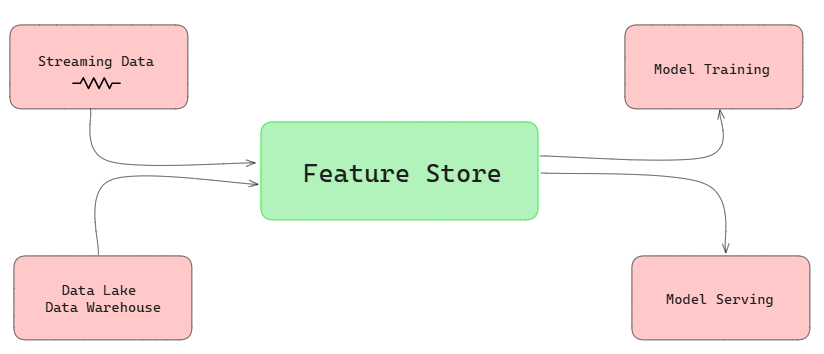
Feature Store overview
Feature stores play a crucial role in ML production environments, providing a reliable and efficient way to manage features throughout the ML workflow. They support both the research and development phases of ML projects, acting as organized repositories that store and manage the essential ingredients (features) required to build accurate and robust models.
What are some key features of the Feature Store?
Feature stores provide essential capabilities for managing and serving features to machine learning models efficiently. Below are some of their core functionalities:
- Collaborative feature sharing and discovery. Teams across an organization can find and reuse features rather than re-engineering the same signals from scratch.
- Automated data pipelines. Reliable, scheduled pipelines keep feature tables fresh without manual intervention.
- Integration with data sources. Feature stores pull from data lakes, warehouses and real-time streams, consolidating them into one managed layer.
- Real-time serving. For low-latency applications, a feature store can serve features to production models in milliseconds.
- Point-in-time correctness. When training on historical data, it’s critical that the model only sees feature values that existed at the time of the label. Feature stores enforce this through time series feature tables and as-of joins.
- Batch and real-time flexibility. A feature store supports both batch scoring pipelines and real-time inference endpoints.
Offline stores and online stores
Feature stores typically manage two data flows.
- Batch data comes from data lakes or warehouses: large, historical datasets that update on a schedule.
- Real-time data flows from streaming sources and event logs: continuously generated data reflecting current state.
To serve both, feature stores use two types of storage:
- Offline Stores (cold storage) hold precomputed, historical feature values. They’re used primarily for model training and batch inference. Implementations typically use cloud object storage (Amazon S3, Azure Data Lake Storage (ADLS), Google Cloud Storage (GCS)) or distributed file systems.
- Online Stores (hot storage) combine precomputed features from the offline store with real-time values to provide a low-latency, unified feature set for live predictions. These are usually backed by NoSQL databases like Cassandra, Redis or DynamoDB, or in-memory stores like Memcached.
Architecture overview of Feature Store
Feature Stores are designed to support a range of data ingestion, processing and storage requirements, ensuring they can handle both batch and real-time data sources effectively.
The diagram below outlines a typical architecture for a Feature Store, illustrating the flow of data from various sources through different stages to support both model training and real-time production environments.
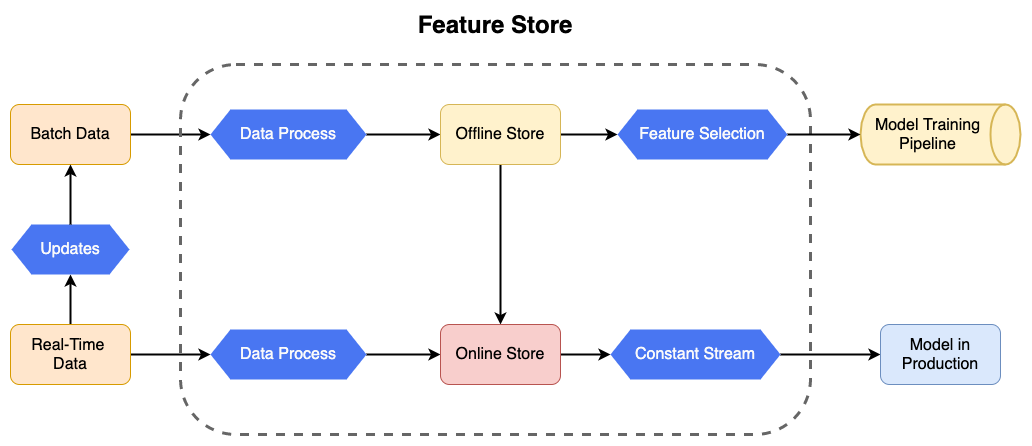
A typical feature store architecture flows like this:
- Data sources. Batch sources (data lakes, warehouses, historical databases) and real-time sources (event streams, logs) feed into the pipeline.
- Data processing. Raw data gets ingested, cleaned, transformed and engineered into features. This includes normalization, scaling, encoding and aggregation.
- Offline and online stores. Processed features land in the offline store. For real-time applications, a subset gets published to the online store for low-latency access.
- ML pipeline integration. The offline store feeds model training; the online store feeds production inference.
- Model training and production. Trained models are deployed and retrieve the features they need automatically at inference time.
Does Databricks have a Feature Store?
Yes, Databricks provides a managed Feature Store as part of its platform, offering a unified solution for feature management, sharing and serving. The Databricks Feature Store simplifies the ML workflow by seamlessly integrating with other Databricks components, such as Delta Lake, MLflow and Spark Structured Streaming, enabling efficient feature engineering, model training and deployment.
What is Feature Engineering?
Feature engineering is a critical process in ML and data science that involves transforming raw data into meaningful features that improve the performance of ML models. These features are derived from raw data through various techniques and domain knowledge, enabling models to learn and generalize better from the data.
Feature engineering includes the following critical steps:
- Data cleaning: Data cleaning is the process of removing or correcting flaws and inconsistencies in raw data, such as missing numbers, duplicates and outliers.
- Data transformation: Data transformation is the process of converting raw data into a format that machine learning algorithms can easily process. This covers normalization, standardization and scaling.
- Feature creation: Creating new features based on the existing ones, often using domain-specific knowledge. This can involve operations like combining features, creating interaction terms and performing mathematical transformations.
- Feature selection: Selecting the most relevant features for the model, which can improve model performance and reduce overfitting. Commonly utilized techniques include correlation analysis, feature importance from models and dimensionality reduction approaches.
- Encoding categorical variables: Convert categorical variables into numerical values using techniques like one-hot encoding, label encoding or target encoding.
Effective feature engineering requires a solid understanding of the data and problem domain, as well as an iterative approach to testing various features and transformations to get the optimal set for the model.
Feature Engineering in Databricks Unity Catalog
Databricks Unity Catalog is the governance layer for all data and AI assets in the Databricks platform. It provides centralized access control, auditing and lineage tracking. And since Databricks Runtime 13.3 LTS, Unity Catalog is your feature store in Unity Catalog-enabled workspaces.
Any Delta table in Unity Catalog with a primary key constraint can serve as a feature table. You don’t need a separate system. Here’s what that gives you:
- Centralized feature storage. All feature tables live in one place, organized under a three-level namespace (catalog.schema.table), and are accessible to every authorized team in every workspace that shares the Unity Catalog metastore.
- Fine-grained access control. Unity Catalog’s permission system controls who can read, write or modify specific feature tables. When you train a model, it automatically inherits the permissions of the data it was trained on.
- Versioning and lineage. Databricks tracks the data sources used to create each feature table, and which models, notebooks, jobs and endpoints use each feature. You can see the full lineage graph in Catalog Explorer.
- Feature discovery. You can search and browse feature tables by name, feature, comment or tag through the Feature Store UI. Tables are documented with ownership, publication status and modification timestamps.
- Point-in-time correctness. When creating a time series feature table, you use the timeseries_columns argument in FeatureEngineeringClient.create_table(). This enables as-of joins during create_training_set() and score_batch(), so your model only sees historical values that existed at the time of each label.
- Model lifecycle integration. Feature metadata is packaged with the model at training time. At inference, the model automatically retrieves the right features from the feature store without any manual join logic.
- Automatic lineage tracking. When you log a model with FeatureEngineeringClient.log_model(), MLflow captures the lineage to each feature table as a feature_spec.yaml artifact inside the model. This is what enables automatic feature lookup during scoring.
Note: Unity Catalog features require Databricks Runtime 13.3 LTS ML or later and the databricks-feature-engineering Python package. The older databricks-feature-store package is now deprecated and was superseded by databricks-feature-engineering as of version 0.17.0. Import paths like from databricks.feature_store import FeatureStoreClient still work if you install the new package, but for Unity Catalog workspaces you should use FeatureEngineeringClient from databricks.feature_engineering.
For more detailed info about feature engineering within Databricks Unity Catalog, See Unity Catalog Feature Engineering.
Now that we’ve covered the basics of what a feature, feature store and feature engineering are, let’s look at what exactly the Databricks Feature Store is
Databricks Feature Store
Databricks Feature Store is the centralized registry for features used in your AI and ML models. Feature tables and models are registered in Unity Catalog, giving you built-in governance, lineage and cross-workspace feature sharing out of the box.
With Databricks Unity Catalog, the entire model training workflow runs on a single platform: data pipelines that ingest raw data and create feature tables, model training, batch inference and model serving endpoints with millisecond latency.
What is the use of Feature Store in Databricks?
The Databricks Feature Store serves multiple purposes within the Databricks ecosystem:
- Feature discovery. The Feature Store UI lets you browse, search and explore existing features by name, tag or comment. That means less time rebuilding signals that already exist.
- Feature lineage. Every feature table tracks its data sources and all downstream consumers: models, notebooks, jobs and serving endpoints. You get complete traceability from raw data to production prediction.
- Consistent training and inference. When you log a model with feature metadata using fe.log_model(), that model carries the specifications for every feature it was trained on. At batch scoring or real-time inference time, it automatically retrieves the right features from the right tables. No manual join logic. No risk of serving different transformations than what the model was trained on.
- Integration with the Databricks stack. The Feature Store works directly with Delta Lake for storage, MLflow for experiment tracking and model registry, Databricks Workflows for scheduling feature pipelines and Model Serving for real-time inference.
- Point-in-time lookups. Time series feature tables support as-of joins, so training data reflects the state of the world at the time of each label observation.
- Online/offline skew elimination. Because the same feature definitions and computations are used for both training and serving, you avoid the class of bugs where models behave differently in production than they did during evaluation.
- On-demand feature computation with FeatureFunction. Some features can only be computed at inference time using data not available in advance (like a real-time user action). FeatureFunction lets you define Unity Catalog SQL functions that combine stored feature values with real-time inputs, computed on the fly during scoring.
- FeatureSpec for reusable serving pipelines. A FeatureSpec is a Unity Catalog entity that bundles FeatureLookups and FeatureFunctions into a single reusable unit. You can use a FeatureSpec in model training or deploy it as a Feature Serving endpoint independently of any specific model.
What is the difference between Databricks Feature Store and Unity Catalog?
While the Databricks Feature Store and Databricks Unity Catalog are closely related components within the Databricks ecosystem, they serve distinct purposes. Here’s a comparison of their key differences:
| Databricks Feature Store | Databricks Unity Catalog |
| Databricks Feature Store is a centralized repository for managing and sharing machine learning features | Databricks Unity Catalog is a unified governance solution for data and AI assets across Databricks |
| Databricks Feature Store is used to create, store and reuse features for ML model training and inference | Databricks Unity Catalog is used to manage access control, auditing and lineage of data across all Databricks workspaces |
| Databricks Feature Store provides a consistent way to manage feature computation and ensures features are used consistently in both training and inference | Databricks Unity Catalog manages various data formats, SQL functions and structured streaming workloads |
| Features can be browsed and searched through the Feature Store UI | In Databricks Unity Catalog data assets can be discovered using a search interface and tagging system |
| Databricks Feature Store tracks the lineage of features, including their source data and usage in models, notebooks and endpoints | Databricks Unity Catalog provides detailed data lineage for tables and other assets, showing how data is transformed and used |
| Databricks Feature Store is integrated with Databricks ML workflows, automatically retrieves features during batch scoring and online inference | Databricks Unity Catalog supports ML workflows by managing data but does not directly handle feature management or retrieval for ML models |
| Databricks Feature Store makes sure features are secure and accessible to authorized users within the ML pipeline | Databricks Unity Catalog provides comprehensive governance, including fine-grained access control, auditing and compliance across data assets |
| Databricks Feature Store stores feature tables, which can be used directly in ML workflows | Databricks Unity Catalog manages storage locations at the metastore, catalog and schema levels, providing flexible storage management |
| Databricks Feature Store works with Databricks Runtime 13.2 ML and above | Databricks Unity Catalog becomes the feature store in Databricks Runtime 13.3 and above |
| Databricks Feature Store is specifically designed for machine learning applications | Databricks Unity Catalog is broadly used for data governance, including non-ML data management |
TL;DR: Unity Catalog is the infrastructure. The Feature Store is the ML-specific layer that sits on top of it.
Architecture of Databricks Feature Store—Behind the scenes functionality
Databricks Feature Store is designed to manage features throughout the ML lifecycle, but its responsibilities extend beyond feature storage. It relies on various components within the Databricks ecosystem to handle different aspects of feature engineering and model development.
How does Databricks Feature Store work?
The basic workflow of Databricks Feature Store typically involves several key steps, streamlining the process from raw data to model deployment:
Step 1—Feature creation
The process begins with writing code to transform raw data into features, which involves Data cleaning and preprocessing and Feature engineering.
Step 2—Storing features in the Feature Store
Depending on your workspace setup, you can store the DataFrame containing the features in one of two places:
- Unity Catalog-enabled Workspaces: Here, the DataFrame is written as a feature table in the Unity Catalog.
- Non-Unity Catalog-enabled Workspaces: Here, the DataFrame is written as a feature table in the Workspace Feature Store.
Step 3—Model training
When training a machine learning model using the Databricks Feature Store:
- The model collects features from the feature store to guarantee that the same feature definitions are applied consistently across models and experiments.
- The specifications of the features used for training are saved alongside the model, including metadata such as feature names, types and transformations applied.
Step 4—Register the model
Once the model is trained, it is registered in the Model Registry. The Model Registry serves as a centralized repository for managing and versioning models, providing capabilities such as:
- Tracking model versions and their metadata.
- Logging the lineage of the model, including the features used for training.
Step 5—Model inference
For model inference:
When the model is deployed, it automatically joins the necessary features from the feature tables stored in the feature store, eliminating the need for manual feature retrieval and ensuring that the same feature definitions are used during both training and inference.
Now that you have understood the basic workflow of how Databricks Feature Store works, let’s dive into its detailed architecture overview.
Architecture of the Databricks Feature Store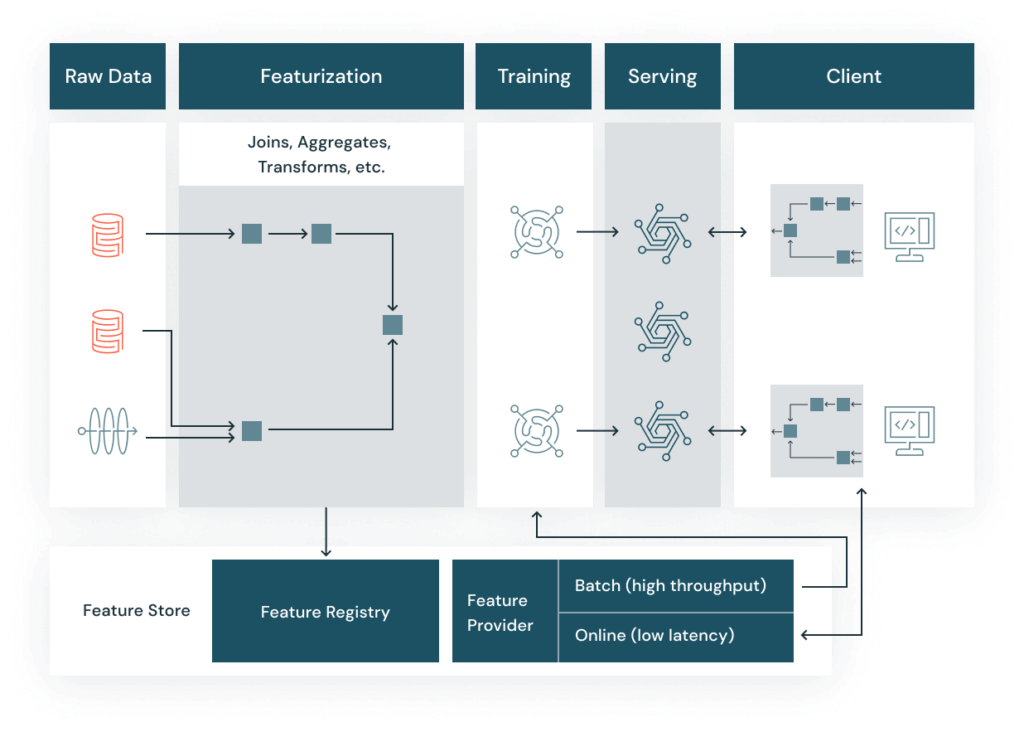
Databricks Feature Store’s architecture can be broken down into the following key components:
Databricks Feature Store architecture with Offline store
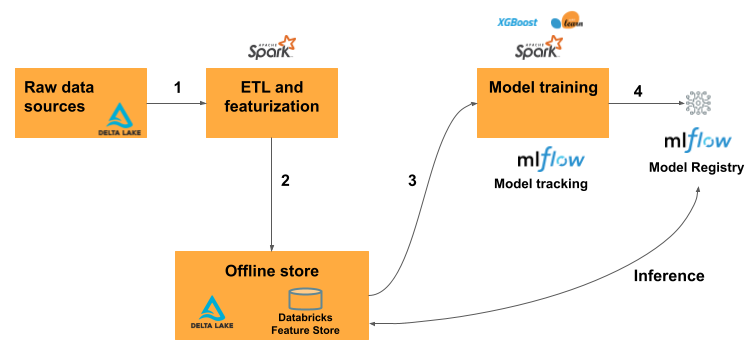
- Raw data sources. The starting point of the feature engineering pipeline is the raw data stored in Delta Lake. These raw data sources can include structured, semi-structured and unstructured data.
- ETL and featurization. The raw data undergoes ETL (Extract, Transform, Load) and featurization processes using Apache Spark. This step involves cleaning, transforming and aggregating the data to create meaningful features that can be used by machine learning models.
- Offline store. The processed features are then stored in the Databricks Feature Store’s offline store, which is backed by Delta Lake. The offline store serves as a historical repository of features, enabling users to access and use these features for model training.
- Model training. The features from the offline store are used to train machine learning models. Popular frameworks such as XGBoost and Scikit-learn can be used for model training. During this phase, MLflow is utilized for model tracking, which ensures that the experiments, parameters and metrics are logged and traceable.
- Model registry and inference. Once trained, the models are registered in the Model Registry. This registry keeps track of different model versions, making it easier to manage and deploy models. For inference, the registered models can retrieve features from the offline store to make predictions.
Databricks Feature Store architecture with Online store
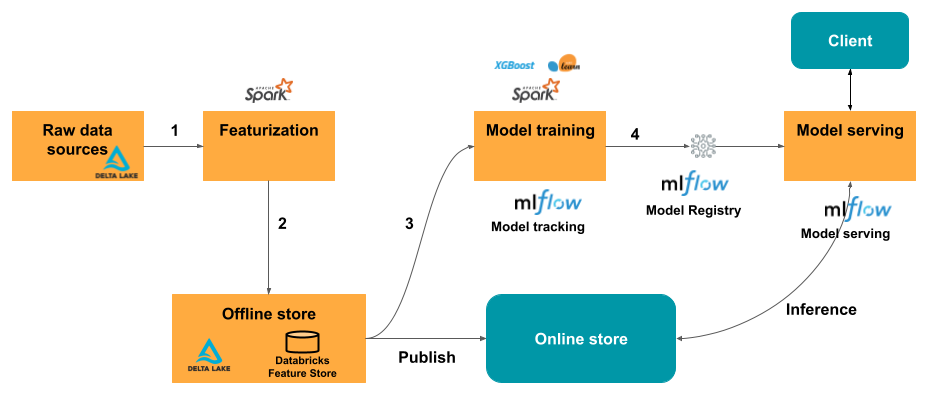
- Raw data sources. Similar to the first architecture(offline), raw data is stored in Delta Lake and serves as the input for feature engineering.
- Featurization. The ETL and feature engineering processes are carried out using Apache Spark, transforming raw data into features.
- Offline store. Features are stored in the offline store (Databricks Feature Store), which serves as a repository for training data and batch inference.
- Model training. Models are trained using features from the offline store, with MLflow tracking the training process. MLflow logs parameters, metrics and artifacts to ensure reproducibility and traceability.
- Online store. For real-time applications, features are published from the offline store to an online store. The online store allows for fast, low-latency access to features, making it suitable for real-time inference.
- Model serving. The trained models are registered in the MLflow Model Registry. During model serving, the models retrieve features from the online store to perform real-time inference. This setup ensures that the models have access to the most up-to-date features for accurate predictions.
- Client. The final predictions are served to the client application, which can be any end-user service or application that consumes the model’s output.
Step-by-step guide to use Databricks Feature Store
To help you get started with the Databricks Feature Store, here is a basic step-by-step guide that walks you through the process of setting up your environment, creating feature tables, training models and performing batch scoring.
Here are the prerequisites and steps involved:
Prerequisite
- Databricks Runtime 13.3 LTS ML or later
- A Unity Catalog-enabled workspace
- A catalog and schema you have CREATE TABLE privileges on
Step 1—Set up the Databricks environment
To get started with Databricks, first, create an account by signing up at the Databricks website. Once you have an account, log in and create a workspace—this is where you’ll manage all your Databricks resources.
See Databricks workspace guide.
After creating the workspace, navigate to the “Clusters” tab and spin up a new compute cluster. This cluster will provide the computational resources required for running your Databricks jobs and notebooks. When creating the cluster, choose an appropriate configuration based on your data processing needs, such as the number of workers, instance types and memory allocation.
Make sure that the cluster is running before proceeding to the next step.
Finally, make sure you have the necessary libraries installed and imported (databricks-feature-store, pandas, scikit-learn and mlflow) if they are not already available in your environment.
from databricks import feature_store
from databricks.feature_store import FeatureStoreClient
from sklearn.ensemble import RandomForestClassifier
import mlflow
import pandas as pdStep 2—Loading and preparing data
Before you can create and store features, you’ll need to load your raw data into a Spark DataFrame. Depending on your data source, you can use Spark SQL or the PySpark API to read the data from various formats like CSV, Parquet, or JSON. For example, if your data is in a CSV file, you can use the following code:
raw_data = spark.read.format("csv").option("header", "true").load("path/to/your/data.csv")Now, clean and transform your data as required for feature engineering. This might involve handling missing values, normalizing data and converting data types. For example:
clean_data = raw_data.dropna().dropDuplicates()- dropna(): Removes any rows in the DataFrame that contain missing values (NaN). After applying this, only rows with no missing values in any column will be retained.
- dropDuplicates(): Removes duplicate rows from the DataFrame. After applying this method, only unique rows will be retained.
Next, prepare your data for feature engineering by transforming it as needed, for instance, converting data types or normalizing values.
from pyspark.sql.functions import col
transformed_data = cleaned_data.withColumn("normalized_column", col("column")/col("max_column"))It’s crucial to make sure that your data is in the desired format and meets the quality standards before proceeding to the next step.
Step 3—Creating a Databricks Feature table
After preparing your data, it’s time to create a feature table in the Databricks Feature Store. This table will serve as a centralized repository for storing and managing your computed features.
First, initialize the Databricks Feature Store client, which provides an interface for interacting with the Feature Store.
from databricks.feature_store import FeatureStoreClient
fs = FeatureStoreClient()Next, define the features you want to store in the feature table. This typically involves selecting relevant columns from your transformed data and applying any necessary transformations or aggregations. For example, you might want to compute the average value of a feature column grouped by an entity ID.
from pyspark.sql.functions import avg
feature_df = transformed_data.groupBy("entity_id").agg(avg("feature_column").alias("average_feature"))Now that you have the feature DataFrame ready, you can create a new feature table in the Databricks Feature Store. This step requires specifying the table name, primary keys, schema and an optional description.
fs.create_table(
		name='feature_store_schema.feature_table_name',
		 primary_keys='entity_id',
		schema=feature_df.schema,
		 description='Brief description of the Databricks feature store table'
)- name: defines the fully qualified name of the feature table, following the format
<database_name>.<table_name> - primary_keys: specifies the column(s) that uniquely identify each row in the table
- schema: allows you to define the table schema based on the feature DataFrame’s schema
- description: provides a brief explanation of the table’s purpose
Step 4—Storing Features
After creating the feature table, you can write the computed features to the table using the write_table method provided by the Feature Store client.
fs.write_table(
		 name='feature_store_schema.feature_table_name',
		df=feature_df,
		mode='overwrite'
)- name: specifies the fully qualified name of the feature table you created in the previous step
- df: is the feature DataFrame containing the computed features
- mode: determines how the data will be written to the table; ‘overwrite’ mode will overwrite any existing data in the table with the new feature data
Note: Databricks Feature Store supports different write modes, including ‘overwrite’, ‘merge’ and ‘append’. The appropriate mode depends on your specific use case and whether you want to overwrite, merge, or append new data to the existing table.
Step 5—Loading Features for Model Training
Once you have stored your features in the Databricks Feature Store, you can easily load them for model training. The Feature Store provides a convenient way to combine your raw input data with the stored features, creating a comprehensive training set.
First, specify the features you want to use for training your model by defining FeatureLookup objects. Each FeatureLookup object represents a feature table and the lookup key (typically the primary key) used to join the raw data with the feature table.
from databricks.feature_store import FeatureLookup

feature_lookups = [
		FeatureLookup(
				table_name='feature_store_schema.feature_table_name',
				 lookup_key='entity_id'
		 )
]Now that you’ve defined FeatureLookup objects, you can build a training set by combining raw input data with features from the feature store. This can be achieved by using the create_training_set method on the Feature Store client.
training_set = fs.create_training_set(
		 raw_data,
		feature_lookups,
		label='label_column'
)
training_set_df = training_set.load_df()- raw_data: The Spark DataFrame containing the raw input data.
- feature_lookups: A list of FeatureLookup objects specifying the feature tables and lookup keys.
- label: The name of the column containing the target variable or label for supervised learning.
The load_df() method loads the training set as a Pandas DataFrame, which can be used directly for model training with popular machine learning libraries like scikit-learn.
Step 6—Model Training
After preparing the training set, you can train your machine learning model with your preferred library. In this example, we will use scikit-learn’s Random Forest Classifier.
First, import the necessary model class from the scikit-learn library:
from sklearn.ensemble import RandomForestClassifierThen, create an instance of the RandomForestClassifier:
model = RandomForestClassifier()Next, fit the model to the training data. Use the fit method on the training dataset, where training_set_df.drop(‘label_column’) removes the label column from the features and training_set_df[‘label_column’] provides the labels:
model.fit(training_set_df.drop('label_column'), training_set_df['label_column'])Step 7—Logging the model with MLflow
After training your model, it’s best practice to log and track it using a model management tool like MLflow. MLflow is an open-source platform for managing the end-to-end machine learning lifecycle, including experiment tracking, model packaging and model deployment.
import mlflow
import mlflow.sklearn

with mlflow.start_run():
mlflow.sklearn.log_model(model, "model")In this example, we first import the required MLflow modules: MLflow for general MLflow functionality and mlflow.sklearn for integrating with scikit-learn models.
Next, we invoke the mlflow.start_run() context manager to start a new MLflow run, which represents a single execution of your machine learning code. Within this context, we log the trained model using mlflow.sklearn.log_model(), specifying the model object and a name for the logged model artifact.
By using MLflow to log your model, you can track its performance metrics, parameters and other metadata, allowing for model reproducibility and model versioning.
Step 8—Scoring data with the Feature Store
After training and logging your model, you can use the Databricks Feature Store to score new data in batch mode. This process involves loading the trained model and using the Feature Store client to score the raw input data.
- Load the model: First, load the trained model from the MLflow model registry using the appropriate model URI.
model_uri = "models:/my_model/production"model = mlflow.pyfunc.load_model(model_uri)- Score batch data: Use the score_batch method provided by the Feature Store client to score the raw input data using the loaded model.
scored_df = fs.score_batch(
		model_uri,
		raw_data
)- model_uri: The URI or path to the trained model you want to use for scoring.
- raw_data: The Spark DataFrame containing the raw input data to be scored.
The method returns a Spark DataFrame (scored_df) containing the original input data along with the predicted scores or labels from the model.
Step 9—Maintaining and updating Features
As your data evolves or feature definitions change, you’ll need to update the features stored in the Databricks Feature Store. This process involves writing new or updated feature data to the existing feature table.
- Update Features: If you have new data or modified feature definitions, compute the updated features and write them to the feature table using the write_table method with the ‘merge’ mode.
new_data = spark.read.csv('/path/to/new/data.csv', header=True, inferSchema=True)
updated_feature_df = new_data.groupBy("entity_id").agg(avg("new_feature_column").alias("average_new_feature"))
fs.write_table(
		name='feature_store_schema.feature_table_name',
		 df=updated_feature_df,
		 mode='merge'
)‘Merge’ mode allows you to update existing rows in the feature table with the new feature data while preserving any existing rows that are not updated.
- Backfill historical data: In some cases, you might need to backfill the feature store with historical data, especially when introducing new features or making significant changes to existing ones. This makes sure that your models can be retrained or scored consistently using the updated feature definitions.
historical_data = spark.read.csv('/path/to/historical/data.csv', header=True, inferSchema=True)
backfilled_feature_df = historical_data.groupBy("entity_id").agg(max("historical_feature_column").alias("max_historical_feature"))
fs.write_table(
		 name='feature_store_schema.feature_table_name',
		df=backfilled_feature_df,
		 mode='overwrite'
)As you can see in this example, we read historical data, compute the new or updated features and write them to the feature table using the ‘overwrite’ mode. This mode replaces the existing data in the table with the new feature data, effectively backfilling the feature store with the updated historical information.
Step 10—Monitoring Feature usage
As your machine learning pipeline grows and evolves, it becomes crucial to monitor the usage and performance of your features and models regularly. The Databricks Feature Store provides a user interface (UI) that allows you to monitor feature health and usage metrics.
To view the Feature Store UI, ensure you are in the Machine Learning persona (AWS, Azure, or GCP). Access the Feature Store UI by clicking the Feature Store icon on the left navigation bar.
Databricks Feature Store UI displays a list of all feature tables in the workspace. It provides detailed information about each table, including:
- Creator of the table
- Data sources
- Online stores
- Scheduled jobs that update the table
- Last update time of the table
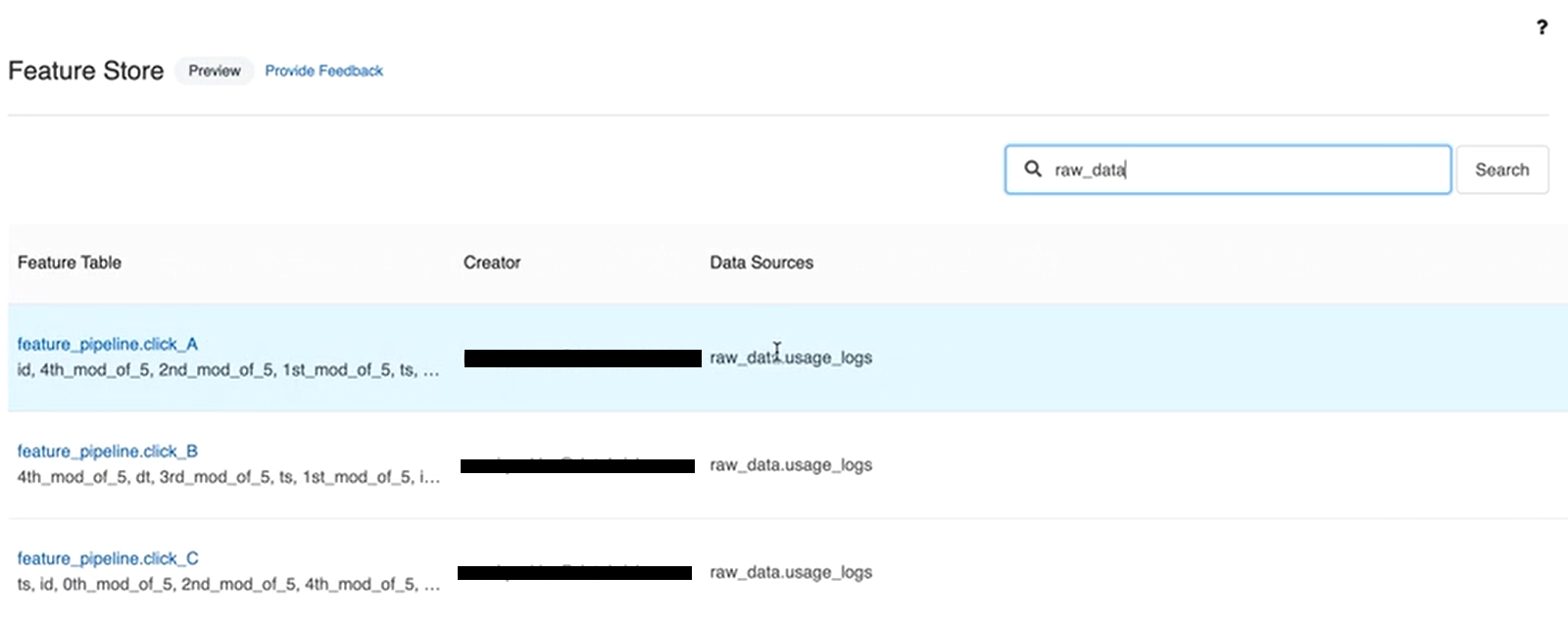
If you regularly monitor these metrics, it helps maintain the health and performance of your machine learning pipeline.
That’s it! If you follow these steps carefully, you can effectively utilize the Databricks Feature Store.
Best practices for effective Databricks Feature Store usage
To get the most out of the Databricks Feature Store, it’s important to follow some best practices.
- Treat features as first-class assets. Give every feature table a clear name, description and documented schema. Undocumented feature tables are liabilities, not assets.
- Design for reuse from the start. Centralizing features makes reuse possible, but only if features are general enough to be useful across projects. Avoid building features that are so tightly coupled to one model that no one else would want them.
- Automate your pipelines. Use Databricks Workflows or Delta Live Tables (DLT) to schedule regular feature computation jobs. Manual feature updates don’t scale.
- Always think about point-in-time correctness. If your features can change over time (and most do), use time series feature tables with timeseries_columns so you don’t accidentally leak future information into training data.
- Monitor feature freshness and quality. A stale feature table is almost as bad as no feature table. Track last-update timestamps and set up alerts for pipeline failures.
- Use Unity Catalog for all feature tables. If Unity Catalog is available in your workspace, there’s no good reason to use the legacy Workspace Feature Store. Unity Catalog gives you cross-workspace access, better lineage and centralized governance.
- Separate offline and online strategies. Design your feature tables with both training and real-time serving in mind from day one. Retrofitting online serving onto tables that weren’t designed for it is painful.
- Use on-demand features for dynamic signals. For features that depend on real-time context (a user’s current session activity, for example), define a FeatureFunction instead of precomputing and storing stale values. This avoids the overhead of frequent materialization for highly volatile signals.
What is the difference between Feature Stores and Delta Tables?
While the Databricks Feature Store leverages Delta tables for storing feature data, there are some key differences:
| Databricks Feature Store | Delta Tables |
| Databricks Feature Store is a centralized repository for managing and serving machine learning features. | Delta Tables efficiently store and manage large-scale structured data. |
| Databricks Feature Store’s primary objective is to centralize feature engineering and streamline model training and inference. | Delta Tables’ primary objective is to provide ACID transactions and optimized query performance for structured data. |
| Databricks Feature Store tracks and manages versions of features for reproducibility and auditing. | Delta Tables track changes to data over time, enabling retrieval of historical snapshots. |
| Databricks Feature Store provides efficient feature serving for real-time inference and batch processing. | Delta Tables support both batch and streaming workloads in a single table. |
| Databricks Feature Store offers comprehensive metadata and documentation about features. | Delta Tables track schema changes but are not specifically focused on feature documentation. |
| Databricks Feature Store includes data quality checks to ensure reliable and accurate features. | Delta Tables ensure data integrity through ACID transactions. |
| Databricks Feature Store is designed to scale with growing data and ML requirements. | Delta Tables are optimized for high-performance analytics and querying on large datasets. |
| Databricks Feature Store is not primarily focused on schema evolution. | Delta Tables support schema evolution without breaking existing pipelines. |
| Databricks Feature Store use cases include model training, real-time inference, model auditing and feature collaboration. | Delta Tables use cases include data warehousing, streaming data ingestion, analytics, reporting and data archiving. |
| Databricks Feature Store can be used with Delta Tables for feature extraction. | Delta Tables can store raw data for feature extraction to populate Feature Store. |
Save up to 50% on your Databricks spend in a few minutes!
Conclusion
And that’s a wrap! Databricks Feature Store is a centralized repository designed to manage machine learning features throughout the entire lifecycle of ML models. It keeps your features consistent and easily accessible, whether you’re training new models or making predictions with existing ones. This setup encourages teamwork among data scientists and engineers, making feature management easier and speeding up the whole process of developing and deploying machine learning models.
In this article, we have covered:
- What is a Feature (in Machine Learning)?
- What is a Feature Store?
- What is Feature Engineering?
- What is Databricks Feature Store?
- What is the difference between Databricks Feature Store and Unity Catalog?
- What is the use of Feature Store in Databricks?
- How does Databricks Feature Store work?
- Architecture of Databricks Feature Store
- Detailed architecture of Databricks Feature Store
- Step-by-step guide to use Databricks Feature Store
- Best practices for effective Databricks Feature Store usage
- What is the difference between Feature Stores and Delta Tables?
… and so much more!
References
- What are the features in Machine Learning?
- Advancing Spark – Databricks Feature Store
- Enable production ML with Databricks Feature Store
- What is a Feature Store?
- The comprehensive guide to Feature Stores
- Feature Store function in Databricks — What you need to know
- Feature Storing — MLOps guide
FAQs
What is a feature in machine learning?
A feature is an input variable used by an ML model to make predictions. Features are derived from raw data through feature engineering and represent measurable properties of each data point.
What are the two main types of features?
Numerical features (continuous variables like price or temperature, and discrete variables like click counts) and categorical features (nominal categories with no inherent order, and ordinal categories with a natural order).
What is a feature store?
A feature store is a centralized data layer where teams store, share and discover curated features for ML models. It ensures the same feature definitions and computations are used during both model training and inference, eliminating training/serving skew.
What are the two main types of feature stores?
Offline stores (for batch data, used in training and batch inference) and online stores (for real-time data, used in low-latency production serving).
Does Databricks have a feature store?
Yes. Databricks Feature Engineering in Unity Catalog is the current feature store offering. Any Delta table with a primary key in Unity Catalog can act as a feature table. The legacy Workspace Feature Store is deprecated and unavailable for new workspaces.
What Python package should I use for the Databricks Feature Store?
Use databricks-feature-engineering. The older databricks-feature-store package has been deprecated as of version 0.17.0 and all its modules have moved to databricks-feature-engineering. For Unity Catalog workspaces, use FeatureEngineeringClient from databricks.feature_engineering.
What’s the difference between FeatureEngineeringClient and FeatureStoreClient?
FeatureEngineeringClient is the current client for feature tables in Unity Catalog. FeatureStoreClient is the legacy client for the deprecated Workspace Feature Store. For new workspaces and any workspace with Unity Catalog enabled, use FeatureEngineeringClient.
Why must I use fe.log_model() instead of mlflow.sklearn.log_model()?
fe.log_model() packages the model with a feature_spec.yaml artifact that encodes all the feature lookups, table names and join keys used during training. Without this, the model doesn’t know how to retrieve its own features at inference time, so automatic feature lookup in score_batch() won’t work.
What does load_df() return?
load_df() returns a Spark DataFrame, not a Pandas DataFrame. If you’re training with a library that expects Pandas (like scikit-learn), call .toPandas() on the result before fitting.
What is the difference between Databricks Feature Store and Unity Catalog?
Unity Catalog is the governance infrastructure. The Databricks Feature Store (Feature Engineering in Unity Catalog) is the ML-specific layer built on top of it. Unity Catalog manages permissions, lineage and discovery for all data assets; the Feature Store adds feature-specific capabilities like training set creation, automatic feature lookup and online store publishing.
Can you use Databricks without Unity Catalog?
Only if your workspace was created before August 19, 2024. Workspaces created after that date require Unity Catalog. Even for older workspaces, Databricks recommends migrating to Unity Catalog.
What is point-in-time correctness and why does it matter?
Point-in-time correctness means that when building a training dataset, each label only has access to feature values that existed at the time of that label’s observation. Without it, you inadvertently let future information leak into training data, which inflates model performance metrics during evaluation but produces worse results in production.
What is FeatureSpec in Databricks?
A FeatureSpec is a Unity Catalog entity that groups FeatureLookups and FeatureFunctions into a reusable unit. You can use a FeatureSpec in create_training_set() or deploy it as a standalone Feature Serving endpoint, independent of any specific model.
What is FeatureFunction in Databricks?
A FeatureFunction is a Unity Catalog SQL function used for on-demand feature computation. It calculates feature values at inference time by combining real-time inputs with data not available in advance. This is useful for highly dynamic signals that would be expensive or impractical to precompute and store.
What is the three-level namespace in Unity Catalog?
Unity Catalog organizes all assets (tables, functions, models) under a three-level hierarchy: catalog.schema.object_name.
Can you use the Databricks Feature Store with Delta tables?
Yes, and the relationship is more direct than it sounds: feature tables in Unity Catalog are Delta tables with a primary key constraint. You can also use any existing Delta table in Unity Catalog as a feature table as long as it has a primary key column defined.
What online stores does Databricks support for real-time feature serving?
Databricks supports several online stores for publishing feature tables, including Amazon DynamoDB, Redis Enterprise, Azure Cosmos DB and others. The supported list depends on your cloud provider. Use fe.publish_table() to push features from the offline store to your configured online store.
What write modes does fe.write_table() support?
Three modes: overwrite (replaces all existing data), merge (upserts based on primary key) and append (adds new rows without modifying existing ones). Use merge for incremental feature updates and overwrite for backfills or full refreshes.
Pramit Marattha
Pramit Marattha is a technical content writer and strategist with 5+ years of experience covering AI, data engineering, data cloud platforms and open source technologies. He turns complex technical concepts into clear, useful content for engineers and developers.







