


Databricks Runtime (DBR) is like the engine that drives your Databricks cluster’s brainpower. It’s built around Apache Spark plus a bunch of other tools for data processing, file systems and other supporting technologies, all packaged together neatly.
In this article, we will cover everything you need to know about Databricks Runtime in detail, covering its core components and key features. On top of that, we’ll also explore the different Databricks Runtime versions, including their features, updates and support lifecycles. Plus, we’ll walk you through how to upgrade to the latest version.
What is Databricks Runtime?
Databricks Runtime is a foundational set of software components that runs on the compute clusters managed by Databricks. It builds on a highly optimized version of Apache Spark and adds enhancements that substantially improve performance, usability and security for big data analytics.
So what’s actually inside it? Here’s a breakdown of the key components:
- Optimized Apache Spark: Apache Spark is the core processing engine in Databricks Runtime. Every DBR version ships with a specific Spark version plus Databricks-specific fixes and improvements. DBR 17.3 LTS, for example, runs Spark 4.0.0. The newer 18.x series (released in 2026) ships with Spark 4.1.0, which brought JDK 21 as the default runtime, along with improvements to null struct handling, partition column materialization and more.
- DBIO (Databricks I/O) module: To speed things up, we’ve got the DBIO (Databricks I/O) module, which optimizes the I/O performance of Spark in the cloud, meaning you can process data faster and more efficiently.
- DBES (Databricks Enterprise Security): The Databricks Enterprise Security (DBES) module provides encryption at rest and in transit, fine-grained data access control and auditing capabilities. It supports compliance standards like HIPAA and SOC 2. In modern Databricks deployments, DBES works in conjunction with Unity Catalog which adds centralized access control, data lineage and cross-workspace data sharing on top of DBES fundamentals.
- Delta Lake: Delta Lake is an open source storage layer built on Parquet that brings ACID transactions, scalable metadata handling and unified batch and streaming data processing to the lakehouse. Every Databricks Runtime version includes Delta Lake as a first-class component, not an optional add-on.
- MLflow integration: Databricks Runtime includes MLflow for managing the machine learning lifecycle, covering experiment tracking, model versioning, reproducibility and deployment. The ML variant of each DBR version bundles a specific MLflow release along with curated ML libraries.
- Rapid releases and early access: Databricks ships new runtime versions on a faster cadence than upstream open-source Spark releases. That means you get bug fixes and performance improvements sooner than you would by tracking the Apache Spark project directly.
- Pre-installed libraries: DBR comes with pre-installed Java, Scala, Python and R libraries, saving the setup overhead that comes with building a Spark environment from scratch. The ML variant adds GPU-ready deep learning libraries on top of that.
- GPU support: Databricks Runtime for Machine Learning includes pre-configured GPU libraries to accelerate demanding ML and deep learning workloads. This is particularly relevant if you’re training large models or doing inference at scale.
- Databricks services integration: Databricks Runtime works seamlessly with other Databricks services, like notebooks, jobs and cluster management, making your workflow smoother.
- Auto-scaling: Databricks clusters, powered by DBR, can automatically adjust compute resources based on workload demand. Combined with auto-termination for idle clusters, this directly reduces both operational overhead and cost.
What’s new in Databricks Runtime 18.2?
As of May 2026, the latest generally available version is Databricks Runtime 18.2, released May 4, 2026. It runs on Apache Spark 4.1.0 and includes:
- JDK 21 as the default Java Development Kit (a shift from JDK 17 in earlier releases)
- NULL struct preservation in Delta MERGE, UPDATE and streaming write operations
- Partition columns materialized in Parquet files
- Improved XPath evaluation over XML (no longer loads external DTDs)
- Auto Loader uses a more efficient listing method for cloud storage sources
- pyspark.pipelines.testing available as a convenience alias for DLT testing APIs
- VOID column type now preserved in SELECT * queries after table creation
- Snowflake JDBC driver upgraded to 3.28.0
A note on versioning: Starting with Databricks Runtime 19 (coming later in 2026), Databricks is moving to a unified release model. Instead of multiple feature versions like 19.0, 19.1 and 19.2, each major DBR version will have a single release page, updated approximately weekly. After roughly six months, the version transitions to long-term support (LTS) status.
For the current stable LTS recommendation, DBR 17.3 LTS (Spark 4.0.0, supported through October 2028) is the right choice for production workloads that need a long, predictable support window.
Databricks Runtime versions: Features, updates and support lifecycle
Databricks is always pushing out fresh versions of its runtime to bring you new features, better performance and tighter security. To get the most from your Databricks setup, you need to know how the different versions work and their status. We have a list of all the recent Databricks Runtime versions. It includes their types, what Apache Spark version they use, when they came out and when support will end.
| Version | Edition/s | Apache Spark version | Release date | End of support (EOS) |
| Databricks Runtime 18.2 | Standard | 4.1.0 | May 4, 2026 | Nov 4, 2026 |
| Databricks Runtime 18.1 | Standard | 4.1.0 | Mar 11, 2026 | Sep 11, 2026 |
| Databricks Runtime 18.0 (beta) | Standard; for Machine Learning | 4.1.0 | Jan 15, 2026 | Jul 15, 2026 |
| Databricks Runtime 17.3 LTS | Standard; for Machine Learning | 4.0.0 | Oct 22, 2025 | Oct 22, 2028 |
| Databricks Runtime 17.2 (EoS) ❌ | Standard; for Machine Learning | 4.0.0 | Sep 16, 2025 | Mar 26, 2026 |
| Databricks Runtime 17.1 (EoS) ❌ | Standard; for Machine Learning | 4.0.0 | Aug 1, 2025 | Feb 1, 2026 |
| Databricks Runtime 17.0 (EoS) ❌ | Standard; for Machine Learning | 4.0.0 | Jun 24, 2025 | Nov 20, 2025 |
| Databricks Runtime 16.4 LTS | LTS; LTS for Machine Learning | 3.5.2 | May 9, 2025 | May 9, 2028 |
| Databricks Runtime 16.3 (EoS) ❌ | Standard; for Machine Learning | 3.5.2 | Mar 31, 2025 | Sep 1, 2025 |
| Databricks Runtime 16.2 (EoS) ❌ | Standard; for Machine Learning | 3.5.2 | Feb 5, 2025 | Aug 5, 2025 |
| Databricks Runtime 16.1 (EoS) ❌ | Standard; for Machine Learning | 3.5.0 | Dec 20, 2024 | Jun 20, 2025 |
| Databricks Runtime 16.0 (EoS) ❌ | Standard; for Machine Learning | 3.5.0 | Nov 11, 2024 | May 11, 2025 |
| Databricks Runtime 15.4 LTS | LTS; LTS for Machine Learning | 3.5.0 | Aug 19, 2024 | Aug 19, 2027 |
| Databricks Runtime 15.3 (EoS) ❌ | Standard; for Machine Learning | 3.5.0 | Jun 24, 2024 | Dec 24, 2024 |
| Databricks Runtime 15.2 (EoS) ❌ | Standard; for Machine Learning | 3.5.0 | May 22, 2024 | Nov 22, 2024 |
| Databricks Runtime 15.1 (EoS) ❌ | Standard; for Machine Learning | 3.5.0 | Apr 30, 2024 | Oct 30, 2024 |
| Databricks Runtime 15.0 (EoS) ❌ | Standard; for Machine Learning | 3.5.0 | Mar 22, 2024 | May 31, 2024 |
| Databricks Runtime 14.3 LTS | LTS; LTS for Machine Learning | 3.5.0 | Feb 1, 2024 | Feb 1, 2027 |
| Databricks Runtime 14.2 (EoS) ❌ | Standard; for Machine Learning | 3.5.0 | Nov 22, 2023 | Nov 5, 2024 |
| Databricks Runtime 14.1 (EoS) ❌ | Standard; for Machine Learning | 3.5.0 | Oct 11, 2023 | Feb 12, 2025 |
| Databricks Runtime 14.0 (EoS) ❌ | Standard; for Machine Learning | 3.5.0 | Sep 11, 2023 | Mar 11, 2024 |
| Databricks Runtime 13.3 LTS | LTS; LTS for Machine Learning | 3.4.1 | Aug 22, 2023 | Aug 22, 2026 |
| Databricks Runtime 13.2 (EoS) ❌ | Standard; for Machine Learning | 3.4.0 | Jul 6, 2023 | Jan 6, 2024 |
| Databricks Runtime 13.1 (EoS) ❌ | Standard; for Machine Learning | 3.4.0 | Jun 1, 2023 | Dec 1, 2023 |
| Databricks Runtime 13.0 (EoS) ❌ | Standard; for Machine Learning | 3.4.0 | Apr 14, 2023 | Oct 14, 2023 |
| Databricks Runtime 12.2 LTS (EoS) ❌ | LTS; LTS for Machine Learning | 3.3.2 | Mar 1, 2023 | Mar 1, 2026 |
| Databricks Runtime 12.1 (EoS) ❌ | Standard; for Machine Learning | 3.3.1 | Jan 18, 2023 | Jul 18, 2023 |
| Databricks Runtime 12.0 (EoS) ❌ | Standard; for Machine Learning | 3.3.1 | Dec 14, 2022 | Jun 15, 2023 |
| Databricks Runtime 11.3 LTS (EoS) ❌ | LTS; LTS for Machine Learning | 3.3.0 | Oct 19, 2022 | Oct 19, 2025 |
| Databricks Runtime 11.2 (EoS) ❌ | Standard; for Machine Learning | 3.3.0 | Sep 7, 2022 | Mar 7, 2023 |
| Databricks Runtime 11.1 (EoS) ❌ | Standard; for Machine Learning | 3.3.0 | Jul 27, 2022 | Jan 27, 2023 |
| Databricks Runtime 11.0 (EoS) ❌ | Standard; for Machine Learning | 3.3.0 | Jun 16, 2022 | Dec 16, 2022 |
| Databricks Runtime 10.5 (EoS) ❌ | Standard; for Machine Learning | 3.2.1 | May 4, 2022 | Nov 4, 2022 |
| Databricks Runtime 10.4 (EoS) ❌ | LTS; LTS for Machine Learning | 3.2.1 | Mar 18, 2022 | Mar 18, 2025 |
| Databricks Runtime 10.3 (EoS) ❌ | Standard; for Machine Learning | 3.2.1 | Feb 2, 2022 | Aug 2, 2022 |
| Databricks Runtime 10.2 (EoS) ❌ | Standard; for Machine Learning | 3.2.0 | Dec 22, 2021 | Jun 22, 2022 |
| Databricks Runtime 10.1 (EoS) ❌ | Standard; for Machine Learning | 3.2.0 | Nov 10, 2021 | Jun 14, 2022 |
| Databricks Runtime 10.0 (EoS) ❌ | Standard; for Machine Learning | 3.2.0 | Oct 20, 2021 | Apr 20, 2022 |
| Databricks Runtime 9.1 LTS ❌ | LTS; LTS for Machine Learning | 3.1.2 | Sep 23, 2021 | Dec 19, 2024 |
| Databricks Runtime 9.0 (EoS) ❌ | Standard; for Machine Learning | 3.1.2 | Aug 17, 2021 | Feb 17, 2022 |
| Databricks Runtime 8.4 (EoS) ❌ | Standard; for Machine Learning | 3.1.2 | Jul 20, 2021 | Jan 20, 2022 |
| Databricks Runtime 8.3 (EoS) ❌ | Standard; for Machine Learning | 3.1.1 | Jun 8, 2021 | Jan 20, 2022 |
| Databricks Runtime 8.2 (EoS) ❌ | Standard; for Machine Learning | 3.1.1 | Apr 22, 2021 | Oct 22, 2021 |
| Databricks Runtime 8.1 (EoS) ❌ | Standard; for Machine Learning | 3.1.1 | Mar 22, 2021 | Sep 22, 2021 |
| Databricks Runtime 8.0 (EoS) ❌ | Standard; for Machine Learning | 3.1.1 | Mar 2, 2021 | Sep 2, 2021 |
| Databricks Runtime 7.6 (EoS) ❌ | Standard; for Machine Learning | 3.0.1 | Feb 8, 2021 | Aug 8, 2021 |
| Databricks Runtime 7.5 (EoS) ❌ | Standard; for Machine Learning | 3.0.1 | Dec 16, 2020 | Jun 16, 2021 |
| Databricks Runtime 7.4 (EoS) ❌ | Standard; for Machine Learning | 3.0.0 | Nov 3, 2020 | May 3, 2021 |
| Databricks Runtime 7.3 (EoS / LTS variants) ❌ | LTS; LTS for Machine Learning | 3.0.1 | Sep 24, 2020 | Sep 24, 2023 |
| Databricks Runtime 7.2 (EoS) ❌ | Standard; for Machine Learning | 3.0.x | (see Databricks archive) | (see Databricks archive) |
| Databricks Runtime 7.1 (EoS) ❌ | Standard; for Machine Learning | 3.0.x | (see Databricks archive) | (see Databricks archive) |
| Databricks Runtime 7.0 (EoS) ❌ | Standard; for Machine Learning | 3.0.x | June 2020 | (see Databricks archive) |
Databricks Runtime 6.x and earlier (6.6, 6.5, 6.4, 6.3, 6.2, 6.1, 6.0, etc.) ❌
- Editions/Types:
- Apache Spark Version: 2.x to 3.0 family depending on release
Databricks Runtime 5.x and earlier (5.5, 5.4, 5.3, 5.2, etc.) ❌
- Editions/Types:
- Apache Spark Version: 2.x family
Databricks Runtime 4.x, 3.x and older historical releases
- Editions/Types:
- Apache Spark Version: typically 1.x to 2.x depending on release
What is LTS in Databricks Runtime?
LTS stands for Long-Term Support in the context of Databricks Runtime. LTS versions are specially designated releases that receive extended support and maintenance from Databricks. These versions are designed for customers who prioritize stability and predictability in their data infrastructure.
Here’s what you get with LTS:
- Extended support window. LTS versions are supported for three years. Standard releases get roughly six months. That’s a significant difference if you’re managing infrastructure that can’t tolerate frequent, disruptive upgrades.
- Production stability. LTS versions go through additional testing before release. They’re the safe choice for critical production workloads where you can’t afford unexpected behavioral changes.
- Predictable planning. Because you know exactly when EOS arrives, you can schedule upgrades in advance rather than scrambling when a standard version hits its six-month window.
- Critical security patches. Security fixes and critical bug fixes are backported to LTS versions throughout their support period.
So, what’s the main difference between LTS and regular releases? It’s all about how you plan to use them and how long you’ll get support. Regular releases bring new features faster, but you’ll get updates more often and support won’t last as long. They’re perfect for anyone who wants the latest and greatest and don’t mind updating frequently. LTS versions are better for organizations that need stability and support for a longer time, even if it means they won’t get the newest features right away.
Currently active LTS versions as of May 2026:
| LTS version | Spark version | EOS date |
| 17.3 LTS | 4.0.0 | Oct 22, 2028 |
| 16.4 LTS | 3.5.2 | May 9, 2028 |
| 15.4 LTS | 3.5.0 | Aug 19, 2027 |
| 14.3 LTS | 3.5.0 | Feb 1, 2027 |
| 13.3 LTS | 3.4.1 | Aug 22, 2026 |
How to upgrade Databricks Runtime to the latest version
Want the latest features, improved performance and better security? Upgrade your Databricks Runtime to the newest version. Here’s how to do it in a few easy steps:
Step 1—Review release notes and compatibility
Don’t migrate until you’ve read the release notes for your current runtime version and the target version. Pay close attention to behavioral changes; the 18.x series in particular introduced several breaking changes around JDK versions, null struct handling and partition column behavior.
See Databricks Runtime release notes versions and compatibility
Step 2—Log in to Databricks
Start by opening your web browser and heading to your Databricks workspace URL. Next, log in to your Databricks account with your credentials.
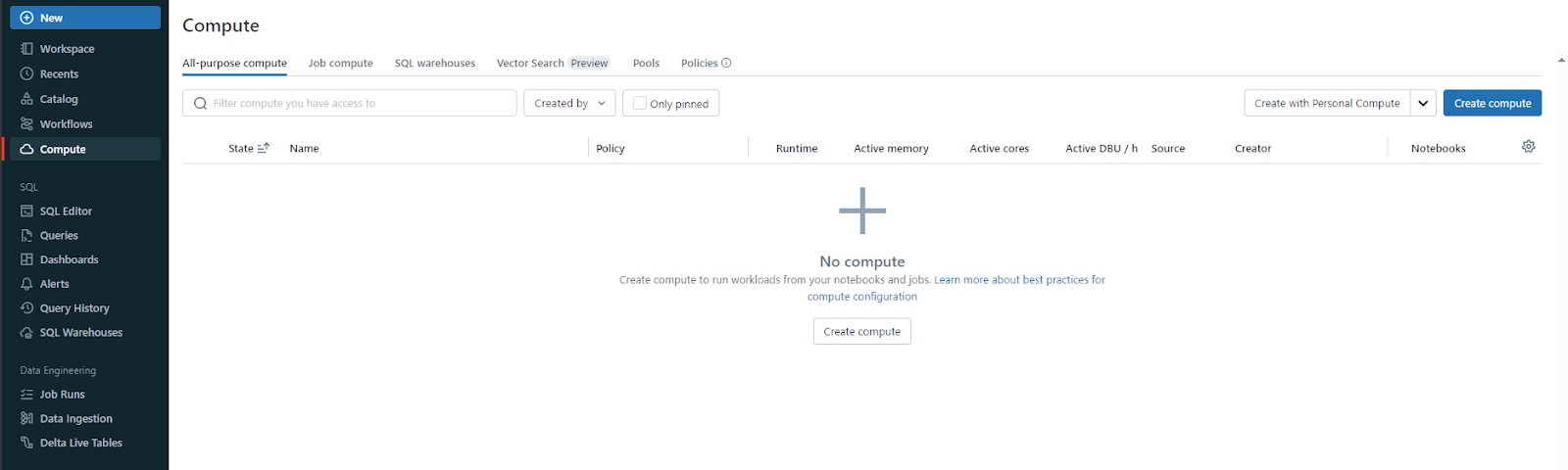
Step 3—Access the Databricks compute page
Once logged in, head over to the Compute page in your Databricks workspace. You’ll land on the Databricks Clusters page, where you’ll see a few tabs. Hit the All-Purpose compute tab. Now you’ll see a list of your existing cluster resources, their status and details. Look to the top right corner—there’s a “Create Compute” button. Click it to start setting up a brand new isolated Spark environment.
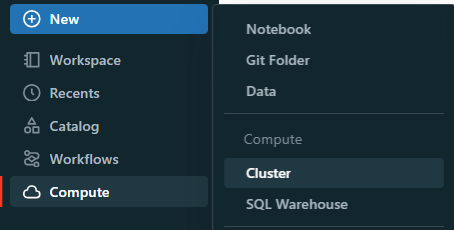
You can get to the same place to create a new cluster by clicking +New ➤ Cluster or using the above option. Either way, you’ll end up on the New Databricks Cluster page.
Step 4—Select or create a Databricks cluster
If you’re upgrading a cluster, find and select it from the list. If you’re creating a new cluster with the latest runtime, click “Create Compute”.

See Step-By-Step Guide to Create Databricks Cluster
Step 5—Set up a test environment first
Set up a dev or test cluster running the target DBR version. This lets you validate your workflows, libraries and dependencies before touching production. Skipping this step is how migrations go wrong.
Step 6—Configure the runtime version
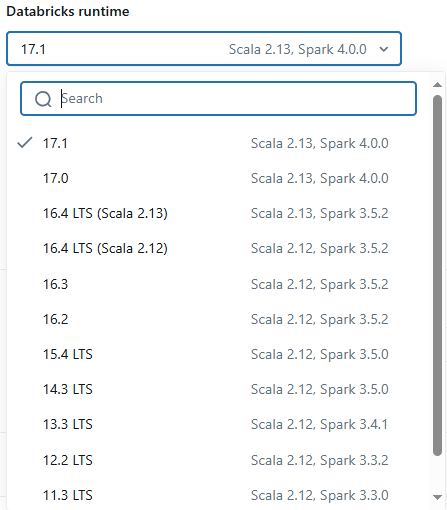
On the cluster configuration page, find the Databricks Runtime Version dropdown and select your target version. For example, 18.2 or 17.x LTS.
Step 7—Apply and restart
Pick your new runtime version and make any other changes you need to. Then, hit Edit ➤ Apply Changes / Confirm.


If you’re updating an existing cluster, you’ll need to restart it to make the changes count. Just click “Restart” to do that. For a brand new cluster, click “Create Cluster” to get it started with the new runtime.
Step 8—Verify the upgrade
After your cluster is up and running, double-check that it’s got the right Databricks Runtime version. To do that, head to the configuration page and look for the “Databricks Runtime Version” field. Or, you can run a simple notebook cell and type in the following simple command to print the Databricks Runtime version:
import os
os.environ["DATABRICKS_RUNTIME_VERSION"]
This should output the current Databricks Runtime version.
Step 9—Update libraries and dependencies
Review your installed libraries and make sure they’re compatible with the new runtime. Some libraries that worked on DBR 15.x or 16.x may need updates for 17.x or 18.x; particularly anything that relies on Spark internals or JVM behavior.
Step 10—Validate workflows and jobs
Run your ETL pipelines, data processing scripts and ML models in the test environment. Watch for errors, unexpected output or performance regressions. Check cluster logs for warnings you might otherwise miss.
Step 11—Migrate to production
Once testing passes, update your production clusters. Back up critical data and settings first. Roll out the runtime upgrade incrementally where possible to limit blast radius if something unexpected surfaces.
Next, update the runtime version for your production clusters. Finally, roll out the update bit by bit to avoid downtime.
Step 12—Monitor and Optimize
After migration, watch cluster performance and job health closely. Databricks provides built-in observability through cluster metrics, event logs and the Spark UI. If you’re using third-party monitoring tools, make sure they’re compatible with the new runtime as well.
Further reading
If you want to get more info about Databricks Runtime, here are some great resources:
- Databricks Runtime release notes versions and compatibility
- Databricks clusters 101
- Databricks workspaces 101
Save up to 50% on your Databricks spend in a few minutes!
Conclusion
And that’s a wrap! Databricks Runtime is the software layer that makes Databricks clusters work. It wraps Apache Spark with performance optimizations like DBIO and Photon, security capabilities through DBES and Unity Catalog, and a curated library stack that covers data engineering, ML and streaming; without the setup overhead of managing those components yourself.
As of May 2026, the latest release is DBR 18.2 (Spark 4.1.0). If you’re building or maintaining production workloads, DBR 17.3 LTS is the most recent long-term support version and is supported through October 2028.
In this article, we have covered:
- What Databricks Runtime is and what it contains
- All major DBR versions, their Spark versions and support lifecycle
- What LTS means and when to use it
- How to upgrade to the latest version
… and more!
FAQs
What is Databricks Runtime?
Databricks Runtime is a set of software artifacts that run on Databricks clusters. It includes Apache Spark and additional components like DBIO, Photon, DBES, Delta Lake, MLflow and more, that improve performance, usability and security for big data analytics.
What is the latest version of Databricks Runtime?
As of May 2026, the latest generally available version is DBR 18.2, released May 4, 2026, running on Apache Spark 4.1.0. For long-term support, DBR 17.3 LTS (Spark 4.0.0, supported through October 2028) is the most recent LTS version.
What is the purpose of LTS versions?
LTS versions are supported for three years rather than the standard six months. They’re designed for production environments where stability, predictability and extended security patching matter more than access to the latest features.
What components are included in Databricks Runtime?
Beyond Apache Spark, DBR includes DBIO for optimized I/O performance, Photon for vectorized query execution, DBES for enterprise security, Delta Lake for transactional storage, MLflow for ML lifecycle management, and a curated set of pre-installed language libraries for Java, Scala, Python and R.
How does Databricks Runtime improve performance?
Primarily through DBIO, which optimizes cloud I/O throughput, and Photon, a vectorized C++ query engine that can significantly accelerate SQL and DataFrame operations compared to standard Spark execution.
What security features does Databricks Runtime offer?
DBR includes DBES (Databricks Enterprise Security), which provides encryption at rest and in transit, fine-grained access control and auditing. Modern Databricks deployments also leverage Unity Catalog for centralized governance, lineage tracking and cross-workspace data sharing. Together, these support compliance with standards like HIPAA and SOC 2.
How often are new Databricks Runtime versions released?
Databricks ships new feature versions roughly every 6 to 8 weeks. LTS versions follow the same cadence but are designated at specific milestones. Starting with DBR 19, the release model changes to a single version per major release, updated weekly.
Can I upgrade my Databricks Runtime version?
Yes. The typical process is to select a new runtime version on the cluster configuration page and restart the cluster. We strongly recommend testing in a non-production environment before rolling out to production clusters.
What is the role of Apache Spark in Databricks Runtime?
Spark is the core distributed processing engine. DBR builds on it with proprietary optimizations and additional components that aren’t part of the open-source Spark distribution.
How does Databricks Runtime handle compatibility?
Each DBR version specifies compatible versions of Spark, Python, Java, Scala and key libraries. Databricks publishes full compatibility matrices in the release notes for each version.
What are common use cases for Databricks Runtime?
Data engineering (ETL pipelines, batch processing), machine learning (training, inference, experiment tracking), real-time analytics (structured streaming), and large-scale SQL analytics on the lakehouse.
How does Databricks Runtime support machine learning?
The Databricks Runtime for Machine Learning variant ships with pre-installed ML libraries (PyTorch, TensorFlow, XGBoost and others), GPU configuration for deep learning workloads, and a specific MLflow version tied to each release.
What operating systems does Databricks Runtime run on?
DBR runs on optimized Linux distributions (based on Ubuntu LTS) within the Databricks-managed cluster environment. As a user, you don’t directly manage the underlying OS.
Can I install additional libraries in Databricks Runtime?
Yes. You can install additional Python, R, Java or Scala libraries via cluster-scoped library settings, init scripts or directly within notebooks. Unity Catalog volumes are the recommended location for init scripts and library artifacts from DBR 14.3 LTS onward.
What is Photon in Databricks Runtime?
Photon is a vectorized query engine written in C++ that runs alongside Spark in DBR. It accelerates SQL queries and DataFrame workloads by processing data in CPU-native batches, particularly benefiting aggregations, joins and scans on Delta Lake tables.
What changed in the Databricks Runtime 18.x series?
The 18.x series (released Jan to May 2026) runs on Apache Spark 4.1.0 and introduced several notable changes: JDK 21 as the default Java runtime, improved handling of NULL structs in Delta operations, partition columns materialized in Parquet files, and a more efficient Auto Loader listing method for cloud storage. See the individual 18.x release notes for the full behavioral change list before migrating.
What is the new unified release model coming in DBR 19?
Starting with DBR 19, Databricks is moving away from numbered feature versions (19.0, 19.1, 19.2). Each major version will have a single release page, updated approximately weekly. After roughly six months of active updates, the version transitions to LTS status with three years of support. This change simplifies the versioning scheme significantly.
Pramit Marattha
Pramit Marattha is a technical content writer and strategist with 5+ years of experience covering AI, data engineering, data cloud platforms and open source technologies. He turns complex technical concepts into clear, useful content for engineers and developers.







