


Databricks was first founded in 2013 by the brilliant minds behind Apache Spark. Fast forward and it’s now a household name in data analytics. The founders—Ali Ghodsi, Andy Konwinski, Ion Stoica, Matei Zaharia, Patrick Wendell, Reynold Xin and Arsalan Tavakoli-Shiraji—had a simple, yet powerful idea: make big data easy to handle. They took Apache Spark’s potential and ran with it, building a platform that could tackle everything from data engineering to machine learning on a massive scale.
According to DB-Engines, Databricks is one of the most fastest-growing unified data analytics platforms. As you can see in the graph below, Databricks now ranks 7th with an overall score of 151.79 (as of June 2026).
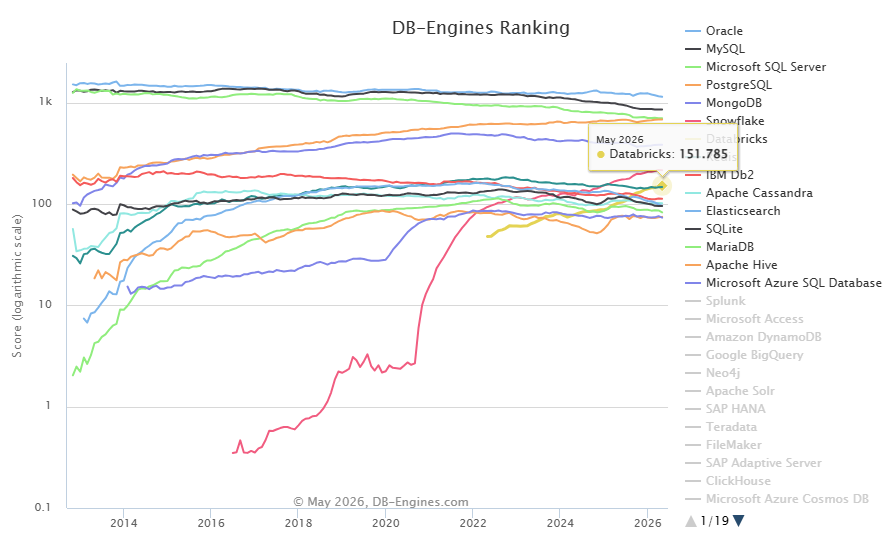
Here’s how DB-Engine evaluates the ranking score: It analyzes Google Trends, checks technical experts’ opinions, counts job postings and tracks mentions on professional as well as social networks. It then crunches the numbers to create a fair, comparable popularity score.
Gartner named Databricks a Leader in the 2025 Magic Quadrant for Data Science and Machine Learning Platforms, ranked highest in both Ability to Execute and Completeness of Vision. Its fifth consecutive year in the Leader quadrant. But the competition is fierce. Snowflake, BigQuery, Redshift and a growing list of open source and cloud-native tools are all competing for the same workloads.
In this article, we’re about to dig in and explore 13 of the most relevant Databricks competitors across architecture, use case fit, strengths and limitations.
Top 13 Databricks competitors: Which will you choose?
1. Snowflake
Snowflake is probably Databricks’ most direct competitor in the market today.
So what is Snowflake?
Snowflake is a cloud-native data platform built around a multi-cluster shared data architecture. Its core design separates storage from compute: data lives in a compressed, columnar storage layer, while virtual warehouses handle query execution independently. You scale compute up or down without touching storage, and multiple warehouses can query the same data simultaneously.

Snowflake stands out with its architecture that keeps storage and compute separate. You can scale up or down without affecting the other. This helps you get the best performance while saving massively on cost.
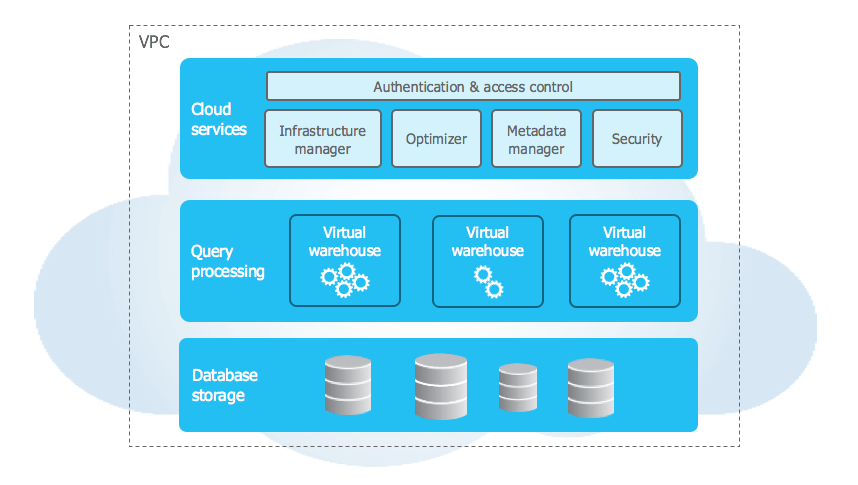
Snowflake is genuinely strong at SQL analytics. Automatic clustering, result caching and the absence of index management make it fast out of the box for most BI workloads. It also handles structured and semi-structured data (via the VARIANT type) well.
In 2025, Snowflake pushed hard into openness and AI. Snowflake Gen2 virtual warehouses launched in May 2025, delivering roughly 2x faster execution and significantly better DML performance. Snowpipe Streaming added high-performance ingestion at up to 10 GB per second with sub-10-second latency. Snowflake Cortex added ML model inference directly in the platform. And Snowflake Open Catalog brought native Apache Iceberg support, letting teams interact with open table formats without leaving Snowflake.
Pros and cons of Snowflake
Pros of Snowflake:
- Clean separation of storage and compute with no manual tuning
- Excellent performance on concurrent SQL workloads, especially for BI
- Strong support for data sharing and collaboration across organizations
- Zero-copy cloning and time travel for data recovery
- Easy onboarding with minimal infrastructure overhead
- Cortex AI for ML inference directly in the warehouse
- Native Apache Iceberg table support
Cons of Snowflake:
- Streaming and complex multi-stage pipeline work is still more limited than Databricks
- Custom ML model training and fine-tuning lags behind Databricks Mosaic AI
- Higher per-credit cost for heavy transformation workloads
- Third-party integrations are still required for full data engineering workflows
Databricks vs Snowflake: Which should you pick?
Here’s how Databricks vs Snowflake compares. It really comes down to what you need. Both Databricks vs Snowflake are top cloud data platforms. Databricks started by focusing on data engineering and data science. It uses Apache Spark for big data processing workloads, MLflow for machine learning and Delta Lake for a unified data lakehouse. Snowflake, on the other hand, set out to create a centralized cloud data warehouse for storing and accessing massive amounts of data.
Databricks excels in real-time data processing, advanced analytics and machine learning workloads. It offers high processing capacity through Apache Spark and configurable clusters. But, it requires more technical expertise for effective configuration and optimization.
In contrast, Snowflake is perfect for teams that want easy data management and simplicity. It’s also great at optimizing performance on its own. Plus, it works well with lots of data tools and is super easy to use.
TL;DR: If you’re stuck deciding between Databricks vs Snowflake? It all depends on what you and your organization need. If you’re all about advanced analytics, AI/ML and real-time data processing, Databricks is probably the way to go. On the other hand, if you want something easy to use, simple and with automatic performance tweaks for analytics, Snowflake might be the better fit.
For a detailed comparison, please refer to the article on Databricks vs Snowflake.
2. Google BigQuery
Google BigQuery is Google Cloud’s fully managed, serverless data warehouse. It launched in 2010 as part of Google Cloud Platform and is one of the most widely used data warehouses in the industry. It’s a strong Databricks competitor for teams already deep in the Google Cloud ecosystem.
Here’s BigQuery’s architecture in a nutshell. It’s built on a few key components that make it serverless and scalable:
1. Dremel Execution Engine
First up, BigQuery has the Dremel Execution Engine, which is the brain behind fast SQL query processing. It achieves this by spreading the workload across multiple servers.
2. Colossus Storage System
Next, there’s the Colossus Storage System. This is where Google BigQuery stores and retrieves data, ensuring it’s always available and secure.
3. Borg
Then there’s Borg, Google’s cluster management system. It ensures resources are used efficiently across the infrastructure.
4. Jupiter Network
And don’t forget the Jupiter Network—BigQuery’s high-speed network that delivers data quickly.
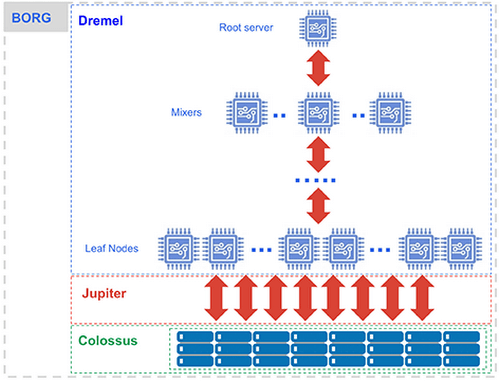
The beauty of Google BigQuery’s architecture is that it’s decoupled, meaning storage and compute resources operate separately, allowing users to scale storage and processing independently, cutting cost and improving performance.
For further details, take a look at this article on Google BigQuery Architecture.
Pros and cons of Google BigQuery
Pros of Google BigQuery:
- Fully serverless. No clusters to configure or manage
- Scales automatically to any dataset size
- On-demand pricing based on data scanned, efficient for variable workloads
- BigQuery ML lets you build and run machine learning models directly using SQL
- Deep integration with the Google Cloud ecosystem
- Strong support for streaming ingestion via Pub/Sub
Cons of Google BigQuery:
- Limited control over compute, which can cause performance unpredictability on some workloads
- Data egress fees and export restrictions complicate cross-cloud or multi-tool setups
- Scheduled queries and certain operations can add unexpected costs
- Less suited for complex multi-step data engineering or ML training workflows
Databricks vs BigQuery: Which should you pick?
So, if you’re trying to decide between Databricks vs BigQuery? First, let’s look at what they’re good at and when to use them.
BigQuery makes a lot of sense if you need serverless, large-scale SQL analytics and you’re already in the Google Cloud ecosystem. It’s particularly good for ad-hoc queries, business intelligence and streaming ingestion from Pub/Sub.
Databricks is better suited for organizations that need a full data engineering platform, including ML pipelines, real-time processing and support for both structured and unstructured data. If your workflows go beyond SQL into Python notebooks, MLflow experiments and Delta Lake pipelines, Databricks offers more depth.
So, which one should you opt for—Databricks vs BigQuery? If you’re focused on data science, data engineering, machine learning and real-time analytics, choose Databricks. If you want easy, large-scale data analysis, especially if you’re already in the Google ecosystem, go with BigQuery.
3. Amazon Redshift
Amazon Redshift is Amazon Web Services’ (AWS) fully managed data warehouse service, designed for large-scale SQL analytics using columnar storage and massively parallel processing (MPP). It’s been around since 2012 and remains one of the dominant data warehouses for AWS-native organizations.
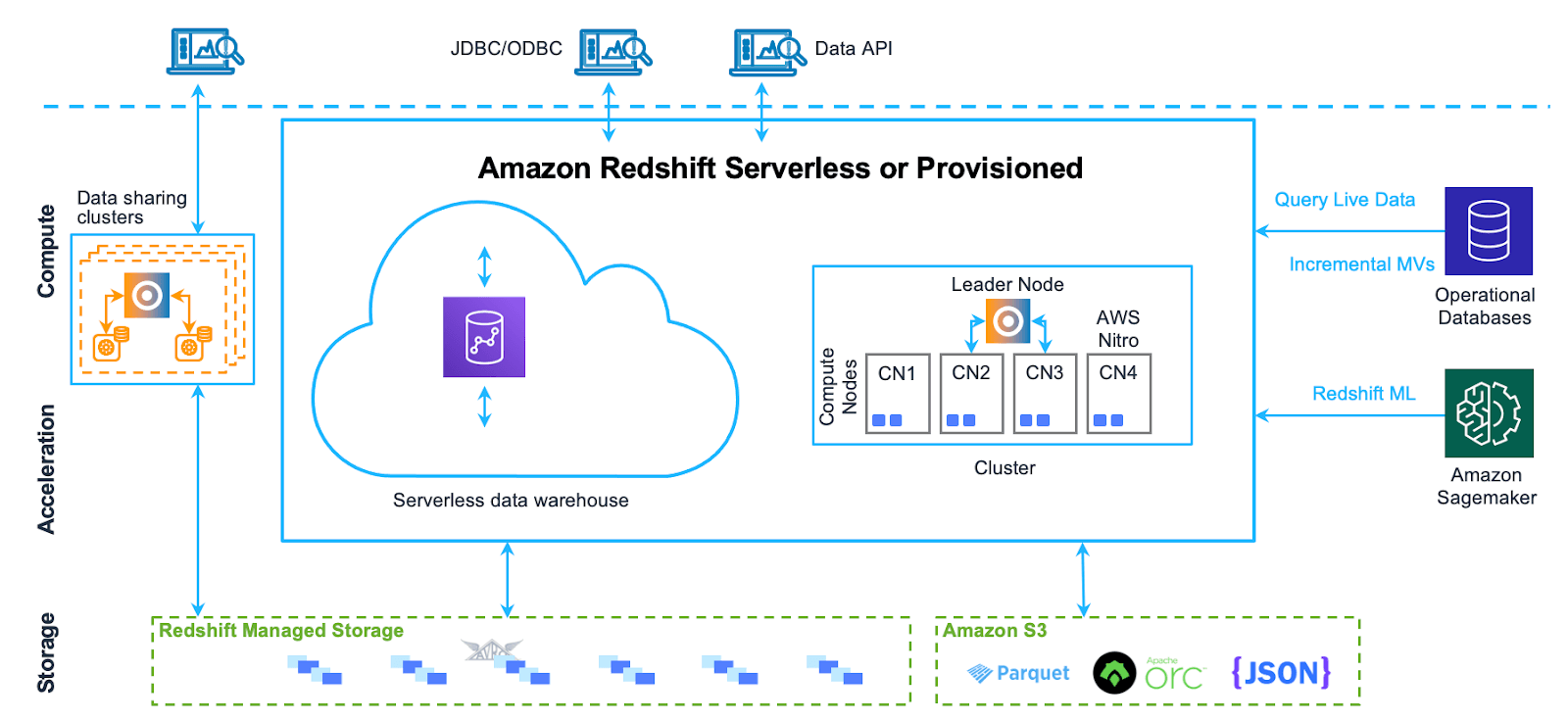
Amazon Redshift’s architecture is based on a cluster of nodes, which are responsible for data storage and processing. The architecture can be summarized in the following components:
- Leader node: The leader node is responsible for coordinating the compute nodes and handling external communication. It parses and develops execution plans for database operations and distributes them to the compute nodes.
- Compute nodes: These nodes execute the database operations and store the data. They get their instructions from the leader node and perform the required operations. Amazon Redshift provides two categories of nodes:
- Dense compute nodes: Optimized for heavy workloads with SSD storage.
- Dense storage nodes: Ideal for large datasets with HDD storage.
- Redshift Managed Storage (RMS): RMS is a separate storage tier that stores data in a scalable manner using Amazon S3 storage. It automatically uses super-fast SD-based local storage as a tier-1 cache and scales storage automatically to Amazon S3 when needed.
- Node slices: Node slices are subdivisions within a compute node, each with its own allocation of memory and disk space. The leader node distributes data and queries across slices, enabling parallel processing. Queries are executed in parallel by the slices, with data partitioned across them to optimize performance.
- Internal network: Amazon Redshift uses a private, high-speed network between the leader node and compute nodes.
- Databases: A cluster may contain one or more databases that store user data. The leader node coordinates queries and communicates with the compute nodes to retrieve data.
For further details, take a look at this article on Amazon Redshift Architecture.
Pros and cons of Amazon RedShift
Pros of Amazon RedShift:
- High-performance query processing for structured analytical workloads
- Tight integration with the AWS ecosystem (S3, Glue, Athena, SageMaker)
- Redshift Spectrum enables querying data directly in S3 without loading it
- Pay-as-you-go pricing with Redshift Serverless
- Zero-ETL integrations with Amazon Aurora and other AWS databases
Cons of Amazon RedShift:
- Vendor lock-in within the AWS ecosystem
- SQL dialect differences from ANSI SQL can complicate migrations
- Performance for Redshift Spectrum queries over S3 can be inconsistent
- Less suited for machine learning workflows compared to Databricks
Databricks vs Redshift: Which should you pick?
Databricks vs Redshift are two popular data warehousing solutions, but they’re pretty different.
Redshift is the practical choice if your organization is deeply invested in AWS and your primary need is structured SQL analytics and business intelligence. It integrates smoothly with the rest of the AWS data stack (Glue, SageMaker, Kinesis and more).
Databricks supports multiple clouds (AWS, Azure, Google Cloud Platform) and offers far more flexibility for data science, ML and real-time analytics. If SQL-based BI is your whole workload, Redshift may be simpler and more cost-effective. If you need machine learning, complex pipelines or cross-cloud flexibility, Databricks wins.
Which one to choose: Databricks vs Redshift? The answer depends on the specific needs of you and your organization. If you’re focused on advanced analytics, machine learning and real-time data processing, Databricks is a great choice. But, if you require a powerful data warehouse for large-scale SQL-based analytics and business intelligence applications and are already invested in the AWS ecosystem, Amazon Redshift is the way to go.
4. Azure Synapse Analytics
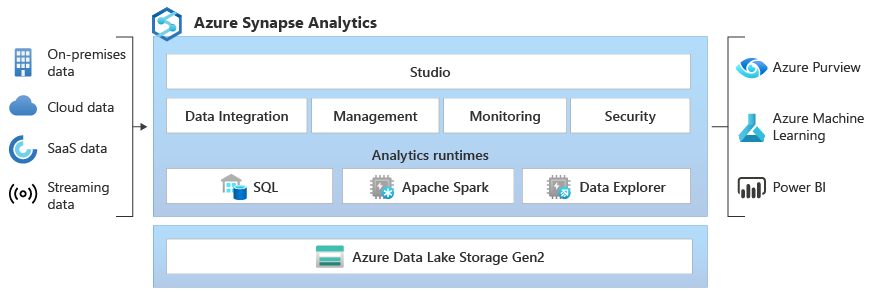
Azure Synapse Analytics is Microsoft’s integrated analytics service that combines enterprise data warehousing, big data processing and data integration into a single platform. It’s the natural choice for organizations already running on Microsoft Azure.
Azure Synapse uses a distributed query system for T-SQL that covers both serverless and dedicated resource models. For warehousing, the dedicated SQL pool provides traditional MPP-style processing. For exploratory work, the serverless SQL pool queries data directly in Azure Data Lake Storage Gen2 without provisioning anything.
Synapse integrates Apache Spark natively for data engineering, ETL and machine learning workloads, running Spark jobs alongside SQL analytics in the same workspace. It also includes the same data integration engine as Azure Data Factory, which means you can build at-scale ETL pipelines directly in Synapse Studio without switching tools.
Synapse Studio is the unified interface for everything: data exploration, SQL querying, Spark notebooks, pipeline orchestration and Power BI integration.
Pros and cons of Azure Synapse Analytics
Pros of Azure Synapse Analytics:
- Unified platform covering SQL, Spark and data integration
- Both serverless and dedicated compute options
- Native integration with Azure Data Factory for ETL pipelines
- Strong T-SQL support, familiar to enterprise SQL developers
- Tight connection to Power BI and Azure Machine Learning
- Integrates with Microsoft Purview for data governance
Cons of Azure Synapse Analytics:
- Deep Azure vendor lock-in
- Performance varies significantly based on configuration and workload type
- Steep learning curve given the breadth of integrated tools
- Cost management can get complex across multiple resource types
- Community ecosystem and tooling depth are thinner than Databricks
Azure Synapse vs Databricks: Which should you pick?
If your team is proficient in T-SQL and you’re already invested in Microsoft Azure and Power BI, Synapse is a compelling choice. The integration between Synapse, Azure Data Factory and Power BI is genuinely tight and saves real integration work.
Databricks is the better pick if your work centers on Spark-based data engineering, advanced machine learning or real-time streaming. It’s also more flexible across cloud providers, which matters if you’re not fully committed to Azure.
Which one should you opt for—Azure Synapse vs Databricks? Consider your existing skills, data landscape and required features. If you’re focused on Spark and data science, Databricks might be the way to go. But if you need a comprehensive analytics solution that integrates data warehousing with big data; especially if your team is proficient in T-SQL and traditional BI tools and you need to integrate with other Azure services, Azure Synapse is the better bet.
5. Apache Spark
Apache Spark is an open source, distributed computing engine that Databricks is built on. It handles large-scale data processing across batch jobs, streaming, machine learning and graph processing. Spark’s speed comes primarily from in-memory processing. It avoids writing intermediate results to disk wherever possible, which is dramatically faster than older disk-based systems like Hadoop MapReduce.
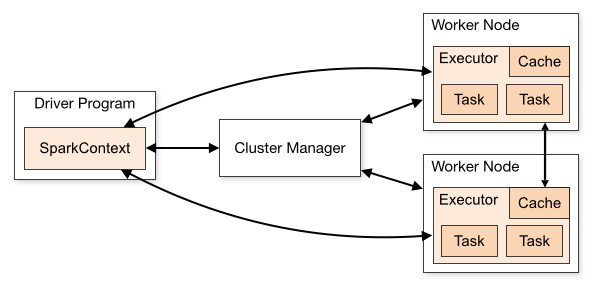
Spark uses a driver-worker architecture with three main components:
1. Driver program
The central coordinator. It converts your application into a directed acyclic graph (DAG) of smaller tasks, then schedules and distributes those tasks across the cluster.
2. Cluster manager
Allocates resources across the cluster and manages resource distribution between the driver and executor nodes. Common cluster managers include YARN, Kubernetes and Spark’s built-in standalone mode.
3. Executor nodes
Worker processes that run the actual tasks assigned by the driver. Each executor runs in its own JVM (Java Virtual Machine) and handles both task execution and in-memory data storage for the application.
The foundational data abstraction in Spark is the Resilient Distributed Dataset (RDD), which distributes data across the cluster with built-in fault tolerance. If a node fails, Spark can recompute lost data using lineage information. In practice, most Spark workloads today use the higher-level DataFrame and Dataset APIs, which are optimized by the Catalyst query optimizer and run on the Tungsten execution engine. RDDs remain the underlying foundation.
Spark also ships with a rich set of libraries: Spark SQL for relational queries, MLlib for machine learning, GraphX for graph processing and Structured Streaming for real-time data.
Key features of Apache Spark:
- Apache Spark processes data in-memory, which significantly speeds up data processing compared to traditional disk-based processing systems.
- Apache Spark supports multiple programming languages, including Java, Scala, Python and R, making it accessible to a wide range of developers.
- Apache Spark provides a unified framework for various data processing tasks, like batch processing, stream processing, machine learning and graph processing.
- RDDs are designed to be resilient, meaning that if a node fails, Apache Spark can recompute lost data using lineage information.
- Apache Spark includes libraries for SQL queries (Spark SQL), machine learning (MLlib), graph processing (GraphX) and stream processing (Spark Streaming).
So why Spark as a Databricks competitor?
Because for teams with the infrastructure expertise to manage their own clusters, open-source Spark on Kubernetes or YARN is a genuine alternative to paying for Databricks. You lose the collaborative notebooks, Delta Lake defaults, Unity Catalog governance and automatic optimizations, but you gain full control and no per-DBU costs.
Databricks adds substantial value on top of Spark in terms of performance (Photon engine, Predictive Query Execution, Vectorized Shuffle), usability (notebooks, workflows, built-in CI/CD) and governance (Unity Catalog). Teams with dedicated data infrastructure engineers can run bare Spark effectively. Most others will find Databricks worth the cost.
6. Amazon EMR (Elastic MapReduce)
Amazon EMR (Elastic MapReduce) is a managed cluster platform that simplifies running big data frameworks, such as Apache Spark, Apache Hadoop, Apache Hive, Apache HBase, Apache Flink and Presto (now Trino). EMR handles cluster provisioning, configuration and scaling automatically, reducing the infrastructure overhead of running these frameworks yourself.
Amazon EMR architecture consists of several layers:
1. Storage layer
This layer manages the different file systems used within the EMR cluster. The main storage options include:
- Hadoop Distributed File System (HDFS): A distributed file system that stores data across multiple instances, ensuring redundancy and fault tolerance. Data in HDFS is ephemeral, meaning it is lost when the cluster is terminated.
- EMR File System (EMRFS): This extends Hadoop’s capabilities by allowing direct access to data stored in Amazon S3 as if it were in HDFS. Typically, input and output data are stored in S3, while intermediate results are kept in HDFS.
- Local File System: Each EC2 instance in the cluster has a local disk, which retains data only while the instance is running.
2. Processing layer
This layer is responsible for executing data processing tasks. Amazon EMR supports several frameworks, which includes:
- Apache Hadoop MapReduce: A programming model for processing large data sets.
- Apache Spark: A fast, in-memory data processing engine that supports batch and stream processing.
3. Cluster Resource Management layer
This layer oversees resource allocation and job scheduling. Amazon EMR uses YARN (Yet Another Resource Negotiator) to manage resources across various data processing frameworks. YARN guarantees that resources are efficiently distributed and that jobs are scheduled without interruption, even when using Spot Instances.
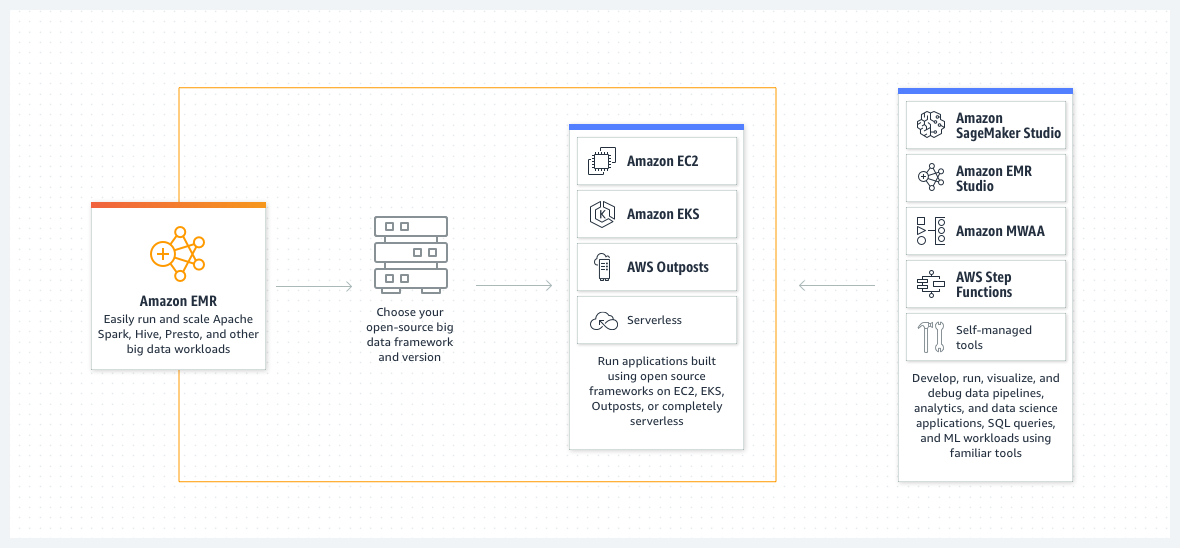
EMR also offers two deployment modes: EMR on EC2 (traditional node-based clusters), EMR on EKS (Spark jobs on Kubernetes) and EMR Serverless (serverless Spark and Hive with automatic scaling and no cluster management).
Key features of Amazon EMR
- Supports a wide range of open-source frameworks beyond just Spark
- Deep AWS integration with S3, EC2, IAM, CloudWatch and more
- Flexible scaling: resize clusters while running, add Spot Instances, or go fully serverless
- Pay-as-you-go pricing with significant savings using Spot Instances
- EMR Serverless removes cluster management entirely for Spark and Hive
Databricks vs EMR: Which should you pick?
When you’re choosing between Databricks vs EMR, think about what each does best.
Databricks is the better choice if your focus is on Spark-based analytics and collaborative data science. It provides a more polished development experience, stronger ML tooling via Mosaic AI and MLflow and better performance optimization through Photon and Predictive Query Execution.
Amazon EMR is the better choice if you need to run multiple frameworks beyond Spark, want maximum control over cluster configuration, or are deeply invested in the AWS ecosystem. EMR Serverless also competes directly with Databricks serverless compute for straightforward Spark jobs.
Therefore, if you’re all about Spark-based analytics and teaming up on data science projects, Databricks might be the way to go. But if you need a platform that can handle multiple big data processing frameworks and works seamlessly with other AWS services, Amazon EMR could be a better fit for you.
7. Google Cloud Dataproc
Google Cloud Dataproc is Google’s managed service for running Apache Hadoop and Apache Spark clusters. It automates cluster creation, configuration and management, letting teams focus on data processing rather than infrastructure. Cluster startup takes under 90 seconds, which makes short-lived, job-scoped clusters practical.
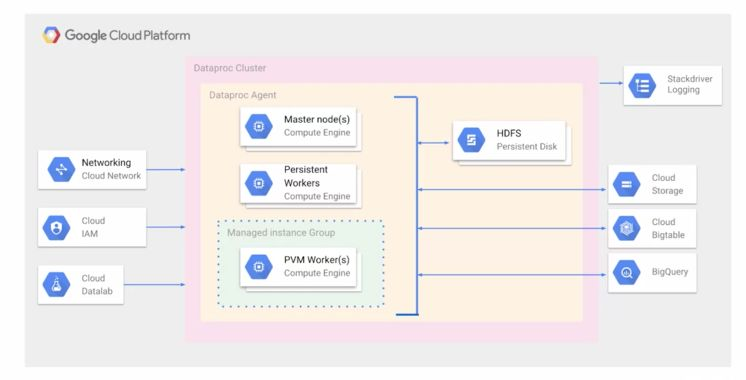
Google Cloud Dataproc’s architecture consists of several key components:
1. Clusters
Google Cloud Dataproc operates on clusters, which are groups of virtual machines (VMs) that run Hadoop or Spark jobs. Users can create, manage and delete clusters as needed. Clusters can be configured with various machine types and sizes to suit different workloads.
A Google Cloud Dataproc cluster consists of:
- Master node: The master node manages the cluster, handling resource allocation, job scheduling and overall management of the cluster. It runs services like the ResourceManager (in YARN) or Master (in Spark) and is responsible for coordinating distributed processing tasks.
- Worker nodes: These nodes execute the actual data processing tasks. Depending on the workload, a cluster can be scaled horizontally by adding or removing worker nodes. Dataproc supports using preemptible VMs to reduce costs for transient workloads.
2. Storage
Google Cloud Dataproc utilizes Google Cloud Storage (GCS) for data storage, which decouples the storage from the compute cluster. This means data can persist independently of the compute cluster’s life cycle, allowing clusters to be created and destroyed without data loss. GCS provides a highly durable and scalable storage solution.
3. Job submission and management
Users interact with Google Cloud Dataproc through Google Cloud Console, gcloud CLI, or REST APIs. Jobs can be submitted using various engines like Apache Spark, Apache Hadoop, Apache Hive, or Apache Pig. Dataproc manages the lifecycle of these jobs, from submission to completion, including monitoring and logging through integrated tools like Stackdriver (it’s now part of Google Cloud’s Operations suite).
4. Initialization actions
During cluster creation, initialization actions can be used to install and configure custom software, setting up the environment before jobs are executed.
5. Integration with Google Cloud Services
Google Cloud Dataproc integrates seamlessly with other Google Cloud services, such as BigQuery for interactive analytics, Bigtable for low-latency data access and Pub/Sub for real-time data ingestion. These integrations enable comprehensive data processing pipelines.
For more details, see Google Cloud Dataproc documentation.
Key features of Google Cloud Dataproc:
- Fully managed. No cluster configuration or maintenance overhead
- Fast cluster creation, scaling and shutdown (under 90 seconds)
- Pay-as-you-go pricing with strong cost efficiency on preemptible VMs
- Native integration with BigQuery, Cloud Storage, Cloud Bigtable and Pub/Sub
- Dataproc Serverless removes cluster management for Spark batch workloads
- Customizable via the Cloud Console, CLI or API
Dataproc vs Databricks: Which should you pick?
Google Cloud Dataproc vs Databricks—they’re both powerful, but they’re built to handle different jobs.
If you’re already running in Google Cloud and your workloads are primarily batch processing and SQL analytics, Dataproc is a cost-effective and well-integrated choice. You get managed Spark and Hadoop without leaving the Google ecosystem.
Databricks offers a richer experience for advanced analytics, collaborative data science and machine learning, and it works across AWS, Azure and Google Cloud. If your team needs notebook-based workflows, MLflow integration, Delta Lake governance or real-time analytics beyond basic streaming, Databricks provides more depth. Dataproc Serverless is worth considering for straightforward Spark batch jobs where you don’t need Databricks’ full feature set.
So, Which one to choose? Welp! It all depends on what you need.
If your focus is on leveraging Google Cloud’s ecosystem and running Apache Spark and Hadoop workloads in a cost-effective and managed environment, Dataproc may be the better choice.
But if you need advanced analytics, machine learning and real-time data processing and you want a platform that can handle all kinds of data, Databricks could be the better choice.
8. IBM Cloud Pak for data
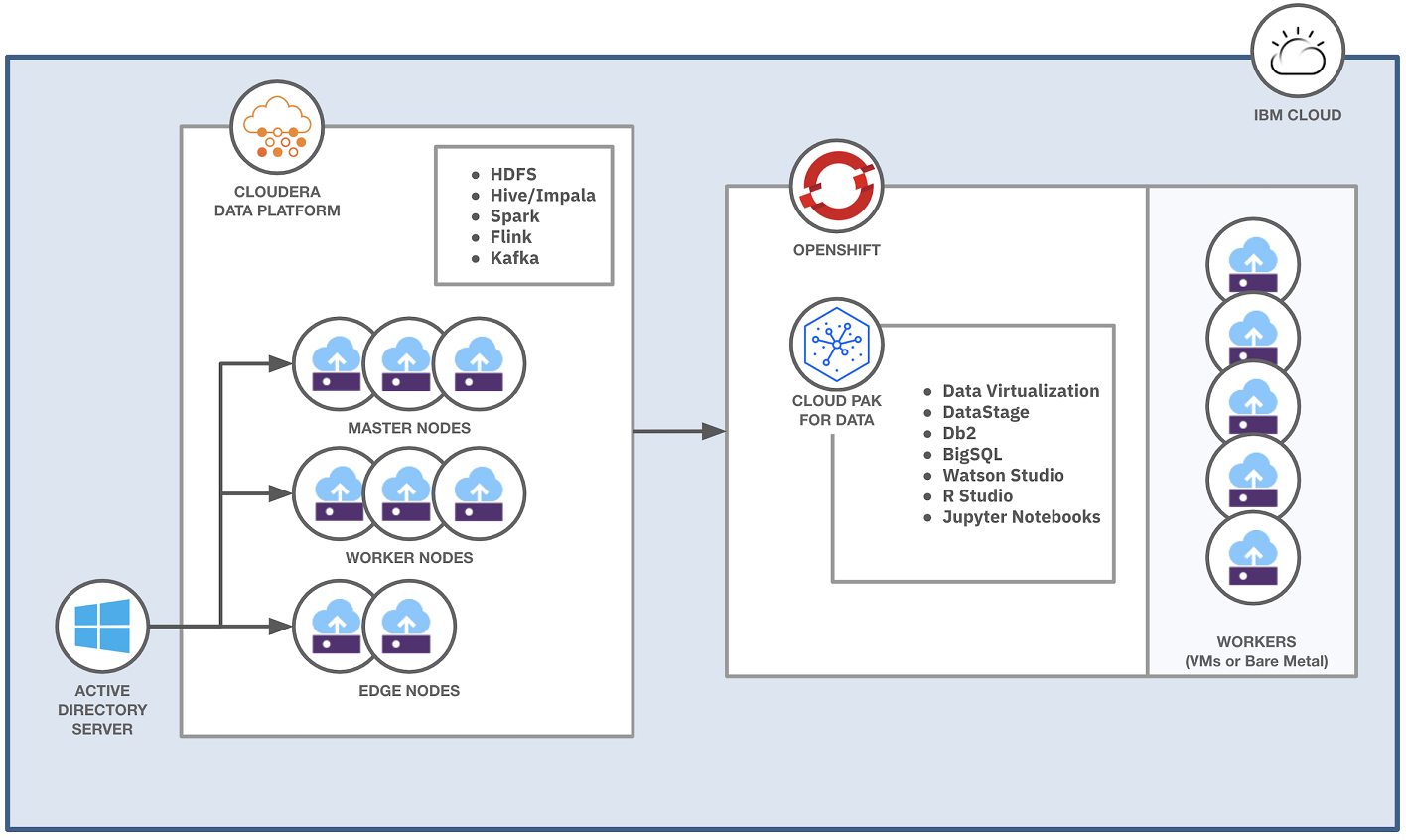
IBM Cloud Pak for Data is a fully integrated data and AI platform designed to modernize the processes of collecting, organizing and analyzing data while seamlessly integrating artificial intelligence (AI) capabilities.
Based on Red Hat® OpenShift® Container Platform, IBM Cloud Pak for Data integrates IBM Watson® AI technology with IBM Hybrid Data Management Platform, enabling organizations to manage their data operations effectively. The platform also encompasses DataOps, governance and business analytics technologies, providing a cohesive framework that supports the entire data lifecycle.
IBM Cloud Pak for Data is a modular platform designed to run integrated data and AI services on a cloud-native architecture. It operates on a multi-node Red Hat OpenShift cluster, leveraging Kubernetes for container management.
The platform architecture is built around several layers:
1. Cloud-native design
IBM Cloud Pak for Data integrates multiple data and AI services to streamline IT operations, reduce costs and enhance scalability. It supports modern DevOps practices while allowing efficient resource management.
2. OpenShift integration
The platform runs on Red Hat OpenShift, which can be deployed on-premises, in a private cloud, or on any public cloud supporting OpenShift. OpenShift’s Kubernetes cluster is utilized for container orchestration.
3. Cluster architecture
Deployed on a multi-node cluster, with a typical production setup including at least three control plane nodes and three or more worker nodes.
4. Modular platform
IBM Cloud Pak for Data platform is modular, consisting of a lightweight control plane that provides essential interfaces and a services catalog. The control plane is installed per project (namespace), enabling interaction with deployed services.
5. Common core services
These are shared services that provide essential features like data source connections, job management and project management. They are installed once per project and utilized by any service requiring them.
6. Integrated data and AI services
IBM Cloud Pak for Data offers a diverse catalog of services, including AI, analytics, data governance and more. Users can select and install services based on their needs, ensuring that sufficient resources are allocated for expected workloads.
Pros and cons of IBM Cloud Pak for data
Pros of IBM Cloud Pak for data:
- Strong data governance and compliance capabilities for regulated industries
- Hybrid and multi-cloud deployment flexibility via OpenShift
- Integrated AI capabilities through Watson
- Covers the full data lifecycle from ingestion to AI model deployment
- Modular architecture lets organizations adopt incrementally
Cons of IBM Cloud Pak for data:
- Steep learning curve given the platform’s depth
- High setup and operational costs, particularly for customized deployments
- Support response times have been a common complaint from users
- The ecosystem and developer community are smaller than Databricks
IBM Cloud Pak for data vs Databricks: Which should you pick?
IBM Cloud Pak for data suits large enterprises with strict governance requirements, particularly in financial services, healthcare or government. If you need a platform that spans hybrid and multi-cloud environments with enterprise-grade compliance baked in, it’s a strong candidate.
Databricks is the better fit for organizations prioritizing data engineering velocity, real-time analytics and machine learning at scale. Databricks’ open-source foundation, Unity Catalog for governance and Mosaic AI for ML makes it more accessible and faster to iterate on.
So, do you need help with overall data management and governance in a hybrid cloud setup? IBM Cloud Pak for Data is your right choice. Or do you need real-time analytics, scalability and machine learning? Then Databricks is the way to go.
9. Dremio
Dremio is an open lakehouse platform that takes a different approach from most competitors: rather than requiring data to be loaded into a proprietary warehouse, Dremio lets you query data in place, directly from cloud object storage and other sources. It’s often called an “open lakehouse” because it supports Apache Parquet, Apache Iceberg and Apache Arrow natively, with no proprietary lock-in.
Dremio sits in front of your data lake and serves as both a query engine and a self-service analytics layer. It uses two key acceleration technologies: Data Reflections (automated, transparent materializations that pre-compute query results for frequently accessed data) and Apache Arrow (an in-memory columnar data format that dramatically reduces serialization overhead).
Key features of Dremio:
- Dremio connects to multiple data sources seamlessly.
- Dremio utilizes Data Reflections and Apache Arrow for optimized query performance.
- Dremio supports community-driven standards such as Apache Parquet, Apache Iceberg and Apache Arrow so there is no proprietary format or lock-in.
- Dremio offers a user-friendly data catalog for efficient data discovery and self-service.
- Dremio integrates with Apache Ranger for fine-grained access control and secure data access.
- Dremio supports flexible deployment on-premises or in the cloud, with options for elastic scaling using Kubernetes.
- Dremio allows for optimized resource allocation across various workloads and users, enhancing performance and efficiency.
- Dremio has native connectors for various data sources, including AWS S3, Azure Data Lake and relational databases.
Pros and cons of Dremio
Pros of Dremio:
- Dremio is praised for its user-friendly interface, making it accessible even to non-technical users.
- Dremio’s ability to perform high-speed queries directly on data lakes is a significant advantage, reducing latency and improving data accessibility.
- Dremio can dramatically cut infrastructure and operational costs by eliminating the requirement for ETL operations and querying data in place.
Cons of Dremio:
- Despite its user-friendly interface, some users find Dremio challenging to master due to the depth of its features.
- Dremio has limitations in handling certain data types, which might require workarounds or additional tools.
- Dremio can be resource-intensive when working with huge datasets, necessitating significant compute power to maintain performance.
Dremio vs Databricks: Which should you pick?
Dremio is the better choice if your primary need is fast, self-service SQL analytics on existing data lakes without moving data into a warehouse. It’s particularly strong for business intelligence teams and reporting use cases where data engineers aren’t building complex pipelines.
Databricks is the better choice for teams that need both data engineering and data science capabilities in one platform, with full machine learning support, real-time processing and advanced pipeline orchestration. The two platforms can also coexist: Dremio as the analytics query layer, Databricks for ETL and ML.
10. Talend data fabric (now part of Qlik)
A quick note before we get into Talend: Qlik completed its acquisition of Talend in May 2023. The platform continues to operate under the Talend Data Fabric name as Qlik’s data integration business unit, combining Talend’s ETL and data quality tools with Qlik’s analytics capabilities.
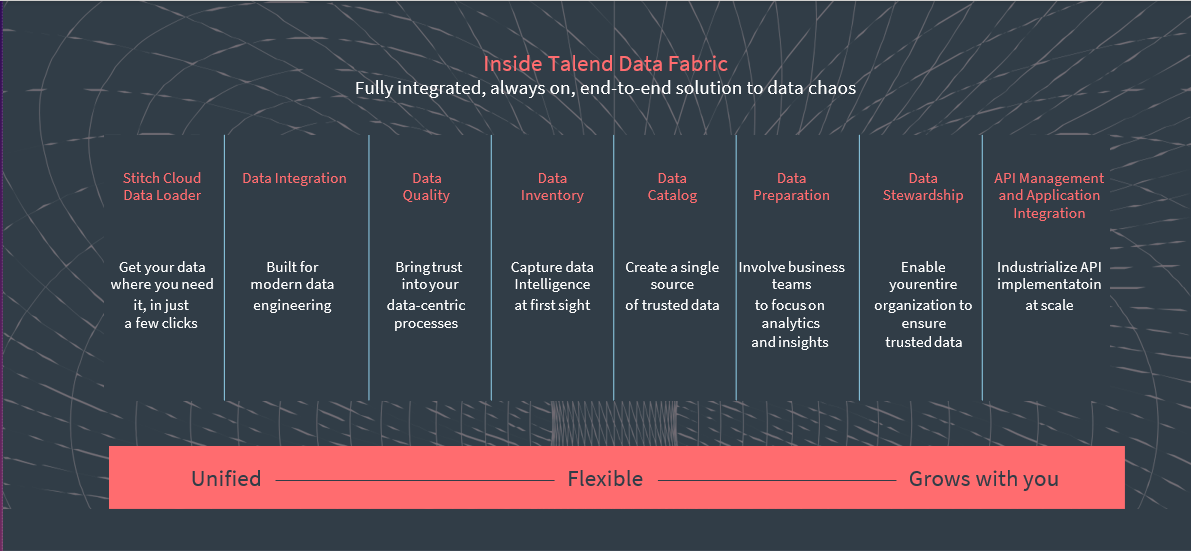
Talend Data Fabric is a low-code, unified data integration platform. It handles data integration, data quality, data governance and API/application integration from a single interface. The platform is built to help organizations bring data from many sources into a consistent, governed state — and it handles that job well.
Talend supports batch and real-time data processing via Apache Spark under the hood. It offers drag-and-drop pipeline design, which lowers the barrier to entry for teams without deep coding expertise. Built-in data quality tools include profiling, reusable transformation recipes for common data issues and compliance tracking.
Key features of Talend data fabric:
- Unified data integration covering batch and real-time processing via Spark
- Data quality tools with profiling and automated issue detection
- Drag-and-drop pipeline builder reduces coding requirements
- Supports cloud, hybrid and on-premises deployment
- API creation and application-to-application integration for secure data sharing
- Single platform for integration, quality, governance and cataloging
Pros and cons of Talend data fabric
Pros of Talend data fabric:
- Accessible to non-technical users with its low-code interface
- Handles a wide range of data sources and integration patterns
- Strong data quality and governance tooling
- Active community and long track record in enterprise data integration
- Works well in both on-premises and cloud environments
Cons of Talend data fabric:
- Advanced customizations often require coding knowledge
- Error management and debugging have been recurring complaints
- Scheduling features are less capable than some competing tools
- Some users report stability issues in very large-scale environments
- Certain features require paid add-ons
Databricks vs Talend: Which should you pick?
These platforms address different primary needs. Talend excels at data integration, quality and governance. If your challenge is getting reliable, clean data from disparate sources into a consistent format, Talend is purpose-built for that problem.
Databricks excels at processing massive data volumes, running advanced analytics and machine learning, and handling real-time workloads. If your challenge is what to do with data once it’s integrated, Databricks is the stronger tool.
For many organizations, the answer is both: Talend handles ingestion and quality, Databricks handles processing and analytics. They integrate well together.
*11. Clickhouse
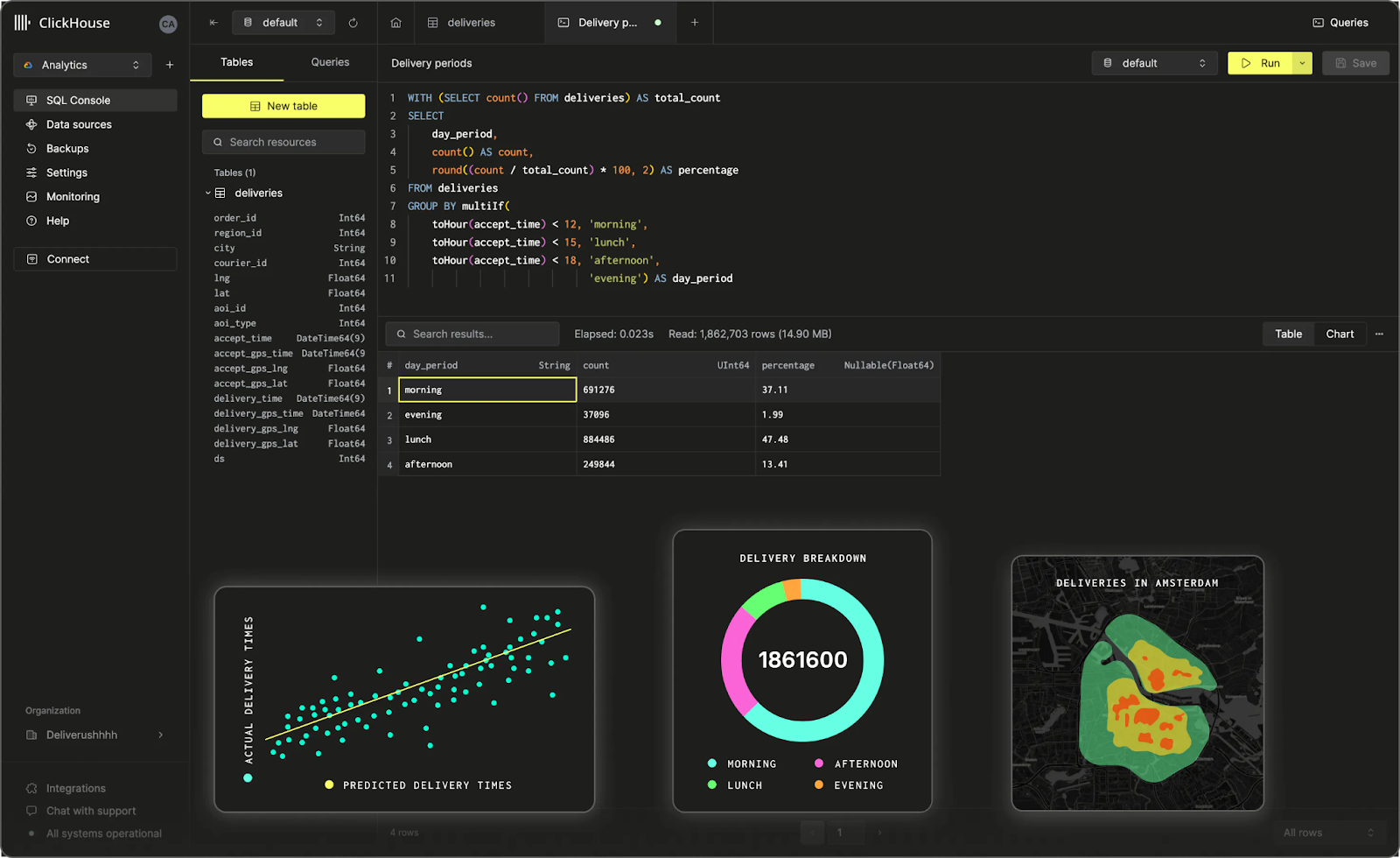
ClickHouse is an open source, column-oriented database management system (DBMS) designed for online analytical processing (OLAP). It was originally developed inside Yandex starting around 2009 to power Yandex.Metrica, one of the world’s largest web analytics platforms. Yandex open-sourced ClickHouse under the Apache 2.0 license in 2016. In 2021, ClickHouse, Inc. was founded as an independent commercial entity to support and develop the project.
ClickHouse is genuinely fast. It stores data in a column-oriented format optimized for analytical queries, uses vectorized query execution, and employs advanced compression (LZ4 by default, or Zstandard) that reduces both storage cost and query time. For real-time OLAP workloads — web analytics, advertising technology, financial data, infrastructure monitoring — ClickHouse is hard to beat.
ClickHouse also scales horizontally via sharding and replication, supports a SQL-like query language and processes data as it arrives without requiring ETL pipelines in between.
Key Features of Clickhouse:
- Column-oriented storage for efficient analytical query performance
- Real-time data ingestion and analytics
- Advanced compression algorithms (LZ4, Zstandard, plus specialized codecs)
- Horizontal scaling via sharding and replication
- SQL-compatible interface
- High throughput for insert-heavy workloads
Pros and Cons of Clickhouse
Pros of Clickhouse:
- Exceptional query performance for OLAP workloads
- Efficient storage and compression at large scale
- Real-time analytics on fresh data without complex pipelines
- Growing ecosystem and community since becoming independent from Yandex
Cons of Clickhouse:
- Limited support for complex multi-statement transactions (single-statement transactions only)
- Smaller ecosystem compared to platforms like Databricks or Snowflake
- Not designed for general-purpose data engineering or ML workflows
- Higher compute requirements for some query patterns
ClickHouse vs Databricks: a comparison
You’re trying to decide between Clickhouse vs Databricks? To make a smart choice, you need to know what you need and the type of workloads you need to handle. Let’s compare them side by side. Here is a table difference between ClickHouse vs Databricks.
| Feature | ClickHouse | Databricks |
| Primary Focus | High-performance real-time OLAP analytics | Unified data analytics and ML |
| Data Storage | Column-oriented with advanced compression | Delta Lake, Parquet, Iceberg and more |
| Scalability | Horizontal via sharding and replication | Apache Spark and cloud infrastructure |
| Query Language | SQL-compatible | SQL, Python, R, Scala, Java |
| AL and Machine Learning | Minimal built-in ML | Advanced ML via Mosaic AI and MLflow |
| Cloud Support | Limited (single-statement) | Full ACID transactions via Delta Lake |
| CLOUD SUPPORT | Self-hosted or ClickHouse Cloud | Native multi-cloud (AWS, Azure, GCP) |
So, if your primary need is high-performance real-time analytics on large, insert-heavy datasets, ClickHouse is a strong option. For web analytics, event tracking, infrastructure monitoring or ad-tech use cases, it’s genuinely excellent.
Databricks is the better choice when you need a platform that covers both data engineering and machine learning, or when your analytics workloads involve complex multi-step pipelines and governance requirements.
12) Cloudera
A brief note on Cloudera’s current status: in October 2021, Cloudera was taken private in an all-cash transaction valued at approximately $5.3 billion, acquired by affiliates of Clayton, Dubilier & Rice (CD&R) and KKR. Cloudera shares were delisted from the New York Stock Exchange at that time. As a private company, Cloudera has continued developing its Cloudera Data Platform (CDP) with a focus on hybrid cloud and multi-cloud enterprise data management.
It was formed through the merger of Cloudera and Hortonworks in January 2019, combining two of the major Apache Hadoop ecosystem players into a single enterprise data platform.
The Cloudera Data Platform (CDP) is designed for organizations that need a unified platform spanning data warehousing, data engineering, machine learning and analytics, with enterprise-grade security and governance built in. CDP can be deployed on AWS, Azure and Google Cloud as well as on-premises, providing genuine hybrid cloud flexibility.
Cloudera’s strength is its Apache ecosystem integration. CDP supports Hadoop, Spark, Kafka, Hive, HBase and other Apache projects natively. Its security model is comprehensive: data encryption, granular access controls and full audit capabilities for regulatory compliance.
Key features of Cloudera:
- Unified platform for data engineering, warehousing, ML and analytics
- Enterprise security with encryption, access controls and audit logging
- Multi-cloud and on-premises deployment flexibility
- Apache ecosystem support (Hadoop, Spark, Kafka, Hive, HBase and others)
- Machine learning and predictive analytics capabilities
- SDX (Shared Data Experience) for consistent security and governance across deployments
Pros and Cons of Cloudera
Pros of Cloudera:
- Comprehensive coverage of data management use cases
- Strong security and governance for regulated industries
- Genuine hybrid and multi-cloud flexibility
- Deep Apache ecosystem integration
Cons of Cloudera:
- Complex to set up and manage, requiring specialized expertise
- Higher operational costs compared to cloud-native alternatives
- Finding skilled Cloudera administrators can be difficult
- Some users report slower product velocity compared to cloud-native competitors
Databricks vs Cloudera: a comparison
Here is a table difference between Databricks vs Cloudera.
| Feature | Cloudera | Databricks |
| Primary Focus | Unified data management across hybrid cloud | Collaborative data analytics and ML |
| Deployment | Multi-cloud and on-premises | Cloud-native, optimized for major clouds |
| Data Processing | Batch and real-time processing | Real-time processing via Apache Spark |
| Machine Learning | Integrated ML tools | Advanced ML with Mosaic AI and MLflow |
| User Interface | Technical, requires expertise | Notebook-based collaborative workspace |
| Pricing Model | Enterprise licensing | Pay-as-you-go DBU-based model |
Cloudera is the right choice for large enterprises in regulated industries that need strong data governance, hybrid cloud flexibility and a platform that spans the full data lifecycle. If you have legacy Hadoop investments and need to modernize gradually, Cloudera’s migration path is designed for exactly that.
Databricks is better for organizations prioritizing analytics velocity, machine learning and real-time data processing. Its developer experience is significantly more modern, and it’s faster to get value from if your team is comfortable with cloud-native tools.
13) Yellowbrick Data
Yellowbrick Data is a hybrid cloud data warehouse built for high-performance analytics. It was founded in 2014 by Neil Carson, Jim Dawson and Mark Brinicombe, who came from database and flash storage backgrounds at Fusion-io, Netezza and Oracle. Their original insight was that by properly using SSD storage to reduce memory requirements and increase CPU throughput, you could build an OLAP database that dramatically outperformed existing solutions at lower cost.
Yellowbrick delivers analytics through an MPP architecture with a purpose-built execution engine, a primary column store, built-in compression and erasure encoding for reliability. It supports ANSI SQL and ACID transactions via a PostgreSQL-compatible front end, which means any database driver or external connector that works with Postgres works with Yellowbrick without modification.
One of Yellowbrick’s defining features is its hybrid cloud flexibility. Organizations can deploy Yellowbrick on-premises for maximum control and low-latency access to local data, in the cloud on AWS, Azure or Google Cloud Platform, or in a hybrid combination of both. A fully cloud-native version built on Kubernetes is available for public cloud deployments.
Key features of Yellowbrick Data:
- MPP architecture for efficient large dataset and complex query handling
- Fast query performance enabling real-time analytics
- Horizontal scaling to handle growing data volumes and workload increases
- PostgreSQL-compatible front end supporting standard SQL and existing drivers
- Column store with built-in compression and erasure encoding
- Hybrid deployment: on-premises, public cloud or both
- Kubernetes-based cloud-native deployment option
Pros and Cons of Yellowbrick Data
Pros of Yellowbrick Data:
- Hybrid cloud architecture provides real deployment flexibility
- Exceptional performance for mixed analytical workloads
- ANSI SQL compatibility simplifies migration from other warehouses
- Purpose-built hardware optimization delivers strong price-performance
Cons of Yellowbrick Data:
- Can be more expensive than fully managed cloud alternatives
- Smaller ecosystem and partner network compared to Databricks or Snowflake
- On-premises deployments require dedicated IT infrastructure management
- Limited ML and data science capabilities compared to Databricks
Databricks vs Yellowbrick Data: which should you pick?
So, you’re trying to decide between Databricks vs Yellowbrick Data for your data warehousing and analytics needs. Both are solid choices, but they’ve got some key differences.
Yellowbrick’s primary advantage is its hybrid cloud flexibility and raw query performance. If your organization has strict data residency requirements, needs on-premises analytics for compliance or latency reasons, or wants a high-performance SQL analytics platform that can span environments, Yellowbrick is a strong candidate.
Databricks is the better choice if your priority is machine learning, AI, real-time streaming and a broader data platform that covers engineering through model deployment. Databricks’ cloud-native architecture, Mosaic AI tools and Delta Lake ecosystem are hard to match for ML-heavy workloads.
Go with Databricks if your organization needs a one-stop shop for machine learning and AI. It’s got advanced ML libraries, AutoML and great collaboration tools that work across cloud environments – perfect for big projects.
If you need super-fast analytics, especially for on-premises or hybrid environments, Yellowbrick Data is the way to go. It’s perfect for organizations dealing with massive datasets that need lightning-fast query responses. Plus, you can deploy it however you want without sacrificing performance.
That’s it! As you can tell, there are loads of Databricks competitors out there that are super powerful. We picked out 13 of them that could go toe-to-toe with Databricks.
Further Reading
- Databricks vs Snowflake: 5 Key Features Compared
- Snowflake vs Redshift Comparison – 10 Key Differences
- Snowflake vs BigQuery Comparison: 7 Critical Factors
- 22 Best DataOps Tools for Data Management and Observability
- What is Amazon Redshift?
- Azure Synapse Analytics
- What Is Apache Spark?
- What is Amazon EMR (Amazon Elastic MapReduce)?
- Run Spark and Hadoop faster with Dataproc
- IBM Cloud Pak for Data
- What is Talend ? — An Introduction to Talend ETL Tool
- Discover Cloudera Data Platform
- Yellowbrick Data Explained in Under 2 Minutes
Save up to 50% on your Databricks spend in a few minutes!
Conclusion
And that’s a wrap! Databricks has established itself as one of the most capable data and AI platforms on the market. Its combination of Delta Lake, Mosaic AI, Unity Catalog, Apache Spark and the new Lakebase OLTP engine makes it a genuine full-stack data platform as of 2026.
But it’s not the right fit for every team. Snowflake remains a better choice for SQL-first analytics teams that want near-zero management. BigQuery makes more sense for Google Cloud-native organizations. Redshift is still the dominant choice within the AWS ecosystem for structured analytical workloads. ClickHouse is genuinely faster for real-time OLAP. And Yellowbrick or Cloudera suit organizations with hybrid cloud or on-premises requirements.
The right answer depends on your workloads, your team’s skills, your existing cloud investments and where your data lives today. We hope this comparison helps you find a real fit.
FAQs
What is Databricks used for?
Databricks is used for data engineering, machine learning, analytics and AI. It’s a unified platform built on Apache Spark with Delta Lake for storage, MLflow and Mosaic AI for machine learning, and Unity Catalog for data governance.
Who founded Databricks and when?
Databricks was founded in 2013 by Ali Ghodsi, Ion Stoica, Matei Zaharia, Patrick Wendell, Reynold Xin, Andy Konwinski and Arsalan Tavakoli-Shiraji — all researchers from UC Berkeley’s AMPLab. They’re the original creators of Apache Spark, Delta Lake, MLflow and Unity Catalog.
How does Databricks compare to Snowflake?
Databricks is better for complex data engineering, machine learning and real-time analytics. Snowflake is stronger for SQL-first BI workloads with near-zero management. The gap is narrowing: Databricks added OLTP (Lakebase) and Snowflake added ML inference (Cortex AI) in 2025. Both support Apache Iceberg.
What are the key features of Google BigQuery?
BigQuery is a serverless data warehouse built on Dremel (query engine), Colossus (distributed storage), Jupiter (high-speed network), Borg (cluster management) and Capacitor (columnar storage format). It scales automatically, integrates with Google Cloud services and includes BigQuery ML for SQL-based machine learning.
Is Amazon Redshift suitable for small businesses?
Amazon Redshift’s complexity and cost structure make it better suited for medium to large enterprises with predictable, structured analytical workloads. Smaller teams may find Redshift Serverless more accessible, or alternatives like BigQuery more cost-effective for variable workloads.
What is the main advantage of Apache Spark?
Apache Spark’s key advantage is in-memory distributed processing, which is significantly faster than disk-based systems for most analytical and ML workloads. It supports Python, Scala, Java, R and SQL, and handles batch, streaming, ML and graph processing in a single unified framework.
How does Amazon EMR differ from Databricks?
EMR supports a wider range of open-source frameworks beyond Spark (Hadoop, Hive, Flink, Presto and more) and gives you more control over cluster configuration. Databricks provides a more polished developer experience, better ML tooling and stronger performance optimization for Spark-based workloads.
What are the key features of Google Cloud Dataproc?
Dataproc is a fully managed service for Apache Hadoop and Spark with cluster startup under 90 seconds, pay-as-you-go pricing, native Google Cloud service integration (BigQuery, Cloud Storage, Pub/Sub) and a Serverless option for Spark batch jobs.
How does Talend Data Fabric differ from Databricks?
Talend Data Fabric (now part of Qlik following the May 2023 acquisition) focuses on data integration, quality and governance. Databricks focuses on large-scale data processing, analytics and machine learning. They’re complementary rather than directly competing.
Is Cloudera still publicly traded?
No. Cloudera was taken private in October 2021 in a $5.3 billion transaction by affiliates of Clayton, Dubilier & Rice and KKR. It was delisted from the New York Stock Exchange at that time.
How does Cloudera’s deployment flexibility compare to Databricks?
Cloudera supports true hybrid cloud: on-premises, private cloud, AWS, Azure and Google Cloud Platform through its Shared Data Experience (SDX) layer. Databricks is primarily cloud-native, optimized for AWS, Azure and Google Cloud, with no traditional on-premises deployment option.
Are Databricks and Redshift the same thing?
No. Redshift is a cloud data warehouse optimized for structured SQL analytics, tightly integrated with AWS. Databricks is a broader data and AI platform covering data engineering, machine learning, analytics and governance, running across multiple cloud providers.
What is Dremio’s open lakehouse approach and how does it compare to Databricks?
Dremio lets you query data in place from cloud object storage and other sources without ETL into a separate warehouse. It uses Data Reflections for query acceleration. Databricks’ Lakehouse combines Delta Lake storage with Spark processing in a more integrated environment — better for engineering pipelines and ML, while Dremio is faster to set up for self-service analytics.
What is Yellowbrick Data and who should use it?
Yellowbrick Data is a high-performance MPP data warehouse with hybrid cloud deployment options (on-premises, cloud or mixed). It’s best suited for organizations with strict data residency requirements, existing on-premises infrastructure, or high-performance SQL analytics needs that justify its cost. Organizations focused on ML and AI workloads are better served by Databricks.
What is Lakebase and why does it matter for the Databricks vs Snowflake comparison?
Lakebase is a Postgres-compatible OLTP (transactional) database that Databricks launched in 2025, built on technology from Neon (acquired in May 2025). It allows transactional and analytical workloads to run on the same platform without separate systems. This positions Databricks as a more complete full-stack data platform and directly challenges traditional OLTP-plus-warehouse architectures.
Pramit Marattha
Pramit Marattha is a technical content writer and strategist with 5+ years of experience covering AI, data engineering, data cloud platforms and open source technologies. He turns complex technical concepts into clear, useful content for engineers and developers.







