
Data is the fuel that powers modern businesses and data warehouses are the engines that make sense of it all. As the world becomes more and more data-driven, robust infrastructure is required to collect, process and analyze the massive volumes of data at its disposal. Snowflake vs BigQuery are two of the main cloud data warehouses on the market today. Both handle petabyte-scale data, both expose ANSI SQL interfaces and both eliminate the need to manage physical servers. But their architectural philosophies differ in ways that have real consequences when production workloads start hitting them at scale.
In this guide, we compare Snowflake and BigQuery across 7 key factors: architecture, scalability, performance, security, pricing, use cases and integrations. We’ll also break down the main strengths and weaknesses of each platform so your team can make an informed decision. Let’s dive right in!
Table of contents
Snowflake vs BigQuery
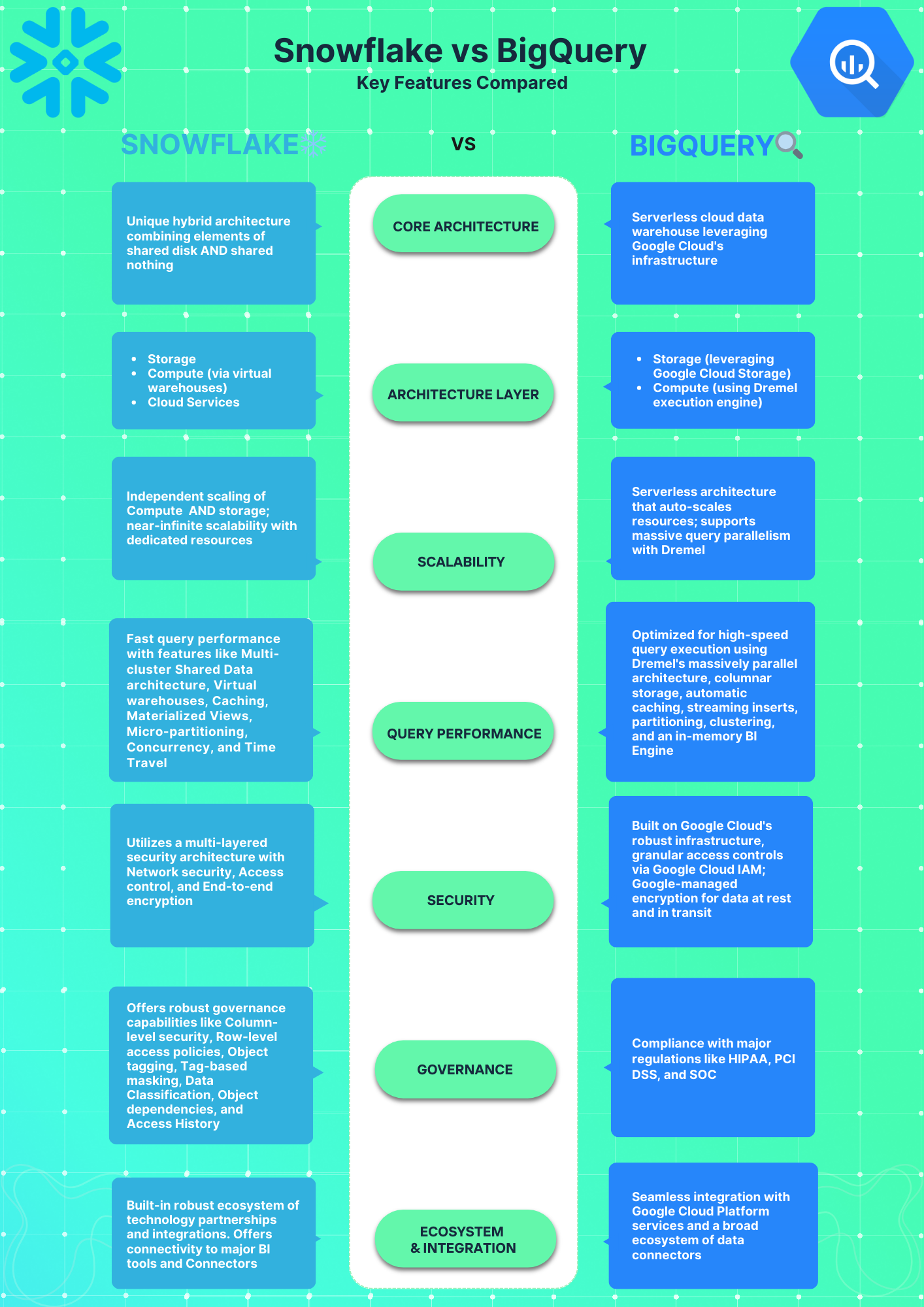
Need a fast rundown on Snowflake vs BigQuery? This brief overview highlights the main distinctions between the two.
What is BigQuery?
Google BigQuery is a fully managed, serverless data warehouse within Google Cloud Platform (GCP). It’s built on four core internal infrastructure components that Google developed for its own systems long before BigQuery became a commercial product.
Key features of BigQuery are:
- Serverless architecture: No cluster to size or manage; compute is allocated on demand
- Columnar storage: Data is stored in Capacitor (BigQuery’s proprietary columnar format) on top of Colossus, Google’s distributed file system
- Dremel query engine: Executes SQL as parallel trees of operations with root nodes, intermediate mixers and leaf worker nodes called slots
- Automatic optimization: BigQuery handles query planning, partition pruning and resource management internally with no user configuration required
- Autoscaling: Compute slots scale automatically based on current query load
- Streaming analytics: Native streaming inserts support near-real-time analytics
- BigQuery ML: Train and deploy ML models directly using standard SQL
- Deep GCP integration: Native connections to Cloud Storage, Pub/Sub, Dataflow, Looker Studio and the Gemini Enterprise Agent Platform (formerly Vertex AI) with minimal configuration
- Analytics Hub: A data marketplace for sharing and subscribing to datasets across organizations
What is Snowflake?
Snowflake is a cloud-native data warehouse delivered as software-as-a-service (SaaS). It uses a unique architecture that separates storage from compute. This enables independent scaling of resources.

Key capabilities and components of Snowflake include:
- Multi-cluster, shared data architecture: Centralized cloud object storage with independent compute clusters that all read from the same data without contention
- Virtual warehouses: on-demand MPP (massively parallel processing) compute clusters sized from X-Small to 6X-Large
- Micro-partitioned storage: Data is stored in compressed, columnar micro-partitions of roughly 50-500 MB each, enabling highly selective partition pruning
- Snowflake Cortex AI: A built-in suite of LLM-powered functions, AI agents and ML tools running within Snowflake’s security boundary. Includes Cortex Analyst (natural language to SQL), Cortex Search (unstructured data retrieval) and Cortex Agents (multi-step AI workflows)
- Time Travel: Query historical table data up to 1 day back on Standard edition or up to 90 days on Enterprise and above
- Fail-Safe: An additional automatic 7-day data protection window beyond Time Travel, self-serve queryable
- Apache Iceberg support: Full native support for Iceberg tables since April 2025, including all Snowflake governance, security and data-sharing capabilities applied to open-format data
- Native data sharing: Zero-copy sharing across Snowflake accounts, cloud platforms and organizations, including Apache Iceberg and Delta Lake tables
- VARIANT data type: Native semi-structured data support for JSON, Avro, Parquet, ORC and XML
- Multi-cloud: Consistent functionality and experience across all three major cloud providers
- Zero Ops: No hardware or software to manage. Snowflake handles patching, upgrades and scaling
To fully understand Snowflake’s capabilities, architecture, security and features, read this in-depth article, which covers everything you need to know about Snowflake.
Now that we have a thorough understanding of Snowflake vs Google BigQuery, we can compare them based on the following major features:
7 critical factors: Snowflake vs BigQuery
Now that we’ve provided an overview of Snowflake and BigQuery, let’s compare them across 7 key factors: Architecture, Scalability, Performance, Security, Pricing Models, Use Cases and Integrations.
Let’s analyze how Snowflake and BigQuery stack up across these key areas will help you to find out about their strengths, weaknesses and ideal use cases.
1) Snowflake vs BigQuery—Architecture comparison
The underlying architecture has significant implications on performance, scaling, security and other capabilities.
Let’s thoroughly examine Snowflake and BigQuery architectural approaches.
Snowflake architecture
Snowflake uses a multi-cluster shared data architecture, a hybrid design that borrows from both shared disk and shared nothing database approaches. The storage layer behaves like shared disk: all data lives in centralized cloud object storage (Amazon S3 on AWS, Azure Data Lake Storage on Azure, Google Cloud Storage on GCP), giving every compute resource a single, consistent view of the data. The compute layer behaves like shared-nothing: each virtual warehouse is an independent MPP cluster that doesn’t share CPU or memory with other warehouses.
Shared-disk architectures centralize data but create compute bottlenecks. Shared-nothing architectures eliminate bottlenecks but require distributing data across nodes. Snowflake gets the data consistency of shared disk plus the compute isolation of shared-nothing in one design.
The three architecture layers are:
- Storage layer: Manages structured, semi-structured and unstructured data storage and optimization. Fully managed by Snowflake.
- Compute layer: Scalable virtual warehouses execute queries in parallel as independent MPP compute clusters.
- Cloud services layer: Handles all services like authentication, metadata, optimization, access control. Runs on instances managed by Snowflake.
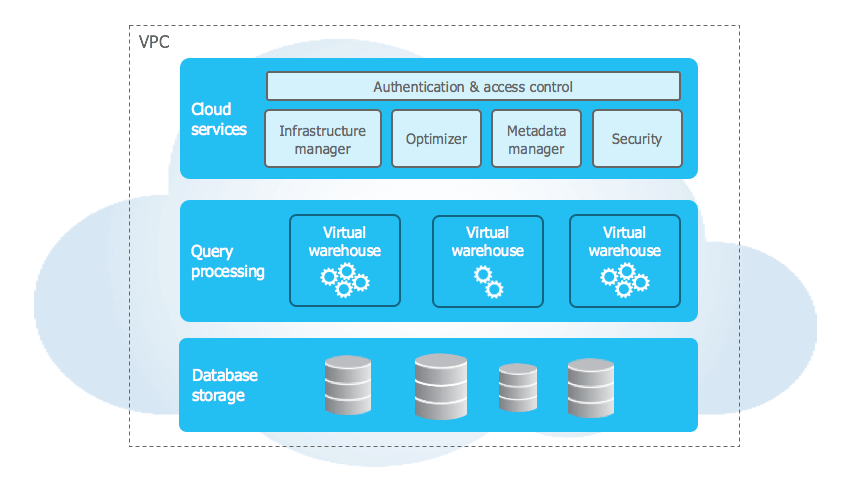
To learn more in-depth about Snowflake’s capabilities and architecture, check out this detailed article.
Google BigQuery architecture
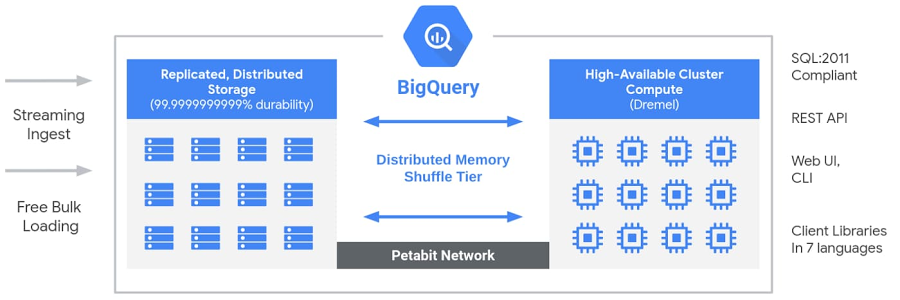
BigQuery is Google’s fully-managed, petabyte scale, low cost enterprise data warehouse designed for business intelligence. It enables super-fast, SQL analytics over massive datasets in the Google Cloud. BigQuery’s serverless architecture separates compute and storage resources completely, allowing each part to scale independently without limits. This provides enormous flexibility for customers to leverage as much or as little of each resource as needed for their workloads. But before we discuss its architecture, let’s actually understand its data lifecycle.
How Google BigQuery fits into the data lifecycle
BigQuery is a core component of Google Cloud’s end-to-end data analytics platform. It covers stages across the data lifecycle, including:
- Ingestion — Loading data into BigQuery from batch or streaming sources
- Processing — Transforming, cleansing and preparing data for analysis
- Storage — Storing large datasets cost-effectively
- Analysis — Enabling interactive SQL, BI and machine learning
- Collaboration — Sharing datasets, dashboards and insights
BigQuery integrates tightly with other Google Cloud data services like Cloud Storage, Pub/Sub, Dataflow, Looker and more!! This allows users to assemble an optimized serverless data warehouse architecture on GCP.
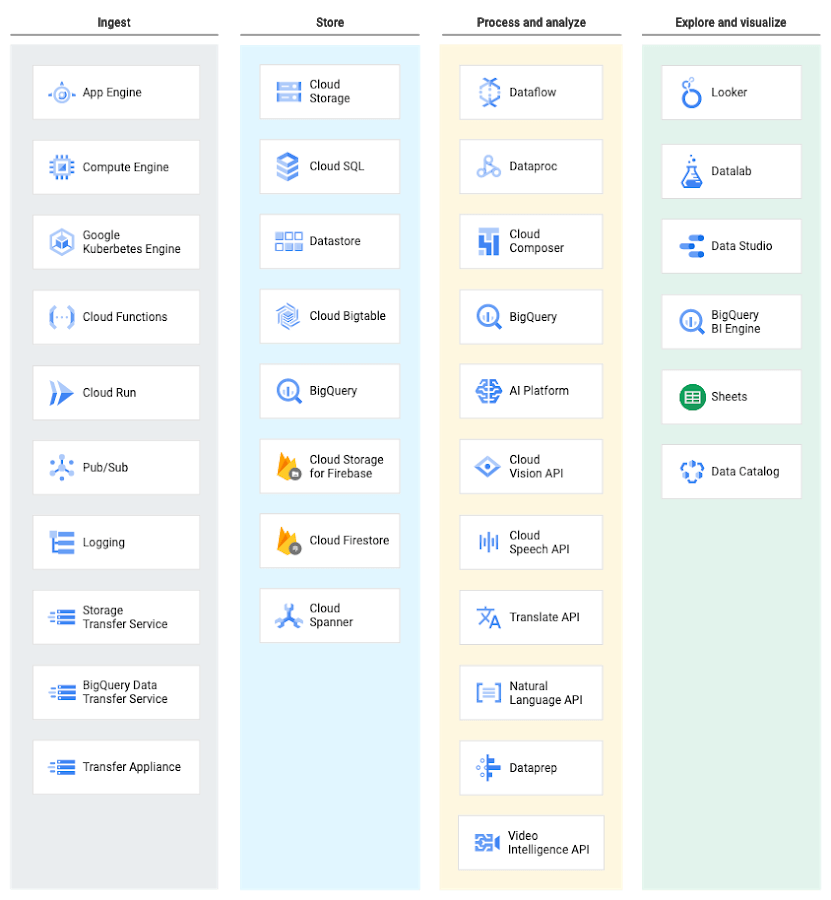
At each phase of the life cycle, Google Cloud provides multiple services to fit specific data needs and workflows. BigQuery delivers a fast, scalable and fully-managed data warehouse at the core of this ecosystem.
Now, let’s discuss its architecture.
BigQuery is Google’s fully-managed, petabyte scale, low cost enterprise data warehouse designed for business intelligence. It enables super-fast, SQL analytics over massive datasets in the Google Cloud. BigQuery’s serverless architecture separates compute and storage resources completely, allowing each part to scale independently without limits, providing enormous flexibility for customers to leverage as much or as little of each resource as needed for their workloads.
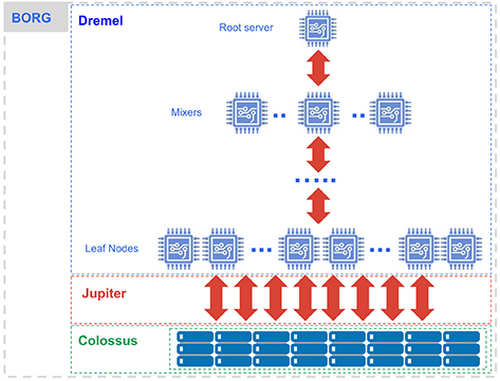
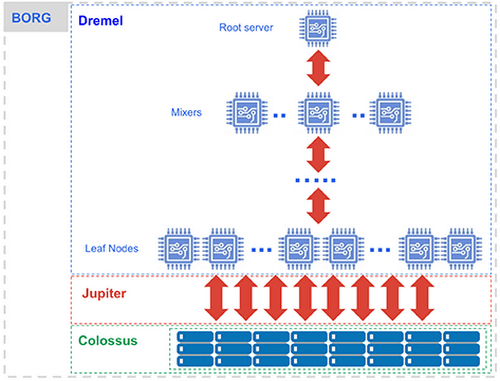
BigQuery is built on four interconnected Google infrastructure components.
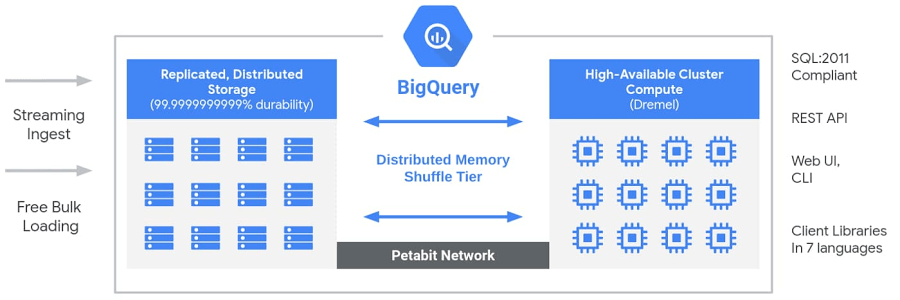
Colossus (storage)
BigQuery stores all data in Colossus, Google’s distributed file system. Within Colossus, data is stored in Capacitor, BigQuery’s proprietary columnar format. Colossus handles replication, fault recovery and distributed storage management across Google’s data centers. Because Colossus and Dremel are fully decoupled, you can store dozens of petabytes without provisioning any compute whatsoever.
Dremel (compute)
Dremel is BigQuery’s massively parallel query execution engine. When you submit a query, Dremel compiles it into a hierarchical execution tree. Leaf nodes called slots read data from Colossus and perform initial computation. Intermediate nodes called mixers aggregate partial results up the tree. The root server collects the final result and returns it to the client. A single query can be dynamically allocated thousands of slots to run in parallel.
Jupiter (network)
Jupiter is Google’s internal network fabric connecting Dremel compute and Colossus storage. It delivers 1 Petabit per second of total bisection bandwidth, meaning data moves between storage and compute fast enough that the physical separation creates no meaningful latency penalty for query execution.
Borg (orchestration)
Borg is Google’s cluster management system and the direct predecessor to Kubernetes. It allocates hardware resources to Dremel jobs, handles scheduling, ensures fault tolerance and manages efficient hardware utilization across Google’s infrastructure
Architecture comparison: which approach wins?
Snowflake’s architecture gives you fine-grained control over compute. You can isolate workloads, size warehouses to match query complexity and prevent one heavy ETL job from degrading dashboard query performance. That control comes with a management cost. Warehouse sizing, auto-suspend configuration and workload assignment all fall on your team.
BigQuery removes all of that. You write SQL and Google figures out the compute. That simplicity has genuine value, but it also means you have fewer levers to pull when performance disappoints.
2) Snowflake vs BigQuery—Scalability
The ability to elastically scale storage and compute is crucial for modern data platforms. Let’s see how Snowflake and BigQuery scale.
Snowflake scalability
Snowflake scales storage and compute independently. Storage scales automatically as data grows; it’s backed by the cloud provider’s object storage, so capacity doesn’t require planning in practice. Compute scales through virtual warehouses.
You can scale in two ways. Scaling up means moving to a larger warehouse size, which increases compute power for individual queries. Scaling out means enabling multi-cluster mode, which adds parallel warehouse clusters to handle more concurrent users. You can combine both approaches.
Snowflake’s auto-suspend feature stops compute billing the moment a warehouse goes idle. Auto-resume brings a warehouse back online when a new query arrives, typically in a few seconds.
Some key aspects of Snowflake’s scalability:
- Independent storage and compute scaling with no downtime required
- Multi-cluster warehouses for high-concurrency workloads
- Query result caching with a 24-hour retention window that avoids redundant computation at no cost
- Workload management for prioritizing critical queries over background jobs
- Full Apache Iceberg support for lakehouse-style architectures on open-format data
- Zero-copy database cloning for rapidly spinning up separate environments without duplicating storage
One quick limitations
Snowflake inherits availability from the underlying cloud provider’s infrastructure. Provider-level outages affect Snowflake’s uptime, which is worth factoring into your disaster recovery planning.
To learn more in-depth about how Snowflake leverages its architecture for almost unlimited scalability, check out this detailed article.
Google BigQuery scalability
BigQuery is serverless, so scaling is automatic and invisible to users. There are no warehouses or clusters to configure. When query load increases, BigQuery allocates more slots from its shared pool. When load drops, those slots are returned.
Storage scales via Colossus with no configuration. BigQuery supports table partitioning by date, integer range or ingestion time, and table clustering by column values, both of which limit data scanned per query for better performance and cost control.
On-demand pricing gives access to a shared slot pool. For sustained, high-concurrency workloads, capacity pricing (Standard, Enterprise or Enterprise Plus editions) lets you reserve dedicated slots that won’t be subject to shared-pool quotas.
Here are some key aspects of BigQuery scalability:
- Fully automatic storage and compute scaling with no user configuration
- Massively parallel query execution across thousands of slots via Dremel
- Native table partitioning and clustering to control scan scope
- Streaming inserts for ingesting real-time data at scale
- BigQuery Omni for querying data stored in AWS S3 or Azure Blob Storage without copying it to GCP
- Seamless data growth from terabytes to petabytes with no downtime
The practical scalability limitation for BigQuery on-demand is slot contention. On-demand access draws from a shared slot pool with per-project concurrency limits. Under heavy concurrent workloads without capacity reservations in place, queries queue and execution times increase.
Scalability comparison: which one wins?
For predictable, high-concurrency workloads, Snowflake’s explicit warehouse model gives you more reliable and consistent performance. You provision what you need and you know what you’re paying for. BigQuery’s serverless model scales more effortlessly for intermittent, unpredictable workloads and removes all capacity planning overhead. Your query patterns determine which model fits better.
3) Snowflake vs BigQuery—Performance
Blazing fast query performance is essential for interactive analytics. How do Snowflake and BigQuery compare?
Snowflake performance
Several architectural factors drive Snowflake’s query speed:
- Workload isolation: Separate virtual warehouses mean one team’s heavy data transformation job doesn’t degrade another team’s dashboard queries. This is a genuine architectural advantage that BigQuery’s serverless model can’t fully replicate without capacity reservations
- Result caching: If the same query runs against unchanged data within a 24-hour window, Snowflake returns the cached result instantly with no compute charged
- Micro-partition pruning: Snowflake’s metadata layer tracks the minimum and maximum values of every column in every micro-partition. Queries that filter on those columns skip irrelevant partitions entirely
- Automatic clustering: For large tables, Snowflake can maintain cluster keys automatically to improve partition pruning efficiency over time
- Materialized views: Precomputed results for frequently repeated transformations reduce repeated computation
- Search optimization service: Delivers index-like behavior for highly selective point queries (available at an additional credit cost)
To learn more in-depth about how Snowflake leverages its unique architecture to deliver industry-leading query performance, check out this detailed article on Snowflake’s performance.
BigQuery Performance
BigQuery’s performance story comes from different strengths:
- Workload isolation: Separate virtual warehouses mean one team’s heavy data transformation job doesn’t degrade another team’s dashboard queries. This is a genuine architectural advantage that BigQuery’s serverless model can’t fully replicate without capacity reservations
- Result caching: If the same query runs against unchanged data within a 24-hour window, Snowflake returns the cached result instantly with no compute charged
- Micro-partition pruning: Snowflake’s metadata layer tracks the minimum and maximum values of every column in every micro-partition. Queries that filter on those columns skip irrelevant partitions entirely
- Automatic clustering: For large tables, Snowflake can maintain cluster keys automatically to improve partition pruning efficiency over time
- Materialized views: Precomputed results for frequently repeated transformations reduce repeated computation
- Search optimization service: Delivers index-like behavior for highly selective point queries (available at an additional credit cost)
While other warehouses like Snowflake have advantages in some areas, BigQuery’s innovative architecture delivers excellent BigQuery performance at scale for most analytics workloads. Its speed and scalability make BigQuery a top choice for high-performance analytics.
4) Snowflake vs BigQuery—Security, compliance and governance
Enterprise-grade security is non-negotiable for any data platform today. Let’s explore Snowflake vs BigQuery security capabilities.
Snowflake—Security, compliance and governance
Snowflake provides robust security capabilities to safeguard data and meet compliance requirements. Snowflake utilizes a multi-layered security architecture consisting of network security, access control and End-to-End encryption.
Snowflake’s security features are built on its innovative cloud architecture. By default, data in Snowflake is encrypted using industry-standard AES-256 encryption both at rest and in transit, meaning that even if someone were to gain unauthorized access to Snowflake’s servers, they would not be able to read the data without the encryption key.
Snowflake’s granular access control features allow organizations to restrict access to data based on user roles, virtual warehouses and views. This means that organizations can create different roles for different users, with each role having different permissions to data. For example, an organization might create a role for data analysts that allows them to read and write data, but not create or delete tables. Snowflake also offers masking policies, which can be used to obscure sensitive data fields, which means that organizations can mask sensitive data, such as social security numbers or credit card numbers, so that they are not visible to unauthorized users.
On top of its security features, Snowflake is also certified for a number of major regulations, including HIPAA, PCI DSS, GDPR and SOC 2. So this means that Snowflake has been audited and found to meet the requirements of these regulations.
Snowflake offers robust governance capabilities through features like column-level security, row-level access policies, object tagging, tag-based masking, data classification, object dependencies and access history. These built-in controls help secure sensitive data, track usage, simplify compliance and provide visibility into user activities.
To learn more in-depth about implementing strong data governance with Snowflake, check out this article
BigQuery—Security, compliance and governance
BigQuery’s security model is built on Google Cloud’s Identity and Access Management (IAM) infrastructure:
- IAM-based access control: Granular roles and permissions at the dataset, table and column level
- Encryption: AES-256 encryption at rest and in transit. Customer-managed encryption keys (CMEK) available via Cloud Key Management Service
- VPC Service Controls: Restrict BigQuery access to specific virtual private networks, limiting the risk of data exfiltration
- Column-level security: Enforce column-level access restrictions using policy tags through BigQuery’s Data Catalog
- Row-level security: Authorized views and row access policies control what specific users see at query time
- Data Access Transparency and Access Approval: Google logs its own administrative access to your data and lets you approve or deny it in real time, which is a distinctive enterprise governance capability
- Cloud Audit Logs: All data access and administrative actions are logged and exportable to security information and event management (SIEM) tools
BigQuery compliance certifications include: SOC 1, SOC 2, SOC 3, HIPAA, PCI DSS, SOC, ISO 27001 and FedRAMP (via Google Cloud’s infrastructure authorization). Google Cloud’s compliance portfolio is extensive and broadly comparable to Snowflake’s across most enterprise requirements.
To learn more in-depth check out Google BigQuery’s full range of compliance offerings.
Security comparison
Both platforms offer enterprise-grade security. The practical differences lie in governance depth. Snowflake’s column masking, object tagging, row-level policies and data classification features give data governance teams more native controls out of the box, often without requiring third-party governance tooling. BigQuery’s security integrates tightly with Google Cloud’s IAM model, which is powerful but requires more configuration to achieve equivalent granularity.
One meaningful difference: BigQuery’s Data Access Transparency gives you visibility into Google’s own administrative access to your environment, which is a governance feature Snowflake doesn’t offer in the same form. For regulated industries, this level of cloud provider transparency can matter.
5) Snowflake vs BigQuery—Pricing models
Cloud data warehouses promise easier cost management. How do the pricing models of Snowflake and BigQuery compare?
Snowflake pricing model
Snowflake uses a consumption-based model. You pay separately for storage and compute, with no upfront infrastructure costs. Billing is per second for compute (with a 60-second minimum per warehouse start) and per TB per month for storage.
Compute is billed per second, with a 60-second minimum charge each time a warehouse starts or resumes. One Snowflake credit equals one full hour of usage for an X-Small warehouse. Credit consumption doubles with each warehouse size step:
| Warehouse size | Credits per hour |
| X-Small | 1 |
| Small | 2 |
| Medium | 4 |
| Large | 8 |
| X-Large | 16 |
| 2X-Large | 32 |
| 3X-Large | 64 |
| 4X-Large | 128 |
| 5X-Large | 256 |
| 6X-Large | 512 |
Credit prices vary by edition and cloud provider. Auto-suspend and auto-resume prevent idle warehouses from consuming credits unnecessarily.
Storage is charged based on average monthly compressed data stored, approximately $40 per TB per month (varies by cloud provider and region). Because Snowflake compresses data significantly (typically 3 to 7 times), effective storage cost is well below the cost implied by raw data size.
Cloud services
Snowflake’s cloud services layer (authentication, metadata management, query compilation) is included for free up to 10% of your daily compute credit consumption. Usage above that threshold is billed as additional compute credits.
Data transfer
Ingress into Snowflake is free. Data transfer within the same region and cloud provider is also free. Cross-region or cross-cloud data transfers incur charges that vary by cloud provider and region.
Editions:
Snowflake offers four editions with different features and pricing:
For in-depth detail on Snowflake pricing, Check out Snowflake pricing breakdown.
BigQuery pricing model
Compute pricing: on-demand vs reserved
BigQuery compute costs come in two flavors. In on-demand pricing, you pay per amount of data your queries scan. That rate is $6.25 per terabyte (TB) of data processed. The first 1 TB of query data per month is free for every account. This means a small analysis that reads just a few gigabytes can cost nothing. But put it another way: if you scan 10 TB in a month, you’d pay about $62.50 (and that’s before any free tier). In on-demand mode, each query is charged independently for the data it reads. So, SELECT queries scanning huge tables will quickly rack up dollars.
Here’s how on-demand works:
- Queries (on-demand) – $0–1 TB per month: Free; above 1 TB: $6.25 per TB of data processed. This applies everywhere (multi-region vs region) in Google Cloud. On-demand pricing is flat after the free 1 TB.
Because it’s easy to spin off big queries accidentally, you can cap costs by setting a “Maximum bytes billed” limit or doing a dry run to see how much data a query would scan.
For heavy or predictable workloads, BigQuery offers capacity (flat-rate) pricing via slots. A slot is roughly one virtual CPU. You can reserve slots so you pay a fixed hourly rate instead of per byte scanned. BigQuery now has Standard, Enterprise, and Enterprise Plus editions, each with different slot prices and commitment discounts. For example:
- Standard edition slots – about $0.04 per slot-hour on-demand (no commitment).
- Enterprise edition slots – about $0.06 per slot-hour on-demand.
- Enterprise Plus edition slots – about $0.10 per slot-hour on-demand.
Commit to one or three years of slot usage and Google gives you a break. A 1-year commitment knocks ~10% off the hourly rate; a 3-year commitment is ~20% off. You pay for the slot availability, not how much you use them. That means if you commit to a certain spend per hour, you pay it even if usage dips. The limitation is predictability: if your team scans a lot of data regularly (think hundreds of TB per month), slot commitments often save money versus pay-as-you-go.
Storage pricing: active vs long-term
Storage in BigQuery is billed separately from compute. You pay for data you store in tables (whether BigQuery-managed or via the Storage Write API). Google Cloud actually distinguishes active vs long-term storage.
- Active storage includes any table or table partition that has been modified in the last 90 days.
- Long-term storage includes any table or table partition that has not been modified for 90 consecutive days. The price of storage for that table automatically drops by approximately 50%. There is no difference in performance, durability, or availability between active and long-term storage.
Practically, that works out to roughly $0.02 per GB per month for active storage and $0.01 per GB per month for long-term storage. Put differently, a full terabyte stored for a month runs about $23.55 if active, and about $11.78 if it’s long-term. Also, each project gets the first 10 GB of storage free each month.
Free or “no-charge” spots: Time Travel and Failsafe (BigQuery’s backup features) do have storage but are mostly free in logic (they cost only if you use the actual storage, which is minimal). Copies of table data outside BigQuery (like Cloud Storage buckets) are not charged under BigQuery. Only data loaded into BigQuery storage is billed.
Ingestion, streaming, and data transfer
Bringing data into BigQuery can incur charges too, depending on how you do it:
- Batch loads (from Cloud Storage or on-prem files): Free, as they use a shared slot pool. (If you buy dedicated slots, those slots can be used but are paid for like other queries).
- Streaming inserts: Real-time inserts (tabledata.insertAll) cost $0.01 per 200 MB. That’s about $50 per TB of continuously streaming data. Many teams batch loads a few times an hour instead, since batch loads are free. Tip: if you don’t need sub-minute freshness, batching your ingestion can cut those streaming costs by ~90%.
- Storage Write API: If using the new Bulk API, it’s $0.025 per GB per month, with the first 2 TB per month free.
- Data extraction/exports: Exporting from BigQuery (via extract jobs) is generally free. You only pay for network egress if exporting data out of region. BigQuery also offers the Storage Read API: using it to read data (up to 300 TB/month) is free and beyond that it’s $1.10 per TB read.
New in 2026
Beginning Feb 1, 2026, Google started charging Cloud Storage network fees for multi-region reads by BigQuery. So, if a BigQuery job reads data stored in a multi-region Cloud Storage bucket, standard multi-region network egress SKUs now apply. Previously, BigQuery bundled that without fee. You can sidestep this by co-locating your storage bucket and BigQuery dataset or using regionally-local buckets.
Discounts, free tier, and cost controls
There are a few built-in discounts and freebies to use:
Free tier: Every Google Cloud account gets the first 10 GB of BigQuery storage and the first 1 TB of query data per month free. It’s easy to overlook this, but if you’re doing just exploration or storing small demo datasets, you might pay nothing. Also, cached query results, metadata calls and failed queries aren’t billed.
Committed Use Discounts (CUDs): As mentioned, slot commitments (1-year or 3-year) cut the slot-hour price by ~10% or 20%. These are worth it if you can predict high usage. But beware: you pay the commitment fee hourly no matter what, so only commit if you’re sure you’ll use that capacity.
Volume discounts: BigQuery doesn’t have a traditional volume curve for queries beyond the first TB free. It’s just linear $6.25/TB. Storage likewise is linear aside from the 50% drop after 90 days.
To learn more details about Google BigQuery pricing, refer to: BigQuery pricing.
6) Snowflake vs BigQuery—Use cases
Understanding the ideal use cases is important in determining which solution better fits your requirements.
Snowflake use cases
Snowflake is optimized for analytic workloads and provides a wide range of capabilities that make it suitable for the following key use cases
Enterprise data warehousing and BI
Snowflake handles structured, semi-structured and unstructured data through a single SQL interface. Its VARIANT data type enables working with JSON, Avro, Parquet, ORC and XML alongside relational data without building separate processing pipelines. Native integrations with Tableau, Looker, Power BI and MicroStrategy make BI connectivity straightforward.
Cloud Data Lake
Since April 2025, Snowflake has had full native support for Apache Iceberg tables. Snowflake’s complete feature set including governance, security, performance optimization, data sharing and Time Travel now applies to open-format data stored externally. This positions Snowflake as a credible lakehouse platform rather than just a traditional data warehouse.
Data science and AI
Snowflake Cortex AI (generally available since November 2025) provides built-in LLM-powered functions running within Snowflake’s security boundary. Cortex Analyst converts natural language to SQL. Cortex Search enables unstructured data retrieval. Cortex Agents orchestrate multi-step AI workflows. For custom ML development, Snowpark Container Services provides Python, Scala and Java execution environments within Snowflake’s compute infrastructure.
Multi-cloud and hybrid analytics
Snowflake’s consistent cross-cloud deployment model makes it a practical foundation for organizations that operate across multiple cloud providers or need portability between them. The same product, same SQL dialect and same governance model runs identically on AWS, Azure and GCP.
High-concurrency analytics
Multi-cluster warehouses allow Snowflake to serve many simultaneous users or workloads without resource contention. This is particularly relevant for SaaS companies embedding analytics into their products or enterprises with many concurrent BI users.
BigQuery use case
BigQuery is optimized as a serverless data warehouse for analytics on massive datasets. Key BigQuery use cases where it shines include:
Ad-hoc analytics
BigQuery’s on-demand pricing and serverless architecture make it genuinely frictionless for one-off queries against massive datasets. Data analysts can query terabytes on demand without capacity planning and pay only for what they scan. There’s no warehouse to start, no cluster to wait for.
GCP-native data warehousing
If you are invested in the GCP data ecosystem, you can get the most from BigQuery. Native connections to Cloud Storage, Pub/Sub, Dataflow, Dataproc, Looker Studio and the Gemini Enterprise Agent Platform work with minimal integration configuration.
Large-scale batch processing
Dremel’s massive slot parallelism excels at linear scans across large datasets. For ETL workloads that need to scan entire partitions or perform large transformations, BigQuery’s parallel architecture is a genuine advantage.
ML and AI workflows
BigQuery ML supports in-database model training using standard SQL without requiring data movement or separate ML infrastructure. The Gemini Enterprise Agent Platform integration extends this to advanced ML pipelines including AutoML, custom model training, LLM integration and multimodal model deployment, all connected directly to BigQuery data.
Real-time and streaming analytics
Native streaming inserts, Pub/Sub integration and BigQuery’s ability to query freshly streamed data in the same tables as historical batch data make it a strong choice for real-time dashboards, event monitoring and streaming pipelines.
Multi-cloud querying (with caveats)
BigQuery Omni lets you run BigQuery SQL against data in AWS S3 or Azure Blob Storage without copying it to GCP. It’s useful for organizations with data spread across clouds, but it’s a querying layer rather than a full multi-cloud deployment model.
7) Snowflake vs BigQuery—Integrations and ecosystem
An ecosystem of integrations determines what you can achieve on top of a data platform. Let’s explore Snowflake and BigQuery’s partner and tool / technology ecosystems.
Snowflake ecosystem
Snowflake has built an extensive ecosystem of technology partners and platform integrations that allow customers to build end-to-end data solutions.
For data integration, Snowflake offers connectivity with leading ETL/ELT platforms (like Fivetran, Matillion, Talend, Informatica, Hevo and Stitch). These tools can sync data bi-directionally between hundreds of data sources and Snowflake, handling transformation in a scalable manner. Snowflake also interoperates natively with data replication platforms like HVR and Qlik to enable real-time data sync.
Snowflake further provides over 100+ first-party data connectors to sync data from diverse sources. This includes connectors for cloud platforms, relational and NoSQL databases, SaaS applications, ad tech, social, mobile, blockchain, IoT and more. Snowflake’s partner ecosystem expands this connector library exponentially.
For business intelligence and reporting, Snowflake offers native direct query integrations with leading BI tools like Tableau, Qlik, Power BI and MicroStrategy, which allows analysts to visualize and dashboard Snowflake data interactively with sub-second query response times. Snowflake also connects with Looker for embedded analytics and insight apps.
Also, Snowflake integrates with big platforms like Databricks, Redshift, Dataiku and more!, allowing data engineers and data scientists to leverage Snowflake’s data alongside these tools for tasks like data preparation, model training and deployment. Python, R, Scala and Java clients are also available for programmatic access to Snowflake.
On the monitoring and operations side, Snowflake provides visibility into usage, workloads and costs through native integrations with platforms like Tableau and Looker. For identity and access management, SAML and OAuth 2.0 integrations secure access and authentication.
Snowflake is also cloud-agnostic, running natively on the major cloud platforms – AWS, Azure and GCP. It integrates deeply with key data services on these platforms like S3, ADLS and BigQuery for hybrid scenarios.
Overall, Snowflake’s extensive and growing partner ecosystem helps customers extract greater value by enabling Snowflake’s data to power a broad range of modern data workloads with ease.
BigQuery ecosystem
BigQuery’s ecosystem is deepest within GCP. Native connections exist with Cloud Storage, Pub/Sub, Cloud Bigtable, Spanner, Dataflow, and Dataproc. The BigQuery Data Transfer Service provides connectors for Google Ads, YouTube, Amazon S3, Teradata and other sources with scheduling built in.
For third-party BI tools, BigQuery supports Tableau, Power BI, Qlik and others through standard SQL connectors. Data Studio is the native visualization layer with direct BigQuery integration.
BigQuery sharing (formerly Analytics Hub) enables data sharing within and across organizations as a marketplace model. Data providers publish datasets; consumers subscribe to live tables without data movement, which is functionally similar to Snowflake’s secure data sharing.
ML integration centers on the Gemini Enterprise Agent Platform. BigQuery ML handles in-database SQL-based training. For more sophisticated pipelines, the Gemini Enterprise Agent Platform provides custom training, AutoML and model deployment in a unified ML platform directly connected to BigQuery data.
BigQuery Omni adds connectivity to AWS and Azure data stores for cross-cloud querying, though its functionality outside of GCP is more limited compared to Snowflake’s native deployment on all three clouds.
BigQuery’s ecosystem advantage is depth within GCP, not breadth across clouds. If your organization runs primarily on GCP, the native integrations reduce friction significantly. For multi-cloud or cloud-agnostic organizations, Snowflake’s ecosystem is more practically useful.
Snowflake vs BigQuery: pros and cons
BigQuery pros and cons
Here are the main BigQuery pros and cons:
BigQuery pros
- Truly serverless — No warehouses to configure, size or manage. Google handles all compute allocation and scaling automatically
- Deep GCP integration — Native connections to Cloud Storage, Pub/Sub, Dataflow, Looker Studio and the Gemini Enterprise Agent Platform reduce integration work significantly for GCP-native teams
- Cost-effective for sporadic workloads — On-demand pricing charges per TB scanned, which is economical when query volumes are low or unpredictable
- Integrated ML capabilities — BigQuery ML enables in-database model training via SQL. The Gemini Enterprise Agent Platform integration supports advanced ML pipelines including LLM-powered workloads
- Real-time analytics — Streaming inserts and Pub/Sub integration handle high-throughput streaming well
- Analytics Hub — Data sharing across organizations without data movement, comparable to Snowflake’s native sharing in concept
- Data Access Transparency — Visibility into Google’s own administrative access to your environment, a governance capability that GCP-committed enterprises value
BigQuery cons
- GCP lock-in: — BigQuery runs only on GCP. BigQuery Omni provides limited cross-cloud querying but it’s not a full multi-cloud deployment model
- On-demand cost unpredictability — An unoptimized query against an unpartitioned multi-terabyte table can generate a large, immediate bill. Without proper table partitioning and query governance, this is a real risk
- Limited performance tuning controls — You can’t resize compute, isolate workloads to dedicated resources or control concurrency granularly without purchasing capacity reservations
- Slot contention under heavy load — On-demand access shares a slot pool. Heavy concurrent workloads hit quota limits and queue without capacity reservations
- Shorter data versioning window — BigQuery’s time travel covers a maximum of 7 days (configurable from 2-7 days). Snowflake Enterprise offers up to 90 days. Additionally, recovering data from BigQuery’s 7-day fail-safe period requires opening a Google Support ticket, unlike Snowflake’s self-serve fail-safe
- Ecosystem breadth outside GCP — BigQuery’s ecosystem is most powerful within GCP and becomes significantly more limited in multi-cloud or cloud-agnostic environments
Snowflake pros and cons
Here are the main Snowflake pros and cons:
Snowflake pros
- Separation of storage and compute — Snowflake uses a unique architecture that decouples storage from compute. This allows independent scaling of storage and compute resources based on workload needs
- Virtual warehouses — Snowflake provides access to scalable clusters of compute power called virtual warehouses. These can be spun up or down on demand to match workload capacity needs
- Long Time Travel and self-serve fail-safe — Enterprise editions provide up to 90 days of queryable Time Travel plus an automatic 7-day Fail-Safe period you can query yourself
- Secure data sharing — Snowflake allows secure data sharing across accounts and cloud platforms without having to move or duplicate data. This makes data access and governance efficient
- Diverse workloads — Snowflake can handle a variety of analytic workloads ranging from enterprise BI to data science, machine learning and application development
- Multi-cloud — Snowflake is cloud agnostic and can run natively on AWS, Azure and GCP, providing flexibility
- Deep data governance — Snowflake comes with column-level security, row access policies, dynamic masking and object tagging, which provide governance depth without requiring separate tooling
Snowflake cons
- Cost — Snowflake’s usage-based pricing can become expensive at scale since customers pay for storage and compute consumed. Costs need active monitoring and optimization.
- Limited data versioning — While Snowflake offers data versioning through Time Travel, the retention period is limited. More robust data lifecycle management capabilities are needed.
- Complexity — Snowflake has a more complex architecture requiring more administrative overheads for setup and management compared to serverless solutions.
- Machine learning support — While Snowflake has growing machine learning capabilities, it is still more optimized for analytics over ML workloads.
Save up to 30% on your Snowflake spend in a few minutes!
Conclusion
And that’s a wrap! Both Snowflake and BigQuery are mature, capable platforms. The main choice comes down to your cloud strategy and workload profile.
If your organization is committed to GCP and relies heavily on Google’s data ecosystem including Cloud Storage, Pub/Sub, Dataflow, Looker Studio and the Gemini Enterprise Agent Platform, BigQuery is the natural anchor for your data infrastructure. On top fo that, the serverless model reduces operational overhead and the native integrations save real integration work.
But, if you’re operating across multiple clouds, running mixed analytical workloads, needing fine-grained compute control or requiring longer data versioning windows, Snowflake’s flexibility is harder to match. Its consistent cross-cloud architecture means you’re not tied to a single provider’s ecosystem, which is a meaningful strategic advantage for many enterprises.
FAQs
Which is better for multi-cloud environments — Snowflake or BigQuery?
Snowflake. It runs natively and identically on AWS, Azure and GCP. BigQuery is a GCP service; BigQuery Omni provides limited querying of AWS and Azure data but is not a true multi-cloud deployment.
What’s the core architectural difference between the two — Snowflake vs BigQuery?
Both separate storage and compute. The difference is in control. Snowflake gives you explicit virtual warehouses you configure and manage. BigQuery is fully serverless; you submit SQL and Google allocates compute automatically with no configuration on your end.
Which is easier to get started with — Snowflake vs BigQuery?
BigQuery has less operational overhead immediately. No warehouses to size or manage. Snowflake has more moving parts but also more control when you need it.
Does BigQuery support data sharing like Snowflake?
Yes, via Analytics Hub. BigQuery’s data sharing capability is comparable in concept to Snowflake’s secure data sharing. However, Snowflake’s sharing ecosystem with over 2,000 marketplace listings is more mature, and Snowflake extends sharing to Apache Iceberg and Delta Lake formats as well.
Which platform has better data versioning?
Snowflake, by a significant margin. Time Travel goes up to 90 days on Enterprise editions plus an automatic self-serve 7-day Fail-Safe window. BigQuery’s time travel maxes out at 7 days (configurable between 2 and 7 days) plus a 7-day fail-safe that requires opening a Google Support ticket to access. For organizations with strict data recovery requirements, Snowflake’s advantage here is substantial.
Is Snowflake or BigQuery more cost-effective?
It depends entirely on your usage pattern. BigQuery on-demand is cheaper for intermittent, low-volume workloads. Snowflake is typically more cost-effective for sustained, high-concurrency workloads once warehouses are properly right-sized. Both require active cost governance to avoid surprises.
Can I run machine learning workloads on both platforms — Snowflake vs BigQuery?
Yes. Snowflake’s Cortex AI provides LLM-based functions, AI agents and traditional ML capabilities natively via SQL and Snowpark. BigQuery ML handles in-database model training via SQL and integrates with the Gemini Enterprise Agent Platform for advanced ML pipelines including LLM-powered and multimodal workloads.
Which has a broader integration ecosystem — Snowflake vs BigQuery?
Snowflake has broader ecosystem reach across cloud providers. BigQuery’s ecosystem is deeper and more seamless within GCP. If you’re a GCP-centric team, BigQuery’s native integrations are a genuine advantage. For multi-cloud or cloud-agnostic organizations, Snowflake’s reach is wider and more consistent.
Which platform supports Apache Iceberg — Snowflake vs BigQuery?
Both support Apache Iceberg. Snowflake added full Iceberg support in April 2025, applying its complete feature set including governance, security, data sharing and performance optimization to Iceberg tables stored externally. BigQuery supports Iceberg tables via BigLake. Snowflake’s Iceberg integration is currently more mature and feature-complete.
Does BigQuery require infrastructure management?
No. BigQuery is fully serverless. There are no clusters, nodes or infrastructure to configure or manage. This is a fundamental difference from Snowflake, where virtual warehouses require configuration, right-sizing and ongoing monitoring to control costs.
Which platform is better for real-time analytics — Snowflake vs BigQuery?
Both handle real-time analytics. BigQuery’s streaming inserts and native Pub/Sub integration handle high-throughput streaming well. Snowflake’s Snowpipe Streaming provides comparable capabilities. For organizations already on GCP, BigQuery’s real-time integrations require less setup. For cross-cloud streaming architectures, Snowflake’s multi-cloud model is more flexible.
Which platform is better for a startup or small team — Snowflake vs BigQuery?
BigQuery’s on-demand pricing model and zero infrastructure management make it a lower-friction starting point for smaller teams. You pay only when queries run, you don’t have to manage warehouses and the free tier (first 1 TB of query processing and 10 GB of storage per month) covers experimentation at no cost. Snowflake makes more sense once you have predictable workloads and the team capacity to manage virtual warehouses actively.
How do the Snowflake and BigQuery handle unstructured and semi-structured data?
Snowflake has native VARIANT data type support for JSON, Avro, Parquet, ORC and XML, enabling SQL queries across structured and semi-structured data in the same warehouse without separate processing. BigQuery handles semi-structured data through native JSON columns and supports nested and repeated fields in its schema. Both are capable here; Snowflake’s VARIANT approach is more flexible for deeply nested or schema-less data.
Pramit Marattha
Pramit Marattha is a technical content writer and strategist with 5+ years of experience covering AI, data engineering, data cloud platforms and open source technologies. He turns complex technical concepts into clear, useful content for engineers and developers.