


Snowflake data governance isn’t just a compliance checkbox anymore. As businesses and organizations run more AI workloads, share data across business units and push analytics into production at scale, governance has become the base that keeps everything from unraveling.
In this article, we will cover what Snowflake data governance actually means in practice, the built-in features that make it work, seven concrete best practices for 2026, and a look at the third-party tools that extend governance beyond Snowflake’s native boundaries.
What is data governance?
Data governance is the set of practices, processes and policies that control how data gets collected, stored, used and shared. It defines who can access data, under what conditions and with what accountability. It also establishes the standards that keep data accurate, consistent and trustworthy over time.
Data governance matters most in regulated industries like healthcare, financial services and insurance, where regulations such as GDPR, HIPAA and CCPA carry real legal weight. Poor governance in these environments doesn’t just create data quality problems; it creates liability. But even outside regulated industries, governance gaps lead to duplicated data, broken pipelines, unauthorized access and analytics built on unreliable foundations.
What are the benefits of having a data governance strategy in place?
- Data reliability. When governance policies define how data is validated and maintained, teams make decisions based on data they can actually trust.
- Regulatory compliance. Organizations subject to data protection laws need verifiable controls over how data is stored, accessed and processed. Governance provides that audit trail.
- Data security. Access controls, masking policies and monitoring tools reduce the risk of unauthorized access or accidental exposure. A breach isn’t just a technical problem; it’s a reputational one.
- Operational efficiency. Teams spend less time hunting for data or questioning its accuracy when governance is working. That translates directly into productivity.
- Better decision-making. Reliable, well-documented data produces better analysis. Better analysis produces better decisions. It’s a simple chain, but governance is what holds it together.
Now, let’s jump back to understanding the concept of Snowflake data governance.
What is Snowflake data governance?
Snowflake data governance refers to the policies, procedures and technical controls applied to data stored and processed in the Snowflake AI Data Cloud. It covers how data is classified, accessed, protected, audited and shared, both within Snowflake and across external systems.
Since 2024, Snowflake has consolidated its governance capabilities under Snowflake Horizon, its built-in governance suite. Horizon brings together compliance tools like tagging and data classification, security controls through the Trust Center, privacy features including data clean rooms, and universal discovery through the Horizon Catalog. The practical benefit is that many capabilities that previously required separate configuration are now available to all Snowflake customers without additional setup.
On the network security side, Snowflake supports private connectivity across all three major cloud providers: AWS PrivateLink, Azure Private Link and Google Cloud Private Service Connect. These keep traffic off the public internet for accounts that need it, typically Business Critical edition and above. Virtual Private Snowflake (VPS) goes further, providing a fully dedicated, single-tenant environment for organizations with the strictest isolation requirements.
Overview of Snowflake’s built-in governance features
Most of Snowflake’s governance features require Enterprise edition or higher. If you’re on Standard edition, you’re working with a limited toolset. Here’s what the full governance stack looks like.
1. Column-level security
Column-level security in Snowflake comes in two forms: dynamic data masking and external tokenization.
- Dynamic data masking applies masking policies at query runtime, so sensitive column data is hidden from unauthorized users without modifying the underlying data. Policies are schema-level objects that use conditional logic and context functions to determine what a given user sees. An authorized role sees the raw value; an unauthorized role sees a masked or redacted version. The same query, different results, based on role.
- External tokenization works differently. Data is tokenized by a third-party tokenization service before it’s loaded into Snowflake. At query time, Snowflake calls an external function via API to detokenize the data for authorized users. The masking policy governs what gets returned. This approach is particularly relevant for payment card data and similar high-sensitivity information where full tokenization is a compliance requirement.
What is masking policy?
Masking policies are schema-level objects that protect sensitive data from unwanted access while allowing authorized users to view the sensitive data during query execution. These masking policies are made up of conditions and functions that change data during query execution when the given criteria are met.
Masking policies can be applied to one or more columns in a table or view that have the same data type. Masking policy conditions can be expressed using Conditional Expression Functions and Context Functions or by querying on a custom table.
In short, Snowflake’s column-level security enables users to apply masking policies to protect sensitive data in tables or views. This feature grants access and visibility only to authorized users who need it, through a flexible policy-driven approach that allows secure control over the data.
2. Row-level security
Row access policies are schema-level objects that control which rows a user can see in a table or view. They apply to SELECT queries as well as DML operations like UPDATE, DELETE and MERGE.
The policy can use any combination of conditions and functions to filter rows at query time. This is particularly useful when different teams or roles should see different subsets of the same table. For example, a regional sales team might only see records for their territory, while a national manager sees everything.
One important behavior to understand: even if a role has OWNERSHIP privilege on an object, a row access policy can override that access. Policy admins can apply row access policies to tables and views either at creation time or afterward. This separation of ownership from visibility is what makes row-level security a useful tool for multi-team governance.
Check out the official Snowflake documentation below to learn more about the Row level policy and how it works: Understanding row access policies
3. Object tagging
Object tags are key-value labels attached to Snowflake objects like tables, views, columns and schemas. They provide a metadata layer that makes it possible to track, categorize and govern data at scale.
Tags inherit down the object hierarchy based on where they’re applied. Tag a database, and the tag propagates to all schemas, tables and columns within it (unless overridden). This inheritance model is what makes tagging practical for large environments; you don’t have to manually tag every column.
Tags have a wide range of governance use cases like tracking sensitive data, classifying objects by sensitivity level, applying row access policies and triggering masking policies. They’re also the mechanism that makes automated data classification work.
Check out this official Snowflake documentation to learn more about the in-depth process of Object tagging and its benefits.
4. Tag-based masking policies
Instead of manually assigning a masking policy to every sensitive column, tag-based masking lets you associate a masking policy with a tag. Once that association is created using the ALTER TAG command, any column tagged with that tag automatically inherits the masking policy, provided the column’s data type matches the policy’s signature.
If a column has both a directly assigned masking policy and a tag-based one, the directly assigned policy takes precedence. This lets you handle exceptions without dismantling the broader policy.
Learn more about it from here: Snowflake official documentation
5. Data classification
Data classification automates the identification of sensitive data in your Snowflake tables. The process runs in three steps: analyze, review and apply.
During the analyze step, Snowflake’s EXTRACT_SEMANTIC_CATEGORIES function scans columns and returns probable category labels with confidence scores. Categories include types like NAME, EMAIL, PHONE_NUMBER, US_SSN and dozens of others covering personal and financial data. The review step lets you validate or override those results. The apply step assigns system tags to columns based on the classification output.
This is meaningful because manual classification at scale is impractical. A table with 200 columns can’t realistically be reviewed column-by-column for every schema change. Automating the detection and using tags to trigger downstream policies is how governance actually keeps pace with data growth.
Check out the official Snowflake documentation, to learn more about the data classification.
6. Data lineage and object dependencies
Snowflake tracks relationships between objects through two complementary mechanisms.
- Object dependencies(via the OBJECT_DEPENDENCIES view in ACCOUNT_USAGE) track structural relationships between objects, for example, which views depend on a given table. This is the go-to tool for impact analysis: before you drop or rename a table, you can see exactly what breaks.
- Data lineage (introduced in November 2024 and visualized in Snowsight) goes further, tracking how data flows from source objects to target objects through SQL operations. It supports both table-level and column-level lineage. Column-level lineage is particularly useful for compliance work, where you need to demonstrate exactly where a specific data field originated and how it was transformed.
Limitations: Snowsight’s native lineage view is limited to Snowflake-native objects. It doesn’t include external sources, cloud storage stages or downstream BI tools. For cross-platform lineage, you’ll need a third-party metadata tool.
Learn more about it from here: Snowflake official documentation
7. Access History
The ACCESS_HISTORY view in the ACCOUNT_USAGE schema records every query that reads column data and every DML statement (INSERT, UPDATE, DELETE) that writes data. This gives you a detailed log of who accessed what and when.
Access history is the primary audit tool for regulatory compliance. It also surfaces patterns that inform governance decisions, like identifying which tables are heavily accessed and potentially need stricter controls, or finding tables that haven’t been accessed in months and might be candidates for archiving.
Access history is available only in Enterprise edition and above.
Check out the official Snowflake documentation below to learn more about Access History: Access History | Snowflake Documentation
8. Data Metric Functions (DMFs)
Data Metric Functions are a newer addition worth calling out explicitly. They’re native SQL-based functions that run automated data quality checks against tables and views on a defined schedule. Snowflake provides system DMFs covering common quality dimensions: null counts, duplicate rates, data freshness, row counts and accepted value ranges. You can also write custom DMFs for business-specific rules.
DMFs are attached directly to tables, and results are recorded in an event table for analysis. Alerts can be configured to fire when quality metrics cross defined thresholds. This brings data quality monitoring inside Snowflake’s governance layer rather than treating it as a separate concern. For AI-driven workloads, where data readiness is a hard dependency, this matters quite a bit.
7 best practices for Snowflake data governance
1. Structure your role hierarchy before you govern anything else
Role-based access control (RBAC) is the foundation everything else sits on. If you get it wrong, the rest of your governance effort is on unstable ground.
Snowflake’s RBAC model grants privileges to roles, then assigns roles to users. The key design principle is to separate access roles (which define what can be done on specific objects) from functional roles (which represent job functions like data analyst or data engineer). Grant access roles to functional roles, and functional roles to users. This hierarchy is what makes governance scalable.
A few things that you need to implement in practice:
- Never run daily operations as ACCOUNTADMIN
- Create environment-specific roles for development and production if you have separate accounts
- Use managed access schemas so that only designated admins can grant privileges on objects within them, removing the risk of object owners arbitrarily expanding access
- Apply the principle of least privilege consistently, meaning users get exactly what they need for their role, nothing more
2. Use Snowflake Horizon’s built-in features as your baseline
Snowflake Horizon consolidates compliance, security, privacy and discovery into a single governance layer. Rather than reaching for third-party tools immediately, start by understanding what Horizon gives you.
At minimum, this means enabling dynamic data masking on sensitive columns, configuring row access policies for data that needs audience segmentation, setting up data classification to automate sensitive data detection, and using object tagging to propagate governance policies across your object hierarchy.
The Trust Center, part of Horizon, adds security posture monitoring: it surfaces misconfigurations, detects anomalous access patterns and provides continuous risk assessment. For teams managing large Snowflake accounts, this is a meaningful addition because it shifts security monitoring from reactive to proactive.
Start here. Get the native controls working before adding complexity from external tools.
3. Build your data governance framework before you need it
A data governance framework is the formal structure that makes governance consistent across teams and time. It should define data quality standards, data privacy requirements, data retention schedules, access policies and escalation paths for governance issues.
The framework should also assign clear ownership.
- Who is responsible for maintaining the quality of a given dataset?
- Who approves access requests?
- Who reviews policies when regulations change?
Without named owners, governance policies become aspirational documents rather than operational ones.
Review and update the framework on a defined schedule. Regulations change, business requirements shift and new data sources get added. A framework that isn’t maintained degrades into irrelevance.
4. Form a dedicated governance team with clear roles
Governance doesn’t run itself. You need people accountable for it. The structure that works for most organizations includes:
- Data stewards own data quality and data definitions for their domain. They’re the people you go to when there’s a question about what a field means or whether a dataset is reliable.
- Data custodians handle the technical implementation of governance controls: applying tags, configuring masking policies, managing access roles.
- Compliance officers monitor regulatory requirements and verify that governance controls meet those requirements.
- Information security officers own security monitoring, incident response and access control policies.
- Data architects design the data models and object structures that governance policies apply to.
- Data quality analysts track quality metrics, investigate anomalies and coordinate remediation.
These roles don’t have to be separate headcount in smaller organizations. A data engineer might serve as both data custodian and data quality analyst. What matters is that the responsibilities are named and owned, not that you have a dedicated person for each.
5. Data quality monitoring with DMFs
Data quality doesn’t maintain itself. Pipelines succeed on schedule and still deliver null IDs, duplicate records or stale dimensions. You need active monitoring to catch these problems before they reach downstream consumers.
Snowflake’s Data Metric Functions give you native SQL-based quality checks that run on a schedule and record results automatically. Set up checks for the dimensions that matter most to your data: null rates on key identifier columns, duplicate detection on transaction records, freshness checks on time-sensitive tables.
Configure alerts when metrics cross acceptable thresholds. Tie alerts to your incident response process so they reach the right people. And surface DMF results in your governance tooling so data stewards can see quality status without writing queries.
6. Apply consistent security controls across sensitive data
Access controls and masking policies only deliver value when they’re applied consistently. A masking policy on 80% of your PII columns doesn’t protect the 20% you missed.
Use tag-based masking to close that gap. When classification assigns a sensitivity tag to a column, a masking policy applies automatically. This removes the manual step of assigning policies column by column, which is where inconsistency typically creeps in.
For network-level isolation, use private connectivity (AWS PrivateLink, Azure Private Link or Google Cloud Private Service Connect) to route traffic off the public internet for accounts that handle regulated data. VPS is the right choice when your compliance requirements demand full tenant isolation.
Implement multi-factor authentication (MFA) as a baseline for all users. Snowflake’s Trust Center now supports passkey-based MFA, workload identity federation and programmatic access tokens, giving you modern authentication options beyond username/password.
Establish a security monitoring and incident response process. The Trust Center’s AI-driven anomaly detection helps surface suspicious activity, but detecting an incident is only the first step. You need a defined process for responding to it.
7. Automate governance and track data lineage systematically
Manual governance doesn’t scale. As your Snowflake environment grows, the number of objects, roles and policies grows with it. Automation is what keeps governance manageable.
Automate tag assignment using Snowflake’s data classification. Schedule classification runs as part of your data onboarding process so new tables are assessed automatically. Use tag inheritance to propagate labels through the object hierarchy without manual intervention.
Automate role provisioning through infrastructure-as-code tools. Defining RBAC in code makes it reproducible, auditable and version-controlled. It also makes it easier to onboard new teams without reinventing the access model each time.
Track data lineage systematically. Enable the GOVERNANCE_VIEWER or USAGE_VIEWER database roles for the people who need access to ACCOUNT_USAGE views that capture lineage metadata, including OBJECT_DEPENDENCIES and ACCESS_HISTORY. Schedule lineage metadata extraction using Snowflake Tasks to keep your lineage graph current. Audit lineage privilege assignments regularly, especially after role changes or new integrations.
For environments that span multiple platforms (Databricks, dbt, BigQuery, on-premises systems) native Snowflake lineage won’t give you the full picture. This is where third-party metadata tools become necessary.
Tools that extend Snowflake governance
1. Collibra
Collibra is an enterprise-oriented data governance tool that helps businesses and organizations understand and manage their data assets. It enables businesses and organizations to create an inventory of data assets, capture metadata about ’em and govern these assets to ensure regulatory compliance. The tool is primarily used by IT, data owners and administrators in charge of data protection and compliance to inventory and track how data is used. Collibra’s aim is to protect data, ensure it is appropriately governed and used and eliminate potential fines and risks from a lack of regulatory compliance.
Collibra’s mission is to help businesses secure their data, ensure appropriate governance and utilization and eliminate potential fines and risks associated with noncompliance with regulatory requirements. So, by integrating Collibra with Snowflake, enterprises can effectively manage their data assets within Snowflake by leveraging Collibra’s governance capabilities. This combination enables data democratization and enterprise-wide collaboration, while also enabling businesses to easily discover and scale access to reliable data. The unique features and complementary capabilities of both platforms empower businesses to increase data usage, collaboration and ultimately deliver faster insights and innovation, all while ensuring proper governance of their data within Snowflake.
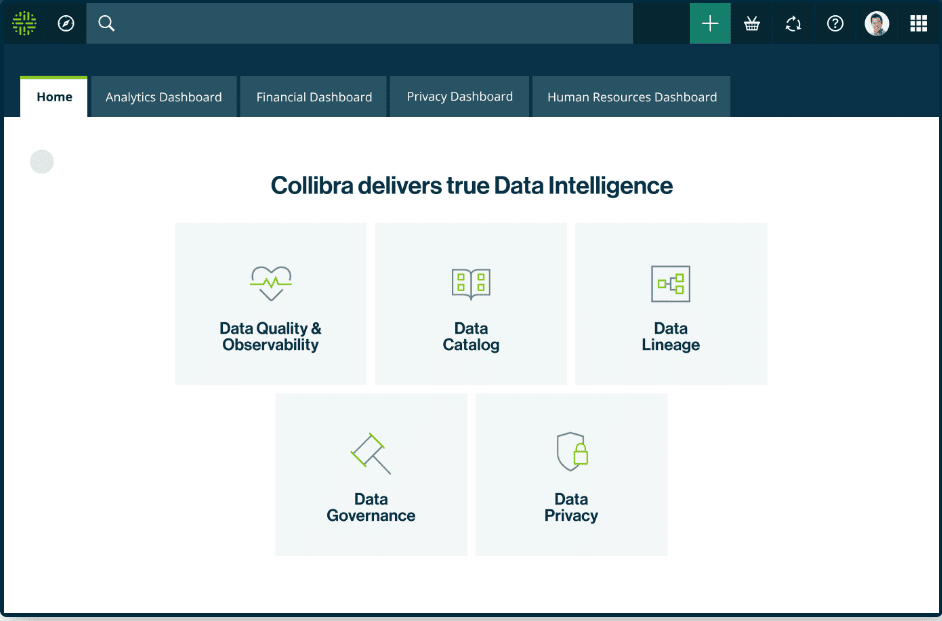
Collibra offers six key functional areas to aid in data governance:
- Collibra Data Quality & Observability: Monitors data quality and pipeline reliability to aid in remedying anomalies.
- Collibra Data Catalog: A single solution for finding and understanding data from various sources.
- Data Governance: A location for finding, understanding and creating a shared language around data for all individuals within an organization.
- Data Lineage: Automatically maps relationships between systems, applications and reports to provide a comprehensive view of data across the enterprise.
- Collibra Protect: Allows for the discovery, definition and protection of data from a unified platform.
- Data Privacy: Centralizes, automates and guides workflows to encourage collaboration and address global regulatory requirements for data privacy.
Collibra is primarily used by data owners, compliance officers and IT administrators who need inventory-level visibility into how data flows and is used across the enterprise.
2. Alation
Alation is a sophisticated data catalog solution designed for enterprise-level organizations, acting as a unified reference for all their data needs. It automatically scans and indexes over 60 distinct data sources, encompassing on-premises databases, cloud storage, file systems and business intelligence tools.
Utilizing query log ingestion, Alation analyzes queries to pinpoint the most frequently accessed data and its primary users. This information forms the foundation of the catalog, which allows users to collaborate and contextualize the data. With the catalog established, data analysts and scientists can swiftly locate, scrutinize, validate and repurpose data, enhancing their productivity.
However, Alation’s capabilities extend beyond a mere data catalog solution. It also serves as a data governance platform, enabling analytics teams to effectively manage and enforce policies for data consumers. Through Alation’s comprehensive metadata management, organizations can establish and enforce policies, monitor usage and maintain compliance with data privacy regulations. Its adaptable workflows and dashboards empower governance teams to effortlessly create, modify and disseminate policies, ensuring responsible data usage across the enterprise.
Alation is an optimal solution for Snowflake data governance, as it centralizes data, fosters collaboration and enforces adherence to data access and usage policies. This leads to heightened productivity and innovation, making Alation an invaluable resource for organizations seeking efficient Snowflake data governance.
Alation offers various solutions to improve productivity, accuracy and data-driven decision-making. These include:
- Alation Data Catalog: Improves the efficiency of analysts and the accuracy of analytics, empowering all members of an organization to find, understand and govern data efficiently.
- Alation Connectors: A wide range of native data sources that speed up the process of gaining insights and enable data intelligence throughout the enterprise. (Additional data sources can also be connected with the Open Connector Framework SDK.)
- Alation Platform: An open and intelligent solution for various metadata management applications, including search and discovery, data governance and digital transformation.
- Alation Data Governance App: Simplifies secure access to the best data in hybrid and multi-cloud environments.
- Alation Cloud Service: Offers businesses and organizations the option to manage their data catalog on their own or have it managed for them in the cloud.
Alation is a strong fit for organizations where self-service analytics is a priority and where data analysts need to find, validate and understand data without routing every request through a data engineering team.
Save up to 30% on your Snowflake spend in a few minutes!
Conclusion
Snowflake data governance is essential for ensuring data quality, security and accuracy. Snowflake data governance has matured considerably. With Snowflake Horizon consolidating compliance, security, privacy and discovery into a unified layer, the built-in toolset is now substantial enough that most organizations can establish a solid governance baseline without immediately reaching for external tools.
That said, governance doesn’t configure itself. RBAC needs deliberate design. Classification needs regular runs as data grows. Quality monitoring needs thresholds and alert routing. Lineage needs access controls and scheduled extraction. These are ongoing operational practices, not one-time configuration tasks.
Start with Horizon’s native features. Get the access model right. Automate what you can. And when your data estate extends beyond Snowflake’s boundaries into other platforms and tools, that’s when metadata control planes like Collibra or Alation earn their place.
FAQs
What is Snowflake data governance?
Snowflake data governance is the set of controls, policies and processes that define how data stored in Snowflake gets classified, accessed, protected and audited. Since 2024, Snowflake has consolidated these capabilities under Snowflake Horizon, its built-in governance suite covering compliance, security, privacy and data discovery.
What edition of Snowflake do I need for governance features?
Most governance features, including dynamic data masking, row access policies, object tagging, data classification and access history, require Enterprise edition or higher. Standard edition provides basic access control but lacks the fine-grained policy tools needed for comprehensive governance.
What are the benefits of a data governance strategy?
A governance strategy improves data reliability, regulatory compliance, data security, operational efficiency and decision-making quality. In regulated industries, it’s also a legal requirement rather than a best practice.
What are Snowflake’s key built-in governance features?
Column-level security (dynamic data masking and external tokenization), row-level security, object tagging, tag-based masking policies, data classification, data lineage, object dependencies, access history and Data Metric Functions for data quality monitoring.
What is Snowflake Horizon?
Snowflake Horizon is Snowflake’s integrated governance suite, introduced to unify compliance, security, privacy, interoperability and discovery capabilities. It includes the Horizon Catalog for universal data discovery, the Trust Center for security posture monitoring and data clean rooms for privacy-preserving collaboration.
How does RBAC work in Snowflake?
Snowflake’s role-based access control (RBAC) grants privileges to roles, then assigns roles to users. Administrators create a hierarchy of access roles (defining object-level permissions) and functional roles (representing job functions), then grant access roles to functional roles and functional roles to users. This model scales across large environments and simplifies both access administration and compliance auditing.
What are Data Metric Functions (DMFs) in Snowflake?
DMFs are native SQL-based functions that measure data quality dimensions, such as null counts, duplicate rates, data freshness and row counts, on a defined schedule. Snowflake provides system DMFs for common checks, and teams can write custom DMFs for business-specific rules. Results are recorded automatically and can trigger alerts when quality thresholds are crossed.
When do I need third-party governance tools alongside Snowflake?
Snowflake Horizon governs data within Snowflake’s boundaries effectively. You’ll need complementary tools like Collibra or Alation when your data estate spans multiple platforms (Databricks, BigQuery, on-premises systems), when business users need self-service discovery without SQL skills or when cross-platform lineage is critical for AI pipelines pulling data from multiple sources.
What is the difference between object dependencies and data lineage in Snowflake?
Object dependencies track structural relationships between Snowflake objects, for example, which views depend on a given table. Data lineage (available since November 2024) tracks how data flows from source to target through SQL operations, supporting both table-level and column-level tracing. Object dependencies are better for impact analysis; lineage is better for compliance tracing and understanding data transformation history.
How does Snowflake handle private connectivity?
Snowflake supports private connectivity through AWS PrivateLink, Azure Private Link and Google Cloud Private Service Connect. These keep network traffic off the public internet by routing it through private network paths. Private connectivity is available in Business Critical edition and above and is a common requirement in regulated industries. Virtual Private Snowflake (VPS) provides full single-tenant isolation for organizations with the strictest requirements.
Pramit Marattha
Pramit Marattha is a technical content writer and strategist with 5+ years of experience covering AI, data engineering, data cloud platforms and open source technologies. He turns complex technical concepts into clear, useful content for engineers and developers.







