


Snowflake has long been a leading platform for Online Analytical Processing (OLAP). Since its public debut a decade ago, it’s focused on delivering a cloud-based data warehouse solution that handles large-scale analytical workloads. Its separation of compute and storage has been central to its ability to scale elastically, making it a go-to platform for data-driven organizations. But as the demand for real-time, transactional data processing has grown, Snowflake has extended its focus beyond traditional OLAP workloads. In June 2022, Snowflake introduced Hybrid Tables as part of its broader Snowflake Unistore initiative, which is now available in public preview. Hybrid Tables are designed to bridge the gap between OLAP (Online Analytical Processing) and Online Transaction Processing (OLTP), enabling users to efficiently handle both analytical and transactional workloads within the same Snowflake platform.
In this article, we will cover everything you need to know about Snowflake Hybrid Tables—covering their architecture, key features, comparisons, benefits, limitations and a detailed step-by-step guide to creating and using them.
What are Snowflake Hybrid Tables?
Snowflake Hybrid Tables, introduced as part of Snowflake Unistore, bring transactional and analytical workloads together on a single, unified platform. They support low-latency, high-concurrency operations such as inserts, updates and deletes, while also enabling real-time data interactions for applications that need immediate access to fresh data.
What sets Hybrid Tables apart is their dual-storage architecture. They combine row-based storage for fast transactional workloads with columnar storage optimized for analytics. This lets you manage both workload types on the same dataset without moving or duplicating data. Snowflake’s query optimizer handles the routing (row-based operations for transactions, columnar storage for analytics) so you get performance tailored to the query at hand.
Snowflake Hybrid Tables also fully support primary keys, foreign keys, unique constraints, and secondary indexes to maintain data integrity and enable fast transactional access. That said, they’re not a drop-in replacement for standard Snowflake tables. Long-range scans and complex aggregations can degrade due to the row-based primary storage. And several features such as materialized views, streams, Snowpipe, fail-safe and data sharing across accounts, aren’t supported, reflecting their focus on operational workloads rather than large-scale batch analytics.
These tables integrate into Snowflake’s existing architecture and benefit from centralized governance, scalable compute and Snowflake’s robust security model.
Watch this video by Carl Perry for an in-depth exploration of Snowflake Unistore and Snowflake Hybrid Tables:
Example use case: Imagine a retail application where orders are processed in real-time (OLTP), but you also need to analyze the data for trends or forecast inventory (OLAP). This is where Snowflake Hybrid Tables shine. They can handle both tasks, making them a great fit for situations like this.
Architecture overview of Snowflake Hybrid Tables
Snowflake Hybrid Tables are designed to integrate seamlessly into the existing Snowflake architecture, providing a robust solution for handling both operational and analytical workloads. This architecture leverages both row and columnar storage to optimize performance and efficiency for various types of queries. Here is a detailed exploration of the architecture, its components and the benefits it offers.
Snowflake Hybrid Tables architecture provides several advantages:
- Seamless data governance — Snowflake’s platform features, such as data governance, work with Snowflake Hybrid Tables out of the box, guaranteeing compliance and security without additional overhead.
- Mixed workloads — Users can run hybrid workloads that combine operational (OLTP) and analytical (OLAP) queries, allowing for a more versatile data handling approach.
- Native query execution — Snowflake Hybrid Tables can be joined with other Snowflake tables natively. This means that all queries are executed efficiently without the need for data federation, which can introduce latency and complexity.
- Atomic transactions — Users can execute atomic transactions across Snowflake Hybrid Tables and other Snowflake tables without needing to manage two-phase commits manually. This simplifies transaction management and enhances reliability.
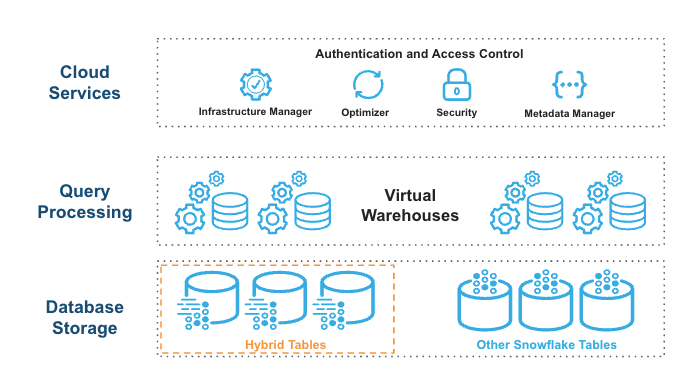
How data flows through the architecture
The architecture of Snowflake Hybrid Table uses a row store as the primary data store for Hybrid Tables, which is crucial for operational query performance. Here’s how it works:
1. Direct writes to row store
When data is written to a Snowflake Hybrid Table, it is immediately stored in the row format. This design is optimized for transactional workloads that require quick read/write operations.
2. Asynchronous data copying
Data is asynchronously copied from the row store into object storage. This process allows for large scans to be performed without impacting ongoing operational workloads, thus providing better workload isolation.
3. Columnar caching for analytics
Some data may be cached in a columnar format in the warehouse. This caching mechanism enhances performance for analytical queries by leveraging the efficiency of columnar storage during read operations.
4. Query optimization
Users execute SQL statements against logical Hybrid Tables. The Snowflake query optimizer intelligently decides where to read data from—whether from the row store or cached columnar data—to ensure optimal performance.
One trade-off worth calling out: because the primary store is row-based, Hybrid Tables typically have a larger storage footprint than standard Snowflake tables. Standard tables use columnar micro-partitions that achieve significantly higher compression rates.
TL;DR: Snowflake Hybrid Tables integrate into the existing Snowflake architecture by utilizing a row store as the primary data storage mechanism, allowing for efficient operational query performance while asynchronously copying data to object storage for large scans and workload isolation. They enable mixed workloads of operational and analytical queries, support native joins with other Snowflake tables without federation and allow atomic transactions across hybrid and standard tables without manual two-phase commit management. The architecture features a cloud services layer for query compilation and optimization, with the Snowflake query optimizer determining the optimal data source for queries, resulting in a consistent view of data while typically incurring a larger storage footprint due to lower compression rates compared to standard columnar tables.
Unique features of Snowflake Hybrid Tables
Snowflake Hybrid Tables come equipped with a range of features that make them uniquely suited for hybrid workloads:
1. Dual-storage architecture (row + columnar)
As we have already mentioned earlier, Snowflake Hybrid Tables support both row-based (for transactional operations) and columnar storage (for analytics).
2. Fast single-row operations
Unlike traditional OLAP tables, Snowflake Hybrid Tables excel at single-row inserts, updates and deletes. This capability is crucial for OLTP workloads where speed and low latency are paramount. Users can expect sub-millisecond latencies for these operations, making Snowflake Hybrid Tables suitable for real-time data processing scenarios.
3. Enforced integrity constraints
Snowflake Hybrid Tables enforce primary key, foreign key and unique constraints at write time. Standard Snowflake tables accept these constraint definitions but don’t enforce them. With Hybrid Tables, referential integrity is guaranteed, not just declared.
4. Row-level locking
Snowflake Hybrid Tables implement row-level locking. Multiple transactions can operate on different rows of the same table simultaneously, which reduces contention and increases throughput under high concurrency. Standard tables use partition or table-level locking, which can become a bottleneck.
5. Snowflake indexes for data retrieval
Users can create secondary indexes on specific columns to speed up queries. This improves the performance of both transactional workloads and analytical workloads by minimizing the time it takes to retrieve data.
6. Security and governance
Snowflake Hybrid Tables integrate with Snowflake’s existing security and governance features. This includes support for role-based access control, data encryption and audit logging.
Snowflake Hybrid Tables can tackle a variety of use cases, thanks to these standout features.
Snowflake Hybrid Tables vs Snowflake Standard Tables
Snowflake Hybrid Tables have some unique capabilities, but to truly understand what they can do, it’s a good idea to compare them against standard Snowflake tables. This comparison will show you where each type of table shines. ‘
Here’s a detailed breakdown of the key differences between Snowflake Hybrid Tables vs Snowflake Standard Tables:
| Feature | Snowflake Hybrid Tables | Snowflake Standard tables |
| Main use case | Optimized for hybrid OLTP and OLAP workloads | Primarily designed for OLAP workloads |
| Primary data layout | Row-oriented, with async columnar copy for analytics | Columnar micro-partitions |
| Locking mechanism | Row-level locking for high concurrency | Partition or table-level locking |
| Indexes | Synchronous on writes; supports secondary indexes | Search Optimization Service provides async index updates |
| PRIMARY KEY constraints | Required and enforced | Optional, not enforced |
| FOREIGN KEY constraints | Optional, enforced for referential integrity | Optional, not enforced |
| UNIQUE constraints | Optional, enforced | Optional, not enforced |
| NOT NULL constraints | Optional, enforced | Optional, enforced |
| Time Travel | Limited (TIMESTAMP parameter only; no OFFSET, STATEMENT, STREAM, or BEFORE clause) | Full support (up to 90 days) |
| Zero-copy cloning | Not supported directly (databases/schemas containing hybrid tables can be cloned with workarounds) | Fully supported |
| Data sharing across accounts | Not supported | Fully supported |
| Materialized views | Not supported | Fully supported |
| Dynamic tables | Not supported | Fully supported |
| Clustering keys | Not supported (ordered by primary key) | Fully supported |
| Streams | Not supported | Fully supported |
| Snowpipe | Not supported | Fully supported |
| Fail-safe | Not supported | Supported |
| Query performance (OLTP) | Optimized for fast point lookups and small range queries | Not optimized for OLTP |
| Query performance (OLAP) | Good for medium-scale analytical queries | Optimized for large-scale analytics |
| Storage footprint | Larger, due to row-based primary storage | Smaller, due to columnar compression |
| ACID compliance | Full | Full |
| Scalability | Strong for OLTP; limited for large OLAP | Highly scalable for OLAP |
| Data loading | Optimized for continuous small-batch inserts; bulk loading supported on empty tables | Optimized for bulk loading |
| Semi-structured data | Supported (but not indexable) | Supported |
| Tri-Secret Secure | Supported via Dedicated Storage Mode | Supported |
| Cost model | Storage billed at flat rate per GB + standard virtual warehouse compute | Storage + compute; generally lower storage costs due to compression |
Snowflake Hybrid Tables excel in scenarios requiring both transactional and analytical capabilities. They’re perfect for operational data stores, real-time analytics and applications that need low-latency access to current data while also supporting analytical queries.
Standard Snowflake Tables remain the go-to choice for pure analytical workloads, especially those involving large-scale data processing, complex aggregations and historical data analysis.
What are the benefits of Snowflake Hybrid Tables?
Snowflake Hybrid Tables offer a multitude of benefits that can significantly enhance an organization’s data management capabilities.
Let’s explore these advantages in detail:
- Unified platform for OLTP and OLAP — Perhaps the most significant benefit of Snowflake Hybrid Tables is their ability to support both transactional and analytical workloads within a single platform.
- Improved data freshness for analytics — Since transactional data lands directly in the row store without batch ETL delays, analytical queries can access near-real-time data. That tightens the loops between data ingestion and decision-making.
- Enhanced data integrity — The enforcement of primary key and foreign key constraints in Hybrid Tables ensures data integrity and consistency.
- ACID compliance — Snowflake Hybrid Tables maintain data integrity and reliability through full ACID compliance, ensuring that all transactions are handled consistently.
- Improved concurrency — The row-level locking mechanism in Hybrid Tables allows for higher concurrency compared to table-level locking like in Standard Snowflake Tables, allowing more users or applications to simultaneously interact with the data without experiencing contention issues, leading to improved overall system performance.
- Simplified data governance — With data residing in a single platform, it’s easier to implement and enforce data governance policies.
- Agile-friendly — Snowflake Hybrid Tables let teams iterate on transactional and analytical data models together, without context-switching between different systems or data formats.
That said, Snowflake Hybrid Tables aren’t free. Storage costs run higher due to the row-based layout, and high-throughput transactional workloads will consume virtual warehouse compute. Always benchmark against your actual workload before committing.
Step-by-step guide to creating and using a Snowflake Hybrid Table
Now that we’ve explored the features and benefits of Snowflake Hybrid Tables, let’s dive into a practical guide on how to create and use them.
Prerequisites
Before we begin, ensure that you have the following in place:
- Snowflake account: Your Snowflake account must be set up in one of the AWS regions where Snowflake Hybrid Tables are available.
- Familiarity with Snowsight: Users should have a basic understanding of the Snowflake Snowsight interface.
- Hybrid Tables enabled: Users must have a non-trial Snowflake account with Hybrid Tables enabled.
- Appropriate permissions: Make sure you have the necessary roles and permissions to create and manage Snowflake Hybrid Tables. This typically includes the ability to create warehouses, databases and schemas.
- Snowflake environment: You should have access to a Snowflake worksheet or Snowflake CLI to execute SQL commands.
- Storage integration (Optional): If you plan to load data from external sources like S3 or Azure Blob Storage, set up the appropriate storage integration.
- Some sample dataset: Prepare some sample data to load into your Snowflake Hybrid Table.
Step 1—Set up your Snowflake environment
First, log in to your Snowflake account and create a new SQL worksheet. This is where we’ll execute our commands.
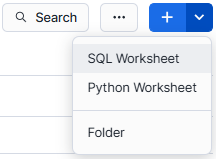
Next, if you don’t already have a Snowflake Warehouse to use, create one with the following command:
CREATE WAREHOUSE IF NOT EXISTS hybrid_wh
WITH WAREHOUSE_SIZE = 'XSMALL'
AUTO_SUSPEND = 300
AUTO_RESUME = TRUE;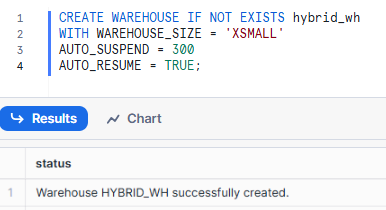
Now that you have created Snowflake Warehouse let’s create a new database and schema to house your Snowflake Hybrid Table:
CREATE DATABASE IF NOT EXISTS hybrid_db;
USE DATABASE hybrid_db;
CREATE SCHEMA IF NOT EXISTS hybrid_schema;
USE SCHEMA hybrid_schema;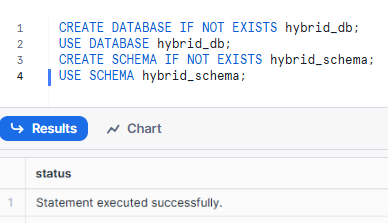
Step 2—Create the Snowflake Hybrid Table
Now, let’s create our Hybrid Table. Here’s a basic syntax for creating a Hybrid Table using the CREATE HYBRID TABLE command:
CREATE OR REPLACE HYBRID TABLE <table_name> (
	 id NUMBER PRIMARY KEY AUTOINCREMENT START 1 INCREMENT 1,
	 col1 VARCHAR NOT NULL,
	 col2 VARCHAR NOT NULL,
	 col3 VARCHAR NOT NULL,
	 col4 VARCHAR NOT NULL,
	 col5 VARCHAR NOT NULL
	...
	 ...
	...
	 ...
);
In this example, we’ll create a simple table to store customer info:
CREATE OR REPLACE HYBRID TABLE customers_table (
		customer_id INT PRIMARY KEY,
		first_name VARCHAR(50),
		 last_name VARCHAR(50),
		 email VARCHAR(100) UNIQUE,
		 cust_signup_date DATE,
		 cust_last_login TIMESTAMP
);
Note: the use of the HYBRID keyword in the table creation statement. This is what distinguishes a Hybrid Table from a standard Snowflake table.
Step 3—Configure table properties
You can set additional table properties if needed like you can set properties such as time-travel duration and retention policy.
ALTER TABLE <table_name> SET DATA_RETENTION_TIME_IN_DAYS = 1;Step 4—Load data into Snowflake Hybrid Table
There are several ways to load data into your Hybrid Table. Let’s explore a few options:
1. Using Snowflake INSERT statements:
INSERT INTO customers_table (customer_id, first_name, last_name, email, cust_signup_date, cust_last_login)
VALUES
(1, 'Elon', 'Musk', 'elon.musk@tesla.com', '2024-10-16', CURRENT_TIMESTAMP()),
(2, 'Jeff', 'Bezos', 'jeff.bezos@amazon.com', '2023-09-10', CURRENT_TIMESTAMP()),
(2, 'Mark', 'Zuck', 'mark@meta.com', '2023-09-05', CURRENT_TIMESTAMP());
2. Using Snowflake COPY command (if you have data in a stage):
COPY INTO customers_table
FROM @my_stage/customers.csv
FILE_FORMAT = (TYPE = CSV FIELD_OPTIONALLY_ENCLOSED_BY = '"')
ON_ERROR = 'ABORT_STATEMENT';
3. Using CREATE TABLE AS SELECT (CTAS):
If you have data in another table, you can use CTAS to create and populate your Hybrid Table in one go:
CREATE OR REPLACE HYBRID TABLE customers_table AS
SELECT * FROM existing_customer_table;
Remember, CTAS is the recommended method for bulk loading data into Snowflake Hybrid Tables due to its optimized performance.
Step 6—Adding indexes to Snowflake Hybrid Table (optional)
Hybrid Tables automatically create an index on the primary key, but you can add secondary indexes to improve query performance on other columns:
CREATE INDEX idx_signup_date ON customers_table (signup_date);Step 7—Query and explore data loaded into the Snowflake Hybrid Table
Now that we’ve created and populated our Snowflake Hybrid Table, let’s explore it:
1. View table properties and metadata:
SHOW TABLES LIKE 'customers_table';2. Display information about the columns:
DESC TABLE customers_table;3. List all the Hybrid Tables in your account:
SHOW HYBRID TABLES;4. List all the indexes in your account:
SHOW INDEXES;5. Query the data:
SELECT * FROM customers_table WHERE signup_date >= '2023-01-01';What are the limitations of the Snowflake Hybrid Table?
Snowflake Hybrid Tables offer tons of benefits, but it’s important to be aware of their limitations to make informed decisions about when and how to use them. Here’s a comprehensive list of the limitations of Snowflake Hybrid Table:
1. Unsupported features
Snowflake Hybrid Tables have a range of unsupported features that can restrict their usability:
- Cloning — Direct cloning of Hybrid Tables isn’t supported, though databases and schemas containing Hybrid Tables can be cloned using the IGNORE HYBRID TABLES parameter
- Clustering keys — You can’t apply clustering keys to Hybrid Tables; data is ordered strictly by primary key
- Data sharing across accounts — Snowflake Hybrid Tables can’t be shared directly across Snowflake accounts (though Native Apps can create Hybrid Tables in consumer accounts)
- Dynamic tables and materialized views — Neither is compatible with Hybrid Tables
- Streams — Change data capture via streams isn’t available on Hybrid Tables
- Snowpipe — Automated ingestion via Snowpipe isn’t supported
- Time Travel (partial) — Only the TIMESTAMP parameter is supported in AT clauses; OFFSET, STATEMENT, STREAM, and the BEFORE clause are all unsupported. UNDROP TABLE is also not supported
- Fail-safe — Snowflake Hybrid Tables don’t support Snowflake’s fail-safe data recovery mechanism
- Search Optimization Service — The Search Optimization Service (SOS) doesn’t work with Hybrid Tables
- Replication — Snowflake Hybrid Tables can’t be replicated across regions, which complicates disaster recovery and cross-region high availability setups
- Results cache — Queries against Hybrid Tables don’t use Snowflake’s persisted query results cache
- Higher-order functions — FILTER, REDUCE, and TRANSFORM aren’t supported in queries against Hybrid Tables
- UUID data type — Not supported for any column in a hybrid table
2. Data size and throughput limitations
| Quota | Current limit | Notes |
| Hybrid storage | 2 TB per Snowflake database | Applies only to active data in the row store, not object storage. Write operations are blocked if exceeded until you drop or truncate data |
| Throughput | ~16,000 operations per second per database | Based on a balanced 80% read / 20% write workload. Throttling kicks in if exceeded |
| Databases with hybrid tables | 200 per Snowflake account (max 100 new databases per hour) | Exceeding this blocks creating hybrid tables in new databases |
3. Consistency model
Snowflake Hybrid Tables use a session-based consistency model by default. Read operations within the same session always return the latest write results from that session. Changes made outside the current session may have up to ~100ms of staleness. To eliminate staleness, set READ_LATEST_WRITES = true at the statement or session level; though this introduces a few milliseconds of additional latency.
4. Constraint rules
Primary key, unique, and foreign key constraints are enforced at the row level and can’t be deferred. Constraints must be defined at table creation time and can’t be added or altered afterward. This limits schema evolution flexibility; plan your data model carefully before creating the table.
5. Data loading and DML limitations
- Optimized bulk loading applies only when the table is empty (applies to CTAS, COPY, and INSERT INTO … SELECT)
- For DML operations, INSERT, UPDATE, and DELETE perform better than MERGE for most workloads. Use MERGE only when your use case specifically requires it
- Transactions in Hybrid Tables are scoped to a single database
- Snowflake Hybrid Tables can’t be created in transient or temporary schemas
6. Data type indexing limitations
Certain Snowflake data types are not supported for primary or secondary indexing in Hybrid Tables, including geospatial types (GEOGRAPHY, GEOMETRY), semi-structured types (ARRAY, OBJECT, VARIANT) and vector types (VECTOR). Also, TIMESTAMP_TZ can’t be a primary, unique or foreign key column (it can be a secondary index column).
7. Tri-Secret Secure
Snowflake Hybrid Tables can work with TSS-enabled accounts, but it requires a specific storage configuration called Dedicated Storage Mode. This isn’t automatic—you need to enable it explicitly. If TSS is already active on your account, check Snowflake’s documentation on Dedicated Storage Mode before creating Hybrid Tables.
8. Regional availability
Snowflake Hybrid Tables are generally available on:
- All commercial AWS regions
- All commercial Microsoft Azure regions
They are not available on:
- Google Cloud Platform (GCP)
- U.S. SnowGov regions
- Trial accounts
- Virtual Private Snowflake (VPS) customers need to contact Snowflake Support for enablement
To design your data architecture effectively, you need to know these limitations. Once you understand them, you can decide if Snowflake Hybrid Tables are right for your needs. They have significant advantages in some cases, but aren’t always the best option.
A note on pricing
The hybrid table cost model changed significantly in March 2026. Previously, Snowflake charged separately for hybrid table “requests”—read and write operations against the underlying row store. As of March 1, 2026, that request-based billing category no longer exists.
Snowflake Hybrid Tables are now billed on two dimensions only:
- Hybrid table storage — A flat monthly rate per GB of data stored in the row store
- Virtual warehouse compute — Standard warehouse consumption for queries executed against Hybrid Tables
Save up to 30% on your Snowflake spend in a few minutes!
Conclusion
Snowflake Hybrid Tables offer a unified solution for both transactional workloads (OLTP) and analytical workloads (OLAP), enabling efficient data management in a single platform. They support high-concurrency operations—such as inserts, updates and deletes—while serving real-time data to applications and handling operational analytics on live data. Hybrid Tables are also capable of running complex queries on large datasets, making them ideal for modern data workloads that require both real-time and historical data processing.
In this article, we have covered:
- What Snowflake Hybrid Tables are and why they exist
- How the dual-storage architecture works
- Key features: Row-level locking, enforced constraints, secondary indexes
- A detailed comparison against standard Snowflake tables
- Benefits and real trade-offs
- A practical step-by-step guide to creating and loading Hybrid Tables
- A comprehensive, up-to-date breakdown of limitations and quotas
… and much more!
FAQs
What are Snowflake Hybrid Tables?
Snowflake Hybrid Tables are a Snowflake table type optimized for low-latency, high-throughput operations. They combine row-based storage for transactional workloads with asynchronous columnar storage for analytics; all within a single table and a single Snowflake platform.
What workloads do Hybrid Tables support?
- High-concurrency transactional operations (inserts, updates, deletes)
- Real-time data serving for applications and APIs
- Operational analytics on current, live data
- Lightweight transactional applications with relational data models
Are there feature limitations compared to standard tables?
Yes, significant ones. Snowflake Hybrid Tables don’t support Time Travel (beyond the TIMESTAMP parameter), fail-safe, cloning, streams, Snowpipe, dynamic tables, materialized views, data sharing across accounts, Search Optimization Service, or cross-region replication.
Can Hybrid Tables be joined with standard Snowflake tables?
Yes. Snowflake Hybrid Tables join natively with standard Snowflake tables in the same query engine—no federation required. You can also execute atomic transactions across both table types.
What’s the storage limit for Hybrid Tables?
2 TB of active data per Snowflake database (row store only; object storage is separate). Write operations are temporarily blocked if you exceed this limit.
What’s the throughput limit?
Approximately 16,000 operations per second per Snowflake database, for a balanced 80% read / 20% write workload. Exceeding this triggers throttling.
Do Hybrid Tables support referential integrity?
Yes. Foreign key and primary key constraints are enforced at write time—not just declared.
How does bulk loading work with Hybrid Tables?
When the target hybrid table is empty, CTAS, COPY INTO, and INSERT INTO … SELECT all use an optimized bulk-loading path. Once the table has existing data, that optimization no longer applies and writes proceed row by row.
How are Hybrid Tables priced now?
As of March 1, 2026, pricing consists of two components: a flat monthly rate per GB for hybrid table storage, plus standard virtual warehouse compute charges for queries. The previous request-based billing category has been retired.
Do Hybrid Tables support Tri-Secret Secure?
Yes, as of late 2025. TSS support for Hybrid Tables requires enabling Dedicated Storage Mode. If your account already has TSS active, review Snowflake’s Dedicated Storage Mode documentation before creating Hybrid Tables.
Pramit Marattha
Pramit Marattha is a technical content writer and strategist with 5+ years of experience covering AI, data engineering, data cloud platforms and open source technologies. He turns complex technical concepts into clear, useful content for engineers and developers.







