
Your next AI governance problem may already be open in someone’s browser. Maybe your colleague pasted a portion of a client brief into ChatGPT or Claude to quickly generate a proposal. Maybe someone on your team signed up for a SaaS app on a personal card because procurement was taking forever. Or maybe they clicked “Allow” when a new app asked to read their work email and files. Any one of these takes seconds and can leave company data where IT can’t see or control it. Multiply that across every team, and you’ve got a growing AI governance problem.
None of this behavior is new. Employees have worked around IT for decades, first with personal computers and USB drives, then with cloud apps that needed only a credit card. That’s shadow IT. What’s different with AI is how easy it is to use and how sensitive the data can be. Most AI tools run in a browser, many have free plans and sign-up takes a minute. People feed them source code, contracts, customer records and business plans. That makes unsanctioned AI use, or shadow AI, much harder to manage than traditional shadow IT.
In this article, we’ll cover what AI governance means for employee AI usage, why shadow AI spreads so fast, why bans backfire and what doing nothing really costs. Then we’ll lay out a 10 step AI governance framework for AI tools and SaaS apps, plus a 90 day plan to get it moving and the AI governance mistakes to avoid along the way.
What is AI governance, and who owns it?
AI governance is the set of roles, rules and controls that decide which AI systems your company uses, what data those systems can touch and who answers for the results. Done well, AI governance is how you say yes to AI without losing control of your data.
There are two parts to this: one covers the AI models and applications you build. The other covers employee AI usage: the AI tools people use every day, such as chatbots, coding assistants, AI features inside SaaS apps and AI agents. This guide focuses on that second half of AI governance, because that’s where the visibility gap is widest.
No single team owns all of it. That’s why enterprise you need one accountable owner (more on that in step 1) and a clear split of duties:
| Team | What it owns |
| Security | Data controls, data loss prevention and AI incident response |
| IT and identity | Single sign-on (SSO), account provisioning, device management and browser management |
| IT asset management (ITAM) | The inventory of AI tools, SaaS apps and their life cycle |
| Legal and privacy | Vendor terms, data processing agreements and regulatory duties |
| Procurement | Vendor intake, approvals and renewals |
| Finance and FinOps | AI spend, budgets and cost allocation |
| Human resources (HR) | Employee AI training and rules for AI usage monitoring |
| Business leaders | Use cases, adoption targets and the outcomes AI supposed to deliver |
You don’t need to build an AI governance framework from scratch. The National Institute of Standards and Technology (NIST) AI Risk Management Framework (AI RMF) gives you a voluntary, widely used risk process, and NIST is revising version 1.0 as part of the White House AI Action Plan. ISO/IEC 42001, published in December 2023, defines a certifiable AI management system for when customers or auditors ask for proof. If you operate in the EU, the AI Act adds legal duties on top, which we’ll cover in step 8.
Frameworks tell you what good looks like. They don’t explain why your current controls keep missing AI use. That’s next.
Why is shadow AI outrunning your AI governance?
Shadow AI spreads quickly because the barriers to using AI are low:
- Employees can create AI accounts with no purchase order, no procurement review and no admin approval
- Free and low-cost plans often sit under spending thresholds, so they rarely trigger a security review
- AI features now ship inside SaaS apps you already pay for, so there’s no new app or login for IT to catch
- Business leaders push people to use AI before the company has approved AI tools, data rules or employee AI training in place
The result is a visibility gap that undercuts AI governance, and the data shows how wide it is. In our 2026 State of ITAM Report, only 31% of organizations reported visibility into AI software. For Saas, it was 66%. Only 45% were actively identifying unsanctioned AI usage.
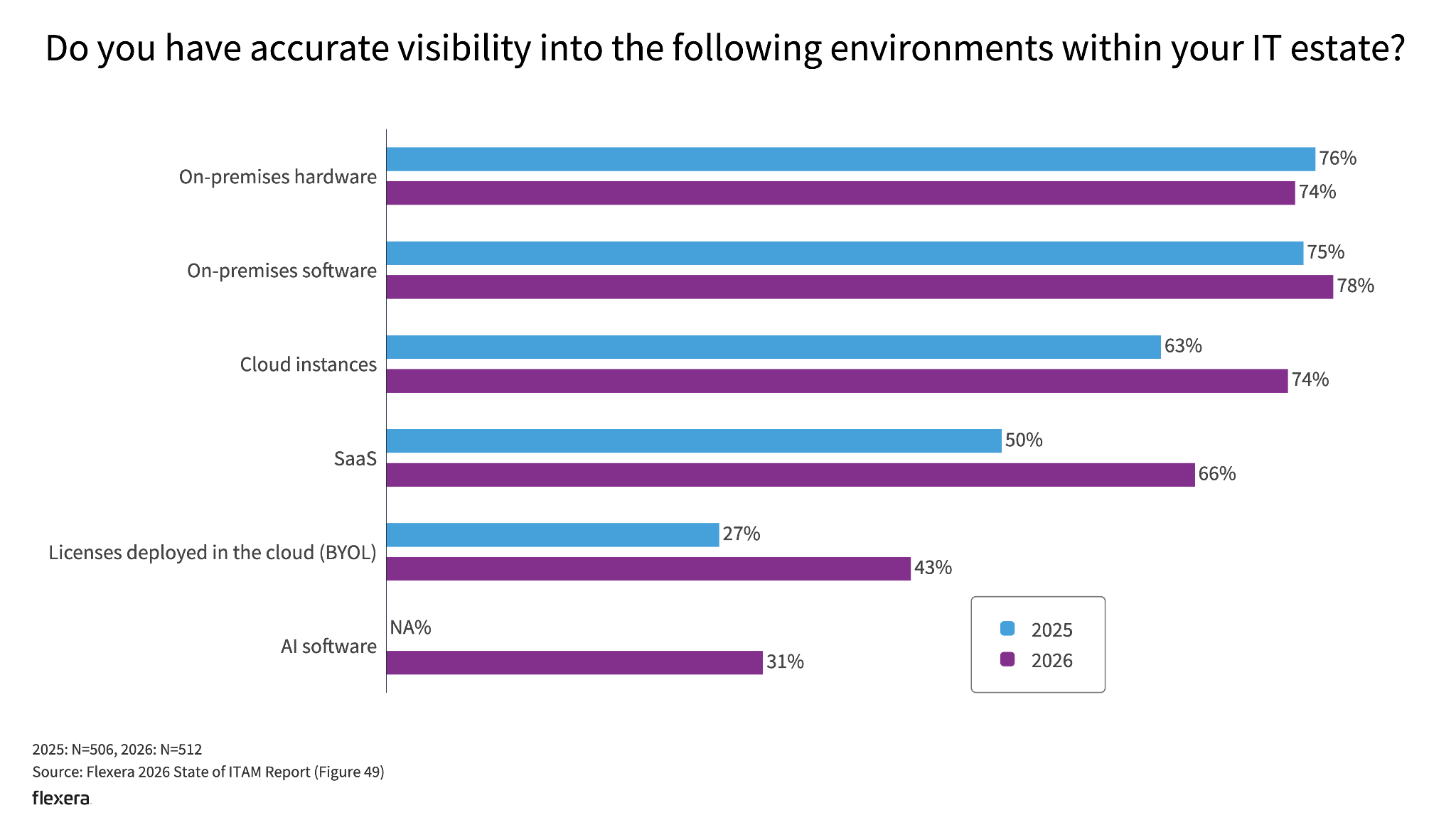
Shadow AI stats: 31% of organizations have AI software visibility vs. 66% for SaaS (Source: Flexera 2026 State of ITAM Report)
In Flexera’s 2026 IT Priorities Report, 85% of IT leaders said gaps in IT visibility put their organization at risk. In the same report, 58% reported issues caused by unsanctioned SaaS.
Employee behavior tells the same story. The Verizon 2026 Data Breach Investigations Report (DBIR) found that 45% of employees now use AI regularly on corporate devices. A year earlier, it was 15%. And 67% of users reaching AI services from those devices used non-corporate accounts. Source code was the top data type sent to outside generative AI tools. Shadow AI also rose to the third most common non-malicious insider action in Verizon’s DLP data, a 4x increase in a year.
On a personal AI account, your company isn’t the customer
Those personal accounts needs a closer look, because they sit outside AI governance entirely. On a personal account, the employee accepted consumer terms, and those terms decide what happens to your data. Business plans and API access run on separate commercial terms. Here’s how the three biggest assistants split it:
| Vendor | Consumer plans | Training on consumer plans | Commercial/Enterprise plans |
| OpenAI | ChatGPT Free, Go, Plus and Pro | On by default until the user turns off “Improve the model for everyone” | ChatGPT Business, Enterprise, Edu and the API aren’t used to train models by default |
| Anthropic | Claude Free, Pro and Max, including Claude Code sessions on those accounts | The user chooses; if they allow it, Anthropic can keep that data for up to five years | Claude for Work, Claude for Government, Claude for Education and the API fall under commercial terms that exclude training by default |
| The consumer Gemini app | Chats can improve Google’s AI while Keep Activity is on, and human reviewers read some chats | Gemini in Google Workspace content isn’t human reviewed or used to train models outside your domain without permission |
So a paid personal subscription doesn’t buy enterprise protection. The line runs between consumer and commercial contracts, not between free and paid. Consumer terms also come without the data processing agreement, admin console, audit logs and retention controls your security and legal teams depend on. That contract gap is why shadow AI needs its own place in your AI governance strategy.
Here’s how it compares with the shadow IT you already know.
Shadow IT, shadow SaaS and shadow AI are related but different
These three terms tend to overlap. But they describe different layers of the same problem.
Shadow IT is the broad category. It covers any hardware, software, service, script or infrastructure used for work without formal IT supervision.
Shadow SaaS is the cloud app slice. It covers self-service sign-ups, free trials, personal subscriptions, expensed apps and SaaS tools connected to company systems outside procurement.
Shadow AI is the AI slice. It covers standalone AI assistants, embedded AI features, coding assistants, local models, agents, API keys, browser extensions and AI connectors used outside approved AI governance.
Here’s the quick comparison:
| Shadow IT | Shadow SaaS | Shadow AI | |
| What it is | Any hardware, software or services used for work without IT approval | Cloud apps adopted outside procurement, often on a free tier or an expensed card | AI assistants, AI features, agents and model access used for work without approval |
| How it gets in | Personal devices, installed software, scripts, unmanaged infrastructure | Self-service sign-ups, free trials, expense cards, OAuth connections | Personal accounts, embedded AI features, browser extensions, local models, API keys, agents and MCP connectors |
| Main risks | Unpatched assets, unmanaged endpoints, uncontrolled data and weak access | Vendor risk, data exposure, duplicate spend and unmanaged access | Sensitive data in prompts, consumer terms that allow training, agents acting on hidden instructions |
| Can it act on data? | Yes, through scripts and automations someone built | Yes, through granted permissions such as read, send or delete | Yes, and agents choose their next action at runtime from text they read, which exposes them to prompt injection |
Shadow IT and shadow SaaS can both act on data. An unsanctioned automation can delete records. An app with the right OAuth scopes can send email in your name. What’s new with AI agents is who decides the action.
A script does what its author wrote. An agent decides what to do next based on what it reads, and that includes instructions an attacker hid in an email, a document or a web page. That attack is called prompt injection, and the OWASP GenAI Security Project ranks it first in its 2026 Top 10 for large language model (LLM) applications.
Where does shadow AI get in?
Shadow AI has more entry points than a traditional application inventory usually captures, which is why AI governance needs a wider net:
- Personal ChatGPT, Claude, Gemini or other AI accounts used for work
- AI features inside software you already pay for, which can switch on with no new app or login
- Browser extensions that read pages or capture content for AI processing
- Meeting assistants that record calls, create transcripts or send summaries to third-party services (an August 2025 lawsuit alleges Otter.ai recorded people without consent and trained its AI on the recordings)
- AI coding assistants and command-line agents
- Local models running on developer laptops or workstations
- API keys created outside your identity and secrets management systems
- Agents connected to business systems through OAuth or service accounts
- Model Context Protocol (MCP) servers and connectors that developers install on their own
Why browser extensions and AI browsers belong on your risk list
Browser extensions are easy to underestimate, and some rank among the riskiest items on that list. In December 2025, Koi Security reported that four extensions from one publisher captured users’ AI chats and sent them to the publisher’s servers. The best known, Urban VPN Proxy, had about 6 million Chrome users and a Featured badge in the Chrome Web Store. Together, the extensions reached more than 8 million users across Chrome and Edge.
The harvesting code was silently pushed out in an update in July 2025. It was quietly collecting conversations with ChatGPT, Claude, Gemini, Microsoft Copilot and other assistants, even when the VPN was off. A privacy tool turned into a leak.
AI browsers add another layer of risk. They combine an AI sidebar that can send content from an open tab to the vendor’s backend with agents that can click, type and submit forms on a user’s behalf. In December 2025, Gartner advised organizations to block AI browsers for the foreseeable future, citing critical cybersecurity risks. That’s why extension and browser control belongs in your AI governance program, not only in endpoint security.
With risks like these, who wouldn’t want to shut it all down? Here’s why a ban rarely works as an AI governance strategy.
Why don’t AI bans work?
A ban doesn’t remove the need behind it. It removes your view of how people meet that need, and visibility is the one thing AI governance can’t work without.
Start with reach. A ban works only where you control the device or the network. A personal phone on cellular data never touches your proxy. Neither does a home laptop. And that gap is wide. In PagerDuty’s 2026 Shadow AI Survey, 50% of office professionals said they’d used personal devices to complete work tasks with AI.
Even within the network, the loopholes are hard to plug. Most AI tools are implemented as features within applications that the user has already permitted access to; a domain block can’t separate the two without breaking the app. Browser extensions also enable AI within sites that the user has permitted. And new AI tools launch faster than anyone can update a denylist.
So the usage doesn’t stop. It drifts somewhere worse. People fall back on personal accounts and the consumer terms we covered earlier. You lose the logs, the DLP coverage and the chance to train someone before they paste a customer list into a model. You’ve traded a known risk for an unknown one.
Then there’s the matter of honesty. Once AI use breaks a rule, people stop talking about it. Nobody reports a risky prompt if reporting it means admitting a violation. Self-reporting is often the fastest early warning an AI governance program gets, and a ban shuts it off.
None of this means you never block anything. Blocking a specific high-risk category, like AI browsers or an extension caught harvesting chats, is sound risk management. Just give people an approved alternative. What fails is the blanket ban with nothing behind it.
What Samsung’s ChatGPT ban really teaches us about AI governance
Samsung’s story shows the whole arc. In March 2023, Samsung’s semiconductor division let engineers use ChatGPT and told them to keep internal information out of it. Within weeks, three leaks surfaced. Two engineers pasted proprietary source code, one to fix a bug and one to optimize code that spots defective equipment. A third pasted a transcript of an internal meeting to produce minutes.
Samsung then restricted generative AI on company-owned computers, tablets and phones, and on its internal networks. The memo, reported by Bloomberg on May 2, 2023, called the restriction temporary. On personal devices, Samsung could only ask employees to keep company and personal data out of chatbots. It warned that breaking the rules could cost people their jobs.
Building real AI governance took almost three years. In June 2026, Samsung’s Device experience (DX) division announced it would roll out ChatGPT, Gemini and Claude to employees after a two-month pilot with about 2500 people. Access goes only to employees who complete internal security training, and Samsung keeps its in-house Samsung Gauss model running alongside the external tools.
So what’s the real lesson? A written warning didn’t stop the first leaks. The ban only reached devices Samsung controlled. And the lasting fix wasn’t the ban at all. It was AI governance: a sanctioned option, controls around it and employee AI training.
What does skipping AI governance cost?
So if bans fail, what happens if you do nothing? The bill shows up in five places: breaches, hidden spend, bad output, regulators and the courtroom. Shadow AI makes breaches pricier, and unvetted AI use can accelerate breaches.
IBM’s Cost of a Data Breach Report 2026 found that 43% of breached organizations had a security incident involving shadow AI, up from 20% a year earlier. Those incidents averaged $5.39 million, above the record $4.99 million global average for all breaches. About one in five also drew a regulatory fine.
AI governance is slipping at the same time. In the same study, 68% of breached organizations had no AI governance policy in place. Only 38% required strict approval before deploying AI tools, down from 45% a year earlier.
It’s not hard to see why these incidents cost more. When a leak runs through a personal account outside AI governance, there’s no admin console, audit log or contract to lean on. Investigators end up rebuilding the timeline from browser history and interviews.
The AI spend you can’t see
Without AI governance, waste builds quietly. Our 2026 State of ITAM Report found that 59% of organizations saw wasted AI spend go up, the highest increase of any category. Some of it is double payment. Enterprise AI seats sit unused while teams expense personal ChatGPT or Claude plans, and scattered subscriptions never earn a volume discount.
The rest is hidden in the tools you already pay for. AI-enabled SaaS scales usage on the fly and brings new pricing models with it, so it’s hard to tell what you’re spending on AI at all. Token based API costs grow with each call and can be lacking a clear owner. It’s why token bills are becoming the new cloud bill. When it comes to renewals, you’re negotiating without usage data.
Work nobody checked
Leaks get the headlines, but unchecked output costs money too. AI tools can sound certain and still be wrong. Without a review step, those answers land in finished work.
In late 2025, Deloitte Australia agreed to refund the final installment of an A$440,000 government contract after a researcher found obvious AI fabrications in a report they delivered. Quotes from court cases didn’t exist and academic citations were fake. It turned out Deloitte had used GPT-4o (Azure OpenAI) to draft parts of the report. Deloitte and the client said the findings and recommendations still stood, but the refund and the public criticism did the damage anyway.
Look at what that means for AI governance. This wasn’t a rogue app. The tool chain was licensed by the client and hosted on the client’s own Azure tenancy. So approving a tool doesn’t excuse errors in its output. Every answer still needs human review before it goes to a client, a regulator or a decision about a person.
Regulators treat careless prompts as data breaches
Regulators aren’t blind to these issues. In August 2024, the Dutch Data Protection Authority warned that AI chatbot use can lead to data breaches after it received several breach notifications. In one, an employee at a general practice entered patients’ medical data into an AI chatbot. In another, a telecom employee uploaded a file that included customer addresses.
The regulator’s point was simple. When employees paste personal data into a chatbot against company agreements, the chatbot provider gains unauthorized access to it, and that’s a personal data breach. Under the EU General Data Protection Regulation (GDPR), a breach like that can trigger a duty to notify the regulator within 72 hours and, when the risk to people is high, to tell the people affected.
Privilege and trade secrets can slip away
Confidentiality can vanish, too. Information shared with consumer AI tools may not receive the same confidentiality or legal protections as information handled through approved enterprise systems. Consumer terms can limit an organization’s ability to claim that information was shared in a confidential setting, particularly when employees use AI tools without approval, contractual protections or organizational controls.
Trade secrets face a similar test. Under the federal Defend Trade Secrets Act, information qualifies as a trade secret only if its owner took “reasonable measures” to keep it secret. Uncontrolled AI use weakens that argument, which means poor AI governance can quietly undo your own secrecy efforts.
Bans backfire, and ignoring shadow AI is expensive. That leaves one option: an AI governance program built around how people already use AI.
A 10-step AI governance framework for AI tools and SaaS apps
These 10 steps build on each other and turn AI governance best practices into a program you can run. Each one answers a single question, and together they form the architecture of a working enterprise AI governance program:
| Step: | Layer | Question it answers | What you end up with |
| 1 | Ownership | Who decides? | One owner, clear decision rights and a one-page AI governance strategy |
| 2 | Visibility | What’s out there? | One inventory of AI tools, SaaS apps, agents and keys |
| 3 | Classification | What’s allowed where? | Tool tiers, a data matrix, AI feature reviews and a fast approval path |
| 4 | Access | Where should people go instead? | Approved enterprise AI tools, with personal accounts blocked on managed devices |
| 5 | Policy | What are the rules? | A two-page AI usage policy people actually read |
| 6 | Enforcement | How do we enforce it? | Identity, consent, prompt-level DLP, extension and gateway controls |
| 7 | Agent control | What can agents do? | Owned, least-privilege agents with human checkpoints |
| 8 | Enablement | Do people know how? | Role-based employee AI training tied to tool access |
| 9 | Assurance | Is it working? | A monthly metrics review and an AI incident workflow |
| 10 | Cost and life cycle | What does it cost? | Seat reclamation, renewal reviews and token cost allocation |
Let’s take them one at a time, starting with who owns AI governance.
1) Put a small team in charge of your AI governance strategy
Enterprise AI governance fails when it belongs to everyone, because then it belongs to no one. Name one accountable owner. Then add a small cross-functional AI governance group: IT, security, legal and privacy, procurement, finance or FinOps, HR and a few business leads who use AI every day.
Give the group clear decision rights:
- Who approves AI tools
- Who sets data rules
- Who owns AI spend
- Who can give an agent production access
Then write your AI governance strategy on one page. State what you want AI to do for the business, which risks you won’t accept and how you’ll measure progress.
Borrow structure from an established AI governance framework instead of inventing it. The NIST AI RMF organizes the work into four functions: govern, map, measure and manage. Its Generative AI Profile (NIST AI 600-1) applies those functions to risks specific to generative AI, such as data privacy and information security. ISO/IEC 42001 gives you a certifiable management system when customers ask for proof.
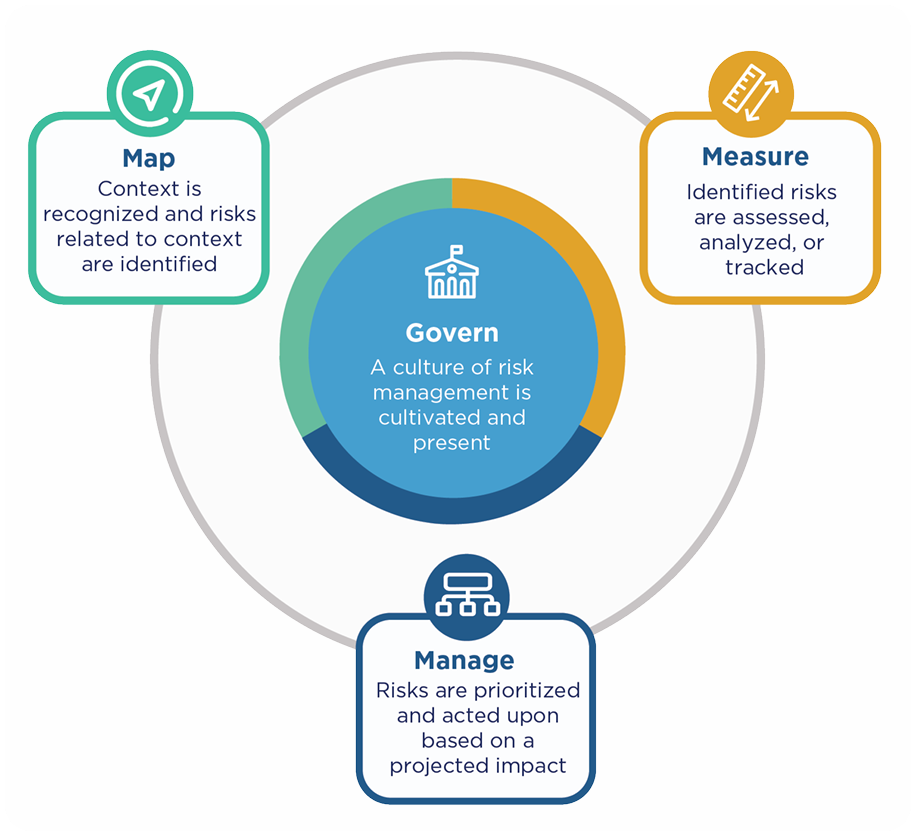
Four functions of the NIST AI Risk Management Framework: govern, map, measure and manage (Source: NIST AI Risk Management Framework)
2) Find every AI tool and SaaS app that’s actually running
You can’t govern what you can’t see, which makes visibility the first real test of AI governance. No single data source sees everything, so combine them:
| Source | What it shows | What it misses |
| Single sign-on (SSO) and identity provider logs | Sanctioned apps and who signs in to them | Personal accounts and apps outside SSO |
| OAuth and app consent records | Third-party and AI apps with delegated access to mail, files and calendars | Tools that never connect to a work account |
| Expense and accounts payable data | Paid subscriptions, including expensed AI plans | Free tiers |
| Browser extension telemetry | Web app use on managed browsers, free AI tools included | Unmanaged browsers and personal devices |
| Security service edge (SSE), cloud access security broker (CASB) or proxy logs | Traffic to AI domains, plus prompt content where Transport Layer Security (TLS) inspection is on | Unmanaged devices and traffic that bypasses the proxy or agent |
| Endpoint agents | Desktop apps, coding assistants and local models | Unmanaged devices and much of what happens inside the browser |
| Cloud and model provider billing | API and token consumption by account | Consumer plans paid by individuals |
| SaaS admin consoles and contracts | AI features switched on inside approved apps | Anything outside those vendors |
Pull it all into one inventory that your AI governance team owns. For each tool, record the owner, users, data it touches, cost, contract terms, AI features and risk tier. Include the non-human side too: service accounts, API keys and agents.
Don’t treat what you find as a scandal. It’s a demand signal that shows what people need. For detection methods in more depth, see our guide on how to detect and govern shadow AI.
3) Sort AI tools and data into tiers
Give every tool one of three labels:
- Approved (fully vetted and allowed for business use)
- Approved with limits (ok for some roles or data, with conditions)
- Not approved (denylisted, with alternatives suggested)
Screen new AI tools with a short set of questions:
- Does the vendor train on your inputs by default, and can the contract switch that off?
- How long does it keep prompts, files and outputs, and can admins set retention?
- Does it support SSO, System for Cross-domain Identity Management (SCIM) provisioning and admin audit logs?
- Where does it store and process data?
- Is there a data processing agreement and a current System and Organization Controls (SOC) 2 Type 2 report or ISO/IEC 27001 certificate?
- Can admins turn individual AI features off?
- If it has agents or connectors, what permissions do they request, and can you narrow them?
Then map data classes to tiers, one of the most practical AI governance best practices you can adopt. Here’s a simple starting matrix. Adjust it to your risk appetite:
| Data Class | Examples | Allowed in personal AI accounts? | Allowed in approved enterprise AI? |
| Public | Published blog posts, press releases, public docs | Yes | Yes |
| Internal | Meeting notes, process docs, early drafts | No | Yes, in tools cleared for internal data |
| Confidential | Customer data, contracts, source code, financials | No | Only in tools approved for that data class |
| Restricted | Credentials, secrets, regulated health or payment data | No | Never for credentials or secrets; regulated data only in a tool approved for that specific regulation |
This part causes a lot of governance confusion. An application can be approved while one of its new AI features isn’t. A customer relationship management (CRM) platform that adds an AI assistant isn’t a new app, but it is a material change to how that app processes your data. It’s one reason AI is changing SaaS management so quickly. Your SaaS review needs to catch that change, so ask:
- Is the AI feature on by default?
- Which model provider powers it?
- Which customer data can it reach, and is that the same data as the core app?
- Does the vendor use customer content to improve its models?
- Can admins switch the feature off by user, group or tenant?
- Does it change data retention or create transcripts, summaries or embeddings?
- Does it add agents or external connectors?
- Does it bill separately through credits, tokens or usage-based add-ons?
Then comes the part most AI governance programs miss: speed. If approval takes 6+ weeks, people will go around you. Publish your request form, a target turnaround and a fast lane for low-risk tools. A few business days for the fast lane and ~10 to 15 business days for a full review is a reasonable starting target. Every request you answer quickly is one fewer tool that ends up as shadow AI.
4) Give employees a safe default and close the personal-account door
People use personal accounts mostly because nobody handed them a better option. So hand them one.
Pick an enterprise AI assistant that meets your AI governance policy: SSO and MFA, no training on your data by default, admin controls, retention settings and a subscription your company owns. Check what you already pay for first. Microsoft 365 Copilot Chat, for example, comes at no extra cost for Microsoft Entra ID users with an eligible Microsoft 365 subscription and includes enterprise data protection. Your other suites and SaaS contracts may include AI assistants you can switch on centrally, too.
Then close the personal-account door on managed devices. OpenAI and Anthropic both support tenant restrictions that let your organization’s accounts through and block personal ones:
- OpenAI’s corporate network controls for ChatGPT Enterprise use a ChatGPT-Allowed-Workspace-Id header, and ChatGPT filters out every workspace not on the list, personal workspaces included
- Anthropic’s tenant restrictions for Claude use an anthropic-allowed-org-ids header on Enterprise plans and Console, and they cover web, desktop, API key and OAuth access
How does that work? Your proxy or SSE platform injects the header into the traffic heading to the vendor. That vendor then blacks out any account not on your allowed list. ChatGPT and Claude remain open. The only account closed is the personal-account one.
Note that this works only on company networks with TLS inspection enabled; personal home devices are still out of scope, which is why your AI usage policy and employee AI training still matter.
5) Write an AI usage policy people will actually read
A policy alone won’t carry the load. Remember PagerDuty’s numbers: most employees believed their company had an AI policy, and two-thirds of AI users had used tools they thought it didn’t allow. The policy isn’t the control. It’s the document that explains the controls.
Treat your AI usage policy as the employee-facing layer of your AI governance policy. Keep it to about two pages of plain language, and cover:
- Which tools you’ve approved, what they’re for and where to find them
- Which data classes can go into which tools, with a link to your matrix
- When a human must review AI output, especially anything customer-facing, legal, financial or used to make decisions about people
- When to disclose AI use to clients, colleagues or candidates
- Rules for meeting recorders, including notice and consent for everyone on the call
- Who can connect an agent to company systems, what it can do and who owns it
- How to request a new tool and how long approval takes
- What happens when someone breaks the rules, with training before discipline for honest mistakes
Review and update it every quarter. AI vendors change their terms faster than most people reread a policy.
6) Apply guardrails where data moves
This is where your AI usage policy turns into enforcement: Connect every AI account to your identity provider
Put approved AI tools behind SSO and MFA wherever the vendor supports it. Use SCIM for automatic provisioning and deprovisioning where it’s available. When someone leaves, remove more than the seat:
- AI seats and API credentials
- OAuth grants and service accounts
- Agent credentials and local tokens
- Any personal access paths tied to business systems
OAuth is easy to underestimate because it often ends with a friendly “Allow” button. That button can grant an app access to email, calendars, files and contacts. Try to limit end-user consent for high-risk permissions and route sensitive scopes through admin approval.
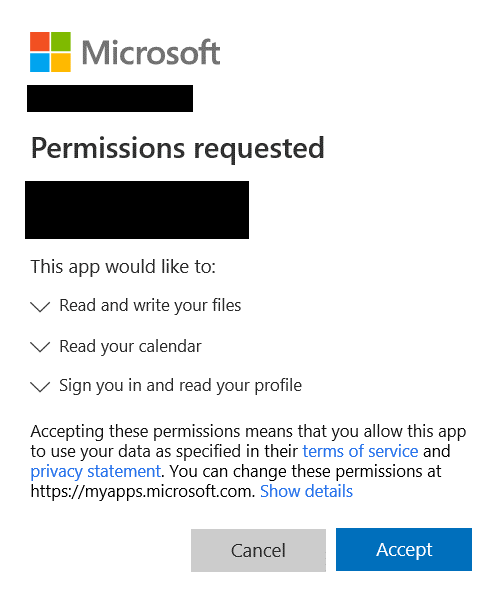
OAuth consent screen where a third-party app asks to read email, files and calendars and keep that access
The big platforms give you the controls. In Microsoft Entra ID, the Microsoft-managed user consent policy blocks end-user consent for a long list of high-value Microsoft Graph permissions, including file, site, mail, calendar and Teams chat access. It applies only to tenants that use that setting, though, and existing consents keep working. Pair this with an admin consent workflow that lets people request access instead of going around you.
Google Workspace API controls let admins mark apps as trusted or limited and restrict high-risk scopes, such as sending mail or deleting Drive files.
Then review the grants you already have. A policy that blocks new risky grants doesn’t fix old ones that are still active.
So why be this strict? In late August 2025, attackers used stolen OAuth tokens tied to Salesloft’s Drift AI chat integration to reach data at more than 700 organizations. They got into Salesforce, Google Workspace and Slack. The stolen data sometimes included API keys, cloud credentials and passwords sitting in support cases. Nobody phished a password. The attackers used keys a trusted integration already held.
Coach prompts before you block them
Traditional DLP focuses on email, file shares and endpoints. AI opens another path. Prompt and file upload. Cover it using a combination of browser controls, endpoint DLP, secure web gateway and CASB policies, AI gateway rules and clipboard controls where appropriate.
Start with training for medium-risk content. A user should see a clear message, something like: “This looks like customer data. Use the approved enterprise AI tool instead”.
Save hard blocks for high-risk material such as credentials, secrets and prohibited regulated data.
The right stack varies by organization, so test your coverage. Don’t assume a traditional DLP product sees every prompt typed into every browser, desktop app or extension.
Allowlist browser extensions instead of trusting badges
Control extensions through managed browser policies and an allowlist. Before you even authorize one, review its publisher, requested permissions, data access, update behavior, external network calls, enterprise support and removal procedure. Remember Urban VPN Proxy? Even with a Featured badge, a silent update turned it into a chat harvester.
Route developer AI traffic through an AI gateway
Development and product teams often call models directly through APIs. An AI gateway, sometimes called a model gateway, can centralize:
- Model selection and routing
- API authentication and rate limits
- Logging and usage allocation
- Request and response filtering, including data redaction
- Cost controls and policy enforcement
It moves AI governance closer to the application, which engineering teams tend to appreciate. It doesn’t cover SaaS-embedded AI, consumer chat or local models, though, which is why the architecture needs every layer above.
Approval doesn’t end the AI governance job. Researchers at Aim Security have discovered, back in June 2025, EchoLeak – a zero-click prompt injection vulnerability affecting Microsoft 365 Copilot, tracked as CVE-2025-32711. A specially crafted email could trick Copilot into leaking information from the user’s context. Microsoft classified the vulnerability as critical and addressed it on the server-side. Customers didn’t need to act, and Microsoft found no evidence of exploitation in the wild.
Copilot-style assistants also surface things that a user already has access to. Years’ worth of file sharing can become instantly searchable. Purge permissions before deploying these products, not after.
7) Govern AI agents, coding assistants and MCP connectors
Agents get their own step in this AI governance framework because they don’t only read data. They act on it. So treat each production agent as a non-human identity with a named owner.
For every agent, record its:
- Human owner and business purpose
- Systems, permissions and credentials
- Data classes it can touch
- Actions it can take and which ones need approval
- Logs, runtime environment and review or expiry date
Then apply least privilege:
- Use narrowly scoped, short-lived credentials
- Separate read access from write access
- Require human approval for high-impact actions
- Log tool calls and material actions
- Restrict outbound network access
- Rotate credentials and remove unused connectors
- Remove or retire any agent that no longer has an active owner
High-impact actions can include:
- Sending external email
- Deleting records
- Changing access permissions
- Moving money
- Deploying production code
- Modifying infrastructure
- Sending regulated communications
Treat MCP as a supply chain boundary
MCP makes it easy to plug tools into agents. That same ease widens the blast radius when a connector is compromised or malicious. For MCP servers:
- Keep an approved registry and pin versions
- Review package provenance and scan dependencies
- Separate development and production connectors
- Restrict network egress
- Store credentials in a managed secrets system
- Require approval for new tools and review capability changes during updates
- Monitor tool invocations
A connector that only needs to send email shouldn’t get access to an entire enterprise mailbox because that was easier to configure.
In September 2025, Koi Security found that an npm package called postmark-mcp, which impersonated Postmark’s official MCP server, had turned malicious. Version 1.0.16 added a single line that blind-copied every email sent through it to an attacker’s address. The package had 1,643 downloads before its developer deleted it. One line of code. That’s all it took.
Secure AI coding assistants
Coding assistants touch your most sensitive asset. Remember that source code was the most common data type Verizon saw employees send to external AI tools. Require:
- Secret scanning and repository access controls
- Protected branches and human review of AI-generated changes
- Dependency scanning and license review where relevant
- Clear rules that keep production credentials out of prompts and agent sessions
- Limits on autonomous deployment
Local models aren’t automatically safer. They still need patching, model provenance checks, license review, endpoint controls and clear rules for which data they can access.
8) Build employee AI training around judgment
Employee AI training is where many AI governance programs slip. Training should answer one question: what should I do differently tomorrow?
Make training short, practical and role-based:
| Role | What to teach |
| Everyone |
|
| Developers |
|
| Sales and customer teams |
|
| HR and legal |
|
| Managers |
|
If you operate in the EU, AI literacy is part of AI governance by law. Article 4 of the EU AI Act has required AI literacy measures since February 2, 2025.
9) Set up AI usage monitoring without turning it into employee surveillance
AI usage monitoring should answer business and security questions. It shouldn’t become a system for judging individual employees by how often they use AI. And don’t measure success by blocked prompts, because that rewards the wrong behavior.
Track AI governance outcomes at the program level instead:
| Area | Metrics to review every month |
| Visibility | AI software visibility, newly found unapproved AI services and personal-account sign-ins from managed devices |
| Security | High-risk OAuth grants, DLP events by data type, unmanaged extensions, over-permissioned agents and time to revoke compromised access |
| Adoption | Share of observable AI activity on approved tools, active users vs paid seats, request volume, time to approve low-risk tools and training completion |
| Financial | AI spend by business unit, API and token spend by application, unused seats, duplicate tools and cost per active user |
| Governance | Agents without an owner, exceptions granted, reviews completed on schedule and share of AI incidents reported through approved channels |
Be very transparent about AI usage monitoring. Tell employees what you collect, why you collect it, who can see it, how long you keep it and how they can ask questions. Collect only what you need.
Define an AI incident workflow
Your AI governance program also needs an AI incident workflow that covers:
- Accidental disclosure in a prompt or upload
- Prompt injection and compromised agents
- Malicious extensions, unauthorized OAuth grants and suspicious API keys
- AI-generated phishing
- Incorrect high-impact outputs
- Vendor outages, vendor security incidents and unexpected data retention
Then make reporting easy. If an employee accidentally puts customer data into the wrong tool, they should be able to report it quickly, without having to figure out which rule they violated. Quick reporting transforms the honesty issue we talked about earlier into an early warning system for AI governance.
10) Manage SaaS and AI spend across the software lifecycle
AI is software and it deserves the same discipline your ITAM and FinOps teams already apply to SaaS and the cloud. In our 2026 State of ITAM Report, tracking or adopting AI applications was the top combined challenge, cited by 84% of respondents, and 51% of ITAM teams already support AI spend visibility. We have broken those numbers down in our AI cost optimization and governance findings.
AI governance becomes much easier when it connects to the software lifecycle you already manage.
Track AI from intake to retirement:
Request ⇒ assess ⇒ approve ⇒ deploy ⇒ monitor ⇒ optimize ⇒ renew ⇒ retire

AI software life cycle from request to retirement
- At intake, capture the owner, business purpose, data and risk tier
- At deployment, connect the tool to SSO and provisioning
- During use, track users, data, permissions and spend
- Before renewal, check active users, seat utilization, AI feature usage, API consumption, contract terms, security posture, data retention, duplicate capabilities and business value
- At retirement, remove seats, API keys, OAuth grants, service accounts, agent credentials, browser extensions, local integrations and scheduled jobs
Then verify that data and credentials were actually removed under the contract and your retention rules. Switching off a seat doesn’t necessarily delete stored chats, files, indexes or embeddings.
This is where ITAM and FinOps meet. Seat-based AI looks like SaaS. Token and inference usage looks like cloud consumption. Embedded AI features can look like either, depending on the vendor’s pricing. You need one financial and overall operational view across all three.
Start with usage, not renewal dates
Don’t wait until procurement sends a renewal reminder. Set standing AI governance rules:
- Reclaim licenses after a documented inactivity period, once business owners confirm
- Consolidate duplicate AI tools
- Review consumption-based contracts before usage jumps
- Allocate shared AI costs to business owners
- Set budget alerts for API and token usage
- Review AI add-ons during every SaaS renewal
- Track AI spend separately when vendor pricing buries it
Tracking where and how AI is being used helps to identify unnecessary costs and manage AI spending more effectively.
Your first 90 days of AI governance
You don’t need all 10 steps of the AI governance framework finished before you see results. Here’s a realistic first 90 days:
| Timeframe | Primary focus | What you need actually to ship |
| Days 1 – 30 | Visibility and ownership | Named owners; one inventory built from SSO, expense, OAuth and browser data; a ranked list of your top 20 AI tools by users and data risk |
| Days 31 – 60 | Safe default | One or two approved enterprise AI tools; a two-page AI usage policy; a request path with a published turnaround; tenant restrictions on managed devices |
| Days 61 – 90 | Enforcement and habit building | Prompt-level DLP in coaching mode; tighter OAuth consent and a cleanup of old grants; role-based training; a monthly metrics review |
By day 90, your AI governance program should let employees answer six questions without asking IT:
- Which tools can I use?
- Which data can go in them?
- Where do I request a new tool?
- Who approves it?
- What happens if I make a mistake?
- How do AI agents get approved?
Common AI governance mistakes to avoid
Even programs built on AI governance best practices stumble. These are the mistakes that show up most often.
Treating the policy as the control. An AI governance policy says what should happen. Identity, DLP, network, browser, endpoint and application controls decide what can happen. You need both.
Governing only standalone AI tools. An AI assistant inside an approved SaaS platform can reach highly sensitive data. Review the feature, not only the vendor.
Approving models instead of use cases. The same model can power a harmless writing task and a high-risk automated decision. In AI governance, risk belongs to the use case.
Ignoring non-human identities. API keys, service accounts and agents don’t appear in an employee directory. They still need owners and life cycle controls.
Blocking everything by default. Blanket blocks push employee AI usage toward personal accounts, local models and unmanaged services. Restrict where it cuts real risk, and always offer an approved alternative.
Treating enterprise plans as automatically safe. Commercial terms help. But enterprise AI can still expose data through excessive permissions, bad prompts, misconfigured connectors or poor access controls. EchoLeak proved it.
Forgetting data removal. Turning off a seat doesn’t necessarily remove stored chats, files, indexes, embeddings, API keys or third-party copies. Retirement needs verification.
Employee AI usage is an ongoing AI governance job that spans software, data and security management. Get visibility into the AI tools and SaaS apps people actually use. Set clear rules for which data goes where. Put guardrails where data moves, train people to use AI with judgment and manage cost across the software life cycle.
Don’t try to stop people from using AI. Good enterprise AI governance gives them a sanctioned path that’s easier than the workaround, one that protects your data, your compliance posture and your budget along the way.
How Flexera helps you govern AI tools and SaaS apps
AI governance starts with visibility, and that’s where we come in.
Flexera One SaaS Management detects known and shadow SaaS apps and helps you find shadow AI and AI waste. Flexera AI Cost Management extends that view across AI apps, agents, models, data clouds and compute.
What is AI governance?
AI governance is the set of roles, rules and controls that decides which AI systems a company uses, what data they can touch and who answers for the results. For most enterprises, the hardest part is employee AI usage: chatbots, coding assistants, AI features inside SaaS apps and AI agents that people adopt on their own. Enterprise AI governance gives employees approved AI tools, clear data rules, guardrails, training and cost oversight instead of relying on bans.
What is shadow AI, and how is it different from shadow IT?
Shadow AI is any AI tool, model, feature or agent that employees use for work without approval from IT, security or compliance. Shadow IT is the broader category, covering any hardware, software or service used without IT oversight. Shadow AI is harder to control because it often runs on personal accounts, hides inside approved SaaS apps and handles sensitive work such as source code, contracts and customer records.
Why is shadow AI a risk for enterprises?
Shadow AI moves company data into tools that fall outside normal AI governance and security controls. The risks go beyond security incidents. Some AI tools may use prompts to train their models under their terms. Sensitive personal data entered into a chatbot can also create privacy and compliance issues. And when employees use AI output without checking it, errors can end up in client work, internal documents or business decisions.
What should an AI usage policy include?
A good AI usage policy lists approved tools, maps data classes to those tools and says when a human must review AI output. It also explains how to request new tools. Keep it to about two pages and point to the technical controls behind it.
Should companies ban ChatGPT, Claude and other AI tools at work?
In most cases, no. A ban only reaches managed devices and networks, so AI use moves to personal phones, home laptops and personal accounts that IT can’t see.
Do ChatGPT, Claude and Gemini train on company data?
It depends on the plan, not the price. By default, OpenAI doesn’t train on inputs or outputs from ChatGPT Business, Enterprise, Edu or its API platform, but personal Free, Plus and Pro accounts share data for training unless the user opts out. Anthropic doesn’t train on its commercial products, such as Claude for Work and the API, by default, while consumer Free, Pro and Max users choose if their chats help train models. Gemini in Google Workspace doesn’t use customer content to train models, unlike the consumer Gemini app.
How do you detect shadow AI and unsanctioned SaaS apps?
Combine several data sources, because no single one sees everything.
- SSO logs show sanctioned apps
- OAuth consent records show apps with access to mail, files and calendars
- Expense data shows paid AI subscriptions, browser extension telemetry shows web-based AI tools and security service edge (SSE) or cloud access security broker (CASB) logs show traffic to AI domains
- Cloud billing shows API and token spend
Pull everything into one inventory that lists each tool’s owner, data, cost and risk tier, including API keys and agents. Flexera One SaaS Management combines several of these sources in one view.
What should an AI usage policy include?
An AI usage policy should fit on about two pages and cover which AI tools are approved, which data classes can go into each tool, when a human must review AI output, when to disclose AI use, rules for meeting recorders, who can connect AI agents to company systems, how to request a new tool and what happens after an honest mistake. Treat it as the employee-facing layer of your AI governance policy. Review and update it every quarter.
Which AI governance framework should enterprises use?
Most enterprises start with the NIST AI Risk Management Framework (AI RMF), a voluntary framework built around four functions: govern, map, measure and manage. NIST’s Generative AI Profile (NIST AI 600-1) applies it to generative AI risks. When customers or auditors want proof, ISO/IEC 42001 defines a certifiable AI management system. Companies that operate in the EU also have EU AI Act duties, including Article 4, which requires measures that support AI literacy among staff.
How do you govern AI agents and MCP servers?
Treat every production AI agent as a non-human identity with a named owner, a documented purpose and least-privilege access. Give each agent short-lived, narrowly scoped credentials and separate read access from write access. Require human approval for high-impact actions such as moving money or deploying code, and log every tool call. For MCP servers, keep an approved registry, pin versions, review package provenance and restrict network egress.
Pramit Marattha
Pramit Marattha is a technical content writer and strategist with 5+ years of experience covering AI, data engineering, data cloud platforms and open source technologies. He turns complex technical concepts into clear, useful content for engineers and developers.