

Somewhere in your company right now, someone is pasting sensitive data into a consumer AI chatbot. Or using an external AI tool or AI model without approval. Or wiring an AI agent into internal company data. No ticket. No security review. None of it shows up in a typical software inventory, and that’s exactly the problem. IT and security teams have little to no visibility into what people are using, what data they’re sharing or what these tools can access. That is shadow AI, the unsanctioned use of AI tools, models and agents inside an organization. According to Flexera’s State of ITAM report, only 31% of organizations have visibility into the AI software being used.
In this article, we’ll cover what shadow AI actually means, why it grew so quickly, where it tends to hide, what it costs when it goes wrong and what a working detection and governance program looks like once you build one.
What is shadow AI?
Shadow AI is any AI tool, AI model or AI agent that employees use for work without IT, security or compliance reviewing, approving or even knowing about it. That’s the whole definition. There’s usually no malicious intent behind it and no attempt to break rules. Someone simply just wants to get their job done faster.
Shadow AI appears in more ways than most people expect:
- Personal ChatGPT, Claude, Microsoft Copilot or Gemini accounts used for work because no approved option exists yet
- AI features quietly switched on inside software the company already licenses, with no new app or login involved
- Browser extensions that summarize pages, rewrite emails or read whatever’s open in a tab
- AI coding assistants running through a personal account and connected straight to a company repository
- Direct calls to model APIs, plus software development kit (SDK) and command-line interface (CLI) tools hitting inference endpoints with personal keys, often from a developer’s device and billed to a personal card where SaaS management tools can’t see them
- AI note-takers that join meetings, record or transcribe them and store that data outside the company’s approved systems
- Service accounts, OAuth grants, API keys and agent credentials created outside identity governance and never retired
- AI agents, including agents built with protocols such as the Model Context Protocol (MCP), which lets AI applications connect to external data sources and invoke tools, connected to internal systems with real access and permissions
That last category is new. It’s no longer just a person copying text into a chat window. Software can now act on someone’s behalf. It can access connected systems, retrieve data and take actions based on whatever instructions and permissions it’s been handed. That’s what makes today’s shadow AI a fundamentally bigger problem than the shadow IT that came before it.
Shadow AI is the AI-specific part of a much older problem called shadow IT. Shadow IT includes any unsanctioned software, hardware or service used inside a company. AI gets its own name because these tools can do more than run on an employee’s device. They can process company data, send information to external providers, access connected systems and, in some cases, take actions on a user’s behalf.
What’s changed is how easy these tools are to start using. Traditional shadow IT usually needed a credit card, a download or at least a signup form. Shadow AI often just needs a browser tab that’s already open.
Shadow AI vs shadow IT
People tend to talk about shadow AI and shadow IT as if they’re the same problem wearing a different name. They’re related, but not interchangeable. Shadow AI is a subset of shadow IT, and it behaves differently.
| Shadow IT | Shadow AI |
|---|---|
| Shadow IT means any unsanctioned software, hardware or service used inside a company | Shadow AI means any unsanctioned AI tool, AI model or AI agent that employees use for work |
| Shadow IT usually starts with a new app, a new subscription or a new device on the network | Shadow AI often starts with an already-open browser tab or a feature toggle inside software the company already approved |
| Shadow IT usually shows up as new network traffic, a new line on an expense report or a hit during an asset inventory scan | Shadow AI often shows up as none of those, since there’s frequently no new spend, no new domain and sometimes no new network traffic at all |
| Shadow IT puts company data at risk by leaving it sitting in an unmonitored, unapproved location | Shadow AI puts the entire company data at risk by feeding it directly into a model, and in some cases using it to improve that provider’s future models |
| Shadow IT cannot take action on its own. A person still drives every step | Shadow AI can easily take action on its own, since an agent can query a database, send an email or trigger a workflow without anyone approving each step |
| Shadow IT has been a known problem for well over a decade | Shadow AI has only been a known problem since ChatGPT’s late-2022 launch, and it’s growing much much much faster |
| Shadow IT falls under general data governance and security policy | Shadow AI falls under all of that, plus a growing set of AI-specific rules, several of which we cover later in this article |
Detection is where shadow IT and shadow AI differ most. Shadow IT usually leaves a trail. That trail could be a new app on the network, a charge on an expense report or a new login IT can spot in an audit. Shadow AI may leave nothing, no obvious trail at all.
An employee might simply turn on an AI feature inside software the company already approves. There is no new app for IT to discover. They could also use a free AI chatbot with a personal email address, leaving no company card charge behind. They might even run a small model locally on a laptop, generating little or no network traffic for security tools to inspect.
The risk changes shape once data leaves approved systems, too. In traditional shadow IT, the question is generally where the data is stored and who has access to it. With shadow AI, data may also be sent to an AI provider for processing. What happens next depends on the provider, the account type and the settings attached to it. Prompts and uploaded data can get retained and used to improve a model.
Enterprise plans usually give you far more control over data retention and training use than consumer plans do. A personal, free-tier account handling business data is a different risk profile entirely from an official enterprise account, especially around retention, training controls and administrative control.
Why shadow AI is spreading
A couple of shifts are happening at the same time.
Generative AI has moved from being used by just a few companies to being found in nearly every part of business. Gartner predicted that over 80% of companies will be using generative AI tools or applications by 2026, a big jump from under 5% in 2023.
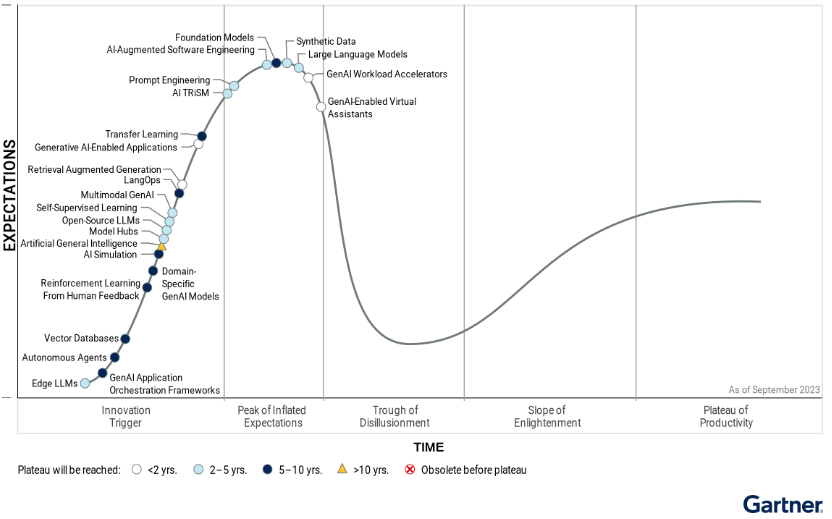
Hype Cycle for Generative AI (Source: Gartner)
Much of this shift began with employees who started using AI tools on their own before their companies officially introduced them or set up approval processes.
Right now, we’re going beyond just chatbots. The ground is shifting again. Agentic AI is growing fast, with systems that can plan tasks, take actions and use other tools instead of just answering a prompt. Gartner predicts that 40% of enterprise applications will feature task-specific AI agents by 2026, up from less than 5% in 2025.
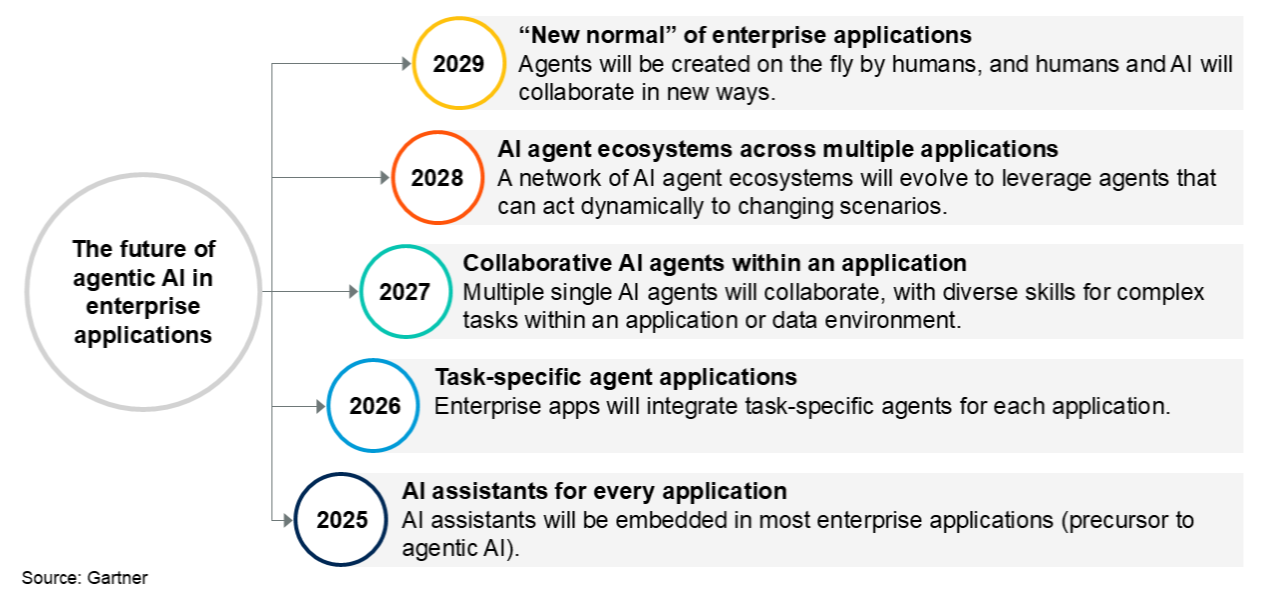
The Future of Agentic AI in Enterprise Applications (Source: Gartner)
That changes the risk. The question used to be about which AI tools employees were using and what they typed into them. Now it’s also about which AI agents have access to company systems and can act without a human in the loop. Google Cloud’s security team has also pointed out these risks. The concern isn’t just what an employee asks an AI to do, but what that AI can do when it has real permissions and behaves in unexpected ways.
And if you look at the 2026 Flexera AI Pulse Report, it found that nearly half of leaders don’t always know how or when their employees are using AI tools. That’s a significant understanding gap. On any given day, leaders have about a 50/50 chance of knowing what’s really accessing company data.
None of this requires a purchase order. Anyone can sign up for an AI tool with just an email address and start using it in minutes. Add pressure to ship work fast, along with employees who already know how these tools can help, it’s easy for adoption to outpace the rules meant to manage it. AI adoption is happening faster than AI governance.
The risks of shadow AI
The 2026 Verizon Data Breach Investigations Report found that 45% of employees are now regular AI users on corporate devices, up from 15% the year before, a 3x jump in 12 months. It also found that 67% of AI users on corporate devices were accessing AI services through non-corporate accounts. Shadow AI was the third most common non-malicious insider action in the dataset, with its share increasing 4x year over year.
Cyberhaven’s 2026 AI Adoption & Risk Report shows how far the problem has spread. It found that 39.7% of data movements into AI tools involve sensitive data, meaning the average employee feeds proprietary company information into an AI tool roughly once every 3 days. The gap between companies is just staggering. Organizations at the leading edge of AI adoption use more than 300 generative AI tools, while cautious companies typically use fewer than 15.
Netskope’s 2026 Cloud and Threat Report tells the same story from the usage side. The number of people using generative AI SaaS applications 3x in a year, while prompt volume grew 6x, from roughly 3000 to 18000 prompts per organization each month. Nearly half of generative AI users, ~47%, still rely on personal accounts. Netskope also found that the average organization sees 223 incidents a month involving sensitive data sent to AI applications.
Menlo Security’s 2025 research found a similar pattern. 68% of employees were using free-tier AI tools through personal accounts, and 57% of those employees were entering sensitive data while doing it. Menlo also tracked more than 6500 GenAI domains and 3000 AI applications. That gives you a sense of how quickly the AI tool landscape has fragmented.
None of this is just theory. Back in 2023, Samsung engineers pasted proprietary semiconductor source code into ChatGPT, trying to debug it. They also pasted a recording of an internal meeting. Samsung identified three separate incidents involving sensitive data within about 20 days and banned generative AI tools on company devices about a month later. Today the data suggests the same behaviour is happening across thousands of organizations, involving far more tools, accounts and data flows.
We could simply group all of this under the term “data leakage” and call it a day. But that misses several other ways shadow AI can create problems. The risks span data protection, compliance, security, cost and third-party exposure, and each one needs a different control.
1) Data and intellectual property (IP) exposure
Source code is one of the most common types of sensitive information employees paste into external AI tools. Images, structured data, research notes and technical documentation show up right behind it. Once that information leaves your approved environment, you may have little control over where it’s processed, how long it’s kept, or who can access it.
2) Compliance and regulatory exposure
Shadow AI can cause compliance issues even if no one is intentionally breaking the rules. When personal or sensitive information reaches an AI service, the same privacy and industry-specific requirements still apply. The General Data Protection Regulation (GDPR) still governs an unapproved chatbot the moment it touches EU personal data, and healthcare organizations still carry Health Insurance Portability and Accountability Act (HIPAA) obligations regardless of which tool a clinician reached for.
Healthcare really highlights how high the stakes become. A 2026 Wolters Kluwer survey found that 40% of healthcare workers had encountered unauthorized AI tools in their workplace, and 17% admitted to using one themselves. One in 10 said they’d used an unauthorized AI tool for direct patient care. That shifts the conversation from productivity to patient privacy, safety and clinical control.
The EU AI Act adds another layer. Article 4, which went into effect on February 2, 2025, mandates providers and deployers of AI systems to take steps to promote AI literacy among employees and anyone who run or utilize those systems on their behalf. An organization without a meaningful AI training or literacy program may be dealing with more than just a governance issue.
3) Security exposure beyond leakage
LLMs carry their own new risks. Prompt injection sits at the very top of the OWASP GenAI LLM Top 10 2026. The fundamental idea is that untrusted input might cause a model to behave in ways that the application did not intend, perhaps leading to unauthorized actions, data exposure or other harmful outcomes that nobody planned for.
Now add shadow AI to that problem. A security team cannot apply controls to an AI application it is not aware of. That specific gap tends to show up as missing logs, no approved data-filtering rules, no documented incident response and no clear owner when something goes wrong. The problem isn’t just the model itself. It’s a lack of visibility across the whole application and its data flows.
Compromised personal AI accounts are their own risk. Security researchers at Flare found more than 200,000 logs containing compromised OpenAI credentials for sale on the dark web. Infostealer malware can collect credentials stored in browsers, potentially granting attackers access to accounts and the information they contain. An employee utilizing a personal AI account for work may reveal months of prior conversations, including critical business context they’d forgotten were ever typed in.
OAuth raises a separate issue entirely. Many AI tools can link to Google Workspace, Microsoft 365 and other business services using “Sign in with” or consent processes. Depending on the app and the permissions it asks for, an OAuth grant can allow a third-party app to access business data or other resources. If an employee approves the connection without checking the requested permissions, they might unintentionally give an unverified app access that IT never intended to allow.
4) Financial exposure
This is where FinOps and IT asset teams tend to feel shadow AI first. Employees can end up with duplicate subscriptions, unused seats, and overlapping tools without anyone keeping track. This issue becomes more costly when AI services charge based on usage. AI agents and applications can keep making API calls or burning tokens while the bill lands somewhere nobody’s watching.
Self-service software already made spend hard to track. AI makes it harder still, because usage can spike overnight. One unmanaged tool isn’t a huge deal on its own. Multiply that by a few hundred tools, each with its own subscription, API key or usage fee, and cost control turns into a much bigger fight than it needs to be.
5) Vendor and third-party risk
When an employee signs up with a new AI vendor, they’re often pulling a third party into the organization’s data flow without any of the usual procurement or security steps. That can mean no vendor evaluation, no agreed data-processing terms and no clear visibility of where the provider stores or processes that data.
That increases the risk beyond just the individual tool. Now you have a vendor relationship that the organization might not even be aware of.
6) Shadow AI agents
This is where shadow AI turns into a materially different kind of problem. A chatbot can share information during a conversation. An agent can take action.
Depending on how it’s configured, an agent can read files, query a database, call an API, send messages or kick off a workflow. That turns the risk from just submitting data to giving someone else authority.
MCP, the open protocol for connecting AI applications to external data sources and tools, illustrates why. Anthropic released it in November 2024, and in December 2025 donated it to the Agentic AI Foundation, a directed fund under the Linux Foundation, where it now sits under vendor-neutral governance backed by Anthropic, Block, OpenAI, Google, Microsoft, Amazon Web Services, Cloudflare, Bloomberg and more. In the year since launch it’s been adopted across ChatGPT, Gemini, Microsoft Copilot and other major AI platforms, and MCP servers can expose capabilities like filesystem access, GitHub operations or database access to any compatible client.
That raises a governance question the industry is still catching up to: it’s no longer just which AI tools employees use, but which tools and data sources those AI systems can reach on their own. Let’s say an employee connects an unapproved agent to a database, an inbox or an internal API, they can quietly create a machine-to-machine access path that skips the organization’s usual review entirely.
That’s a very different kind of risk from just pasting a paragraph into a chatbot. The AI now holds permissions, tools and the ability to change things in the environment. As more AI systems become capable of acting on their own, this difference will become much more important.
How do you detect shadow AI?
You can’t govern what you can’t see. Detection comes first.
Shadow AI does not have a single entry point. It usually shows up in three different ways:
- Personal AI accounts accessed through a browser on managed or unmanaged devices
- Direct API calls made by engineers from app code
- AI features enabled inside SaaS apps the company already approved
A network control can help with the first case. But it won’t tell you much about the other two. That’s why solid detection uses several layers. Each one answers a different question.
Layer 1 — Network-layer detection
Cloud access security brokers (CASBs), secure web gateways (SWGs) and firewall or DNS logs are your first layer of shadow AI visibility. They can identify browser and API traffic headed toward known AI services. Depending on the control point, they can allow, block or alert on it. Many of these capabilities now sit inside broader security service edge (SSE) platforms instead of standalone CASB products. The underlying job stays the same either way.
But these controls have real limits too. A network log might show a device connected to api.openai.com or api.anthropic.com. It won’t tell you which app made the call. It won’t show what data went with it. And if several tools share the same backend, it can’t tell you which one sent the request.
Network controls are even less useful for locally running models. Those never touch an external AI service, so there’s nothing for a network tool to catch. Encryption creates another limitation. Without the right inspection tools and policy, a network device can’t read an HTTPS request’s contents. It might know exactly where the request is headed. But it can’t see what’s inside it.
Layer 2 — SaaS security posture management
SaaS security posture management (SSPM) covers a different blind spot: AI features built into apps the company already trusts. SSPM tools connect to SaaS apps (like Salesforce, Microsoft 365 and others) through their APIs and assess configuration, permissions, integrations and other changes over time.
That can help security teams identify AI functionality, OAuth connections and third-party integrations that are difficult to discover from network traffic alone. However, the only limitation is coverage. An SSPM tool can only inspect apps it supports and is actually connected to. It’s not a stand-in for broader discovery.
Layer 3 — Identity and OAuth auditing
Identity systems can help identify AI services connected to corporate accounts through single sign-on (SSO) or OAuth. New app consents, unusual OAuth scopes and unexpected service connections all provide useful signal.
Don’t assume every “continue with Google” or “continue with Microsoft” event lands in your corporate identity logs, though. An employee on a personal account can bypass the corporate identity layer entirely. OAuth monitoring works best paired with other detection methods, not relied on alone.
Layer 4 — Endpoint and browser monitoring
Endpoint agents and browser controls give you visibility closer to what’s actually happening on the device. Depending on the product and configuration, they can identify AI applications installed locally, browser activity involving AI services and attempts to move sensitive information into web apps.
This layer is particularly useful for local models. Take a model running through a tool like Ollama or LM Studio on a laptop. It never touches an external AI provider, so a network tool has nothing to catch there. Endpoint visibility can still show the software exists, and sometimes how it’s being used.
Layer 5 — Content-layer inspection
Data loss prevention (DLP) adds another layer because it looks at the content itself rather than only the destination.
A DLP tool can catch sensitive information in a prompt or upload before it reaches an AI service, including source code, customer records, credentials or regulated data. Modern AI-focused DLP tools go further still, blocking the transfer, warning the user or redacting sensitive content in real time.
That distinction matters more than it sounds. Knowing that someone visited an AI site tells you there was activity. Knowing that the person pasted a customer database into it tells you what the actual risk was.
Layer 6 — LLM gateway or proxy
The previous layers may not give you enough visibility into an engineer calling an AI provider directly from application code. On the wire, that request can look like a normal outbound HTTPS connection. Network and endpoint tools miss it completely.
One way to find existing usage is to inspect the codebase itself. Search repositories, dependency files and build manifests for provider SDKs, packages and API keys. An OpenAI or Anthropic dependency, for instance, tells you an application was built to talk to an AI provider. That does not prove the application is actively making calls, but it gives you a useful lead for further investigation.
Controlling that traffic is a separate problem. An LLM gateway acts as a central route for AI API requests. Instead of applications connecting straight to providers, requests pass through a proxy that handles authentication, logging, policy enforcement, sensitive-data redaction and usage attribution.
A gateway only monitors what actually flows through it, which is its main weakness. If developers can still open direct connections outside the approved route, the underlying problem remains. That’s why blocking direct outbound access is usually part of the initial design.
It’s worth mentioning that newer AI gateway platforms are starting to provide that same control for MCP and agent traffic, not just standard API calls. That’s where the next layer comes in.
Layer 7 — AI Agent and MCP-specific monitoring
AI agents create a different detection problem. The important asset is no longer just the AI application. It is the combination of the agent, its identity, the tools it can call and the data those tools can reach.
Start with an inventory of deployed agents and the tools available to each one. Then review the permissions associated with those tools. Identify which agents can access sensitive systems and look for connections that bypass normal application or vendor review.
MCP makes this especially relevant. An MCP server can expose capabilities such as filesystem operations, database queries or repository actions to an AI client, which means the server’s permissions and exposed tools become part of your security boundary. That same connectivity introduces risks like tool poisoning, where a malicious or compromised tool feeds an agent misleading instructions or metadata that shape how it behaves. An official MCP registry makes servers easier to find and trace back to a publisher, but being listed there is no substitute for actually reviewing a server’s code, permissions and behavior.
Permissions still matter most. An agent with read-only access to a low-risk dataset is very different from one that can query production databases, send email or modify internal systems. The more authority an agent has, the more closely its identity, tools and actions should be monitored.
No single control catches every form of shadow AI. Most organizations need a combination of layers: network controls for application discovery and traffic enforcement; SSPM for SaaS configuration and integrations; identity and OAuth monitoring for account and consent visibility; endpoint and DLP controls for device activity and sensitive content; and LLM gateways for managed AI API traffic.
Don’t ignore the less technical signs either. Procurement systems and expense reports can surface AI subscriptions that never showed up in network, endpoint or identity telemetry. A corporate card charge for an AI service is sometimes the easiest clue you’ll get.
So where do you start? Figure out which of the three entry points you currently can’t see: browser-based AI use, direct API traffic or AI functionality embedded in software you already trust. Start there and close the biggest visibility gap first.
How to govern shadow AI
Finding shadow AI tells you where the risk sits. It doesn’t fix the problem. Fixing it takes real governance, and real governance starts with getting the basics right.
Three ways governance goes wrong.
The first mistake is banning AI completely. It might seem like the safest choice, but it often doesn’t address the real issue. Employees still have work to get done, and they’ll find a way to do it. The only thing that changes is that security and IT lose sight of which tools people use and where the data goes. A ban doesn’t eliminate the need; it just makes it harder to keep track of.
The second mistake is doing nothing and hoping the problem sorts itself out. It won’t. People will keep reaching for whatever tool gets the job done, and data will keep flowing into apps nobody’s checked. Sooner or later something goes wrong: a security incident, an audit finding, an angry customer. And there’s no policy, no approval step, no record of what happened to fall back on.
The third mistake is creating a policy that’s so unclear that no one knows how to use it. Saying “Don’t share confidential data with AI tools” seems reasonable until someone asks what exactly is considered confidential data. Which AI tools are allowed? Who decides if a new one can be used? What if a business team needs a tool that isn’t on the approved list?
A policy only works when people can act on it. Give employees clear rules, approved tools, a simple request path and a way to report problems. Keep the policy readable. Otherwise, the policy becomes another document everyone agrees with and nobody follows.
Here’s what actually works instead:
Put someone in charge
Name an executive owner with real authority across security, IT, legal, procurement and the business. Don’t hand this to “IT” or leave it as “everyone’s job”, because that means nobody’s. Back that person with a cross-functional group that meets on a set cadence to review new AI requests, security incidents, material vendor changes and exceptions as they come up, plus a broader program review at regular intervals.
Get the right people in the room
A shadow AI program run entirely by security can feel like a crackdown. That can push usage further underground instead of into the open.
Bring in security, IT, legal, privacy, procurement, compliance and business leaders. Each sees a different part of the problem. Security cares about access and data exposure. Legal and privacy cover data processing, retention and contractual terms. Procurement reviews vendors and negotiates terms. Business leaders explain why employees adopted an unapproved tool in the first place.
That last part matters more. Maybe a team skipped the approved process because it was slow or missing something they genuinely needed. Treat that as useful information and fix the gap instead of just blocking the workaround.
Write the policy in plain, simple language
Define what data employees can and can’t enter into AI tools. List which AI tools and use cases get a green light. Explain how someone requests a new tool, who reviews it and what happens if the rules get broken.
Cover the common edge cases too. All of the following should fall under the policy:
- Personal AI accounts
- Browser-based tools
- Application-embedded AI
- Coding assistants
- AI meeting tools
- Browser extensions
- APIs
- Plugins
- AI agents
Focus the policy on the use case and data flow, not only the product name. One AI service might be low risk when someone uses it to rewrite public marketing copy, and high risk the moment it gets wired into customer records through an integration.
Keep an inventory of AI use
You can’t govern what you can’t see, and that’s just as true here as it was for detection.
Maintain an inventory of approved AI services, models, embedded features, API integrations and higher-risk agents. Record the owner, business purpose, data types, provider, connected systems, access permissions and review status for each one.
Don’t let this inventory depend entirely on employees self-reporting. Pair policy and self-reporting with real technical detection: identity systems, application inventories, network controls, endpoint telemetry, browser or SaaS monitoring and cloud logs, wherever each one fits your environment.
Tier the risk instead of treating every tool the same
Plain language covers the who and what. Risk tiering covers the how much. Not every AI tool carries the same risk, so don’t govern them all the same way.
A useful scoring model weighs:
- The sensitivity of the data the AI system can receive
- The business impact of the use case
- The systems and permissions the AI can access
- The provider’s rights to retain or reuse inputs for model training
- How much the output affects customers, employees, finances, security or other high-impact decisions
- How much human review happens before someone acts on the output
Let’s say a simple summarization tool might need a lightweight review. An AI agent with access to source code, production systems or customer data needs stronger controls.
For agents specifically, pay close attention to permissions and autonomy. OWASP identifies excessive functionality, excessive permissions and excessive autonomy as the three common root causes of risk in agentic systems, and it’s exactly the same breakdown worth applying to your own risk tiers.
Give people an approved alternative
This step gets skipped too often.
Employees adopt shadow AI because it solves a real problem. Sometimes that’s speed. Sometimes it’s a missing feature. Sometimes the approved tool just isn’t very good.
Offer approved tools that meet common needs, make it easy to request more and keep provisioning fast. Make the safe path genuinely easier than the workaround, not only technically allowed.
Put AI through procurement and vendor review
Treat AI vendors as a software and data-risk issue, not as an exception to procurement.
Review each provider’s:
- Security controls
- Privacy terms
- Data handling practices
- Retention practices
- Deletion practices
- Model-training practices
- Subprocessors
- Access controls
- Incident-notification terms
Control access, data and integrations
Governance can’t stop at policy.
Use identity and access controls to separate personal AI accounts from company-approved services. Apply DLP, SWG or SSE controls and other monitoring wherever they fit your environment, and log the authentication, application, API and administrative activity the security team needs to investigate unusual use.
For sensitive use cases, limit what data can enter the system in the first place. For AI agents and integrations, grant the minimum permissions needed and keep high-impact actions behind human approval.
This matters because an AI tool can be fully compliant at the vendor level and still turn risky purely because of how your organization configures it.
Review the program continuously
Shadow AI governance isn’t a project with an end date. Tools change, providers rewrite their terms and new AI features show up inside software you already approved.
Review the inventory, exceptions, incidents, vendor changes and high-risk use cases on a recurring basis. Reassess controls whenever an AI system gains new capabilities, new integrations or broader access to business data.
Train people on the risks they’ll actually face
Make AI literacy part of the governance program, and skip the generic annual compliance video.
Teach people how to handle company data in AI tools, recognize unsafe AI integrations, use approved services, check AI-generated output before acting on it and report an unapproved tool or suspicious AI feature. In the EU, this carries real regulatory weight too: Article 4 of the EU AI Act has required exactly this kind of measure since February 2025, and enforcement is now fully active.
Aim the training at decisions people will actually face. Which data can go into this tool? Can this connect to my corporate account? Does this agent need write access? Where do I report something that isn’t approved?
Measure if governance is working
A shadow AI program needs a few operating metrics. Otherwise, it’s hard to tell if controls are reducing risk or just creating paperwork.
Track things like detected versus approved AI services, time to review new requests, policy exceptions, high-risk integrations, security incidents involving AI and the share of employees covered by AI literacy training.
Conclusion
Shadow AI isn’t really a new problem. It’s your old shadow IT problem, moving faster and touching more sensitive data than anything that came before it. Shadow AI is already running, right now, across tools you’ve approved and plenty you haven’t.
Banning AI outright doesn’t work. Prohibition doesn’t remove the usage, it just removes your visibility into it. What actually works is layered visibility across network traffic, SaaS configurations, browser activity and direct API and agent traffic. Pair that with a governance program that’s fast enough that people don’t feel the need to route around it. Get both pieces in place, and shadow AI stops being something you’re chasing and becomes just another category of software you manage well.
If your team already uses IT asset management or SaaS management tools, you’re probably in better shape than you realize. The visibility you already have for software extends naturally to AI tools and agents too.
What is shadow AI?
Shadow AI is the use of AI tools, models, features or agents for work without the organization’s IT or security teams knowing about, reviewing or approving that use. It includes personal Claude, ChatGPT, Microsoft Copilot or Gemini accounts, unapproved AI coding assistants, browser extensions, AI features enabled inside approved SaaS applications and AI agents connected to internal systems without proper control.
What is the difference between shadow AI and shadow IT?
Shadow IT is the use of unauthorized technology of any kind, including software, hardware and cloud services. Shadow AI is the subset of shadow IT that involves AI tools and services specifically.
Shadow AI is harder to detect because it can run through approved SaaS applications, personal accounts, browser extensions or direct API connections. It also creates AI-specific risks such as sensitive data exposure, model-provider data retention and unauthorized actions taken by AI agents.
What are the biggest risks of shadow AI?
The main risks are sensitive data exposure, intellectual property leakage, privacy and compliance violations, unauthorized software or integrations and excessive permissions granted to AI agents.
Employees may enter source code, customer data, internal documents or other confidential information into external AI services. Shadow AI also creates risk the moment an AI tool gains access to corporate email, files, databases or APIs.
How do you detect shadow AI?
Shadow AI detection takes multiple sources of telemetry working together. Security teams typically combine DNS and network logs, secure web gateways or CASBs, identity and OAuth data, endpoint and browser telemetry, SaaS inventories, DLP, API logs and application logs.
No single control catches every form of shadow AI. Network controls can identify access to known AI services, but they miss AI features inside approved SaaS applications, local AI models and a lot of direct API use.
Does shadow AI violate GDPR?
Shadow AI does not automatically mean a GDPR violation. The risk arises when employees use AI systems to process personal data without an appropriate legal basis, transparency, security controls or other required safeguards.
GDPR can still apply when personal data flows through an unauthorized AI service. The specific obligations depend on the organization, the data involved, the processing activity and the roles each party plays.
Does banning AI tools stop shadow AI?
No. Blocking AI tools can restrict access from managed devices, but it doesn’t eliminate the underlying use. Employees can switch to personal accounts, personal devices or other AI services entirely.
A more effective approach provides approved AI tools, defines acceptable-use rules, restricts sensitive data, monitors AI usage and gives people a real process for getting new tools approved.
Pramit Marattha
Pramit Marattha is a technical content writer and strategist with 5+ years of experience covering AI, data engineering, data cloud platforms and open source technologies. He turns complex technical concepts into clear, useful content for engineers and developers.