
AI cost management is the practice of tracking, allocating, optimizing and governing every dollar an organization spends on AI. That spend hides in more places than most teams expect. Some of it sits in standalone AI apps and AI agents, plus AI add-ons inside SaaS suites, often licensed per user and sometimes bought without IT’s knowledge. Some of it comes from model inference, where providers bill by the token, the request or another usage unit. The rest comes from GPU compute, cloud infrastructure and data cloud platforms. AI cost management applies FinOps principles, IT asset visibility and SaaS governance to AI-specific spend. For enterprise IT and FinOps teams, it has gone from a nice-to-have to a MUST-HAVE. The reason is speed. AI adoption is moving faster than most teams can track what it costs.
In this guide, we’ll cover what AI cost management includes, how it works in practice, how it differs from cloud cost management and FinOps, why AI spending is hard to track and how to build a strategy that keeps AI costs visible, controlled and accountable.
What does AI cost management cover?
AI cost management covers four layers of spend: apps and agents, models, data cloud platforms and infrastructure. Each layer bills in a different unit and leaks in a different place.
| Layer | What you pay for | How it’s billed | Where it leaks |
| AI apps and agents | Copilots, chat assistants, AI features inside SaaS products and agent platforms | Seats, credits, actions | Unused seats, duplicate tools and purchases made outside procurement |
| AI models | Inference from model providers, directly or through a cloud provider’s model service | Tokens, requests, provisioned capacity | Oversized models, long prompts, retries and agent loops |
| Data cloud platforms | AI functions and model serving on platforms such as Databricks and Snowflake | Snowflake AI Credits or Databricks Units (DBUs), metered per token or per provisioned hour, plus the compute that runs the query | AI charges buried in the data platform bill |
| AI infrastructure | GPUs, containers and virtual machines (VMs) that train and serve models | Instance hours, GPU hours, reserved capacity | Idle reserved capacity and low utilization |
Supporting services add AI costs around every layer: vector databases, storage, networking and egress, logging and evaluation tools. They rarely carry an AI label, so they hide inside general cloud spend and observability bills.
The layers also differ in where they show up. Models you call through a cloud marketplace and GPUs you rent from a cloud provider land on a cloud bill. Seats, credits and direct contracts with model providers don’t. That gap is why AI cost management exists as its own practice, and why we compare it with cloud cost management next.
How is AI cost management different from cloud cost management?
Cloud cost management covers the full range of cloud spend: compute, storage, networking and the reserved-instance and rightsizing work that keeps it under control. AI cost management lives within that discipline, but AI adds its own twist.
AI workloads also bring cost drivers that traditional cloud accounting wasn’t built for:
- Inference and token costs. Every API call to a large language model incurs a per-token cost that scales with usage in ways traditional compute costs don’t
- GPU and specialized compute. Training and running AI models often means reserving expensive, high-demand GPU capacity, with pricing and availability that behave differently from standard cloud instances
- Burstiness and unpredictability. AI usage can scale fast once a team finds a use case, turning a small pilot into a large bill within weeks
- SaaS and tool sprawl. AI features are being added to existing SaaS products, and new standalone AI apps appear all the time. Individual teams or employees often subscribe on their own. This “shadow AI” spend slips through normal procurement and appears as new line items
AI is already reshaping the cloud bill it sits inside. For the full breakdown of where that spend goes and why cheaper models haven’t lowered it, see Flexera’s “What impact does AI have on cloud and data cloud spend?” For AI cost management purposes, the short version is enough: adoption is outpacing governance within the same organizations paying for it, a pattern that Flexera’s own research puts in the numbers below.
In practice, these factors mean an AI bill behaves differently than a typical cloud bill. Even a quiet endpoint can churn up token costs as usage grows. GPUs reserved for training might keep charging while idle. And AI features hidden in your SaaS subscriptions can blow up an invoice unexpectedly. So in short, AI workloads reshuffle the cloud economics. You can no longer assume “more usage = more servers”. Every token, API call and AI agent introduces a new cost dimension.
What is the AI cost crisis?
“AI cost crisis” isn’t a Flexera term or a formal industry standard; it’s shorthand that’s come to describe a specific situation: AI adoption moving faster than most organizations’ ability to track, allocate or govern what it costs. The numbers from Flexera’s own research show why the phrase has stuck:
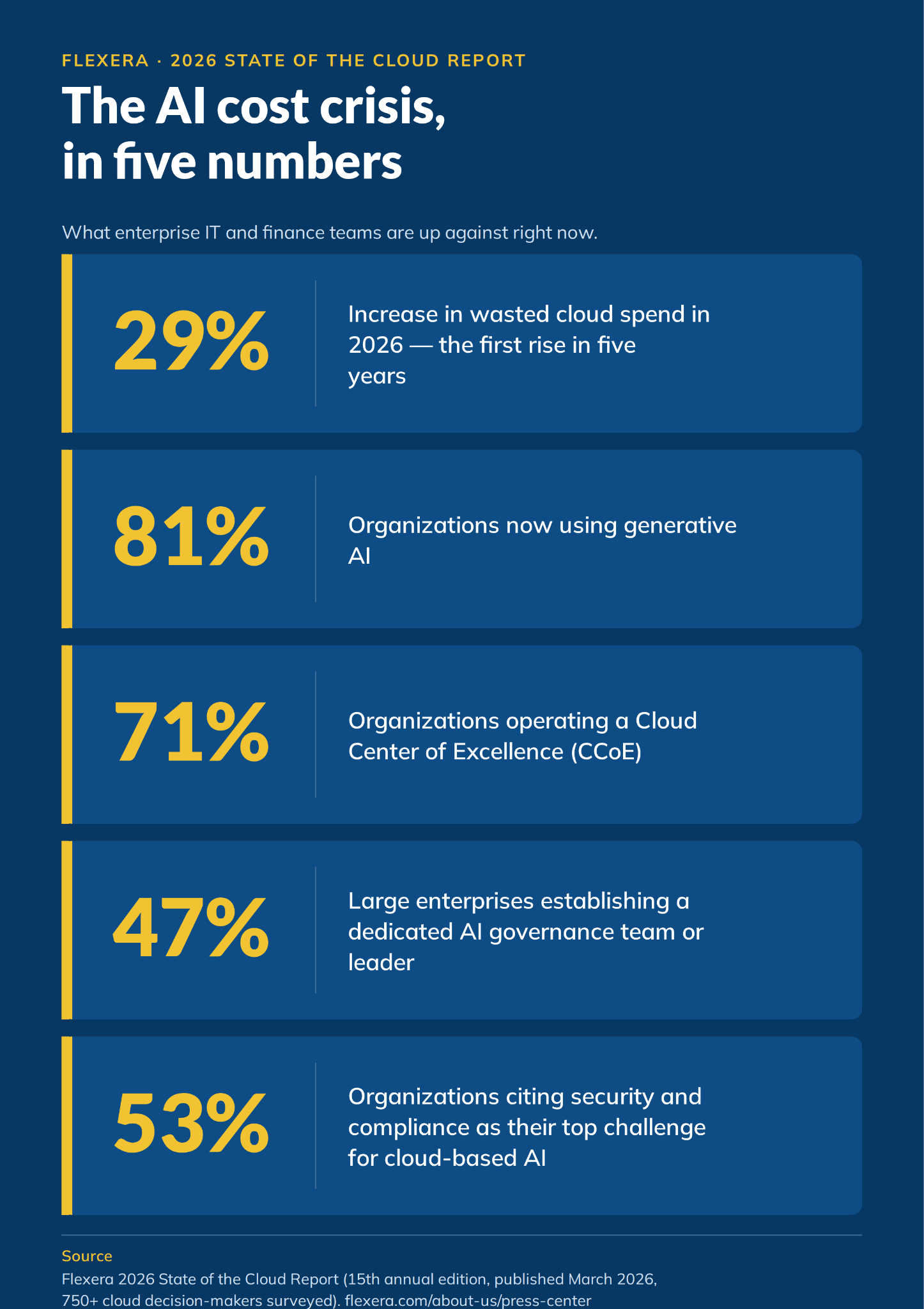
Data points from Flexera’s 2026 State of the Cloud report
Our other 2026 research points the same way:
- Priorities gap. In the 2026 IT Priorities Report, 94% of IT leaders want to integrate AI into their technology stack, but only 19% say demonstrating AI usage and effectiveness is a top priority
- Spend outruns confidence. In that same report, 80% of IT leaders report higher spending on AI applications and over a third (36%) believe they’re overspending
- Visibility gap. In our State of ITAM 2026 findings, only 31% of organizations have visibility into AI software, and 59% report increased wasted AI spend
Put those together and the pattern is clear: AI adoption is running ahead of governance. That’s the gap AI cost management is meant to close.
Want the live version? Join our webinar series, The AI Cost Crisis, which runs from September 29 to November 17, 2026.
What drives AI overspend?
AI overspend rarely traces back to one poor decision. Instead, it builds up from several habits that may seem innocent on their own but can be costly when combined. Here are common habits found in almost every organization:
- Decentralized purchasing. Teams buy AI tools and API credits on corporate cards or through self-serve sign-ups, outside procurement. You end up with overlapping subscriptions and no single record of what you own
- Unallocated spend. AI charges land in a shared account or an untagged project, so no team sees its own number. When nobody owns the bill, nobody has a reason to shrink it
- Idle GPU and provisioned capacity. Someone spins up a GPU cluster for training or fine-tuning and forgets to scale it down, so idle hours turn into AI waste and higher GPU costs. You keep paying for expensive GPU uptime even when the work is done. Provisioned model capacity bills by the hour even when no requests arrive
- Frontier models and maximum reasoning for every task. Teams default to the largest model and the highest reasoning setting, even for summaries and classification that a smaller model handles. Reasoning tokens bill as output, so the extra thinking shows up as cost you never see in the response
- Token bloat. Long system prompts, full chat histories and oversized retrieval results ride along with every request. Every one of those tokens bills, even the ones the model didn’t need
- Runaway agents and jobs. An AI agent stuck in a retry loop or a scheduled job with no stop condition can run up charges for hours before anyone checks a dashboard
- Free tier pricing that ends. Pilots and free tiers convert to paid plans, and an auto-renewal can move a tool onto a usage-based tier at higher volume. Costs jump before anyone reviews the contract
- Incentives that reward burn. Some companies turned token counts into a productivity score, a trend nicknamed tokenmaxxing. Reward consumption and you get consumption, not output
The bill for these habits can arrive super fast. In April 2026, Uber’s CTO said the company had already burned up its 2026 AI budget in just four months.
None of these causes is unique to AI; they happen with cloud and SaaS too. But AI amplifies them: deployments scale rapidly, billing is often metered to the second, and a single experiment can generate thousands of tokens before anyone notices. For a shorter AI cost control checklist, see our steps for AI cost governance.
These habits also blur who should fix what, because FinOps, cloud cost management and SaaS management each see only part of the problem. The next section sorts out where AI cost management fits among them.
AI cost management vs FinOps vs cloud cost management vs SaaS management
These four terms overlap, which is why buyers often can’t tell which tool solves which problem. AI cost management overlaps with each of the others, but it isn’t a subset of any of them. Here’s how AI cost management is different from cloud cost management, FinOps and SaaS management.
| Discipline | Main focus | What it covers for AI spend |
| FinOps | The cross-functional culture and practice of managing cloud spend accountably, aligning finance, engineering and business teams | Sets the accountability model AI cost management runs on: who owns AI spend, how it’s allocated and how teams are held to it |
| Cloud cost management | The execution layer: rightsizing instances, reserved capacity and cloud spend visibility across cloud providers | Extends to AI-specific compute, including GPU reservations and inference infrastructure |
| SaaS management | Discovery, licensing and optimization of software subscriptions, including detecting shadow IT | Extends to shadow AI: AI tools, AI software and AI features inside existing SaaS subscriptions bought outside IT’s oversight |
| AI cost management | AI-specific view across all the above | Model, token and GPU costs; AI tool license sprawl; governance of who can adopt new AI tools and at what cost |
AI cost management isn’t a totally separate function; it’s what happens when FinOps, cloud cost management and SaaS management are all pointed specifically at AI spend.
Here’s how that looks in practice:
- The FinOps team sets the AI cost management policy: Every AI resource and API key carries an owner tag, and AI spend gets a monthly review
- Cloud cost management flags a GPU node pool with low GPU utilization and recommends a smaller instance type
- SaaS management spots three teams paying for the same AI app and consolidates their AI licenses onto one contract
- AI cost management rolls it all into one view: AI spend by team and model, what changed this month and what each unit of work cost
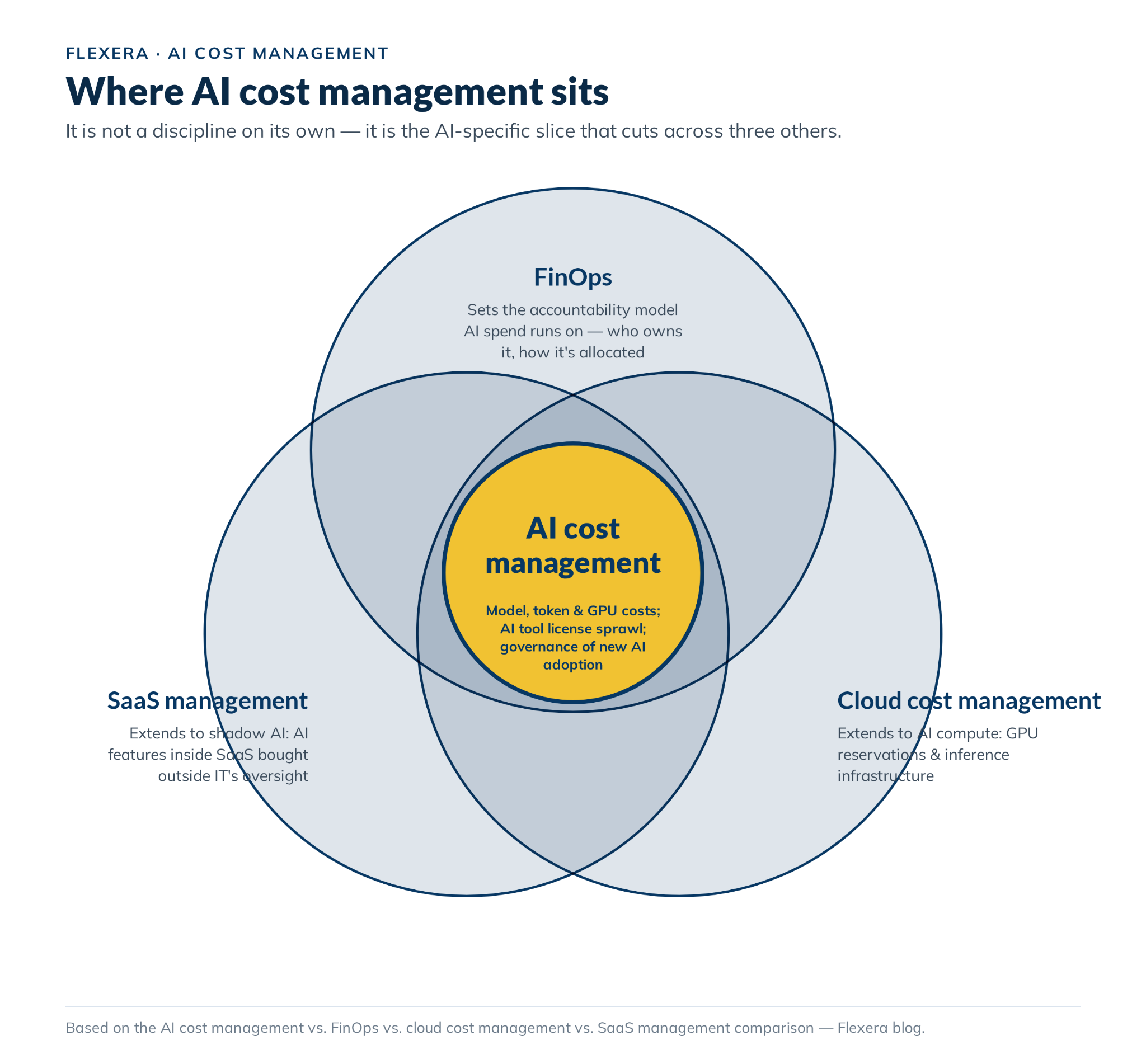
AI cost management across FinOps, cloud cost management and SaaS management
For the FinOps side in more depth, see 5 FinOps practices you should apply to AI and our practical guide to FinOps for AI.
Knowing who does what is half the battle. The other half is a plan that makes those roles routine, and that’s what we build next.
How do you build an AI cost management strategy?
A durable AI cost management strategy runs on the same loop as a mature FinOps practice, the lifecycle in the FinOps Framework: Inform, Optimize and Operate. First you get visibility, then you act on it, then you build the habits that keep AI cost control working.
Step 1 — Establish visibility (Inform)
Build an inventory of your AI software and AI infrastructure: every AI app, agent, model endpoint, API key, data platform workload and GPU pool. Include tools bought outside procurement. Then pull from several sources, because no single one shows everything:
- Identity provider logs for sign-ins and app permission grants
- Expense and card data for AI vendor charges
- Cloud and marketplace bills for model services and GPU hours
- Model provider consoles and usage APIs
- Data platform usage tables
Keep the inventory up to date, because a snapshot goes stale fast. You can’t manage what you can’t see. You can’t manage what you can’t see, and AI cost management starts there.
Step 2 — Allocate cost to the teams that generate it (Inform)
Use tags, labels, projects and workspaces so AI spend lands against the team, product or project that caused it, not on one unallocated line. Then report it two ways: showback shows each team its own cost, and chargeback bills that cost to its budget. Allocation is where AI cost management turns bills into accountability.
Step 3 — Set cross-functional accountability (Operate)
AI cost management decisions cut across FinOps, engineering, security and procurement, so name an owner for each. Without owners, AI costs land with whichever team happens to notice the bill.
| Team | Owns |
| FinOps team | The allocation model, AI cost reporting, forecasts and the monthly review |
| Engineering and platform teams | Model selection, prompt and caching design, GPU rightsizing and scheduling |
| SaaS management or IT asset management (ITAM) team | AI seat inventory, license reclamation, shadow AI detection and renewals |
| Procurement | Vendor contracts, commitments and approval of new AI purchases |
| Security and compliance | Risk review of new AI tools, data handling and access policy |
| Business unit leaders | Budgets, unit cost targets and the final call on what AI spend is worth |
Set a cadence too: a weekly anomaly review, a monthly showback review and a quarterly pass over commitments and renewals. Naming owners and rhythm up front, instead of assuming one team will own AI costs end to end, keeps AI cost management running past its first quarter.
Step 4 — Optimize continuously (Optimize)
Cut usage first, then lower the rate you pay for what’s left. Rightsize compute, route work to the cheapest model that does the job well and buy capacity you can fill. We walk through each AI cost optimization lever in the section below.
Step 5 — Govern new adoption (Operate)
Set up a lightweight AI governance intake path so new AI tools, models and add-ons show up before their first invoice does. Keep it fast. If approval takes a month, teams route around it with a credit card, and you’re back at step 1.
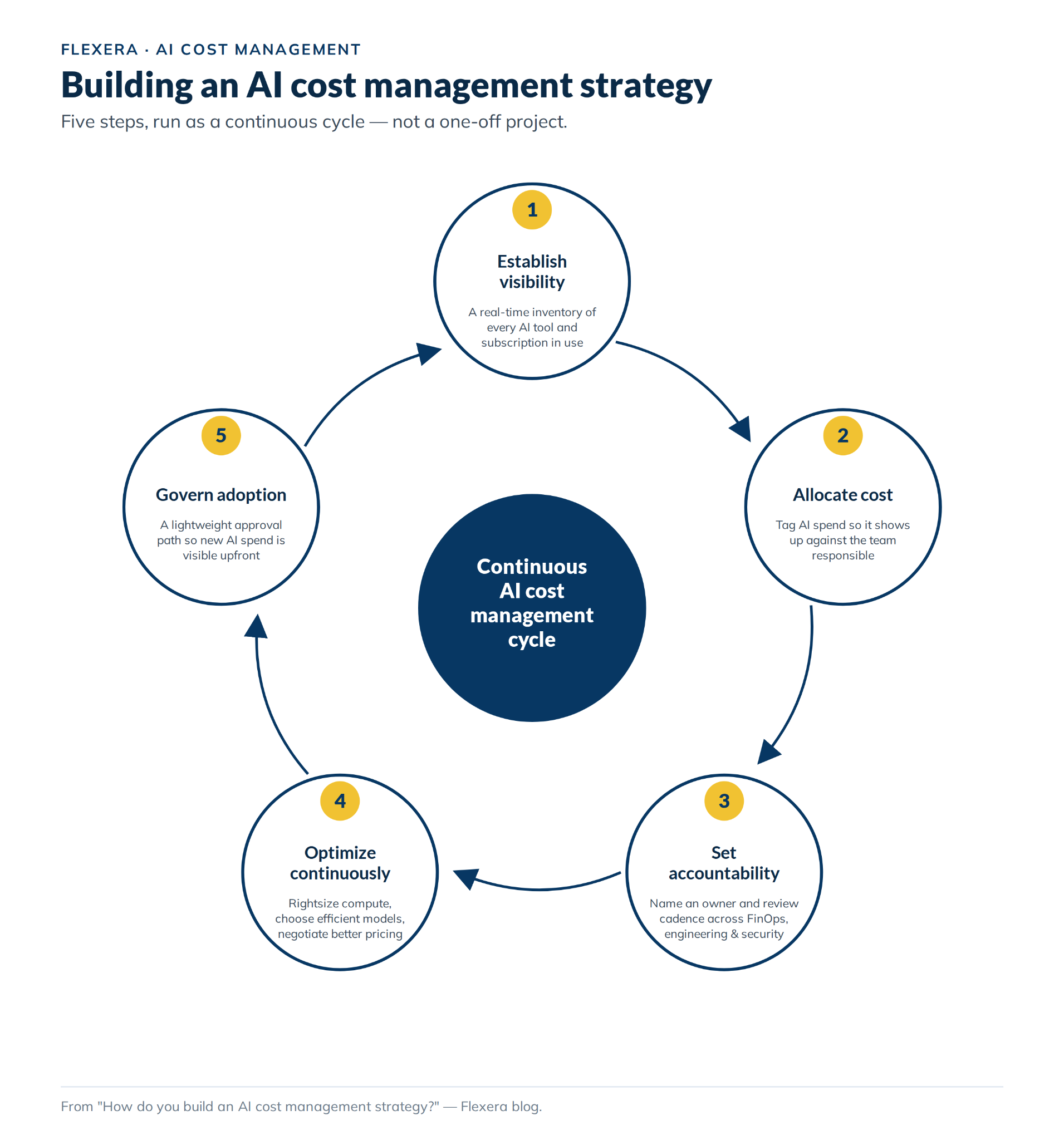
Five-steps of AI cost management strategy (Source: Flexera)
See how Flexera One brings AI, cloud and SaaS cost data together on one platform.
Which AI cost optimization techniques actually work?
AI cost optimization comes after visibility in AI cost management, and it follows an order: cut usage first, then lower the rate you pay for what’s left. A discount on AI waste is still waste.
Usage optimization: use less for the same result
Rightsize the model. Send each task to the cheapest model that does it well and keep your largest AI models for the work that needs them. Routing sends simple requests to small models, and cascading escalates to a larger model only when the small one falls short.
Cache repeated prefixes. Put static content first (system prompts, documents, tool definitions) and variable content last, so the provider can reuse the prefix. Cache reads cost less than fresh input, which lowers your cost per token on repeated prompts. Our prompt caching breakdown covers the details by provider.
Cap context and output. Trim system prompts, summarize long histories and limit retrieved chunks to keep token costs down. Cap output length too.
Set spend caps and loop limits. Give every AI agent a step limit, a retry limit and a budget per task. Add a hard stop at the gateway or provider project level, so a runaway job halts instead of billing overnight. Caps like these are the simplest form of AI cost control.
Reclaim idle seats. Pull activity data for per-user AI licenses and reclaim seats that sit unused for a set window, such as 30 days. Consolidate duplicate AI subscriptions onto one contract before renewal.
Rightsize and schedule GPUs. Match GPU type and count to the job, track GPU utilization, shut down idle training clusters and run fine-tuning on fault-tolerant capacity to hold down GPU costs.
Tune data platform AI functions. AI functions on data cloud platforms bill by token, and the query that calls them still uses compute. Token cost multiplies by every row you process, so filter rows before the function call and test on a small sample first. On Snowflake, use a warehouse no larger than MEDIUM for AI functions, because a larger one adds cost without adding speed.
Compare self-hosting with APIs at your volume. The FinOps Foundation describes a crossover point where self-hosting LLMs beats API pricing, and it warns that self-hosting carries the most risk when GPUs sit underused. Model both options at your real volume before you buy GPU compute.
Rate optimization: pay less for what you use
Commit where usage is steady. Savings Plans, reservations and enterprise agreements lower the rate for steady GPU and compute use. Commit to your usage floor, not your peak, and track utilization after you buy. Check out our cloud commitment management and see how it handles it.
Use provisioned throughput only for steady, high-volume traffic. Provisioned capacity bills by the hour even when no requests arrive, so it pays off only when utilization stays high. Longer commitment terms lower the hourly rate but lock you in. A commitment usually ties you to one model, so check the provider’s deprecation schedule first.
Use spot capacity for fault-tolerant work. Spot and preemptible capacity can cost up to 90% less than on-demand on AWS and Azure and up to 91% less on Google Cloud. Providers can reclaim it on short notice, so reserve it for checkpoint training and batch inference.
Optimization only covers the spend you can see. Shadow AI is the spend you can’t.
How do you detect and manage shadow AI?
Shadow AI is AI use that falls outside IT’s oversight: individual employees using unsanctioned AI tools, teams enabling AI features within existing SaaS subscriptions without review or departments buying model access directly on a card. It carries the same risks as shadow IT (data exposure, compliance violations and duplicate spend), with the added twist that AI tools are being adopted faster than most procurement processes can keep up with.
No single source catches everything, so combine these signals:
- Identity provider logs. Sign-ins with company credentials and OAuth permission grants to AI apps
- Expense and card data. Recurring charges from AI vendors and API credit top-ups
- Network and browser telemetry. Traffic from managed devices to known AI services
- Cloud and marketplace bills. Model service charges in accounts that never had them
- Code and secrets scanning. Model provider API keys committed to repositories
- SaaS admin consoles and release notes. AI features a vendor added to a tool you already license, sometimes switched on by default
Shadow AI is a big enough topic to deserve its own deep dive. For the full walkthrough, see our guide to what shadow AI is and how to detect and govern it.
Detection is only half the job. Banning AI tools tends to push use out of sight, which leaves you with the same spend and less visibility. Use AI governance instead:
- Have AI governance teams publish an allowlist of approved tools and models and a denylist of blocked ones, and note which data each may touch
- Keep the intake path short, so a review takes days, not weeks
- Offer an approved alternative for every tool you block
- Review AI features inside existing SaaS at each renewal and whenever a vendor changes pricing or terms
- Show each team its shadow AI spend, and move the tools worth keeping onto contracts that procurement owns
Our steps for AI cost governance go into the process in more detail. The point is not to slow AI down, but to make sure that every tool is visible and owned. Thus, AI cost management covers the spend while teams continue to use it.
What should you look for in an AI cost management platform?
We will not rank individual tools, since the best choice depends on what is already in your stack. Evaluate any AI cost management platform against these criteria:
| Criteria | What to ask |
| Coverage across the four layers | Does it cover all four AI cost management layers in one view: apps and agents, models, data cloud platforms and infrastructure? |
| Data sources | Can it ingest cloud bills, model provider usage, data platform usage tables, identity data and expense data without custom work? |
| Normalization | Does it map tokens, credits, DBUs and GPU hours into one schema, and does it support FinOps FOCUS? |
| Attribution | Can it allocate by tag, label, project, workspace or inference profile, and split shared costs by a rule you set? |
| Unit economics | Can it report cost per task, ticket or document, not only cost per token? |
| Forecasting and anomaly detection | Does it forecast from drivers, and how fast does it flag a runaway agent? |
| Optimization | Which AI cost optimization recommendations does it make, and which can it act on with your approval? |
| Governance | Does it support AI governance by detecting shadow AI, tracking approvals and keeping an audit trail? |
| Data handling | What does it collect? An AI cost management tool shouldn’t need your prompts or responses |
| Fit with your tools | Does it connect to your ITAM, ITSM, finance and procurement systems? |
These criteria matter more together than individually. A platform that’s strong on visibility but weak on governance will show you the problem without helping you fix it, and the reverse is just as true.
Here’s how we approach it at Flexera.
How does Flexera approach AI cost management?
Flexera’s approach spans three connected modules rather than a single point tool:
- IT Visibility maps the full hybrid IT estate, hardware, software, cloud and SaaS, onto a single data set (Technopedia), so AI infrastructure shows up alongside everything else an organization runs rather than in a separate system
- SaaS Management discovers and monitors SaaS subscriptions, including AI tools and AI features added to existing platforms, to surface shadow AI and underused licenses
- FinOps (Cloud Cost Optimization) provides multi-cloud visibility, anomaly detection and budget tracking that extends to AI compute and inference costs across AWS, Azure and Google Cloud
The idea is that AI cost sits inside the same platform as the rest of an organization’s technology spend, rather than requiring a separate AI-specific tool that then needs to be reconciled against the cloud and SaaS numbers everyone else is working from. More details on each module are available on the Flexera One product page.
How do you measure the return on investment of AI cost management?
Start with two numbers: allocation coverage and waste rate. Both should move the right way as your program matures, with allocation up and waste down. Then add the key performance indicators (KPIs) below.
| KPI | What it shows | How to calculate |
| Allocation coverage | How much AI spend has an owner | Allocated AI spend / total AI spend |
| Cost per unit of work | What one outcome costs | Total AI cost / accepted tasks, resolved tickets or documents processed |
| Cache hit rate | How much input you’re not paying full price for | Cached input tokens / total input tokens |
| GPU utilization | How much paid capacity does real work | Busy GPU hours / paid GPU hours |
| Commitment utilization | How much reserved or provisioned capacity you use | Used capacity / committed capacity |
| Seat utilization | How many paid AI seats are active | Active users / paid seats |
| Time to detect | How fast new AI spend shows up in reporting | Days from first use to first report line |
| Governance coverage | How many AI tools passed review | Reviewed tools / all tools found |
| Forecast accuracy | How accurate is the forecast | 1 – (absolute forecast error / actual spend) |
Conclusion
AI cost management applies FinOps, cloud cost management and SaaS management to AI spend, then covers what they miss: token contracts, credits and per-seat AI add-ons. Rising AI adoption and growing AI waste aren’t reasons to slow AI down. They’re reasons to set up visibility, allocation and governance before the next tool, model or subscription lands on next month’s bill. That’s how AI cost management keeps you ahead of the AI cost crisis.
Start with visibility. Allocation, forecasting and optimization all get easier once you can see what you spend on AI and who spends it. From there, AI cost management lets you show AI ROI and the business value each dollar buys.
See how Flexera helps enterprises control their token spend with Token Cost Control.
What is AI cost management?
AI cost management is the practice of tracking, allocating and optimizing an organization’s AI spending, including model and inference costs, GPU compute and AI tool licenses, whether purchased through a formal process or not.
What is the AI cost crisis?
It’s shorthand for AI spending and usage growing faster than organizations can track, allocate and govern what they cost. AI cost management is how you close that gap. Flexera’s 2026 State of the Cloud Report found wasted cloud spend rose 29% in 2026, the first increase in five years, driven largely by AI workloads.
How is AI cost management different from cloud cost management?
Cloud cost management covers all cloud spend. AI cost management is the AI-specific slice of it, with cost drivers, like per-token inference pricing and GPU reservations, that standard cloud cost practices weren’t built around.
What causes AI cost overspend in enterprises?
The most common causes of AI cost overspend are decentralized buying, no chargeback or showback model, defaulting to the largest model for every task, growing prompt context, agent loops that multiply model calls, idle reserved GPU capacity and unreviewed renewals. None is unique to AI, but AI usage scales from pilot to habit in weeks, so these causes compound faster.
What is shadow AI?
Shadow AI is any AI tool, model or agent employees use for work without IT, security or compliance reviewing it.
How does prompt caching reduce AI costs?
Prompt caching stores a stable prefix, like a system prompt, so a provider charges a discounted rate on repeat use instead of the full input-token price.
What are the best AI spend management tools?
There’s no single best tool for AI spend management, because it depends on what’s in your stack. Look for unified visibility across cloud, SaaS and on-premises assets, AI-specific usage data, automated discovery (including shadow AI) and FinOps-aligned reporting. Flexera offers all of that in one.
What is Tokenomics?
Tokenomics is the economics of AI tokens: how the cost per token, usage and efficiency add up to cost and value. It’s the unit economics behind AI cost management. The FinOps Foundation calls tokenomics and FinOps for AI two views of the same work, and neither is a subset of the other. Our post on the rise of tokenomics covers the basics.
What role does FinOps play in managing AI costs?
FinOps provides the accountability model AI cost management runs on: measuring spend, allocating it to the teams responsible and holding a cross-functional group accountable for optimizing it on an ongoing basis. See Flexera’s 5 FinOps practices you should apply to AI for a practical breakdown.
How do I govern employee use of AI tools and SaaS apps?
Start with visibility, because you can’t write AI governance policy for tools you can’t see. Then set up a lightweight approval path for new tools and publish an allowlist of approved models and apps and a denylist of blocked ones. Review AI subscriptions on the same schedule as the rest of your SaaS estate, and treat any unreviewed tool as shadow IT until it passes. Treat this as part of AI cost management: every reviewed tool is one you can allocate and forecast. Our guides to shadow AI and AI cost governance walk through the details.
What capabilities should an enterprise AI cost management platform have for budgeting and forecasting?
A good AI cost management platform offers allocation by team or project through tags, labels, workspaces or inference profiles, and AI budget alerts before spend passes plan. It also flags a runaway agent before month end and reports from the same data as your cloud and SaaS budgets, not a separate spreadsheet.
What reporting do I need to forecast AI and cloud licensing costs?
Build forecasts on AI usage trends, not last year’s invoice. Track month-over-month growth by team, flag tools near a pricing tier change and compare commitments (reserved instances, savings plans, provisioned throughput and annual AI subscriptions) against actual usage before they renew.
Pramit Marattha
Pramit Marattha is a technical content writer and strategist with 5+ years of experience covering AI, data engineering, data cloud platforms and open source technologies. He turns complex technical concepts into clear, useful content for engineers and developers.