

Every single API call to a large language model (LLM) reprocesses your whole prompt from scratch. That prompt usually includes system instructions, tool definitions and your full chat history. In most production apps, most of that content stays identical from one request to the next, yet without prompt caching the model works through that repeated prefix before it writes a single new word, and you pay full price for it every time.
At a small scale, the extra compute is easy to miss. At scale, however, it gets expensive fast. Anthropic, OpenAI, Google and other providers charge for every token they process, so if your app sends the same 10k token prompt hundreds of thousands of times each day, you end up paying to process the same input over and over. It’s one of the less visible drivers of the AI cost crisis, where inference spend climbs faster than most FinOps teams expect once adoption begins to scale.
Prompt caching removes most of that waste. It lets a provider remember the part of your prompt that hasn’t changed and skip recomputing it, so you only pay full price for what’s actually new. That one change cuts redundant computation, reduces input token costs and lowers response latency, all without compromising the model’s output quality or forcing you to switch to a cheaper model.
Below, we get into how prompt caching works under the hood, what each major provider actually charges as of mid-2026 and where the savings show up (or don’t) on your bill.
What is prompt caching?
Take a typical AI chatbot or coding assistant. Every request opens with the same system prompt and tool definitions, often followed by large chunk of documentation or source code, before it even gets to the user’s question. Most of that context doesn’t change between requests. Without prompt caching, the model processes it from scratch every single time, and you’re billed for that same static content again and again.
Prompt caching fixes that. The first time a prompt prefix (the stable, repeated part at the start of a request) comes in, the provider stores the processed version of it. The next time an identical prefix shows up, the provider skips reprocessing it and applies a steep discount to those tokens instead. Same output, lower bill, faster response, because skipping computation also means skipping time.
That’s the short version. The interesting part is what “processed version” actually means, and that comes down to how transformer models generate text in the first place.
Why token spend gets out of hand without prompt caching
Global AI spending is forecast to reach $2.59 trillion in 2026, a 47% jump from 2025, according to Gartner’s latest estimate published in May 2026. Flexera’s 2026 AI Pulse Report reflects a similar trend in practice: 80% of leaders say they’ve increased AI investment, more than one-third (36%) say they’ve overspent on AI applications, and cost unpredictability ranks among the top three challenges for almost every organization scaling AI in the cloud, right alongside security gaps and messy data.
None of that is abstract. Agentic workflows, the kind that loop through a plan, call a tool, read the result and call the next tool, burn through far more tokens than a single question and answer, because the model re-reads the accumulating conversation on every turn of the loop. A ten-turn agent session with a 5k token system prompt reprocesses that same prompt ten separate times if nothing is cached. Multiply that across a team, a product and a company, and it’s easy to see how AI cost overruns keep making headlines.
Prompt caching doesn’t fix everything (more on that later), but it addresses the most obvious waste: paying full price to recompute something the model already computed a few minutes ago. It’s also only one lever among several. For the fuller cost-control picture, see Flexera’s 5 FinOps practices for AI or its step-by-step guide to FinOps for AI in 8 steps.
The architecture breakdown: how prompt caching works
LLMs generate text one token at a time. At every layer of the transformer, each token gets projected into three vectors, a Query, a Key and a Value. Attention uses these to work out which earlier tokens matter most to the one being generated right now.
Without any optimization, generating token number 500 would mean recalculating the Key and Value vectors for all 499 tokens before it, every single time. That’s quadratic complexity, and it gets painfully slow on long prompts.
The fix, which every production LLM has used for years, is the key-value (KV) cache. The model computes the key and value vectors for each token once and saves them. Generating the next token only requires computing key and value for that single new token; everything before it gets pulled straight from the cache. That turns the dominant, repeated projection cost from quadratic (O(n^2)) into linear (O(n)) in the length of the prompt, which is why a 1-million-token prompt doesn’t take a million times longer to process than a single-token one. Attention scoring itself, where the new token compares against everything cached so far, is still work proportional to how much is cached, but the far more expensive redundant recomputation sitting underneath it is gone.
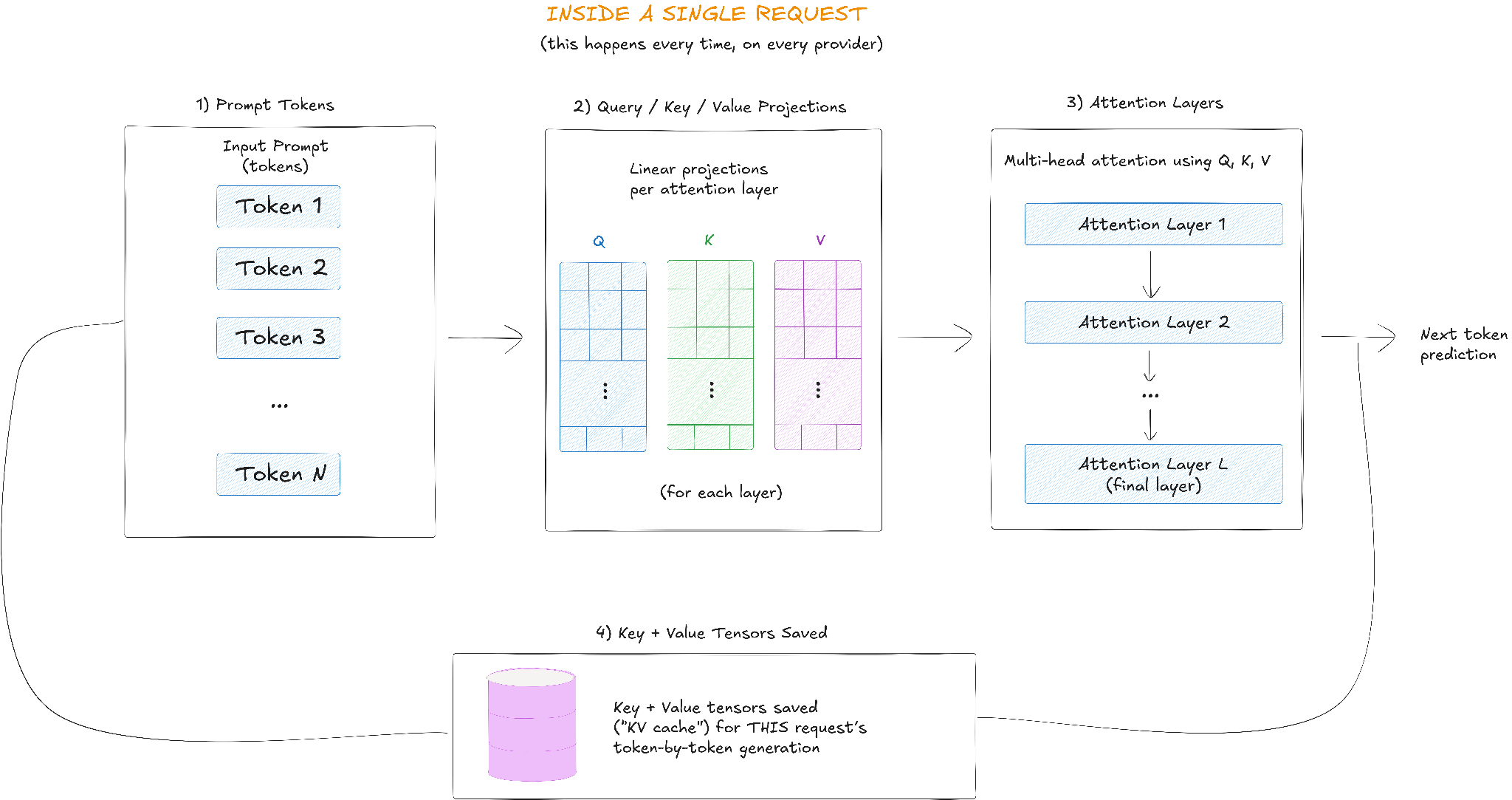
- Prompt tokens: the input text gets tokenized into a sequence
- Q, K, V projections: each token is projected into Query (Q), Key (K) and Value (V) vectors at every attention layer
- Attention layer: the model computes attention using Q, K and V across all layers to produce the next token
- KV cache: the Key and Value tensors from all layers are saved in memory and reused to generate each subsequent token within that request
Two distinct phases are at work here.
The initial phase is prefill. When your prompt arrives, the model reads it all in parallel and computes Key and Value vectors for each token at each layer of the network. Its sole purpose is to build the key-value cache, a running record of what each token in your prompt “means” to the attention mechanism, layer by layer.
The second phase is decode. Now the model generates your answer one token at a time, computing Key and Value for each new token and appending it to everything already sitting in the cache. The old tokens never get recomputed. The cache grows by one entry per step until the response is done.
Prompt caching takes that same key-value cache and stretches it across separate requests instead of confining it to one. Here’s how it works. First, the provider hashes the prefix of an incoming prompt (OpenAI, for instance, hashes roughly the first 256 tokens) and checks that hash against a store of recently computed KV tensors. If there’s a match, the provider skips the prefill for that portion and moves straight to the new, variable part of the prompt. If there’s no match, it runs a full prefill, and the new prefix gets written to the cache for next time.
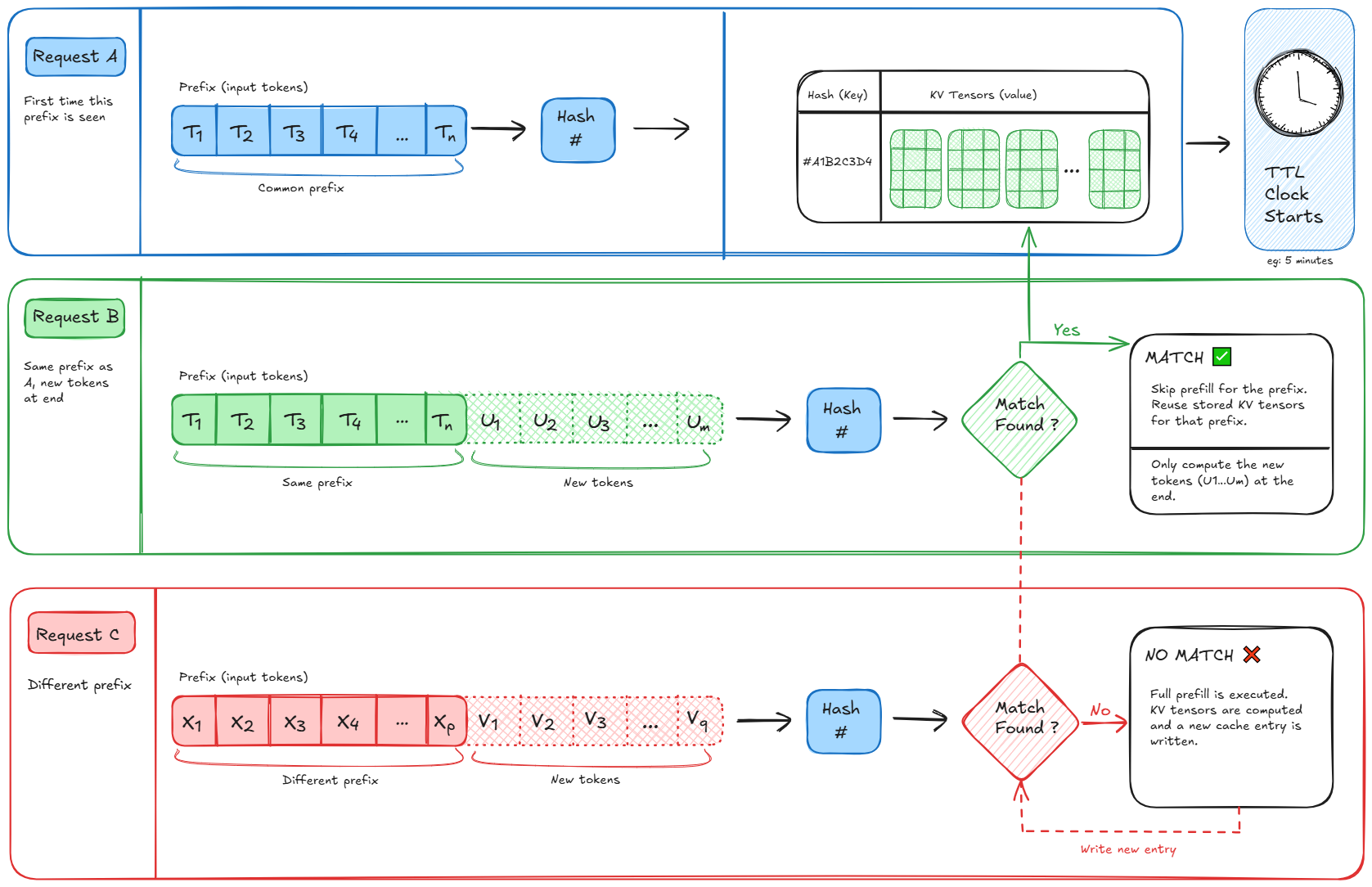
TL;DR:
- Prefill builds the key-value cache for the prompt
- Decode reuses it to generate tokens one at a time
- Prompt caching saves the prefill work across separate API calls when the prefix repeats
So, the match must be exact. A single byte difference anywhere in the cached prefix breaks the hash and the whole thing misses. More on avoiding that in the best practices section below.
Another thing you should know is that the cache itself is expensive to store. A 100k token token prompt can generate several hundred megabytes of key-value tensors in GPU memory, multiplied by every concurrent user a provider is serving. That’s the main reason cache writes usually cost a bit more than a normal input token. Providers are partly charging for that memory allocation, not only the compute.
How do the big providers implement prompt caching?
The mechanics above are common across providers. The pricing and the controls you get are not, and the gap between providers keeps shifting as each one tries to out-discount the AI cost crisis narrative it’s competing against. Here’s a breakdown of the top providers right now.
Anthropic Claude
Anthropic gives you two ways to turn on prompt caching.
- Automatic caching adds a single cache_control field to the top level of your request; the system locates the last cacheable block and shifts that breakpoint forward as your conversation progresses, so a multi-turn chat stays cached without your intervention
- Explicit breakpoints let you mark up to four points in a request, useful when different portions change at different rates (tools rarely change, a knowledge base may update daily, chat history updates every turn)
The default cache lasts 5 minutes and refreshes for free every time it’s read, so a steady stream of requests keeps it alive indefinitely. A 1-hour cache is available for double the write cost and suits workloads with gaps longer than 5 minutes but shorter than an hour, like slower agent loops, human-in-the-loop approval steps or users who take their time responding.
Pricing runs on three fixed multipliers that apply across current Claude models. A 5-minute cache write costs 1.25x the standard input rate, a 1-hour write costs 2x and a cache read costs 0.1x, a 90% discount. Claude Sonnet 5 currently carries introductory pricing of $2 per million input tokens through August 31, 2026, reverting to $3 per million after that. At the standard $3 rate, that works out to $3.75 per million to write a 5-minute cache, $6 per million for the 1-hour tier and $0.30 per million to read; at today’s introductory rate, those figures are $2.50, $4 and $0.20 respectively.
Make sure to check the current pricing page before you budget against a specific model, since Anthropic updates rates by model generation.
The minimum prompt length that can be cached varies by model and isn’t always consistent. As of July 2026, per Claude’s own documentation:
| Model | Minimum cacheable length |
| Claude Opus 4.8, Claude Sonnet 5, Claude Sonnet 4.6, Claude Sonnet 4.5, Claude Mythos 5 (AWS Bedrock) | 1,024 tokens |
| Claude Mythos Preview, Claude Opus 4.7, Claude Haiku 3.5 | 2,048 tokens |
| Claude Opus 4.6, Claude Opus 4.5, Claude Haiku 4.5 | 4,096 tokens |
| Claude Fable 5, Claude Mythos 5 (native API) | 512 tokens |
If your cacheable content falls short of the minimum, the request still succeeds; it just processes at full price with no error telling you why.
As of February 5, 2026, prompt caches on the direct Claude API, Claude Platform on AWS and Microsoft Foundry are isolated by workspace rather than by organization, so teams sharing one Anthropic organization now get separate cache namespaces per workspace. Amazon Bedrock and Google Cloud still isolate at the organization level.
Claude’s documentation also confirms the system scans backward from your breakpoint to find the longest matching prefix, checking roughly ~20 content blocks back at most (the breakpoint itself counts as the first). Cache reads don’t count against your input tokens per minute (ITPM) rate limit for most current models, Claude Haiku 3.5 is the one exception that still counts cache reads toward ITPM, which means a high hit rate on everything else effectively multiplies your usable throughput on top of cutting your bill.
OpenAI
OpenAI’s default mode is simple: no setup required. Automatic (implicit) caching applies to every eligible request on GPT-4o and newer, with no code changes needed.
The minimum is a flat 1,024 tokens across models, growing in 128-token increments after that. Under the hood, OpenAI routes a request to a server based on a hash of the first chunk of the prompt (roughly the first 256 tokens), then checks whether that prefix is already cached. You can set an optional prompt_cache_key to help route related requests to the same machine, useful once you’re sending more than about 15 requests per minute against the same prefix.
Retention comes in two types.
- In-memory retention keeps a cache warm for 5 to 10 minutes of inactivity, up to a maximum of one hour under light load, using volatile GPU memory only.
- Extended retention can hold a cache for up to 24 hours by offloading the key/value tensors (never the original prompt text) to GPU-local storage once memory fills up.
For GPT-5.5, GPT-5.5 Pro and every model that’s followed them, extended retention isn’t just an option, it’s the only one; in-memory retention isn’t available at all on those models. For older models that support both (GPT-4.1, GPT-5, GPT-5.1 and GPT-5.4 among them), the default follows your organization’s data retention setting: 24 hours if you haven’t turned on zero data retention, in-memory if you have.
Regarding discount size, OpenAI’s cached-token pricing varies by model tier rather than sitting at a flat number: roughly 75% off on the GPT-4.1 family, up to 90% off across the current GPT-5.x lineup, and as high as 98.75% off on realtime audio models like gpt-realtime-2.1, where cached audio drops to $0.40 per million tokens against $32 standard. Unlike Anthropic, OpenAI’s cached tokens still count against your tokens-per-minute cap.
There’s also a recent update. Cache writes on automatic mode aren’t free across the board anymore. That was true through GPT-5.5, but starting with GPT-5.6, OpenAI began charging 1.25x the uncached input rate for cache writes, on both automatic and the new explicit mode. Explicit caching on GPT-5.6 and later works a lot like Anthropic’s, using a prompt_cache_breakpoint marker on a content block and a prompt_cache_options.mode set to explicit, with a minimum cache lifetime of 30 minutes. Writes are reported back in cache_write_tokens and reads in cached_tokens, so you can measure write cost against read savings directly. If you’re still on GPT-5.5 or earlier, cache writes remain free.
Google Gemini
Google runs two caching modes side by side, and the choice mostly comes down to how much control you want.
- Implicit caching is on by default across all Gemini 2.5 models and newer, needs nothing to set up, and applies its discount automatically whenever your traffic happens to repeat a recent prefix. You get no control over what’s cached or for how long, typically a window of a few minutes, and no guarantee of a hit on any given call. The minimum depends on which model generation you’re running: 2,048 tokens on Gemini 2.5 Flash and Gemini 2.5 Pro, rising to 4,096 tokens on the current Gemini 3.5 Flash and Gemini 3.1 Pro Preview models
- Explicit caching is entirely different. You create a cache object, get back an ID and reference it in future requests. The savings are guaranteed rather than opportunistic, but you pay a continuous hourly storage price for as long as the cache exists, on top of the standard rate to write it in the first place. The default TTL is 60 minutes if you don’t set one, and Google doesn’t cap how long or short you can make it. The minimum token count for explicit caching follows the same per-model floor as implicit caching (2,048 to 4,096 tokens), it’s not a separate, much higher bar the way it was on older Gemini generations
The discount is consistent across current models: 90% off the cached portion on Gemini 2.5 and later, for both implicit and explicit caching. Gemini 2.0’s older 75% rate is now mostly academic, since Gemini 2.0 Flash and Flash-Lite were shut down on June 1, 2026, and nothing still running gets that lower number. Cached content isn’t limited to text either. Gemini’s caching covers PDFs, images, audio and video.
Storage pricing is what keeps casual users away from explicit caching. You’re charged for the tokens you’ve cached for every hour they sit there, even if nothing ever reads them again (Google’s current rate is $1.00 per million tokens per hour on Flash-tier storage and $4.50 per million tokens per hour on Pro-tier storage). A cache that gets hit constantly is a bargain. A cache you create and then mostly forget about can end up costing more than never caching at all, so delete explicit caches as soon as a job finishes rather than leaving them to expire on their own.
AWS Bedrock
Bedrock’s implementation mostly inherits the economics of whatever model is running on it. For Claude models specifically, that means the same 1.25x (5-minute) or 2x (1-hour) write premium and 0.1x read rate you’d see calling Anthropic directly. AWS claims up to 90% lower cost and up to 85% lower latency on supported models. The 1-hour TTL option went generally available on Bedrock in January 2026 for Claude Sonnet 4.5, Haiku 4.5 and Opus 4.5.
Bedrock uses cache checkpoints, markers placed at the end of a cacheable section, with support for up to four checkpoints per request and up to 32,000 cached tokens for Claude models. For Claude models specifically, Bedrock also offers simplified cache management, where a single checkpoint automatically checks for cache hits across roughly the last 20 content blocks, similar to Anthropic’s own automatic caching.
Note: Anthropic’s actual automatic-caching mode, which is supported on the direct API, Claude Platform on AWS, Google Cloud, and Microsoft Foundry, is not available on Bedrock. Simplified cache management achieves a similar result, but it relies on the checkpoint technique rather than Anthropic’s own automatic mode.
Minimums per checkpoint also vary by model and can lag behind the direct Claude API: Bedrock still lists a 4,096-token minimum for Claude Opus 4.5, Opus 4.6, Haiku 4.5 and Sonnet 4.5, even though Anthropic’s own API has since lowered that to 1,024 tokens for newer Sonnet-tier models.
Amazon’s Nova models add a layer of automatic caching aimed at latency, but AWS still points people toward explicit checkpoints when cost, not only latency, is the main goal.
TL; DR:
| Provider | Prompt caching mode | Discount on hits | Write cost | Minimum prefix | Default TTL |
| Anthropic Claude | Automatic or explicit (up to 4 breakpoints) | 90% | 1.25x (5 min) or 2x (1 hour) | 512 to 4,096 tokens, model dependent | 5 minutes, refreshes on read (1 hour optional) |
| OpenAI | Automatic (free write pre-GPT-5.6); explicit on GPT-5.6+ (1.25x write) | Up to 90%, varies by model | None on automatic mode through GPT-5.5; 1.25x on both modes from GPT-5.6 on | 1,024 tokens, then 128-token increments | 5 min to 1 hour in-memory (pre-GPT-5.5 only); up to 24 hours extended (mandatory on GPT-5.5 and later) |
| Google Gemini | Implicit or explicit | 90% (2.5 and later, including current 3.x models) | Standard input rate, plus hourly storage for explicit | 2,048 to 4,096 tokens, model dependent, same floor for implicit and explicit | Not user-set (implicit); 60 minutes default, no min or max (explicit) |
| AWS Bedrock | Explicit checkpoints only (Claude models) | Up to 90% | 1.25x (5 min) or 2x (1 hour) | 1,024 to 4,096 tokens, model and platform dependent | 5 minutes; 1 hour on Sonnet 4.5, Haiku 4.5 and Opus 4.5 since January 2026 |
A quick note on Azure OpenAI
Azure OpenAI Service runs the same models as OpenAI’s direct API, and its caching works the same way: automatic, prefix-based and free to write on the standard automatic mode. If you understand OpenAI’s setup, Azure’s version won’t surprise you much. That said, it’s worth checking Microsoft’s documentation for how long they keep data, and testing new caching features before you rely on them, since Azure can run weeks behind the direct API on day-one functionality.
Self-hosted: vLLM and SGLang
Not everyone calls a hosted API. If you’re running open-weight models on your own GPUs, you still benefit from prompt caching, just implemented at the inference-engine level instead of behind a billing API.
vLLM manages the KV cache using a mechanism known as PagedAttention, which works a lot like how operating systems manage virtual memory. Instead of one contiguous memory block per request, the cache is divided into fixed-size pages that can be stored anywhere in GPU memory, cutting down on wasted and fragmented space. On top of that, vLLM’s Automatic Prefix Caching hashes those pages so identical prefixes across separate requests, not just within one conversation, get detected and reused automatically. The –enable-prefix-caching flag used to be how you opted in; on the current v1 engine, prefix caching is on by default for any model that supports it, so you’re more likely to reach for –no-enable-prefix-caching if you actually want it off. When memory fills up, vLLM evicts unreferenced blocks first, working outward from the least recently used.
SGLang takes a related but different approach with RadixAttention, built on a radix tree (a compressed prefix tree) instead of a flat hash table. Every request that shares a common prefix, a fleet of agents all running the same system prompt, for example, branches off a shared node in that tree, and the shared portion gets computed exactly once no matter how many individual requests reference it. That makes RadixAttention especially strong for multi-agent or heavily branching workloads, where dozens of calls fan out from a shared ancestor prompt. As a rough guideline, once traffic runs somewhere north of 60% shared prefix overlap, RadixAttention’s latency advantage gets pronounced; for mostly unique prompts, the two engines land closer together.
Both systems can also push cached K/V tensors out of GPU memory into CPU RAM or further into distributed and disk storage, trading some retrieval speed for a much bigger effective cache. SGLang calls its version HiCache, which organizes the tiers as GPU memory, then host memory, then external storage, echoing a classic CPU cache hierarchy. There’s no per-token pricing to track here, since you’re paying for GPU-hours rather than API calls. The payoff shows up as more requests served per GPU, or lower latency per request, which then flows into whatever cost-per-request model you’re already using for your infrastructure.
Example: what caching actually saves
Say you’re running a retrieval-augmented generation (RAG) support bot on Claude Sonnet 5 at its standard rate ($3 per million input tokens), with a ~10,000 token system prompt plus reference content, handling ~5,000 requests a day.
Without caching, you’re processing 10,000 tokens for each of those 5,000 requests, for a total of 50 million tokens a day of pure repetition. At $3 per million, that’s $150 a day or roughly $4,500 a month, for the same static content processed over and over.
With caching, assume a 95% hit rate (250 cache writes and 4,750 cache reads a day, a reasonable split once traffic settles down):
- Writes: 250 requests x 10,000 tokens x $3.75 per million (the 1.25x rate) = $9.38 a day
- Reads: 4,750 requests x 10,000 tokens x $0.30 per million (the 0.1x rate) = $14.25 a day
- Total: roughly $23.63 a day, or about $709 a month
That’s an 84% cut on that part of the bill, saving about $3,790 a month, from a change that likely takes half an hour to make. If you’re calling Sonnet 5 during its introductory pricing window through August 31, 2026, the underlying input rate drops to $2 per million and the savings scale down proportionally, but the percentage cut stays roughly the same.
Where prompt caching really pays off
Prompt caching is most effective when a large part of the input stays the same across requests. That usually happens in a few patterns.
Multi-turn conversations are a strong fit. The conversation history keeps growing, but the earlier turns usually stay unchanged. Each new request only adds a small dynamic tail to a mostly stable prefix.
Retrieval-augmented generation (RAG) is another perfect fit, especially when the same documents, policies, or knowledge base chunks are retrieved again and again for similar queries.
Coding agents and developer tools also benefit a lot. They often reuse the same system prompt, tool definitions, and large chunks of file or repository context across many turns in a single session. That repeated prefix can be expensive, so caching helps reduce repeated prefill work.
Few-shot prompting can also work well when the examples stay fixed and only the user query changes.
If a workload is genuinely one-off, a unique document summarized once and never touched again, caching has nothing to grab onto, and that’s fine. Not every request needs to be cache-friendly.
Best practices for prompt caching
The most important rule of all is to prioritize static material over dynamic stuff. Put the system prompt, tool definitions and reference material at the head of the request, and the section that changes with each call (the user’s latest message) at the very end.
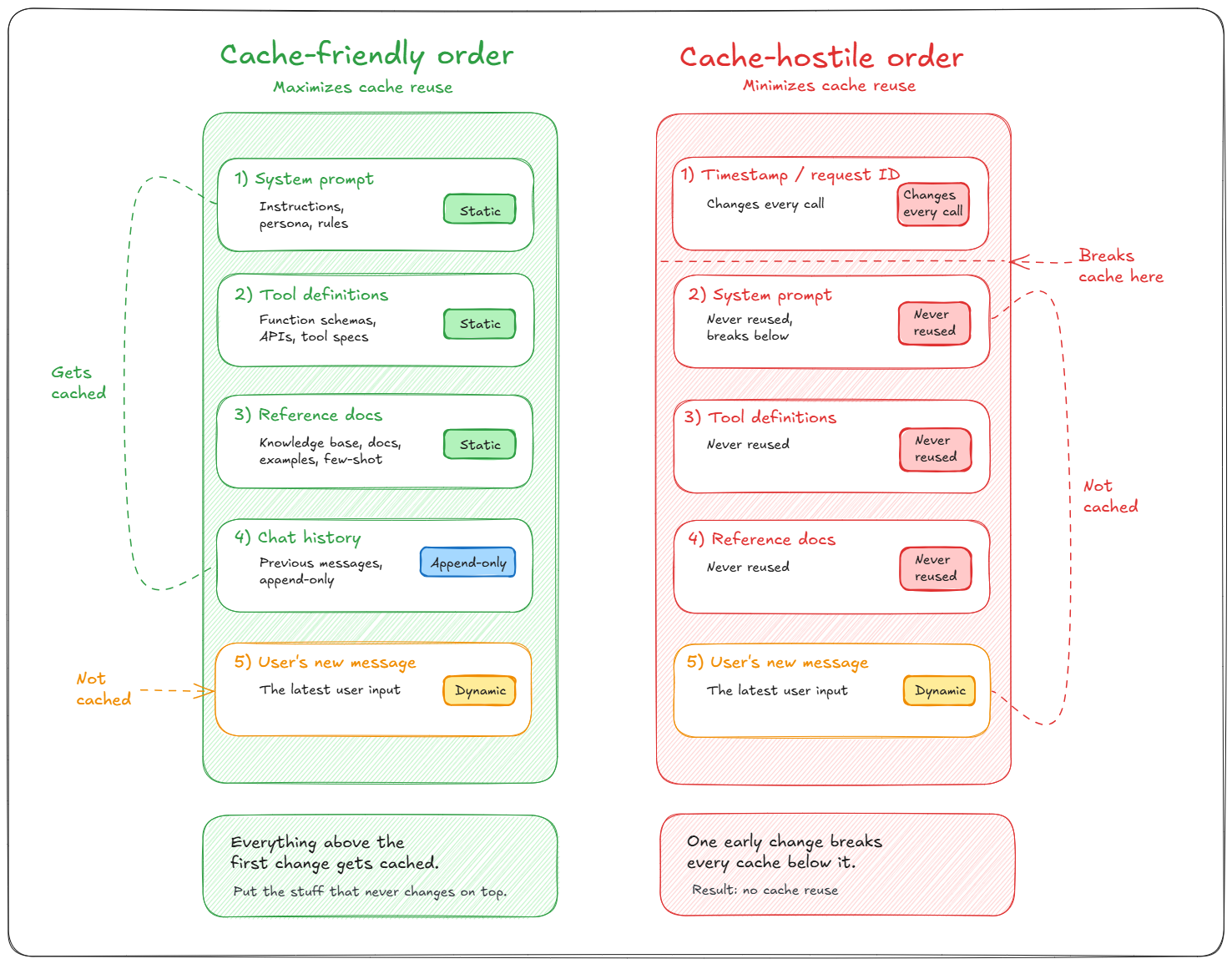
Cache-friendly
- Put static content (system prompt, tools, docs) at the top
- Keep dynamic content (the user message) at the bottom
- Result: maximizes cache hits, lowers cost, lowers latency
Cache-hostile
- Putting changing content early breaks the cache
- Nothing below it can get reused
- Result: minimizes cache hits, raises cost, raises latency
A short list of things that quietly break caching:
- A timestamp or request ID sitting anywhere before the cached prefix
- Tool definitions or JSON keys serialized in a different order between calls
- Trailing whitespace or invisible Unicode differences a human reviewer would never catch
- Switching models mid-session, since caches are model-specific and don’t carry over
The fix is the same for all of these: log the cache hit and miss counts every provider exposes in the response, cache_read_input_tokens on Anthropic, cached_tokens on OpenAI, or a similarly named field elsewhere, and find and fix a sudden drop in hit rate.
What prompt caching won’t solve
It wouldn’t be fair to suggest that prompt caching is a complete solution for AI spending issues. It doesn’t.
Caching only impacts the input tokens. If a workload is output-heavy (a short prompt producing a long generated response) the input side doesn’t really affect the bill, and caching won’t make much of a difference. It also doesn’t help truly unique, one-shot prompts with nothing to reuse, and it carries a small write premium that only pays off once a prefix gets read back at least a few times.
There’s also a bigger, less visible catch, which every FinOps team should consider. Cheaper tokens do not necessarily imply lesser total spend. When something becomes less expensive per unit, individuals tend to use more of it, rather than less. For more than a century, economists have referred to this as the Jevons paradox, and it applies equally to API calls as it did to coal. A team that uses prompt caching frequently responds by running more agent loops, longer talks, and larger context windows since they can now afford to. The per-token bill goes down. The overall invoice, more often than not, continues to rise, which is how the AI cost crisis keeps catching finance teams by surprise even at companies that did everything technically right.
That’s not a reason to avoid prompt caching. Leaving 90% discounts on the table out of fear of the Jevons paradox seems odd. It’s better to pair the technical fix with insights about what drives usage.
A quick word on security
Cached data is never shared between businesses, even when two different customers send byte-identical prompts. Anthropic and OpenAI both certify their caching as zero data retention (ZDR) eligible: raw prompt text isn’t stored at rest, only the computed key-value representations are held in memory (or briefly offloaded for extended-retention modes), and they’re destroyed once the TTL expires.
Google’s explicit caching also supports virtual private cloud (VPC) service controls on its enterprise platform, so caches can’t leave your designated network boundary. None of this replaces your own review of a provider’s current data-handling terms before caching anything genuinely sensitive, but the architecture itself isn’t the risk; it was built with the same data-isolation assumptions as any other API request.
Want to learn more? Reach out for a chat
Conclusion
And that’s a wrap! Prompt caching is one of the easiest ways to cut down on costs without affecting the model quality. If your application keeps sending the same system prompts, tool definitions, examples, or reference documents, caching can really help lower both processing costs and response times.
The details of how to implement it can vary between AI providers. Things like cache eligibility, expiration rules, pricing, and matching behavior can be different on platforms like OpenAI, Anthropic, Google, AWS, and self-hosted systems. So, it’s important to understand how caching works on your specific platform instead of assuming the same approach will work everywhere.
The main idea, though, is the same everywhere. Don’t reprocess prompt content that hasn’t changed, and reserve compute for the new information that actually needs model inference. As AI workloads keep growing, prompt caching remains one of the more reliable and clever ways to build faster, cheaper applications and combat the AI cost crisis that many organizations face.
Does prompt caching change the quality of the response?
No. Prompt caching only skips recomputing the cached portion of the input during the prefill stage. The model still performs normal decoding to generate the response. Cache hits don’t reduce model quality or reasoning capability, although responses may still vary between identical requests if sampling parameters such as temperature introduce randomness.
What’s the difference between prompt caching and semantic caching?
Prompt caching requires an exact or provider-defined matching prompt prefix and still performs a new model inference. Semantic caching compares the meaning of incoming requests using embeddings or vector similarity and may reuse a previously generated response without invoking the model at all. The two approaches solve different problems and are often used together
Can I clear a cache manually?
It depends on the provider and caching mode. Automatic or implicit caches generally expire automatically after their time-to-live (TTL) and can’t be deleted manually. Explicit caching systems, such as Google Gemini’s explicit cache objects, let you create and delete caches directly through the API.
Is there a minimum prompt length for prompt caching to work?
Yes. Every major provider requires a minimum amount of cacheable input before prompt caching activates, but the threshold varies by provider and model. Current minimums generally range from about 1,024 to 4,096 tokens for automatic caching. Some explicit caching implementations, such as Google Gemini’s explicit cache API, require substantially larger cached content. If the cacheable prefix is below the minimum threshold, the request still succeeds but is processed normally without caching.
Does prompt caching work with tool calls, images and streaming?
Generally, yes, although support varies by provider. Tool definitions are commonly cacheable because they usually remain unchanged across requests. Some providers also support caching multimodal inputs such as images or PDFs. Streaming responses work normally because prompt caching only affects input processing during the prefill stage, not token generation during decoding. Any change to cached content invalidates the cache from that point onward.
Does prompt caching reduce latency as well as cost?
Yes. Cache hits skip most or all of the repeated prefill computation, so latency usually drops alongside input token costs. The actual improvement depends on the provider, model and prompt length, but workloads with large reusable prefixes often see substantial reductions in first-token latency.
Does switching models mid-conversation break my cache?
Yes. Prompt caches are tied to a specific model version and implementation. Switching to a different model, or even a newer version of the same model, typically invalidates existing cached prefixes. The next request performs a full prefill before a new cache can be created.
Can I combine prompt caching with batch processing?
Often, yes, but support depends on the provider. Anthropic supports prompt caching together with Message Batches for asynchronous processing. OpenAI supports cached pricing in supported batch-style workflows on eligible models. Google Gemini also supports prompt caching in batch scenarios, although behavior differs between implicit and explicit caching modes. Because batch APIs evolve quickly, it’s worth checking the current documentation for the model you’re using.
How do I actually measure my cache hit rate?
Every provider exposes cache statistics in its usage metadata, although field names differ. Anthropic reports fields such as cache_read_input_tokens and cache_creation_input_tokens. OpenAI reports cached_tokens, with newer models also exposing cache write metrics. Google Gemini reports cached content token counts. A simple cache hit rate can be estimated by dividing cached input tokens by total cache-eligible input tokens. Sudden drops usually indicate changes somewhere in the reusable prompt prefix.
Is prompt caching worth it for a low-traffic application?
Not always. Prompt caching delivers the biggest savings when identical prompt prefixes are reused frequently within the provider’s cache retention window. Low-volume or highly sporadic workloads may experience few cache hits, reducing or eliminating the cost benefit. It’s worth measuring actual cache hit rates before assuming caching will reduce costs.
How much money can prompt caching actually save on a real bill?
It depends entirely on how much of your prompt repeats and how often. On a workload with a large stable prefix and a high hit rate, cutting the input-token portion of the bill by 80% to 90% is a realistic outcome. On a workload with mostly unique prompts, the savings can be close to zero, or slightly negative once you count the write premium. Run the math on your own token volumes rather than assuming a headline percentage applies directly to your invoice.
Does prompt caching work the same way on every Claude, GPT or Gemini model?
No, and this is one of the most common sources of confusion. Minimum cacheable prompt length, write cost, discount size and TTL all vary by specific model version, not only by provider. Claude Haiku 4.5 needs a longer minimum prefix than Claude Sonnet 5, for example, and GPT-5.6 prices cache writes differently than GPT-5.5 did. Always check the pricing page for the exact model you’re calling.
Why is my Anthropic or OpenAI prompt cache hit rate suddenly zero?
The most common causes are a non-deterministic value (a timestamp, a random request ID, a UUID) sitting somewhere in what should be your static prefix, tool definitions or JSON keys getting serialized in a different order between calls, or the TTL simply expiring between requests. Log your provider’s cache usage fields on every call and diff your prompt structure between a hit and a miss to find the source.
Does prompt caching still work with extended thinking or reasoning models?
Mostly, yes, but behavior varies by provider. Prompt caching still applies to the cacheable portions of the input, such as system prompts and tool definitions. However, provider-specific reasoning or thinking features may introduce additional tokens or metadata that affect cache eligibility. On Anthropic Claude, for example, changing extended thinking settings can invalidate portions of the cached prefix. Always check the documentation for the reasoning model you’re using because caching behavior is not standardized across providers.
Pramit Marattha
Pramit Marattha is a technical content writer and strategist with 5+ years of experience covering AI, data engineering, data cloud platforms and open source technologies. He turns complex technical concepts into clear, useful content for engineers and developers.