
Ask your FinOps team or anyone in finance what has hit the budget hardest this year and the answer is likely to be the same: AI.
AI’s impact on cloud spend and data cloud spend isn’t a five-year-out projection anymore. It’s already sitting on this month’s invoice. Gartner puts worldwide AI spending at $2.59 trillion in 2026, up 47% from the year before. AI infrastructure alone is forecast at $1.43 trillion.
The spending does not stop at GPUs or model inference. AI workloads also generate more data processing, storage, networking, retrieval, database queries and supporting services. A single user request can trigger several of these workloads before the user sees an answer.
Nearly every major cloud provider and data platform has responded by rolling out new usage-based pricing for its AI services. Depending on the service, you might get charged for input and output tokens, requests, processing time, storage or some other usage metric entirely.
The exact meter changes by provider. The underlying problem doesn’t.
AI adds more consumption, more pricing models and more places for spend to hide.
In this article, we’ll walk through where that AI spend is actually going, how it affects cloud and data cloud spend, why AI makes forecasting harder, why falling AI costs do not necessarily lead to lower total AI spending and what you can do about it.
Why is AI spend becoming a growing concern?
AI spending is growing so quickly, but the more interesting change is where that spending goes. The numbers are scary and rising fast. Compared with overall IT spending, AI spending is growing at more than 3x the rate. It’s one of the fastest-growing line items within the overall IT budget.
Gartner puts AI infrastructure, meaning AI-optimized cloud capacity, servers, network equipment and the chips underneath all of it, at $1.43 trillion in 2026. That’s up from $976 billion in 2025, and Gartner expects it to climb to $1.89 trillion by 2027.
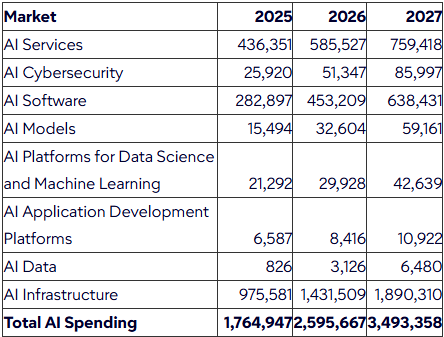
Worldwide AI Spending by Market, 2025-2027 (Source: Gartner)
That one particular category now makes up more than 55% of total AI spending globally. In other words, over half of every dollar spent on AI goes toward the pipes and chips that run it, not the software layered on top.
Now put that next to overall IT budget growth. Gartner’s separate IT spending forecast puts global IT spending at $6.37 trillion in 2026. That’s up 14.2% year over year. Set the two growth rates up (47% for AI, 14.2% for IT overall) and AI spending is moving more than three times faster than the rest of the budget.
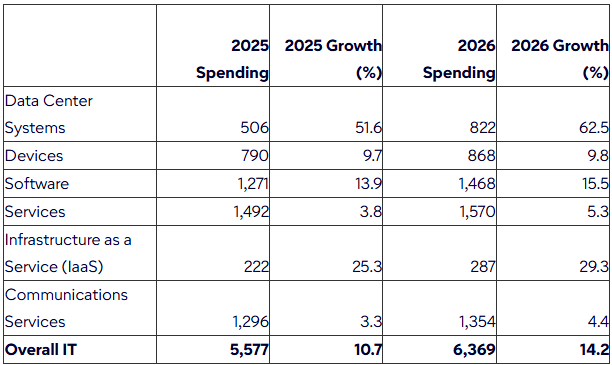
Worldwide IT Spending Forecast (Source: Gartner)
That IT spending forecast has one more detail worth mentioning. Buried deep inside that $6.37 trillion total, data center systems are set to jump 62.5% to $822 billion. That’s the category most directly tied to AI infrastructure, and it’s now the fastest-growing major category in the entire forecast. IT services still hold the largest overall share, but nothing else comes close on growth.
If you do the math, whoever oversees your company’s infrastructure budget, and its AI spending line specifically, is in for an interesting year.
We’ve covered where all this AI money comes from, and how it’s reshaping the rest of the IT budget, in our breakdown of why AI spending is the fastest-growing part of IT budgets.
Where does AI spending go?
Let’s start at the bottom of the stack, with the hardware.
GPUs are expensive
AI workloads need large amounts of accelerated compute, especially during model training, fine-tuning and high-volume inference, and that compute doesn’t come cheap. That’s exactly why compute so often dominates AI spend.
Renting a single NVIDIA H100 GPU can run anywhere from around ~$2 to $15 per GPU-hour, depending on the provider. Specialized GPU clouds, often called neoclouds, tend to charge less, while the big hyperscalers charge more for the same chip.
Stack eight of those NVIDIA H100s into a cluster and the cloud spend climbs fast. Think something like ~$15 an hour on a budget provider, pushing toward ~$90 to ~$100 an hour on demand from a hyperscaler. And that’s before storage, networking and data transfer costs stack on top.
NVIDIA H200 and Blackwell B200 chips have pulled demand away from the NVIDIA H100, which generally pushes NVIDIA H100 prices down. But a 2026 memory shortage has pushed rental prices up at times too, especially for newer silicon. So AI hardware got cheaper depends a lot on which chip you’re asking about and when you’re buying it.
Demand for that hardware has reshaped hyperscaler AI spend, and how they charge you for it.
Compute isn’t the whole story, even if it’s the loudest part. Storage adds to the cloud spend too. Training data, checkpoints and fine-tuning datasets pile up, and nobody wants to delete a checkpoint that might come in handy later.
Moving that data around costs money as well. Training runs often need data shipped to wherever the GPU capacity happens to be sitting. Cross-region or cross-cloud transfer fees pile up fast when you’re moving terabytes at a time.
Zoom out far enough and the scale will start to become even more clear. The big hyperscalers, Amazon, Microsoft, Alphabet (Google) and Meta, are on track to spend roughly $725 billion combined on capital expenditure in 2026, up about 77% from roughly $410 billion in 2025.
Much of that AI spending goes toward data centers, chips, networking equipment and the power and cooling infrastructure needed to run them. And forecasts suggest their combined capex could approach $1 trillion in 2027. Someone ultimately has to pay for that build-out, and it won’t be the hyperscalers absorbing all of the AI spend themselves.
Cloud spend is being driven up by AI
Raw hardware costs are only half the story.
On top of standard cloud infrastructure, managed AI services add entirely new consumption meters. Depending on the provider, model and deployment, you might pay based on input and output tokens, requests, processing units, reserved capacity, accelerator time or some other usage measure entirely.
All the big cloud providers have layered their own AI-specific pricing on top of standard consumption-based pricing. AWS Bedrock, Microsoft Foundry and Google Vertex AI all support usage-based pricing for managed AI models, though the exact billing structure varies by service and deployment.
Microsoft’s naming alone shows how quickly this market is changing. Azure AI Studio became Azure AI Foundry, which is now Microsoft Foundry. Microsoft describes the current platform as the latest stage in that evolution.
For many hosted language models, pay-as-you-go pricing bills you for the input and output processed. That’s flexible (you pay for what you use), but AI spend can climb fast as request volume, context size and response length grow. Microsoft Foundry, for example, bills supported serverless model deployments by token usage, and AWS Bedrock and Vertex AI also offer token-based pricing for supported models.
Then there’s provisioned capacity. Instead of paying purely per request, you can reserve throughput for workloads that need predictable performance or sustained capacity.
The billing model differs by provider. Microsoft charges for provisioned throughput units (PTUs). AWS offers Provisioned Throughput priced in model units. Google prices it in generative AI scale units (GSUs), a measure of reserved throughput for a chosen model and region.
Either way, you’re paying for reserved processing capacity instead of counting tokens as they come in.
That creates a familiar cloud spend problem: utilization.
If you provision capacity for a workload that only needs it occasionally, you’re still paying for capacity that sits idle. Microsoft is explicit that provisioned deployments get billed for the throughput you deployed, flood of requests or not.
Another option is Batch processing, though it’s better thought of as a different execution mode than a middle ground between on-demand and provisioned pricing. Batch suits workloads that can tolerate asynchronous processing, and providers cut pricing in exchange for that flexibility. Amazon Bedrock, for example, prices batch inference at 50% below on-demand rates for supported foundation models.
Bedrock also runs Flex and Priority service tiers alongside standard on-demand pricing. Flex trades guaranteed response speed for a 50% discount. Priority pays a 75% premium for faster, more consistent response times. Microsoft Foundry offers a comparable priority tier of its own, and Google’s platform mirrors the same standard, priority and flex pattern.
Availability and specific discounts may vary depending upon the model, provider and region, but being aware of the mode in which you are operating can be a direct control point on AI spending.
Here’s the part that surprises people: a single AI feature rarely shows up as one charge. Ask an AI agent a question, and that one request might trigger a model call, a vector search, embedding generation, data retrieval, application compute and other supporting services. All are billed separately, depending on how the application is built, and every one of those calls adds to the cloud spend total whether or not the user ever sees it.
So while the user sees one question, the cloud sees a chain of workloads. Multiply that by thousands of users a day, and the AI spend profile looks nothing like a simple per-seat software subscription. The model call might be only one slice of the total bill.
The result of all this? More cloud consumption and more AI spending, with more complexity riding along with both. Flexera’s 2026 State of the Cloud Report found that wasted cloud spend rose to 29% in 2026, the first increase in five years.
Over the same period, generative AI (GenAI) climbed to the third most widely used public cloud service. Usage hit 58% of organizations, up from 50% the year before and just 47% in 2024.
AI workloads are expanding faster than most organizations can track, govern and optimize: more AI spend and more waste, at the same time. Flexera ties the rise in waste directly to growing cloud complexity, including the spread of AI workloads.
Gartner has placed generative AI in the “Trough of Disillusionment” phase of its hype cycle, with 2026 marking roughly the point where enterprises start demanding measurable returns instead of more open-ended experimentation. AI spending is climbing fast, but not every AI workload is paying for itself yet.
How is AI driving up data cloud spend?
Cloud infrastructure gets most of the attention, but data platforms sit right in the middle of this shift too.
Focusing only on GPUs and model APIs while treating the data layer as an afterthought is a mistake. AI needs data, and modern data platforms charge for the compute, storage and services required to prepare, transform, serve and analyze that data.
It helps to draw a clean line between the two. Cloud spend covers the raw compute, storage and networking you rent from AWS, Azure or Google Cloud, the GPUs and services covered in the last section.
Data cloud spend is what you pay Snowflake, Databricks and similar platforms, to turn that raw power into something queryable: warehouses, pipelines, governance and, increasingly, AI functions layered on top. The two often share a hyperscaler underneath, but they land on different invoices, get optimized by different teams and each now carries its own AI-driven markup.
Snowflake and Databricks make good examples, because AI functionality now lives directly inside the data platform. The meters aren’t bolted on the side. They’re part of the query engine itself.
Take Snowflake: for years, Snowflake ran on a single currency: the credit. Compute burned credits, credits had a price, and the price depended on your edition.
Standard sat around $2 a credit on AWS US East, Enterprise around $3, Business Critical around $4. Storage billed separately, at roughly ~$23 per terabyte a month on capacity pricing. Everyone understood the model, even when they hated the invoice.
That pricing model split in two on April 1, 2026. Snowflake now bills in Platform Credits and AI Credits, and they behave differently.
AI Credits cover AI. The AI Credit price has nothing to do with your edition.
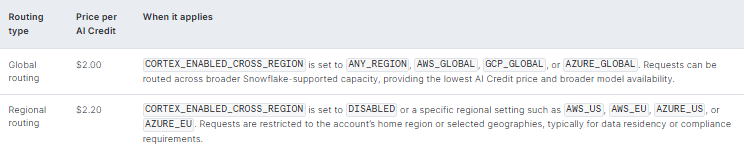
Snowflake AI Credit price (Source: Snowflake)
Your AI unit price is set by a data residency setting, not by your contract tier. A Business Critical account pays exactly what a Standard account pays per AI Credit.
Automatic discounts based on annual contract value still apply to AI Credits, but prepaid capacity discounts don’t. So a routing parameter that most teams set once and forget about is worth a 10% swing on every single AI call the account makes.
So what actually counts as AI usage on Snowflake?
A lot does. Snowflake’s AI functions (AI_COMPLETE, AI_EMBED, AI_CLASSIFY, AI_EXTRACT etc.), the Snowflake Cortex REST API, Snowflake Cortex Agents, Snowflake Cortex Search, Snowflake Cortex Batch Search and AI Parse Doc all bill in Snowflake AI Credits.
So do Snowflake CoCo (Snowflake’s coding AI agent for developers, formerly called Snowflake Cortex Code) and Snowflake CoWork (its natural-language AI agent for business users, formerly called Snowflake Intelligence). Both products got their new names at Snowflake Summit 2026.
But not everything got moved over. Two things stayed behind on Platform Credits as legacy items: Snowflake Cortex Fine-tuning and the standalone Snowflake Cortex Analyst API.
If you invoke Snowflake Cortex Analyst through Snowflake Cortex Agents instead, which Snowflake now recommends, it runs on the newer AI Credit model. So the same underlying feature can land on two different pricing systems depending on how you call it.
The model you pick is the biggest influence you have.
Token rates across Cortex’s models can differ by well over an order of magnitude. Asking a small open-source model to classify some text might cost a few cents per million tokens. Asking a frontier model to handle something harder can run into dollars per million tokens instead. Nothing else on this list moves your bill as much as which model you point a workload at.
Cortex Search, Snowflake’s tool for finding the right chunk of text in a mountain of documents, runs on two separate meters. Serving compute bills by the GB of indexed data, embeddings included, every month. It keeps charging around the clock, no matter who queries it.
Embedding compute is billed separately, per token, and only fires when you insert or update the underlying data.
Cortex Batch Search flips the serving side around. Same per-gigabyte logic, but it only runs for the length of the batch job instead of nonstop. That matters if your search workload looks more like a nightly refresh than an always-on chatbot. Either way, it’s another line item in your data cloud spend that has nothing to do with warehouse compute.
And remember, the warehouse is still running underneath all of it. None of the AI meters replace ordinary compute. They sit on top of it.
Snowflake Gen1 warehouse, aka Snowflake warehouse,rates double with every size step, from 1 credit an hour at X-Small up to 512 at 6X-Large.
Snowflake Gen2 warehouses, which run on newer hardware, cost 1.35 times more than Gen1 on AWS (and Google Cloud Platform, where available) and 1.25 times more on Azure. That works out to 1.35 and 1.25 credits an hour at X-Small, doubling up to 172.8 or 160 at 4X-Large (there’s no 5X-Large or 6X-Large option for Gen2 yet).
Faster hardware means a higher credit rate per second, so Gen2 only pays off if your workload finishes fast enough to make up the difference.
Billing runs per second, with a 60-second minimum every time a warehouse starts or resumes. That minimum matters more than it used to, because agentic workloads are bursty by nature. A workload that wakes a suspended warehouse every couple of minutes ends up paying that floor over and over.
One more thing you must not forget: when Cortex Analyst generates SQL, running that SQL is a warehouse charge. The natural-language part goes toward the AI Credit bill. The query itself still goes toward the Platform Credit bill. Add it up, and Snowflake’s data cloud spend now runs through two separate currencies instead of one.
What about Databricks?
Snowflake had one currency and split it into two. Databricks never had one universal rate to begin with. Its billing runs on the Databricks Unit (DBU), a normalized measure of processing that Databricks uses to price consumption.
Databricks DBU rate varies by product and compute type, so classic Databricks jobs compute, Databricks all-purpose compute and Databricks SQL warehouses each carry different rates, while serverless products run their own pricing structure. Those rates already span a wide range on their own, from about $0.07 a DBU for Databricks Model Serving up to around $0.70 for Serverless compute. And that’s before any AI-specific charge even enters the picture.
We’ve broken down the full Databricks DBU rate table by workload and cloud provider if you want the complete picture. AI didn’t simplify any of that. It stacked more layers on top.
The important part is that AI doesn’t replace the underlying compute charge. When you run a Databricks AI function, the query still consumes compute on whatever it runs on: a Databricks SQL warehouse, Databricks notebook compute or Databricks job compute. Depending on the function, Databricks then charges separately for the inference itself, typically around $0.07 per DBU for its managed Databricks AI Functions.
According to Databricks’ own documentation on AI Function costs, task-specific functions such as ai_classify, ai_summarize and ai_translate run on Databricks-managed serverless GPU infrastructure through Model Serving, and that inference charge lands on top of the compute running the query. Functions such as ai_forecast and ai_top_drivers are the exception: they run entirely on the SQL warehouse or cluster you submit them from and don’t trigger a separate model inference charge.
ai_query can also add Model Serving charges, depending on the endpoint and model behind it.
So one AI workload can generate two distinct cost components:
Data processing and query compute + AI inference
Databricks Model Serving adds another pricing layer on top of that for production inference. Databricks supports pay-per-token access to supported foundation models, while provisioned throughput offers dedicated serving capacity for workloads that need predictable performance. Those options behave very differently on the bill, so your Databricks Model Serving cost depends on how the model is deployed and consumed, not simply on the Databricks DBUs the surrounding data workload generates.
Then there’s Databricks AI Search (renamed from Vector Search). Databricks AI Search handles retrieval for AI workloads. It runs through managed search endpoints and indexes with their own consumption and capacity costs: roughly $0.28 an hour for standard compute or $1.28 for storage-optimized compute, plus separate per-gigabyte storage.
All of that sits on top of the compute running your SQL or data pipeline. Configuring a higher target query throughput, for instance, provisions additional capacity and raises endpoint cost regardless of actual query traffic.
Selected Databricks AI-related DBU rates (Premium tier, approximate)
| Service | Unit | Rate |
| Databricks Model Serving (CPU and GPU) | Per DBU | ~$0.07 |
| AI Functions (AI_CLASSIFY, AI_EXTRACT, AI Parse Doc) | Per DBU | ~$0.07 |
| Serverless SQL | Per DBU | ~$0.70 |
| AI Search, standard endpoint | Per hour, per unit | ~$0.28 |
| AI Search, storage-optimized endpoint | Per hour, per unit | ~$1.28 |
The underlying data cloud spend doesn’t disappear either. Storage, data processing and network usage keep adding to the bill around the AI workload.
This is exactly where AI can quietly push up data cloud spend. A single application request can touch model inference, retrieval and data processing across several Databricks services at once. The user sees one answer. Databricks sees several billable workloads.
So when you look at the true AI spend on a Databricks workload, the model price is only one input among several. A more realistic view looks like:
AI spend = compute + model inference + data processing + retrieval + storage + network + observability + security + governance
And for some workloads, add:
+ evaluation + experimentation + failed requests + idle capacity
Put Snowflake and Databricks side by side and you get two different answers to the same underlying problem. Snowflake took its sprawling AI feature set and funneled most of it into one flat-rate currency, fine-tuning and the standalone Cortex Analyst API aside. Databricks kept its already-granular DBU system and layered close to a dozen new AI meters on top of it, each with its own unit.
Neither approach is wrong exactly, but both mean the same thing for whoever’s watching the budget: AI isn’t one line item anymore. It’s a dozen small ones, scattered across a bill that already had plenty of moving parts before generative AI showed up.
Our Databricks Data + AI Summit 2026 recap covers the newer platform features layered on top of this billing model, if you want the dull details.
Cheaper AI, bigger bills: what’s going on?
All of this raises an obvious question. If AI keeps getting more efficient, shouldn’t AI spend come back down? Not exactly, and the reason is a little counterintuitive.
AI is genuinely getting cheaper. That part isn’t in dispute. A frontier-level model call that cost dollars per million tokens a couple of years ago now often costs cents for a comparable job.
Hardware keeps getting more efficient too, and providers keep finding new ways to squeeze more inference out of the same chip through quantization, smarter routing and caching.
And yet nobody’s cloud spend is shrinking. If anything, it’s doing the opposite. So why?
This isn’t a new problem, and it isn’t even an AI problem originally. Economist William Stanley Jevons described it in 1865 after steam engines became more fuel-efficient. Britain expected coal use to fall. Instead, it surged, because cheaper power made steam engines worth installing across factories, ships and railways that couldn’t have justified them before.
Efficiency didn’t reduce demand. It created new demand.
AI is following the same example. Cheaper tokens don’t necessarily lower AI spend. They make it cheaper to use more AI. A $10 task dropping to 10 cents quickly goes from “is this worth doing?” to “where else can we use this?”
The same logic applies to AI infrastructure. Commodity inference keeps getting cheaper, while frontier models still demand scarce, expensive compute. That split shows up in hardware too, which is the NVIDIA H100-versus-NVIDIA H200 story from earlier.
Older silicon gets cheaper as demand rotates away from it. Newer silicon doesn’t necessarily follow the same curve, especially with a memory shortage keeping its price high. So “AI is getting cheaper” depends a lot on which part of the stack you’re looking at.
Cheaper AI is good for adoption, but it can also drive usage faster than prices fall. That’s the Jevons paradox playing out in real time, and it’s the reason falling per-token prices are a poor predictor of next quarter’s AI spend.
AI spending does not grow at a steady pace. It often jumps when a team launches a new AI feature, levels off as usage settles, then rises again as new use cases emerge. Make sure to treat AI spend as a variable cost that grows with adoption. Plan for increases in stages and adjust the budget as usage and AI workloads expand, rather than assuming a fixed monthly cost.
The hidden AI costs your budget doesn’t see
Add up compute, tokens, storage and every meter covered so far across your cloud spend and data cloud spend, and you’d still come up short. Remember the AI spend formula from earlier? It closed with four extra terms: evaluation, experimentation, failed requests and idle capacity.
Most budgets never get that far. Here’s what’s hiding in that list, plus one cost the formula doesn’t name at all.
- Idle capacity is the easiest to spot once you know where to look. A Snowflake warehouse that resumes every few minutes pays that 60-second minimum on repeat, a data cloud spend problem hiding inside what looks like an ordinary compute bill. Provisioned throughput on Microsoft Foundry or Amazon Bedrock bills the reserved rate no matter how many requests show up. You paid for readiness, not usage, and readiness doesn’t discount itself when demand goes quiet.
- Failed requests are sneakier. A model call that times out on the client side can still get billed in full, because the provider’s compute already ran before the connection dropped. A response that fails a schema check or a content filter still got generated at full price. Agentic systems make this worse, since every retry or fallback path is another billable call.
- Then there’s the overhead of doing AI responsibly: logging prompts and responses for audit trails, scanning outputs for sensitive data and evaluating every candidate model you didn’t end up shipping. None of it produces a feature. All of it shows up in your AI spend.
- Plus the cost none of your dashboards can see: shadow AI. The coding assistant your developer bought on his personal card, the chatbot subscription nobody in procurement could track down. Gartner has long estimated that 30% to 40% of enterprise IT spending in large companies occurs on unsanctioned tools, and AI represents a rising proportion of that general category of shadow IT.
Flexera’s own research arrives at the same conclusion from a different angle: just 31% of organizations claiming to have accurate insight into their AI software spending, according to the same report. Every AI spending figure quoted in this article, ours included, is probably an undercount for exactly this reason. We’ve gone deeper on how to spot and govern this specific problem in our guide to shadow AI.
What can you actually do to reduce AI spend on cloud and data cloud platforms?
None of this is unmanageable. It just needs to be treated as a discipline in its own right, rather than something tacked onto your existing cloud cost management processes and tools. Here are a few steps you can start on right away.
Get visibility into cloud spend and data cloud spend before you optimize anything. You can’t manage what you can’t see, and right now, most organizations can’t see their AI spend well. Snowflake splits your bill into AI Credits and Platform Credits. Databricks splits into a dozen different DBU rates depending on compute type. Your hyperscaler adds its own token, request and provisioned-capacity meters on top. None of that is comparable until you tag it by team, project and workload. From there, convert it into a shared metric, like cost per resolved ticket or cost per active user, instead of stopping at the aggregate bill. Flexera’s own research found this kind of unit-economics tracking climbing from 40% to 49% of organizations in a year.
Match the model to the job. That order-of-magnitude spread between Cortex’s cheapest and priciest models holds on every platform, not only Snowflake. A call to Snowflake’s AI_CLASSIFY or Databricks’ ai_classify rarely needs the same model as a complex reasoning prompt, yet plenty of pipelines route everything through one default model regardless. Splitting that traffic by task, a cheap model for classification and extraction and a frontier model for what actually needs it, is the single biggest lever on this list for cutting data cloud spend.
Choose the execution mode based on your workload. On-demand is flexible but pricey. Batch is cheap and slow, and Amazon Bedrock’s 50% discount encourages workloads that can afford to wait. Provisioned throughput only makes sense at a high and consistent utilization, as sitting on unused capacity (the risk described above) is one of the easiest ways to overspend.
Cache what doesn’t change. System prompts, retrieved context and few-shot examples are often identical from one call to the next. Most providers, Snowflake’s AI Credit pricing included, charge less for a cached read than a fresh input token. A pipeline that resends the same 5,000-token system prompt on every request without caching is paying full price for tokens it already paid for minutes earlier.
Put guardrails on provisioned and reserved capacity. Review reserved throughput and warehouse sizing on a real schedule rather than once at setup, and auto-suspend idle warehouses aggressively. A deployment stuck at 20% utilization for a month isn’t something to leave alone. It needs resizing or a move back to on-demand.
Bring Shadow AI into the light instead of pretending it isn’t happening. Publish an approved AI tool list good enough that people don’t feel the need to work around it. Give teams a fast path to request new AI tools. Then use network or expense-based detection to catch what’s already running unsanctioned. Punishing people for finding workarounds rarely works. Making the sanctioned path the easy path usually does.
Treat all of this as a multidisciplinary effort, not something finance or engineering owns alone.
Conclusion
AI’s impact on cloud spend and data cloud spend isn’t a future risk to plan around someday. It’s already on this month’s invoice. It’s growing faster than the rest of the IT budget, by a wide margin. And it shows up through more channels than most budgets were built to track: compute, tokens, storage, provisioned capacity, retries, evaluation and AI tools nobody in finance signed off on.
Falling prices won’t solve that on their own. The Jevons paradox already shows how likely that outcome really is. The organizations getting ahead of this aren’t waiting for AI to get cheap enough to stop mattering. They’re building the visibility, model discipline and governance that treat AI as the permanent, structural part of the cloud spend it’s already become.
Two years ago, none of this existed in its current form. Two years from now, it’ll look different again, probably with new meters, new pricing currencies and a few more line items nobody’s budgeted for yet. Get the fundamentals right now: visibility, unit economics, the right model for the right job. Do that, and you’ll be in a much better position to handle whatever comes next, no matter what it ends up being called.
How does AI increase cloud spend?
AI increases cloud spend by adding compute-intensive workloads, esp. GPU and other accelerator workloads, alongside model inference, storage, networking, data processing, observability and security. AI applications can also create multiple model and AI tool calls from a single user request, which increases total consumption. The actual increase depends on the workload, model, traffic and cloud architecture.
Why does AI make cloud harder to predict?
AI introduces usage patterns and pricing metrics that differ from traditional cloud infrastructure. Depending on the service, organizations may pay for GPU or accelerator time, input and output tokens, requests, provisioned throughput, storage, data transfer or other consumption units. Agentic applications can make forecasting even harder because one user request may trigger several model calls and supporting services.
Does AI increase data cloud spend?
Yes. AI workloads can increase data cloud spend by driving additional storage, SQL or query compute, data transformation, embedding generation, vector search, indexing and data transfer. Data cloud platforms such as Snowflake and Databricks also provide AI capabilities that introduce additional AI-related consumption alongside their existing warehouse, lakehouse and storage costs.
How does generative AI affect Snowflake costs?
Generative AI can increase Snowflake costs through AI Credits as well as normal Platform Credit consumption. Snowflake uses AI Credits for supported AI features such as Snowflake AI Functions, Cortex Agents, Cortex Search and more. Standard warehouse compute, storage and data transfer continue to use Platform Credits, so an AI workload can create multiple cost components.
What’s the difference between Snowflake AI credits and Platform credits?
Snowflake split its billing into two. Platform Credits cover warehouse compute, storage and everything that isn’t AI, and the price still depends on your edition (Standard, Enterprise or Business Critical). AI Credits cover Snowflake AI Functions, Cortex Agents, Cortex Search and similar features, and the price is flat regardless of edition. It only depends on whether requests route globally or stay within a single region for data residency reasons. Either way, both credit types add to your overall data cloud spend.
How does AI affect Databricks cost?
AI workloads on the Databricks data cloud platform can generate several types of consumption. The query or pipeline still consumes the compute where it runs, while some Databricks AI Functions also use Databricks-managed inference infrastructure that creates an additional charge. Databricks Model Serving and AI Search introduce additional consumption based on the specific service and configuration. Databricks documents this separation explicitly for Databricks AI Functions, which is exactly why Databricks AI spend is so easy to underestimate.
Should you use on-demand, batch or provisioned throughput for AI workloads?
It depends on the traffic pattern.
- On-demand suits unpredictable or low-volume traffic, since you only pay for what you use
- Batch suits workloads that can tolerate delay, like nightly processing jobs, in exchange for a meaningful discount
- Provisioned throughput suits steady, high-volume, latency-sensitive traffic, but only pays off if utilization stays high
- Idle provisioned capacity is one of the most common ways AI spend overruns its budget
Why doesn’t cheaper AI reduce cloud spend?
Lower AI prices can reduce the cost of individual tasks while increasing total AI spending across the organization. As inference becomes cheaper, organizations can economically apply AI to more workflows, users and transactions. This is related to the Jevons paradox.
Are GPUs the biggest cost of AI in the cloud?
GPUs and other accelerators can be major AI infrastructure costs, particularly for model training, fine-tuning and high-volume inference. They aren’t the only cost, though. A production AI application can also generate AI spending for CPUs, memory, storage, networking, model APIs, data processing, retrieval, observability, governance and a lot more. The largest cost depends on the architecture and workload.
What is shadow AI, and how does it add to cloud spend?
Shadow AI is AI tool, AI model or Ai agent usage that IT and finance never approved or even know about: a personal ChatGPT or Claude subscription, an API key billed to a personal card, or an AI feature quietly switched on inside software the company already licenses. Because it doesn’t run through normal procurement, it rarely shows up in a cloud or SaaS bill by name, which means most organizations are underestimating their real AI spend across both cloud and data cloud platforms.
How can I get AI cloud spend under control?
Visibility comes first. Most organizations can’t yet break AI spend down by team, project, workload or model, which makes every other optimization step, model selection, execution mode, caching, guesswork. Tag AI consumption the same way you’d tag any other cloud resource, then convert it into a unit metric like cost per active user or cost per resolved task before trying to cut anything.
Pramit Marattha
Pramit Marattha is a technical content writer and strategist with 5+ years of experience covering AI, data engineering, data cloud platforms and open source technologies. He turns complex technical concepts into clear, useful content for engineers and developers.