


Databricks is an all-in-one, open analytics platform that simplifies data management, advanced analytics and AI workflows. Built on Apache Spark, it provides a robust, high-performance environment tailored for processing large datasets and executing machine learning tasks at scale. A defining feature of Databricks is its collaborative workspace, where data engineers, analysts and data scientists can perform ETL processes, analyze data in real-time and develop machine learning models within a unified interface, all while benefiting from shared notebooks and collaboration tools. Databricks’ architecture is designed to operate seamlessly across major cloud providers—Microsoft Azure, Amazon Web Services (AWS) and Google Cloud Platform (GCP)—offering flexibility in cloud platform choice. Each platform offers distinct integration points and performance optimizations to align Databricks with its native services, assuring compatibility with a user’s existing ecosystem and unique requirements.
In this article, we’ll cover the unique capabilities, features, optimizations and pricing of Databricks on AWS, Azure and Google Cloud platforms.
Databricks architecture overview
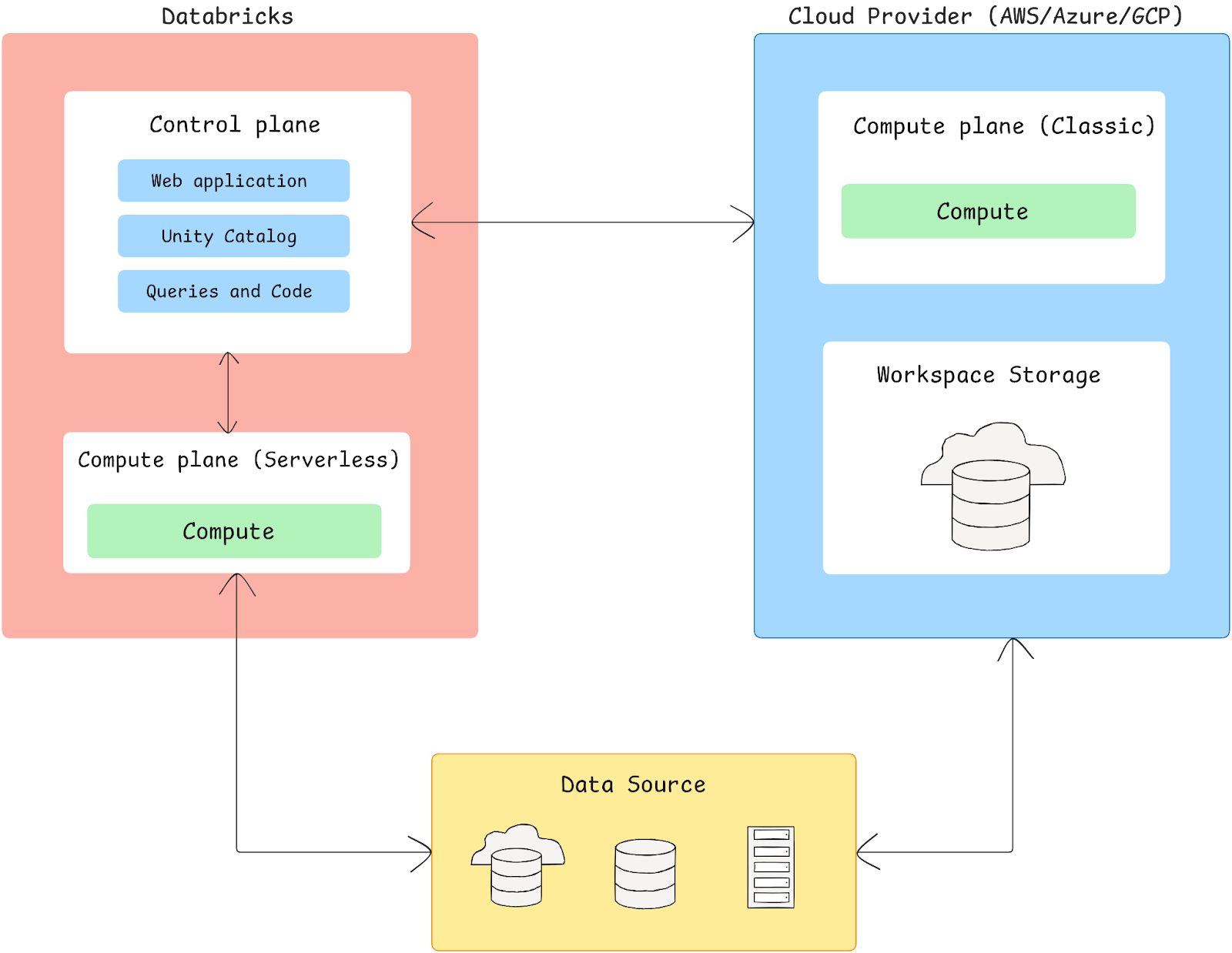
Databricks is engineered to integrate seamlessly with cloud providers like Azure, AWS and Google Cloud, enabling a unified environment for big data processing and analytics. Its architecture is divided into two primary components—the Control plane and Compute plane—which together offer flexibility in data processing, access and resource management.
The Databricks architecture is segmented and unites different components:
a) Control plane
Control plane is a fully managed layer by Databricks, responsible for key backend services. It is responsible for orchestrating and managing the cluster lifecycle, scheduling jobs, handling user authentication, managing access controls and providing secure data access. The control plane hosts the Databricks web application, user interfaces and APIs, which operate as a conduit for interfacing with various platform services.
b) Compute plane
Compute plane is responsible for executing data workloads and is hosted within your cloud account. Databricks offers two options here:
➤ Serverless compute plane:
- Databricks manages the infrastructure, so resources are provisioned automatically.
- Supports network isolation to secure workloads, maintaining compliance and privacy.
- Provides instant scaling without requiring you to manage the underlying cloud resources.
➤ Classic (Customer-managed) compute plane:
- Compute resources operate within your cloud account, granting you full control over network, security policies and scaling.
- Operates within a dedicated Virtual Private Cloud (VPC) on AWS or a Virtual Network (VNet) on Azure and Google Cloud, enabling detailed security configurations and custom network controls.
c) Storage architecture (workspace storage)
Databricks workspaces are associated with a dedicated storage bucket in AWS or Google Cloud or a storage account in Azure. Key components include:
- Databricks Workspace Storage: Stores notebooks, job logs, cluster logs and other system files.
- Unity Catalog metadata: A metadata layer for managing data governance across the platform, providing central access control and compliance features.
- DBFS (Databricks File System): A distributed file system layered over cloud storage, enabling users to organize data within a Databricks environment.
Check out this article to learn more in-depth about Databricks architecture.
Databricks on AWS vs Azure vs GCP: Quick comparison
If you’re in a hurry, here’s a quick summary and detailed comparison of key features for Databricks on AWS, Azure and GCP.
1) Architecture
| Component | Databricks on AWS | Databricks on Azure | Databricks on GCP |
| Compute infrastructure | EC2-based clusters; on-demand, reserved and spot instances; AWS Graviton (ARM) support | Azure VM-based clusters; general-purpose and memory-optimized VM series; spot and reserved instances | Google Compute Engine (GCE)-based clusters via Google Kubernetes Engine (GKE); standard, compute-optimized and memory-optimized machine types; preemptible VM support |
| Storage architecture | Amazon S3 for data lake; EBS volumes for cluster storage; Delta Lake with ACID transactions | Azure Blob Storage and ADLS Gen2; premium SSD managed disks for cluster storage; Delta Lake with ACID transactions | Google Cloud Storage (GCS) for data lake; persistent disk storage for clusters; Delta Lake with ACID transactions |
| Identity and access | Native AWS IAM; SCIM provisioning; AWS IAM Identity Center (formerly AWS SSO) | Microsoft Entra ID (formerly Azure Active Directory); SCIM provisioning; Microsoft Entra SSO | Google Cloud IAM; SCIM provisioning; Google Cloud Identity SSO |
2) Network and security
| Feature | Databricks on AWS | Databricks on Azure | Databricks on GCP |
| Network integration | Customer-managed VPCs; AWS PrivateLink; VPC peering | VNet injection; Azure Private Link; VNet peering | VPC support; Private Service Connect; VPC network peering |
| On-premises connectivity | AWS Direct Connect; VPN | Azure ExpressRoute; VPN Gateway | Cloud Interconnect; Cloud VPN |
| Security features | Security groups; network ACLs; VPC endpoints | Network Security Groups (NSGs); Azure Firewall; service endpoints | Cloud Armor; firewall rules; VPC Service Controls |
3) Data integration
| Service type | Databricks on AWS | Databricks on Azure | Databricks on GCP |
| Data warehousing | Amazon Redshift; Redshift Spectrum | Azure Synapse Analytics; dedicated SQL pools | BigQuery; BigQuery ML |
| Streaming | Amazon Kinesis; Amazon MSK (Managed Kafka) | Azure Event Hubs; Azure Stream Analytics | Pub/Sub; Dataflow |
| ETL/orchestration | AWS Glue catalog; AWS Step Functions | Azure Data Factory; Azure Synapse Pipelines | Cloud Data Fusion; Cloud Dataprep |
| Data governance | AWS Glue Data Catalog + Unity Catalog | Microsoft Purview + Unity Catalog | Dataplex + Unity Catalog |
4) ML capabilities
| Feature | Databricks on AWS | Databricks on Azure | Databricks on GCP |
| ML platforms | Amazon SageMaker; MLflow | Azure Machine Learning; MLflow | Vertex AI; MLflow |
| GPU support | NVIDIA GPUs on P3, P4d, G4 and G5 instance families | NVIDIA GPUs on NCasT4_v3, NC A100 v4, ND A100 v4 and NVadsA10 v5 series | NVIDIA GPUs on A2 and N1 machine types |
| Model serving | SageMaker endpoints; MLflow model serving | Azure ML deployment; MLflow model serving | Vertex AI endpoints; MLflow model serving |
5) Cost management
| Feature | Databricks on AWS | Databricks on Azure | Databricks on GCP |
| Billing integration | AWS Marketplace; AWS Cost Explorer | Azure EA; Azure Cost Management | GCP Marketplace; Cloud Billing |
| Cost optimization | Instance pools; spot instances; AWS Savings Plans | Instance pools; spot VMs; Azure Reserved VM Instances | Instance pools; preemptible VMs; committed use discounts |
6) Compliance and certifications
| Feature | Databricks on AWS | Databricks on Azure | Databricks on GCP |
| Certifications | SOC 2 Type II; ISO 27001; HIPAA; PCI DSS; FedRAMP Moderate (commercial); FedRAMP High (AWS GovCloud) | SOC 2 Type II; ISO 27001; HIPAA; PCI DSS; FedRAMP High | SOC 2 Type II; ISO 27001; HIPAA; PCI DSS |
| Data protection | AWS KMS; BYOK; field-level encryption | Azure Key Vault; BYOK; column-level encryption | Cloud KMS; BYOK; column-level encryption |
Comprehensive breakdown of Databricks on AWS vs Azure vs GCP
1) Databricks on AWS
Databricks on AWS offers a unified data analytics and AI platform by integrating directly with Amazon S3, enabling efficient SQL analytics, data science and machine learning on a single platform. It supports SQL-optimized compute clusters and utilizes the Lakehouse architecture, which combines data lake scalability with data warehouse performance, offering up to 12x better price performance compared to traditional data warehouses. Databricks on AWS is widely adopted by enterprises due to its proven ability to handle comprehensive analytics and AI workloads.
Databricks on AWS—Architecture overview
Databricks on AWS brings together data engineering, data science, ML and analytics on AWS infrastructure. It uses the Lakehouse pattern, which combines the scale of a data lake with the performance of a data warehouse while integrating natively with AWS services.
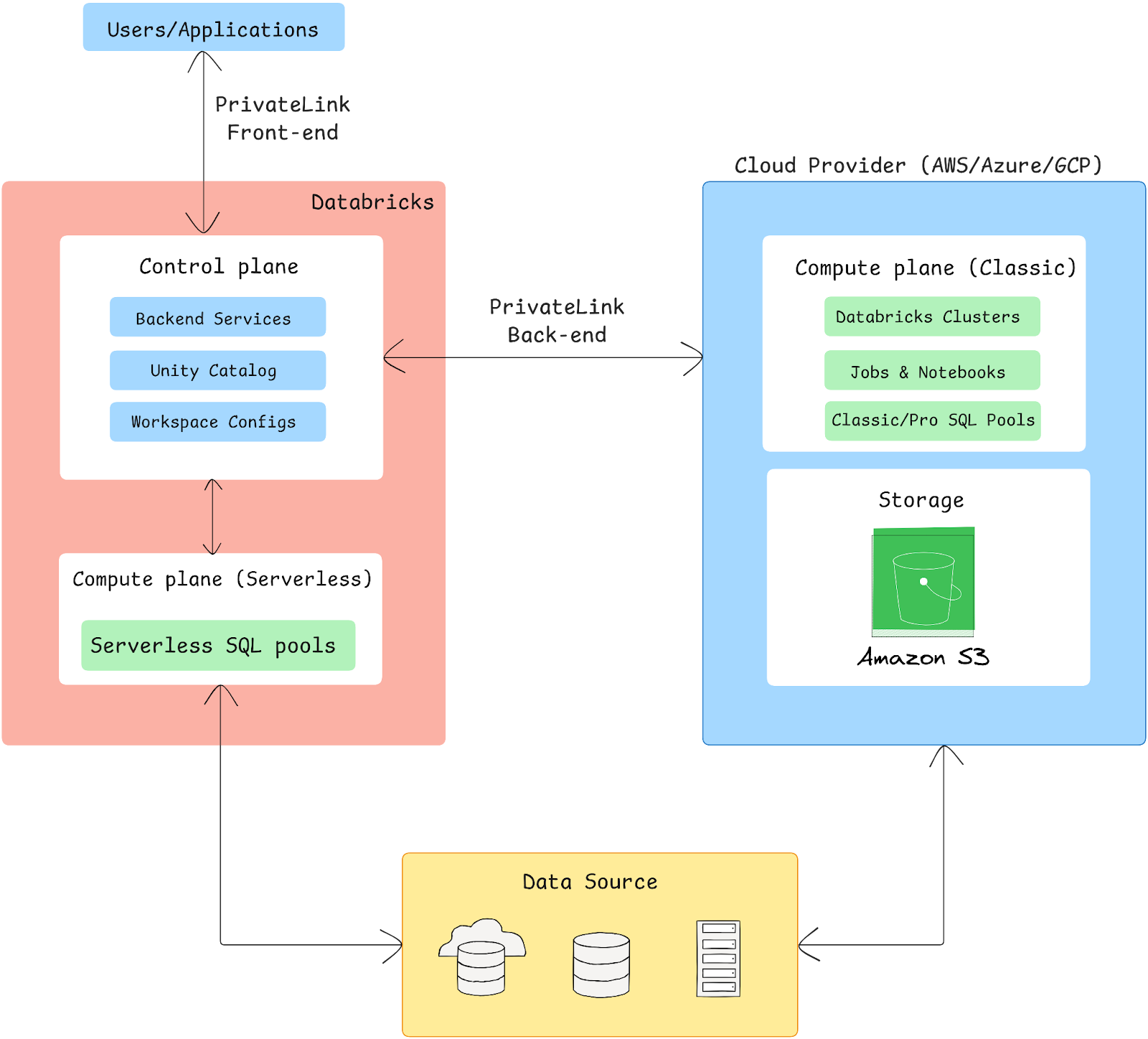
Databricks on AWS architecture can be broken down into two main planes: the Control plane and the Compute plane.
Control plane
Control Plane is managed by Databricks and includes backend services that facilitate user interactions and workspace management. Key features of the Control Plane include:
- Web Application: The user interface for managing Databricks workspaces, notebooks and jobs.
- REST APIs: For programmatic access to Databricks functionalities, supporting automation and integration with other services.
- Workspace Management: Manages user authentication, job scheduling and resource allocation.
- Security Features: Implements encryption and access controls for data security.
Compute plane
This is where data processing occurs and is hosted within the customer’s AWS account. It can operate in two modes:
- Classic compute plane: This operates within the user’s AWS account. All compute resources are provisioned in the customer’s virtual private cloud (VPC), providing complete control over network configurations and security settings. This setup allows for:
- Elastic Compute Cloud (EC2) Instances: Databricks clusters run on EC2 instances within private subnets, providing a secure environment for data processing.
- Isolation: Each workspace resides in its own VPC for workload isolation.
- Serverless compute plane: Hosted in a Databricks-managed account, this allows automatic scaling and resource management with minimal user setup.
Workspace storage bucket
Each workspace is tied to an AWS S3 bucket used for Spark logs, notebook metadata and Unity Catalog. Databricks File System (DBFS) is a legacy abstraction layer over S3 and is now deprecated. Use Unity Catalog volumes for new workloads.
Networking architecture
The networking architecture implements multiple security layers and connectivity options:
a) PrivateLink implementation:
i) PrivateLink front-end:
- Establishes private endpoints in the customer VPC for web application and REST API access.
- Uses custom DNS resolution to route user traffic directly to Databricks workspace URLs.
- Supports mutual TLS authentication for API endpoints.
- Handles traffic routing through the AWS backbone network.
ii) PrivateLink back-end:
- Creates dedicated VPC endpoints for cluster-to-control-plane communication.
- Implements secure channel encryption for all data in transit.
- Supports custom routing tables and network ACLs.
- Maintains persistent secure connections for optimal performance.
AWS native features and service integration
Databricks on AWS seamlessly integrates with AWS native services, extending its capabilities for complex data workflows:
- Amazon S3 for data storage: Databricks uses Amazon S3 as their primary storage solution.
- AWS Glue for ETL: Databricks connects with AWS Glue, a fully managed ETL solution that streamlines data preparation and loading for analytics.
- Amazon Redshift for data warehousing: Databricks can read and write to Redshift, enabling complicated analytics processes by integrating data from Redshift with Databricks Spark clusters for increased processing capability.
- AWS Lambda and EventBridge: AWS Lambda and AWS EventBridge integrate with Databricks to enable real-time event processing, making it easy to trigger Databricks workflows based on AWS events.
- Amazon Kinesis for real-time data processing: The integration with Amazon Kinesis facilitates real-time data ingestion and processing.
- Amazon Athena for querying data: Users can utilize Amazon Athena to run SQL queries directly against data stored in S3.
- AWS Graviton support: Databricks clusters can use AWS Graviton instances, which are designed for high performance and low cost.
- Integration with Amazon QuickSight: Databricks seamlessly integrates with Amazon QuickSight, allowing users to develop data-driven visualizations and dashboards.
- IAM and IAM roles: Databricks employs AWS IAM to manage permissions and secure resources, enabling fine-grained access controls over S3 buckets, databases and other AWS services.
- AWS KMS (Key Management Service): Databricks integrates with AWS KMS to encrypt S3 data and secure other sensitive information.
- SageMaker and Other ML services: Databricks connects with Amazon SageMaker for deploying and managing ML models, with a flexible API integration that allows data scientists to train and deploy models using familiar AWS tools.
- AWS Direct Connect and VPC peering: Databricks can connect securely to on-premises networks through AWS Direct Connect or VPC Peering.
- PrivateLink: PrivateLink ensures secure, private connectivity between Databricks workspaces and AWS services.
In the following section, we will go into more depth regarding these services.
Performance
Databricks on AWS gets meaningful performance advantages from a few specific features. The Photon query engine, which is Databricks’ C++-based vectorized execution engine, that accelerates SQL and Delta Lake operations significantly, particularly for scan-heavy and aggregation workloads. AWS Graviton instances (ARM-based) offer solid price-performance for Spark workloads that don’t rely on x86-specific software.
Delta Lake handles performance at the storage layer through ACID transactions, automatic data compaction (OPTIMIZE) and Z-ordering for skipping irrelevant data blocks during queries.
Data storage
Databricks on AWS leverages Amazon S3 as its primary data storage layer, using the Databricks File System (DBFS) as an interface that enables users to work with data as though it’s in a local file system. DBFS provides compatibility with cloud object storage, though the use of Unity Catalog volumes is now preferred over legacy DBFS mount configurations due to enhanced access management and data governance capabilities.
Computing
Databricks on AWS leverages AWS EC2 instances to support a distributed computing environment. Clusters, composed of a driver and worker nodes, execute tasks within an AWS VPC.
Cluster types include:
- All-Purpose Clusters: For interactive analysis, notebook development and ad hoc queries
- Job Clusters: For scheduled or automated data jobs; spin up for a run, then terminate
Integration services
Databricks on AWS provides seamless integration with AWS data services, particularly AWS Glue and Amazon Redshift. Through AWS Glue integration, Databricks can utilize the AWS Glue Data Catalog as an external metastore, enabling consistent metadata management across AWS services. With Amazon Redshift integration, Databricks supports direct connectivity through Redshift’s Data API, enabling high-performance data exchange between Databricks clusters and Redshift warehouses. Users can leverage Databricks’ JDBC/ODBC connectors to query Redshift data directly or use Databricks’ optimized Spark-Redshift connector for bulk data transfers.
Security and compliance
Security features on Databricks for AWS include:
- AWS IAM: Role-based access and fine-grained permissions across S3, databases and other AWS services
- SSO and RBAC: Centralized identity via AWS IAM Identity Center
- Encryption: AWS KMS for data at rest; TLS for data in transit
- Compliance: SOC 2 Type II, ISO 27001, HIPAA, PCI DSS, FedRAMP Moderate (commercial), FedRAMP High (AWS GovCloud)
Network integrations
Network architecture in Databricks on AWS is built on AWS VPC infrastructure. You can deploy Databricks within your own VPC, maintaining complete control over network isolation and security. The deployment supports both classic and enhanced VPC architectures, with the latter providing additional security features and network customization options. Security groups and network ACLs can be configured to control traffic flow to and from Databricks clusters. The platform also supports AWS PrivateLink for secure connectivity between your Databricks workspace and AWS services, eliminating the need for public internet access.
AI & Machine Learning
For ML workloads, Databricks on AWS integrates with:
- Amazon SageMaker integration: Models developed with Databricks can be hosted on SageMaker endpoints for production use.
- Delta Lake & MLflow: Provides feature storage and model tracking, supporting both batch and real-time inference options.
Pricing overview
Note: Databricks pricing changes regularly. All the figures below reflect publicly listed rates for the US East (N. Virginia) region. Always verify current pricing at databricks.com/product/pricing before making purchasing decisions.
1) Databricks workflows (Lakeflow jobs) — Starting at $0.15 per DBU (US East North Virginia region)
➤ Classic jobs/Classic jobs photon clusters
- Premium plan: $0.15 per DBU
- Enterprise plan: $0.20 per DBU
➤ Serverless (Preview):
- Premium plan: $0.35 per DBU
- Enterprise plan: $0.45 per DBU
2) Lakeflow Spark Declarative Pipelines — Starting at $0.35 per DBU (US East North Virginia region)
- Premium plan:
- Serverless: $0.35 per DBU
- Classic:
- Classic Core: $0.20 per DBU
- Classic Pro: $0.25 per DBU
- Classic Advanced: $0.36 per DBU
- Enterprise plan:
-
- Serverless: $0.45 per DBU
- Classic:
- Classic Core: $0.20 per DBU
- Classic Pro: $0.25 per DBU
- Classic Advanced: $0.36 per DBU
3) Lakeflow Connect — Starting at $0.35 per DBU (US East North Virginia)
- Premium plan:
- Managed Connectors: $0.35 per DBU
- Zerobus Ingest: $0.050 per GB
- Enterprise plan:
- Managed Connectors: $0.45 per DBU
- Zerobus Ingest: $0.064 per GB
4) Databricks SQL — Starting at $0.22per DBU (US East North Virginia)
- Premium plan:
- SQL Classic: $0.22 per DBU
- SQL Pro: 0.55 per DBU
- SQL Serverless: $0.70 per DBU
- Enterprise plan:
- SQL Classic: $0.22 per DBU
- SQL Pro: 0.55 per DBU
- SQL Serverless: $0.70 per DBU
5) Lakebase — Starting at $0.0092 per DBU
- Premium plan:
- Lakebase Compute with Autoscaling: $0.0092 per Capacity unit hour
- Database Storage: $0.35 per GB-month
- Enterprise plan:
-
- Lakebase Compute with Autoscaling: $0.111 per Capacity unit hour
- Database Storage: $0.35 per GB-month
6) Compute for Data Science — Starting at $0.55 per DBU
- Premium plan:
- Classic All-Purpose Compute Clusters: $0.55 per DBU
- Serverless: $0.75 per DBU
- Enterprise plan:
-
- Classic All-Purpose Compute Clusters: $0.65 per DBU
- Serverless: $0.95 per DBU
7) Databrics Apps — Starting at $0.75 per DBU
- Premium plan:
- App Capacity: $0.75 per DBU
- Enterprise plan:
-
- App Capacity: $0.95 per DBU
8) Databrics AI pricing
a) Agent Bricks
- Premium plan:
- Knowledge Assistant: $0.150 per Answer
- Supervisor Agent: $0.0.70 per DBU
- Enterprise plan:
- Knowledge Assistant: $0.150 per Answer
- Supervisor Agent: $0.0.70 per DBU
b) AI Functions
- Premium plan:
- AI Parse Document: $0.070 per DBU
- AI Extract: $0.070 per DBU
- AI Classify: $0.070 per DBU
- Enterprise plan:
- AI Parse Document: $0.070 per DBU
- AI Extract: $0.070 per DBU
- AI Classify: $0.070 per DBU
c) AI Gateway
- Premium plan:
- AI Guardrails: $1.50 per million tokens
- Inference Tables: $0.50 per GB
- Usage Tracking: $0.100 per GB
- Enterprise plan:
- AI Guardrails: $1.50 per million tokens
- Inference Tables: $0.50 per GB
- Usage Tracking: $0.100 per GB
d) Databricks Model Serving
- Premium plan:
- CPU Serving: $0.070 per DBU
- GPU Serving: $0.070 per DBU
- Enterprise plan:
- CPU Serving: $0.070 per DBU
- GPU Serving: $0.070 per DBU
e) Foundation Model Serving
- Premium plan:
- Per token pricing: $0.50 per million input token, $1.50 per million input token
- Provisioned Throughput: $6 per Hour
- Batch Inference: $6 per Hour
- Enterprise plan:
- Per token pricing: $0.50 per million input token, $1.50 per million input token
- Provisioned Throughput: $6 per Hour
- Batch Inference: $6 per Hour
f) AI Runtime
- Premium plan:
- A10 On Demand: $2.50 per DBU
- H100 On Demand: $7.00 per DBU
- Enterprise plan:
- A10 On Demand: $2.50 per DBU
- H100 On Demand: $7.00 per DBU
g) Vector Search
- Premium plan:
- Vector Search Standard:
- Compute: $0.28 per Hour
- Storage: $0.230 per GB per month (first 30 GB free)
- Vector Search Storage Optimized:
- Compute: $1.28 per Hour
- Storage: $0.046 per GB per month
- Vector Search Standard:
- Enterprise plan:
-
- Vector Search Standard:
- Compute: $0.28 per Hour
- Storage: $0.230 per GB per month (first 30 GB free)
- Vector Search Storage Optimized:
- Compute: $1.28 per Hour
- Storage: $0.046 per GB per month
- Vector Search Standard:
h) Agent Evaluation (Databricks MLflow)
- Premium plan:
- Agent Evaluation:
- Input: $0.15 per million input tokens
- Output: $0.60 per million output tokens
- Agent Evaluation Synthetic Data: $0.35 per question
- Agent Evaluation:
- Enterprise plan:
-
- Agent Evaluation:
- Input: $0.15 per million input tokens
- Output: $0.60 per million output tokens
- Agent Evaluation Synthetic Data: $0.35 per question
- Agent Evaluation:
i) Databricks Model Training
- Premium plan:
- Model Training – fine-tuning: $0.65 per DBU
- Model Training – forecasting: $0.65 per DBU
- Enterprise plan:
- Model Training – fine-tuning: $0.65 per DBU
- Model Training – forecasting: $0.65 per DBU
9) Databrics Managed Services
- Premium plan:
- Data Quality Monitoring: $0.35 per DBU
- Predictive Optimization: $0.35 per DBU
- Fine-Grained Access Control (FGAC): $0.35 per DBU
- Data Classification: $0.35 per DBU
- Enterprise plan:
-
- Data Quality Monitoring: $0.45 per DBU
- Predictive Optimization: $0.45 per DBU
- Fine-Grained Access Control (FGAC): $0.45 per DBU
- Data Classification: $0.45 per DBU
10) Databrics Data Transfer pricing
See Databricks Data Transfer Pricing
11) Databrics Storage
- Premium plan: $0.023 per DSU
- Enterprise plan: $0.023 per DSU
For more in-depth details on overall pricing, check out the Databricks pricing page.
2. Databricks on Azure
Databricks on Azure combines high-performance, auto-scaling Apache Spark clusters optimized for big data and machine learning workloads. With enhanced Spark performance—up to 50x faster in certain scenarios—Azure Databricks is a powerful choice for enterprises requiring advanced data analytics and machine learning. As a managed service, it simplifies setup and integrates seamlessly with Azure’s suite of services, providing a unified platform for data engineering, analytics and data science teams.
Databricks on Azure—Architecture overview
Azure Databricks integrates Apache Spark’s data processing capabilities with Azure’s secure cloud infrastructure, enabling streamlined data analytics and machine learning.
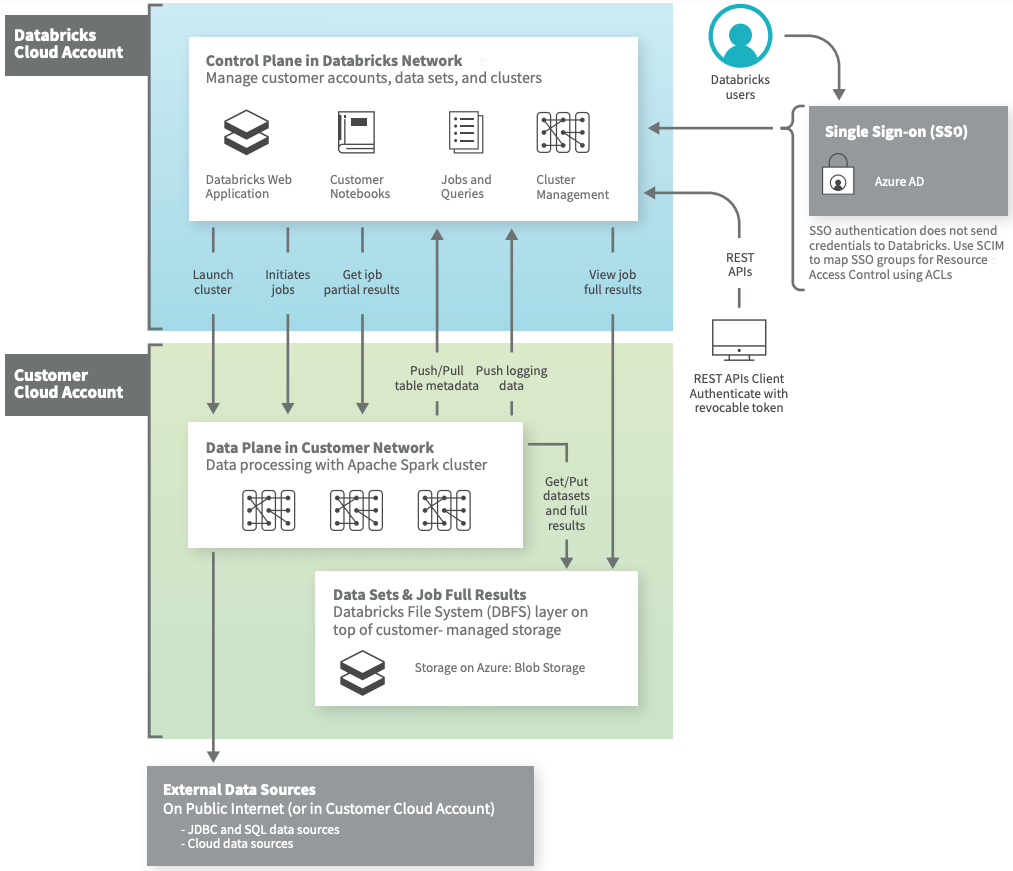 Azure Databricks architecture overview (Source: Databricks)
Azure Databricks is built on a two-plane architecture: the Control plane and the Compute plane, providing separation of data processing and management layers. This architecture is pivotal for secure and efficient analytics at scale on the Azure platform.
- Control plane: Managed entirely by Databricks, the control plane is located outside of the user’s Azure subscription. It handles backend tasks, including metadata storage, cluster lifecycle management and job orchestration, with all communications secured through encrypted channels.
- Compute plane: The compute plane, where data processing takes place, resides within the user’s Azure subscription. Azure Databricks offers two configurations:
- Classic compute: Operates within the user’s Virtual Network (VNet) with customizable access controls.
- Serverless compute: In this configuration, compute resources are fully managed by Databricks, providing automatic scaling with minimal infrastructure oversight required from users.
Data storage and integration
Azure Databricks integrates seamlessly with Azure’s storage solutions, such as Azure Data Lake Storage (ADLS) and Azure Blob Storage. These connectors, optimized by Microsoft, provide high-speed data access and support efficient storage scalability for large datasets. The Delta Lake storage layer also adds ACID transactions and schema enforcement, making it ideal for creating Lakehouse architectures that combine data lakes and data warehouses into a unified data management approach.
Networking and security
Networking within Azure Databricks can be configured using two primary approaches:
- Databricks-Managed VNet: Databricks manages the virtual network and associated security configurations. Network Security Groups (NSGs) and routing are handled automatically, simplifying the setup for most users but with limited customization options.
- Customer-Managed VNet (VNet Injection): Allows users to configure custom VNets, granting control over IP address ranges, private endpoints and on-premises connectivity.
All configurations leverage Azure’s private backbone network to minimize exposure to the public internet, while Secure Cluster Connectivity (SCC) ensures that data is transmitted solely through private channels.
Security features
Azure Databricks integrates robust security features to meet stringent enterprise requirements:
- Microsoft Entra ID (formerly Azure Active Directory) supports user authentication, Single Sign-On (SSO) and RBAC, enabling secure and managed user access.
- Private endpoints restrict Databricks and other Azure services access, enabling secure connections without exposing services to the internet.
- Encryption at rest and in transit, with key management through Azure Key Vault, adds an extra layer of protection for sensitive data.
- Audit Logging through Azure Monitor provides insights into workspace activity, helping organizations maintain visibility and compliance.
We will go into greater detail regarding the capabilities and services offered by Databricks on Azure.
Azure native features and service integration
Databricks on Azure includes multiple integrations with Azure-native services. Here’s a breakdown of key features and integrations:
- Azure Data Lake Storage (ADLS): Scalable storage for structured, semi-structured and unstructured data, ideal for big data workloads.
- Azure Data Factory: Facilitates ETL workflows to move and transform data for use within Databricks.
- Azure Synapse Analytics: Supports seamless data exchange for advanced analytics and near-real-time processing.
- Azure Event Hubs: Enables real-time event streaming into Databricks for immediate analysis.
- Azure Key Vault: Manages sensitive information securely within Databricks environments.
- Azure Monitor: Provides insights into Databricks operations for efficient performance management.
- Power BI: Integrates for real-time visualization and data sharing.
- Azure Active Directory (AAD): Offers identity management and SSO for secure, simplified access.
- Microsoft Purview: Supports governance by connecting with Databricks’ Unity Catalog for data visibility and compliance.
- Azure DevOps: Integrates version control, CI/CD and project management into Databricks workflows.
In the following sections, we will go over each of these services and features in further detail.
Performance and scalability
Databricks on Azure utilizes an optimized version of Apache Spark, enhancing processing speed significantly—up to 50 times faster than conventional Spark setups—ideal for big data ETL, interactive queries and real-time analytics.
Data storage
Azure Databricks primarily uses Azure Data Lake Storage Gen2 (ADLS Gen2), which combines features of ADLS Gen1 and Blob Storage. This supports:
- Hierarchical namespaces
- ACID transactions via Delta Lake
You can store structured, semi-structured and unstructured data at exabyte scale without file size limitations.
Computing
For computing power, Azure Databricks runs on Azure Virtual Machines, offering options from general-purpose VMs to GPU-enabled instances. The platform supports:
- Azure Confidential Computing (using DCsv2 and DCsv3 series VMs) provides isolated environments with Intel SGX for secure workloads.
- AMD SEV-SNP Technology in select VMs enables full VM memory encryption, adding further security layers for sensitive computations.
Integration services
Databricks on Azure can be easily integrated with other Azure services. You can:
- Connect directly to Azure Synapse Analytics for SQL operations.
- Use Azure Data Factory for workflow orchestration.
Security and compliance
Databricks on Azure is highly secure. Here are some notable security features that Azure provides to strengthen the Databricks workflow:
- User authentication: Managed via Azure Active Directory (AAD), supporting single sign-on (SSO) to streamline secure access.
- Secrets management: Secured through Azure Key Vault, allowing Databricks to store and manage sensitive information, such as API keys, securely.
- Role-based access control (RBAC): Implements fine-grained permissions, enabling control over access to resources at the workspace, cluster and job levels.
Network integrations
For network security in Azure Databricks, Azure Virtual Networks are key. They help isolate and control network traffic. You can set up VNets with Network Security Groups to manage access to resources, which is crucial for keeping your Azure Databricks workspace secure. Azure Private Link also lets you create private connections to Databricks services. This limits exposure to the public internet and makes things more secure by routing data through Azure’s private network.
To make remote access more secure, you can use Azure ExpressRoute for private connections from on-premises environments to Azure Databricks. This is done over a dedicated network, so you avoid the public internet. If ExpressRoute isn’t an option, VPN Gateway can provide encrypted remote access. Another step is to enable secure cluster connectivity, also known as “No Public IP”. This restricts cluster access to VNets, stops public IP addresses from being used and gives you more control over network access.
AI & Machine Learning
Azure Databricks provides robust AI and ML support, integrating with Azure Machine Learning for model training and deployment and MLflow for tracking and versioning models. The platform supports popular Azure AI services, for building AI applications at scale.
Azure Databricks pricing overview
1) Databricks workflows (Lakeflow jobs) — Starting at $0.15 per DBU (US East)
➤ Classic jobs/Classic jobs photon clusters
- Premium plan: $0.30 per DBU
➤ Serverless (Preview):
- Premium plan: $0.45 per DBU
2) Lakeflow Spark Declarative Pipelines — Starting at $0.45 per DBU (US East)
- Premium plan:
- Serverless: $0.45 per DBU
- Classic:
- Classic Core: $0.30 per DBU
- Classic Pro: $0.38 per DBU
- Classic Advanced: $0.54 per DBU
3) Lakeflow Connect — Starting at $0.45 per DBU (US East North Virginia)
- Premium plan:
- Managed Connectors: $0.45 per DBU
- Zerobus Ingest: $0.064 per GB
4) Databricks SQL — Starting at $0.22per DBU (US East)
- Premium plan:
- SQL Classic: $0.22 per DBU
- SQL Pro: $0.55 per DBU
- SQL Serverless: $0.70 per DBU
5) Lakebase — Starting at $0.111 per DBU
- Premium plan:
- Lakebase Compute with Autoscaling: $0.111 per Capacity unit hour
- Database Storage: $0.390 per GB-month
6) Compute for Data Science — Starting at $0.55 per DBU
- Premium plan:
- Classic All-Purpose Compute Clusters: $0.55 per DBU
- Serverless: $0.95 per DBU
7) Databrics Apps — Starting at $0.95 per DBU
- Premium plan:
- App Capacity: $0.95 per DBU
8) Databrics AI pricing
a) Agent Bricks
- Premium plan:
- Knowledge Assistant: $0.150 per Answer
- Supervisor Agent: $0.0.70 per DBU
b) AI Functions
- Premium plan:
- AI Parse Document: $0.070 per DBU
- AI Extract: $0.070 per DBU
- AI Classify: $0.070 per DBU
c) AI Gateway
- Premium plan:
- AI Guardrails: $1.50 per million tokens
- Inference Tables: $0.50 per GB
- Usage Tracking: $0.100 per GB
d) Databricks Model Serving
- Premium plan:
- CPU Serving: $0.070 per DBU
- GPU Serving: $0.070 per DBU
e) Foundation Model Serving
- Premium plan:
- Per token pricing: $0.50 per million input token, $1.50 per million input token
- Provisioned Throughput: $6 per Hour
- Batch Inference: $6 per Hour
f) AI Runtime
- Premium plan:
- A10 On Demand: $4.90 per DBU
- H100 On Demand: $7.00 per DBU
g) Vector Search
- Premium plan:
- Vector Search Standard:
- Compute: $0.28 per Hour
- Storage: $0.260 per GB per month (first 30 GB free)
- Vector Search Storage Optimized:
- Compute: $1.28 per Hour
- Storage: $0.052 per GB per month
- Vector Search Standard:
h) Agent Evaluation (Databricks MLflow)
- Premium plan:
- Agent Evaluation:
- Input: $0.15 per million input tokens
- Output: $0.60 per million output tokens
- Agent Evaluation Synthetic Data: $0.35 per question
- Agent Evaluation:
i) Databricks Model Training
- Premium plan:
- Model Training – fine-tuning: $0.65 per DBU
- Model Training – forecasting: $0.65 per DBU
9) Databrics Managed Services
- Premium plan:
- Data Quality Monitoring: $0.45 per DBU
- Predictive Optimization: $0.45 per DBU
- Fine-Grained Access Control (FGAC): $0.45 per DBU
- Data Classification: $0.45 per DBU
10) Databrics Data Transfer pricing
11) Databrics Storage
- Premium plan: $0.026 per DSU
For more in-depth details on overall pricing, check out the Databricks pricing page.
3. Databricks on GCP
Databricks on Google Cloud integrates the open architecture of Databricks with Google Cloud’s robust infrastructure, offering a flexible, scalable platform for data engineering, data science and analytics. It runs on Google Kubernetes Engine (GKE) with the first Kubernetes-based Databricks runtime, optimized to deliver high-performance analytics and fast insights. This managed integration provides seamless compatibility with Google Cloud’s native security, billing and management tools, enabling organizations to leverage containerized deployments for efficient, scalable and secure data processing workflows.
Deploying Databricks on Google Cloud is streamlined through a one-click deployment option available via the Google Cloud Console. This integration assures seamless compatibility with Google Cloud’s security, billing and management tools. Also, Databricks supports containerized deployments that enhance scalability and security while enabling efficient data engineering, collaborative data science and production-level machine learning across various Google Cloud services, including BigQuery and Google Cloud Storage.
Databricks on GCP—Architecture overview
Databricks on Google Cloud Platform (GCP) architecture is designed to enable efficient data engineering, data science and analytics workflows while leveraging the scalability and security of GCP.
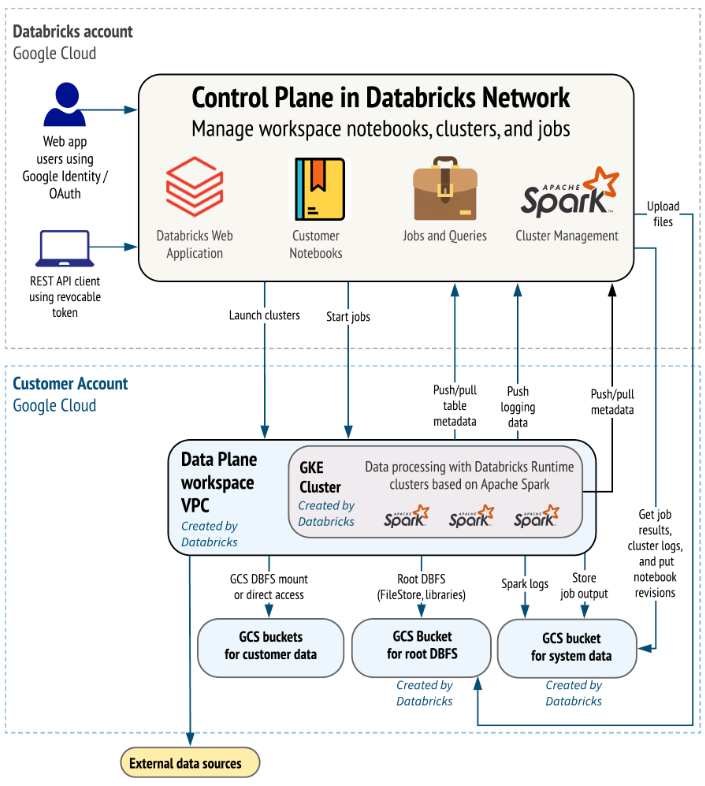
The architecture of Databricks on Google Cloud also consists of two main components: the Control Plane and the Data Plane.
Control plane: Databricks control plane is hosted and managed by Databricks in their own cloud infrastructure. It handles:
- Workspace management and cluster lifecycle operations
- Job scheduling and monitoring
- Security and access management, including API operations
- Service metadata storage and orchestration
All interactions in the control plane are securely managed and customer data does not traverse this layer.
Data plane: Data Plane resides within the customer’s GCP account and is where data processing occurs. Compute resources, typically deployed as clusters, operate within this plane to perform data engineering, analytics and machine learning tasks. These clusters connect to Google Cloud Storage (GCS), BigQuery and other external data sources for streamlined data ingestion and processing. The data plane is secured with Virtual Private Cloud (VPC) configurations that enable private communication between services without public internet exposure.
Integration with Google Cloud Services
Databricks on Google Cloud tightly integrates with several GCP services, enhancing data processing workflows and allowing efficient data access, transformation and analytics:
- Google Cloud Storage (GCS): Used as the primary data storage solution, supporting Delta Lake with ACID transactions, time-travel and scalable metadata handling.
- BigQuery: Databricks provides native support for querying BigQuery tables, enabling users to perform scalable SQL analytics directly within the Databricks environment. BigQuery integration supports analytics on large datasets with minimal data movement.
- Google Kubernetes Engine (GKE): Databricks runs its compute environment on GKE, leveraging Google’s Kubernetes infrastructure for flexible, containerized deployments that scale to meet dynamic workload demands.
- AI and Machine Learning tools: Integrates with Databricks for model training and deployment, enabling users to build and operationalize machine learning models directly on data processed within Databricks.
Security features
Databricks on GCP includes several layers of security to protect data, infrastructure and user access:
- Encryption: Data at rest and in transit is encrypted. Customers can choose between Databricks-managed keys and Google Cloud’s Customer-Managed Encryption Keys (CMEK) for enhanced control.
- Role-Based Access Control (RBAC): Fine-grained access control ensures that users have permission only to access the data and functionalities they are authorized for, supporting secure multi-user environments.
- Network security: VPC Service Controls are used to set up security perimeters around resources, limiting the exposure of sensitive data and services. Also, firewall rules provide granular control over network traffic to manage inbound and outbound requests effectively.
GCP native features and service integration
Databricks on Google Cloud is designed to leverage Google’s native services, creating an ecosystem where data workflows can be executed seamlessly across GCP’s data and analytics platforms. Here’s an overview of key integrations:
- Google Cloud Storage (GCS)
- BigQuery
- Google Cloud AI Platform
- Google Identity and Access Management (IAM)
You can directly access and analyze data without significant data movement, benefiting from the comprehensive Google ecosystem while maintaining Databricks’ Lakehouse architecture.
Performance and scalability
Designed specifically to harness Google Cloud’s infrastructure, Databricks on GCP is optimized for scalable and efficient data processing. This deployment is the first to feature a Kubernetes-based Databricks runtime, allowing users to leverage Google Kubernetes Engine (GKE) for flexible, containerized compute environments that scale to meet varying workload demands efficiently.
Data storage
Databricks on Google Cloud natively integrates with Google Cloud Storage (GCS), which provides scalable, durable storage for data of all types and sizes. This integration also supports Delta Lake storage, which brings the benefits of ACID transactions and structured file management, offering reliability and performance for both batch and real-time data processing needs.
Computing
Databricks on GCP utilizes both Google Compute Engine and Google Kubernetes Engine (GKE) for its compute infrastructure:
- Compute Engine: Provides scalable virtual machine instances, supporting various machine types tailored to workload requirements, including memory-optimized and compute-optimized instances.
- GKE: Runs containerized workloads, allowing Databricks to deploy a Kubernetes-based runtime that facilitates auto-scaling and high availability, making it ideal for handling diverse data processing and AI tasks.
Integration services
Key integration services for Databricks on GCP include:
- BigQuery: Provides fast, scalable SQL analytics for large datasets, enabling both ad hoc and scheduled queries within Databricks.
- Google Cloud AI platform: Enables model training, deployment and management, with Managed MLflow in Databricks supporting experiment tracking and model lifecycle management.
Security and compliance
Databricks on GCP leverages Google Cloud’s advanced security features, aligning with stringent enterprise security protocols:
- Google Identity and Access Management (IAM): Manages access at an organizational level, providing a unified point for managing Databricks user permissions within the Google Cloud environment.
- Google Cloud Identity: Supports secure authentication and authorization across users and applications, strengthening Databricks’ security setup.
- Secrets Management: Google Cloud’s Secret Manager integrates with Databricks, allowing secure management of sensitive information like API keys and credentials.
Network integrations
Networking on Databricks for Google Cloud utilizes Google’s Virtual Private Cloud (VPC), which enables users to define IP ranges, subnets and private connections. Databricks can integrate with Google Cloud Private Service Connect to establish private connections to Google services, minimizing public internet exposure and enhancing data security. For hybrid setups:
- Interconnect and VPN: Connect on-premises environments with Databricks on GCP through Google Cloud’s Interconnect and VPN services, which provide dedicated and encrypted connections, respectively.
- Secure Cluster Connectivity: Known as “No Public IP,” this configuration restricts cluster access to VPCs, enhancing network security by preventing the use of public IPs.
AI & Machine Learning
Databricks on Google Cloud integrates deeply with Google Cloud’s AI and ML capabilities. The Google Cloud AI Platform complements Databricks by providing tools for model building, training and deployment. Managed MLflow on Databricks enables tracking, model versioning and deployment management, supporting both batch and streaming inference. Databricks users can also leverage popular ML libraries, including TensorFlow, PyTorch and scikit-learn, to build scalable AI solutions within GCP’s infrastructure.
GCP Databricks pricing overview
1) Databricks workflows (Lakeflow jobs) — Starting at $0.15 per DBU (US Virginia region)
➤ Classic jobs/Classic jobs photon clusters
- Premium plan: $0.15 per DBU
- Enterprise plan: $0.20 per DBU
➤ Serverless (Preview):
- Premium plan: $0.35 per DBU
- Enterprise plan: $0.45 per DBU
2) Lakeflow Spark Declarative Pipelines — Starting at $0.35 per DBU (US Virginia region)
- Premium plan:
- Serverless: $0.35 per DBU
- Classic:
- Classic Core: $0.20 per DBU
- Classic Pro: $0.25 per DBU
- Classic Advanced: $0.36 per DBU
- Enterprise plan:
-
- Serverless: $0.45 per DBU
- Classic:
- Classic Core: $0.20 per DBU
- Classic Pro: $0.25 per DBU
- Classic Advanced: $0.36 per DBU
3) Lakeflow Connect — Starting at $0.35 per DBU (US Virginia)
- Premium plan:
- Managed Connectors: $0.35 per DBU
- Zerobus Ingest: $0.050 per GB
- Enterprise plan:
- Managed Connectors: $0.45 per DBU
- Zerobus Ingest: $0.064 per GB
4) Databricks SQL — Starting at $0.22per DBU (US Virginia)
- Premium plan:
- SQL Classic: $0.22 per DBU
- SQL Pro: 0.55 per DBU
- SQL Serverless: $0.70 per DBU
- Enterprise plan:
- SQL Classic: $0.22 per DBU
- SQL Pro: $0.55 per DBU
- SQL Serverless: $0.70 per DBU
5) Lakebase — Starting at $0.0092 per DBU
- N/A
6) Compute for Data Science — Starting at $0.55 per DBU
- Premium plan:
- Classic All-Purpose Compute Clusters: $0.55 per DBU
- Serverless: $0.75 per DBU
- Enterprise plan:
-
- Classic All-Purpose Compute Clusters: $0.65 per DBU
- Serverless: $0.95 per DBU
7) Databrics Apps — Starting at $0.75 per DBU
- Premium plan:
- App Capacity: $0.75 per DBU
- Enterprise plan:
-
- App Capacity: $0.95 per DBU
8) Databrics AI pricing
a) Agent Bricks
- Premium plan:
- Knowledge Assistant: $0.150 per Answer
- Supervisor Agent: $0.0.70 per DBU
- Enterprise plan:
- Knowledge Assistant: $0.150 per Answer
- Supervisor Agent: $0.0.70 per DBU
b) AI Functions
- Premium plan:
- AI Parse Document: $0.070 per DBU
- AI Extract: $0.070 per DBU
- AI Classify: $0.070 per DBU
- Enterprise plan:
- AI Parse Document: $0.070 per DBU
- AI Extract: $0.070 per DBU
- AI Classify: $0.070 per DBU
c) AI Gateway
- Premium plan:
- AI Guardrails: $1.50 per million tokens
- Inference Tables: $0.50 per GB
- Usage Tracking: $0.100 per GB
- Enterprise plan:
- AI Guardrails: $1.50 per million tokens
- Inference Tables: $0.50 per GB
- Usage Tracking: $0.100 per GB
d) Databricks Model Serving
- Premium plan:
- CPU Serving: $0.070 per DBU
- GPU Serving: $0.070 per DBU
- Enterprise plan:
- CPU Serving: $0.070 per DBU
- GPU Serving: $0.070 per DBU
e) Foundation Model Serving
- Premium plan:
- Provisioned Throughput: $6 per Hour
- Batch Inference: $6 per Hour
- Enterprise plan:
- Provisioned Throughput: $6 per Hour
- Batch Inference: $6 per Hour
f) AI Runtime
- N/A
g) Vector Search
- Premium plan:
- Vector Search Standard:
- Compute: $0.28 per Hour
- Storage: $0.230 per GB per month (first 30 GB free)
- Vector Search Storage Optimized:
- Compute: $1.28 per Hour
- Storage: $0.046 per GB per month
- Vector Search Standard:
- Enterprise plan:
-
- Vector Search Standard:
- Compute: $0.28 per Hour
- Storage: $0.230 per GB per month (first 30 GB free)
- Vector Search Storage Optimized:
- Compute: $1.28 per Hour
- Storage: $0.046 per GB per month
- Vector Search Standard:
h) Agent Evaluation (Databricks MLflow)
- Premium plan:
- Agent Evaluation:
- Input: $0.15 per million input tokens
- Output: $0.60 per million output tokens
- Agent Evaluation Synthetic Data: $0.35 per question
- Agent Evaluation:
- Enterprise plan:
-
- Agent Evaluation:
- Input: $0.15 per million input tokens
- Output: $0.60 per million output tokens
- Agent Evaluation Synthetic Data: $0.35 per question
- Agent Evaluation:
i) Databricks Model Training
- Premium plan:
- Model Training – forecasting: $0.65 per DBU
- Enterprise plan:
- Model Training – forecasting: $0.65 per DBU
9) Databrics Managed Services
- Premium plan:
- Data Quality Monitoring: $0.35 per DBU
- Predictive Optimization: $0.35 per DBU
- Fine-Grained Access Control (FGAC): $0.35 per DBU
- Data Classification: $0.35 per DBU
- Enterprise plan:
-
- Data Quality Monitoring: $0.45 per DBU
- Predictive Optimization: $0.45 per DBU
- Fine-Grained Access Control (FGAC): $0.45 per DBU
- Data Classification: $0.45 per DBU
10) Databrics Data Transfer pricing
11) Databrics Storage
- Premium plan: $0.023 per DSU
- Enterprise plan: $0.023 per DSU
For more in-depth details on overall pricing, check out the Databricks pricing page.
Save up to 50% on your Databricks spend in a few minutes!
Conclusion
Databricks is the real deal: a rock-solid, cloud-agnostic data and AI platform that helps data pros work together and streamline their workflows across AWS, Azure and Google Cloud. Databricks’ powerful Spark engine, a single workspace and seamless connectivity with cloud services enable customers to easily tackle difficult data chores such as ETL, real-time analytics and machine learning. When choosing a cloud platform for Databricks, think about what you already have in place, what you need to integrate and what your budget is. Every cloud solution has its perks, so match the platform’s strengths with your business needs to get the best bang for your buck with Databricks.
In this article, we have covered:
- Why Databricks is a leading choice for data processing, analytics and AI
- Core Databricks architecture overview
- Comparison of Databricks on AWS, Azure and GCP
- Databricks on AWS
- Databricks on Azure
- Databricks on GCP
- Quick summary—Databricks on AWS vs Azure vs GCP
… and much more!
FAQ
Who are the major cloud providers?
AWS, Microsoft Azure and GCP are the three dominant cloud platforms. Databricks is available as a managed service on all three.
Which is better: GCP, AWS, or Azure?
Each platform has its strengths:
- AWS: Dominates in market share and service variety, offering extensive tools for various applications.
- Azure: Excels in enterprise integration, especially for organizations already using Microsoft products.
- GCP: Known for its advanced data analytics and machine learning capabilities, leveraging Google’s expertise in AI.
Is Databricks better on Azure or AWS?
It depends on your existing stack. Azure Databricks integrates more deeply with Microsoft services and is a first-party offering. AWS Databricks offers broader third-party integrations, better FedRAMP commercial coverage and generally lower DBU rates.
What’s the key difference between Databricks’ Control and Compute Planes?
The control plane manages backend services—authentication, job scheduling, cluster orchestration. The compute plane runs actual data processing, either in your cloud account (classic) or in Databricks-managed infrastructure (serverless).
How does Databricks on AWS integrate with AWS services?
Databricks on AWS utilizes several AWS services:
- Amazon S3 for storage.
- AWS Glue for ETL processes.
- Amazon Redshift for data warehousing.
- Amazon SageMaker for hosting machine learning models.
What are the key security features of Databricks on AWS?
AWS IAM for access control, AWS KMS for encryption key management and AWS PrivateLink for private connectivity between your Databricks workspace and AWS services.
How does Databricks on Azure integrate with Azure data services?
Direct integration with ADLS Gen2, Azure Synapse Analytics, Azure Data Factory, Azure Event Hubs and Microsoft Purview for governance.
What are the networking options in Databricks on Azure?
Databricks-managed VNet (simpler setup, less control) or customer-managed VNet via VNet injection (full control over IP ranges, routing and private endpoints). Both support Azure Private Link.
What GCP integrations does Databricks on GCP have?
GCS for storage, BigQuery for SQL analytics, Vertex AI for ML deployment and Cloud IAM for unified access management.
How does Databricks enforce security on GCP?
Cloud IAM for user permissions, VPC Service Controls to define security perimeters and CMEK for customer-managed encryption keys.
What performance benefits does the Kubernetes runtime provide for Databricks on GCP?
Containerized workloads scale faster under high concurrency and can have lower cold-start times compared to VM-based deployments in some scenarios. The trade-off is a dedicated GKE cluster cost per workspace (~$200/month).
How does Databricks support Delta Lake across cloud platforms?
Delta Lake is the default storage format across all three clouds. It provides ACID transactions, time travel, schema enforcement and automatic file compaction (OPTIMIZE/Z-ORDER) on top of whichever object storage the cloud uses (S3, ADLS Gen2 or GCS).
What’s the difference between classic and serverless compute?
Classic compute runs in your cloud account—you control VPC configuration, instance types and security policies. Serverless compute is fully managed by Databricks; you pay per workload without managing infrastructure.
How does PrivateLink enhance security in Databricks on AWS?
PrivateLink allows users to establish private endpoints within their VPCs, ensuring that traffic between their Databricks workspace and other AWS services remains secure and isolated from the public internet.
What Azure services integrate with Databricks pipelines?
Azure Data Factory for pipeline orchestration, Azure Event Hubs for real-time streaming ingestion and Microsoft Purview for data governance and cataloging.
How does Databricks leverage GCP’s private network infrastructure?
Traffic routes through Google’s private backbone network rather than the public internet. VPC Service Controls and Private Service Connect further restrict exposure.
How can Graviton instances lower costs on Databricks on AWS?
AWS Graviton (ARM-based) instances offer competitive price-performance on Spark workloads. Databricks supports Graviton natively, and teams can select Graviton instance families when configuring clusters.
What key security features does Azure provide that benefit Databricks users?
Azure enhances security through features such as:
- Integration with Azure Active Directory for identity management.
- Use of Azure Key Vault for managing secrets and encryption keys securely.
- Monitoring capabilities via Azure Monitor, which provides insights into resource usage and performance metrics.
How does Databricks integrate ML on GCP?
Integration with Vertex AI for model training and deployment, MLflow for experiment tracking and model registry and support for TensorFlow, PyTorch and scikit-learn across GCE/GKE compute.
What networking and security isolation does Databricks provide across all clouds?
VPC/VNet-level isolation, private endpoints or PrivateLink, Network Security Groups or security groups and optional secure cluster connectivity (no-public-IP mode).
How does Databricks support GPU computing on Azure?
Databricks leverages Azure’s GPU instances such as the DCsv2/DCsv3 series, which are optimized for compute-intensive workloads like deep learning tasks, providing significant acceleration over CPU-based processing.
Who are Databricks’ main competitors?
Snowflake is the most direct competitor for the Lakehouse use case. Google BigQuery, Amazon Redshift and Azure Synapse Analytics compete on the data warehousing side. Apache Spark-based alternatives include AWS Glue, GCP Dataproc and Azure Synapse Spark Pools.
Is BigQuery similar to Databricks?
They’re different tools. BigQuery is a fully serverless data warehouse optimized for SQL analytics at scale—no cluster management, pay per query. Databricks is a collaborative analytics and ML platform built on Apache Spark, built for workloads that go beyond SQL: ETL, streaming, ML model training and generative AI. Many teams use both.
What role do Delta Live Tables play in data quality?
Delta Live Tables (DLT) automates pipeline construction with built-in data quality constraints. You define expectations (rules about what clean data looks like), and DLT enforces them during ingestion—flagging, quarantining or blocking bad records. Time travel lets you roll back to any previous version if something goes wrong.
Pramit Marattha
Pramit Marattha is a technical content writer and strategist with 5+ years of experience covering AI, data engineering, data cloud platforms and open source technologies. He turns complex technical concepts into clear, useful content for engineers and developers.







