


Flexera’s March 2026 updates deliver major enhancements across ITAM, SaaS Management, IT Visibility, and Security. Highlights include new Flexera documentation experience, enhancements to IT Visibility devices and data exploration, bulk deletion in ITAM, deeper insight into Microsoft 365 with SaaS Management, and upgraded SVM Cloud features for faster patching and tighter security. These innovations help organizations improve visibility, reduce cost, and strengthen operational efficiency across their hybrid environments.
Learn more about what’s coming with Flexera’s 2026 AI Innovation Roadmap here.
Innovation area: Flexera One
Find what you need faster: a simpler, smarter flexera documentation experience
Flexera has modernized its product documentation experience with a redesigned docs.flexera.com site, making it faster and easier for customers to find, trust, and stay current with product information.
Key Highlights
- Find answers faster with a cleaner layout, simpler navigation, and fewer clicks
- One consistent experience across all Flexera product documentation, including Flexera One
- Quick access to what’s new through a dedicated, easy‑to‑find release notes page
- Powerful global search across product docs, Flexera.com, and the Flexera Community
- Always up to date documentation thanks to faster, more automated publishing
- No disruption. Existing links and bookmarks continue to work via redirects
Why It Matters
As Flexera’s solutions continue to expand, customers need documentation that’s easy to navigate, easy to trust, and keeps pace with rapid product innovation. This modernization removes friction from finding information, ensures documentation evolves alongside product releases, and lays the groundwork for future enhancements like inline help, helping customers get value from Flexera products faster and with greater confidence.
Innovation area: IT Visibility
Greater transparency into device and software data in IT Visibility
New enhancements to IT Visibility Devices make it easier to see and understand the evidence behind your device and software inventory, helping you trust the data that drives your decisions.
Key Highlights
- Clear hardware evidence per device so you can see exactly how hardware details are discovered
- Expanded software evidence visibility beyond installers, including file‑based and OS‑level evidence
- Richer OS details with added context like OS caption and CSD version
- Consistent UI and API evidence for more reliable analysis and reporting
- Improved confidence in inventory data through greater transparency and traceability
Why It Matters
Accurate IT decisions depend on understanding where your data comes from. These enhancements give you deeper visibility into the evidence behind device and software records, making it easier to validate inventory, troubleshoot discrepancies, and confidently act on IT Visibility insights across your environment.
For full details, see the release notes and community post or explore more in Flexera documentation (identifying devices and identifying applications).
Explore massive inventory datasets instantly, without exports or limits
Flexera One Data Explorer in IT Visibility now supports asynchronous rendering, allowing you to sort, filter, and search millions of rows of inventory data directly in the UI—without truncation, performance issues, or exporting data to external tools.
Key Highlights
- Work with millions of records in the UI: no more row or payload limits
- Search, filter, and sort across the full dataset, not just visible rows
- No forced exports: analyze large reports directly in Flexera One
- Automatic performance optimization that kicks in seamlessly for large datasets
- Consistent user experience with no changes to existing workflows
Why It Matters
Large‑scale environments demand large‑scale analysis. This enhancement eases daily operational reporting by keeping even massive datasets fully usable inside Flexera One. The result is faster insights, less context switching, and greater trust in Flexera One as a single destination for enterprise‑grade inventory reporting and analytics.
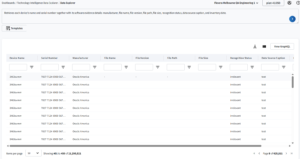
Understand the evidence behind your device and software inventory
Innovation area: IT Asset Management
Bulk Deletion
Data management in ITAM has been enhanced with the introduction of bulk deletion functionality for purchases and assets.
Key highlights include:
- Users can now delete purchases and assets in batches of up to 1,000 records
- Bulk deletion can also be performed utilizing the business adapter
- Deletions are executed automatically during reconciliation after “Marked for Deletion” and do not degrade system performance
Why It Matters
Previously, maintaining clean data was challenging due to the manual effort of deleting single entries. Data management and cleanup is essential for maintaining a coherent asset inventory, giving better visibility into assets that you’re able to take real cost saving actions on.
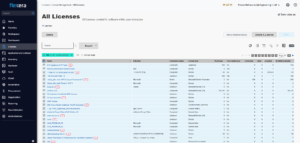
Delete purchases and assets at scale
VM density columns by operating system added in Report Builder
Report builder has been enhanced to report on virtual machine (VM) density by operating system variants at the cluster level.
Key highlights include:
- VM density is calculated as the ratio of VM’s to the number of hosts in a cluster
- New columns have been added to support licensing scenarios
- Windows virtual machines (density)
- RHEL virtual machines (density)
- SUSE virtual machines (density)
Why It Matters
These updates to report builder provide clearer insight into the distribution of VM’s by operating system relative to the number of hosts in a cluster. This helps our customers better understand VM density and the impact on licensing.
Innovation area: SaaS Management
Optimize Microsoft 365 with Real Mailbox and OneDrive Usage Insight
The Flexera M365 connector now includes Mailbox and OneDrive usage data, giving teams deeper insight into how Microsoft 365 storage is actually being consumed. This added visibility helps customers better manage costs, reduce sprawl, and strengthen governance decisions.
Key Highlights
- See storage usage beyond licenses
Understand more than just who has a license with mailbox size, activity, and OneDrive consumption. - Identify waste and risk faster
Spot inactive mailboxes, over‑utilized accounts, and growing OneDrive sprawl. - Make smarter optimization decisions
Use real usage data to support cleanup, right‑sizing, and renewal conversations. - Reduce manual reporting effort
Eliminate reliance on external tools and manual analysis for usage insights.
Why It Matters
Microsoft 365 costs and risks are driven by licensing, but storage usage also plays a major role. By adding Mailbox and OneDrive usage visibility, Flexera helps organizations connect usage, cost, and governance data in one place, enabling more confident optimization decisions and stronger control over SaaS growth.
Innovation area: Security Vulnerability Management
Stronger security, expanded macOS support, and greater deployment flexibility in the latest SVM Cloud update
The SVM March 2026 cloud update delivers important fixes and enhancements that improve patch reliability, strengthen security posture, and expand deployment flexibility, while adding native support for macOS environments and more secure patch signing options.
Key Highlights
- Reliable Adobe patching with fixed detection logic for Adobe Acrobat DC and Reader DC
- Stronger security and compliance by resolving 75 high and 50+ medium/low severity code scanning alerts
- Cleaner vulnerability posture with zero Dependabot vulnerabilities reported
- Expanded macOS support with native Jamf Pro integration for deploying .dmg and .pkg packages
- Greater deployment flexibility with support for multiple setup package URLs in the PFM API
- Flexible digital patch signing options, including standard and custom (HSM‑based) signing
- Seamless compatibility with the latest Patch Publisher (v7.31.2212)
Why It Matters
Modern environments demand secure, reliable patching across diverse platforms. Deploy patches with greater confidence, reduce security risk, and simplify complex Windows and macOS deployments, without changing existing workflows. By combining stronger security, broader endpoint support, and more flexible automation, SVM continues to scale with your environment as complexity grows.
Want to learn more about these and future updates? Get in touch!



