


Teradata and Snowflake are two leading data warehouse platforms that take fundamentally different approaches to storing and analyzing data. Both sit near the top of the enterprise analytics food chain, yet they differ significantly in architecture, use cases and core capabilities. Snowflake has established itself as a best-in-class cloud data warehouse built for elastic scalability and separation of storage from compute. Teradata, by contrast, has spent over four decades as a fixture in enterprise data warehousing, delivering high performance and scalability for the most complex mixed workloads.
As of June 2026, Snowflake currently ranks 6th, whereas Teradata ranks 23rd among the most popular data warehousing platforms as per the DB-Engines ranking. Both have substantial user bases spanning startups to Fortune 500 enterprises across virtually every industry.
In this article, we compare Teradata vs Snowflake across seven key features: architecture, performance and scalability, workload configuration and management, ecosystem and integration, security and governance, supported programming languages and indexing. We also break down their pricing models as a bonus section.
Let’s dive right in!!
Teradata vs Snowflake: which is the better choice for your needs?
Before getting into the details, here’s a high-level summary comparing the two platforms on the dimensions that matter most. The table below illustrates their main similarities and differences.
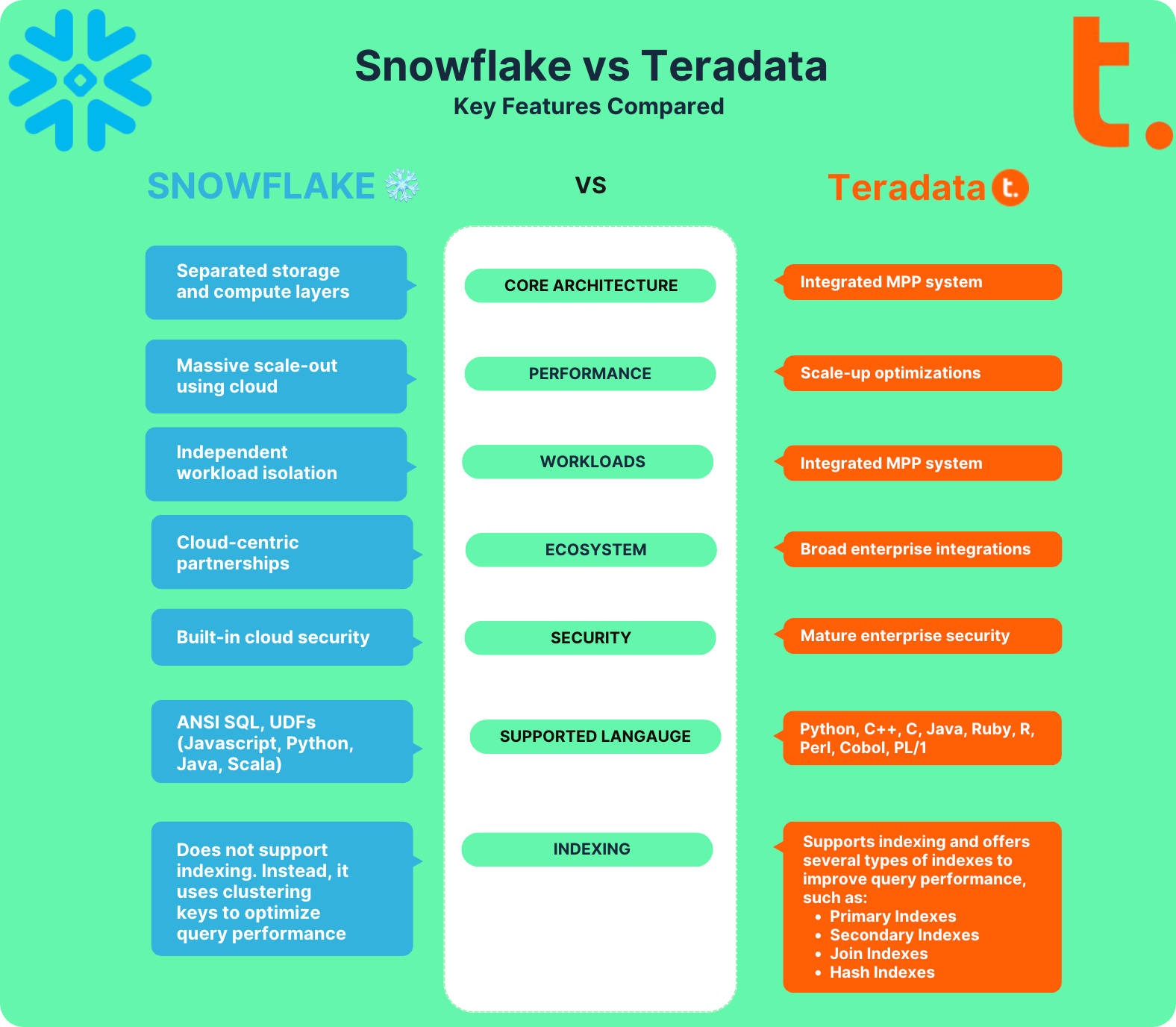
What is Teradata?
Teradata is an enterprise data warehousing solution that delivers high-performance analytics and data management on a massively parallel processing (MPP) system. It enables organizations to store, process and analyze large volumes of data across various sources and formats.
Founded in 1979 (roughly 47 years ago) in Brentwood, California by Jack E. Shemer, Philip M. Neches, Walter E. Muir, Jerold R. Modes, William P. Worth, Carroll Reed and David Hartke, Teradata was one of the earliest commercial databases to use a shared-nothing MPP design. That architecture distributes data and queries across multiple nodes, each with its own processor, memory and disk, to maximize performance, throughput and reliability.
Important note on shared-nothing terminology: The phrase “shared-nothing architecture” was formally coined by Michael Stonebraker in a 1986 paper. Teradata, however, was among the very first commercial databases to operate on that design principle in practice, shipping its DBC/1012 database machine in 1984.
Teradata has since evolved from a purely on-premises solution into a hybrid cloud platform. It now offers multiple deployment options, including VantageCloud Lake, VantageCloud Enterprise and on-premises IntelliFlex and IntelliBase systems. Teradata supports structured, semi-structured and unstructured data and bundles tools like Teradata Studio & Studio Express, Teradata ClearScape Analytics and the Teradata Data Fabric for analytics, integration and management.

Some of the key features of Teradata are:
Massively parallel processing (MPP) architecture: Teradata’s MPP system distributes both storage and compute across independent nodes. A hashing algorithm assigns rows to nodes to keep data balanced across the system, supporting high throughput and fault tolerance
Workload management: Teradata manages workload performance by monitoring system activity and enforcing pre-defined limits. Two strategies are available:
- Teradata Active System Management (TASM): prioritizes workloads, tunes performance and monitors overall system health
- Teradata Integrated Workload Management (TIWM): a subset of TASM features, typically used in environments that don’t require the full TASM ruleset
Data federation: Teradata lets users query data stored outside the main system, including Amazon S3, Azure Blob Storage and Google Cloud storage, via native object store access and foreign tables, without copying the data into Teradata first
Shared-nothing architecture: Each node operates independently, with no shared disk or memory between nodes, eliminating storage bottlenecks and contention
Connectivity: Teradata supports channel-attached systems (such as mainframes) and network-attached systems
ClearScape Analytics: Teradata’s in-database analytics engine supports advanced functions for ML model training, scoring and deployment directly in the warehouse
Programming language support: Teradata supports Python, C++, C, Java, Ruby, R, Perl, Cobol and PL/I for in-database analytics and integration work
Linear scalability: The system scales up to 2048 Nodes by adding more AMPs
Fault tolerance: Teradata includes hardware and software protection mechanisms, including automatic failover and recovery
Flexible deployment and pricing: Organizations can run Teradata on-premises, in the cloud via VantageCloud or in hybrid configurations, with both committed and consumption-based pricing
To sum up, Teradata has been in the enterprise analytics business long enough to have shaped the way data warehousing is done. It’s optimized for the most demanding mixed workloads, from business intelligence (BI) and reporting to AI-driven analytics. Key sectors it serves include banking, retail, telecom and healthcare.
What is Snowflake?
Snowflake is a cloud-native data platform that enables organizations to store, process and analyze large datasets at scale, without managing infrastructure. Its architecture separates storage, compute and cloud services into three independent layers, meaning each layer can scale on its own. Snowflake runs on Amazon Web Services (AWS), Google Cloud Platform (GCP), Microsoft Azure (Azure).
It handles data warehousing, data engineering, data lakes, data science, cybersecurity analytics and collaborative data sharing, all from a single platform.

Some key architectural features and capabilities of Snowflake are:
Scalability and performance: Snowflake’s cloud-native architecture scales up or down on demand. Virtual warehouses can be spun up and shut down in seconds, and multiple warehouses can run simultaneously without sharing resources
Flexibility: Snowflake’s multi-cluster shared data architecture keeps data centralized in object storage while allowing compute to scale across multiple cloud regions. It handles both structured and semi-structured data (JSON, Avro, Parquet, ORC, XML) natively
Zero maintenance: Snowflake fully manages infrastructure, query optimization, vacuuming, compression and backups. There are no indexes to build or tune
Security: Snowflake provides role-based access control (RBAC), network policies, end-to-end encryption and multi-factor authentication (MFA)
Governance and compliance: Built-in features like data classification, column-level masking, row-level access policies, object tagging, cloning and Time Travel support regulatory requirements
Global availability: Snowflake is deployed across AWS, Azure and GCP in multiple regions and availability zones, letting organizations store data near end users to reduce latency
Concurrency and workload isolation: Multi-cluster warehouses handle high concurrency levels. Workloads run in isolated virtual warehouses, eliminating resource contention between teams
Cloud portability: Snowflake runs on all three major cloud providers and supports querying across cloud storage services, reducing vendor lock-in
Collaboration: Snowflake’s Data Sharing, Data Exchange and Marketplace features let organizations share live data securely with partners and customers, without moving or copying it
Elasticity: Storage and compute scale independently. Compute billing is per second, with a 60-second minimum per warehouse start
Cortex AI: Snowflake Cortex AI (expanded significantly through 2024 and 2025) provides built-in large language model (LLM) functions, vector search capabilities and a managed ML model registry, all within Snowflake’s security perimeter
Snowsight: Snowflake’s web interface for building charts, dashboards, running ad hoc queries and validating data
Time Travel: Snowflake’s Time Travel feature lets you query historical snapshots of your data. The Standard Edition provides a 1-day retention period by default. With Enterprise Edition and above, the retention period can be configured up to 90 days. After the Time Travel window closes, data moves to a 7-day Fail-Safe period for disaster recovery before being permanently removed
Pay-per-usage model: You pay only for what you actually use, with no upfront hardware or license costs
Snowflake uses a hybrid of shared disk and shared-nothing architectures. In the storage layer, data lives in a centralized cloud object store accessible to all compute nodes, similar to a shared disk design. In the compute layer, independent virtual warehouses process queries in parallel without sharing resources, similar to a shared-nothing model.
—and much more!!
Snowflake utilizes a unique hybrid architecture that combines elements of shared disk and shared-nothing Snowflake architectures. In the storage layer, data is stored in a centralized location in the cloud, accessible by all compute nodes, similar to a shared disk architecture. However, the compute layer operates on a shared-nothing model, where independent compute clusters called virtual warehouses process queries independently.
For more details on what Snowflake is and how it works:
Snowflake vs Redshift comparison: 10 key differences
Now, let’s dive into the next section, where we will compare Teradata vs Snowflake across 7 different features.
Teradata vs Snowflake: 7 critical features you need to know
Teradata vs Snowflake—Which option best suits your requirements? Let’s dive into the specifics and examine their essential features:
1) Teradata vs Snowflake—Architecture breakdown
One of the sharpest distinctions between Teradata and Snowflake is their underlying architecture. It shapes everything: how they store data, how they run queries and how well they handle scale.
Now, let’s explore their architectural differences.
Snowflake’s architecture
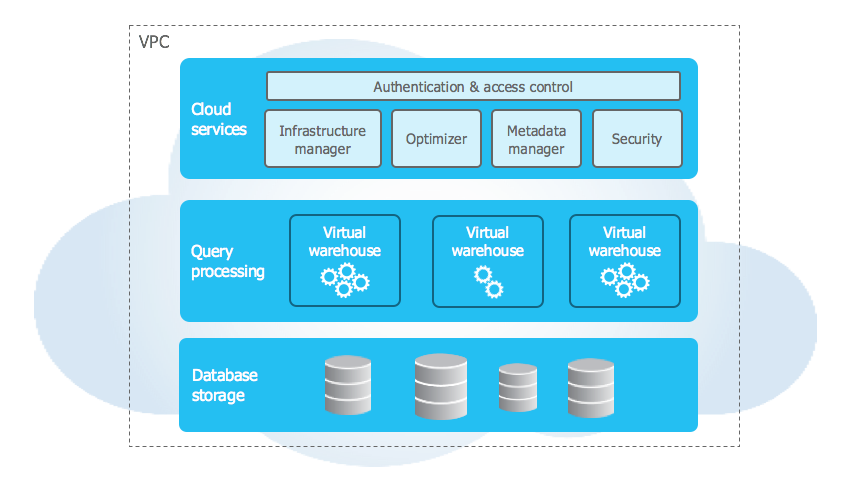
Snowflake utilizes a unique hybrid cloud architecture that combines elements of shared disk and shared-nothing architectures. In the storage layer, data resides in a central data repository that is accessible to all compute nodes, like a shared disk. But the compute layer uses independent virtual warehouses that process queries in parallel, like a shared-nothing architecture.
Snowflake’s architecture has three distinct layers:
When data loads into Snowflake, it converts automatically into a compressed, columnar format stored in cloud object storage (S3, Azure Data Lake Storage or Google Cloud Storage). Snowflake manages all aspects of that storage, including file structure, compression, metadata and statistics. Users can’t access the underlying files directly; everything goes through SQL.
Snowflake’s compute layer uses virtual warehouses to run queries. Each virtual warehouse is an independent MPP compute cluster allocated from cloud resources. Multiple virtual warehouses can run simultaneously without sharing compute, so one team’s heavy batch job won’t slow down another team’s ad hoc queries.
Snowflake cloud services layer is the control plane for everything Snowflake does. It handles authentication, access control, infrastructure management, metadata management, query parsing and query optimization. It runs on compute provisioned by Snowflake from the underlying cloud provider.
Note that the cloud services layer runs on compute instances provisioned by Snowflake from the cloud provider.
Check out this in-depth article if you want to learn more about the capabilities and architecture of Snowflake.
Teradata’s architecture
Teradata’s architecture is based on a massively parallel processing (MPP) system that integrates storage and compute nodes in a single system, meaning that Teradata distributes data and queries across multiple nodes, each with its own processor, memory and disk, to achieve high performance, throughput and reliability.
Teradata can handle massive data volumes, support complex workloads and provide enterprise-grade performance at scale.
Let’s do a deep dive into the various components that make up Teradata’s robust MPP architecture.
The architecture of Teradata consists of five main components: Teradata Nodes, Parsing Engine BYNET and AMP. Here is the high-level architecture of the Teradata Node.
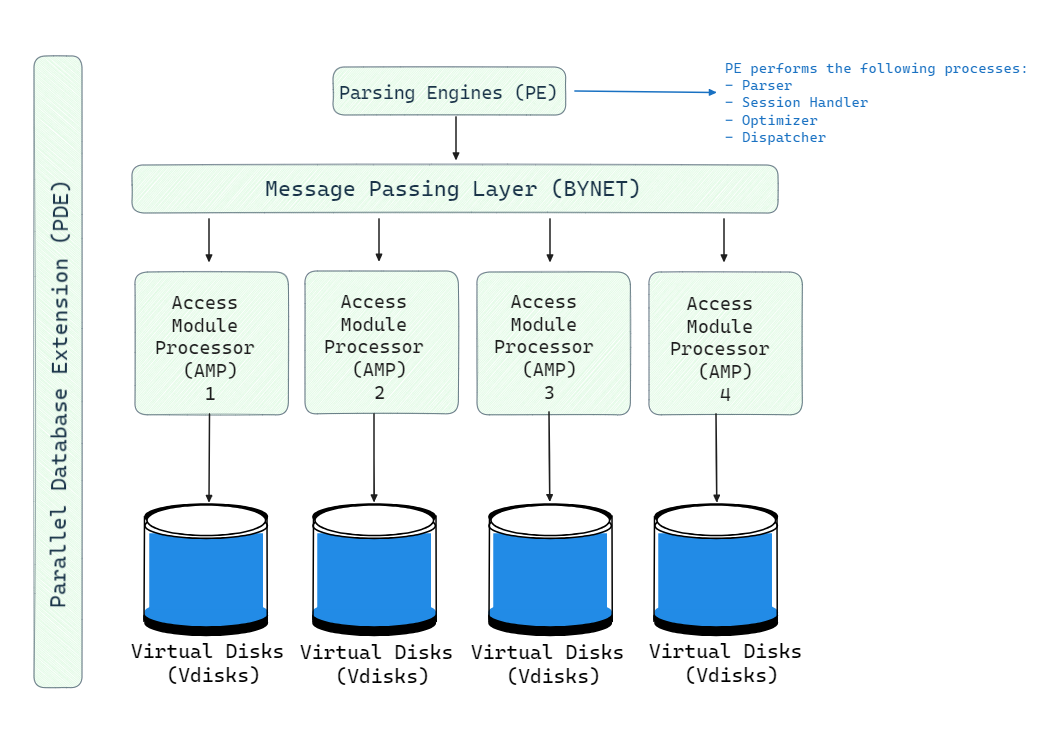
The basic building block of a Teradata system is a node. Each node is an individual server consisting of the following elements:
- CPU: The central processing unit provides the computing capability. Each node will have multiple powerful CPUs.
- Memory: Substantial RAM is provisioned for in-memory operations, caching and temporary storage.
- Storage: Disk storage is directly attached to each node for permanent storage of data.
- Network: An interconnect facilitates high-speed communication between nodes.
- Software: The Teradata database software and operating system is deployed on each node.
Multiple homogeneous nodes are interconnected to form a Teradata system. The number of nodes can scale into the hundreds to provide massive combined computing power and storage capacity.
Parsing Engine (PE), also known as a virtual processor (vproc), is a component in a Teradata system that handles communication with client applications and coordination of SQL processing. Each node has a Parsing Engine. The key responsibilities of the Parsing Engine are:
- Receive queries from client applications
- Parse and validate the SQL syntax
- Check user privileges and object access
- Generate an optimized execution plan
- Pass the execution plan to the BYNET for distributed execution
- Receive result rows and return to the client
The Parsing Engine processes the SQL and creates a plan for efficient execution by extracting parallelism in operations like scanning, filtering, aggregations and joins.
TL;DR:
Parsing Engine acts as a communicator between the client system and AMP via BYNET.
3) BYNET (message passing layer)
BYNET is Teradata’s internal interconnect. It routes messages between Parsing Engines and Access Module Processors (AMPs) for query execution and result collection. BYNET provides a high-speed, reliable channel for passing requests, execution plans, data rows and responses between nodes, enabling thousands of AMPs to coordinate in parallel.
4) Access Module Processors (AMPs)
Access Module Processors (AMPs) are the workhorses for data storage and processing in Teradata. There can be hundreds of AMPs across multiple nodes working together. AMPs perform the following key functions:
- Store row data across attached disk storage
- Receive execution plans from BYNET and extract operations
- Perform scans, filters, aggregations, sorting, joins and other data operations
- Send result rows back to BYNET for collection.
AMPs run in their own portion of memory and utilize available CPUs for data processing. BYNET distributes incoming queries to relevant AMPs holding the target tables and data involved. Each AMP has dedicated access to its attached storage for read and write operations.
Vdisks are the logical storage units owned by each AMP. They map to physical disk space and hold user data rows.
6) Parallel Database Extension (PDE)
Parallel Database Extension (PDE) provides a software layer that allows the operating system (Linux, MP-RAS or Windows) to interact with Teradata’s node architecture.
Teradata Storage: how it works
Teradata uses a shared-nothing storage architecture where the entire data is evenly divided into chunks and distributed across all the AMPs. When new data is added through INSERT statements, the Parsing Engine passes the rows to BYNET which allocates them evenly to AMPs.
A hashing algorithm assigns rows to AMPs to ensure uniform distribution. Each AMP stores its rows on its locally attached disks as data blocks. This architecture eliminates storage bottlenecks since large datasets can be divided and stored in parallel across hundreds of AMPs and disks.
During retrieval, BYNET routes incoming queries to the relevant AMPs that contain the target tables. The AMPs scan and process the data blocks in parallel and pipe back qualifying rows through BYNET to the Parsing Engine.
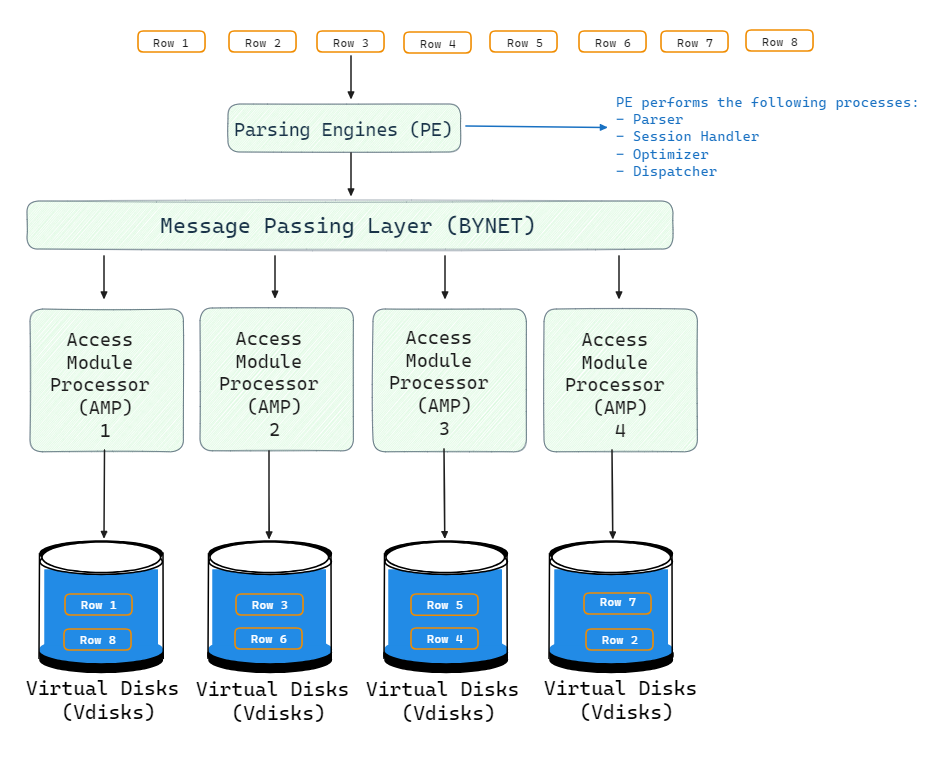
Teradata query processing: how it works
During query processing, BYNET and AMPs retrieve data in parallel:
- Client sends a query to the Parsing Engine
- PE generates a plan and passes it to BYNET
- BYNET routes requests to the relevant AMPs based on data location
- AMPs scan their local data in parallel and return qualifying rows
- BYNET transfers rows back to the PE
- PE performs any final aggregation and returns results to the client
All AMPs work concurrently on local data partitions. BYNET handles transferring rows between AMPs for additional processing like sorting, joining, aggregating, etc. The parallel architecture minimizes response times for even the most complex queries.
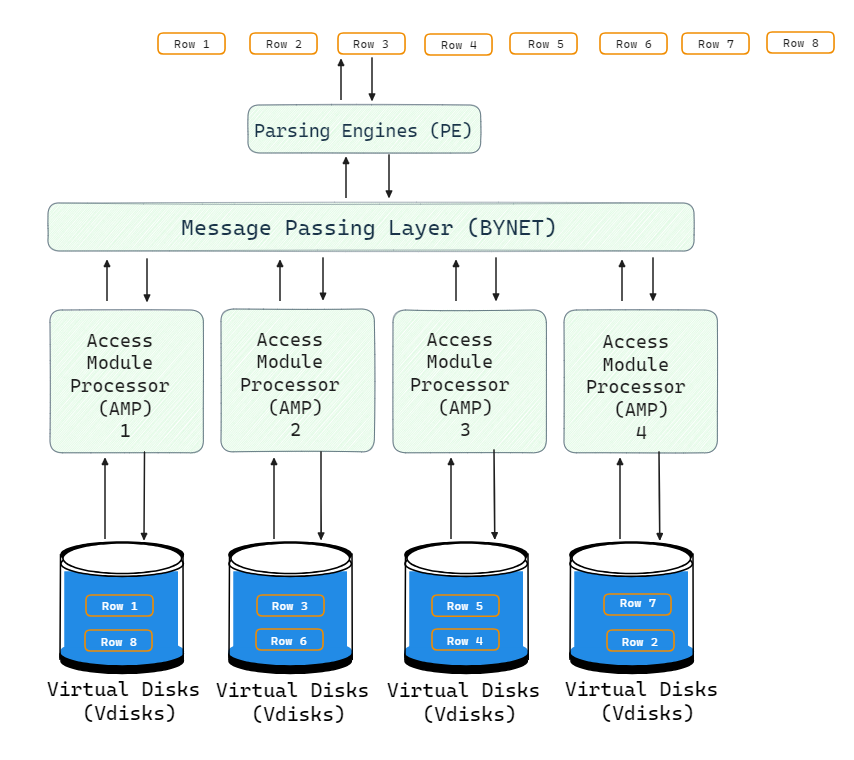
This powerful design can handle heavy workloads, massive data volumes and concurrency levels that would overwhelm traditional databases.
2) Teradata vs Snowflake—Performance and Scalability
When it comes to sheer query performance, both Snowflake and Teradata can provide extremely fast response times. But, they achieve high performance through different architectural approaches.
Snowflake performance model
One of the most revolutionary innovations from Snowflake is the total separation between storage and compute. Snowflake’s storage layer runs on low-cost object storage from major cloud providers like AWS, Azure and GCP. The storage is effectively infinite and decoupled from compute.
Snowflake then uses clusters of virtual warehouses to provide the compute power for running queries. These virtual warehouses can scale up and down instantly. More importantly, they scale independently from storage.
This means Snowflake can throw enormous parallel compute at a single query when needed. You can easily spin up a large virtual warehouse for a complex analytical job, then immediately suspend it when done. Because billing is per second with a 60-second minimum, idle compute doesn’t cost anything.
For workloads with unpredictable spikes or high concurrency, Snowflake’s multi-cluster warehouses automatically add cluster instances when queries start queuing, then scale back down when demand drops. That elasticity is genuinely difficult to match with fixed hardware.
Teradata performance model
Teradata, on the other hand, scales through adding more nodes to the system, each contributing additional CPU, memory and directly attached storage. Because AMPs process data locally and in parallel, Teradata can achieve strong performance on complex, multi-step analytical workloads that have been carefully tuned for the platform.
Teradata’s query optimizer has decades of refinement behind it. It handles complex join strategies, intelligent data partitioning, workload prioritization and index-aware execution in ways that reflect years of real-world enterprise use. For organizations running on Teradata today with stable, well-defined workloads, migrating to Snowflake won’t automatically deliver faster results.
The real constraint is capacity ceilings. Physical node count, interconnect bandwidth and disk I/O define the performance envelope in a way that cloud-native platforms aren’t subject to. Teradata’s VantageCloud addresses some of this on public cloud, but the architecture still reflects its on-premises roots.
That said, for new cloud projects, unpredictable workloads and workloads that need burst scaling, Snowflake is hard to beat. For existing enterprise data warehouses with complex, well-understood query patterns and significant Teradata investment already in place, the performance case for migrating isn’t always as clear as it looks.
3) Teradata vs Snowflake—Workload configuration and management
Large organizations almost always run a mix of workload types simultaneously: scheduled ETL jobs, interactive ad hoc queries, dashboards, machine learning pipelines and more. How each platform manages these competing demands is a real differentiator.
Snowflake workload management
Snowflake handles workload isolation through virtual warehouses. Each logical workload gets its own warehouse, sized and configured independently. Heavy batch jobs won’t compete for resources with a CFO running a dashboard query because they’re literally running on separate compute clusters.
Administrators can set resource monitors to control credit consumption, define query timeout limits and configure multi-cluster scaling policies. Snowflake also provides a Query History interface and Snowsight dashboards for monitoring performance and identifying bottlenecks.
The tradeoff is that each warehouse adds cost when running. Managing a sprawl of warehouses requires governance, and it’s possible to spin up underutilized clusters that quietly consume credits.
Teradata workload management
Teradata’s approach is different. Rather than isolating workloads into separate compute silos, all queries flow through a centralized, closed-loop workload manager that continuously balances the system as a whole.
Sophisticated scheduling algorithms prioritize queries based on business rules and service-level agreements (SLAs). Administrators define workload classifications (TASM rules) that group requests and allocate system resources accordingly. High-priority workloads get more AMPs assigned; low-priority ones get throttled to protect interactive users.
Teradata also provides tools like Viewpoint for real-time monitoring, Data Fabric for cross-system data integration and QueryGrid for federated query execution across heterogeneous data sources.
Here is the difference: Teradata actively optimizes total system throughput across all workloads simultaneously. It’s a tighter orchestration model that tends to work well in environments with predictable, recurring workload patterns and strict SLA requirements.
4) Teradata vs Snowflake—Ecosystem and integration
Teradata vs Snowflake: both of ‘em have extensive partnerships and integrations available.
Snowflake ecosystem
Snowflake connects to virtually every modern data tool. Native integrations and certified connectors cover BI tools (Tableau, Looker and Power BI ), transformation tools (dbt, Informatica, Talend), orchestration platforms (Airflow, Prefect), data ingestion tools (Fivetran, Airbyte), and cloud services across AWS, Azure and GCP.
Snowflake’s REST API and SDKs (Python, Java, .NET, Go, Node.js) allow programmatic access from virtually any language. The Snowflake Marketplace provides access to third-party data sets, connectors and pre-built applications, reducing integration work for common use cases.
The overall ecosystem is modern, API-first and cloud-native by design. Most new analytics tools prioritize Snowflake integration.
Teradata ecosystem
Teradata has been in the data warehousing business much longer than Snowflake and thus naturally has a more mature and larger ecosystem of partners that have supported users for decades. Teradata has over ~110+ ecosystems of partners that offer various integrations and solutions for users. Some notable categories of Teradata partners are:
Technology Alliance Partners
Like Snowflake, Teradata partners with AWS, Azure and GCP to offer users hybrid deployment flexibility. It has additional OEM partnerships with companies like IBM and more.
Consulting Partners
Large system integrators and Teradata services partners help users with the the implementation, support and managed cloud services on Teradata’s platform. Major partners include Accenture, Adastra, s.r.o., Algo, Cognizant, Capgemini etc.
Startups
Teradata actively seeks partnerships with innovative startups. Startups get access to Teradata expertise and users.
Independent Software Vendors
Teradata works with hundreds of ISV partners across marketing, IoT, healthcare, security and other domains. Key partners include Alation, ActionIQ, Alteryx, Astera Data—and so much more.
Academia Partners
Teradata Academic Alliance promotes research and innovation through university partnerships globally. It provides research grants and data platforms to educational institutions.
Check out the list of Teradata ecosystem partners.
Like Snowflake’s partner ecosystem, Teradata’s partners deliver consulting, technology and domain-focused solutions to help users maximize ROI from analytics. But key differences are that Teradata maintains tightly controlled OEM relationships with hardware vendors and a more proprietary approach compared to Snowflake’s open model.
5) Teradata vs Snowflake—Security and governance
Security and governance are essential aspects of any data platform, as they ensure the protection, quality and compliance of the data stored and accessed by various users and applications. Both Teradata and Snowflake provide robust features and capabilities to support data security and governance, but there are some differences in their approaches and offerings.
Snowflake security
Snowflake provides robust security capabilities to safeguard data and meet compliance requirements. Snowflake utilizes a multi-layered security architecture consisting of network security, access control and End-to-End encryption.
Network security
Admins can configure network policies to restrict access to authorized IP ranges or private cloud endpoints (AWS PrivateLink, Azure Private Link, Google Cloud Private Service Connect). This keeps data traffic off the public internet.
Snowflake’s access model is built on hierarchical roles. Admins create roles aligned to job functions and assign privileges (ownership, read, write) accordingly. More granular controls include row-level security via Secure Views, column-level masking policies, object-level privileges and multi-factor authentication. SAML and OAuth-based federated authentication support single sign-on (SSO) with identity providers.
Encryption
All data stored in Snowflake is encrypted at rest using AES-256 by default. Snowflake supports both platform-managed and customer-managed encryption keys (Customer Managed Keys / Tri-Secret Secure for Business Critical Edition). Built-in key rotation and re-keying are available. Data in transit is encrypted via TLS.
Snowflake Governance
Snowflake offers robust governance capabilities through features like column-level security, row-level access policies, object tagging, tag-based masking, data classification, object dependencies and access history. These built-in controls help secure sensitive data, track usage, simplify compliance and provide visibility into user activities.
Check out this article to learn more in-depth about implementing strong data governance with Snowflake.
Compliance certifications
Snowflake holds SOC 2 Type II, HIPAA (BAA available), PCI DSS Level 1, FedRAMP Moderate (for U.S. government deployments) and ISO 27001 certifications.
Teradata security
Over its 45+ year history, Teradata has built an extensive arsenal of enterprise-grade security and governance practices to protect data and provide visibility into its usage.
Network and encryption security
Teradata secures communications via encryption and firewalls. Database traffic can be encrypted with AES, 3DES, or RC4 symmetric algorithms. SSL/TLS connections prevent man-in-the-middle attacks.
To prevent network eavesdropping, Teradata can encrypt specific requests or entire sessions. Data at rest can also be encrypted using solutions like Protegrity Database Protector. Backup archives can be encrypted using tape drive or deduplication system encryption.
Teradata’s BYNET provides the secure interchange between different Terabyte nodes. BYNET handles authentication and access controls when transferring requests and data between nodes.
User authentication
Teradata supports multiple authentication methods: internal database authentication, LDAP integration with Active Directory, Kerberos for single sign-on, SAML and OAuth for SSO and Two-factor authentication/MFA for high-security environments.
Teradata’s access controls allow granular permissions so users only access data necessary for their role. For example:
- Multi-level security roles simplify assigning access privileges across groups of users. Roles can be nested for efficient administration.
- Row-level and column-level access controls restrict data visibility at very granular levels.
- Object privileges precisely control capabilities like SELECT or DELETE on specific database tables and views.
- Context-based rules can dynamically filter data based on session user, application, time, geo-location and other factors.
Leveraging these capabilities enables the enforcement of least privilege and separation of duties policies.
Auditing and monitoring
Teradata logs database activity including logins, logouts, SQL queries, privilege usage and account changes. QueryGrid and Viewpoint give administrators visibility into query activity across the system. Custom triggers can fire on specific data access or modification patterns. Periodic audits validate that access controls and log settings stay current.
Compliance support
Regulations like GDPR and HIPAA impose strict security and privacy standards that Teradata can help address:
- Data discovery, masking and right-to-be-forgotten features assist with GDPR compliance.
- Granular access controls, auditing help satisfy HIPAA data security mandates.
- Certifications like ISO 27001 and Common Criteria validate Teradata’s security posture.
Teradata also provides documentation, including security white papers and deployment guides, focusing on compliance needs.
Security ecosystem
Teradata integrates with leading security solutions to enable end-to-end protection:
- SIEM integration sends Teradata alerts to security analytics platforms.
- Tools like Imperva, Protegrity and Thales provide data encryption, masking and tokenization.
- Micro Focus solutions enable access controls, user provisioning and privileged access management.
These partnerships expand Teradata’s security capabilities across the extended technology stack.
Check out all the list of Teradata security ecosystem partners
Teradata offers guidance and best practices on the organizational aspects of data protection. Check out this teradata white paper for an in-depth understanding of Teradata’s security and governance features.
6) Teradata vs Snowflake—Supported programming languages
Whenever you are working with large-scale data platforms, it is important for data professionals to leverage familiar languages for various automation and analytics tasks. Both Snowflake and Teradata understand this need and support a wide variety of programming languages out of the box. Now, in this section, we will explore the different languages supported by each of these platforms.
Snowflake programming language support
Snowflake is built around SQL as the primary interface but extends it significantly.
ANSI SQL: Snowflake is largely ANSI SQL compliant with Snowflake-specific extensions for semi-structured data, time-series operations, array processing and CREATE TABLE AS SELECT (CTAS). SnowSQL (the command-line client) and the Snowsight web interface both support SQL natively.
User-Defined Functions (UDFs) and stored procedures: Snowflake supports UDFs and stored procedures in JavaScript, Python, Java, Scala and SQL. Python UDFs can use popular data science libraries within Snowflake’s secure execution environment.
Snowpark: Snowflake’s Snowpark SDK brings Python, Java, Scala and .NET development directly to Snowflake’s processing layer. Rather than pulling data into a local environment, developers push computation to where the data lives. Snowpark also supports the deployment and invocation of ML models within Snowflake.
REST API: Snowflake’s REST API accepts HTTP requests for warehouse operations from any client, supporting languages like Go, Node.js, PHP and others that don’t have a dedicated native SDK.
Teradata programming language support
Teradata supports a broad range of languages for both in-database analytics and external connectivity.
Core languages: C/C++, Java, Python, Go and R for stored procedures, UDFs and external analytics routines
Legacy languages: COBOL, Fortran, Perl and Ruby, which remain in active use at large enterprises running long-standing Teradata workloads
SQL: ANSI SQL compliant with support for SQL stored procedures containing control-flow logic
Data formats: JSON and XML data types supported natively
External connectors: Teradata provides drivers and connectors for Python (teradataml), R, Matlab, SAS, TensorFlow and PyTorch, letting data scientists access Teradata data from external tools without complex ETL pipelines
7) Teradata vs Snowflake—Indexing
Indexes are one of the oldest performance tuning mechanisms in relational databases. They let the engine locate relevant rows without scanning an entire table. Teradata and Snowflake take polar opposite approaches to this problem.
Snowflake indexing
Snowflake doesn’t use traditional indexes. Instead, it relies on micro-partitions, clustering keys and automatic partition pruning to deliver fast query performance.
Micro-partitions: Snowflake stores all table data in small, immutable micro-partitions, each containing 50 MB to 500 MB of uncompressed data in a columnar format. Each micro-partition stores rich metadata about its contents, including min/max values, null counts and distinct value counts for every column.
Partition pruning: When a query runs, Snowflake’s query optimizer uses the predicate conditions and micro-partition metadata to eliminate partitions that can’t possibly contain relevant rows. For highly selective queries on well-clustered data, this can reduce the amount of data scanned by orders of magnitude.
Clustering keys: For tables that aren’t naturally sorted in a useful order, you can define a clustering key to logically reorganize rows so that related data ends up in the same micro-partitions. Snowflake’s Automatic Clustering service maintains the clustering continuously in the background as new data arrives.
When you combine micro-partitions, intelligent pruning, optional clustering and scale-out compute, Snowflake handles most analytical workloads without needing traditional indexes.
Teradata indexing
Teradata uses a full-featured indexing system that gives database administrators direct control over data distribution and access paths.
a) Primary indexes: Every Teradata table must have a primary index. Teradata uses the primary index to hash rows and distribute them across AMPs. Choosing the right primary index is one of the most impactful design decisions in a Teradata deployment. Primary indexes cannot be changed after table creation without rebuilding the table.
- Unique Primary Index (UPI): Guarantees unique values for the indexed column(s). Each AMP receives roughly the same number of rows, maximizing parallel execution
- Non-Unique Primary Index (NUPI): Allows duplicate values. More flexible but can create data skew if a low-cardinality column is chosen
b) Secondary indexes: Secondary indexes improve access performance for queries that filter on columns other than the primary index. Unlike primary indexes, secondary indexes can be created or dropped after table creation.
- Unique Secondary Index (USI): Requires unique values. Teradata stores a separate subtable mapping USI values to primary index row locations
- Non-Unique Secondary Index (NUSI): Allows duplicates. Useful for range queries and join optimization on non-primary columns
c) Join indexes: Join indexes store the results of predefined join operations in a separate physical structure. When the Parsing Engine determines that a query matches the join index pattern, it can read directly from the join index rather than executing the full join from base tables. Teradata’s Parsing Engine decides autonomously whether to use a join index; defining one doesn’t guarantee its use. Types include:
- Single Table Join Index(STJI)
- Multi Table Join Index(MTJI)
- Aggregate Join Index
- Sparse Join Index
d) Hash indexes: Hash indexes distribute rows across partitions using a hash function, similar to primary index distribution. They’re designed to improve performance for queries with exact-match predicates on specific column combinations, effectively working like a Single Table Join Index with a different access path.
Bonus: Teradata vs Snowflake pricing
Finally, Teradata and Snowflake distinctly vary in their pricing models. In this part, we will dive into the depth of “Teradata vs Snowflake” pricing to help you in making well-informed and cost-effective decisions for your data platform investment.
Snowflake pricing breakdown
Snowflake uses a consumption-based model. You pay separately for storage and compute, with no upfront infrastructure costs. Billing is per second for compute (with a 60-second minimum per warehouse start) and per TB per month for storage.
Storage costs
Snowflake stores your data in compressed columnar format, so actual stored size is typically 3 to 5 times smaller than the raw input size. You pay based on the compressed size.
Two pricing structures exist:
- On-Demand: Pay as you go, no commitment. On AWS US East (N. Virginia), on-demand storage runs approximately $40 per TB per month. Rates vary by cloud provider and region; EU and Asia Pacific regions are generally higher
- Capacity (pre-purchase): Commit to storage upfront and receive a lower rate. Capacity pricing runs approximately $23 per TB per month for AWS US East, with higher commitment tiers unlocking further discounts
Compute costs
Snowflake’s compute is organized around virtual warehouses. You choose a size when creating a warehouse, and each size tier roughly doubles the compute resources and credit consumption.
| Warehouse size | Credits per hour |
| X-Small | 1 |
| Small | 2 |
| Medium | 4 |
| Large | 8 |
| X-Large | 16 |
| 2X-Large | 32 |
| 3X-Large | 64 |
| 4X-Large | 128 |
| 5X-Large | 256 |
| 6X-Large | 512 |
Credit prices depend on your Snowflake edition: approximately $2 per credit for Standard, $3 for Enterprise, $4 for Business Critical, with custom pricing for Virtual Private Snowflake (VPS). These are on-demand rates; capacity contracts reduce costs by roughly 20 to 30%.
Warehouses auto-suspend when idle (configurable) and auto-resume on the next query. When not running, they consume no credits. This makes Snowflake very cost-efficient for bursty, intermittent workloads but surprisingly expensive for continuously active ones.
Cloud services
Snowflake’s cloud services layer (authentication, metadata management, query compilation) is included for free up to 10% of your daily compute credit consumption. Usage above that threshold is billed as additional compute credits.
Data transfer
Ingress into Snowflake is free. Data transfer within the same region and cloud provider is also free. Cross-region or cross-cloud data transfers incur charges that vary by cloud provider and region.
Snowflake editions
Snowflake offers four editions with progressively more features:
- Standard: Core data warehousing, 1-day Time Travel, basic security
- Enterprise: Multi-cluster auto-scaling, up to 90-day Time Travel, column-level security, materialized views
- Business Critical: Enhanced security with HIPAA BAA, PCI DSS compliance support, customer-managed keys
- Virtual Private Snowflake (VPS): Dedicated cloud infrastructure for maximum isolation
Learn more in-depth about Snowflake pricing.
Teradata pricing breakdown
Teradata uses unit-based pricing for its VantageCloud offerings. Units measure the resources consumed by workloads. Pricing varies by cloud provider, region and commitment term.
Teradata offers both committed (annual or three-year) and consumption-based models.
VantageCloud Lake
Designed for organizations that want cloud-native analytics on object storage, VantageCloud Lake is Teradata’s more accessible cloud entry point.
- VantageCloud Lake Standard: Starts at approximately $4.80 per compute hour. This newer, lower-cost tier targets organizations earlier in their analytics modernization journey
- VantageCloud Lake: Approximately $6.00 per compute hour (three-year commitment, billed annually). Translates to roughly $4,300 to $4,800 per month for a continuously running system, depending on configuration
- VantageCloud Lake+: Approximately $7.20 per compute hour, adding Priority Service support, industry data models and Direct Quick Start Support
All Lake tiers include the Teradata Engine, ClearScape Analytics, ecosystem tools, governance and observability features, and Premier Cloud Support. Storage and data transfer are billed separately.
VantageCloud Enterprise
For organizations running enterprise-grade analytics workloads requiring high performance and reliability:
- VantageCloud Enterprise: Starting from approximately $9,000 per month (one-year commitment)
- VantageCloud Enterprise+: Starting from approximately $10,500 per month, adding Priority Service, industry data models and Direct Quick Start Support
Both Enterprise tiers include ClearScape Analytics, ecosystem tools and Advanced Services.
Consumption pricing
For variable or unpredictable workloads, Teradata offers consumption pricing with a low monthly minimum. This works for both Lake and Enterprise packages and includes the same features as the commitment-based tiers.
Committed units must be used within each 12-month term. Unused units don’t roll over.
You can use Teradata’s online pricing calculator to estimate costs based on your workload profile, or contact Teradata directly for a customized quote.
Teradata vs Snowflake: pros and cons
Choosing the right platform is extremely crucial if you are looking to manage and analyze their data effectively. In this section, we will explore the pros and cons of Teradata vs Snowflake to help you make the right decision.
Snowflake pros and cons
Here are the main Snowflake pros and cons:
| Snowflake pros | Snowflake cons |
| Near-instant elasticity: scale compute up or down in seconds without downtime | Learning curve: advanced features like clustering keys, resource monitors and cost governance take time to master |
| Cloud-native architecture: runs natively on AWS, Azure and GCP with no infrastructure management | Cloud-only: no on-premises option, which is a blocker for some regulated environments |
| True compute and storage separation: pay only for the compute you actually run | Consumption costs can surprise: a warehouse left running or a poorly tuned query can spike your bill significantly |
| Strong governance and compliance: SOC 2 Type II, HIPAA, PCI DSS, FedRAMP, ISO 27001 | Data egress fees: moving data out of Snowflake (cross-region or cross-cloud) incurs charges |
| Native support for structured and semi-structured data (JSON, Parquet, Avro, etc.) without preprocessing | Vendor dependency: you’re running on a cloud provider’s infrastructure, and Snowflake’s pricing changes over time |
| Broad ecosystem: connects to virtually every modern analytics, BI and data engineering tool | |
| Cortex AI: built-in LLM functions, vector search and ML capabilities without leaving the platform |
Teradata pros and cons: why migrate from Snowflake to Teradata?
Now, let’s review some of the key considerations for and against migrating from Snowflake back to Teradata:
| Teradata pros | Teradata cons |
| Mature, proven platform: 47 years of optimization for the most demanding enterprise analytics workloads | High total cost of ownership: on-premises systems carry significant hardware, licensing and operational costs |
| Advanced workload management: centralized TASM orchestration handles complex, mixed-workload environments effectively | On-premises scaling limits: physical hardware defines the performance ceiling in ways cloud-native platforms don’t face |
| Deep security: AES-256 encryption, FIPS 140-2 certification, comprehensive auditing and fine-grained access controls | Steep learning curve: Teradata’s feature depth requires significant ramp-up time, particularly for workload management and index strategy |
| ClearScape Analytics: in-database ML model training, scoring and deployment without moving data | Migration complexity: large Teradata estates often have decades of SQL, ETL and business logic tied to platform-specific features |
| On-premises control: for organizations with strict data residency or regulatory requirements that prohibit public cloud | Cloud offerings still maturing: VantageCloud has improved significantly but doesn’t yet match the operational simplicity of cloud-native competitors |
| Hybrid deployment: run the same platform on-premises, in VantageCloud or in hybrid configurations | |
| Broad language support: Python, Java, R, C/C++, COBOL, Perl and more for in-database analytics |
Save up to 30% on your Snowflake spend in a few minutes!
Conclusion
And that’s a wrap! Teradata and Snowflake both of them hold strong positions in enterprise data warehousing, but they’re increasingly optimized for different scenarios.
Snowflake is the right call for new cloud initiatives, variable or unpredictable workloads, organizations that want zero infrastructure management and teams that need fast, modern integrations with the rest of the analytics ecosystem. Its elastic architecture, broad ecosystem and built-in Cortex AI capabilities make it the more forward-looking platform for most greenfield projects.
Teradata still wins where it matters most to large enterprises: extremely complex, mixed analytical workloads with strict SLAs, environments with long-standing investments in Teradata SQL and tooling, and use cases requiring the most advanced workload orchestration. VantageCloud Lake has made Teradata meaningfully more accessible on public cloud, and ClearScape Analytics keeps it competitive in the in-database ML space.
In this article, we covered:
- What is Teradata?
- What is Snowflake?
- Architecture breakdown
- Performance and scalability
- Workload configuration and management
- Ecosystem and integration
- Security and governance
- Supported programming languages
- Indexing
- Pricing models
- Pros and cons for each platform
…and so much more!
FAQs
What is Teradata?
Teradata is an enterprise data warehousing solution providing high-performance analytics on an MPP system. It’s been a leader in data warehousing for over 47 years and now offers both on-premises and cloud (VantageCloud) deployment options.
What is Snowflake?
Snowflake is a cloud-native data warehouse that runs on public cloud infrastructure (AWS, Azure, GCP). It separates storage and compute into independent layers, allowing each to scale on demand.
How do the architectures differ – Teradata vs Snowflake?
Teradata uses an MPP architecture where storage and compute are co-located at the node level, with BYNET connecting nodes and AMPs handling data. Snowflake separates storage (cloud object store), compute (virtual warehouses) and services (cloud services layer) into three independent tiers.
Which platform scales better – Teradata vs Snowflake?
Snowflake scales compute and storage independently and near-instantly on cloud infrastructure. Teradata scales by adding nodes but has more finite upper limits, particularly on-premises.
Which platform scales better – Teradata vs Snowflake?
Snowflake scales compute and storage independently and near-instantly on cloud infrastructure. Teradata scales by adding nodes but has more finite upper limits, particularly on-premises.
Does Teradata offer cloud deployment?
Yes. Teradata’s VantageCloud (Lake and Enterprise editions) runs on AWS, Azure and GCP. It also supports hybrid architectures combining on-premises and cloud.
Which has better security – Teradata vs Snowflake?
Both are robust. Snowflake excels in cloud-native security automation and modern compliance certifications (SOC 2, FedRAMP, ISO 27001). Teradata’s strength is its fine-grained, enterprise-grade access control, FIPS 140-2 certification and decades of hardening for regulated industries.
What languages work with Snowflake?
Snowflake supports SQL, JavaScript, Python, Java and Scala for UDFs and stored procedures. Snowpark extends Python, Java, Scala and .NET to in-database processing. REST API and connectors cover Go, Node.js, PHP and others.
What languages work with Teradata?
Teradata supports SQL, Python, Java, C/C++, R, Go, COBOL, Fortran and Perl. External connectors support SAS, MATLAB, TensorFlow and PyTorch for data science workflows.
How does query performance compare – Teradata vs Snowflake?
Both deliver fast query performance through different mechanisms. Snowflake leverages elastic scale-out compute. Teradata relies on deeply optimized workload management, intelligent indexing and decades of query optimizer refinement.
What compliance certifications do they hold – Teradata vs Snowflake?
Snowflake: SOC 2 Type II, HIPAA, PCI DSS Level 1, FedRAMP Moderate, ISO 27001. Teradata: HIPAA, PCI DSS, FedRAMP, ISO 27001, FIPS 140-2 (TDGSS and Gateway).
How does indexing work in each platform – Teradata vs Snowflake?
Snowflake doesn’t use traditional indexes. It uses micro-partitions (50 to 500 MB of uncompressed columnar data), automatic partition pruning and optional clustering keys. Teradata uses a full indexing system: primary indexes for data distribution, secondary indexes for access optimization, join indexes for common join patterns and hash indexes for exact-match lookup.
What pricing models do they offer – Teradata vs Snowflake?
Snowflake: consumption-based, with separate per-second compute billing (credits) and per-TB storage billing. No upfront commitment required, though capacity contracts reduce rates significantly. Teradata: unit-based, with both committed (annual or three-year) and consumption models. VantageCloud Lake starts at approximately $4.80/hour. VantageCloud Enterprise starts at approximately $9,000/month.
Does Snowflake require upfront commitments?
No. Snowflake’s on-demand model has no upfront requirements. Capacity contracts are optional and provide discounted rates.
Can Teradata be deployed on-premises?
Yes. Teradata continues to support on-premises deployments via IntelliFlex and IntelliBase appliances.
Which has the larger partner ecosystem – Teradata vs Snowflake?
Teradata has a deeper ecosystem for legacy enterprise integrations, with over 110 partner organizations. Snowflake’s ecosystem is newer but grows faster and covers virtually every modern cloud-native analytics tool.
Is Snowflake serverless?
Not entirely. Snowflake provisions and manages compute clusters, but users don’t manage the underlying servers. Certain features (Snowpipe, Automatic Clustering, Materialized View maintenance) are fully serverless in the traditional sense.
Can Teradata query cloud object storage like S3?
Yes. Teradata VantageCloud supports native object store access, letting users query data in S3, Azure Blob Storage and Google Cloud Storage directly, using foreign tables or NativeObjectStore access.
When is Teradata the better choice?
For organizations with large existing Teradata estates and complex workloads requiring advanced orchestration; high-security, regulated environments; or hybrid deployments where on-premises and cloud need to work together seamlessly.
When is Snowflake the better choice?
For new cloud initiatives, modern data stack builds, variable workloads that benefit from elastic scaling, and teams that need easy integrations with a wide range of cloud-native tools and data sources.
What’s the difference between Snowflake’s Standard and Enterprise editions?
Enterprise Edition adds multi-cluster auto-scaling, Time Travel up to 90 days (Standard is limited to 1 day), column-level security and materialized views, among other features. Business Critical and Virtual Private Snowflake editions add further compliance and isolation capabilities.
Does Teradata support in-database machine learning?
Yes. Teradata’s ClearScape Analytics provides in-database ML functions for model training, scoring and deployment. It supports Python-based analytics via the teradataml library and integrates with open-source frameworks like scikit-learn and XGBoost.
Pramit Marattha
Pramit Marattha is a technical content writer and strategist with 5+ years of experience covering AI, data engineering, data cloud platforms and open source technologies. He turns complex technical concepts into clear, useful content for engineers and developers.







