


Snowflake’s BUILD 2025 conference rolled out tons of new features and capabilities. From new connectors to AI-powered tools, here’s a quick breakdown of everything that was announced.
In this article, we’ll go over all the new features, highlighting what’s fresh and why it’s relevant. So, let’s jump right in and see what Snowflake unveiled at Snowflake BUILD 2025.
TL;DR:
If you’d like a quick summary, here is an overview of what was released.
| Category | Feature | Status | Short note |
|---|---|---|---|
| AI & ML | Snowflake Intelligence | GA | Natural-language chat for querying data and generating SQL. |
| AI & ML | Managed MCP Server | GA | Standard bridge for external AI systems to query Snowflake. |
| AI & ML | Cortex Agents API | GA | Build reusable AI agents that query Snowflake data. |
| AI & ML | Experiment Tracking | GA | Track ML experiments and metadata in Snowflake. |
| AI & ML | One-click Hugging Face deployment | Public preview | Fast deploy of HF models into Snowflake inference paths. |
| AI & ML | AISQL | GA | Native SQL functions for LLM-based transforms and inference. |
| AI & ML | AI_Redact, AI_Token_Count | Public preview | PII redaction and token-counting SQL functions. |
| AI & ML | Feature-level RBAC, Model-level RBAC | Public preview | Fine-grained access controls for features and models. |
| AI & ML | Cost guardrail features | GA soon | Budget and cost controls for AI workloads. |
| AI & ML | Cortex Code | Private preview | In-UI AI assistant for code explanation and optimization. |
| Apps & Analytics | Interactive Tables & Warehouses | GA soon | Low-latency table type and warm warehouses for fast queries. |
| Apps & Analytics | Data Type Updates | GA | New or improved data type support across Snowflake. |
| Apps & Analytics | Cortex Knowledge Extensions | GA | Index external docs and knowledge for agents to query. |
| Apps & Analytics | Sharing of Semantic Views | GA | Share business-metric views as first-class shared objects. |
| Apps & Analytics | Open table format sharing | GA | Share Iceberg/Delta tables via Snowflake sharing without copying. |
| Apps & Analytics | Declarative sharing | GA | Simplified, policy-driven sharing primitives. |
| Apps & Analytics | Snowflake Optima | GA | Automatic workload-driven optimizations (hidden indexes, tuning). |
| Data Engineering | Openflow (SPCS) | GA | Managed, NiFi-like pipeline service for connectors and streaming. |
| Data Engineering | Snowpipe Streaming (high-performance architecture) | GA | Enhanced streaming ingest for low-latency data. |
| Data Engineering | SAP Connector | Public preview soon | Zero-copy integration with SAP Business Data Cloud. |
| Data Engineering | Oracle Connector | Public preview soon | Native connector for Oracle systems (preview). |
| Data Engineering | Workday Connector | Partnership announced | Connector partnership to bring Workday data into Snowflake. |
| Data Engineering | Hybrid Tables (Azure) | GA | Tables that support transactional updates and analytics. |
| Data Engineering | Horizon Catalog (write to Iceberg) | GA | Write Snowflake-managed data into Iceberg tables. |
| Data Engineering | Catalog-linked databases | GA | Link external catalogs and treat them like Snowflake DBs. |
| Data Engineering | BCDR for managed Iceberg tables | GA | Backup and replication support for managed Iceberg tables. |
| Data Engineering | Snowflake Postgres | Public/private preview | Managed PostgreSQL inside Snowflake for OLTP apps. |
| Data Engineering | pg_lake | GA | Postgres extension to manage Iceberg catalog and metadata. |
| Data Engineering | Data Quality updates | Public preview | UI and tooling to score and surface data quality. |
| Data Engineering | Trust Center updates & Backups | GA soon | Expanded compliance, backups and trust tooling. |
| Data Engineering | External Lineage | Public preview | Lineage capture for assets outside core Snowflake objects. |
| Dev Experience | dbt Projects on Snowflake | GA | Run and store dbt projects natively inside Snowflake. |
| Dev Experience | Snowpark Connect for Apache Spark | GA | Run Spark code with Snowflake as the execution engine. |
| Dev Experience | Dynamic Tables | GA | Serverless, incremental materialization for streaming ETL. |
| Dev Experience | SnowConvert: AI code verification & repair | Public preview | Automated code checks and repair suggestions for migrations. |
| Dev Experience | SnowConvert: Automated & incremental validation | GA | Continuous validation for ETL and BI migrations. |
| Dev Experience | Full ecosystem migration (ETL & BI) | Public preview | Tools to migrate ETL and BI assets into Snowflake. |
| Dev Experience | Workspaces | GA | In-UI file-based developer workspace with folders and files. |
| Dev Experience | Git Integration | GA | Native Git workflows and CI/CD integrations from Snowsight. |
| Dev Experience | SnowCLI | GA | Command-line tooling for Snowflake management and dev tasks. |
| Dev Experience | VS Code integrations | GA | Editor integrations for Snowflake development workflows. |
🔮 AI and Machine Learning enhancements
Snowflake BUILD 2025 pushed hard on AI and ML tooling. They’ve been talking about this for a while, but this year a bunch of it finally hit GA.
👉 Snowflake Intelligence (Chat Interface GA):
The long-anticipated Snowflake Intelligence is now generally available. You can ask questions in simple plain English (or natural-language commands), and Snowflake will answer with SQL and charts. It uses LLM-powered agents under the hood to parse queries and fetch results.
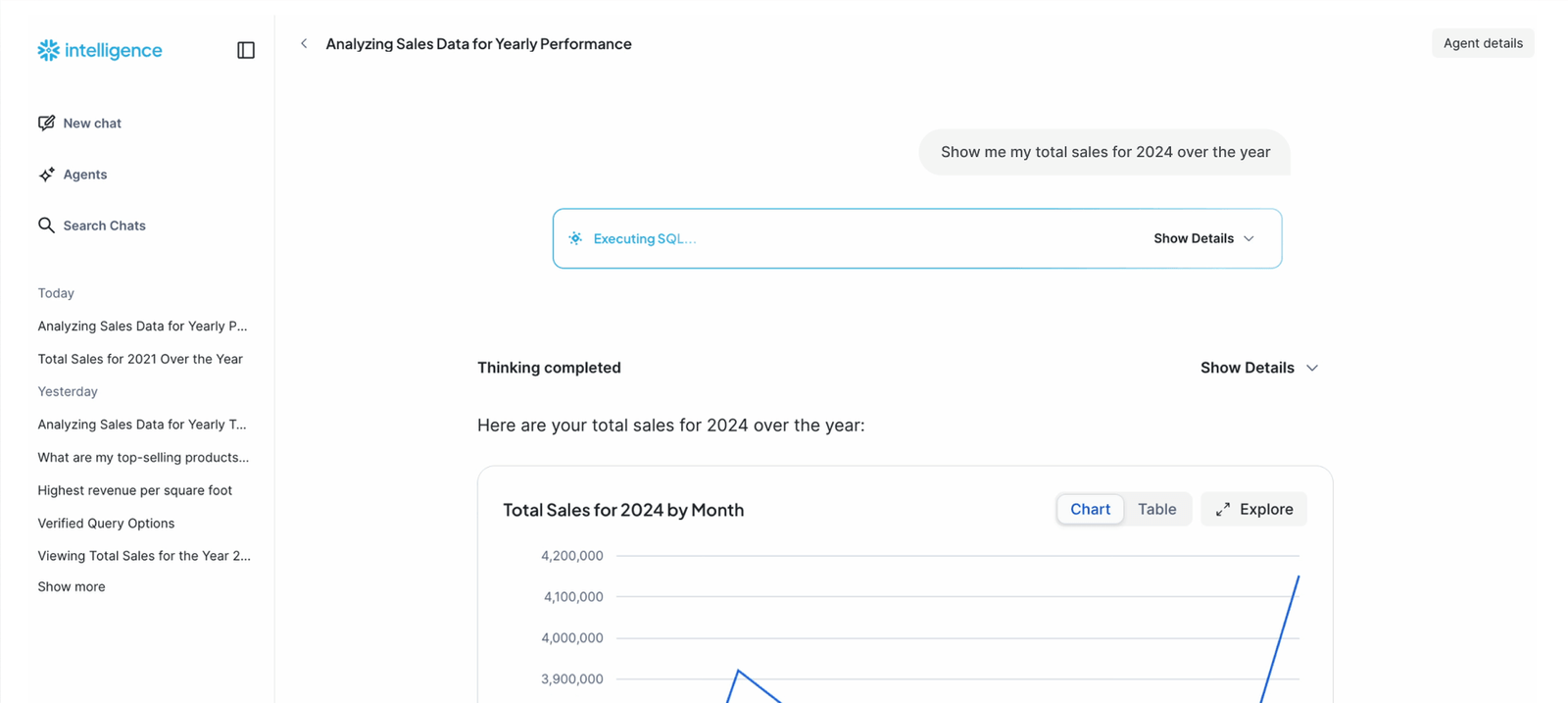
Snowflake Intelligence – Snowflake BUILD 2025
👉 Cortex Code (AI Assistant, preview)
Snowflake introduced Cortex Code (private preview) – an AI coding assistant built right into Snowsight. You can ask Cortex Code to explain your Snowflake resources, optimize a complex query, or tweak filters simply by describing the task in natural language.
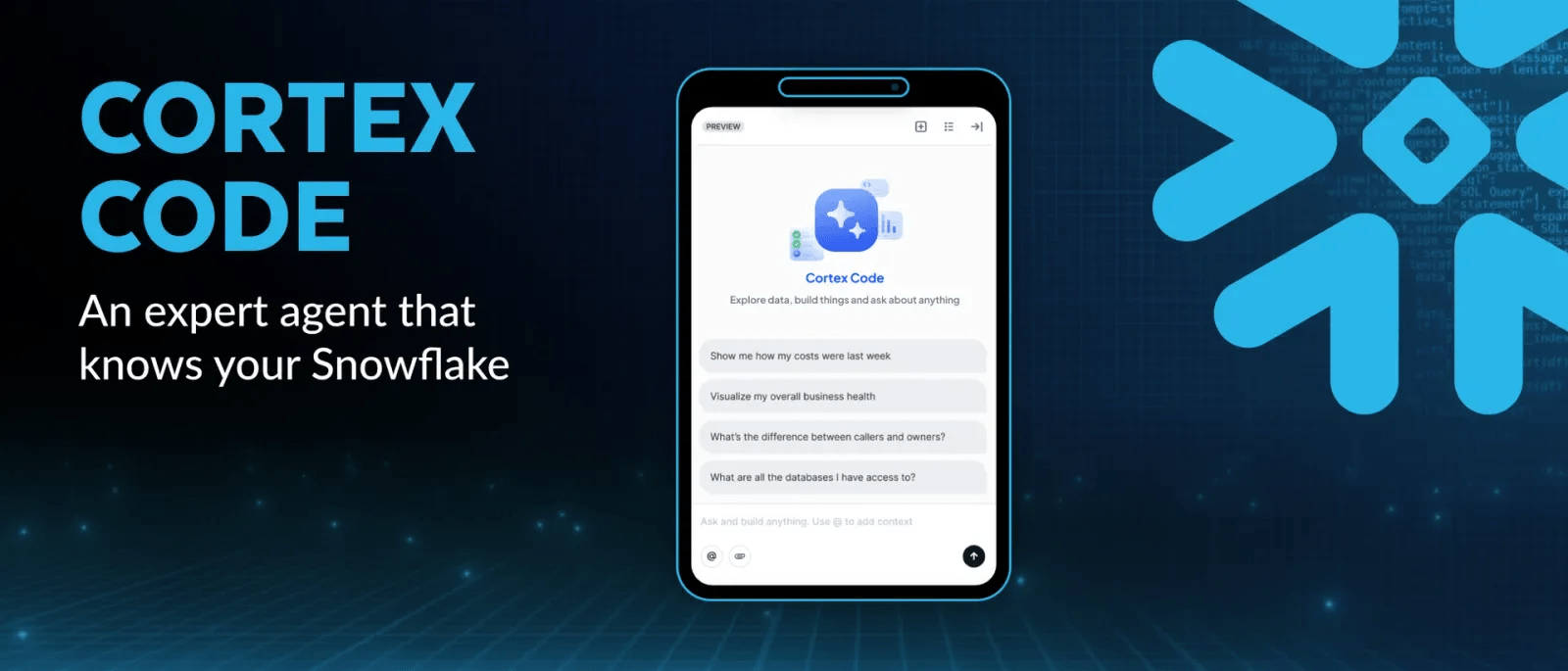
Snowflake Cortex Code – Snowflake BUILD 2025
👉 Cortex Agents API and Knowledge Extensions (GA)
Behind Snowflake Intelligence are new services called Cortex. The Cortex Agents API (GA) exposes Snowflake data and logic as reusable AI agents. These agents can retrieve structured or unstructured data and reason over it, returning insights via a REST API. Likewise, Cortex Knowledge Extensions (GA) let Snowflake host external knowledge bases (like news or documentation) securely. Agents can then query that indexed content alongside your data. In short, Snowflake now provides AI toolkits that blend your data and third-party content under unified security.
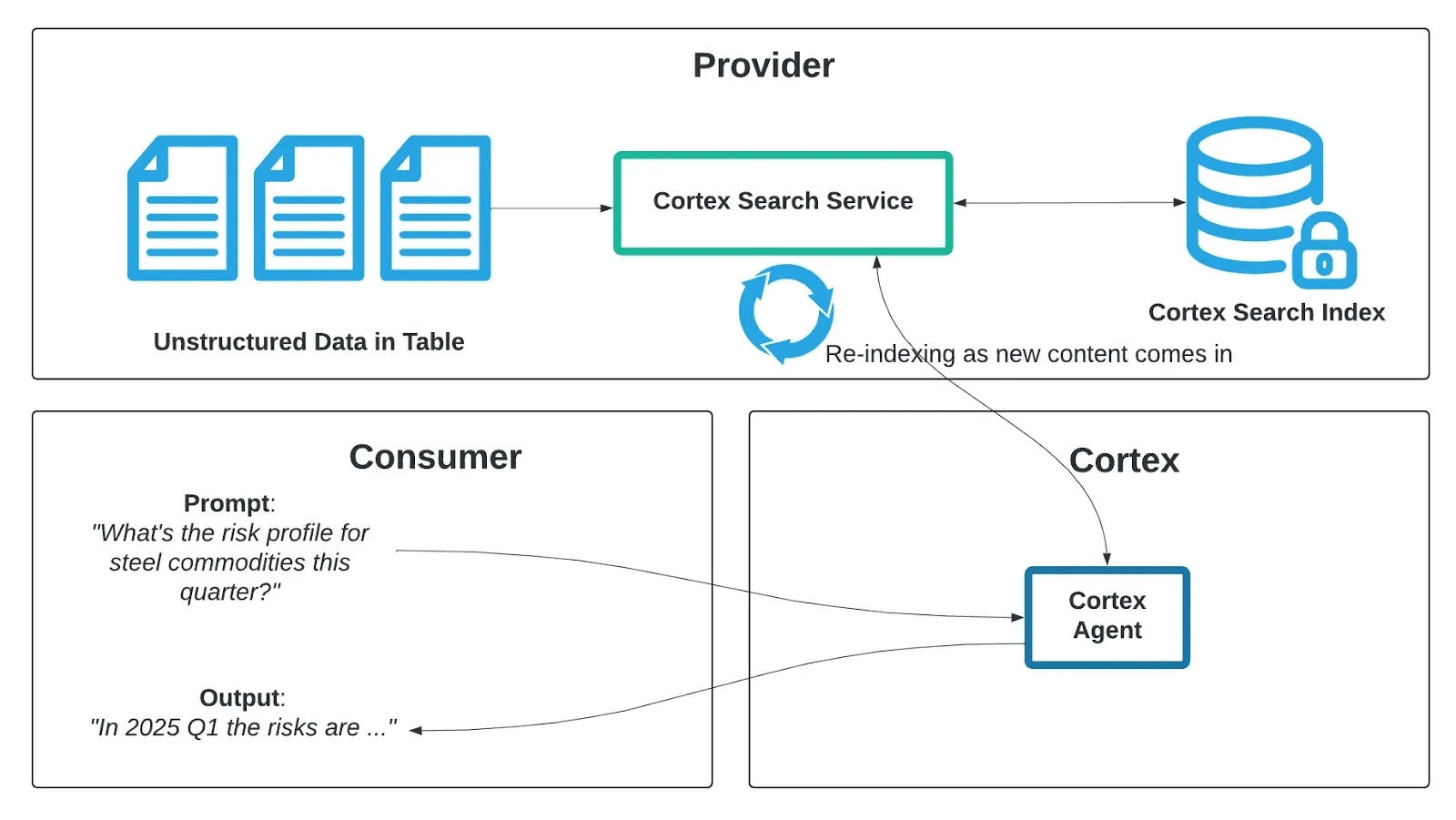
Snowflake Cortex Agents API and Knowledge Extensions – Snowflake BUILD 2025
👉 Managed MCP Server (GA)
Snowflake’s Managed Model Context Protocol (MCP) Server is now GA. MCP is an open standard that lets external AI systems (like ChatGPT, Claude, etc.) query your data through Snowflake’s own “sub-agent”. In practice, you spin up a Snowflake MCP server and point your favorite AI at it. Then that AI can execute governed Snowflake SQL or fetch data seamlessly. Now you don’t have to write custom data connectors to let a chatbot or agent use Snowflake data; MCP bridge handles it securely.
👉 AISQL enhancements (GA & preview)
Snowflake added features to Cortex AISQL. AISQL is now GA, so you can define AI inference pipelines with declarative SQL (using Snowflake Dynamic Tables). For example, you can select from data and apply LLM transforms on the fly. A new preview function AI_REDACT lets you scan text (or documents) for PII and automatically mask names, addresses, etc.. There’s also AI_TRANSCRIBE for audio/video transcription. In addition, Snowflake provides AI_CLASSIFY, AI_EMBED, AI_SIMILARITY functions to categorize or vectorize text/images. In short, Snowflake’s SQL now natively includes LLM-based functions so you can prep and score data for AI without exiting SQL. Altogether, the AISQL suite continues to grow, backed by Cortex AI.
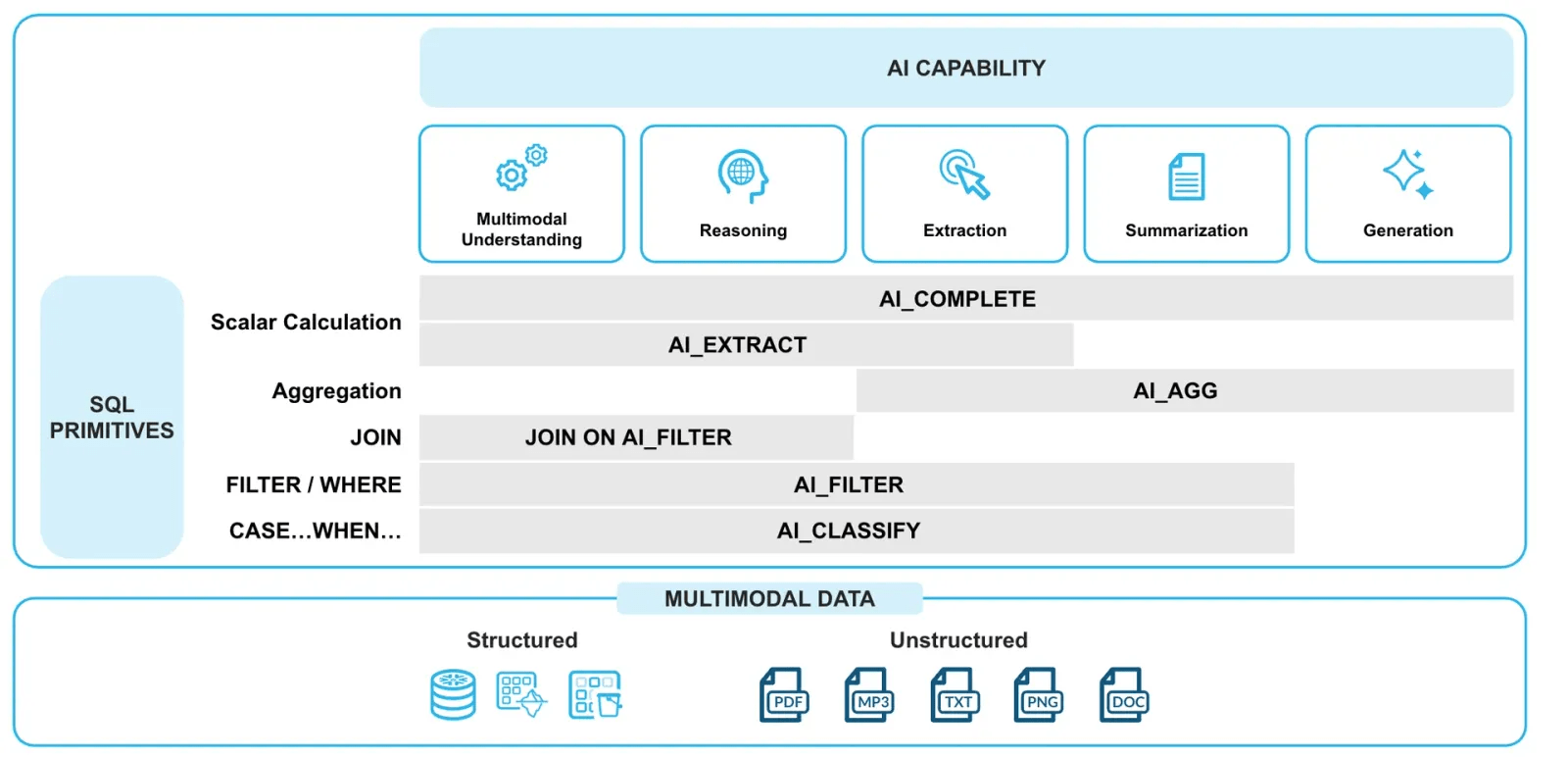
Snowflake Cortex AISQL – Snowflake BUILD 2025
👉 Data Quality & Code Security
Building trust into AI pipelines got attention too. Snowflake launched a Data Quality UI (public preview). It automatically scores your tables for accuracy and consistency, generating a summary so developers can see at a glance if the data is healthy. On the security side, Code Security features (GA) enforce new controls around developer code. For instance, Snowflake can now lock down who can edit or execute model code, preventing accidental data poisoning. These moves underline that Snowflake isn’t just AI-friendly; it wants your data to be correct and safe while doing it.
👉 Snowflake + Vercel
Finally, Snowflake announced a new partnership with Vercel’s v0 AI framework. Vercel v0 is a tool for building Next.js apps with AI; the integration (announced at Snowflake BUILD) lets you connect Vercel v0 to Snowflake. You can ask questions via chat and have it generate a Next.js app that runs against your Snowflake data Compute stays in Snowflake, while Vercel handles the front-end. In short data engineers can now expose Snowflake data through AI-generated web apps without moving the data around. This puts Snowflake right into the modern app dev stack.
Build and deploy data applications on Snowflake with v0 – Vercel
🔮 Integration and Data Ingestion
Snowflake doubled down on unifying data sources. A key update was Openflow Snowflake Deployment now generally available on AWS and Azure.
👉 Snowflake Openflow GA
Snowflake Openflow is now generally available on AWS and Azure. Openflow is fully-managed, Apache NiFi–based service which lets you build data pipelines without spinning up servers.
Openflow can run in your own VPC or within Snowflake’s environment, connecting any data source (on-prem or cloud) to any destination (Snowflake or elsewhere) at scale. For example, you can drag-and-drop connectors for SharePoint, Slack, SQL Server, or Kafka and stream that data into Snowflake automatically. It’s basically NiFi in the cloud with Snowflake’s security baked in, so you don’t write custom ETL scripts.
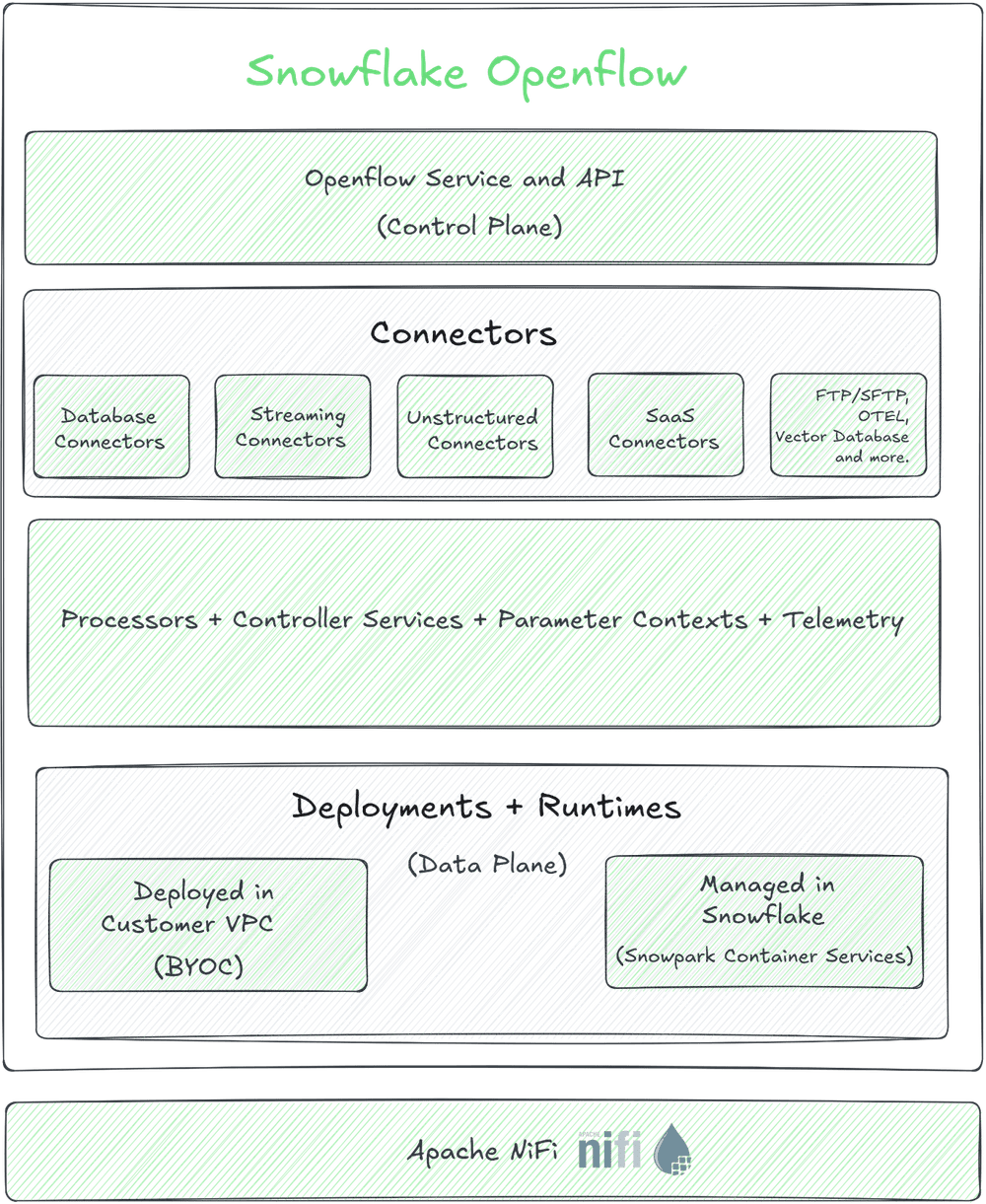
Snowflake Openflow Architecture Overview – Snowflake BUILD 2025
Snowflake Openflow allows teams to finally stop rebuilding wheels for common integrations. This incredibly simplifies feeding Snowflake with structured and unstructured data (text, images, JSON, etc.) at near-real-time speeds.
👉 New connectors and partners
Snowflake BUILD 2025 also spotlighted new partners. Snowflake announced a zero-copy integration with SAP’s Business Data Cloud (BDC). This bidirectional link means SAP customers can query Snowflake AI Data Cloud from within SAP apps, and vice versa, without manual data movement. (Workday, Salesforce, and Oracle connectors are coming as well.) In practice, business-ready SAP data flows into Snowflake with business context preserved.
Snowflake’s new connectors (like SAP BDC) plug external enterprise data into the AI Data Cloud seamlessly, meaning your data lake now includes curated SAP data for analytics and AI without extra ETL.
🔮 Platform and infrastructure updates
Some solid under-the-hood improvements here.
👉 Storage Lifecycle Policies (GA)
Snowflake now supports automatic data tiering and retention. Now with Snowflake Storage Lifecycle Policies, you can define rules to move older data from WARM to COOL or COLD storage tiers, or even delete rows after a set age. This replaces custom scripts and helps cut costs. (By the way, COOL and COLD storage rates are 4 and 1 credits per TB/month respectively). The policies use serverless tasks, so you only pay for a fraction of compute to run them. This makes long-term data archiving and retention easier to manage.
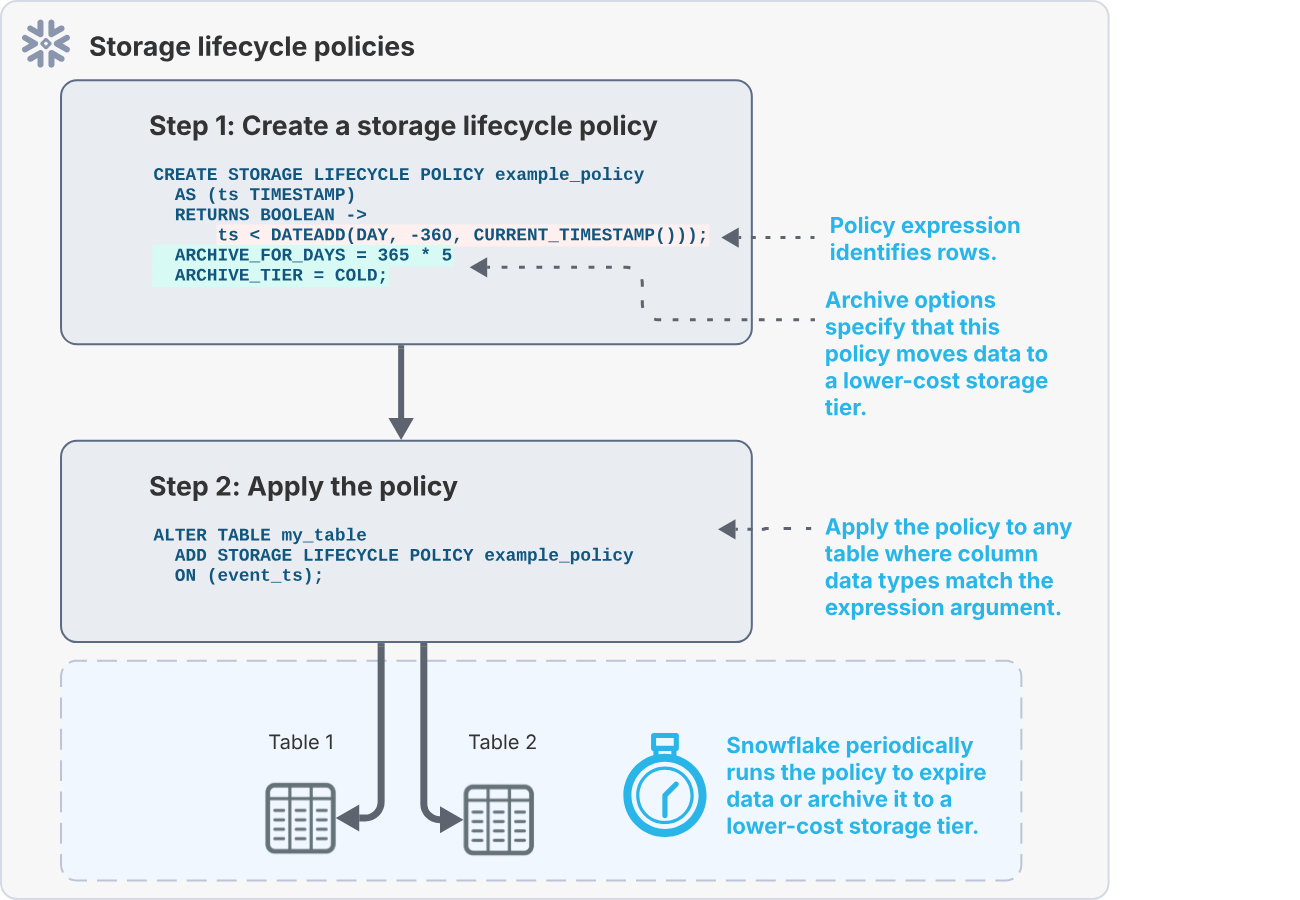
Snowflake Storage Lifecycle Policies – Snowflake BUILD 2025
👉 Snowflake Postgres (Preview)
One big new offering is Snowflake Postgres (private preview). This is a fully managed PostgreSQL database inside your Snowflake account. It’s designed for high-volume transactional workloads (OLTP) alongside your analytical data. In practice, you’ll provision a Postgres instance in the Snowflake cloud (it even includes popular Postgres extensions like PGVector and PostGIS). Your app connects to it as if it were a normal Postgres server. Then you can JOIN or replicate that data into Snowflake’s analytics tables without a custom pipeline. Essentially Snowflake is giving you a Postgres database that lives inside its secure AI Data Cloud.
Snowflake Postgres (in preview) delivers a managed OLTP database with minimal admin. It supports standard Postgres drivers and syntax, but runs on Snowflake’s multi-cluster engine. This is great for data-driven apps needing both real-time OLTP and heavy analytics on the same platform.
👉 pg_lake (GA)
To complement Snowflake Postgres, Snowflake introduced pg_lake (GA). This is an open source PostgreSQL extension that manages an Apache Iceberg catalog. In other words, pg_lake makes Postgres the catalog engine for your data lake. (DuckDB did something similar before). With pg_lake, you can easily browse Iceberg table versions and metadata via SQL, and even speed up metadata-heavy queries.
The diagram below illustrates the idea:
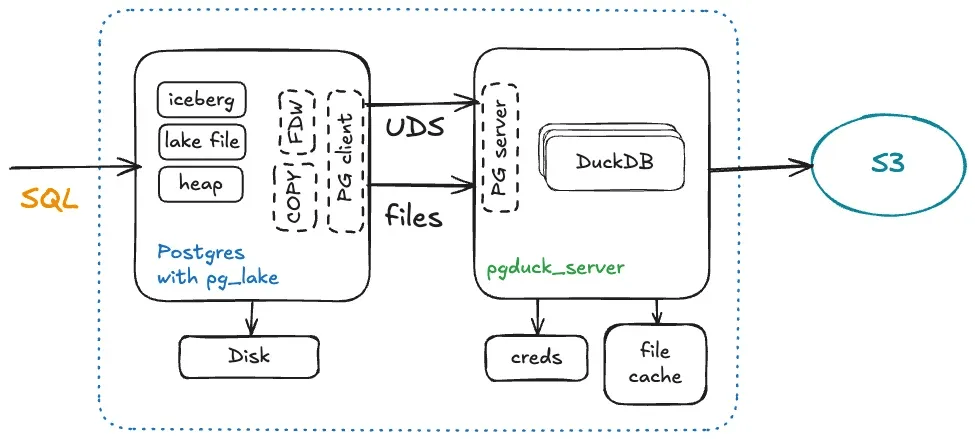
Snowflake pg_lake architecture – Snowflake BUILD 2025
👉 Hybrid Tables & Iceberg updates
Snowflake’s Hybrid Tables (supporting both transaction and analytic workloads) are now GA on Azure. That means on Azure you can run OLTP-style updates on tables alongside analytics queries on the same data. Also, Snowflake’s Horizon Catalog learned to write to any Iceberg table (thanks to Apache Polaris integration). In practice, this means Snowflake’s governance (tagging, lineage, etc.) now applies even if an Iceberg table is written by Snowflake or another engine.
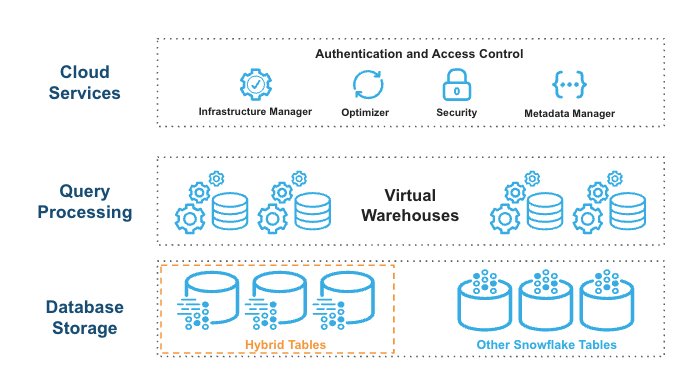
Snowflake Hybrid Table Architecture (Source: Snowflake) – Snowflake BUILD 2025
For business continuity, Iceberg tables get replication. Snowflake-managed Iceberg tables can now be replicated across accounts for failover. That is, you can add Iceberg tables to a replication group or failover group just like normal tables, so your data is protected across regions.
👉 Interactive Tables & Warehouses
Near the end of the conference, Snowflake hinted that Interactive Tables and Warehouses (low-latency engines) will be GA soon. Interactive tables are a special table type optimized for very fast, simple queries (sub-second response), and Interactive warehouses are kept warm to serve high-concurrency dashboards. Think of them like Snowflake’s take on OLTP-like speed for hot data. These are designed for things like real-time UIs or APIs where query speed is king.
🔮 Developer tools and ecosystem
👉 Workspaces (GA)
Snowflake rolled out Workspaces for Snowsight (now GA). Workspaces is a file-based development environment embedded in the UI. It provides a unified code editor for SQL, Python, JavaScript, etc., all organized in folders. Each user gets a personal workspace database in Snowflake to store these files. You can drag old worksheets into a workspace file, run them, and commit changes. Because everything is file-based, it plugs into Git easily. Importantly, Shared Workspaces are now in preview – so teams can collaborate in a shared repo inside Snowflake.
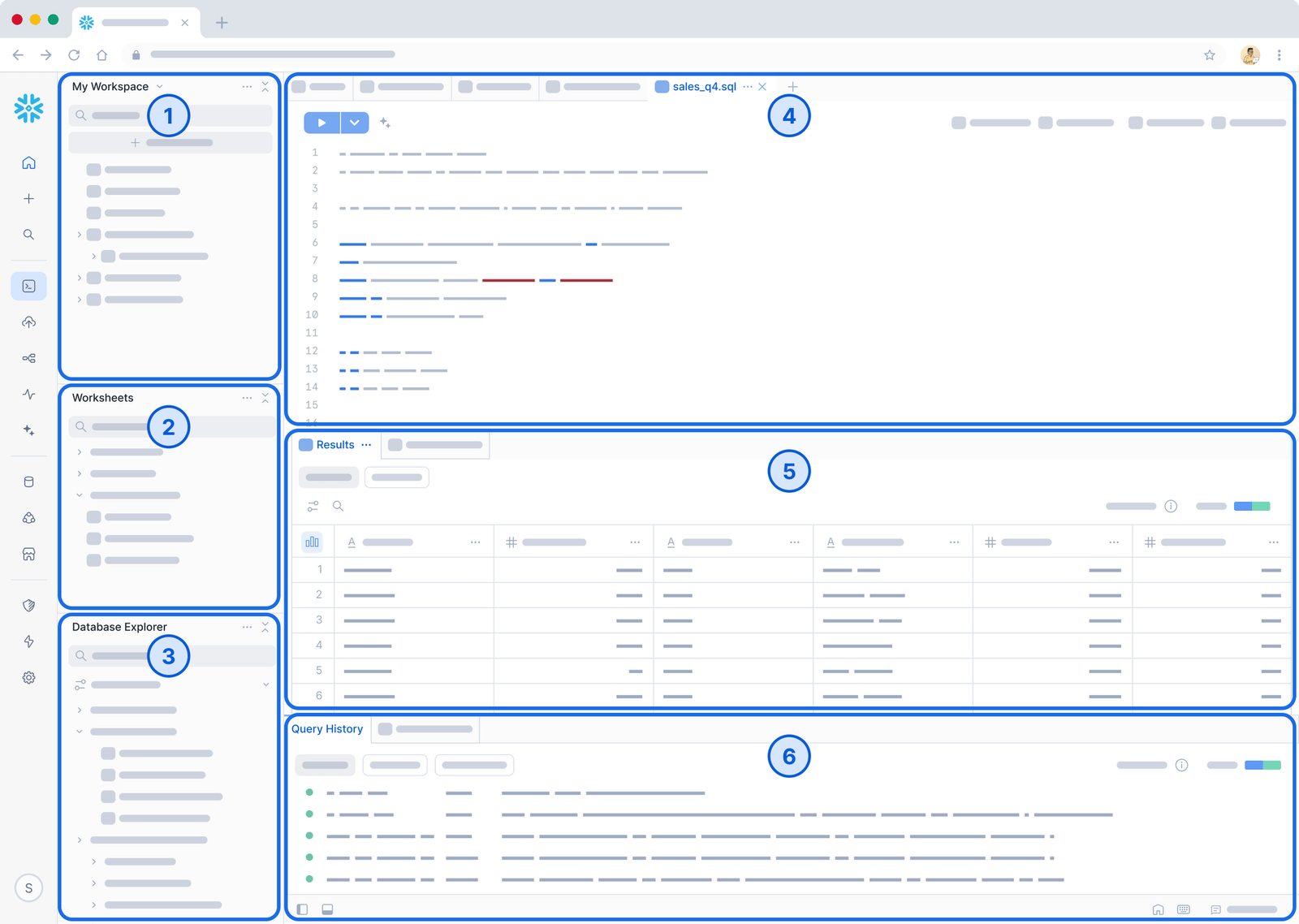
Snowflake Workspaces – Snowflake BUILD 2025
Workspaces is like your IDE inside Snowflake. It provides a unified editor and file system so developers can group scripts, code modules, and queries together. Everything syncs to an internal database. Workspaces was built for collaboration (yes, it even integrates with Git and your existing CI/CD) and it eliminates fragmented worksheets across the UI.
👉 Git integration (GA)
Snowsight UI now supports richer Git workflows. You can connect to private repos (not just GitHub SaaS), and there’s a Snowflake GitHub Actions app in the Marketplace for CI/CD. The enhanced Git experience means you can version-control your code and automatically trigger Snowflake tasks on commit. (Remember to keep your repo credentials handy – you can set up SSH or OAuth as needed.)
👉 dbt projects on Snowflake (GA)
Snowflake dbt integration is full GA. Now you can import an existing dbt project or create a new one entirely in Snowflake. Snowflake added a new object type – a schema-level DBT PROJECT – that stores all your project files. You use familiar dbt commands (or the Snowflake CLI) to run dbt deps, dbt run, etc…, inside Snowflake. In practice, this means no more standalone dbt Core infra: you can test and run models directly in your account. As Umesh Patel’s guide explains, it works like this: you connect a Git repo or a workspace folder to a DBT PROJECT, deploy it, then execute it. The snowflake-side dbt knows your virtual warehouses and schedules tasks just like a built-in pipeline.
👉 Snowpark Connect for Apache Spark (GA)
Spark users, rejoice: Snowpark Connect is GA. This feature lets you take existing Spark code (DataFrame, SQL, PySpark) and run it directly on Snowflake’s compute engine. The Spark client talks to Snowflake instead of a Spark cluster. All your jobs still use PySpark APIs but run 100% on Snowflake, getting full pushdown optimizations. According to Snowflake and partners, this can be ~5.6× faster than managed Spark and cuts cost ~40%. (It also eliminates Spark cluster ops and egress fees entirely.) Under the hood it uses Spark Connect, the new Spark 3.4 protocol. For example, data scientists can keep writing PySpark code in notebooks, but the heavy lifting happens in Snowflake.
Snowpark Connect for Apache Spark™ now Generally Available
Snowpark Connect lets you “run existing Spark workloads directly on Snowflake”. You write Spark code as usual, but Snowpark Connect sends it to Snowflake’s warehouses. This unifies data governance and security, because your Spark jobs now live inside Snowflake’s secure perimeter. This also means no Spark cluster setup – Snowflake handles it all.
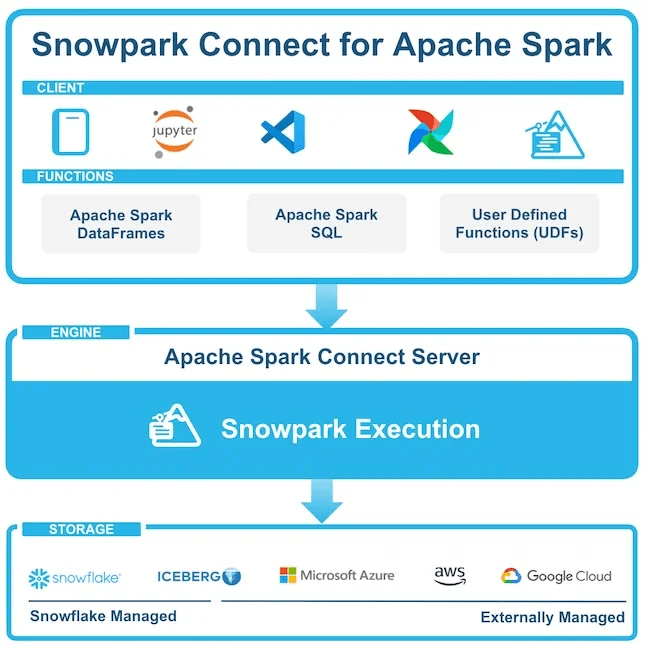
Snowpark Connect for Apache Spark – Snowflake BUILD 2025
👉 Snowflake Optima (GA)
Performance tuning got an automation boost with Snowflake Optima (GA). Optima is a background engine that learns from your workload and applies optimizations without user intervention. Basically it lives off your query history: when it sees repeated patterns (like point-lookups on a table), it might automatically create a hidden index or adjust partition pruning for you. Optima continously analyzes workload patterns and implements the most effective strategies so your queries just get faster over time. No knobs to turn – just enable it and Snowflake handles the rest. For example, Optima Indexing builds and maintains indexes in the background on high-value query paths speeding up point queries at no extra cost. You can monitor these optimizations in the Query Profile view to see how many partitions Snowflake skipped thanks to Optima.
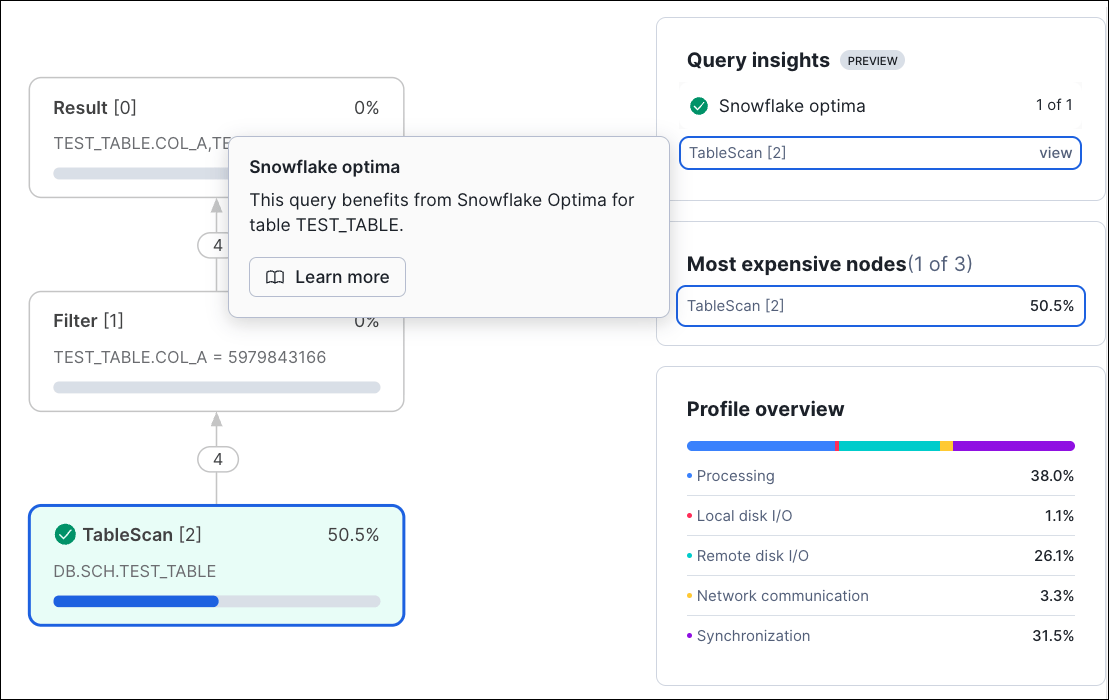
Snowflake Optima – Snowflake BUILD 2025
🔮 Sharing, security & cost controls
👉 Semantic Views (GA)
Snowflake now allows sharing Semantic Views as first-class shared objects. A semantic view is a layer on top of your data where you define business concepts (metrics, dimensions) in familiar terms. For example, you can define “Revenue” or “Net Profit” as aggregated logic so everyone uses the same definition. BUILD announced you can include these views in data shares and the Marketplace. That means if you partner or list data, you can also share the semantic layer. Recipients can query these views directly (even via Snowflake Intelligence) and get consistent business definitions. In short, Snowflake is making it easier to share not just raw tables but also the meaning behind them.
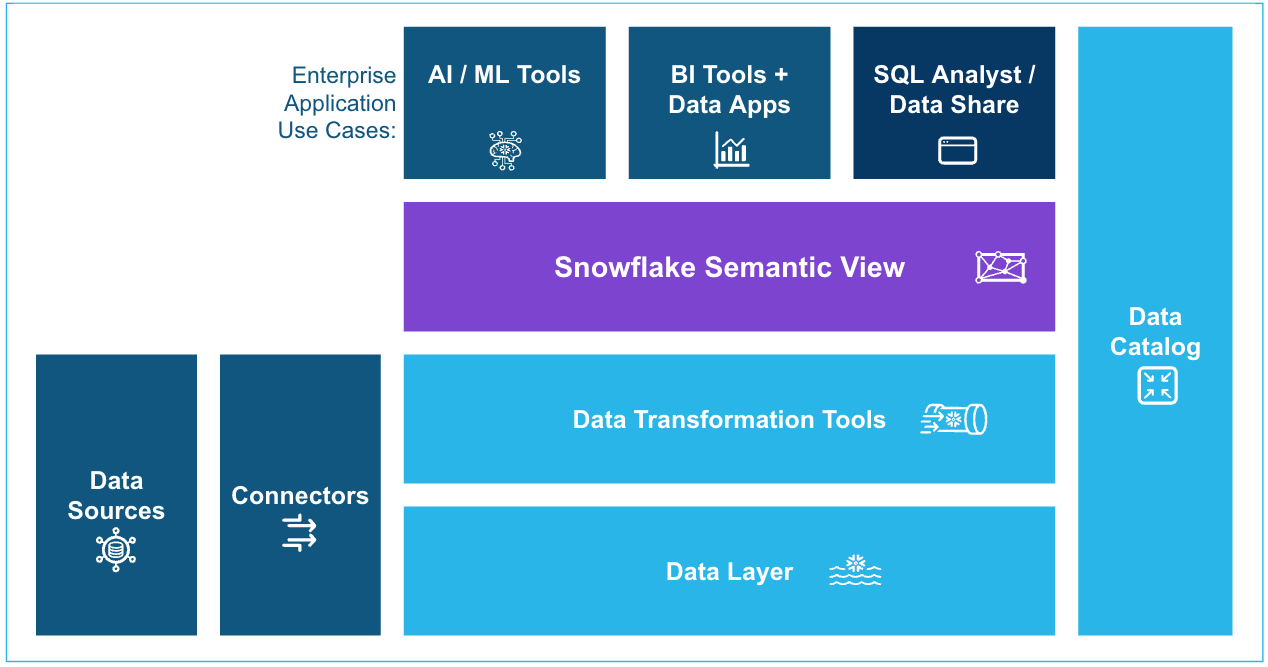
Snowflake Semantic Views – Snowflake BUILD 2025
👉 Open table format sharing (GA)
Another big step: Snowflake’s data sharing now supports open table formats. In practice, this means you can share Iceberg or Delta Lake tables over Snowflake’s zero-ETL sharing. A Snowflake customer can, for instance, set up a share that gives you query access to their Iceberg table stored in S3 – no copy needed. The benefit is that Snowflake’s native collaboration tools (like Data Marketplace and Direct Share) now work with data kept in open formats. So partners using non-Snowflake engines can still participate in your ecosystem easily.
🔮 Other key highlights
👉 Snowflake Horizon catalog updates
Snowflake BUILD also detailed more Horizon Catalog innovations. Now Snowflake-managed Iceberg tables expose an Apache-Polaris-compatible REST Catalog API. This lets external engines (Spark, Trino, etc.) list and open Snowflake Iceberg tables directly. Similarly, you can federate to external Iceberg catalogs (Glue, Unity Catalog, OneLake) to query their tables in Snowflake’s console. And Iceberg v3 support is here, so Snowflake can read and write Iceberg tables in any catalog. You even get fail-safe replication: Snowflake replication now works with managed Iceberg tables for cross-cloud DR. Immutable backups also arrived (GA), meaning once you take a backup it can’t be changed or deleted. In short, Snowflake BUILD 2025 made it clear Snowflake doesn’t want to lock you in – Iceberg and open data sources work everywhere with these new hooks.
👉 FinOps and cost control
On top of the AISQL budgets and storage tiering above, Snowflake made more cost controlling features. For example, admins can now assign spending limits on shared resources (users/warehouses) and trigger alerts. Build even talked about user/group budgets for AI workloads. Overall, the theme is better cost visibility and guardrails for big AI deployments.
Save up to 30% on your Snowflake spend in a few minutes!
Conclusion
All told, Snowflake BUILD 2025 was loaded with updates for data engineers and developers. The platform is leaning heavily into making AI feel native (Cortex AI, AISQL, Snowflake Intelligence) and the data lakehouse more open and real-time (Openflow, Interactive Tables, Iceberg interoperability). At the same time, they also smoothed out the dev experience (Workspaces, Git, Snowpark Connect) while beefing up enterprise ops like FinOps controls, encryption, and backups. And that’s just scratching the surface.







