

Kubernetes (K8s) has become the standard way to run containerized workloads, including a growing share of AI workloads. But many organizations still struggle to use compute resources efficiently.
According to a study by Dimensional Research, 46% of cloud practitioners who had adopted Kubernetes struggled with overprovisioning, and 42% underutilized their resources. When you can’t provision the right amount of resources, you pay for it twice: once for capacity you never use, and again when you scramble to fill gaps with expensive on-demand pricing. The problem extends beyond Kubernetes. Flexera’s 2026 State of the Cloud report found that the average organization wastes 32% of its cloud spend. Many Kubernetes containers use well under the CPU and memory they request.
Underprovisioning and overprovisioning are an acute business problem
When resource requests and limits for Kubernetes workloads are set incorrectly, resources get allocated incorrectly too. Underprovisioning causes performance issues such as out-of-memory (OOM) events, CPU throttling and increased latency. In development environments, this can disrupt testing and staging and slow down releases. In production, it can damage the business’s reputation.
To prevent this, many teams overprovision so their applications can handle peak demand. That practice drains budget and lowers the efficiency of the whole infrastructure. Wasted CPU is especially costly, because CPU is the more expensive part of a machine. As a result, wasted CPU usually makes up most of the budget lost to overprovisioning.
Rightsizing has a significant impact on the business. Some customers have reported reducing resource usage by up to 50% with rightsizing. But manually evaluating and adjusting resource allocation is expensive. It takes engineering time and expertise away from core business work.
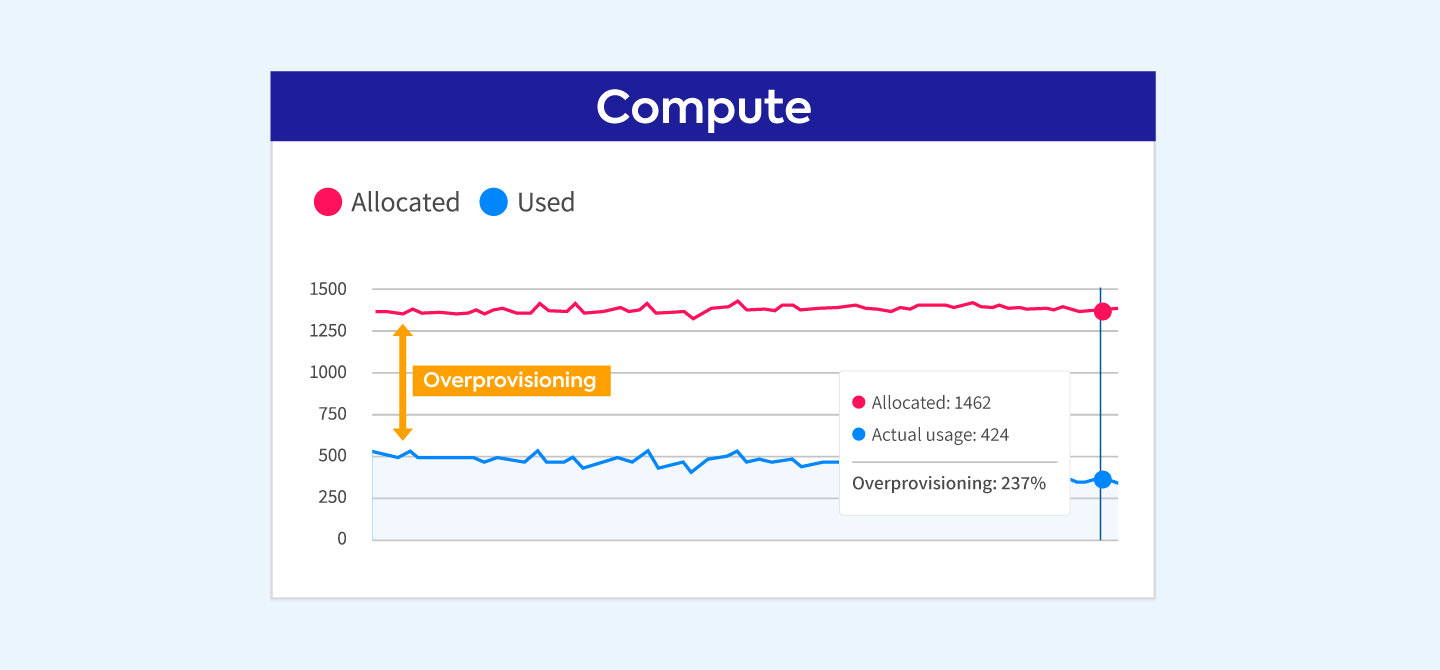
Mind the gap!
Automatic rightsizing is the only viable way to win the provisioning challenge and reduce costs
Enterprises and scale-up companies can’t commit to manual rightsizing. No enterprise-grade container management solution is complete without automating this task.
Flexera’s Autonomous Workload Optimization (AWO), also known as Ocean and Elastigroup, helps teams optimize cloud infrastructure for both Kubernetes and virtual machine workloads. For Kubernetes, Ocean’s automatic rightsizing extends continuous optimization from the underlying infrastructure into the running application. It sizes your workloads to your application’s real demands: no more, no less.
Automatic rightsizing has three key components:
- Visualization: See waste and potential monthly savings at the cluster or workload level in the console.
- Rightsizing recommendations: Get insight into actual compute usage trends over time.
- Auto-apply: Set automation policies with granular configuration at the workload level and controls that protect availability.
With these insights, you can maximize resource utilization in your Kubernetes environment, improve performance and reduce compute costs.
You get a complete view of workload usage, including requested and recommended compute values, in one console. When you can see the total waste in a cluster, it’s easier to understand the financial impact and decide where to optimize first.
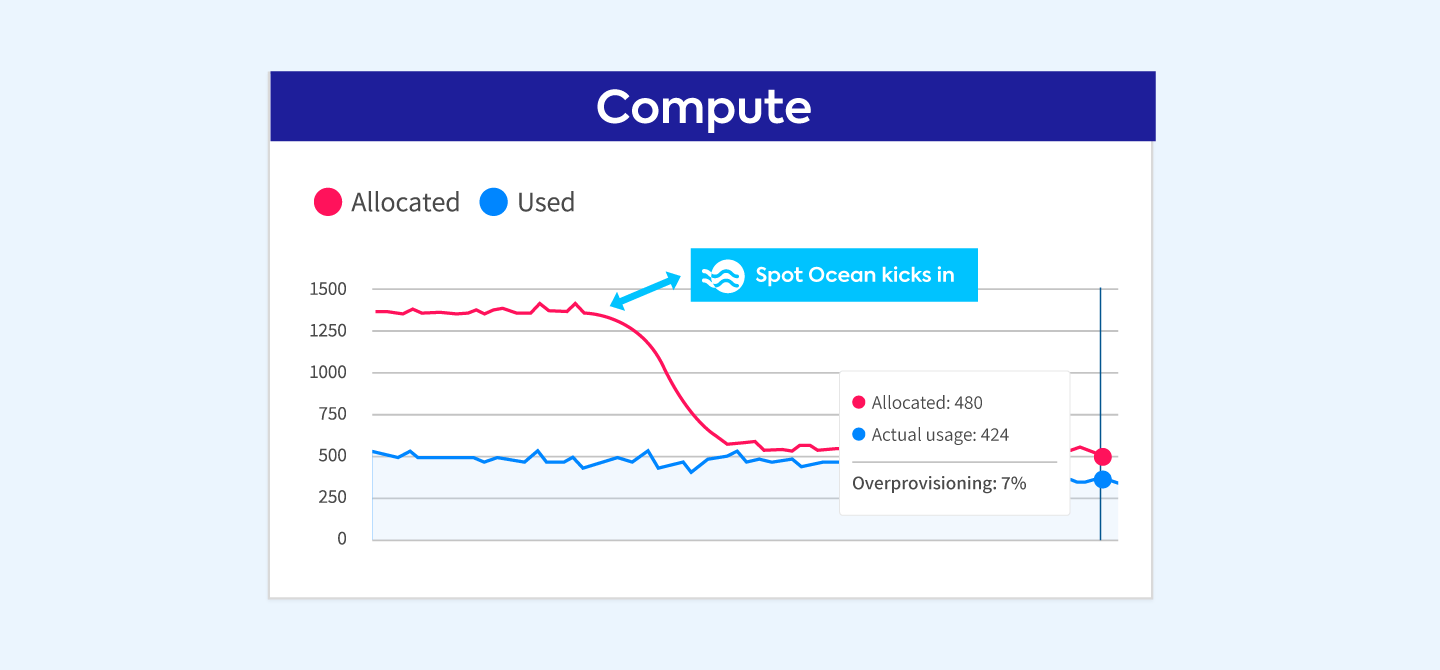
Meet your application’s true demands
How automatic rightsizing works for Kubernetes workloads
Along with potential savings, Ocean shows sizing recommendations at several levels: cluster, namespace, workload, container and label. Recommendations are based on historical and near-live consumption data collected from the Kubernetes cluster over the past 14 days.
Preliminary recommendations appear after as little as 1 hour. More accurate recommendations are available after four days.
You have two options for applying recommendations:
- One-time export: Copy the recommended CPU and memory values into your configuration files and apply them to the cluster yourself. This lets you review each change before it goes live.
- Ongoing automation (recommended): Create automation rules that define how, when and to which workloads recommendations are applied. For example, all workloads in namespace x, or all workloads with label y.
Rightsizing automation rules give you full control over recommendation boundaries, including minimum thresholds, timing, overhead, HPA trigger sync and more. For details, see Automatic Rightsizing Recommendations and Rules. You can track realized savings from applied recommendations in the rightsizing savings view.
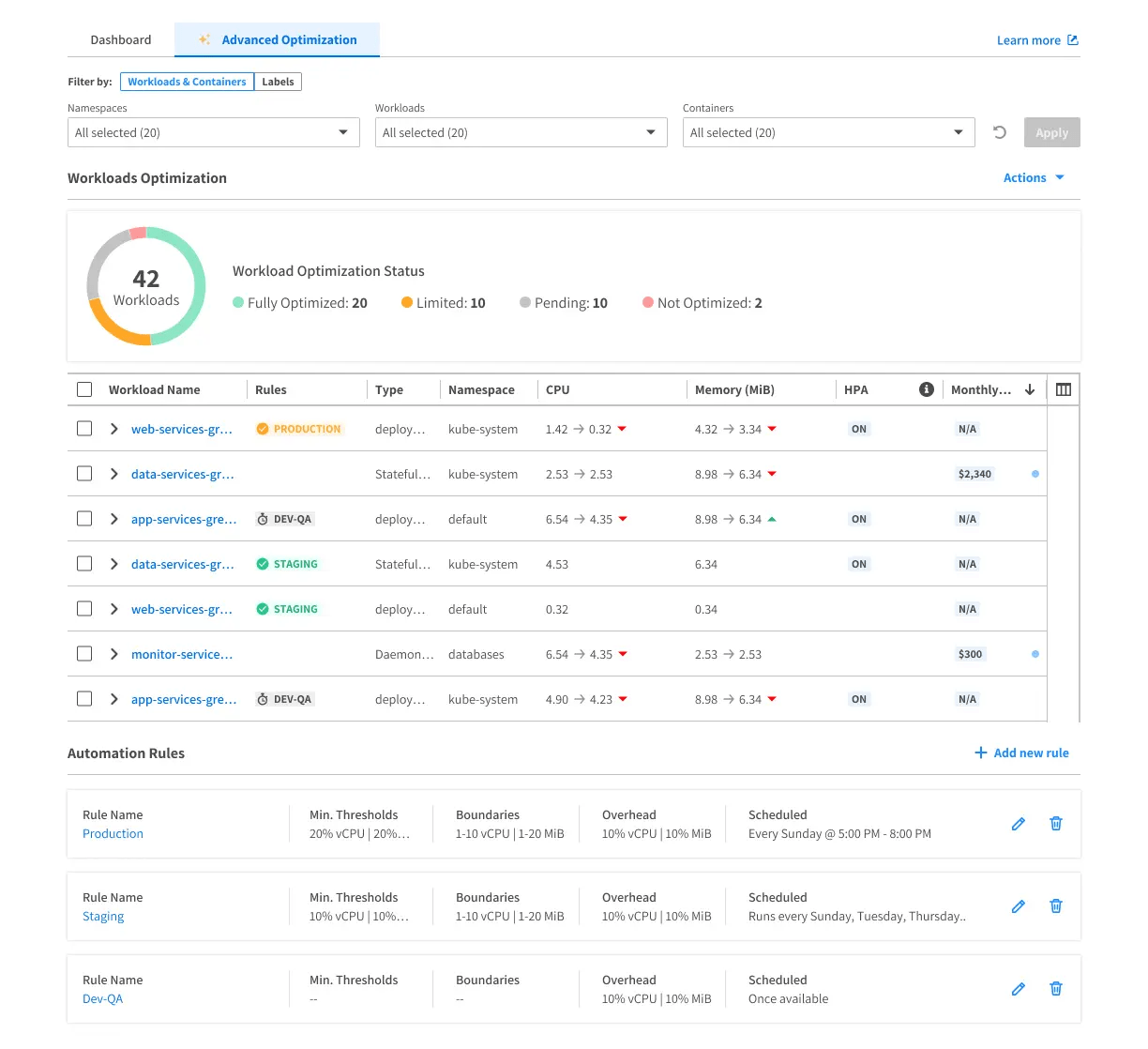
Rightsizing automation rules – workload drilldown
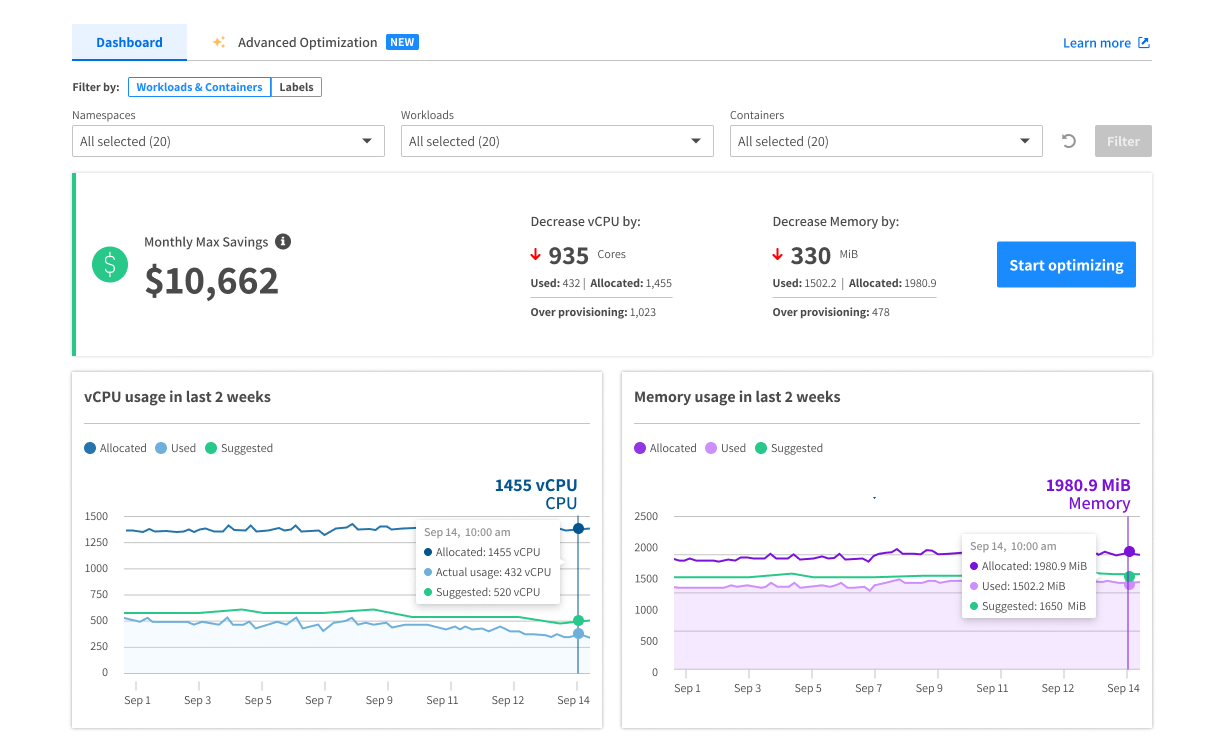
Rightsizing dashboard
How do I start?
Want to apply recommendations without restarting pods? Read how in-place pod rightsizing saves Kubernetes resources. To learn how Ocean protects availability while it optimizes, see Zero-downtime Kubernetes optimization.
Ocean helps you align resource allocation with what your workloads need, reduce waste and keep performance steady without manual tuning. Learn more about Kubernetes container optimization with Flexera or request a demo to see automatic rightsizing in your environment.
What is Kubernetes rightsizing?
Rightsizing adjusts a workload’s CPU and memory requests and limits to match its actual usage. This reduces both overprovisioning (wasted spend) and underprovisioning (performance issues such as OOM events and CPU throttling).
Why automate Kubernetes rightsizing?
Workload usage changes constantly, and manual tuning can’t keep up at scale. Automation applies recommendations continuously, within rules you define.
Can I review recommendations before they’re applied?
Yes. You can export recommendations and apply them yourself, or create automation rules that apply them only to the workloads and within the thresholds you choose.
Yarden Kesari
Yarden Kesari is a Senior Manager, Product Management at Flexera, leading cloud infrastructure optimization products focused on Kubernetes, performance, and cost efficiency. He drives product strategy across FinOps and large-scale cloud infrastructure optimization, working closely with engineering and go-to-market teams. Prior to his current role, Yarden led DevOps and SRE teams, bringing strong technical and people leadership alongside hands-on experience in building and scaling cloud-native production systems.