


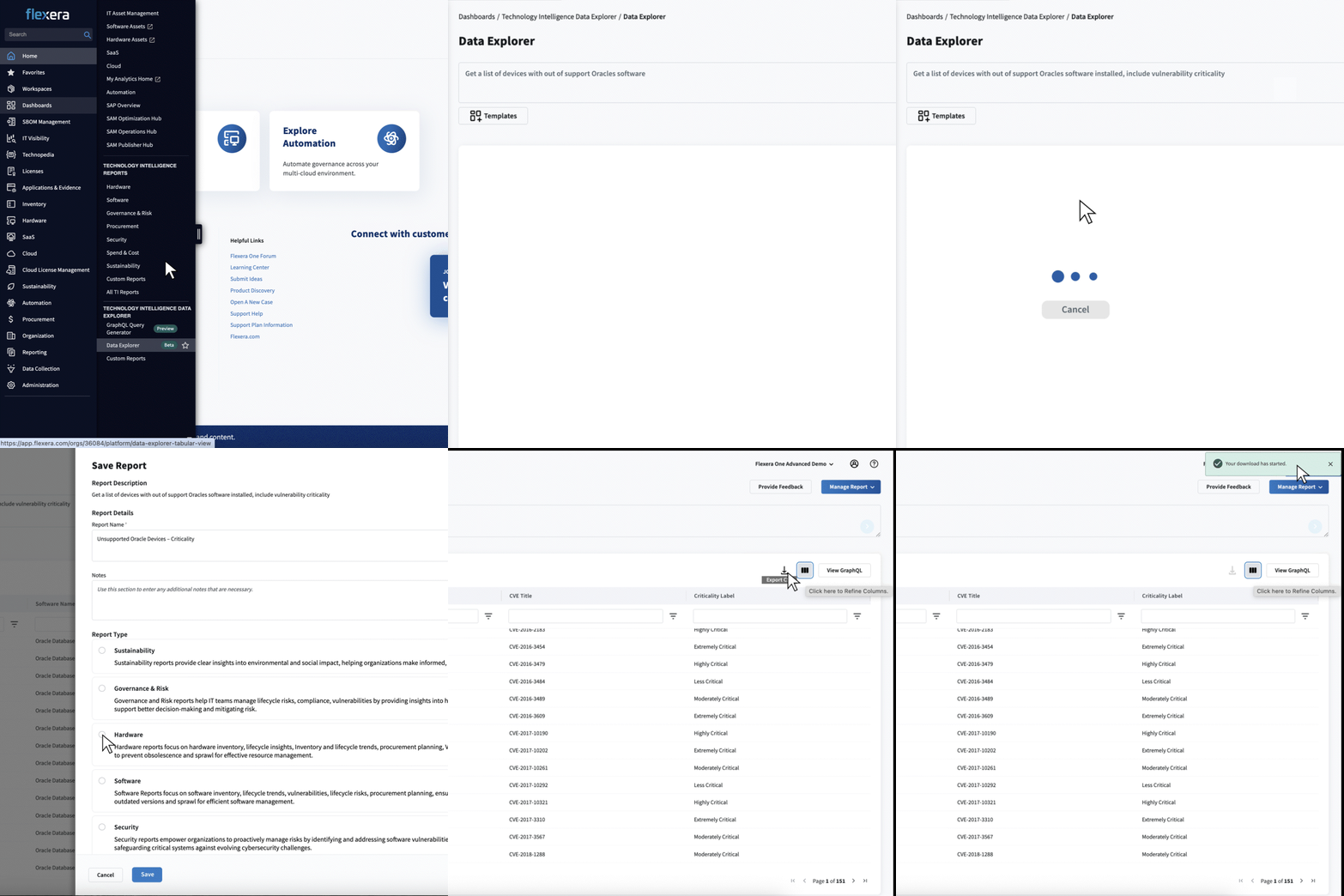
Flexera today launched Data Explorer, a groundbreaking AI-native capability built on the Technology Intelligence (TI) Platform for Flexera One. Designed to accelerate decision-making, Data Explorer gives users natural-language access to Technology Intelligence Inventory data, returning relevant tabular reports and insights directly within Flexera One.
Imagine asking, “Get me the list of devices running out-of-support Oracle software.” In seconds, Data Explorer delivers a clean table with the right columns, providing a concise summary to help teams move from question to action faster than ever.
Why Data Explorer?
Today, practitioners often navigate multiple screens, reconcile conflicting views, or build custom BI reports just to answer routine questions. This complexity slows decisions, introduces handoffs, and erodes confidence in “the right answer.” As data grows, so does the burden.
Data Explorer closes these gaps by providing one conversational entry point to query inventory data and receive personalized, authoritative answers, reducing cognitive load, eliminating conflicting choices, and dramatically shortening time to value. Building on GraphQL Query Generator, available in Flexera One IT Visibility, Data Explorer takes natural language processing and data accessibility even further.
Data Explorer reflects a simple belief: our customers should be able to ask questions in plain language and trust the answers they get back. By making Technology Intelligence data intuitive and actionable, we’re helping teams move faster, reduce complexity, and make critical business decisions with confidence.
What do you get with Data Explorer?
Natural language data queries
- Request inventory data in plain language, making report generation accessible to non-technical users.
Customizable and exportable reports
- Reports are highly customizable, built-in UI tabular views: add or remove columns as needed using an intuitive interface.
- Reports can be exported as CSV files for further analysis or sharing.
Role-based access and collaboration
- The “Manage Data Explorer Reports” role grants you the ability to create, edit, duplicate, and delete any data explorer report within the organization.
- Access any data explorer report, manage your own, and duplicate Flexera-provided templates for faster setup.
Template reports for quick start
- Pre-built template reports (focused on devices and software) are available and can be duplicated and customized, reducing setup time for common use cases.
- Flexera encourages customer feedback to improve and expand template offerings, so please let us know your thoughts!
Comprehensive native report management
- Save, organize, and manage custom reports, including editing details, saving versions, and deleting obsolete reports.
- The platform supports both personal and organization-wide report management, enhancing collaboration and governance.
Transparency and technical insight
- View the GraphQL query behind each report, providing transparency and enabling advanced users to understand or replicate the data extraction logic.
Key benefits
- Faster, higher-confidence decisions
Ask in plain English (“Show devices nearing end of support this quarter”) and get exactly what you need—initially in table format—so teams act quickly.
- One trusted source for everyone
Create a view with a simple prompt (“List non-compliant software by business unit”), save it and share securely. Everyone sees the same version, reducing debate and keeping focus on decisions.
- Scales as data grows without complexity
As new datasets arrive, keep using natural language (“Show me servers with different patch levels running the same OS version”). The same interface makes them instantly explorable, expanding use cases while staying simple.
Looking ahead
Data Explorer previews a broader AI-native direction for the Technology Intelligence Platform in Flexera One, where users describe outcomes in plain language and Flexera delivers exactly what they need across views, roles, and workflows. These capabilities will extend beyond inventory reporting to power consistent, intuitive experiences across Flexera One.
Want to learn more?
Start asking questions and experience the fastest path from intent to insight.
Explore our FAQs, prebuilt reports, and integration options inside Flexera One and contact us directly to learn more about getting started with Flexera One IT Visibility.