


Snowflake and MongoDB are two of the most popular database platforms today, but they differ greatly in their architecture, use cases and capabilities. So, which platform comes out on top? Snowflake has established itself as a best-in-class cloud data warehouse, providing instant elasticity and separation of storage and compute. It uses SQL and a relational model. On the other hand, MongoDB is a document-oriented operational database that utilizes a NoSQL, JSON-like document model.
As per DB-Engines ranking, Snowflake currently ranks at 6th, whereas MongoDB ranks 5th among the most popular database management systems as of January 2025. Both platforms have massive and devoted user bases, ranging from startups to enterprises, across various industries and domains. But raw ranking numbers don’t tell you which one suits your architecture.
In this article, we will compare Snowflake vs MongoDB across 9 different key criteria: architecture, performance, scalability, integration/ecosystem, security, machine learning capabilities, programming language support, pricing and more!! We’ll highlight the unique capabilities and features of each platform and outline the core pros and cons to consider.
Let’s dive right in!!
At a glance: Snowflake vs MongoDB
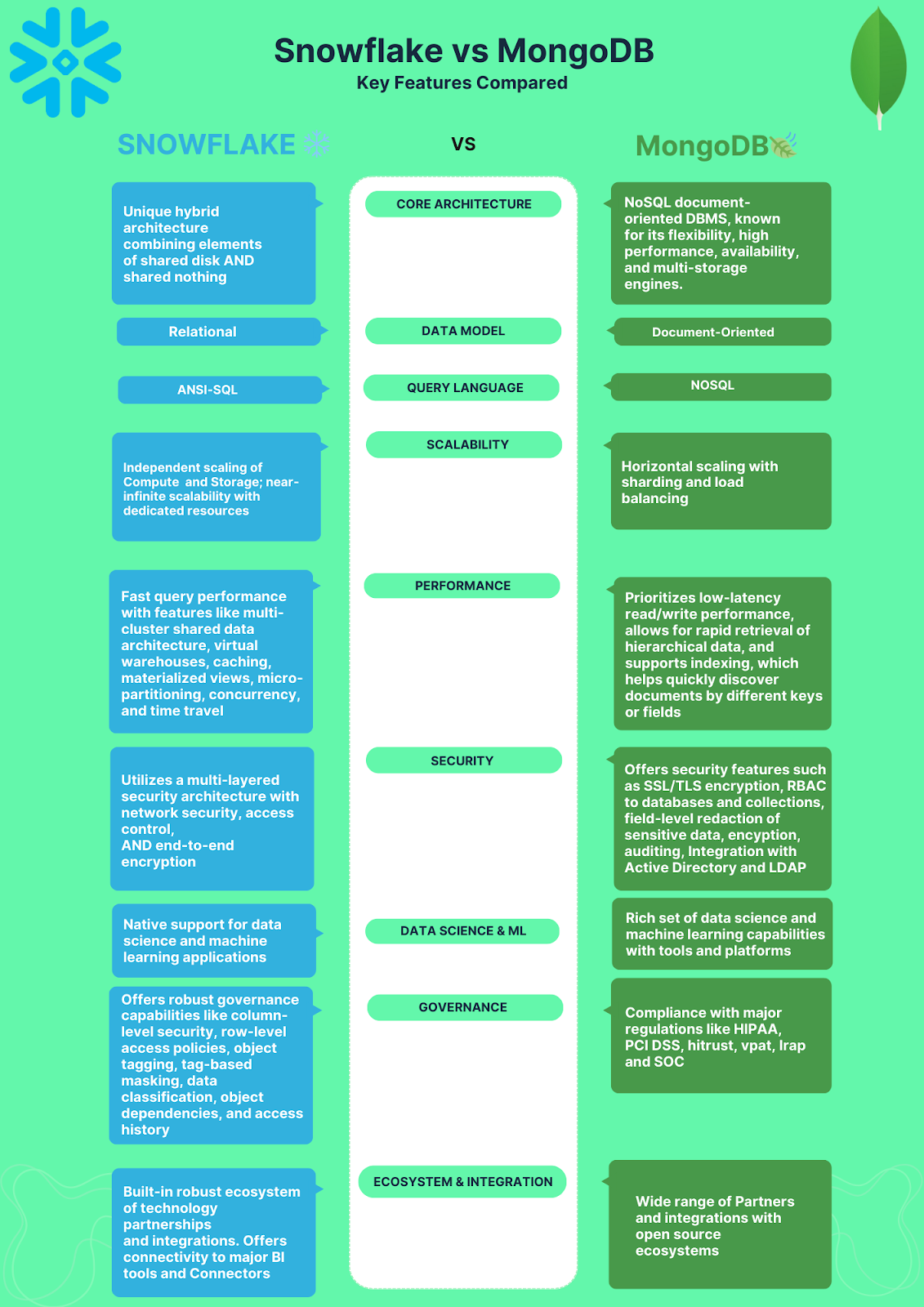
Before we dive into the details of each platform, let’s take a high-level look at their key differences. The following illustration compares the two on various aspects, including core architecture, data model, scalability, performance, security, governance, Data Science & ML support, ecosystem, integration etc.
What is MongoDB?
MongoDB is a popular, source available, document-oriented database that uses NoSQL to store and manipulate flexible and dynamic data. Unlike relational DB’s that use tables and rows to store data, MongoDB uses collections and documents to store data. Each document is a JSON-like object that can hold any number of fields and values, and documents within the same collection don’t need to share a schema.
MongoDB’s story started in 2007 when Dwight Merriman, Eliot Horowitz and Kevin P. Ryan, all alumni of DoubleClick, set out to build a database that could handle the large and complex datasets generated by modern web applications. The goal was a developer-friendly, scalable database that could grow with application needs. And thus, MongoDB was born!!

Some key features of MongoDB are:
- Document data model: MongoDB stores data as flexible, JSON-like documents grouped into collections. Documents support embedded sub-documents and arrays, making complex and hierarchical data structures straightforward to represent
- MongoDB Query Language (MQL): A powerful query language supporting CRUD operations, aggregation, text search, geospatial queries and graph traversal
- Indexing: MongoDB supports single-field, compound, multi-key, text, geospatial, hashed and wildcard indexes. Indexes can be created or dropped without taking the database offline
- Replication: Replica sets synchronize data across multiple servers, providing data redundancy, fault tolerance and high availability
- Sharding: MongoDB distributes data across multiple servers using sharded clusters. Each shard is a replica set that holds a portion of the data. A mongos router directs queries to the right shards and config servers store cluster metadata
- Atlas cloud services: MongoDB Atlas is the fully managed cloud offering that handles provisioning, scaling, backups and monitoring across AWS, Azure and Google Cloud
MongoDB is well-suited for high-velocity application workloads, real-time data access and use cases with rapidly evolving schemas. Major companies including eBay, Cisco, 7-Eleven, MetLife, Glassdoor and EA use MongoDB as their operational database.
What is Snowflake?
Snowflake is a cloud-native data platform designed to take full advantage of cloud infrastructure elasticity. Its architecture separates compute, storage and cloud services into independent layers that each scale on their own. This design makes Snowflake particularly effective for analytical workloads, data sharing and large-scale reporting.

Here are some of the key features of Snowflake:
- Multi-cluster shared data architecture: Multiple virtual warehouses (compute clusters) can access the same storage layer simultaneously, so you can scale compute without moving data
- Separation of storage and compute: Storage and compute are billed and scaled independently. You can spin up or shut down virtual warehouses without touching your data
- Semi-structured and structured data support: Snowflake natively loads and queries JSON, Avro, Parquet, ORC and XML alongside traditional relational data
- ANSI SQL: Snowflake uses standard SQL with Snowflake-specific extensions for time travel, data sharing and clustering
- Secure data sharing: Organizations can share live data across accounts without copying or moving it
- Near-zero maintenance: Snowflake is fully managed. There’s no infrastructure to provision, upgrade or tune
- Elastic scaling: Virtual warehouses scale up or down automatically based on workload demand
- ACID transactions and high concurrency: Snowflake supports ACID-compliant transactions while handling high concurrency across multiple warehouses
- Time travel and fail-safe: Users can query or restore historical data versions. Schema changes are versioned for safe rollbacks
- Role-based and granular access control: Row-level and column-level security, data masking and object-level access policies give fine-grained control
- Multi-cloud: Snowflake runs on AWS, Azure and Google Cloud, with consistent behavior across all three
- Apache Iceberg table support: Full read and write support for the open Apache Iceberg table format, providing interoperability with Databricks, AWS Glue and other platforms without data migration
- Cortex AI: Native AI capabilities including AI_COMPLETE (text generation and classification), AI_EXTRACT (structured data extraction), Cortex Analyst (natural language to SQL), and Cortex Code (an AI coding agent launched November 2025, now used by over 50% of Snowflake customers)
- Snowflake Intelligence: Agentic AI layer for building and deploying AI agents that operate on Snowflake-governed data
- Gen2 standard warehouses: GA since November 2025, offering ~2.1x faster analytical performance than Gen1 warehouses at 1.35x the credit rate on AWS and GCP
…and much more!!
For an in-depth look at Snowflake’s full capabilities, check out this article.
Now, let’s dive into the next section, where we will compare Snowflake vs MongoDB across 9 different features.
Top 9 detailed feature breakdown: Snowflake vs MongoDB
Snowflake vs MongoDB are two very different data titans designed for different use cases. Let’s navigate through the details and dissect their key features:
1) Snowflake vs MongoDB—Architecture and data models
One of the most important aspects to consider when choosing a database is its architecture and data model, as they determine how data is stored, processed and accessed. Snowflake and MongoDB have fundamentally different architectures and data models.
Now, let’s explore their architectural differences.
Snowflake architecture
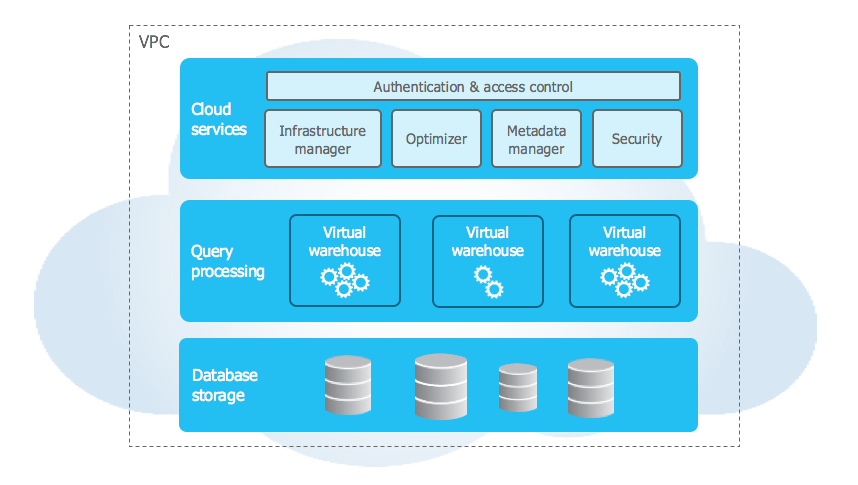
Snowflake utilizes a unique hybrid cloud architecture that combines elements of shared disk and shared nothing architectures. The storage layer acts like shared disk: a central repository accessible to all compute clusters. The compute layer behaves like shared nothing: independent virtual warehouses process queries in parallel without contending for compute resources.
The Snowflake architecture has three layers:
- Storage layer: Snowflake converts all ingested data into a compressed, columnar format and automatically divides it into micro-partitions. Each micro-partition holds between 50 MB and 500 MB of uncompressed data (significantly smaller after compression, typically around 16 MB compressed). This structure enables fine-grained query pruning where Snowflake skips irrelevant micro-partitions rather than scanning full tables. Snowflake fully manages this layer, including replication, backup and recovery.
- Compute layer: Virtual warehouses are independent, massively parallel processing (MPP) compute clusters that Snowflake provisions on demand. You can create, resize, suspend or resume them at any time. Multiple virtual warehouses can read from the same storage simultaneously without interfering with each other. You pay only for the time each warehouse runs.
- Cloud services layer: Cloud services layer handles authentication, metadata management, query optimization, access control and infrastructure orchestration. It maintains a central metadata repository covering table definitions, schemas, statistics and query history. This metadata powers features like time travel and zero-copy cloning.
Check out this in-depth article if you want to learn more about the capabilities and architecture of Snowflake.
MongoDB architecture
MongoDB stores data as flexible, schema-optional documents rather than rows in fixed tables. This gives developers the freedom to store complex, hierarchical or rapidly changing data without upfront schema design.
MongoDB’s architecture is built on three core components:
- Database: A database is a logical grouping of data that resides on a MongoDB server. A MongoDB server can host multiple databases, each with its own set of files on the file system. A database can contain one or more collections of documents.
- Collection: Think of collections as groups of documents. A collection is equivalent to a table in a relational database but without a fixed schema. A collection can have any number of documents and each document can have different fields and data types.
- Document: These are the core units of data in MongoDB, represented as flexible JSON-like objects. Each document is essentially a collection of key-value pairs. But, documents are schema-less, meaning they can have different structures and data types within the same collection. This schema-less nature empowers developers to store complex and evolving data without schema rigidity.
Supporting these core components are several architectural elements:
- Storage Engines: MongoDB offers various storage engines like WiredTiger and In-Memory Storage Engine, optimizing performance for specific workloads.
- Query Language: MongoDB’s query language (MQL) is powerful and expressive, allowing for complex data retrieval and manipulation.
- Aggregation Framework: The aggregation framework provides tools for advanced data processing and analysis directly within the database.
- Security: MongoDB incorporates security features like role-based access control and encryption for data protection.
2) Snowflake vs MongoDB—Performance breakdown
Snowflake and MongoDB are both high-performance platforms capable of managing large and complex workloads. Their performance varies based on factors such as query types, data models, indexing strategies, hardware configurations, network settings and scaling options. This section compares and contrasts their performance, exploring optimization possibilities for different scenarios.
Snowflake performance
Snowflake is purpose-built for massive scale and blazing-fast analytical query performance. Its performance advantages stem from these unique characteristics:
Columnar storage: Storing data column-by-column rather than row-by-row means queries scan only the columns they need. A query touching 3 of 50 columns reads roughly 6% of stored data.
Micro-partition pruning: Snowflake stores metadata (min, max, distinct counts, null counts) for every column in every micro-partition. At query time, it uses this metadata to skip partitions that can’t possibly match a query’s filters. A query targeting one hour out of a full year of hourly data may scan fewer than 0.01% of total micro-partitions.
Massively parallel processing: Queries are distributed across all compute nodes in a virtual warehouse and executed in parallel. Doubling the warehouse size roughly halves runtime for query-bound workloads.
Automatic caching: Snowflake maintains multiple cache layers. The result cache serves identical queries instantly at zero compute cost. The local disk cache on each warehouse node stores recently scanned data, avoiding cloud storage round-trips on repeated access. Caching is automatic and requires no configuration.
Automatic query optimization: Snowflake’s optimizer continuously adapts execution plans based on statistics and data characteristics, without manual tuning.
Data clustering: You can define clustering keys on frequently filtered columns. Snowflake then organizes micro-partitions around those keys, improving pruning efficiency for workloads that consistently filter on the same columns.
Virtual warehouse sizing: Snowflake warehouses range from X-Small (1 node, 1 credit/hour) to 6X-Large (512 credits/hour). Credit consumption doubles with each size step. Choosing the right warehouse size is the primary performance and cost lever.
MongoDB performance
MongoDB is optimized for low-latency, high-throughput operational workloads:
Flexible document model: Data that belongs together is stored together. Fetching a document avoids joins, which is a significant performance advantage for transactional read patterns where related data is often embedded in a single document.
Horizontal sharding: MongoDB distributes data across shards using a shard key. Queries that include the shard key route directly to the relevant shard without scanning others.
In-memory storage option: The in-memory storage engine holds all data in memory, dramatically reducing latency for use cases where persistence can be traded for speed.
Index-driven performance: MongoDB’s query optimizer uses indexes to serve read operations efficiently. Without the right indexes, MongoDB performs collection scans, so index design is a significant performance lever. Covered queries, where all queried fields are in the index, return results directly from the index without touching documents at all.
MongoDB 8.x improvements: MongoDB 8.0 and the subsequent 8.3 release delivered approximately 35% higher write throughput and 45% higher read throughput compared to MongoDB 7.x, along with expanded native query expressions for in-database data transformation.
To sum up:
- For analytical queries on large datasets, Snowflake’s columnar storage, MPP architecture and intelligent pruning make it substantially faster.
- For operational read and write workloads with low-latency requirements, MongoDB’s indexed document model and horizontal sharding deliver superior performance.
3) Snowflake vs MongoDB—Who scales better?
Snowflake and MongoDB are also highly scalable platforms for large and complex workloads. However, their scalability varies based on factors such as data type, query complexity, concurrency and storage/compute requirements. In this section, we will compare the scalability of Snowflake vs MongoDB, exploring adjustments for different scenarios.
Snowflake scalability
Snowflake’s decoupled storage and compute architecture is what makes it uniquely elastic.
Storage scales automatically as data volumes grow. You never provision storage manually.
On the compute side, virtual warehouses scale independently. You can resize a warehouse (X-Small through 6X-Large) or use multi-cluster warehouses, which automatically spin up additional compute clusters during peak concurrency and shut them down when demand drops. Multi-cluster warehouses are available in Enterprise Edition and higher. As of February 2025, the maximum cluster count in multi-cluster configurations is no longer capped at a single fixed limit; it now varies by warehouse size and can be configured via SQL commands.
But note that, Snowflake has real constraints worth knowing:
- Snowflake relies entirely on AWS, Azure or GCP. Any outages, latency spikes or throttling from the underlying cloud provider will affect Snowflake directly
- Warehouse sizes are predefined (X-Small through 6X-Large). You can’t customize individual node parameters within a size tier. If your workload falls between sizes, you’ll either overprovision or underprovision
- Large-scale data movement out of Snowflake incurs egress fees from the cloud provider, which creates real switching costs once significant data is loaded
- Snowflake doesn’t run on-premises. If your compliance posture requires self-managed infrastructure, Snowflake isn’t an option
MongoDB scalability
MongoDB was designed for horizontal scalability:
Sharding: MongoDB distributes data across shards, each of which is a replica set, based on a user-defined shard key. Adding more shards scales both storage capacity and write throughput. Automatic balancing redistributes data across shards as volumes change.
Replication: Replica sets can hold up to 50 members, with a maximum of 7 voting members. Additional members beyond 7 serve as non-voting replicas for read scaling and disaster recovery. Automatic failover elects a new primary if the current primary fails.
Deployment flexibility: MongoDB runs on-premises, in the cloud via Atlas, or in hybrid environments. This flexibility makes it easier to meet data residency and compliance requirements that Snowflake’s cloud-only model can’t accommodate.
Flexible data modeling: MongoDB’s schema-optional design makes it straightforward to evolve data structures over time without coordinated schema migrations across large teams.
But, MongoDB has some scalability limitations:
- The 16 MB BSON document size cap means large payloads must be split across documents or handled via GridFS
- Shard key selection is largely irreversible without significant operational overhead. A poor choice creates hot spots that undermine horizontal scaling
- Complex cross-shard queries don’t scale as cleanly as single-shard queries and can be difficult to optimize
So while MongoDB provides very high horizontal scalability, sharding, replication and deployment flexibility, some data modeling and query constraints exist.
TL;DR: Snowflake excels at petabyte-scale analytics with independent compute and storage elasticity. MongoDB excels at horizontal scaling for transactional, operational workloads, especially when deployment flexibility and on-premises support matter.
4) Snowflake vs MongoDB—Ecosystem and integration
Snowflake and MongoDB both have extensive partnerships and integrations available.
Snowflake ecosystem and integration
Snowflake has developed an extensive ecosystem of technology partners and integrations. It provides native connectivity to leading business intelligence tools like Tableau, Looker and Power BI for easy data visualization and dashboarding.
Snowflake also includes first-party and third-party connectors to ingest and analyze data from popular SaaS applications. On top of that, Snowflake has tight integrations with major cloud platforms (AWS, Azure and GCP) enabling organizations to leverage their preferred infrastructure.
For custom integrations, Snowflake provides a REST API that can be used to build connections with diverse applications based on business needs.
To supplement its analytics capabilities, Snowflake partners with top data management and governance solutions. For example, it has partnered with Collibra for data cataloging and metadata management, Talend for ETL and data integration and Alteryx for data blending and preparation.
The Snowflake Marketplace offers various partner applications, connectors and accelerators that extend Snowflake’s core functionalities. However, compared to open-source(source-available) options like MongoDB, the Snowflake ecosystem is relatively closed as a proprietary commercial product. But it provides deep integration with both tools and infrastructure.
MongoDB ecosystem and integration
MongoDB has a vibrant and growing partner ecosystem that offers various integrations and solutions for users.
Cloud Partners
MongoDB can run on various cloud platforms, such as AWS, Azure and GCP and across different regions and zones. MongoDB also offers a database-as-a-service solution, called MongoDB Atlas, which handles the provisioning, management—and monitoring of MongoDB clusters on the cloud.
MongoDB provides officially supported drivers for all major programming languages and platforms. These drivers allow developers to connect their applications to MongoDB databases and perform CRUD operations.
Some of the most popular MongoDB drivers include:
- MongoDB Node.js Driver: Enables interacting with MongoDB from Node.js applications using asynchronous I/O.
- MongoDB Java Driver: Provides synchronous and asynchronous interaction with MongoDB from Java applications.
- MongoDB .NET/C# Driver: Allows .NET developers to work with MongoDB databases.
- PyMongo: The official Python driver for MongoDB.
—and more!
There are also hundreds of community-supported libraries available.
MongoDB offers an extensive range of tools and integrations that make it easier for developers and administrators to work with MongoDB databases. These include:
- MongoDB Compass: GUI-based query interface and document explorer for MongoDB. Provides features like graphical view of query performance, visual query builder and more.
- MongoDB Charts: Built-in data visualization tool that provides intuitive charts and graphs for analyzing and visualizing MongoDB data.
- MongoDB BI Connector: Provides read-only SQL access to MongoDB databases from BI and data visualization tools like Tableau, Qlik and others.
- MongoDB Ops Manager: Automates MongoDB deployment, upgrades, backup and more. Available as a self-hosted or fully managed solution.
- MongoDB Atlas Data Lake: Query engine for Amazon S3 buckets that enables MongoDB querying against data in S3.
- MongoDB & HashiCorp Terraform: Infrastructure as Code tool that provides providers for deploying MongoDB on various platforms.
- MongoDB Enterprise Kubernetes Operator: Simplifies running MongoDB on Kubernetes for container orchestration.
There are also hundreds of integrations available from partners that allow syncing MongoDB with other DB, analytics and visualization tools, caching systems, message queues—and more. You can check the MongoDB Partner Ecosystem Catalog, which provides a directory of MongoDB partners offering compatible technologies and services for MongoDB implementations.
Community Support Resources
MongoDB has cultivated an active community of users, developers, admins and partners through community forums, events, courses—and more:
- MongoDB Community Forums: Active forums for asking questions and getting help from MongoDB experts and community members.
- MongoDB University: Free online courses for learning MongoDB design, operations, security, performance tuning and more.
- MongoDB Events: Global events including MongoDB World conference and local MongoDB Days workshops.
- MongoDB Blog: Regular educational blog posts and announcements from MongoDB experts.
- MongoDB Community: Get help from fellow MongoDB users on the community-run forums/channels.
- MongoDB Meetup Groups: Opportunities to connect with local MongoDB users at in-person Meetup events.
- MongoDB Developer Center: Resources for developers building apps on MongoDB.
5) Snowflake vs MongoDB—Security and governance
Snowflake and MongoDB are reliable data platforms with distinct approaches to ensuring data security and governance. This section compares and contrasts their methods, examining how each platform secures and governs your data.
Snowflake security and governance
Snowflake provides robust security capabilities to safeguard data and meet compliance requirements. Snowflake utilizes a multi-layered security architecture consisting of network security, access control and End-to-End encryption.
Network security
Snowflake allows configuring network policies to restrict access to only authorized IP addresses or virtual private cloud (VPC) endpoints. Users can set up private connectivity options like AWS PrivateLink or Azure Private Link to establish private channels between Snowflake and other cloud resources.
Access Control
Snowflake has extensive access control mechanisms built on roles and privileges. Users can create roles aligned to specific job functions and assign privileges like ownership or read-write access accordingly. Granular access control is also possible through Object Access Control, Row Access Control via Secure Views and Column Access Control by masking columns. Multi-factor authentication and federated authentication via OAuth provide additional access security.
Encryption
Encryption is a core part of Snowflake’s security posture. All data stored in Snowflake is encrypted at rest using AES-256 encryption by default. Snowflake supports both platform-managed and customer-managed encryption keys. For key management, Snowflake provides built-in key rotation and re-keying capabilities. Users can also enable client-side and column-level encryption for enhanced data protection.
Snowflake Governance
Snowflake offers robust governance capabilities through features like column-level security, row-level access policies, object tagging, tag-based masking, data classification, object dependencies and access history. These built-in controls help secure sensitive data, track usage, simplify compliance and provide visibility into user activities.
Check out this article to learn more in-depth about implementing strong data governance with Snowflake.
MongoDB security and governance
MongoDB’s security capabilities are configurable and customizable and are designed to provide various options and features to secure and govern your data. Some of the key security capabilities of MongoDB are:
MongoDB supports various mechanisms to authenticate and authorize users and applications to access the database, such as SCRAM, x.509, LDAP proxy authentication, Kerberos and OpenID Connect. MongoDB also provides role-based access control (RBAC) to manage the permissions and privileges of users and roles on the database, such as creating, reading, updating and deleting data and objects.
Encryption and masking
MongoDB supports various methods to encrypt and mask data stored and transferred on the database, such as TLS/SSL, encryption at rest and client-side field level encryption. MongoDB also supports customer-managed encryption keys, which allow users to control the encryption and decryption of their data. MongoDB also integrates with various third-party encryption and masking solutions, such as Baffle, Protegrity and SecuPi.
Auditing and logging
MongoDB provides granular auditing and logging capabilities, which allow users to monitor and track the activities and events on the database, such as user login, data access, data manipulation, data replication and data sharding. MongoDB also provides various tools and utilities to query and analyze the audit and log data, such as the MongoDB Audit Log Filter, hatchet, MongoDB Log Analyzer and MongoDB Compass.
Data governance and classification
MongoDB provides various features and tools to help users govern and classify their data on the database, such as schema validation, data quality rules, data lineage and data catalog. These features and tools allow you to define, enforce and document the structure, quality and origin of their data and identify sensitive, personal, or regulated data. MongoDB also integrates with various third-party data governance and catalog solutions, such as Atlan, BigID and Immuta.
Data protection and compliance
MongoDB provides various features and mechanisms to protect and comply with the data regulations and standards, such as CSA STAR, VPAT, GDPR, IRAP, HITRUST, HIPAA, PCI DSS, SOC—and so much more. These features and mechanisms include data retention and deletion, data anonymization and pseudonymization, data breach notification and response, data subject rights and requests, data processing agreements and contracts and data security certifications and attestations.
Check out this MongoDB Trust Center to learn more in-depth about MongoDB data security and governance features.
6) Snowflake vs MongoDB—AI and ML capabilities
This is an area where both platforms have moved quickly. The better question isn’t “which wins?” but rather “which fits your AI workflow?” They serve different ML patterns.
Snowflake AI and ML capabilities
Snowflake has invested substantially in bringing AI and ML natively into its data platform:
Snowflake Cortex AI: A suite of AI features powered by large language models. Cortex AI includes SQL-callable functions for text summarization, sentiment analysis, translation, entity extraction, document classification and multi-modal analysis of video and audio. Snowflake Intelligence, built on Cortex AI, is a generally available agentic query interface that lets business users ask natural-language questions and receive SQL-generated answers with charts. The Cortex Agents API exposes Snowflake data and logic as reusable AI agents via a REST API.
Snowpark ML: Snowflake’s ML development framework lets data scientists pre-process data and build, train and deploy ML models entirely within Snowflake, without moving data to external platforms. Snowpark ML integrates with popular frameworks including scikit-learn, XGBoost and LightGBM.
Snowpark Container Services: Enables deployment of containerized ML workloads, including GPU-accelerated model training and inference, within Snowflake’s security and governance perimeter. You can fine-tune open-source LLMs using Snowflake-managed GPU infrastructure.
Snowflake ML Functions: Out-of-the-box ML capabilities including anomaly detection, forecasting, classification and contribution analysis, all accessible via SQL without writing model code.
Partner integrations: DataRobot, Dataiku and H20.ai integrate natively with Snowflake, bringing AutoML and MLOps capabilities to teams that prefer managed ML tooling.
Statistical functions: Built-in SQL functions like CORR, COVAR_SAMP and MEDIAN support exploratory analysis without external tools.
MongoDB AI and ML capabilities
MongoDB has repositioned itself as a unified AI data platform, combining operational data storage, embeddings, vector search and ML feature management in a single system:
Atlas Vector Search: Native vector indexing and approximate nearest-neighbor (ANN) search built into Atlas clusters. Developers store vector embeddings alongside operational data in the same documents, then run semantic search queries without a separate vector database. This is particularly valuable for retrieval-augmented generation (RAG) pipelines and recommendation systems.
Voyage AI automated embeddings: MongoDB acquired Voyage AI in 2025. The integration brings Voyage AI’s embedding and reranking models directly into Atlas, so embeddings are automatically generated and kept in sync with document updates, removing the need to orchestrate a separate embedding pipeline.
Feast feature store integration: Atlas now serves as a backend for Feast, the open-source feature store. This means ML teams can use Atlas as a single source of truth for both model training features and real-time inference feature serving, reducing the database sprawl common in ML infrastructure.
LangGraph.js memory integration: Atlas integrates with LangGraph.js as a persistent long-term memory store for AI agents, enabling cross-session memory for JavaScript and TypeScript-based agent applications.
Native aggregation pipeline: MongoDB’s aggregation framework performs complex transformations inside the database, which is useful for feature engineering without external ETL.
Python and R integration: PyMongo connects MongoDB to the full Python data science ecosystem including NumPy, pandas, scikit-learn, PyTorch and TensorFlow.
MongoDB Charts: A built-in visualization tool for exploratory data analysis directly within Atlas.
TL;DR: Snowflake is the stronger choice for traditional analytical ML workflows, large-scale model training on warehouse data and teams already working in SQL. MongoDB’s strength is in AI-native application development, especially RAG pipelines, semantic search and agent memory, where operational data and vector embeddings need to live together.
7) Snowflake vs MongoDB—Programming language support
Snowflake and MongoDB are both versatile data platforms that can support various programming languages and development platforms. In this section, we will compare and contrast the programming language support of Snowflake and MongoDB and see how they can enable developers to build applications using their preferred languages and tools.
Snowflake programming language support
Snowflake’s primary interface is SQL, with additional language support for extending and connecting to the platform:
- ANSI SQL: Snowflake supports the ANSI SQL standard, which is a common and widely used language for querying and manipulating relational data. Snowflake also extends the ANSI SQL syntax with some Snowflake-specific features and functions, such as data loading, data sharing, time travel and clustering. You can use ANSI SQL to interact with Snowflake from various tools and applications, such as SnowSQL (the Snowflake command-line client), Snowflake web interface and third-party SQL clients.
- User-Defined Functions (UDFs): Snowflake allows you to create and execute user-defined functions (UDFs) that extend the functionality of Snowflake and perform custom logic on your data. You can create UDFs using the following languages:
MongoDB programming language support
MongoDB also supports various drivers and libraries for connecting to the database from different languages and frameworks, such as:
On top of the official drivers, MongoDB also has a strong community that has developed additional libraries and drivers to work with nearly every programming language that exists today.
8) Snowflake vs MongoDB—Indexing and optimization secrets
Snowflake and MongoDB are both efficient data platforms that can optimize query performance and data access. But, they use different approaches and techniques to achieve this goal. In this section, we will compare and contrast the indexing and optimization secrets of Snowflake vs MongoDB and see how they can improve the speed and quality of queries.
Snowflake indexing and optimization secrets
Unlike traditional DBs, Snowflake does not use indexes to optimize queries. Instead, Snowflake leverages its cloud-native architecture and features like micro-partitioning, automatic clustering and query optimization to deliver fast query performance.
Snowflake stores data in small micro-partitions, typically 50 MB to 500MB in size. Micro-partitions contain a subset of rows stored in a columnar format. This enables parallel processing and scanning only relevant data during queries.
Snowflake utilizes sophisticated query pruning techniques. Using statistics on micro-partitions and query predicates, Snowflake determines which micro-partitions can be eliminated from scanning based on the query filter conditions. This minimizes the amount of data required for processing.
For further optimization, Snowflake can automatically cluster data by grouping related rows into the same micro-partitions. A clustering key defines the column(s) to cluster data on. Clustering improves pruning efficiency as related rows exist in fewer partitions.
On top of all this, Snowflake continuously analyzes comprehensive query history and table statistics to adapt and optimize query execution plans over time. It determines the optimal approaches to process different query types and data shapes without manual tuning.
When you combine micro-partitions, intelligent optimization, clustering and scale-out compute, Snowflake doesn’t need traditional database indexes for most workloads!
Of course, Snowflake does have some tools like materialized views for tuning specific performance-intensive use cases. But in general, its architecture minimizes the need for indexes. The cloud-scale optimizations happen automatically “under the hood“.
MongoDB Indexing and optimization secrets
Now, MongoDB comes from a very different background than Snowflake. It was built as a general operational database for powering real-time applications.
MongoDB relies heavily on explicit indexes. Without the right indexes, MongoDB performs collection scans, which are expensive on large collections.
Index types: MongoDB supports single-field, compound, multi-key (for arrays), text, geospatial (2dsphere, 2d), hashed, sparse, partial and wildcard indexes. Atlas Vector Search adds a separate HNSW-based vector index type for approximate nearest-neighbor queries.
Index design discipline: The goal is to build indexes that match your application’s actual query patterns. A compound index with the right field order can serve multiple query patterns from a single index structure. The leading field in a compound index determines which queries it can support efficiently.
In-memory caching: WiredTiger maintains an internal cache for frequently accessed data and indexes, reducing disk I/O.
Query planner: MongoDB’s query planner selects the optimal index for each query using a trial-based approach. The explain() method lets you inspect execution plans and identify collection scan bottlenecks.
Aggregation optimization: The aggregation framework can push $match and $sort stages early in the pipeline to take advantage of indexes, significantly reducing data processed in later stages.
The control indexes give you is genuinely valuable, but you’re responsible for getting them right. Index analysis, profiling and maintenance are ongoing tasks, especially as query patterns evolve.
9) Snowflake vs MongoDB—Billing and pricing
Last but certainly not least, Snowflake and MongoDB differ significantly in their pricing models. In this section, we’ll navigate the intricacies of “Snowflake vs MongoDB” pricing to help you make the most informed and budget-conscious decisions for your data platform investment.
Snowflake pricing breakdown
Snowflake uses a consumption-based model. You pay separately for storage and compute, with no upfront infrastructure costs. Billing is per second for compute (with a 60-second minimum per warehouse start) and per TB per month for storage.
Compute is billed per second, with a 60-second minimum charge each time a warehouse starts or resumes. One Snowflake credit equals one full hour of usage for an X-Small warehouse. Credit consumption doubles with each warehouse size step:
| Warehouse size | Credits per hour |
| X-Small | 1 |
| Small | 2 |
| Medium | 4 |
| Large | 8 |
| X-Large | 16 |
| 2X-Large | 32 |
| 3X-Large | 64 |
| 4X-Large | 128 |
| 5X-Large | 256 |
| 6X-Large | 512 |
Credit prices vary by edition and cloud provider. Auto-suspend and auto-resume prevent idle warehouses from consuming credits unnecessarily.
Storage is charged based on average monthly compressed data stored, approximately $40 per TB per month (varies by cloud provider and region). Because Snowflake compresses data significantly (typically 3 to 7 times), effective storage cost is well below the cost implied by raw data size.
Cloud services
Snowflake’s cloud services layer (authentication, metadata management, query compilation) is included for free up to 10% of your daily compute credit consumption. Usage above that threshold is billed as additional compute credits.
Data transfer
Ingress into Snowflake is free. Data transfer within the same region and cloud provider is also free. Cross-region or cross-cloud data transfers incur charges that vary by cloud provider and region.
Editions:
Snowflake offers four editions with different features and pricing:
For in-depth detail on Snowflake pricing, Check out Snowflake pricing.
MongoDB pricing breakdown
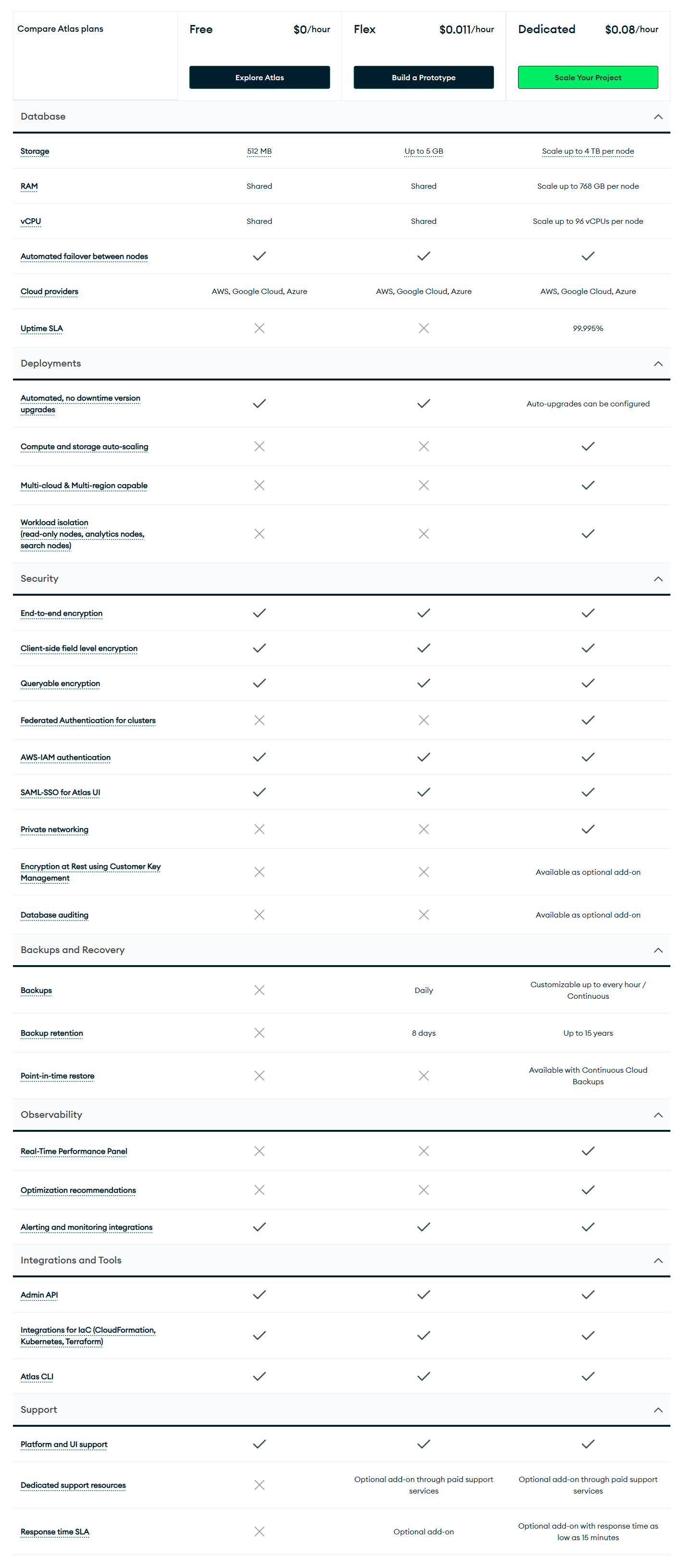
MongoDB Atlas uses three main pricing tiers as of 2025, following a significant restructuring that deprecated the previous M2/M5 shared clusters and Serverless instance types.
Atlas tiers: free, flex and dedicated clusters
MongoDB Atlas offers three main tier groups: Free (M0), Flex (entry-level), and Dedicated (M10 and up). Each tier charges by the hour (billed monthly) and bundles specific resources:
Free tier: Permanently free. Provides 512 MB storage, shared RAM/vCPU on a 3-node replica set. It’s $0.00 forever. Use it for learning or testing. (No backups or scaling – once you hit that 512 MB limit, you must upgrade).
Flex tier: Introduced in February 2025, the Flex tier replaces the old M2/M5 sandbox tiers. Flex clusters auto-scale with workload and cap out at a fixed monthly maximum. Pricing starts at about $0.011 per hour (roughly $8/mo for low activity) and goes up to $0.0411/hr ($30/mo) at 400–500 ops/sec. That base fee includes 5 GB storage and basic backups. Flex is ideal for development or unpredictable traffic: you pay only for what you use, but won’t get a surprise bill above $30. (By comparison, the legacy M2 was $9/mo and M5 $25/mo, but MongoDB is migrating those into Flex.)
Dedicated tier (M10 and above): Dedicated tier is fully isolated clusters on reserved VMs. They start at $0.08/hr for an M10 (2 vCPUs, 10 GB storage) – about $57/month on AWS us-east-1. From there, prices jump with tier: for example an M30 (8 GB RAM) is ~$0.54/hr, an M50 (32 GB RAM) ~$2.00/hr. At the top end, an M700 (96 vCPUs, 768 GB RAM) can be ~$33/hr (that’s ~$24,000/mo) in some regions. In short, going from an M10 to an M700 is a 415× range – the single biggest cost driver in Atlas.
These cluster prices include compute, attached storage, and a 3-node replica set for high availability (plus automated backups up to 24-hour point-in-time for free on paid tiers). They do not include cross-region replication, Atlas Search nodes, BI Connector, advanced support, or other add-ons – those bump the bill separately. Also note that list prices vary slightly by region and cloud. For example, AWS US-East is generally cheapest: an M10 is $0.08/hr there vs ~$0.09/hr in AWS Frankfurt. (Azure and GCP in the same region have similar rates, though actual costs for backup storage and data transfer can differ.)
Extra fees: backups, data and support
Atlas usage isn’t just cluster-hours. You’ll likely pay for:
- Backups and storage speed: Automated backups are on by default, but the snapshot data counts against storage fees. Expect roughly $0.14 per GB-month for backup storage. If you keep 50 GB of backups, that’s ~$7/mo extra. Also, Atlas can use higher-end disk (NVMe) for faster I/O on big clusters – opt-in if needed (some large tiers auto-switch), but that costs more.
- Data transfer: Ingress (incoming) to Atlas is free, but egress (outgoing) costs money. Same-region traffic is cheap (~$0.01/GB on AWS), but cross-region can be $0.02/GB on AWS and $0.04/GB on Azure. Internet-bound egress is higher ($0.09/GB on AWS). In practice, a busy multi-region setup can rack up hundreds of dollars monthly just in transfer fees.
- Add-on services: Additional features each have their own rates. For example, Atlas Search runs on separate nodes (S10 tier 2 vCPU/8 GB RAM at $0.10/hr, up to $3.20/hr for S60). Atlas Charts is free for the first 100 MB scanned, then $0.50/GB. App Services (Functions/Triggers) incur compute-seconds and sync charges (often adding ~5–15% overhead). There’s also Vector Search, Stream Processing, Data Federation, etc – each billed by usage. We won’t list all rates, but keep in mind each new feature can boost the total.
- Support plans: Every Atlas account gets free “Basic” support. Upgrading costs extra: Developer Support is $49/mo (or 20% of your bill, whichever is higher) and Pro Support is $799/mo (or 20%). So if your Atlas bill is $5,000, Developer support would be $999 (20% of $5k). Enterprise and Platinum SLAs are custom quotes. Yes, 20% of revenue is steep compared to AWS’s ~3% support plans, but MongoDB points out their support team are DB specialists. Still, treat support as a significant line item.
Putting it together: a small 2-node cluster might be $60–$70/mo plus a few dollar for backups and $49 if you add Developer support. A production cluster can easily double once you factor in backup retention and a support plan.
Self-hosted (Enterprise Advanced) licensing
If you run MongoDB on your own servers or private cloud, you need Enterprise Advanced. This is a subscription license (per-server or per-core) that bundles advanced features (LDAP/Kerberos auth, encryption, audit logging, Ops Manager, etc) and official support. Unlike Atlas, there’s no public price list; you must contact MongoDB sales for a quote.
Snowflake vs MongoDB: pros and cons:
Snowflake pros and cons:
Here are the main Snowflake pros and cons:
Snowflake pros:
- Independent storage and compute scaling eliminates the classic “overprovision compute to handle data growth” tradeoff
- Analytical query performance at petabyte scale without requiring index design or manual tuning from the user
- Native governance: column-level masking, row access policies, object tagging, access history and the Trust Center all ship out of the box
- Near-zero administration; Snowflake handles optimization, maintenance and infrastructure
- Secure data sharing across organizations and cloud accounts without copying data
- Cortex AI brings LLM-powered functions, agentic AI orchestration and Snowpark ML natively inside the platform’s security boundary
- Standard SQL reduces the learning curve for data teams already familiar with relational systems
- Pay only while queries are running; suspended warehouses generate no charges
Snowflake cons:
- Warehouse costs can grow quickly without discipline around auto-suspend settings and right-sizing. Per-second billing is forgiving, but teams that leave large warehouses running idle discover this fast
- All compute comes in fixed warehouse size tiers. Fine-grained resource customization below the tier level isn’t available
- Fully cloud-dependent; no true on-premises deployment exists. Virtual Private Snowflake still runs in cloud infrastructure
- Data egress fees for large-scale exports can be substantial and create real data portability friction over time
- Not designed for sub-millisecond transactional workloads requiring high-concurrency individual record operations
MongoDB pros and cons:
Here are the main MongoDB pros and cons:
MongoDB pros:
- Flexible document model handles evolving schemas without ALTER TABLE migrations or application downtime
- Low-latency reads and writes on indexed fields, well-suited for real-time application backends
- Horizontal write scaling via sharding supports very high write throughput across many servers
- Native vector search with Voyage AI automated embeddings positions MongoDB as a strong backend for AI applications needing real-time operational data alongside semantic search
- Wide driver support across 14+ officially supported languages plus extensive community libraries
- Atlas Flex tier provides a generous $30/month hard-capped entry point for variable or low-traffic workloads
- The source-available Community Server is free for most commercial uses without SaaS redistribution
- Replica sets provide automatic failover with no application code changes required
MongoDB cons:
- Complex analytical queries spanning many documents are significantly slower than equivalent Snowflake queries. MongoDB is not a data warehouse substitute
- The schemaless model becomes a liability at scale if schema validation rules aren’t applied consistently from the start
- Shard key selection is manual. Reversing a bad shard key choice is disruptive and expensive
- Multi-document ACID transactions exist but add latency and should be used sparingly, not as a default design pattern for high-volume writes
- Individual BSON document size is capped at 16 MB
- Indexes don’t manage themselves. Performance tuning requires ongoing attention from someone who understands the application’s query patterns
- SSPL licensing restrictions push most commercial SaaS use toward paid Atlas or Enterprise tiers
Save up to 30% on your Snowflake spend in a few minutes!
Conclusion
And that’s a wrap! To sum up, Snowflake and MongoDB are built for different jobs.
Snowflake is the right choice if you need to run analytical queries at scale: dashboards, reporting, BI workloads, data science pipelines and anything that involves scanning large volumes of historical data. Its separation of compute and storage, columnar architecture and Cortex AI suite make it the strongest analytical data platform available in the cloud today.
MongoDB is the right choice if you need a flexible, high-velocity operational database, especially when data models are complex or rapidly evolving. Its native vector search capabilities and AI data platform positioning make it extremely valuable for teams building AI-native applications.
In this article, we have covered:
- What is MongoDB?
- What is Snowflake?
- A detailed breakdown of 9 key features in Snowflake vs MongoDB
- 9 detailed breakdown of Snowflake vs MongoDB
- Pros and cons of Snowflake vs MongoDB
…and more!!
FAQs
Which platform scales better, Snowflake or MongoDB?
For analytical workloads, Snowflake scales better by independently scaling storage and compute. For transactional, operational workloads, MongoDB scales better horizontally via sharding.
How does Snowflake optimize query performance?
Through columnar storage, massively parallel processing, automatic micro-partition pruning, multi-layer caching, clustering and continuous query plan optimization. No manual index management required.
How does MongoDB achieve high performance?
Via index-driven reads and writes, the WiredTiger storage engine cache, the document model (which avoids joins for related data) and horizontal sharding for write distribution.
What programming languages work with Snowflake?
Snowflake UDFs support JavaScript, Python, Java, Scala and SQL. Snowpark supports Python, Java and Scala for data pipeline and ML development. Connector languages include Python, Node.js, Go, .NET and others.
What programming languages work with MongoDB?
MongoDB maintains official drivers for C, C++, C#, Go, Java, Kotlin, Node.js, PHP, Python, Ruby, Rust, Scala, Swift and TypeScript.
How does MongoDB handle security compared to Snowflake?
Both provide encryption at rest and in transit, RBAC, auditing and compliance certifications. Snowflake’s governance features (column-level masking, tag-based policies, access history) are deeply integrated. MongoDB’s client-side field-level encryption offers a control Snowflake doesn’t match: encrypting specific document fields so even database administrators can’t read the plaintext values.
How can you run AI and ML workflows in MongoDB?
Through Atlas Vector Search for semantic retrieval, Voyage AI automated embeddings for RAG pipelines, the aggregation pipeline for in-database feature engineering, Atlas Data Federation for multi-source queries, and integrations with Python ML libraries via PyMongo.
Does Snowflake use traditional database indexes?
No. Snowflake relies on micro-partitioning, automatic pruning, clustering and caching instead of traditional indexes. Materialized views are available for specific performance-tuning scenarios.
Why does MongoDB rely on indexes?
MongoDB’s document model is flexible and schema-optional. Without indexes, MongoDB performs full collection scans, which are expensive at scale. Indexes map specific fields and structures to efficient access paths, enabling fast lookups.
What is Snowflake’s credit system?
One Snowflake credit equals one hour of usage for an X-Small warehouse (one node). Credit consumption scales with warehouse size, doubling at each step up to 512 credits per hour for a 6X-Large. Billing is per-second with a 60-second minimum each time a warehouse starts or resumes.
What are MongoDB Atlas’s current pricing tiers?
MongoDB Atlas offers three tiers: Free (M0, permanently free, 512 MB storage), Flex (consumption-based, replaces the deprecated M2/M5 and Serverless tiers) and Dedicated (M10 and above).
What happened to MongoDB Atlas Serverless and M2/M5 clusters?
Both were deprecated in February 2025 and replaced by the Flex tier. All existing instances were automatically migrated by mid-2025. Full support for the old APIs ended January 22, 2026.
Does Snowflake require ETL for new data sources?
Not always. Snowflake can query semi-structured data like JSON natively using the VARIANT type. For complex transformations, Snowpark or tools like dbt handle in-platform ELT without traditional ETL pipelines.
Can Snowflake run on-premises?
No. Snowflake is a cloud-native SaaS platform that runs exclusively on AWS, Azure and Google Cloud.
Can MongoDB handle analytics workloads?
MongoDB handles moderate analytical workloads via the aggregation pipeline and Atlas Data Federation. It isn’t optimized for complex SQL analytics at petabyte scale, where Snowflake has a clear structural advantage.
Which platform requires more administrative effort – Snowflake vs MonDB?
MongoDB typically requires more hands-on index design, shard key planning and cluster configuration. Snowflake automates most tuning decisions, including query optimization, clustering and resource management, reducing ongoing administrative load significantly.
How does sharding work in MongoDB?
MongoDB distributes data across shards (each a replica set) based on a shard key you define at collection creation. A mongos router directs queries to the appropriate shards. The shard key choice is a critical and largely permanent decision: a poor choice creates hot spots that undermine horizontal scaling.
What is Snowflake Cortex AI?
Snowflake Cortex AI is a suite of built-in AI capabilities, including LLM functions (summarize, translate, classify, extract entities), Cortex Agents for building AI workflows, Snowflake Intelligence for natural-language data querying and Cortex Code for SQL assistance. Most Cortex features are callable from standard SQL.
What is MongoDB Atlas Vector Search?
Atlas Vector Search is a native vector indexing capability built into MongoDB Atlas. It supports approximate nearest-neighbor search using the HNSW algorithm, enabling semantic search, RAG pipelines and recommendation systems without requiring a separate vector database.
What replaced MongoDB Realm?
MongoDB Realm was rebranded to Atlas App Services. It provides managed triggers, serverless functions, GraphQL APIs and authentication services for mobile and web applications built on MongoDB.
Pramit Marattha
Pramit Marattha is a technical content writer and strategist with 5+ years of experience covering AI, data engineering, data cloud platforms and open source technologies. He turns complex technical concepts into clear, useful content for engineers and developers.







