
Microsoft license management
A best practices guide
Unlock hidden savings, avoid costly audits and master Microsoft license management using the actionable strategies and expert insights inside this guide.
Table of contents
Why proactive audit preparation is more important than ever
Learn why early audit preparation reduces risk, controls costs and ensures compliance with Microsoft’s evolving licensing and AI features.
What triggers an audit?
Discover the main events and patterns that prompt Microsoft audits, and how to recognize and avoid these triggers.
Understanding your Microsoft agreement
Understand the types of Microsoft licensing agreements, their benefits, limitations and how recent changes affect negotiation and cost control.
Microsoft licensing pitfalls
Identify common licensing mistakes and pitfalls—and learn strategies to avoid compliance issues and unnecessary spend.
Tools and data sources for license optimization
Explore tools and data sources for tracking, optimizing and managing Microsoft licenses across cloud, SaaS and on-premises environments.
Microsoft license optimization opportunities
Find actionable ways to optimize Microsoft license usage, including rightsizing, server licensing and leveraging new product features and regulatory changes.
Why proactive audit preparation is more important than ever
Microsoft is a key vendor for large companies. It’s also the most active auditor. Sixty-four percent of companies surveyed said they have had a Microsoft audit in the past three years. With Microsoft’s vast portfolio, many organizations are facing tough questions about license compliance—and license usage and optimization—especially with add-on Copilot capabilities.
This guide provides best practices for managing Microsoft licenses effectively. Proper license management is critical to avoiding audit risks and controlling costs.
Prepare now—through clean entitlement data, proper use of product rights, reconciliation of entitlements against use and governance for AI usage—to reduce exposure and cost surprises.
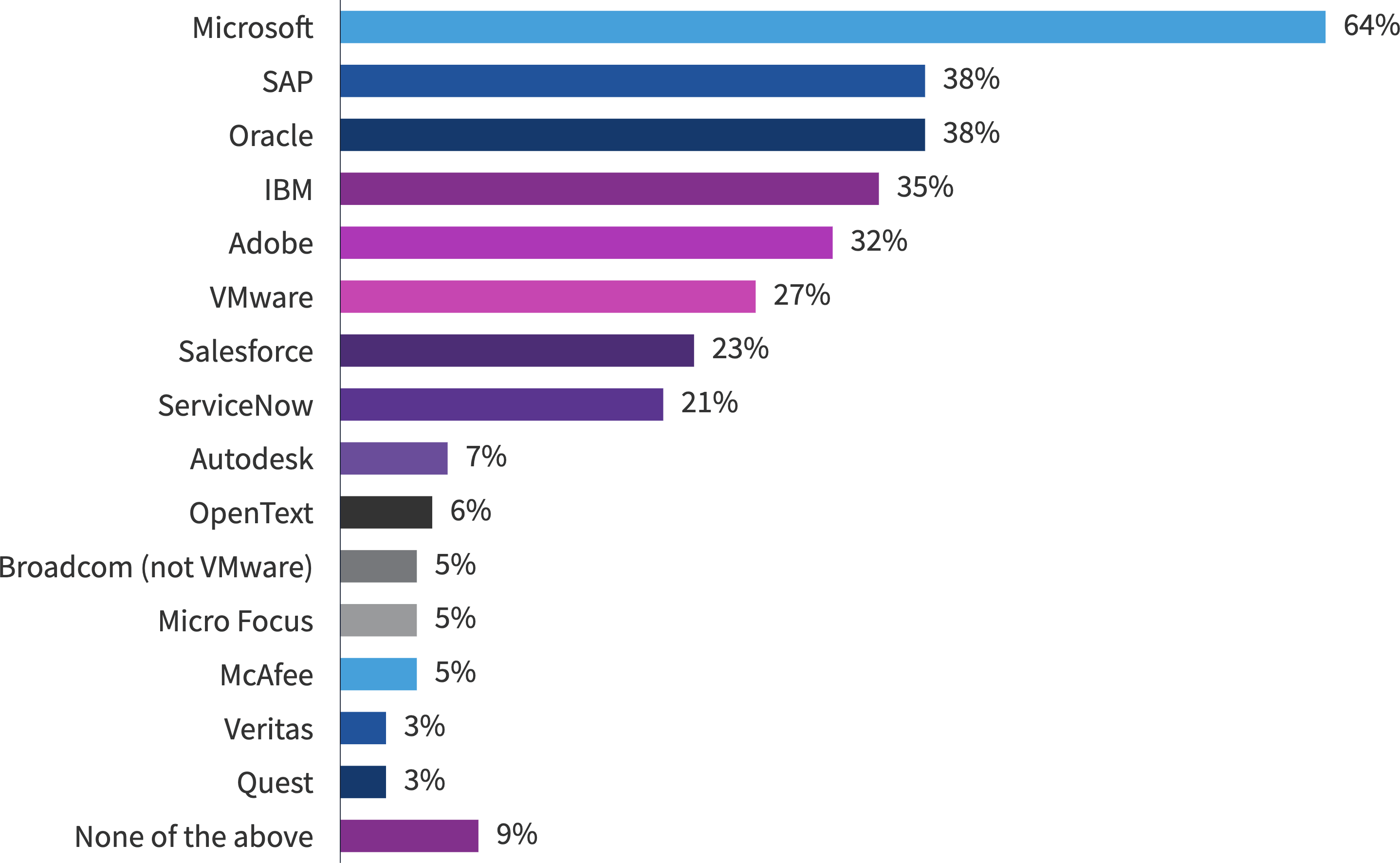
What triggers an audit?
A few key events or patterns typically trigger Microsoft audits. Understanding these triggers helps you stay prepared and avoid unnecessary risk.
Unusual spikes in spend or usage
- Sudden increases in license purchases, cloud consumption or unexpected changes in usage patterns prompts Microsoft to verify that your licensing matches your actual usage.
- Automated systems and account teams monitor for these spikes.
- If your spend or usage deviates from historical trends, it can flag your organization for review.
Mergers and acquisitions
- Mergers, acquisitions or divestitures are a major audit trigger.
- M&A drives a higher risk of accidental non-compliance or duplicate licensing.
- Microsoft may audit to ensure that all entities are properly licensed.
- Proactive license reviews during mergers and acquisitions (M&A) activity can help you avoid surprises.
Free assessments that surface issues
- Free software asset management (SAM) assessments or compliance reviews can surface issues like missing licenses or misused products.
- Accepting a free assessment means sharing deployment and usage data.
- If discrepancies are found, Microsoft may follow up with a full compliance audit.
Best practice
If your data is clean and your processes are well-documented, you’re in a strong position to respond to any audit request. Regular internal reviews, clear records of license assignments and proactive management of changes (e.g., onboarding, offboarding and organizational restructuring) will help you minimize risk and maintain compliance.
Understanding your Microsoft agreement
Your agreement type determines your flexibility, cancellation rules and price protection. The Enterprise Agreement (EA) gives stability and discounts to big companies. Cloud Solution Provider (CSP) is flexible and helps partners of all sizes. Microsoft Products and Services Agreement (MPSA) and Open Value are still options for legacy or niche scenarios. The first step is to know which agreement you have—this shapes your negotiation power and cost control. Here are the three main ways organizations buy Microsoft licenses, each with its own strengths and trade-offs.
| Enterprise agreement (EA) | CSP under Microsoft customer agreement (MCA) | MPSA and open value | |
| Best for | Larger organizations (typically 500+ users/devices); increasingly reserved for enterprises with 2,400+ users | Organizations seeking flexibility, with fluctuating needs or avoiding large upfront commitments | Organizations with legacy needs or smaller orgs not ready for cloud-first; MPSA for 250+ users/devices, open value for 5–499 users/devices |
| Managed by | Direct agreement with Microsoft | Through a Microsoft partner (partner handles billing, support, adjustments) | Direct with Microsoft or reseller; transactional approach |
| Commercials | 3-year contract; organization-wide commitment; predictable annual payments; volume discounts; price locked for term | Monthly or annual terms; pay-as-you-go; no long-term commitment; price protection for subscription duration | Transactional (MPSA) or short-term commitment (open value); less price protection; Software assurance optional (MPSA) or included (open value) |
| Benefits | Simplified license management; software assurance (upgrades, support, training); ability to adjust licenses annually | High flexibility; scale up/down easily; cancel or reduce licenses at subscription end; partner-managed experience | Mix of cloud and on-premises options; suits legacy needs; fewer benefits compared to EA or CSP |
Microsoft licensing pitfalls
There are a variety of licensing pitfalls organizations encounter. Avoiding these challenges requires a combination of accurate data, regular audits and the right tools. Move beyond basic dashboards and spreadsheets, pay attention to the fine print and consolidate your reporting to get a true picture of your licensing health.
Treating basic usage dashboards as optimization
- Microsoft’s built-in dashboards focus on adoption and activity, not on whether you're over-licensed or wasting spend. They show who's using a product, but not whether you could safely downsize or reassign licenses.
- True optimization requires feature-level usage analysis and matching license types to actual needs, not just tracking logins or basic activity.
Flexera’s market-leading ITAM solutions provide usage details at the device, SKU and user level, helping organizations reclaim unused licenses, downgrade to less expensive bundles and prevent over buying
Multiple tenants hide duplicates
- If your organization has more than one Microsoft 365 tenant, it’s easy to miss duplicate users, licenses or services. This can lead to paying twice for the same person or resource.
- Consolidating reporting across tenants and regularly auditing for overlaps helps you spot and eliminate unnecessary spend.
Flexera’s scalable ITAM solutions consolidate a view of license usage and optimization across organizations with multi-tenant environments
Missing fine print for SQL, Windows and Visual Studio
- Licensing for SQL Server, Windows Server and Visual Studio includes detailed rules about usage, environments and entitlements. Overlooking these details can result in accidental non-compliance or missed savings.
- For example, Visual Studio licenses are for development and testing only, not production. SQL and Windows licensing depend on core counts, virtualization and access rights. Always review the official licensing terms and check for updates.
Misusing trials or Visual Studio rights
- Trials and evaluation licenses are for short-term testing, not ongoing business use. Extending or misusing trial licenses can trigger compliance issues during an audit.
- Visual Studio rights are strictly for development, testing and demonstrations. Any use in production environments is a violation and should be corrected immediately.
Relying on spreadsheets for your entire license position
- Spreadsheets are useful for tracking, but they are fragile and prone to errors, especially as environments grow more complex. Manual updates can miss changes, and version control is difficult.
- Use dedicated SAM or ITAM tools that link purchase records to actual use, automate compliance checks and give you a better idea of your license status.
Tools and data sources for license optimization
You likely have one or more tools at your disposal to understand your license position and usage across your SaaS, cloud and on-premises Microsoft environments. The table below helps you assess the right tool for the right job. Flexera connects what you bought to what is used, which exposes rightsizing and bring-your-own-license (BYOL) opportunities. Microsoft Configuration Manager or Intune is strong for device and software inventory. Microsoft 365 admin and usage reports are good for adoption and activity. Azure cost and resource tools show what runs and what it costs.
| Capability / Question | Flexera | ConfigMgr/Intune | M365 admin/Usage analytics | Graph reports API | Azure cost management + advisor | Azure resource graph | Defender for cloud |
|---|---|---|---|---|---|---|---|
| E1/E3/E5 rightsizing (feature-level) | Yes (use rights, Copilot usage) | Partial (inventory) | Adoption only | Adoption only | N/A | N/A | N/A |
| Seat utilization and unassigned licenses | Yes | No | Yes | Yes | N/A | N/A | N/A |
| Project/Visio 90-day no-use | Yes | No | Yes | Yes | N/A | N/A | N/A |
| Windows core licensing calculation and stacking | Yes | Partial (hardware/VM data) | — | — | — | Yes | — |
| Identify Windows/SQL Pay-as-you-go (PAYG) → Azure Hybrid Use Benefit (AHUB) | Yes | — | — | — | Yes | Yes | Partial |
| Track AHUB claim coverage and drift | Yes | — | — | — | Yes | Yes | — |
| Visual Studio (MSDN) assignment and usage | Yes | Partial | — | — | — | — | — |
Did you know?
Flexera’s solutions help optimize your cloud infrastructure, SaaS and on-premises license spend by matching entitlements to usage and providing insights to reduce spend.
Microsoft license optimization opportunities
There are many optimization opportunities to be aware of—however, these are the big rocks many organizations miss.
Microsoft 365 rightsizing
- Rightsizing means matching what people have to what they use. A classic pattern is E5 assigned but only E3 features are used. Project and Visio often sit unused—and unassigned seats are common. As a rule of thumb, 20 - 30% of spend on the top tier can be avoided when you check usage at the feature level.
Metrics that matter:
- Percent of seats unassigned; percent of seats assigned but no use in last X days
- People with E5 assigned but E3-level usage
- Project or Visio with no use for 90 days or more
Microsoft Server licensing and use in Azure
- For server licenses, the cost depends on core counts and virtualization. Microsoft has introduced more flexible virtualization benefits, including per-VM licensing for Windows Server and expanded rights to deploy licenses on shared cloud infrastructure. With per-VM licensing, you can license Windows Server based on the number of virtual cores used in your virtual machines, rather than being tied to the physical server core count.
- The Flexible Virtualization Benefit lets you use eligible licenses on authorized outsourcers' shared servers, not just dedicated hardware. This opens up more options for cloud deployment and outsourcing, giving you greater flexibility to optimize costs and architecture.
- In Azure, look for instances that are on PAYG pricing. If you're eligible, move those to your own licenses by using the Azure Hybrid Use Benefit. This change often delivers fast and significant savings as PAYG can be up to 85% more expensive than bringing your own license.
Did you know?
Flexera saved 25% of its total compute Azure bill by using BYOL insights.
Metrics that matter:
- Windows or SQL Server PAYG instances that qualify for BYOL
- Available BYOL licenses
- Track coverage of Azure reservations or Spot savings plans in addition to using the Azure Hybrid Benefit to see if you’re using the best infrastructure cost model
Visual Studio and CALs
Visual Studio subscriptions are licensed strictly on a per-user basis. Each individual who uses Visual Studio must have their own subscription assigned; these can't be shared among teams, labs or groups.
As an admin, you should regularly review your user inventory and ensure that everyone who interacts with Visual Studio-licensed software is covered by their own license. This includes both internal and external developers, testers and stakeholders.
Subscriptions can be reassigned, but only once every 90 days. This means you need to track assignment changes and avoid frequent swaps, which can trigger compliance issues.
Audit your environment for any accidental or intentional use of Visual Studio in production environments. Remove any such usage immediately to avoid compliance penalties. This includes checking for Visual Studio installations on production servers or VMs.
Metrics that matter:
- Use of Visual Studio in production environments—servers and desktops
- Compare that to entitlements to determine if you are over subscribed
General CAL management
- Beyond Visual Studio, ensure you have the correct Client Access Licenses (CALs) for users and devices accessing Windows Server, SQL Server or other Microsoft environments.
- CALs are required for every user or device connecting to a server. You can check CAL usage via tools like the Essentials Dashboard, PowerShell queries or the Remote Desktop Licensing Manager.
- Regularly review your CAL inventory, audit for compliance and remove access for users who have left or no longer require server access. This helps prevent over-licensing and ensures you’re not paying for unused entitlements.
Renewal levers that still work:
- Know your numbers before you negotiate
- Swap unused products for ones you need
- Control joiners and leavers
- Use early renewal only if it locks in a better price or terms
Additional optimization opportunities include:
- Microsoft Teams: Microsoft has globally restructured its Microsoft 365 and Office 365 suites. Now, new commercial customers must choose whether to buy suites with Teams included or without Teams. This change was driven by regulatory requirements and is designed to give organizations more choice and transparency. If you need Teams, you can add it as a separate subscription.
- Copilot: Microsoft 365 Copilot is now easier to deploy and test in small teams or pilot groups. You can assign Copilot licenses to select users, gather feedback and refine your rollout before scaling up. Be sure to track adoption to ensure your organization is getting the most out of this new solution.
What to do if you’re facing an audit
If you’ve received an audit notice letter, don’t panic. Move forward with confidence and start your audit journey by checking out our guide—10 steps to navigating a software audit.
If you’re not already a Flexera customer, we recommend you register for Flexera’s Vendor Audits Readiness Workshop. In these sessions, up to three members of your team will participate in a hands-on workshop with former audit defense practitioners on Flexera’s Solutions Advisory team. These experts will equip you with audit preparation best practices, advice on your rights and obligations during a vendor audit, clarity on the data you’ll need to meet audit demands—and much more.
Get expert guidance on Microsoft licensing
We connect your entitlements to real usage, so you spend less, stay audit ready and renew with leverage.