


Make sure your data is in the proper format. That is the key to processing and analysis. If you perform numerical computations, date manipulations, or string operations, you need the correct data types. Data type conversion is the answer. Say you have a dataset where dates are stored as strings, but you need to do date-based calculations. Or perhaps you have numeric data stored as strings and you need to do math. These are the scenarios where data type conversion is essential. And if you work with Snowflake, then it has a function for this: the CAST function.
In this article, we’ll walk through what Snowflake CAST does, how to use it, when to reach for TRY_CAST instead and where both functions have real limits.
What is the CAST function in Snowflake?
Snowflake CAST converts a value from one data type to another. It’s a standard SQL function, not something Snowflake invented, but Snowflake’s implementation has specific behaviors you should understand before relying on it in production.
One thing worth knowing upfront: internally, CAST calls the appropriate type-specific conversion function automatically. If you cast a NUMBER to a BOOLEAN, Snowflake internally calls TO_BOOLEAN. If you cast a string to a DATE, it calls TO_DATE. That’s a useful mental model. CAST is a convenient wrapper around Snowflake’s family of TO_ conversion functions. All the rules that apply to those underlying functions apply when you call CAST too.
Next, we’ll cover the syntax and basic usage of Snowflake CAST. This will give you the foundation to start using this function well in your Snowflake queries.
Syntax and basic usage of Snowflake CAST
Now that we understand what Snowflake CAST does, let’s look at how to use it in Snowflake. The syntax is straightforward.
Basic syntax:
The basic syntax for the Snowflake CAST function is:
CAST(expression AS target_data_type)Alternatively,
You can use the shorthand cast operator:
expression::target_data_typeParameters:
expression: The value or column you want to convert. This can be a literal value, a column name or a more complex SQL expression.target_data_type: The Snowflake data type you’re converting to. You can specify precision and scale for numeric types, or length for string types. For example, NUMBER(10,2) or VARCHAR(50).
Snowflake supports many data types, including NUMBER, VARCHAR, DATE, TIMESTAMP and more. You can also specify precision and scale for numeric types, or length for string types, like this: NUMBER(10,2) or VARCHAR(50).
Basic Snowflake CAST example:
Let’s consider a simple example where we convert a string to a number:
SELECT CAST('123' AS NUMBER);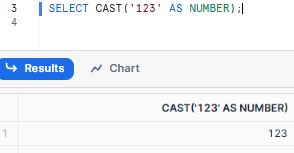
To check the data type of the result of a query in Snowflake, you can use the SYSTEM$TYPEOF function.
SELECT SYSTEM$TYPEOF(CAST('123' AS NUMBER));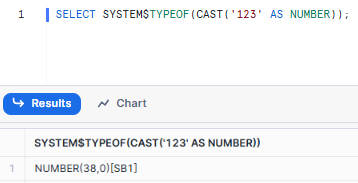
As you can see, Snowflake CAST converts the string “123” to the number 123.
CAST vs :: — What’s actually different
For most conversions, CAST(expr AS type) and expr::type are interchangeable. There is one functional difference that matters when working with structured OBJECT types.
The CAST keyword supports two optional clauses: RENAME FIELDS and ADD FIELDS. These let you modify field names or add new fields to a structured OBJECT during a cast. The :: operator doesn’t support these arguments at all.
Full syntax (Only with the CAST keyword):
CAST( <source_expr> AS <target_data_type> ) [ RENAME FIELDS | ADD FIELDS ]
Shorthand (no RENAME FIELDS or ADD FIELDS support):
<source_expr> :: <target_data_type>
If you’re not working with structured OBJECTs, this distinction won’t affect you. But it’s worth knowing before you hit an unexpected syntax error.
There’s also a collation behavior to be aware of: collation specifications are not retained when you cast values to text string types like VARCHAR or STRING. If you need collation preserved, apply it explicitly after the cast:
CAST(myvalue AS VARCHAR) COLLATE 'en-ai'
CAST operator precedence — The easy thing to get wrong
The :: operator has higher precedence than arithmetic operators like *< (multiply) and even unary minus (negation). That can produce results you don’t expect.
Take this query:
SELECT height * width::VARCHAR || ' square meters' FROM dimensions;
You might expect height * width to be calculated first, then converted to VARCHAR. What actually happens is the cast binds more tightly, so Snowflake reads it as:
SELECT height * (width::VARCHAR) || ' square meters' FROM dimensions;
That’s almost certainly not what you want. Fix it with parentheses:
SELECT (height * width)::VARCHAR || ' square meters' FROM dimensions;
When you’re mixing :: with arithmetic, add parentheses around the expression you want cast. It costs nothing and prevents a class of subtle, hard-to-spot bugs.
As we progress through this article, we’ll explore more complex scenarios and best practices to help you leverage the Snowflake CAST function to its full potential.
What is TRY_CAST?
Snowflake TRY CAST is a safer alternative to the CAST function. While the CAST function raises an error if the conversion fails, Snowflake TRY_CAST returns NULL, making it more robust for handling conversion errors.
Snowflake TRY_CAST function is useful when you anticipate potential conversion errors and want to handle them gracefully without interrupting your data processing pipeline.
Syntax and basic usage of Snowflake TRY_CAST
Basic syntax:
The basic syntax for the TRY_CAST function is as follows:
TRY_CAST(expression AS target_data_type)Parameters:
The parameters for Snowflake TRY_CAST are essentially the same as for Snowflake CAST:
1. expression
This can be any valid SQL expression that results in a value. Examples include:
- A column name: TRY_CAST(user_id AS VARCHAR)
- A literal value: TRY_CAST(‘2023-07-23’ AS DATE)
- A more complex expression: TRY_CAST(TRIM(user_input) AS NUMBER)
2. <target_data_type>
This specifies the target Snowflake data type. As with CAST, you can specify precision and scale for numeric types or length for string types.
Error handling using Snowflake TRY_CAST
Let’s look at a practical example to see how Snowflake TRY_CAST handles errors:
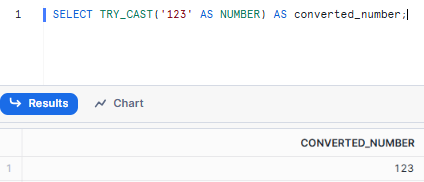
SELECT TRY_CAST('123' AS NUMBER) AS converted_number;In this scenario:
- If the expression contains “123”, the converted_number will be 123.
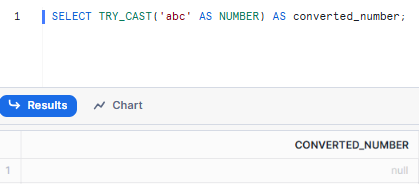
- If the expression contains “abc”, the converted_number will be NULL.
- If the expression contains “12.3aaabc”, the converted_number will be NULL.
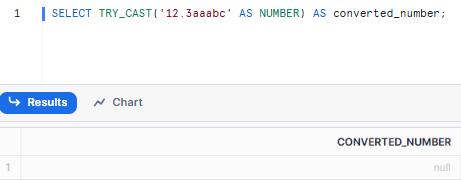
Snowflake TRY_CAST is particularly useful when:
- You’re working with data from external sources where quality isn’t guaranteed.
- You want to identify rows with problematic data for further investigation.
- You need to ensure your ETL processes are robust and can handle unexpected input.
Limitations of Snowflake TRY_CAST
Snowflake TRY_CAST is awesome for handling conversion errors, but it’s not a magic solution. There are some things it can’t do and you should know what they are.
1. String inputs only
The biggest limitation of TRY_CAST is that it only takes string inputs. So you can only cast from string to another Snowflake data type, not between other types.
For example, this will work:
SELECT TRY_CAST('123' AS NUMBER);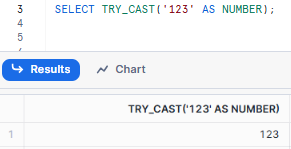
But this will not:
SELECT TRY_CAST(123 AS VARCHAR);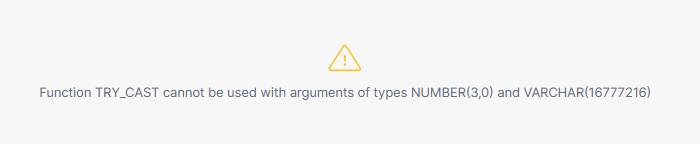
If you need to convert between non-string types, you’ll need to use the regular Snowflake CAST function or convert to a string first.
2. Limited target types
Snowflake TRY_CAST supports conversion to a subset of Snowflake data types. The supported target Snowflake data types are:
You can’t use Snowflake TRY_CAST to convert to more specialized types like ARRAY or OBJECT directly. For these types of conversions, you might need to use a combination of Snowflake TRY_CAST and other Snowflake functions.
3. NULL ambiguity
Snowflake TRY_CAST returns NULL for both failed conversions and NULL inputs. You can’t tell the difference without extra logic. If that distinction matters, filter on IS NULL AND original_column IS NOT NULL to isolate actual conversion failures.
4. No error detail
When a conversion fails, TRY_CAST gives you NULL and nothing else. You lose all visibility into why the conversion failed. For data quality investigation, you’ll need to add filtering logic separately.
5. Silent failures
Because TRY_CAST doesn’t error out, data quality problems can go unnoticed. A column of unexpected NULLs might look normal until you investigate. This is a trade-off worth thinking through before applying TRY_CAST broadly.
Despite all these limitations, Snowflake TRY_CAST is still super useful in many situations. You just need to know when to use it and when to use something else.
Next, we’ll compare Snowflake CAST and Snowflake TRY_CAST head-to-head to help you decide.
What is the difference between CAST and TRY_CAST in Snowflake?
Let’s compare Snowflake CAST vs Snowflake TRY_CAST across several key dimensions:
| Snowflake CAST | Snowflake TRY_CAST |
| Snowflake CAST converts a value from one data type to another. | Snowflake TRY_CAST also converts a value from one data type to another. Returns NULL if conversion fails. |
| Snowflake CAST raises an error if type casting is not possible. | Snowflake TRY_CAST returns NULL if type casting is not possible. |
| Snowflake CAST is suitable when the conversion must be guaranteed to succeed and any failure should be explicitly handled by error. | Snowflake TRY_CAST is suitable for scenarios where conversion might fail and handling the failure gracefully with NULL is acceptable. |
| Snowflake CAST is used in strict data conversion scenarios where validation is required. | Snowflake TRY_CAST is used in flexible data conversion scenarios where potential errors should not disrupt the process. |
| Snowflake CAST supports a wide range of data types including numbers, strings, dates, etc. | Snowflake TRY_CAST supports conversion for specific types like VARCHAR, NUMBER, DATE, BOOLEAN and TIMESTAMP variations. |
| Syntax: CAST(<expression> AS <target_data_type>) or <expression> :: <target_data_type> |
Syntax: TRY_CAST(<expression> AS <target_data_type>) |
| Example: CAST(‘2024-01-01’ AS DATE) will convert the string to a date, but CAST(‘not-a-date’ AS DATE) will throw an error. |
Example: TRY_CAST(‘2024-01-01’ AS DATE) will convert the string to a date, while TRY_CAST(‘not-a-date’ AS DATE) will return NULL. |
The choice between Snowflake CAST and Snowflake TRY_CAST depends on your use case. It depends on your data quality and error-handling needs.
Practical examples of Snowflake CAST
Now that we’ve covered the theory, let’s dive into some practical examples of how to use Snowflake CAST.
Note: In the following examples, we will use the SYSTEM$TYPEOF function to display the data types of both the original values and the converted values.
Example 1—Converting a string to an integer using Snowflake CAST
Here is how you can convert a string to an integer in Snowflake:
SELECT
		'12345' AS original_value,
		 SYSTEM$TYPEOF('12345') AS original_value_data_type,
		CAST('12345' AS INTEGER) AS converted_value,
		SYSTEM$TYPEOF(CAST('12345' AS INTEGER)) AS converted_value_data_type;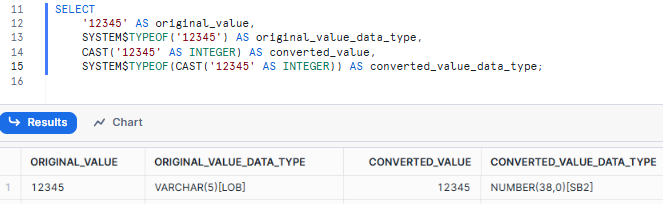
As you can see, in this query, the string “12345” is converted to the integer 12345. The Snowflake CAST function ensures that the conversion handles only valid numerical string values, raising an error if the conversion is not possible.
Example 2—Converting a string to a date using Snowflake CAST
To convert a string formatted as a date to an actual DATE type:
SELECT
		 '2024-07-23' AS original_value,
		 SYSTEM$TYPEOF('2024-07-23') AS original_value_data_type,
		 CAST('2024-07-23' AS DATE) AS converted_value,
		 SYSTEM$TYPEOF(CAST('2024-07-23' AS DATE)) AS converted_value_data_type;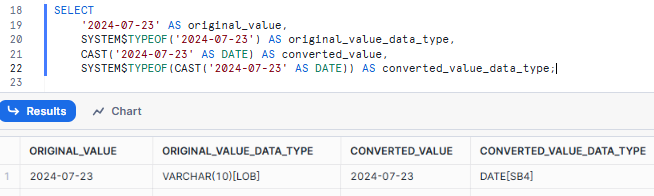
Here, the string “2024-07-23” is transformed into the date 2024-07-23. The format of the string must match the expected date format, otherwise, an error will be thrown.
Example 3—Converting a number to a decimal with specified precision and scale using Snowflake CAST
When converting a number to a decimal with specific precision and scale:
SELECT
		123.4567 AS original_value,
		SYSTEM$TYPEOF(123.4567) AS original_value_data_type,
		CAST(123.4567 AS DECIMAL(5,2)) AS converted_value,
		SYSTEM$TYPEOF(CAST(123.4567 AS DECIMAL(5,2))) AS converted_value_data_type;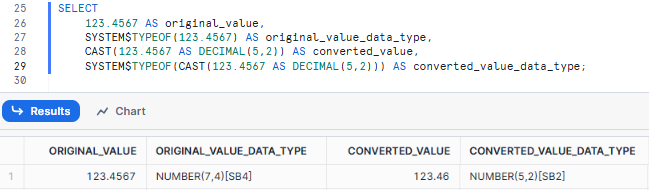
In this example, the number 123.4567 is converted to a decimal with a precision of 5 and a scale of 2, resulting in 123.46. Snowflake rounds the number to fit the specified scale.
Example 4—Converting a float to an integer using Snowflake CAST
To convert a float to an integer:
SELECT
		 45.67 AS original_value,
		SYSTEM$TYPEOF(45.67) AS original_value_data_type,
		 CAST(45.67 AS INTEGER) AS converted_value,
		 SYSTEM$TYPEOF(CAST(45.67 AS INTEGER)) AS converted_value_data_type;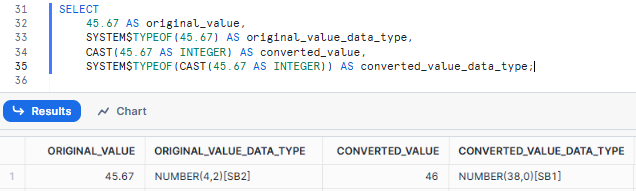
In this case, the float 45.67 is converted to the integer 46, with Snowflake rounding the value to the nearest integer.
Example 5—Converting a string to a decimal using Snowflake CAST
For converting a string containing a decimal number to a DECIMAL type:
SELECT
		'789.1234' AS original_value,
		SYSTEM$TYPEOF('789.1234') AS original_value_data_type,
		CAST('789.1234' AS DECIMAL(7,3)) AS converted_value,
		SYSTEM$TYPEOF(CAST('789.1234' AS DECIMAL(7,3))) AS converted_value_data_type;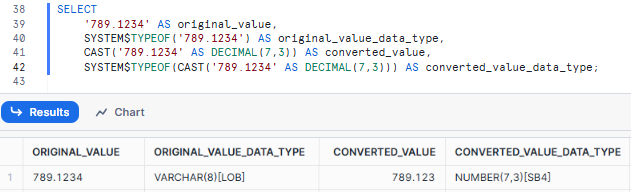
As you can see, this will convert the string “789.1234” to the decimal 789.123, where the specified precision is 7 and the scale is 3.
Example 6—Extracting a date from a timestamp using Snowflake CAST
To strip the time part from a timestamp and convert it to a date:
SELECT
		'2024-07-23 14:32:29' AS original_value,
		 SYSTEM$TYPEOF('2024-07-23 14:32:29') AS original_value_data_type,
		CAST('2024-07-23 14:32:29' AS DATE) AS converted_value,
		 SYSTEM$TYPEOF(CAST('2024-07-23 14:32:29' AS DATE)) AS converted_value_data_type;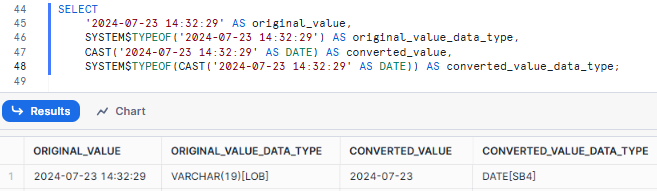
In this query, the timestamp “2024-07-23 14:32:29” is converted to the date 2024-07-23, effectively removing the time component.
Snowflake CAST can do a lot more than what you see here. This is just the tip of the iceberg. You can use it to convert Snowflake data types in a flash, or make super-precise adjustments. Whatever Snowflake data type you’re dealing with, Snowflake CAST can tackle it with ease.
How to use CAST and TRY_CAST effectively?
Here are practical guidelines for getting the most out of both functions.
1. Pick the right function for your data quality context
Use Snowflake CAST when your data quality is controlled and you want failures to surface immediately as errors. That’s the right behavior for internal data pipelines where unexpected values should never pass through silently.
Use Snowflake TRY_CAST when working with external data sources, user-submitted input or semi-structured data where some conversion failures are expected. It lets your query complete and lets you handle NULL results downstream.
2. Use TO_ functions for date/time with specific formats
CAST can convert strings to DATE, TIME, or TIMESTAMP, but it relies on Snowflake’s implicit parsing, which may not always be robust or handle all formats. Therefore, for better clarity and more explicit control, especially when dealing with diverse input formats, opt for dedicated conversion functions:
TO_DATE(<string_expression> [, <format_string>])TO_TIME(<string_expression> [, <format_string>])TO_TIMESTAMP(<string_expression> [, <format_string>]), TO_TIMESTAMP_LTZ, TO_TIMESTAMP_NTZ, TO_TIMESTAMP_TZ
SELECT TO_DATE('25-08-2025', 'DD-MM-YYYY') AS explicit_date_conversion;3. Combine TRY_CAST with COALESCE for default values
TRY_CAST returns NULL on failure. COALESCE converts that NULL into a usable default. Together, they let you keep pipelines running cleanly even when input quality is inconsistent:
SELECT
		value_str,
		COALESCE(TRY_CAST(value_str AS NUMBER), 0) AS safe_number_with_default,
		 COALESCE(TRY_CAST(value_str AS DATE), CURRENT_DATE()) AS safe_date_with_default
FROM VALUES
		 ('123'),
		 ('abc'),
		 (NULL),
		('2025-08-25') AS t(value_str);
4. Use TRY_CAST to isolate bad data for investigation
TRY_CAST is excellent for identifying problematic data without stopping your entire process. You can use it in a WHERE or QUALIFY clause to isolate records that failed conversion for further investigation or cleaning.
SELECT
		id,
		 string_column
FROM my_table
WHERE TRY_CAST(string_column AS NUMBER) IS NULL
	AND string_column IS NOT NULL;
5. Be precise about precision and scale
When converting to NUMBER or DECIMAL, think carefully about what you specify. Insufficient scale causes rounding (data loss). Insufficient precision causes an error. Know your data’s numeric range before choosing these values. NUMBER(10,4) is safer than NUMBER(5,2) if you’re not sure.
Limitations of Snowflake CAST
Here are the limitations of the Snowflake CAST function:
1. Failed conversions throw errors
If CAST can’t convert a value to the target type, it raises an error and stops execution. There’s no partial success. Use TRY_CAST if you need resilience.
2. Precision and scale constraints
If the scale is insufficient, CAST rounds the value. If the precision is insufficient after rounding, it raises an error. These are two different outcomes and can be easy to conflate. Test your conversions with edge-case values.
3. Unsupported type pairs
Not every source/target type combination is valid in Snowflake. Snowflake’s data type conversion reference documents what’s castable and what requires a specialized function. For semi-structured types, use TO_VARIANT, PARSE_JSON or OBJECT_CONSTRUCT as appropriate.
4. Date/time format sensitivity
CAST for DATE and TIMESTAMP depends on Snowflake’s default parsing logic. Non-standard input formats will cause errors. Use TO_DATE or TO_TIMESTAMP with an explicit format string for any input you don’t control.
5. NULL propagation
NULL inputs produce NULL outputs, not errors. CAST doesn’t validate whether a NULL result is expected or a sign of a problem. Add explicit NULL checks in your query logic where needed.
6. No RENAME FIELDS or ADD FIELDS with ::
:: operator with structured OBJECT types, you can’t use the RENAME FIELDS or ADD FIELDS clauses. Use the full CAST(… AS …) syntax for those operations.
7. Collation is not retained
Casting to VARCHAR or STRING drops any collation specification from the source value. Re-apply collation explicitly after the cast if your use case requires it.
Want to learn more?
Want to learn more about Snowflake CAST and TRY_CAST functions? We’ve got you covered. Here are some helpful resources.
Save up to 30% on your Snowflake spend in a few minutes!
Conclusion
So, that’s a wrap! Snowflake CAST function is super powerful when it comes to switching/converting data types. It makes sure your data is compatible and accurate while processing. Once you get the hang of its syntax, usage and what it can’t do, you’ll be able to use CAST to handle all kinds of data conversions in Snowflake.
In this article, we have covered:
- What the Snowflake CAST function does and how it works internally
- Syntax for both CAST and the :: shorthand, including the functional difference between them
- Cast operator precedence and why parentheses matter
- What TRY_CAST does and when to use it
- Limitations of both functions, with specifics on what each limitation actually means
- Practical examples covering the most common conversion scenarios
- Best practices for using CAST and TRY_CAST in real pipelines
… and so much more!
FAQs
What is the CAST function in Snowflake?
CAST converts a value of one Snowflake data type into another using the syntax CAST(expression AS target_data_type). If the conversion isn’t possible, it raises an error.
How does the :: operator relate to Snowflake CAST?
The :: operator is shorthand for CAST. expression::target_data_type produces the same result as CAST(expression AS target_data_type) in most cases. The only exception is that :: doesn’t support the RENAME FIELDS or ADD FIELDS clauses for structured OBJECT types.
What is the difference between Snowflake CAST and TRY_CAST?
CAST raises an error on a failed conversion. TRY_CAST returns NULL. TRY_CAST also only accepts string inputs, while CAST works with any supported Snowflake data type.
How do I handle type conversion errors in Snowflake?
Use Snowflake TRY_CAST to handle conversion failures gracefully. Failed conversions return NULL instead of stopping query execution. Combine with COALESCE to supply a default value when NULL results aren’t acceptable.
What data types can Snowflake CAST convert to?
Snowflake CAST supports conversion across most Snowflake data types including NUMBER, VARCHAR, DATE, TIMESTAMP, BOOLEAN and more. See Snowflake’s official data type conversion table for the complete list of supported source/target pairs.
What data types can Snowflake TRY_CAST convert to?
TRY_CAST supports a subset: VARCHAR (and synonyms), NUMBER (and synonyms), DOUBLE, BOOLEAN, DATE, TIME, TIMESTAMP, TIMESTAMP_LTZ, TIMESTAMP_NTZ, TIMESTAMP_TZ and interval variations.
Can Snowflake CAST handle precision and scale for numeric types?
Yes. You specify them in the target data type, for example CAST(value AS DECIMAL(10,2)). If the scale is insufficient, Snowflake rounds the value. If the precision is insufficient, CAST raises an error.
Does Snowflake CAST round or truncate when converting a float to an integer?
Snowflake rounds the value, not truncates. CAST(45.67 AS INTEGER) returns 46, not 45.
What happens if Snowflake CAST conversion fails?
Snowflake CAST raises an error and stops execution. Use TRY_CAST if you need the query to continue and can handle NULL results downstream.
What is the syntax for Snowflake TRY_CAST?
TRY_CAST(expression AS target_data_type), where expression must be a string.
What happens when Snowflake TRY_CAST fails?
It returns NULL instead of raising an error.
Can TRY_CAST accept non-string inputs?
No. Snowflake TRY_CAST only works with string expressions. Passing a non-string value like a numeric literal will raise an error. Use CAST for non-string conversions.
How do I cast a VARIANT value to a specific type in Snowflake?
Use Snowflake CAST with the appropriate target type, for example CAST(variant_value AS NUMBER). Be aware that the conversion rules of the underlying TO_ function (like TO_NUMBER) apply here.
How do I distinguish a Snowflake TRY_CAST failure from a NULL input?
Check both the TRY_CAST result and the original column: WHERE TRY_CAST(string_column AS NUMBER) IS NULL AND string_column IS NOT NULL. That isolates actual conversion failures.
Does Snowflake CAST retain collation when converting to VARCHAR?
No. Collation specifications are dropped when casting to text string types like VARCHAR or STRING. Apply collation explicitly after the cast if you need it: CAST(myvalue AS VARCHAR) COLLATE ‘en-ai’.
Does the :: operator have higher precedence than arithmetic operators?
Yes. The :: operator binds more tightly than *, + and unary minus. Use parentheses around expressions you want evaluated before casting: (height * width)::VARCHAR instead of height * width::VARCHAR.
When should I use TO_DATE instead of Snowflake CAST for date conversion?
Use TO_DATE with an explicit format string whenever your input date format isn’t a standard YYYY-MM-DD format. For example, TO_DATE(’25-08-2025′, ‘DD-MM-YYYY’) handles non-standard formats reliably, while CAST depends on Snowflake’s implicit parsing logic.
Pramit Marattha
Pramit Marattha is a technical content writer and strategist with 5+ years of experience covering AI, data engineering, data cloud platforms and open source technologies. He turns complex technical concepts into clear, useful content for engineers and developers.







