
Ask any platform engineer how they set CPU and memory requests and you’ll usually hear some version of “we guessed, then added a bit more to be safe.” That padding adds up. Kubernetes reserves capacity based on what each workload requests, not what it uses.
AWS’s container team names overprovisioned resources as the primary driver of cloud cost waste on Amazon EKS. In one example, pods were using only about 21% of the CPU and 29% of the memory they requested, and rightsizing them cut the EC2 instances needed by two-thirds. Flexera’s own 2026 State of the Cloud report puts the share of cloud spend lost to inefficiency at 29%, the first increase in wasted spend in five years.
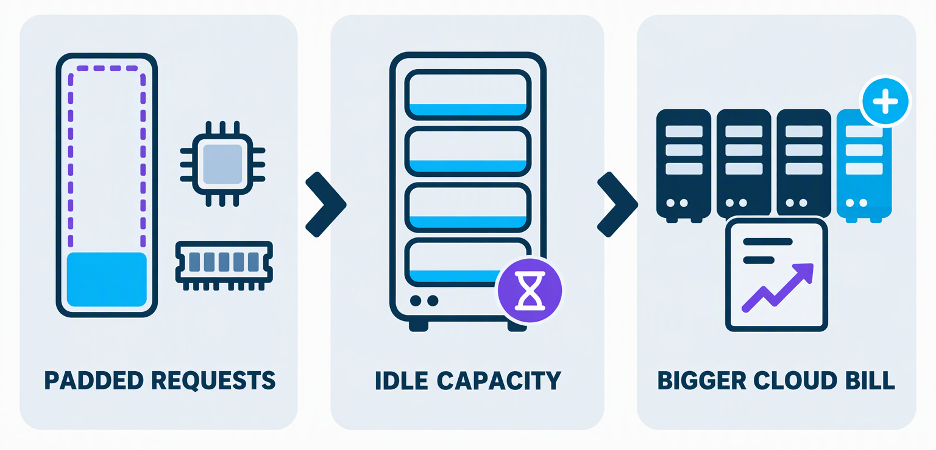
The cost of padding: inflated requests reserve capacity that sits idle, and the cloud bill grows to cover it.
Spotting the waste is easy enough. Keeping up with it is another story. Usage changes every week, there are hundreds of services to look after, and nobody wants to spend their Fridays retuning YAML. So the padding stays.
That’s the problem Autonomous Rightsizing in Ocean was built for when we launched it in 2024. Since then, we have invested in giving platform teams enough control and visibility that they’re comfortable letting it run on its own.
How Autonomous Rightsizing in Ocean works
Ocean learns the CPU and memory utilization pattern for each workload over time, recommends new resource requests, and applies them according to rules you define. It supports Amazon EKS, Azure AKS and Google GKE.
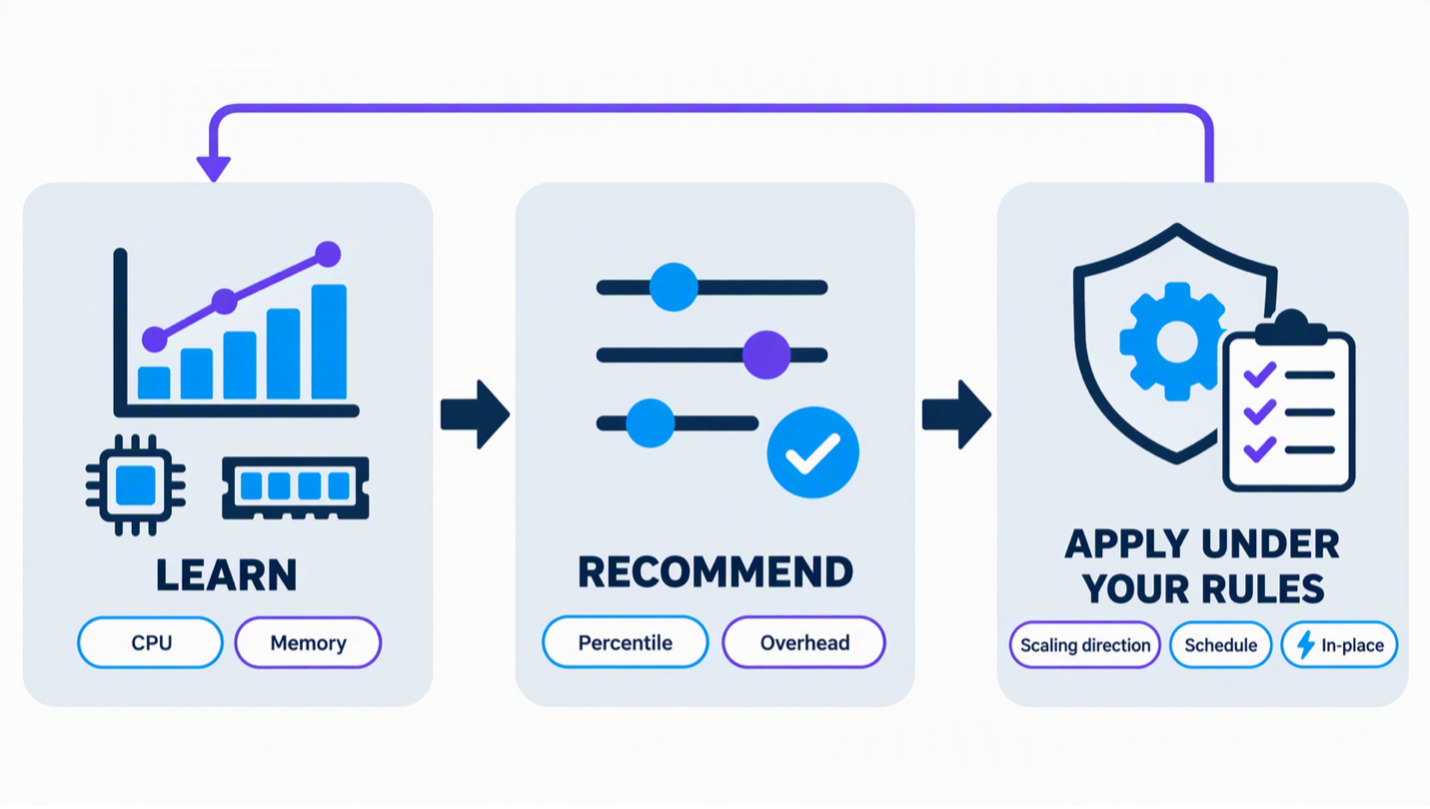
The Autonomous Rightsizing loop: Ocean learns usage, recommends requests and applies them under your rules.
The Advanced Optimization view shows a potential savings figure derived from each workload’s true usage as compared to the resources it requested. Preliminary recommendations show up within a few hours, and Ocean continues to refine the recommendations over a period of up to four days.
Rules let you decide how cautious to be. You pick the usage percentile threshold, whether Ocean can only reduce requests or increase them too, how much overhead to add, and when changes happen. Ocean also recommends minimum and maximum replica counts for each workload. If the workload uses an HPA, that’s a suggested range for its settings. If it runs a fixed number of replicas, it shows the range the workload actually needs. Every setting is explained in the Automatic Rightsizing documentation.
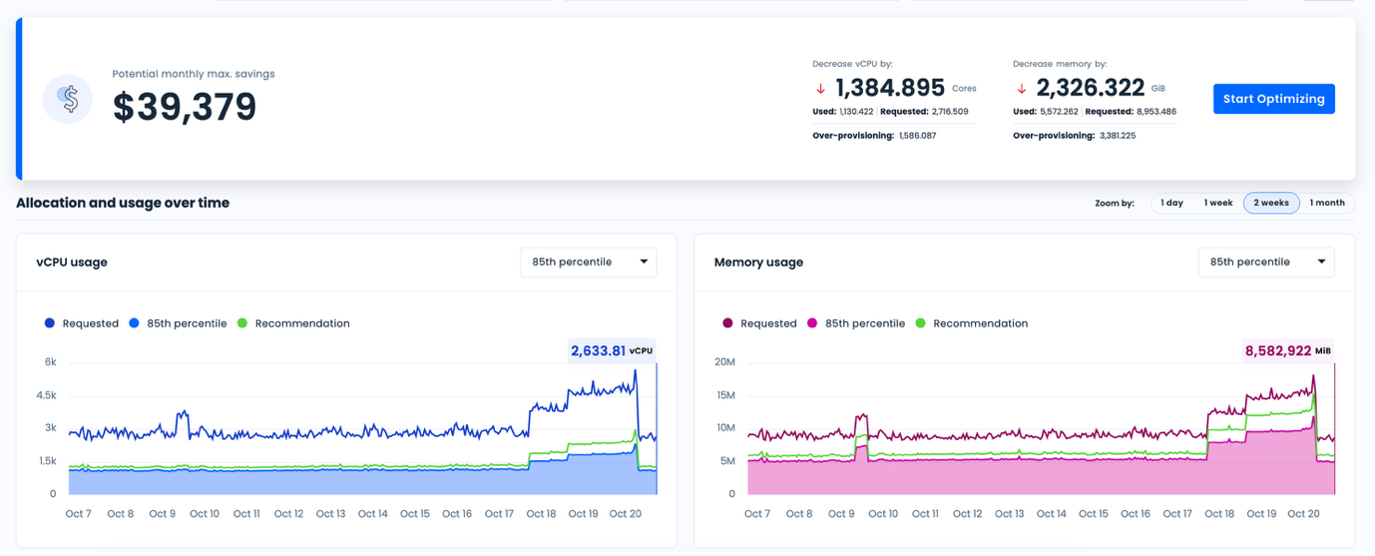
Compare requested resources with actual usage alongside Ocean’s recommendation.
Keeping production safe with automated rightsizing
Platform teams often hesitate to automate rightsizing because they worry about breaking something. These features are there to address that:
- In-place updates. By default, Ocean resizes running pods without restarting them, so your workloads and your GitOps flow aren’t disrupted. This requires Kubernetes ≥1.33, the release where in-place pod resize became enabled by default.
- HPA awareness. If you shrink requests without considering the Horizontal Pod Autoscaler, utilization goes up, the HPA adds more pods, and you end up in a feedback loop. Ocean checks that the HPA target stays above the workload’s new utilization, so the two don’t work against each other.
- Memory protection with rollback. If a workload runs short of memory after a change, Ocean detaches the rule from it and marks it for your team to review.
- Clear statuses. You can see at a glance whether each workload is Optimized, Limited, Pending or something else. When a recommendation is held back or only partly applied, Ocean tells you why. The workload status reference explains each status and what to do next.
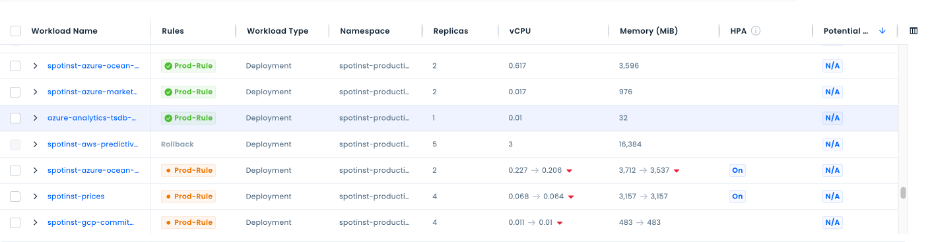
The table shows which rule is attached to each workload and the recommended CPU and memory changes.
Set Kubernetes rightsizing rules once with auto-attach
Auto-attach rules offer an invaluable everyday convenience capability. You define a rule by namespace, label or workload type, and Ocean applies it to every matching workload, including the ones your team deploys next month. A common setup is a cautious rule for production, a more aggressive one for dev and test, and a label teams can add to bring their own services in. Argo Rollouts work too.
Here are two examples:
1. By environment (the most common setup)
- Production rule: auto-attach to the prod namespace. High percentile (95th), decrease-only, extra overhead, in-place updates, apply only once recommendations are stable (4+ days of data).
- Dev/test rule: auto-attach to the dev and staging namespaces. Lower percentile (85th), increase and decrease, default overhead, apply as soon as recommendations are ready.
2. Opt-in by label
- A rule auto-attached to a label such as rightsizing: enabled.
- Nothing changes until a team adds the label to its services, which makes it a gradual, low-risk way to roll out across a large cluster.
Showing Kubernetes cost savings to FinOps teams
FinOps teams can see how much Ocean has already saved, for a single cluster or across the whole organization. The same data is available through the API, and Ocean’s Grafana dashboard shows rightsizing recommendations next to your other cluster metrics. For a real-world example, Flaschenpost estimates its AKS clusters would be 15–25% larger without continuous rightsizing.
What’s next for Autonomous Rightsizing
We’re adding event-driven rightsizing, so Ocean can respond within seconds to memory pressure, CPU throttling and restarts, inside the limits and cooldowns you set. We’re also working on applying replica recommendations automatically, so Ocean can adjust how many pods you run as well as how big they are.
Getting started with Kubernetes rightsizing in Ocean
If you already use Ocean, open the Advanced Optimization tab, create a rule with the default settings, and auto-attach it to a non-production namespace. Give it a week, check the results, and expand from there. If a year-end change freeze is coming up, that non-production namespace is a low-risk place to let it run in the meantime. New to Ocean? See how it fits into Flexera’s workload optimization solutions.