


Databricks is a powerful unified analytics platform that helps you manage and analyze massive amounts of data. It works smoothly with cloud storage and lets data scientists, engineers and business analysts collaborate effectively. You can do just about anything with Databricks, from building data pipelines to training machine learning models. It’s a must-have for companies that want to get a grip on their data. In data analysis, date calculations are crucial. They help analysts to extract insights from date- or time-based data, enabling businesses to track progress, identify trends and make smart decisions. One key function in Databricks for performing date calculations is the DATEDIFF function. It’s one of those built-in functions that sounds simple but has a few layers worth understanding, especially if you’re working with timestamps or calculating differences in units like months or quarters.
In this article, we’ll walk through exactly how DATEDIFF works in Databricks, cover both versions of the function, show real examples and flag the limitations you’ll want to know about before you rely on it in production.
What is Databricks DATEDIFF function?
Databricks DATEDIFF is a built-in Databricks SQL function that calculates the difference between two dates or timestamps. At its simplest, it tells you how many days sit between two dates. With the more capable timestamp version, it can return differences in microseconds, minutes, months, years and everything in between.
The function shows up constantly in real analytical work. Some of the most common use cases are:
- Calculating how long an event or process took
- Measuring customer or user retention periods
- Spotting trends across time intervals
- Computing age from birth dates
- Tracking time-to-resolution for support tickets
There are two distinct versions of DATEDIFF in Databricks, and they behave differently enough that it’s worth treating them separately.
Two versions of Databricks DATEDIFF
There are two primary versions of the DATEDIFF in Databricks:
- Date-only version: Calculates the difference between two date values, ignoring the time component. The result is an integer representing the number of days between the two dates.
- Timestamp version: Allows for more granular calculations, including the difference in specific time units such as seconds, minutes, hours or even milliseconds.
Let’s dive into how Databricks DATEDIFF works. We’ll cover its syntax, the units it supports and how to use it in real-world scenarios.
How does Databricks DATEDIFF work?
To get the most out of the DATEDIFF in Databricks, you need to know how it works. So let’s take a closer look at the syntax for dates and timestamps, with some examples to help you get going.
1. Date-only version
The date-only version calculates the number of days between two DATE values. It ignores any time component entirely.
Applies to: Databricks Runtime 11.3 LTS and above, Databricks SQL
Syntax:
DATEDIFF(endDate, startDate)
- endDate: The later date in the calculation
- startDate: The earlier date in the calculation
This Databricks DATEDIFF function returns an INTEGER representing the number of days between startDate and endDate. It’s important to note that if endDate is before startDate, the result will be negative.
Example:
SELECT DATEDIFF('2024-08-30', '2024-08-01') AS days_difference;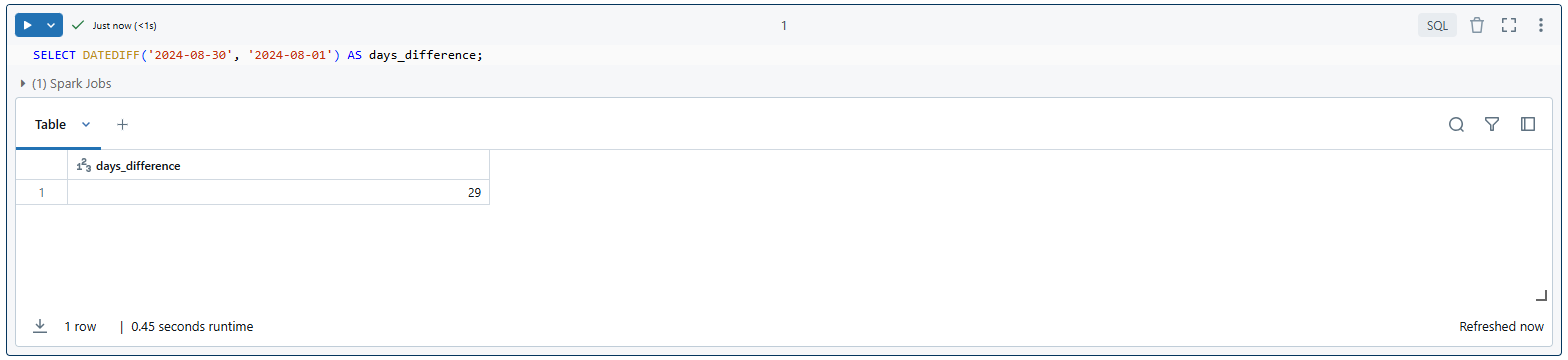
As you can see in this example, if you use the Databricks DATEDIFF function to find the days between August 1, 2024 and August 30, 2024, you’ll get 29. That’s because there are 29 days between those two dates.
This particular version of Databricks DATEDIFF is useful when working with date columns in your datasets where time of day is not relevant.
2. Timestamp version
The timestamp version is more flexible. It lets you specify the unit of measurement, so you can get your difference in seconds, hours, months or whatever fits your use case. Note that this version is a synonym for the TIMESTAMPDIFF function in Databricks.
Applies to: Databricks Runtime 10.4 LTS and above, Databricks SQL
Syntax:
DATEDIFF(unit, start, end)- unit: The unit of time for the calculation (e.g., HOUR, DAY, MONTH, YEAR….)
- start: The starting timestamp
- end: The ending timestamp
Depending on the unit specified, the function will return the difference in that unit. The return value is a BIGINT representing the difference in the specified unit. If the start is greater than the end, the result will be negative.
The timestamp version of Databricks DATEDIFF supports a wide range of units, allowing for precise time calculations. Here are the supported units:
Date Parts:
- DAY
- WEEK
- MONTH
- QUARTER
- YEAR
Time Parts:
- MICROSECOND
- MILLISECOND
- SECOND
- MINUTE
- HOUR
For example, to calculate the number of hours between two timestamps:
SELECT DATEDIFF(HOUR, TIMESTAMP '2024-08-27 00:00:00', TIMESTAMP '2024-08-29 12:00:00') as hours_difference;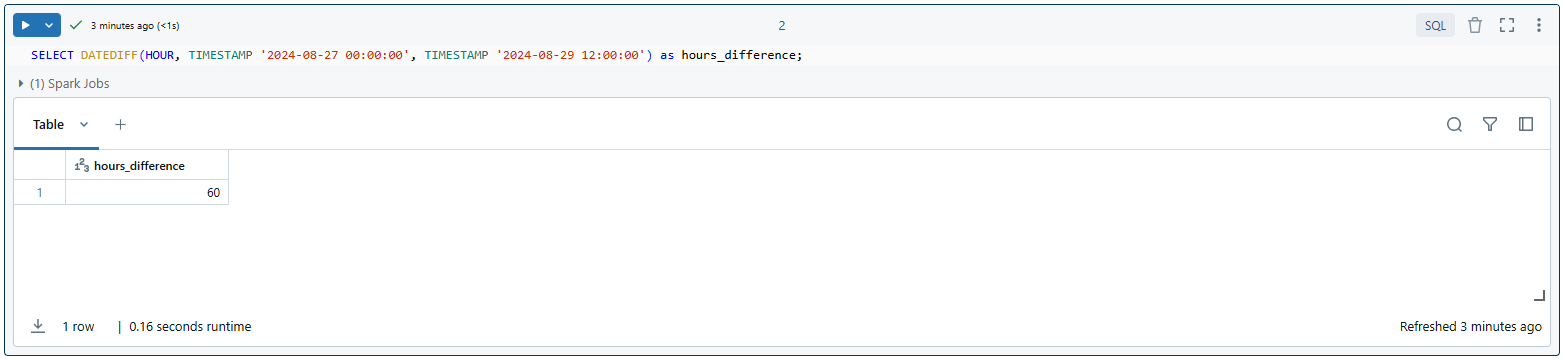
As you can see, this would return 60, as there are 60 hours between the start and end timestamps.
How Databricks DATEDIFF handles time calculations?
When using the timestamp version of Databricks DATEDIFF, it’s important to understand how it handles time calculations:
1. Whole units only
Databricks DATEDIFF counts whole elapsed units based on UTC, where a DAY equals exactly 86,400 seconds. It does not return fractional values. If 1.5 days have elapsed, you get 1, not 1.5.
2. Month calculations
A month is considered elapsed when two conditions are both true: the calendar month has increased, and the calendar day and time of the end timestamp is equal to or greater than the start. This can trip you up.
For example:
SELECT DATEDIFF(MONTH, TIMESTAMP '2023-02-28 12:00:00', TIMESTAMP '2023-03-28 11:59:59') as months_difference;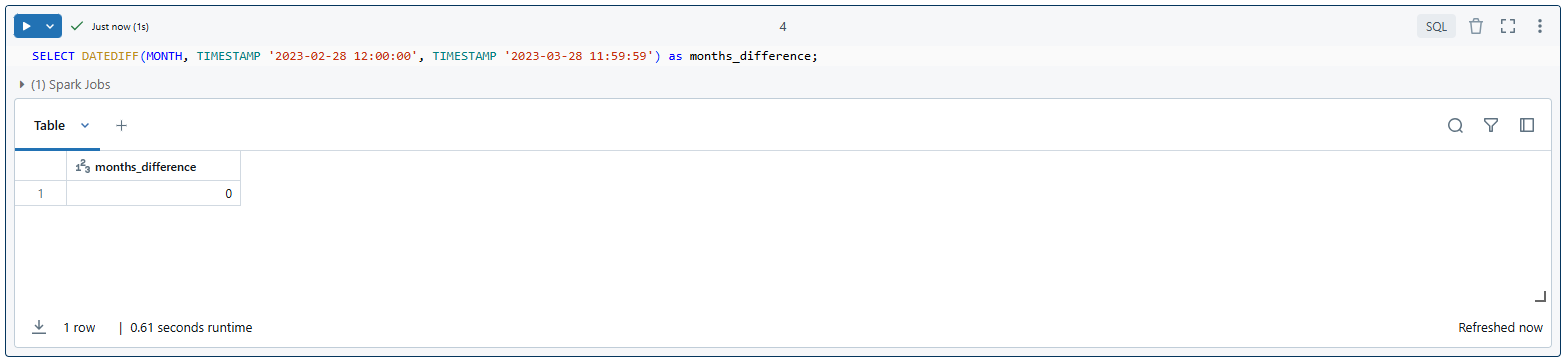
You can see this would return 0, as a full month hasn’t elapsed yet.
SELECT DATEDIFF(MONTH, TIMESTAMP '2023-02-28 12:00:00', TIMESTAMP '2023-03-28 12:00:00') as months_difference;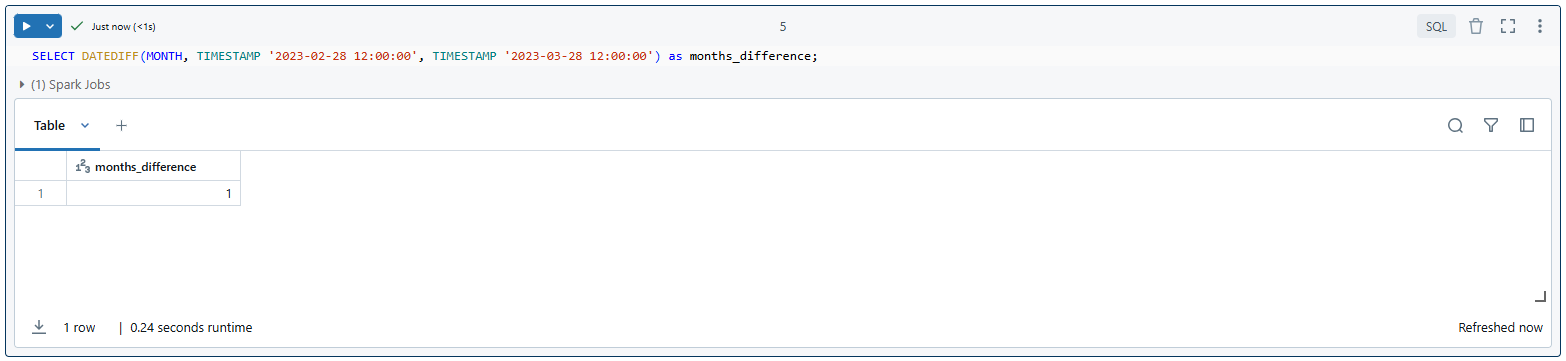
This would return 1, as a full month has now elapsed.
3. Weeks, quarters and years
Weeks, quarters and years follow the same principle as months, based on calendar progression.
Getting these details right is key for doing accurate time-based calculations correctly, especially when you’re working with bigger units of time.
In the next section, we’ll explore more practical examples and use cases for both versions of Databricks DATEDIFF.
Practical examples and use cases of Databricks DATEDIFF
Now that we’ve covered the basics of how Databricks DATEDIFF works, let’s dive into some practical examples and use cases.
Example 1—Calculating differences in days using Databricks DATEDIFF (date-only version)
First, let’s start with a simple example using the date-only version of DATEDIFF to calculate the number of days between two dates.
SELECT DATEDIFF('2024-12-31', '2024-01-01') as days_in_2024;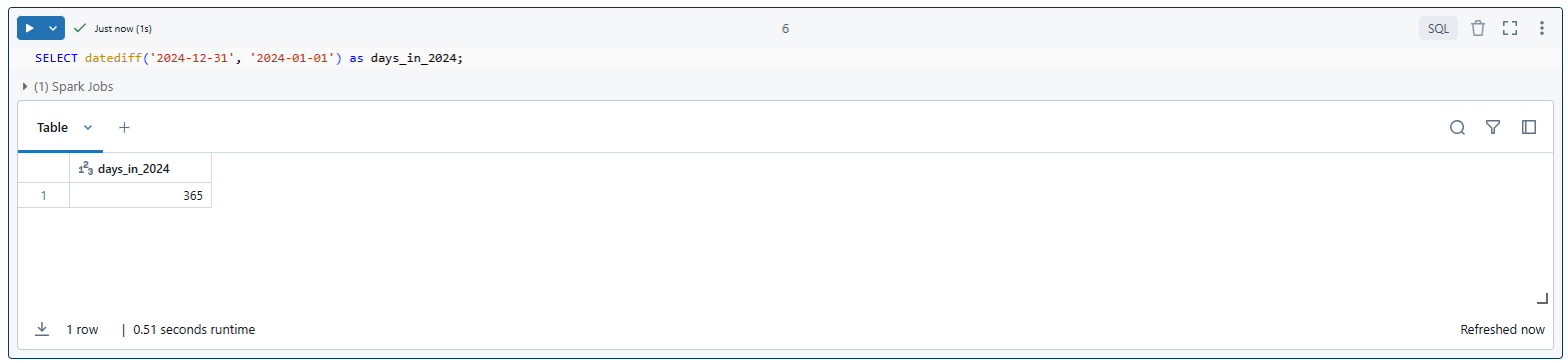
SELECT DATEDIFF(CURRENT_DATE, '2000-01-01') as age_in_days;
SELECT datediff('2025-01-01', CURRENT_DATE) as days_until_new_year;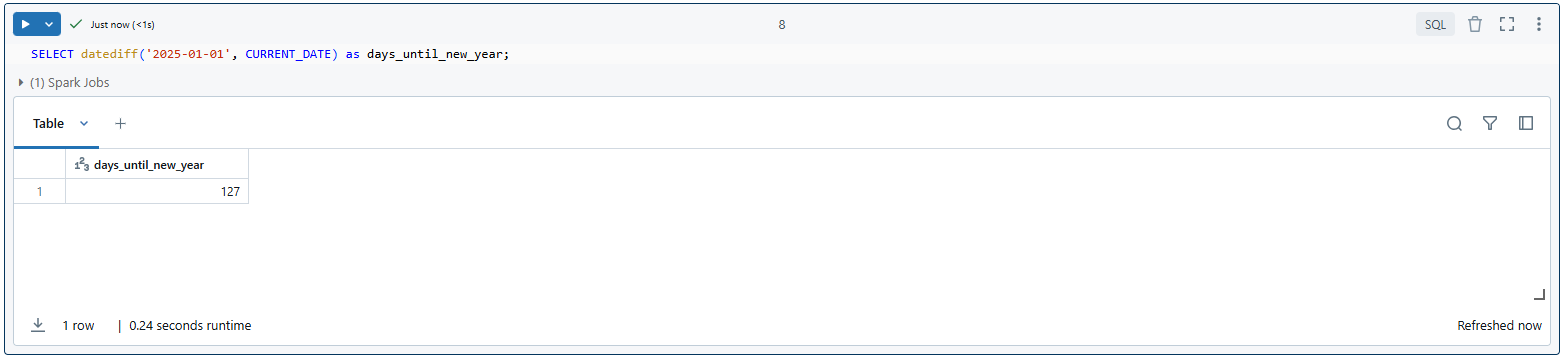
As you can see, these examples show you how to use the date-only version for simple stuff like finding out how long a year is, working out ages, or counting down to a specific date.
Example 2—Calculating differences in various units using Databricks DATEDIFF (timestamp version)
Now, let’s explore the timestamp version of Databricks DATEDIFF, which allows us to calculate time differences in various units.
a. Calculating the difference in microseconds using Databricks DATEDIFF
SELECT DATEDIFF(MICROSECOND,
								TIMESTAMP '2024-08-27 00:00:00.000000',
								TIMESTAMP '2024-08-27 00:00:01.000000') as microseconds_difference;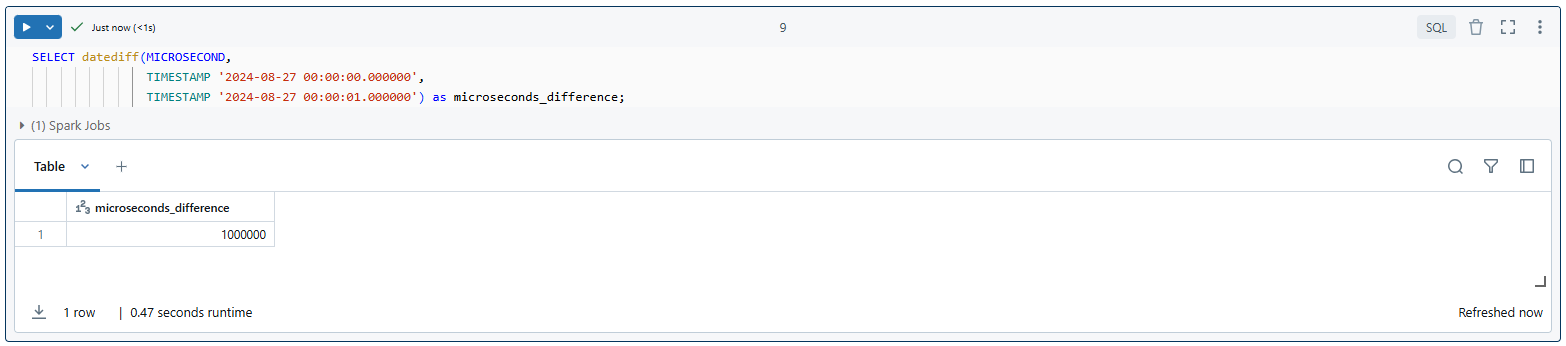
This query calculates the number of microseconds in one second, which should return 1000000.
b. Calculating the difference in milliseconds using Databricks DATEDIFF
SELECT DATEDIFF(MILLISECOND,
								 TIMESTAMP '2024-08-27 00:00:00.000',
								TIMESTAMP '2024-08-27 00:01:00.000') as microseconds_difference;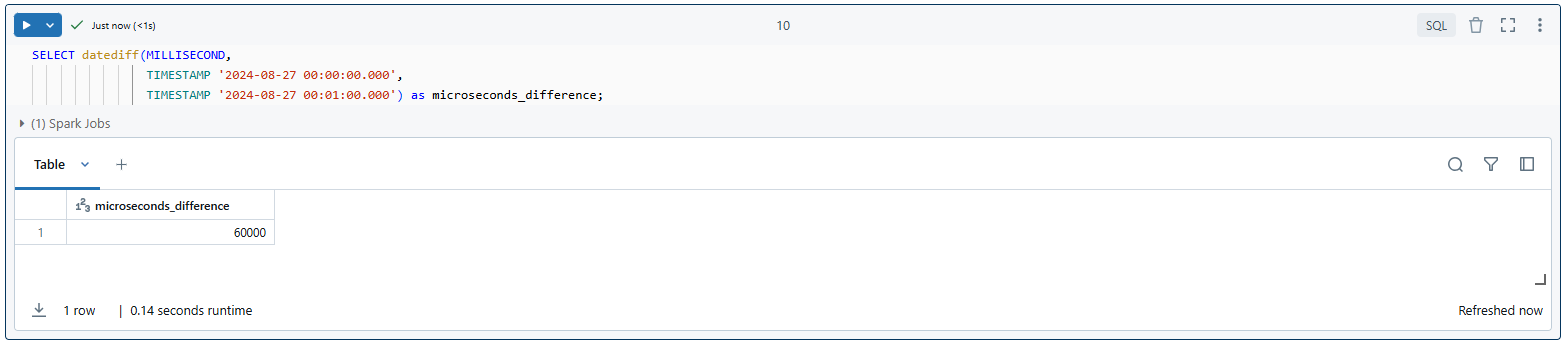
As you can see, this query calculates the number of milliseconds in one minute—returning 60,000 milliseconds.
c. Calculating the difference in seconds using Databricks DATEDIFF
SELECT DATEDIFF(SECOND, TIMESTAMP '2024-08-27 10:00:00', TIMESTAMP '2024-08-27 10:01:00') AS seconds_difference;
This query calculates the difference in seconds between two timestamps—returning 60 seconds.
d. Calculating the difference in minutes using Databricks DATEDIFF
SELECT DATEDIFF(MINUTE,
								TIMESTAMP '2024-08-27 00:00:00',
								 TIMESTAMP '2024-08-28 00:00:00') as minutes_difference;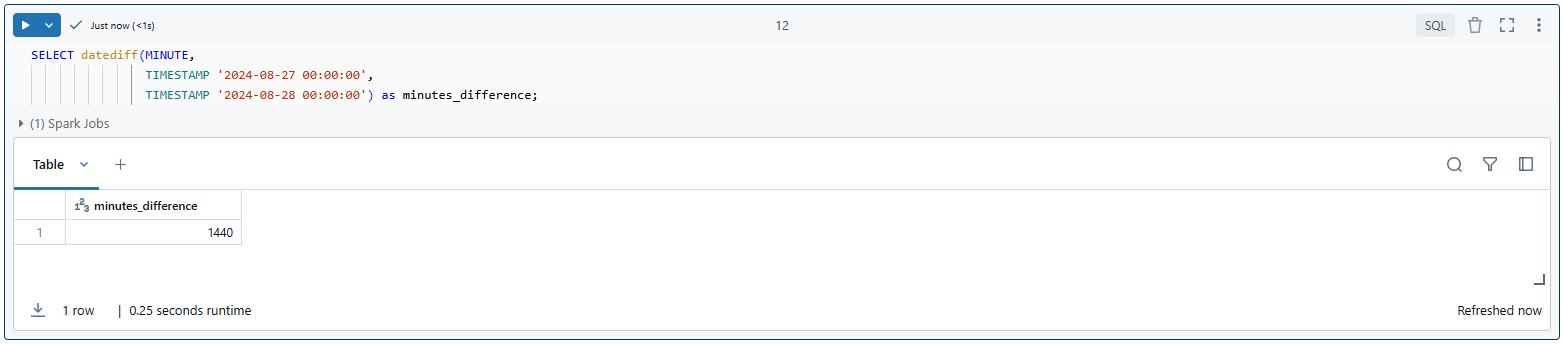
This query calculates the number of minutes in one day—returning 1,440 minutes.
e. Calculating the difference in hours using Databricks DATEDIFF
SELECT DATEDIFF(HOUR, TIMESTAMP '2024-08-27 10:00:00', TIMESTAMP '2024-08-27 11:00:00') AS hours_difference;
This query calculates the difference in hours between two timestamps—returning 1 hour.
f. Calculating the difference in days using Databricks DATEDIFF
SELECT DATEDIFF(DAY, TIMESTAMP '2024-08-01', TIMESTAMP '2024-08-26') AS days_difference;
This query calculates the difference in days between two dates—returning 25 days.
g. Calculating the difference in weeks using Databricks DATEDIFF
SELECT DATEDIFF(WEEK, TIMESTAMP '2024-08-01', TIMESTAMP '2024-08-26') AS weeks_difference;
This query calculates the difference in weeks between two dates—returning 3 weeks (with some extra days).
h. Calculating the difference in months using Databricks DATEDIFF
SELECT DATEDIFF(MONTH,
								TIMESTAMP '2024-01-01 00:00:00',
								 TIMESTAMP '2025-01-01 00:00:00') as months_difference;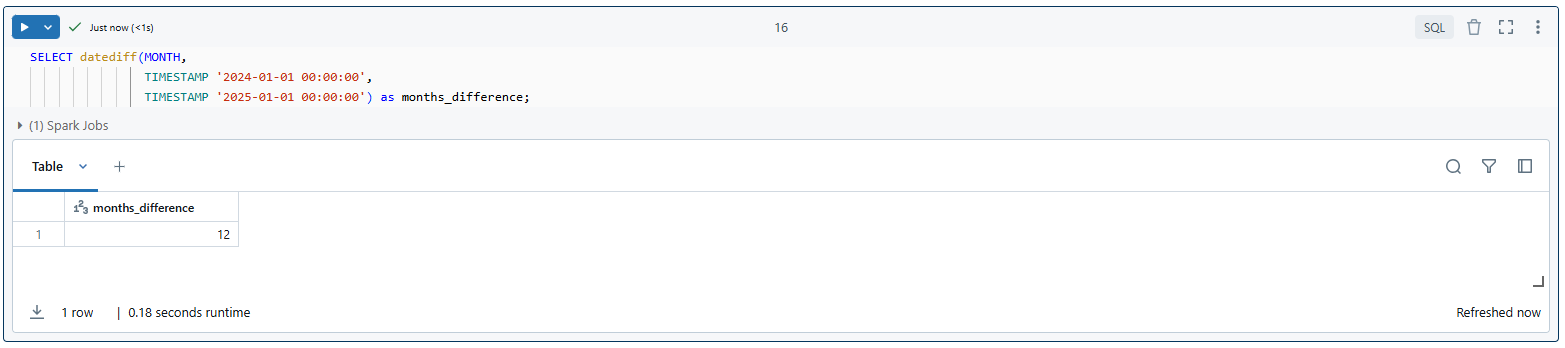
This query calculates the number of months in the year 2024, which should return 12.
i. Calculating the difference in quarters using Databricks DATEDIFF
SELECT DATEDIFF(QUARTER, TIMESTAMP '2024-01-01 00:00:00', TIMESTAMP '2024-10-01 00:00:00') AS quarters_difference;
This query calculates the difference in quarters between two dates—returning 3 quarters.
j. Calculating the difference in years using Databricks DATEDIFF
SELECT DATEDIFF(YEAR,
								 TIMESTAMP '2000-01-01 00:00:00',
								TIMESTAMP 2024-01-01 00:00:00') as years_difference;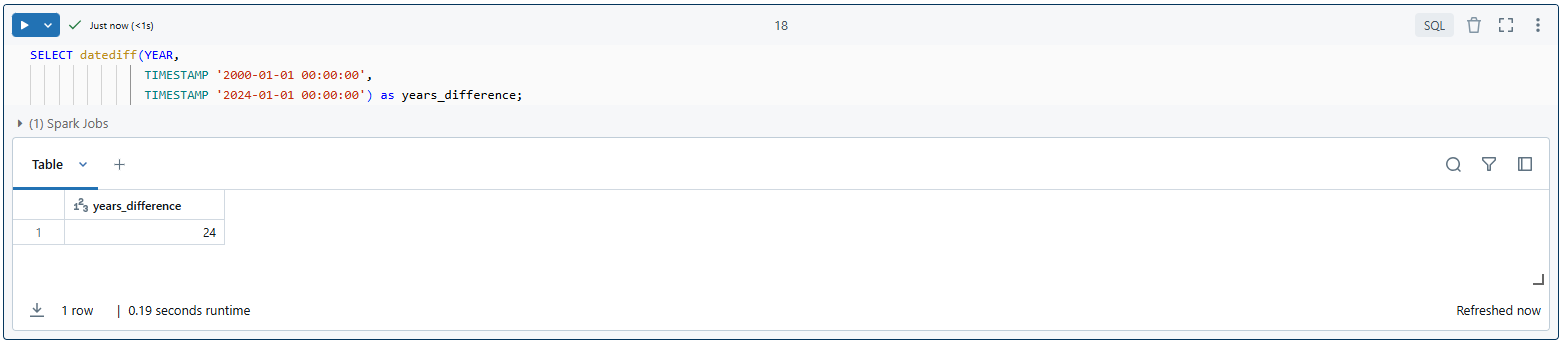
This query calculates the number of years between the start of 2000 and the start of 2024, which should return 24.
Example 3—Comprehensive example using Databricks DATEDIFF
Let’s create a more complex example that demonstrates the use of Databricks DATEDIFF in a real-world scenario. We’ll create a table of users orders and use Databricks DATEDIFF to analyze various aspects of the data.
Step 1: Create the table
CREATE TABLE users_orders (
		order_id INT,
		 user_id INT,
		 order_date TIMESTAMP,
		delivery_date TIMESTAMP
);
Step 2: Populate the table with sample data
INSERT INTO users_orders VALUES
		 (1, 101, '2024-01-01 10:00:00', '2024-01-03 14:30:00'),
		(2, 102, '2024-01-02 11:15:00', '2024-01-04 09:45:00'),
		 (3, 101, '2024-01-10 09:30:00', '2024-01-12 16:20:00'),
		(4, 103, '2024-02-01 14:00:00', '2024-02-03 11:10:00'),
		 (5, 102, '2024-02-15 16:45:00', '2024-02-18 10:30:00');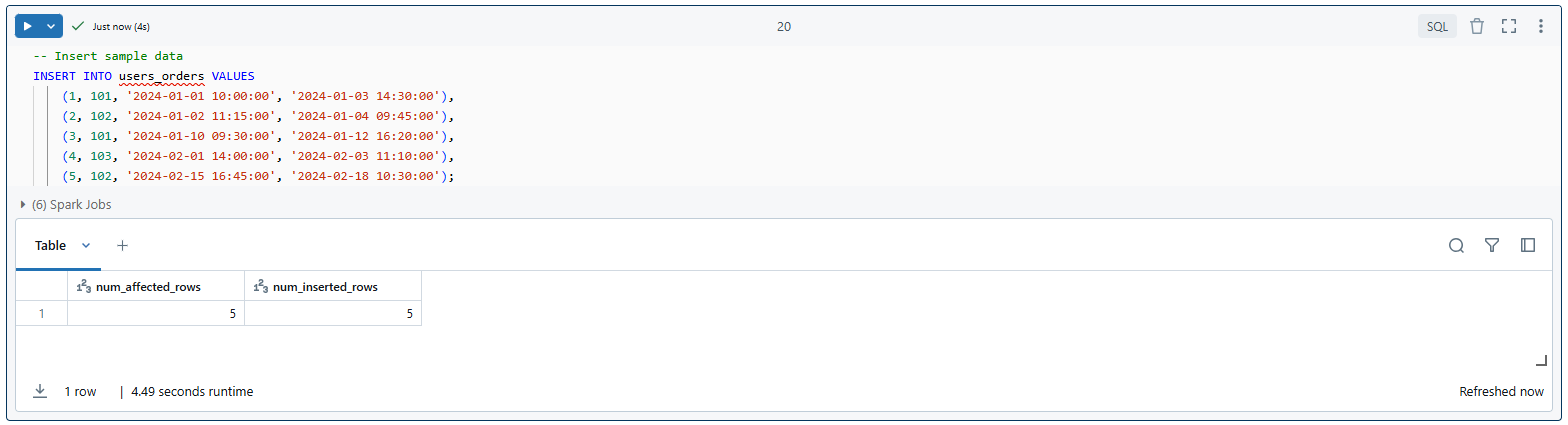
Step 3: Calculate differences using Databricks DATEDIFF
SELECT
		order_id,
		 user_id,
		 order_date,
		delivery_date,
		DATEDIFF(MICROSECOND, order_date, delivery_date) as delivery_time_microseconds,
		 DATEDIFF(MILLISECOND, order_date, delivery_date) as delivery_time_milliseconds,
		DATEDIFF(SECOND, order_date, delivery_date) as delivery_time_seconds,
		 DATEDIFF(MINUTE, order_date, delivery_date) as delivery_time_minutes,
		DATEDIFF(HOUR, order_date, delivery_date) as delivery_time_hours,
		 DATEDIFF(DAY, order_date, delivery_date) as delivery_time_days
FROM users_orders
ORDER BY user_id, order_date;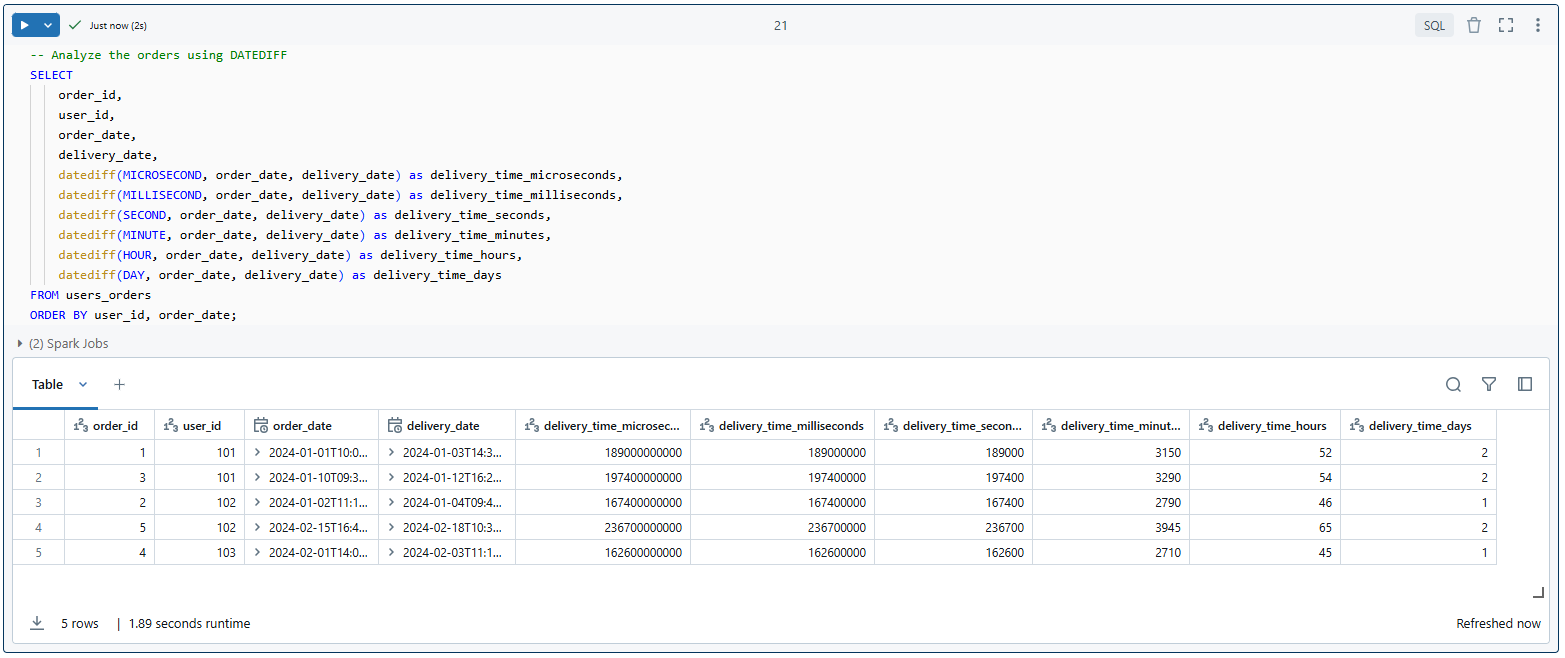
This comprehensive example shows off what Databricks DATEDIFF can do:
We figure out how long it takes to deliver each order in microseconds, milliseconds, seconds, minutes, hours and days.
The results of this query would provide valuable insights into order processing times and user ordering patterns.
That’s it! DATEDIFF in Databricks is super versatile. We can use it for everything from simple day calculations to more complex time-based analyses. It’s a total game-changer for working with date and time data.
Benefits of using Databricks DATEDIFF
Databricks DATEDIFF function offers several key benefits that make it a valuable tool in data processing and analysis. Let’s explore these advantages in detail:
1. Efficient handling of time-based calculations
One of the main benefits of using Databricks DATEDIFF is its efficiency in handling time-based calculations. It’s super efficient. It works like a charm in Databricks. Its distributed computing zooms through large datasets.
Performance-wise, Databricks DATEDIFF is designed to work with Spark’s distributed model. It makes time calculations lightning-fast, even with massive datasets.
Scalability-wise, as your data grows, Databricks DATEDIFF scales with it. It keeps up with millions or billions of records.
One more thing: Databricks DATEDIFF gives consistent results across your dataset. So, you don’t need to hack together complex custom logic for date and time calculations.
2. Enhanced data analysis capabilities
Databricks DATEDIFF supercharges your data analysis, making it way easier to spot trends and patterns over time.
Want to identify trends? Databricks DATEDIFF helps you calculate time differences in a snap, so you can pinpoint things like seasonal sales spikes, app usage surges, growth rates and more.
How about recognizing patterns? Databricks DATEDIFF lets you uncover cycles in users or customer behavior or system performance fluctuations.
Need to segment your data by time? Databricks DATEDIFF makes it possible, so you can drill down into specific periods and get more detailed insights.
And for cohort analysis, Databricks DATEDIFF has got you covered; just group users or events by similar time frames or intervals and you’re good to go!
3. Automation in data workflows
Databricks DATEDIFF plays a crucial role in automating various aspects of data workflows. Here’s how:
In ETL processes, use Databricks DATEDIFF to auto-calculate time-based metrics. This way, you don’t have to lift a finger.
Use Databricks DATEDIFF in scheduled reports and it’ll give you consistent time-based KPIs without any manual intervention.
Finally, you can make use of Databricks DATEDIFF for data quality checks to catch anomalies in time-stamped data, like weird future dates or unreasonably long processing times.
4. Flexibility and versatility
Databricks DATEDIFF is super flexible, which makes it a great tool for all sorts of date and time based calculations.
It can handle really small time units like microseconds and really big ones like years. That means you can use it for a wide range of time-based analyses.
Databricks DATEDIFF works with both positive and negative time intervals. So, you can use it to forecast what might happen in the future or to analyze what happened in the past.
Plus, it’s easy to combine Databricks DATEDIFF with other functions. This lets you do even more complex calculations and analyses.
5. Standardization and consistency
Using Databricks DATEDIFF promotes standardization and consistency in your data analysis:
- When you use a standard function like DATEDIFF, you know everyone on your team is on the same wavelength—calculating time differences the same way.
- You’ll also cut down on errors. Databricks DATEDIFF handles tricky calendar calculations like leap years, so you don’t have to worry about messing up time-based analyses.
- Plus, Databricks DATEDIFF simplifies your SQL code, making it more readable and maintainable compared to custom date calculation logic.
Limitations of Databricks DATEDIFF
Databricks DATEDIFF function is powerful for time-based calculations, but you need to know its weaknesses. Let’s check out the big limitations:
1. Accuracy with larger units
When working with larger time units like months or years, DATEDIFF may not always provide the intuitive result you might expect:
a. Month calculations
DATEDIFF considers a month elapsed when the calendar month increases and the day of the month in the end date is equal to or greater than the start date. This can lead to unexpected results, especially when dealing with months of different lengths.
Example:
SELECT DATEDIFF(MONTH, '2024-01-31', '2024-02-28') as months_diffence;
As you can see, this returns 0, even though it spans most of February, because a full month hasn’t elapsed according to Databricks DATEDIFF’s logic.
b. Year calculations
Similar to months, year calculations can be counterintuitive, esp. when dealing with leap years or dates close to year boundaries.
To fix this, consider using alternative methods or additional logic when precise month or year differences are crucial to your analysis.
2. Leap year handling
Databricks DATEDIFF does consider leap years, but it might not always work the way you need it to for business or analytical purposes.
- When you’re counting days, Databricks DATEDIFF gets it right—it includes the extra day in leap years.
- But things get trickier with months and years. The leap day can mess with your calculations in ways you might not expect.
So, take your time to test your queries that involve leap years, especially if they cover multiple years or are close to February 29th.
3. Daylight saving time
Databricks DATEDIFF calculations are based on UTC and don’t account for Daylight Saving Time (DST) changes:
- This can lead to unexpected results when calculating time differences that span DST transition periods.
- For applications where DST is crucial (e.g scheduling or time-sensitive operations), additional logic may be needed to handle these transitions correctly.
4. Time zone differences
Databricks DATEDIFF doesn’t inherently handle time zone conversions:
- All calculations are performed based on the timestamps as they are stored, without consideration for time zone differences.
- If your data involves multiple time zones, you’ll need to make sure all timestamps are normalized to a single time zone before using DATEDIFF, or account for time zone differences in your calculations.
5. Negative results
When your start date or time is later than your end date or time, Databricks DATEDIFF gives you a negative answer. That’s what it’s supposed to do, but it can be super confusing if you’re not careful with your analysis.
6. Performance at scale
Databricks DATEDIFF is usually pretty efficient, but it can have performance implications in some cases:
- If you’re working with huge datasets or complex queries, Databricks DATEDIFF calculations can take a toll on performance.
- Performance may degrade when using DATEDIFF in combination with window functions or complex joins.
To fix this:
- Consider pre-calculating and storing time differences for frequently used queries.
- Optimize your queries and use appropriate partitioning strategies when working with large datasets.
7. No fractional unit support
Databricks DATEDIFF only returns whole number results:
- It doesn’t support fractional units, which might be necessary for more precise calculations (e.g., 1.5 months).
- For scenarios requiring fractional time differences, you may need to combine DATEDIFF with other functions or custom logic.
8. Fixed set of supported units
Databricks DATEDIFF does a lot, but it doesn’t cover every time unit out there. If you need to work with a unit DATEDIFF doesn’t support, you have to get creative with custom calculations or string together multiple DATEDIFF calls.
Save up to 50% on your Databricks spend in a few minutes!
Conclusion
Databricks DATEDIFF function in Databricks is a must-know for anyone working with dates and timestamps. It’s great because it can calculate differences in all sorts of time units—from days to seconds. That makes it perfect for simple date calculations and complex time-based analyses. To get the most out of DATEDIFF, you must understand how it operates, what units it supports and where it falls short. Then you may use it to measure the time between occurrences, observe trends across time, or automate date-related operations. When you get the hang of this function, it will transform the way you handle data workflow. It really is revolutionary!
In this article, we have covered:
- What the Databricks DATEDIFF function is
- The two versions and their exact syntax
- How DATEDIFF handles month, year and UTC-based calculations
- Practical examples across all supported units
- Benefits of using DATEDIFF in data workflows
- Limitations to watch out for in production
… and more!
FAQs
Is there a limit to how far apart the dates can be when using DATEDIFF?
DATEDIFF can handle large time spans, but for extremely wide gaps spanning thousands of years, you may hit limits based on how Databricks represents dates internally. For typical analytical use cases, this isn’t an issue.
How does DATEDIFF perform with large datasets?
It leverages Spark’s distributed computing, so it scales well. Performance can degrade with very large datasets combined with complex joins or window functions. Pre-calculating time differences for frequently used queries is a practical mitigation.
Can DATEDIFF in Databricks handle fractional time units?
No. DATEDIFF returns whole numbers only. For fractional results, use a smaller unit and divide, or combine DATEDIFF with custom logic.
What happens if I pass invalid date formats to DATEDIFF?
Databricks returns an error indicating the input format is incorrect. Make sure your string literals are in YYYY-MM-DD or YYYY-MM-DD HH:MM:SS format, or use explicit DATE and TIMESTAMP literals.
Can I use Databricks DATEDIFF with timestamps in different time zones?
Yes, but convert all timestamps to a common time zone first. DATEDIFF does not do that conversion for you.
How accurate is DATEDIFF for very small time units like microseconds?
It’s accurate within the limits of timestamp precision in Databricks. Make sure your source data is captured and stored at microsecond precision if you need that level of detail.
How does DATEDIFF handle leap years?
For day-level calculations, it counts the leap day correctly. For month and year calculations, the extra day can produce edge-case results. Test carefully when your date ranges include February 29.
What happens if the start date is after the end date?
DATEDIFF returns a negative value. This applies across all units and both versions of the function.
Is DATEDIFF resource-intensive?
For most workloads it’s efficient. On very large datasets with complex queries, it can be resource-heavy. Use appropriate partitioning and consider pre-computing frequently needed time differences.
Can DATEDIFF work with time intervals shorter than a second?
Yes. The timestamp version supports MICROSECOND and MILLISECOND, so you can get precise sub-second measurements as long as your source timestamps are stored at that precision.
Pramit Marattha
Pramit Marattha is a technical content writer and strategist with 5+ years of experience covering AI, data engineering, data cloud platforms and open source technologies. He turns complex technical concepts into clear, useful content for engineers and developers.