


Estimating your Snowflake bill can feel like predicting the weather. Warehouse sizes, cloud regions, Snowflake editions and variable workloads all move the number in different directions. That’s exactly why a Snowflake cost estimator tool, sometimes called a Snowflake pricing calculator, is worth having in your toolkit before real spend kicks in.
In this article, we cover the 4 best Snowflake cost estimator tools available in 2026. Each one is freely accessible online and helps you model costs across different configurations, workloads and cloud platforms.
How Snowflake billing actually works (a quick grounding)
Before picking a calculator, it helps to understand what you’re modeling. Snowflake’s consumption-based pricing has three components: compute, storage and cloud services. Compute is almost always the biggest line item.
Compute is billed in credits. Your credit rate depends on your edition:
- Standard: ~$2/credit on-demand (AWS US East)
- Enterprise: ~$3/credit on-demand
- Business Critical: ~$4/credit on-demand
- Virtual Private Snowflake (VPS): custom pricing, negotiated directly with Snowflake
Non-US regions add roughly 50% to those rates. Capacity contracts, which require at least a ~$25k/year commitment, reduce credit costs by 20-30%.
Warehouse sizes consume credits at fixed hourly rates, doubling with each step up. An X-Small warehouse uses 1 credit/hour, a Small uses 2 credits/hour, a Medium uses 4, a Large uses 8, and they scale all the way up to 6X-Large at 512 credits/hour. Snowflake bills per second, but there’s a 60-second minimum each time a warehouse starts or resumes from a suspended state.
Storage is billed separately, per TB per month, based on compressed data volume. Snowflake compresses data automatically, typically at around 3:1, so 30 TB of raw data becomes roughly 10 TB on your bill. The rate depends on pricing model:
- On-demand: ~$40/TB/month (AWS US East)
- Capacity (pre-purchase): ~$23/TB/month (AWS US East)
Cloud services include query parsing, metadata operations and authentication. Snowflake provides a free allocation equal to 10% of your daily compute spend. Charges only apply when cloud services exceed that threshold.
Without planning, a Medium warehouse running 8 hours a day for 30 days burns through 960 credits (4 credits/hour × 8 hours × 30 days), which is roughly $1,920 at Standard rates. A cost estimator is the fastest way to stress-test assumptions before any of that becomes real.
Key factors for selecting the best Snowflake cost estimator tools
Let’s cover what to look for before getting into specific tools:
- Accuracy: A reliable estimator uses current Snowflake pricing data and incorporates your actual usage inputs. Look for tools that ask for warehouse size, hours, data volume, edition and cloud region, then compute totals from those inputs directly
- Intuitive interface: You shouldn’t need a manual just to enter parameters. Clear fields for cloud, region, compute hours and storage reduce errors and speed up budgeting
- Reliability: Snowflake’s pricing doesn’t change often, but it does change. A good tool gets updated accordingly. Check user reviews or community forums to see if a calculator has a history of stale rates or inconsistent output
- Cloud platform support: Snowflake runs on AWS, Azure and GCP, and rates can differ slightly by provider and region. A calculator that lets you specify your cloud and region is more useful than one that assumes a single rate. That cross-provider comparison alone can save a round of manual spreadsheet work
With that in mind, here are four tools to help estimate Snowflake costs. We cover each one’s features, plus pros and cons.
Top 4 Snowflake cost estimator tools
1. Snowflake pricing calculator
Snowflake Pricing Calculator is Snowflake’s official cost tool. It’s freely available on Snowflake’s website. Because it’s built by Snowflake, it stays in sync with the latest pricing tiers, editions and warehouse configurations. There’s no registration, no fee and no lag between a pricing update and the tool reflecting it.
The workflow is pretty much straightforward. Select your cloud provider (AWS, Azure or GCP), choose a region and pick your Snowflake edition. Then enter your storage volume and estimated warehouse hours. The calculator outputs a cost breakdown by component.
One important note: the calculator supports standard storage only. If you need estimates for additional storage types or serverless features, you’ll have to contact Snowflake’s sales team or supplement with another tool.
Key features of Snowflake Pricing Calculator:
- Cloud and region selection across all three platforms
- Edition-based cost breakdowns (Standard, Enterprise, Business Critical)
- Separate estimates for on-demand and capacity-based pricing models
- No account required; results are shareable via a generated link
Pros:
- Most accurate source for baseline Snowflake rates, since Snowflake maintains it
- Clean, guided interface with minimal setup
- Free and always current
Cons:
- High-level only. There’s no field for query frequency, ETL load size or variable workload patterns. You enter static compute hours and data stored, and the tool assumes both are constant
- No serverless feature modeling. Snowpipe, materialized view maintenance and search optimization all consume credits outside of virtual warehouse charges. If those are part of your workload, actual costs will run higher than what this calculator shows
2. Credencys Snowflake Cost Calculator
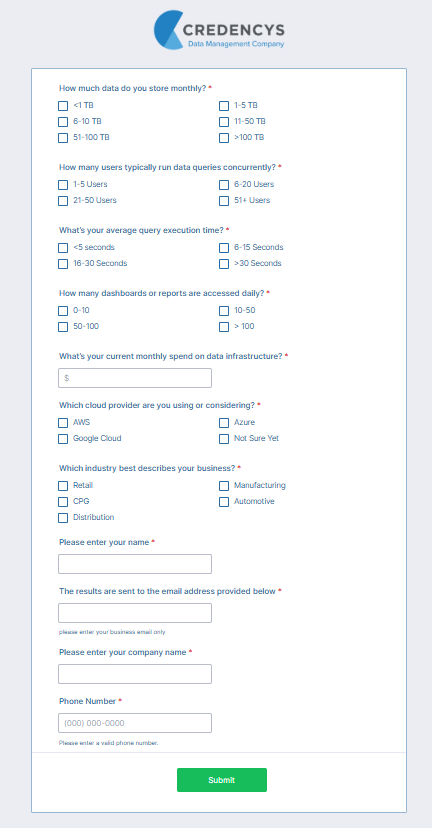
The Credencys Snowflake Cost Calculator takes a different approach. Instead of asking for technical specifications upfront, it guides users through business-context questions: How much data do you have? How many queries do you run daily? What are your performance requirements? Which cloud platform are you on?
This framing makes the tool accessible to stakeholders who aren’t familiar with warehouse sizing or credit consumption rates. The calculator translates business inputs into a cost estimate without requiring the user to understand how those map to Snowflake’s pricing model.
Key features of Credencys Snowflake Cost Calculator:
- Business-oriented input questions (data volume, user count, query frequency, performance needs)
- Context-aware estimates that factor in industry and use case patterns
- Return on investment (ROI) comparison against legacy on-premises platforms, useful if you’re building a migration business case
- Explanations included with estimates, so you can validate the assumptions against your actual usage
Pros:
- No Snowflake expertise needed to get a meaningful estimate. Any technical or non-technical stakeholder can answer the questions
- Context-sensitive modeling. A financial services company with strict compliance workloads will get a different estimate than an e-commerce team running nightly analytics, because the underlying assumptions differ
- The ROI framing is useful for internal budget justification, particularly if you’re migrating from an on-premises data warehouse or another cloud platform
Cons:
- Requires contact information. Unlike the other tools in this list, Credencys asks for your email and company details before delivering an estimate. It’s a lead generation tool as much as a calculator
- No instant results. You submit your inputs and receive a customized estimate, possibly after a follow-up conversation with their team. That’s useful if you want guidance, but it slows things down if you’re doing quick comparisons
- Less technical granularity. The business-context framing means the output doesn’t show you specific warehouse costs or storage breakdowns. For cost optimization work, you’ll need to supplement elsewhere
The Credencys calculator is best for organizations in the evaluation phase who want business-oriented cost estimates and are comfortable sharing contact information in exchange for more personalized analysis.
3. Trevor Fox Snowflake Cost Calculator
The Trevor Fox Snowflake Cost Calculator is a comprehensive tool built by Trevor Fox, a growth consultant who has worked extensively with data platforms. The calculator goes beyond basic compute estimates to include storage types and data transfer costs.
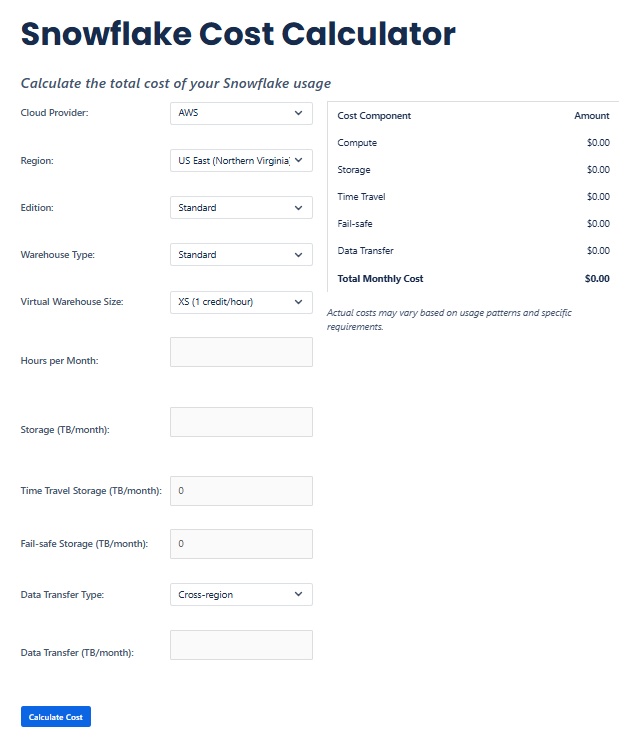
This tool is only designed for people who understand Snowflake’s architecture and want detailed cost breakdowns across all three pricing layers.
Most calculators lump storage into a single figure. This one doesn’t. It breaks storage into permanent, transient, temporary, Time Travel and Fail-safe, each of which carries different cost implications depending on your retention settings. If you’re running extended Time Travel periods or have heavy-update tables, that granularity matters.
Key features:
- Compute estimates based on warehouse type, size and multi-cluster settings. You can set minimum and maximum cluster counts for Enterprise Edition workloads, which affects both cost and concurrency behavior
- Granular storage estimation across all storage types (permanent, transient, temporary, Time Travel and Fail-safe), rather than a single aggregate storage input
- Data transfer cost estimation covering cross-region and cross-cloud transfers, both of which carry additional charges that most calculators ignore entirely
- Full monthly cost breakdown showing where spend is distributed across components
Pros:
- Covers the full Snowflake cost picture. Compute, storage and data transfer together give you a more accurate total than tools that address only one or two layers
- Multi-cluster warehouse support is genuinely useful for Enterprise Edition users dealing with concurrency. Being able to model minimum and maximum cluster counts reflects how those warehouses actually bill
- Transparent calculations. You can see how the tool arrived at its estimates, which makes it easier to validate assumptions and adjust inputs when something looks off
Cons:
- Requires Snowflake familiarity. You need to understand concepts like transient storage, Time Travel retention periods, data transfer types and multi-cluster behavior to use it effectively. It’s not a tool for first-time evaluators
- Manual input of usage estimates. Like most calculators, you’re responsible for estimating warehouse hours and storage volumes. The tool doesn’t help you translate business requirements into those technical parameters
- No serverless feature modeling. Snowpipe, materialized views and search optimization are not included in the estimates. For teams using these features heavily, actual costs will exceed the calculator’s projections
4. Godatadrive
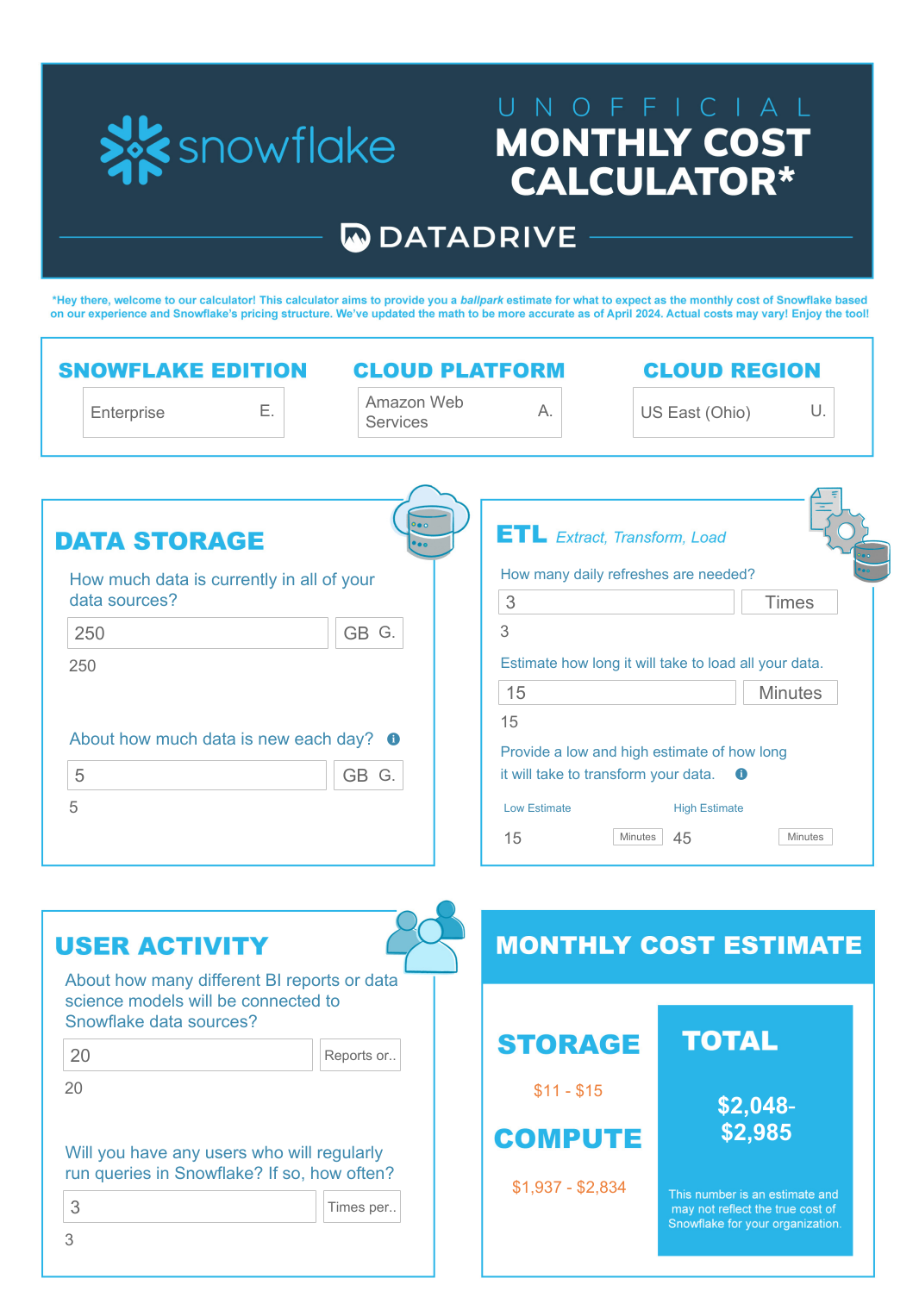
Godatadrive is a data analytics and cloud consulting company that specializes in Snowflake cost optimization. Alongside their consulting work, they’ve built a monthly cost calculator that estimates Snowflake spend based on a set of usage-specific inputs.
The calculator accepts variables including storage size, ETL details, user activity levels, cloud platform, Snowflake edition and cloud region. It then produces a monthly cost estimate based on those inputs, rather than a generic rate-sheet calculation.
Key features:
- Usage-specific inputs (ETL workload details, user activity, cloud platform and region) that go beyond simple static hours and storage figures
- Monthly cost estimates broken down by compute and storage components
- Output delivered in a Tableau report format, which makes it easier to share across teams or include in budget presentations
- Built by a SnowPro Core Certified cloud data engineer, which adds confidence that the underlying logic reflects how Snowflake actually bills
Pros:
- ETL and workload-specific inputs produce estimates that are more grounded in real usage patterns than calculators based purely on compute hours
- The Tableau report output is a practical feature for teams that collaborate across finance, engineering and leadership. Being able to share a formatted report is more useful than a raw number
- Free to use once you’ve created an account
Cons:
- >Requires sign-up. Creating an account is a step that some users will skip, particularly if they’re doing early-stage exploratory comparisons
- The tool’s update cadence is less transparent than Snowflake’s official calculator. It’s worth verifying that the rates reflect current on-demand pricing for your region before using the output for formal budget planning
Honorable mentions— SnowflakeCostCalculator.com
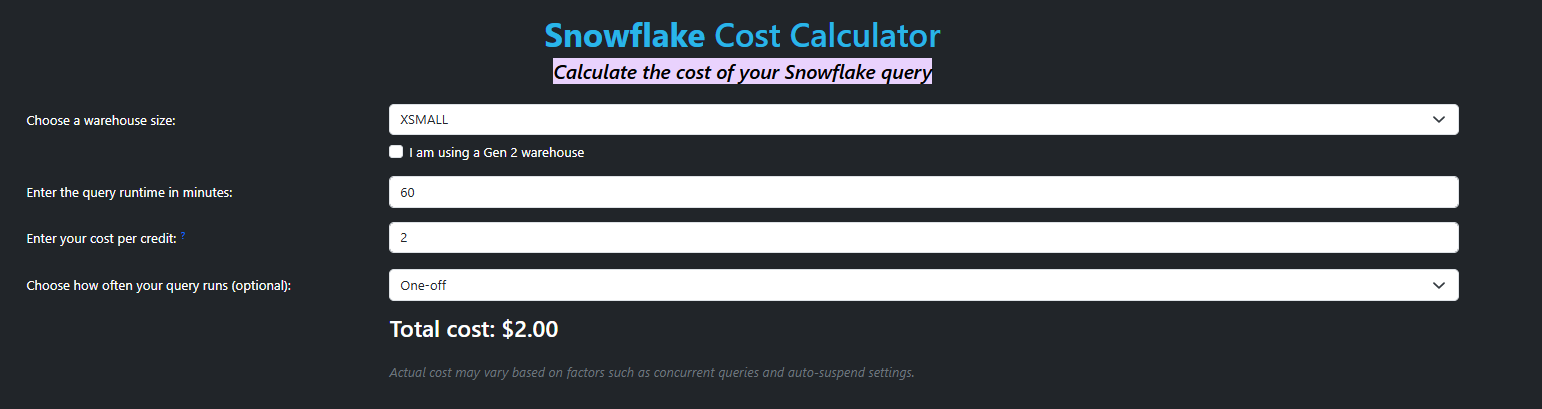
SnowflakeCostCalculator.com doesn’t try to model your entire Snowflake deployment. It focuses on a single, narrower question: how much does a specific query cost?
The interface asks for three inputs: query runtime, warehouse size and your cost per credit. It returns the query cost. That’s it.
The default credit rate is $2.00, which reflects Standard edition on-demand pricing in US AWS regions. You can adjust this to match your actual edition and contract type.
The math follows Snowflake’s per-second billing model. A query that runs for 5 minutes on a Small warehouse (2 credits/hour) costs: (300/3600) × 2 × $2.00 = $0.33. That’s the per-query cost if the warehouse was already running.
One thing to factor in: Snowflake’s 60-second minimum billing applies each time a warehouse starts or resumes from a suspended state, not per query. So if your warehouse wakes up specifically for a 37-second query, you’re billed for 60 seconds regardless. That makes the actual cost (60/3600) × 2 × $2.00 = $0.067, not $0.041 as a raw per-second calculation would suggest. The tool mentions this minimum but doesn’t apply it automatically, so keep that in mind for short-running queries on frequently suspended warehouses.
Pros:
- Fast and frictionless. No account, no forms, no multi-step process. Enter three numbers, get a result
- Useful for query optimization decisions. If you’re evaluating whether to move a workload from a Large to a Medium warehouse, or trying to quantify the cost impact of reducing a query’s runtime from 5 minutes to 2, this tool gives you immediate numbers to compare
- Adjustable credit rate means you can model your actual contract rate rather than the on-demand default
Cons:
- Single query only. Building a full monthly estimate means running separate calculations for every query in your workload and aggregating them manually
- The 60-second billing minimum isn’t applied automatically. For short queries on freshly resumed warehouses, this leads to underestimation
- No idle time or concurrency modeling. If multiple queries run simultaneously on one warehouse, they share compute. If a warehouse sits idle between queries, you’re still being charged. This tool doesn’t account for either scenario
SnowflakeCostCalculator.com is best used alongside a broader estimator, not as a replacement for one. It’s most valuable during query optimization when you want to put a dollar figure on performance improvements.
Save up to 30% on your Snowflake spend in a few minutes!
Conclusion
And that’s a wrap! No single tool in this list covers everything. That’s worth saying plainly. Snowflake’s billing has enough moving parts that a single calculator rarely models the full picture.
For a quick baseline across editions and regions, start with the official Snowflake calculator. For a full technical breakdown including storage types and data transfer, Trevor Fox’s tool does more of the heavy lifting. For business-context estimates during an evaluation process, Credencys adds framing that raw numbers don’t. For workload-specific monthly estimates with a shareable output, Godatadrive is worth the sign-up. And when you’re in the middle of query optimization and want to put a cost on a runtime improvement, SnowflakeCostCalculator.com answers that specific question faster than any other tool here.
The accuracy of any estimate is only as good as the inputs you give it. These tools can’t read your actual Snowflake usage logs. They work from what you tell them. Spend a few minutes getting your warehouse sizes, estimated hours and data volumes right, and the outputs will be more useful.
FAQs
What should I look for in a Snowflake cost estimator tool?
Always look for accuracy (uses actual Snowflake rates for your edition and region), a clear interface and multi-cloud support if you use AWS, Azure or GCP. In practice, that means the tool asks for your cloud, region, warehouse size and data volumes, then gives a detailed breakdown. Reliability matters too: check that the tool is updated when Snowflake changes rates, and look at user reviews or community forums to see if it has a track record of accurate output.
Why use a Snowflake pricing calculator?
Snowflake’s pay-as-you-go billing can produce unexpected charges, particularly from idle warehouses, serverless features and Time Travel storage accumulating over time. A calculator lets you model the bill before it arrives, test different configurations and make warehouse sizing decisions with numbers rather than guesswork.
How do I calculate Snowflake costs manually?
Here is the core formula to calculate Snowflake cost: (credits consumed × price per credit) + (storage TB × storage rate per TB/month). Credits consumed = warehouse credit rate (credits/hour) × hours the warehouse ran. For example, a Medium warehouse (4 credits/hour) running for 10 hours consumes 40 credits. At Standard on-demand rates in US AWS ($2/credit), that’s $80 in compute. Add storage at ~$40/TB/month on-demand (US AWS), plus any serverless feature or data transfer costs. The calculators in this article automate that math, but knowing the formula helps you validate their outputs.
How much does 1 Snowflake credit cost?
It depends on your edition. Standard Edition runs approximately $2/credit on-demand, Enterprise is ~$3/credit and Business Critical is ~$4/credit. Those are AWS US East baseline rates. Non-US regions add roughly 50%. Virtual Private Snowflake (VPS) is custom-priced. Capacity contracts, which require a minimum annual commitment, reduce rates by 20-30% compared to on-demand.
What are On-Demand and Capacity pricing models in Snowflake?
These are billing models, not storage types. On-Demand means you pay for what you use each month, with no upfront commitment. Rates are higher but there’s no lock-in. Capacity pricing involves pre-purchasing a block of Snowflake credits for a discounted rate, typically 20-30% lower. Capacity pricing requires a minimum annual commitment ($25,000/year at the low end). The same distinction applies to storage: on-demand storage in US AWS runs ~$40/TB/month, while capacity storage runs ~$23/TB/month.
Does Snowflake charge for storage separately from compute?
Yes, completely separately. Compute credits and storage are independent billing lines. You can scale one without affecting the other, which is one of the architectural advantages of Snowflake’s separated compute and storage model. Storage is billed per TB per month based on compressed data, and includes Time Travel data and Fail-safe data in your total.
What’s the 60-second minimum billing in Snowflake?
Each time a virtual warehouse starts or resumes from a suspended state, Snowflake bills for a minimum of 60 seconds, regardless of how short the actual query or workload is. After that initial 60 seconds, billing is per second. This matters most for warehouses that suspend frequently between short queries. If you’re running a 15-second query on a warehouse that suspends after each run, you’re paying for 60 seconds of compute each time. Setting auto-suspend to a slightly longer interval can reduce the number of resume events and lower the effective per-query cost.
Is Snowflake expensive compared to other cloud data warehouses?
It depends on usage patterns and how you manage warehouses. Snowflake’s per-second billing and auto-suspend features are cost-efficient compared to services that charge by the hour regardless of activity. Teams that right-size warehouses and set sensible auto-suspend intervals often find Snowflake cost-competitive. Teams that leave large warehouses running idle, or that haven’t accounted for serverless feature costs, often get surprised. The best way to compare is to model your specific workload, which is exactly what these estimators help you do.
What are the hidden costs in Snowflake?
The most common ones that don’t show up in basic estimates: serverless feature credits (Snowpipe, materialized view maintenance, search optimization and automatic clustering all consume credits outside of warehouse charges), Time Travel and Fail-safe storage (extended retention policies silently accumulate storage costs on frequently updated tables), cloud services overage (cloud services usage beyond 10% of your daily compute spend is billed separately) and data transfer fees (cross-region or cross-cloud data movement carries per-GB charges that vary by provider and direction). Most calculators don’t model all of these, so treat any estimate as a floor rather than a ceiling if your workload uses these features.
Pramit Marattha
Pramit Marattha is a technical content writer and strategist with 5+ years of experience covering AI, data engineering, data cloud platforms and open source technologies. He turns complex technical concepts into clear, useful content for engineers and developers.







