
SaaS and AI governance is the set of processes, data sources, and controls an organization uses to monitor every application and AI tool in use, decide which are allowed, and keep their cost in line with the value they deliver. Most enterprises already run parts of this: an SSO directory, a procurement process, a security review. The gap is that these pieces rarely share data, so unmanaged SaaS and AI tools slip between them.
The scale of that gap is measurable. Flexera’s 2026 State of ITAM Report found that 66% of organizations have visibility into their SaaS environment, but only 31% have visibility into AI software. The same report found that 59% of organizations saw wasted AI software spend increase year over year, and 43% reported increased wasted SaaS spend.
This guide sets out a three-stage program for IT and finance leaders: discover and centralize visibility, implement governance for AI and SaaS usage, then optimize spend and license utilization. Each stage depends on the one before it. Governance policies cannot be applied to tools nobody has found, and spend cannot be optimized without knowing who approved what.
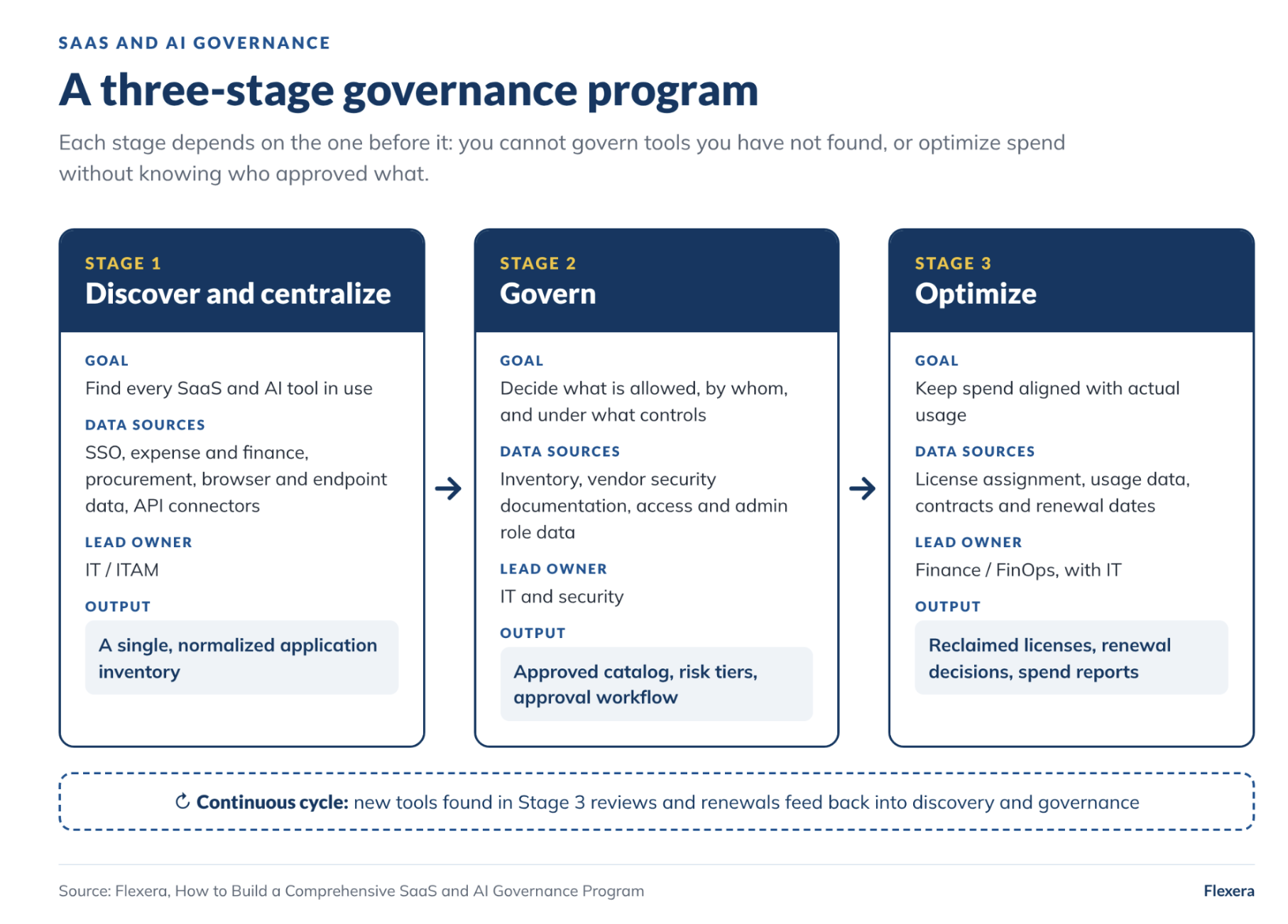
Three-stage SaaS and AI governance program: discover and centralize, govern, optimize
Discover and centralize SaaS visibility
Discovery is the foundation of a governance program. The aim is a single source of truth: one inventory of every SaaS application and AI tool in use, built by aggregating data from the systems that already record purchases, logins, and usage.
How do I discover shadow SaaS in my company?
Shadow SaaS is discovered by correlating multiple data sources against your known application inventory. No single source is complete, so the method relies on cross-checking:
- Identity data (SSO and identity providers). Shows which sanctioned applications users sign in to, and how often. It misses tools that are accessed with personal credentials or via direct sign-up.
- Financial data (expense, accounts payable, corporate cards). Captures tools bought outside procurement, including individual subscriptions expensed by employees.
- Procurement and contract records. Establishes what the organization has formally agreed to buy, at what tier, and until when.
- Browser and endpoint data. Browser extensions, CASB connections, and endpoint agents detect usage of applications that never appear in SSO or finance systems, including free tiers.
- API connectors to major SaaS platforms. Pull license assignment, last-login, and admin-role data directly from applications such as Microsoft 365, Salesforce, or Slack.
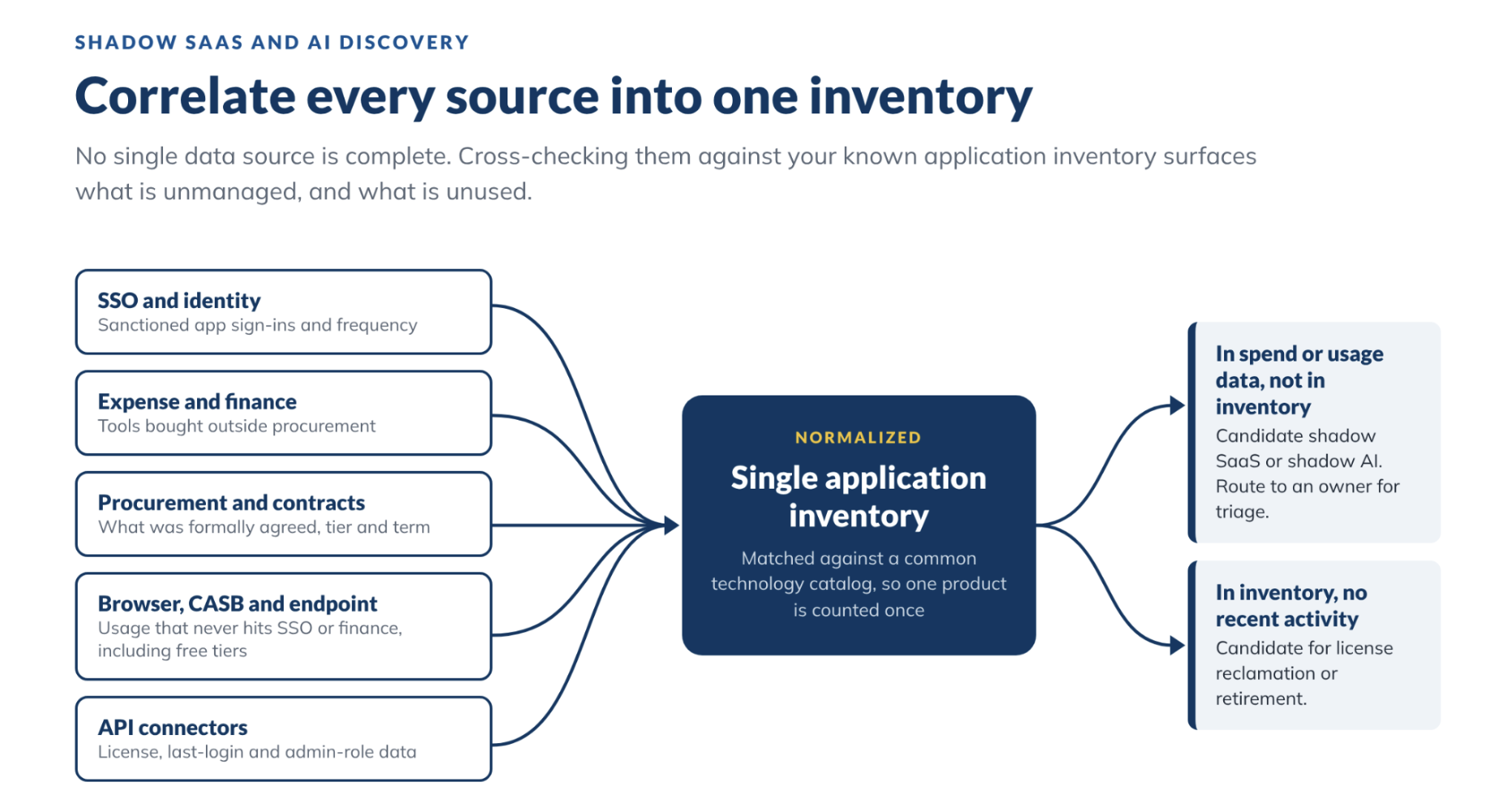
Five data sources correlated into a single application inventory to find shadow SaaS and unused apps
Any application that appears in financial or usage data but not in your inventory is a candidate shadow SaaS tool. Any application in the inventory with no recent logins is a candidate for removal. An IT visibility platform such as Flexera One IT Visibility normalizes these sources against a common technology catalog, so the same product is not counted three times under three different vendor or invoice names.
How is shadow AI different from shadow SaaS?
Shadow AI is harder to detect because much of it does not look like a new application. AI capability now arrives in three forms:
- Standalone AI tools (chat assistants, image generators, coding assistants) that behave like other shadow SaaS and can be found with the methods above.
- AI features within approved SaaS, enabled by an admin or a vendor update that do not create a new application record at all.
- AI agents and direct API usage, often running on personal API keys, corporate cards, or cloud functions rather than user logins, which identity-based discovery misses entirely.
To cover all three, extend discovery beyond logins: track AI-related line items in finance data, monitor vendor release notes and admin settings for AI features in existing applications, and include cloud and API billing in the inventory. Flexera’s guide to what shadow AI is and how to detect it covers detection controls such as network monitoring, SSPM, and data loss prevention in more depth.
What are the risks of unmanaged SaaS?
Unmanaged SaaS creates risk in four areas:
- Data exposure. Company or customer data is stored with vendors whose security posture and data handling have not been reviewed.
- Compliance. Unreviewed tools can breach data protection obligations (such as GDPR), contractual terms with customers, or sector regulations.
- Access control. Accounts created outside SSO are not removed automatically when an employee leaves, resulting in orphaned access to company data.
- Unplanned cost. Duplicate subscriptions, auto-renewals, and expensed tools add spend that finance cannot see until it has already been committed.
Why is shadow SaaS a risk?
Shadow SaaS is a risk because controls can only be applied to applications the organization knows about. Security reviews, access policies, offboarding processes, and spend approvals all depend on the application being in the inventory first. A tool outside the inventory sits outside every one of those controls at once.
Make discovery continuous
A one-off audit produces an inventory that is out of date within weeks. Set up automated discovery workflows so that new applications are flagged as soon as they appear in any source:
- Schedule recurring data syncs from SSO, finance, and procurement systems.
- Configure alerts for new applications, new AI-related vendors in expense data, and new OAuth grants to third-party tools.
- Route each newly discovered tool to a named owner for triage (approve, replace with a sanctioned alternative, or retire).
Implement governance for AI and SaaS usage
Governance turns the inventory into decisions: which tools are approved, who can use them, under what conditions, and who is accountable for each one. The aim is to make the sanctioned route faster than the unsanctioned one, so employees have less reason to work around it.
How do I detect and manage “shadow AI” tools and AI-enabled SaaS usage across the organization?
Detect shadow AI by extending discovery to AI-specific signals, then manage it through a defined policy and approval process rather than blanket bans. In practice:
- Detect. Combine SSO, finance, browser, and API data (covered above) with monitoring of AI features inside existing SaaS applications and AI line items in cloud and API billing.
- Classify. Tag each AI tool or feature by the type of data it can access and whether it can take actions on a user’s behalf (as AI agents can).
- Decide. Approve, restrict, or retire each tool against a published AI usage policy.
- Offer alternatives. Where a tool is restricted, point users to an approved equivalent so demand does not move to another unsanctioned tool.
- Monitor. Keep AI tools in the same continuous discovery and review cycle as other SaaS.
How do I govern employee use of AI tools and SaaS apps?
Govern employee usage by consolidating all applications into a single centralized view, then applying consistent policies across them. A working governance framework includes:
- A centralized dashboard. Every application, its owner, users, risk tier, and cost, in one place. Flexera One SaaS Management is built to provide this view across known and shadow applications, including AI-powered apps.
- A published usage policy. A plain-language statement of which AI and SaaS tools are approved, what data may and may not be entered into them, and how to request something new.
- Named application owners. Each application, and each AI agent, has an accountable owner. When that person changes role or leaves, ownership is reassigned as part of the offboarding process.
- Risk tiers. Not every tool needs the same level of review. Tiering lets low-risk tools move quickly while high-risk ones get full scrutiny.
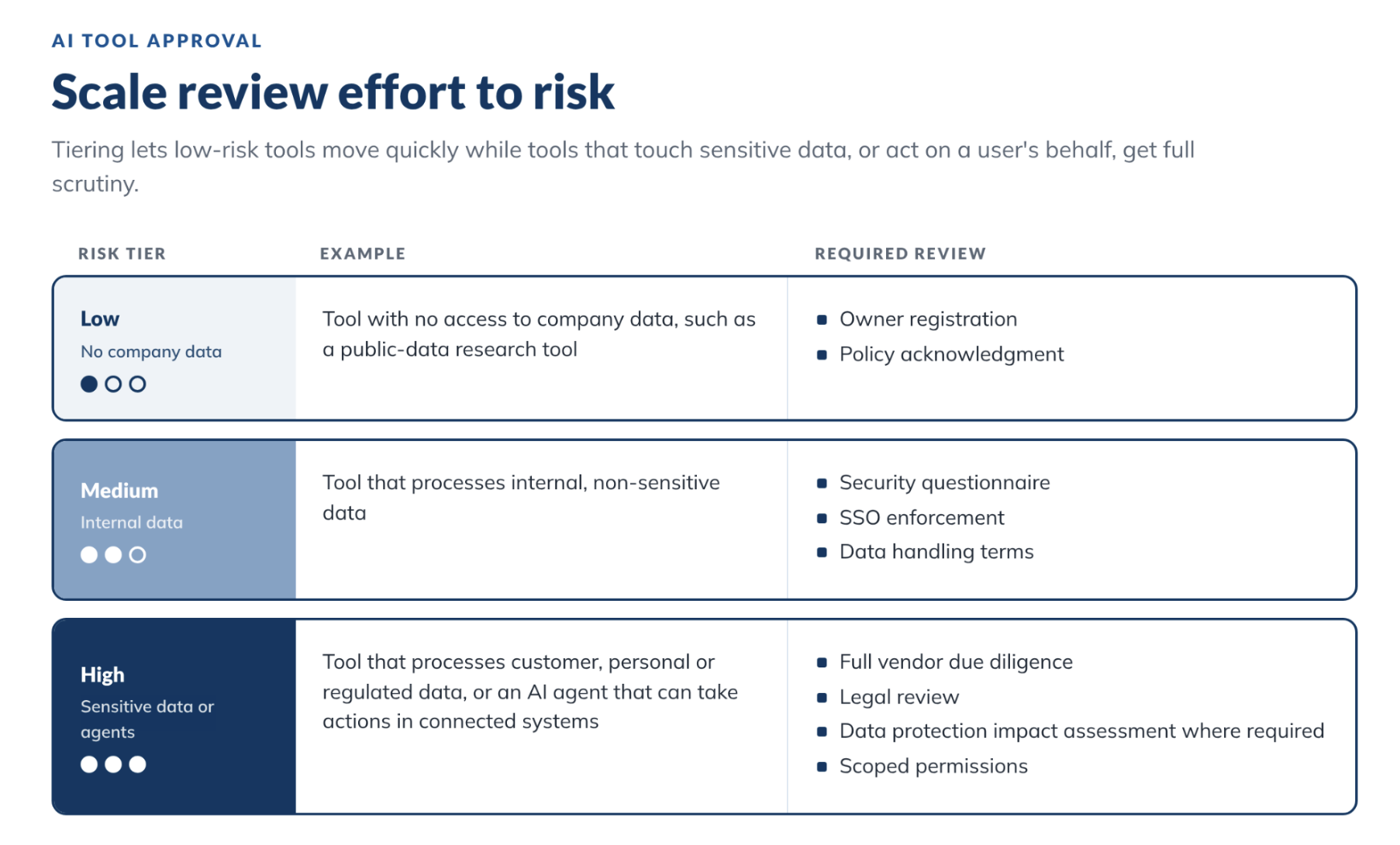
Low, medium, and high risk tiers for AI tool approval with required reviews
Define a vendor due diligence process
Every AI-enabled SaaS tool should be assessed before it touches company data. A standard due diligence checklist covers:
- Security certifications and audit reports (for example, SOC 2 or ISO 27001).
- Where data is stored and processed, and under which jurisdiction.
- Whether customer inputs are used to train the vendor’s models, and whether that can be switched off contractually.
- Data retention and deletion terms.
- Sub-processors, including any third-party AI model providers the vendor relies on.
- Incident notification commitments.
Repeat the review at renewal, or sooner if the vendor adds significant AI functionality to an existing product.
Monitor user access and admin roles
Access drifts over time. Run a regular review of:
- Who has access to each application, compared with current HR records, so leavers and role changes are reflected.
- Admin roles, which should be limited to the minimum number of named people needed to run each application.
- OAuth grants and integrations, which can give third-party and AI tools access to email, files, or calendars without a separate login.
- Agent permissions, so AI agents hold only the access their task requires.
Connect your SaaS management platform to HR systems so that joiner, mover, and leaver events automatically trigger access changes, rather than relying on manual tickets.
Create a standardized approval workflow for new AI tools
A standard workflow makes approval predictable for employees and auditable for IT:
- Request. The employee submits the tool, the business need, and the data it will use.
- Check the catalog. If an approved tool already covers the need, the request is redirected.
- Assign a risk tier based on data access and agent capability.
- Security and legal review, scaled to the tier.
- Finance check. Confirm budget, pricing model (seat-based or consumption-based), and contract terms.
- Approve and provision through SSO, with a named owner and a review date.
- Add to the inventory so the tool enters the same monitoring and optimization cycle as everything else.
Publish expected turnaround times for each tier. A slow, opaque process is one of the main reasons employees adopt tools without asking.
Optimize SaaS spend and license utilization
Once tools are visible and governed, the third stage keeps their cost aligned with how they are actually used. This is where FinOps principles apply: shared visibility between IT and finance, accountability for spend, and decisions based on usage data rather than assumptions.
What are the best practices for SaaS spend optimization?
SaaS spend optimization follows a repeatable cycle:
- Centralize subscription data. Bring contracts, invoices, expense claims, and license counts into the same inventory used for governance.
- Track utilization. Compare purchased licenses with assigned licenses, and assigned licenses with actively used licenses.
- Remove redundancy. Identify applications with overlapping capabilities across departments and consolidate to fewer tools.
- Right-size license tiers. Move users who only use basic features to lower-cost tiers.
- Manage renewals proactively. Review each contract well before its notice period, not after it auto-renews.
- Report and allocate. Attribute spend to departments and owners so cost is visible to the people making usage decisions.
Consumption-based pricing for AI (tokens, API calls, credits) makes this cycle more important because spend can rise between billing cycles without any new purchase. Flexera’s guide to FinOps for AI in 8 steps covers usage-based AI cost management in more detail.
How can I identify unused SaaS licenses?
Identify unused licenses by comparing license assignment data with activity data from each application:
- Unassigned licenses: purchased but not allocated to anyone.
- Inactive licenses: assigned to a user with no login or activity within a set period (commonly 30, 60, or 90 days, depending on the application).
- Leaver licenses: still assigned to users who have left the organization, found by matching against HR records.
- Over-tiered licenses: premium licenses held by users who only use standard features.
Set a reclamation policy that defines the inactivity threshold for each application, notifies the user before removal, and returns reclaimed seats to a pool for reassignment before any new seats are purchased.
How do I automate SaaS license renewals?
Automate renewal management by recording every contract’s renewal date and notice period in a central system, then triggering alerts and reviews on a fixed schedule:
- 90 to 120 days before the notice deadline: alert the application owner and finance, and pull current usage data.
- 60 to 90 days before: review utilization, redundancy, and tier mix; decide whether to renew, renegotiate, downsize, or cancel.
- 30 days before: confirm the decision and complete negotiations or cancellation in time to meet the notice period.
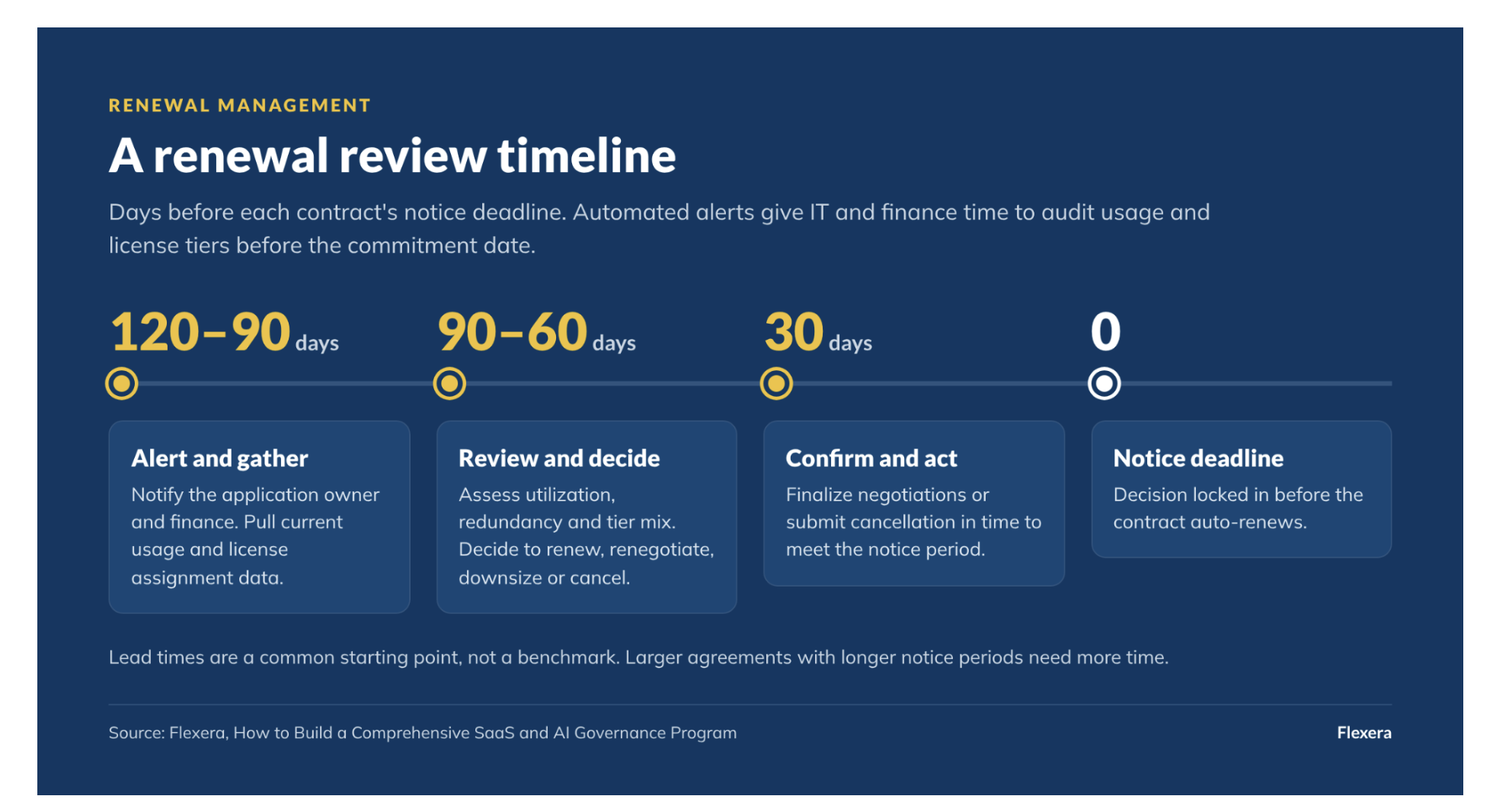
SaaS renewal review timeline from 120 days before the notice deadline
The exact lead time depends on contract size and notice terms. Larger agreements need more time for negotiation. AI-based contract ingestion can help populate renewal dates, license tiers, and terms from existing contracts so the schedule starts from complete data.
How do I track SaaS application usage effectively?
Track usage at the level that supports a decision. For most applications, that means:
- Last login and login frequency per user.
- Feature-level usage where the application’s API exposes it, to support tier decisions.
- For AI tools, consumption metrics such as tokens, credits, or API calls, attributed to a team or project.
Generate regular spend reports
Produce spend reports on a monthly or quarterly cycle that break down SaaS and AI costs by:
- Department and cost center, for budget accountability.
- Application owner, so the person approving usage sees its cost.
- Employee, where appropriate, for high-cost licenses.
- Category (for example, collaboration, security, AI tools), to spot overlap.
- Trend, showing month-over-month change and upcoming renewals.
Share the same reports with IT and finance, so both teams work from the same numbers when renewal, consolidation, and budget decisions come up.
Where to start
- Connect your first three data sources, typically SSO, expense data, and procurement records, and build a baseline inventory.
- Publish a short AI usage policy and a standard request route for new tools, even before the full workflow is in place.
- Load your next 12 months of renewals into a single calendar with owners and notice periods attached.
For the broader context on how AI is changing the way SaaS is bought, priced, and managed, see Flexera’s analysis of AI’s impact on SaaS management.
What is a SaaS and AI governance program?
A SaaS and AI governance program is a framework that combines discovery, policy, and cost management for every SaaS application and AI tool an organization uses. It gives IT, security, and finance a shared inventory, a consistent approval process, and regular reporting, so tools are visible, secured, and paid for in line with their actual use.
What is the difference between shadow IT, Shadow SaaS, and shadow AI?
Shadow IT is any technology used without IT’s knowledge or approval. Shadow SaaS is the subset delivered as cloud applications. Shadow AI is the use of unsanctioned AI tools, models, features, or agents, which can include AI capabilities inside otherwise approved SaaS applications. Shadow AI is often harder to detect because it does not always require a new login or purchase.
What is the difference between shadow IT, shadow SaaS, and shadow AI?
Shadow IT is any technology used without IT’s knowledge or approval. Shadow SaaS is the subset delivered as cloud applications. Shadow AI is the use of unsanctioned AI tools, models, features, or agents, which can include AI capabilities inside otherwie approved SaaS applications. Shadow AI is often harder to detect because it does not always require a new login or purchase.
Who should own SaaS and AI governance?
Ownership is usually shared. IT or ITAM typically owns discovery and inventory; security owns risk review and access policy; and finance or FinOps owns budget, renewals, and spend reporting. Each application should also have a named business owner who is accountable for its use and cost.
Should organizations ban unapproved AI tools?
Outright bans tend to push usage to personal devices and accounts, where it is harder to see. A more effective approach is to publish clear rules on what data can be used with AI tools, offer approved alternatives, and make the request process fast enough that employees use it.
How often should SaaS licenses be reviewed?
High-cost and high-volume applications benefit from monthly usage reviews, with a full review ahead of each renewal. Lower-cost applications can be reviewed quarterly. Automated inactivity alerts reduce the need for manual checks between reviews.
What should a SaaS management platform do for AI governance?
A SaaS management platform should discover AI-powered applications alongside other SaaS, including unsanctioned use, show the users, cost, and risk associated with each, and connect to SSO, finance, HR, and procurement systems so discovery, access changes, and renewal alerts run automatically.