
What’s new at Flexera in October 2026 includes cost controls for AI cloud infrastructure and data clouds. Autonomous workload optimization now balances cost and performance across clouds, Kubernetes, Databricks and Snowflake, and new collaborations with Revenium and Ascerta (formerly Pay-i) connect Flexera to the tools that govern AI traffic.
FinOps teams get AI-based cost anomaly detection, usage-based shared cost allocation and scheduled recommendation emails. ITAM and SaaS teams get REST API integrations in Business Adapter Studio, simpler AI purchase order ingestion and new filters for Microsoft 365 and Entra ID user imports.
AI Cost Management
Flexera AI Cost Management extends to AI cloud infrastructure and AI data clouds, and broadens its ecosystem
Flexera announced cost controls for AI cloud infrastructure and AI data cloud platforms, building on AI Cost Management (AICM) capabilities that already span AI applications, agents, models and workflows. The expansion adds new autonomous capabilities to Data Cloud Optimization and Workload Optimization, and brings gateways, observability, routing, and economic control systems into the AI Cost Management ecosystem.
Key Highlights
- Cost controls for AI infrastructure and data clouds: Enable AI Cost Management for cloud infrastructure and data cloud platforms that support models and agents.
- Autonomous agents balance cost and performance: Autonomous workload optimization continuously balances cost efficiency and performance across clouds, containers, and data platforms such as Databricks and Snowflake, so engineers can focus on innovation.
- Kubernetes workload optimization: Most dynamic AI workloads run on containers/Kubernetes, and our autonomous workload optimization capabilities autonomously provisions spot capacity, autoscale VMs and nodes, and rightsize pods for clusters that run AI workloads.
- A broader AI ecosystem: Flexera is working with gateway, observability, routing and economic control vendors, so the financial (e.g. budgets and true costs factoring negotiated rates and commitments) and enterprise context (e.g. cost centers and business owners) in Flexera One connects to the tools that govern AI traffic. Collaborations with Revenium, which brings AI usage metering and economic controls at the gateway, and Ascerta (formerly Pay-i), which brings agent tracking and AI value and ROI attribution, help organizations gain greater visibility, governance, and financial accountability across their AI investments.
- AI Cost Management Maturity Assessment: Answer six questions and get an instant maturity scorecard to see how you compare to peers, and help identify the next steps in your AI cost management journey.
Why it matters
Only 31% of organizations report having accurate visibility into their AI software, according to the Flexera 2026 State of ITAM Report, and nearly 75% of enterprises cannot confidently prove AI business outcomes to their CFO. Proving AI value starts with knowing what AI costs, and that cost is spread across several systems. Each prompt can reason, retry, plan and draw on additional data sources, so a single prompt can consume tens of thousands of tokens across models, data clouds and compute. Cost controls and autonomous optimization at the infrastructure and data layers, together with the gateway ecosystem, bring that spend into clearer view.
Learn More
For an overview of the portfolio, see AI Cost Management. For product details and guidance, see the Token Cost Control product page and the product documentation. To hear why AI spend is so hard to attribute, register for and watch our webinar series, The AI Cost Crisis. To benchmark your organization, take the AI Cost Management Maturity Assessment.
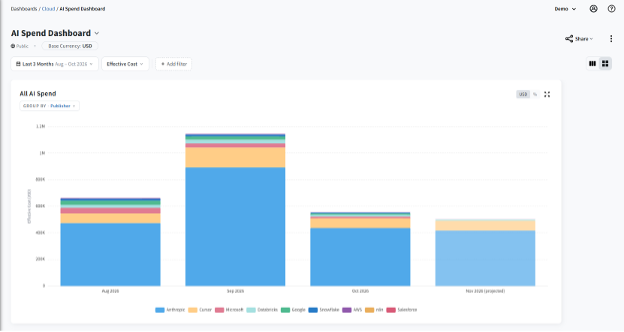
Token Cost Control Dashboard – All spend
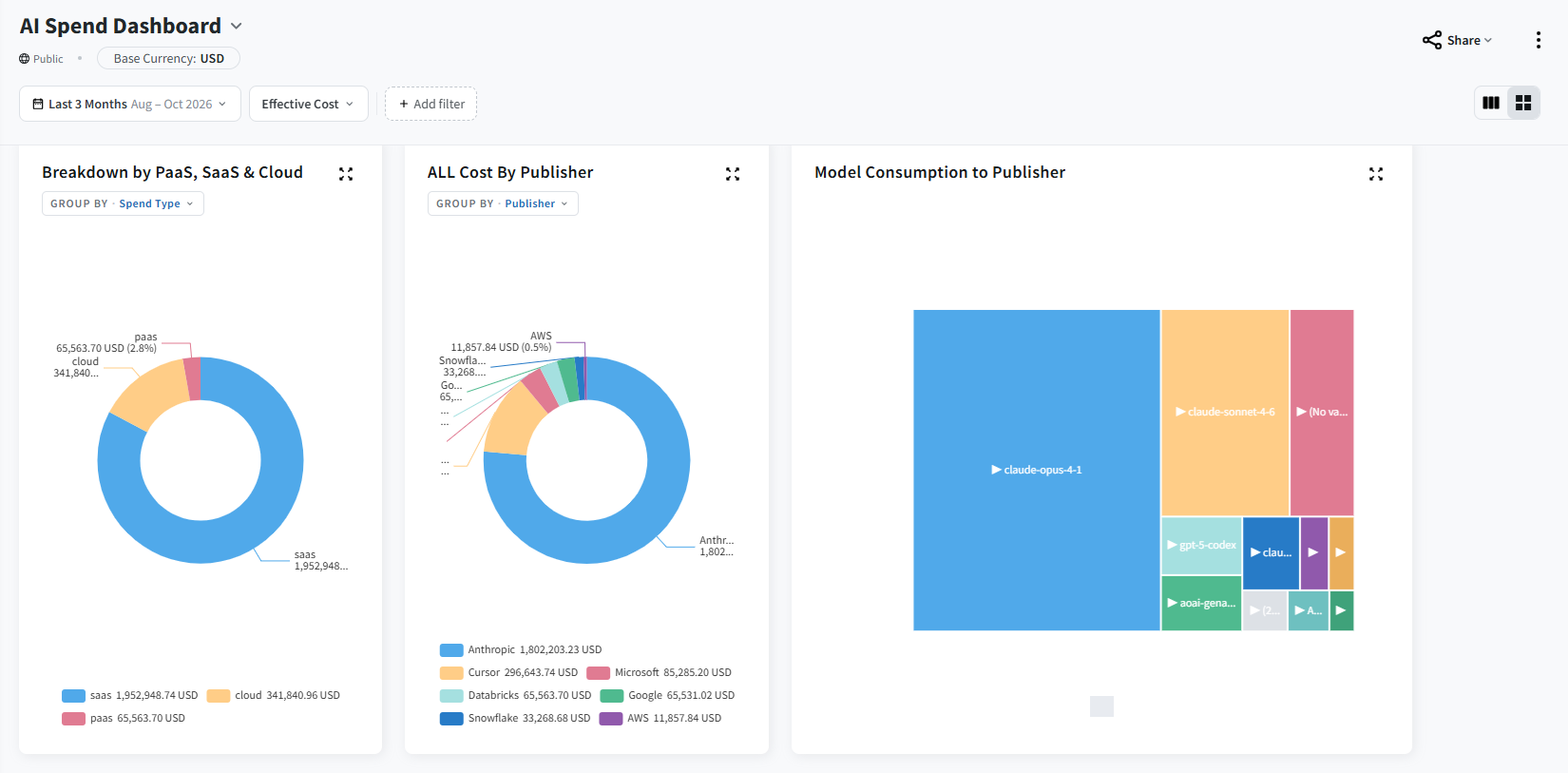
Token Cost Control dashboard – Breakdown
FinOps
AI-based Cost Anomaly Detection for Cloud Cost Optimization (V2)
AI-based cost anomaly detection is generally available for Cloud Cost Optimization organizations using the V2 pipeline. It automatically evaluates cloud cost data and presents detected changes in a dedicated experience for investigation.
Key Highlights
- Automated anomaly detection: Scheduled evaluations detect unexpected increases and decreases in cloud costs without requiring teams to inspect cost reports manually.
- Multi-cloud analysis: Evaluate cost activity across AWS, Microsoft Azure, and Google Cloud data available through the V2 pipeline.
- Dimensional attribution: Investigate detected anomalies by provider, region, service, account, and billing center.
- Dedicated anomaly experience: Review anomalies in a dashboard with cost impact, impact percentage, detection information, time-series details, filters, and sorting.
- Impact-based prioritization: Focus investigation on the anomalies with the greatest cost effect.
- Historical pattern analysis: Detection uses a 90-day lookback window and combines forecasting and statistical models to account for trends and recurring patterns.
- Optional contextual descriptions: AWS Bedrock can provide readable descriptions based on structured anomaly attributes, with fallback behavior when the service is unavailable.
- Non-disruptive workflows: Existing Analyze Spend workflows and legacy anomaly capabilities remain available.
Why it matters
Automated detection reduces manual monitoring, while dimensional attribution helps FinOps practitioners narrow an anomaly to the provider, service, region, account, or billing center that contributed to the change. This gives FinOps, cloud, and IT finance teams a more consistent way to prioritize investigation, understand cost impact, and take corrective action before unexpected spend grows
Learn More
For an overview of the feature, see AI-based cost anomaly detection. For product guidance, see Cost Anomaly Detection in Cloud Cost Optimization.
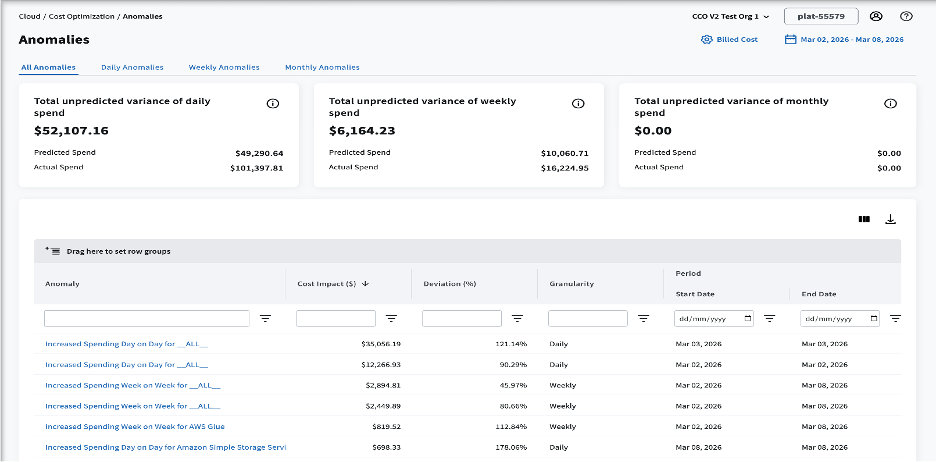
Auto-generated anomaly detection dashboard view
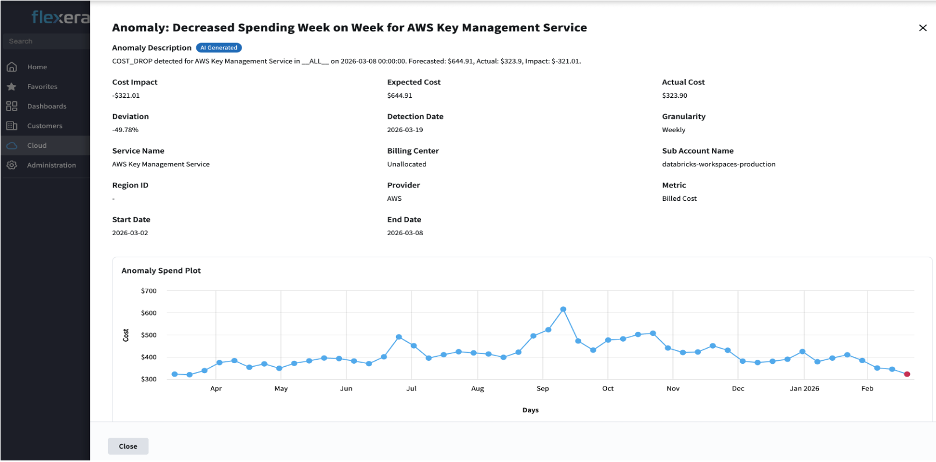
Anomaly detail view
Usage-Based and Auditable Shared Cost Allocation
Shared Cost Allocation now provides two complementary capabilities: a usage-based proportional allocation method and improved visibility into how shared costs were distributed.
Key Highlights
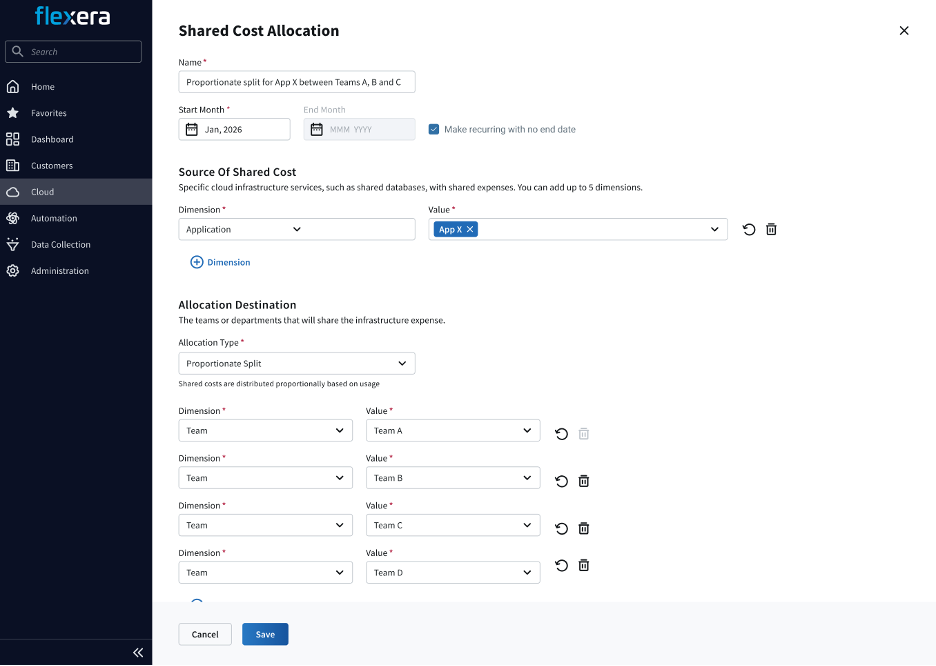
- Usage-based proportional allocation: Distribute shared costs among destination teams or business units based on their usage data rather than predefined percentages.
- Automatic allocation calculations: Cloud Cost Optimization retrieves usage data and calculates the proportional split for each allocation rule.
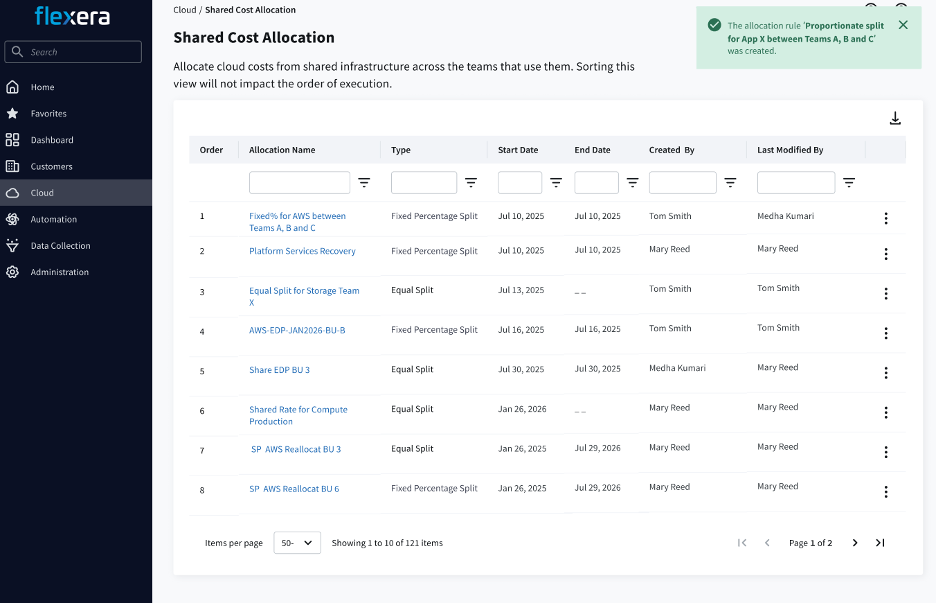
- More allocation choices: Use the new usage-based method alongside the existing Equal Split and Fixed Percentage methods.
- Integrated rule configuration: Select usage-based proportional allocation within the existing Shared Cost Allocation experience.
- Allocation analysis in Tabular View: Examine allocated costs using familiar grouping, filtering, and reporting capabilities in Analyze Spend.
- Rule traceability: Identify the allocation rule, method, ratio, source-cost context, and destination associated with redistributed costs.
- Dedicated audit dimensions: Analyze allocation information using dimensions for the allocation rule, allocated resource, resource name, and allocation details.
- Raw and adjusted cost perspectives: Compare original cloud billing costs with shared-cost-adjusted results.
- Faster access to audit details: Launch a preconfigured analysis from a Shared Cost Allocation rule with the relevant rule and filters applied.
Why it matters
Usage-based allocation gives FinOps teams a way to distribute those costs according to consumption, reducing the need for calculations outside the platform.
Audit dimensions and direct access to allocation analysis make it easier to explain how a charge was calculated, validate allocation rules, investigate unexpected results, and support chargeback and showback conversations. Together, these capabilities improve cost visibility, budget accountability, and confidence in shared-cost reporting.
Learn More
For information about the available allocation methods, see Shared Cost Allocation types. For instructions on reviewing allocation results, see Reprocess bills and verify Shared Cost Allocation results.
Review the related release notes:
Manage shared cost allocation rules
Configure usage-based cost allocation
Recommendation Subscriptions for Cloud Cost Savings
Cloud Cost Optimization users can now subscribe to recommendation views and receive scheduled emails containing current cost-saving and optimization recommendations.
Key Highlights
- Scheduled recommendation delivery: Receive recommendation updates by email on a daily, weekly, or monthly schedule.
- Targeted recommendation views: Create subscriptions based on criteria such as recommendation type, severity, cloud provider, account, tags, or saved filters.
- Actionable email summaries: Review current recommendations, potential savings information, severity, and resource details without repeatedly checking the Recommendations page.
- Direct access to recommendations: Follow links in subscription emails back to the corresponding filtered Recommendations view in Cloud Cost Optimization.
- Multi-recipient distribution: Share recommendation updates with additional internal recipients to keep FinOps, engineering, finance, and cloud stakeholders informed.
- Centralized management: Create, edit, pause, resume, or delete recommendation subscriptions through a consistent subscription-management experience.
- Enterprise and MSP support: Scope subscriptions to the appropriate organization or customer tenant while respecting existing access controls and permissions.
Why it matters
Scheduled recommendation emails bring relevant savings insights to the people responsible for reviewing and acting on them, helping teams maintain a consistent optimization process and coordinate action across FinOps, engineering, finance, and cloud operations. For MSPs, tenant-scoped subscriptions also provide a repeatable way to distribute relevant recommendations to the appropriate customer stakeholders.
Learn More
For configuration and subscription-management guidance, see Subscriptions in Cloud Cost Optimization. Review the October release information in What’s New in Flexera One Cloud Cost Optimization.
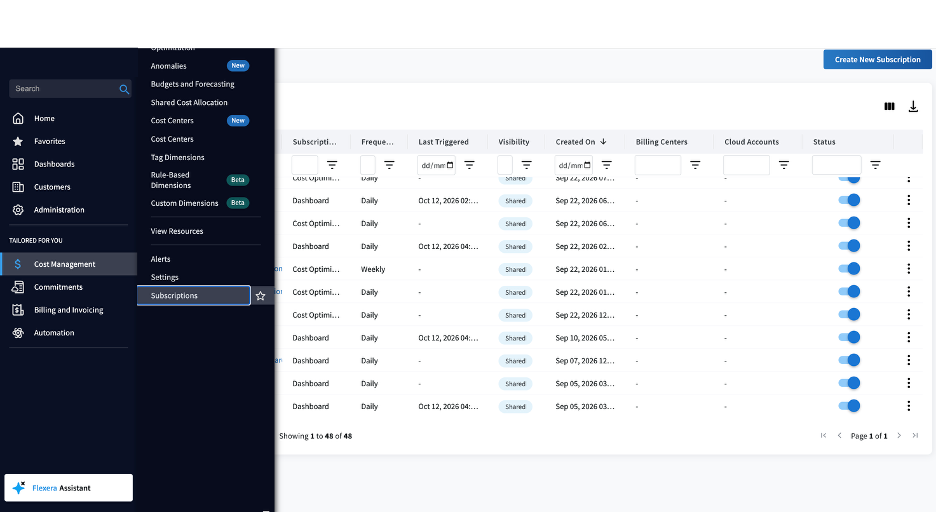
Recommendation subscription setup
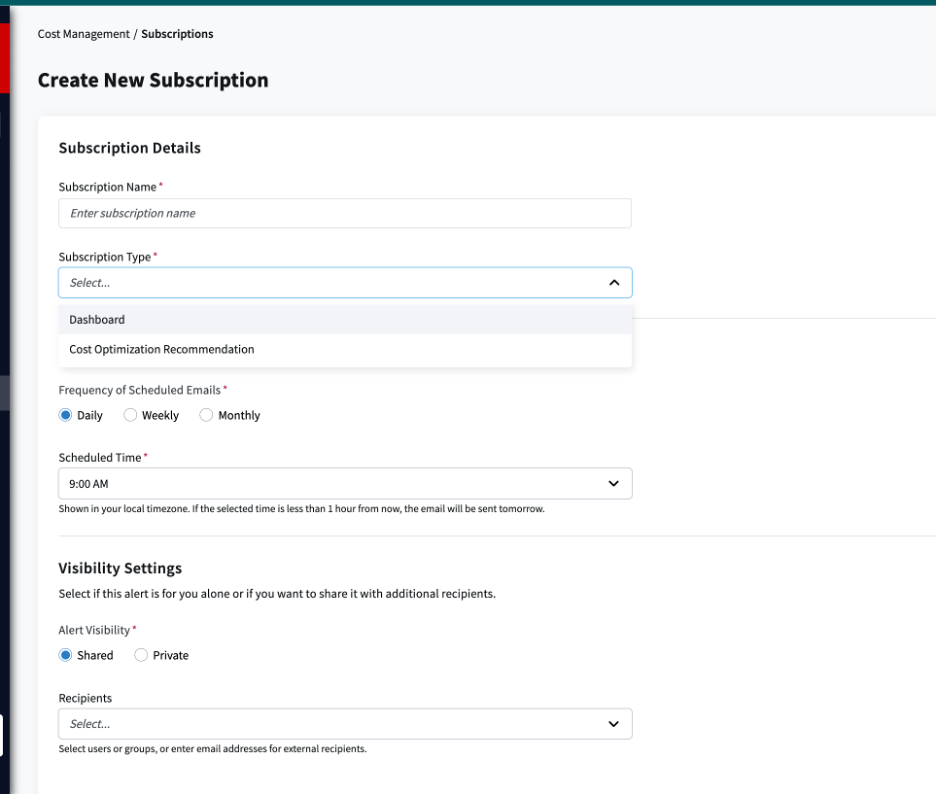
Create and schedule a recommendation subscription
Control which customers can connect cloud bills in Cloud Cost Optimization
Partners can now control which customers can connect and manage their own cloud bills in Flexera One Cloud Cost Optimization (CCO) through the new Bill Configuration capability, available on each customer’s Capabilities tab.
What’s new
Partners can enable or disable Bill Configuration for individual customers. Disabling it prevents new bill connections and pauses collection for existing ones without deleting any configurations. Re-enabling it resumes collection without requiring additional setup. Distributors manage this capability for their downstream partners, while partners manage it for their customers.
Why it matters
Previously, customers could connect cloud bills independently, including for spend outside their partner’s management scope. This new control gives partners greater oversight of customer bill connections and the cloud spend they manage.
Availability
Available now to partners using Cloud Cost Optimization. Bill Configuration remains enabled for existing customers to avoid disruption, while new customers have it disabled by default until their partner enables it.
Learn more: See the release notes for additional details.
SaaS Management
New Filtering feature for Microsoft 365 connector
Key Highlights
Within the connector settings, you can select to:
- Import all users: The default option to include all discovered users in the aggregated data.
- Import selected users having:
- Users with subscriptions: To include users with at least one Microsoft assigned license.
Why it matters
You can now optimize your data collection by filtering which users are imported from Microsoft 365 and Microsoft Entra ID. This additional filtering capability allows you to focus on the most relevant data, ensuring your user counts are accurate and reports remain clean and actionable.
Learn More
For more information, see Add the Microsoft 365 connector and Add the Microsoft Entra ID connector.
ITAM
REST API Support in Business Adapter Studio: Business Adapter Studio (BAS) now supports native REST API integrations.
Key Highlights
- Connect directly to cloud services, SaaS applications, and third-party systems through REST APIs, eliminating the need for custom scripts and file-based imports.
- Accelerate integration projects with a guided configuration experience that simplifies connection setup, data preview, and field mapping.
- Import large datasets efficiently with built-in support for common pagination methods.
- Map REST API data directly to ITAM records, such as contracts, licenses, and purchase orders.
- Reduce implementation and maintenance effort by removing reliance on external tools and staging processes.
- Protect sensitive credentials with secure storage, encryption, and masking of API keys, tokens, and client secrets.
- Two new preconfigured Coupa templates, CoupaContract.xml and CoupaPurchaseOrder.xml, which provide predefined mapping between Coupa REST API responses and IT Asset Management contract and purchase order records, simplifying integration with the Coupa contract management platform.
Why it matters
Native REST API support in Business Adapter Studio lets ITAM teams pull contract, purchase and entitlement data directly from cloud services, SaaS applications and procurement platforms like Coupa, with no custom scripts or file imports. The result is faster integrations, lower maintenance costs and an up-to-date view of what the organization owns. That supports stronger audit defense and smarter renewal decisions.
Learn More
For step-by-step configuration instructions, see Completing Connection Properties for a REST API.
Simplified AI Purchase Order Ingestion
Key Highlights
You can now start the AI purchase creation workflow directly from the All Purchases page and easily track uploaded documents with direct access to unprocessed purchases.
Why it matters
This enhancement delivers faster workflows, greater transparency, and improved auditability by allowing users to launch AI-based purchase uploads directly from the standard purchases view. Users can quickly locate and review uploaded documents without navigating through multiple import menus.
Learn More
For steps on how to manually create a purchase order document, see Creating a Purchase.
For steps on how to upload an original purchase order document for AI Purchase Order Ingestion, see Upload an Original Purchase Order Document
Alexa Abbruscato
Alexa Abbruscato is a Senior Product Marketing Manager for Flexera.