


Flexera’s April 2026 updates introduce meaningful advancements across Flexera One partner services, IT Asset Management, FinOps, and Security, helping organizations manage technology estates with greater intelligence, automation, and confidence. From AI‑powered contract ingestion and expanded cloud cost visibility to new FinOps alerts and stronger Software Vulnerability patching controls, these updates enable teams to optimize spend, reduce risk, and make faster, more informed decisions across hybrid and cloud environments.
Learn more about what’s coming with Flexera’s 2026 AI Innovation Roadmap here.
Innovation area: Flexera One
Partner Services: Bulk lifecycle management of customers
Managed Service Provider (MSP) partners can now onboard and offboard customers in minutes, streamlining customer lifecycle management end to end. This capability eliminates operational friction and accelerates time to value by allowing MSP partners to:
Key highlights
- Create and remove customers in bulk through publicly available APIs
- Add or delete customers manually directly within the Flexera One UI
- Import customer data using CSV files in the Flexera One UI
Bulk operations support up to 100 customers per request, whether performed via APIs or the Flexera One UI.
For more information, see the following topics in the Flexera One Help:
- Creating a child organization under our MSP parent organization
- Updating child organization details
- Deleting a child organization
Innovation area: IT Asset Management
AI contract ingestion
Automate cumbersome and error-prone manual data entry with Flexera’s AI contract ingestion (available in Flexera One ITAM and Snow Atlas SAM) solution. Our AI contract ingestion leverages natural language processing (NLP) and machine learning (ML) to parse and convert uploaded contracts into structured data fields pulling in the contract number, start, expiry, and renewal dates, payment schedules, terms and conditions, and more.
Key highlights
- Reduce the burden of uploading each software vendor contract by up to four hours
- Reduce manual errors and legal interpretation headaches
- Create a defensible ELP record by starting with a contract upload
Watch the demo to see how it works.
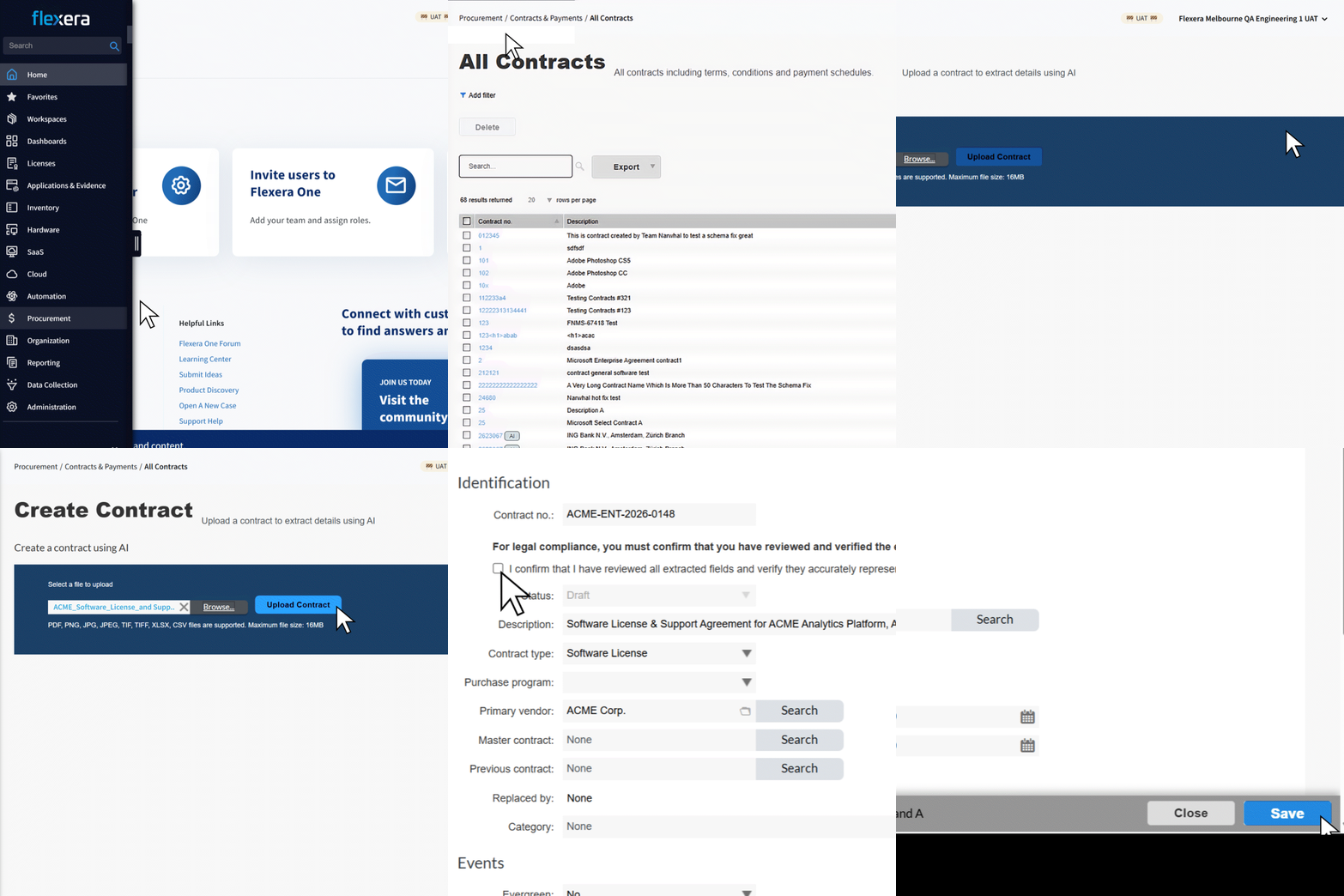
Automate cumbersome and error-prone manual data entry with Flexera’s AI contract ingestion
Innovation area: FinOps
Databricks cost visibility
Flexera’s FinOps portfolio is leveling up for the AI era. Cloud Cost Optimization, our industry-leading cloud cost management solution, now ingests Databricks billing and compute data for cost reporting and analysis.
With this capability, you can:
- View your Databricks costs in Flexera One to get a complete view of your cloud costs
- Drill down to identify the most expensive SKUs, clusters, and other dimensions
- Forecast your Databricks spend across different dimensions
- Perform cost allocation and planning across teams using tags and rule-based dimensions
Stay tuned for further updates, including optimization recommendations.
New Alerts experience for Budgets and Anomalies
Flexera One Cloud Cost Optimization now has a new Alerts page (Cloud > Alerts & Notifications > Alerts), where you can manage Budget Alerts and Anomaly Alerts. The Alerts page provides a centralized location to view and manage alert configurations. From this list view, you can see key details for existing alerts and quickly create, edit, pause, resume, or delete alerts to help you manage cloud spending proactively.
Existing policy-based Budget Alerts and Cost Anomaly Alerts are being deprecated. Users are encouraged to switch to the new Alerts and Notifications experience.
Innovation area: Security Vulnerability Management
Stronger patch confidence and smarter control across Software Vulnerability Management (SVM)
The April 2026 SVM updates deliver improved visibility, smarter patch filtering, and stronger security controls across both on‑prem and cloud deployments, helping teams patch with greater confidence, precision, and operational efficiency.
Key highlights
- Patch with greater precision: New deployment type and architecture filters make it easier to select the right vendor patches for Windows and macOS, reducing failed deployments and rework.
- Improve security decision-making: A new Digitally Signed filter is available in Configure View, and a corresponding property is now shown in Patch Information. Expanded visibility into digitally signed and unsigned patch packages helps teams assess risk before deployment and avoid introducing untrusted software.
- Simplify patch publishing at scale: Support for compressed vendor patch module (VPM) packages streamlines ingestion and creates single, deployment‑ready artifacts for Intune and ConfigMgr.
- Enhance access control and visibility: IP-based user restrictions and expanded UI support for network appliance target groups improve security while aligning modern and legacy workflows.
- Increase Intune accuracy and hygiene: Improved PowerShell-based detection and version-based retention ensure cleaner environments and more reliable patch applicability reporting.
Why it matters
These updates help security and endpoint teams reduce patching risk, minimize operational overhead, and maintain consistent outcomes across hybrid environments, ensuring vulnerabilities are addressed faster, with fewer errors, and greater confidence in what gets deployed.
For full details, see the release notes here (on prem) and here (cloud).
Kevin Miller
Kevin Miller is the Director of Product Marketing at Flexera. He develops marketing strategy and messaging, with a focus on IT insights, data quality, and technology value optimization.



