
Webinar
If your Microsoft renewal arrived tomorrow, would you be ready?
Related Solutions
Overview
Microsoft renewals are getting harder to navigate. With Microsoft 365, Azure, data center licensing and emerging AI consumption models, understanding what you own, what you use and what you’ll actually need next is becoming more complex.
In this on-demand webinar, Microsoft licensing experts Rich Gibbons and Jeffrey West unpack what’s changing and what it means for your next renewal. They share practical ways to uncover optimization opportunities, build a realistic view of future demand and put you in a stronger position before you sit down with Microsoft.
You’ll walk away knowing how to
- Build a complete picture of your Microsoft estate across Microsoft 365, Azure, data center licensing and emerging AI consumption models
- Find and remove waste before you commit, from unused licenses and overprovisioned cloud resources to commitments that don’t match demand
- Build a credible forecast for your next agreement based on what you’ll realistically use, not Microsoft’s growth assumptions
- Evaluate your agreement and licensing options, including how your EA, CSP and existing entitlements could affect the economics of your renewal
- Bring ITAM, FinOps, procurement and finance together around a shared view of your Microsoft estate and renewal strategy
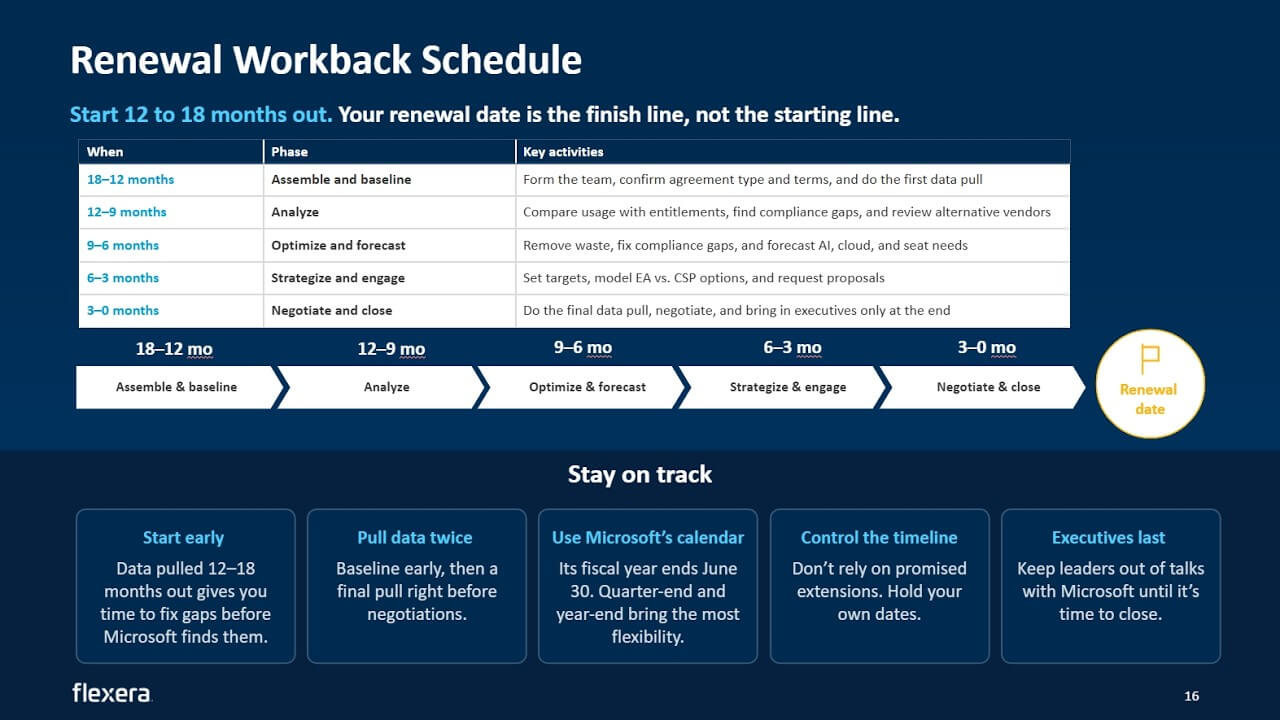
- Work backward from your renewal date to understand what to tackle 12 to 18 months out, what to optimize next and what to save for the negotiation
Speakers

Rich Gibbons
Head of Microsoft Intelligence
Synyega

Jeffrey West
Solutions Advisory Director, Data & Content
Flexera
Work backward from your renewal date to negotiate from strength
Why your Microsoft renewal is now an enterprise-wide decision
Microsoft spend is no longer a single line item. Consumption-based AI, end-user compute, data center licensing and cloud infrastructure each have different owners, buying models and opportunities to save. Leadership often needs to sign off before anything is agreed.
Outcome: A Microsoft renewal is a business decision. Organizations need visibility across all four spend areas to avoid negotiating blind.
What triggers scrutiny, audit exposure and unfavorable renewal pressure
Mergers and acquisitions, multiple tenants, spreadsheet-based tracking and unpredictable consumption add risk to every renewal. Microsoft may have a clearer view of your cloud and SaaS usage than your own teams do, and potential noncompliance can become another source of leverage.
Outcome: Understanding what triggers scrutiny and how leverage has shifted toward Microsoft helps teams prepare early, challenge assumptions and stay in control of their timeline.
How your agreement type shapes your options and leverage
Microsoft is steering more customers from EA to CSP, while MCA-E offers a direct alternative. Each option comes with different trade-offs in flexibility, price protection and available amendments. With prices increasing, a like-for-like renewal will likely cost more.
Outcome: Agreement type is a real option, not a default. Teams that understand their licenses, usage and roadmap can evaluate EA, CSP and MCA-E on their merits and push back with confidence.
How to align your organization and executives
ITAM, FinOps, procurement, finance and AI teams each hold part of the picture. Consumption models can put the user in one team and the bill in another, while commercial conversations with Microsoft may reach executives before internal teams have aligned around the data.
Outcome: Effective renewals require shared ownership across ITAM, FinOps, procurement, finance and executive leadership, supported by one realistic forecast and a united position.
How to assess your Microsoft stack and optimization options
Cloud, data center, end-user compute and AI consumption each require different data, from tagging and utilization to cores, Software Assurance, license assignments and API usage. The order of the levers matters: remove waste first, commit to steady usage, then apply licenses you already own.
Outcome: Clean data and the right sequence of optimization levers let teams size commitments on forecast demand rather than Microsoft’s growth targets.
How to reverse-engineer your timeline for a successful renewal
Many organizations start preparing when Microsoft calls, by which point some of their leverage may already be gone. Working backward from the renewal date, teams can establish a baseline 12 to 18 months out, optimize in the months that follow, model their options three to six months out and reserve the final three months for negotiation.
Outcome: A renewal workback plan, timed around Microsoft’s fiscal calendar, helps teams know what to tackle when and what to save for the negotiation.
Get expert guidance on Microsoft licensing
Microsoft renewals can take longer than teams expect, and your leverage can shift once Microsoft starts the conversation. Price increases, new consumption models and changing agreement options mean your last renewal playbook may no longer apply. Talk to a Microsoft expert to understand your estate, pressure-test your forecast and build a stronger renewal position before you sit down with Microsoft.
Transcript
Jeffrey West (00:06 - 01:30)
Good morning, good afternoon, and good evening, everyone, and thank you for joining us today for our webcast. The new Microsoft stack, which demands new visibility for renewal.
We're really glad that you could join us today. I would like to discuss quickly what we're going to talk about today.
So our discussion, we're going to have why your Microsoft renewal is now an enterprise wide decision, what triggers scrutiny on an exposure on favorable renewal pressures, how your agreement type shapes your options and leverage, how to align your organization and executives, how to assess your Microsoft stack data and optimization levers, including vendor alternatives, and how to reverse engineer your timeline for a successful renewal.
And we're gonna do our best to keep the conversation tight so that we have some time at the end for Q and A. There also is a, Q and A chat in the tool.
So I'd like to introduce myself to you. I am Jeffrey West. I am a sir.
I'm joined by my esteemed colleague, Rich Gibbons. Rich, give yourself a quick.
Rich Gibbons (01:30 - 01:59)
Awesome. Thank you.
Hi, everyone. Yeah.
I'm Rich Gibbons. Many of you will probably have seen me, whether you wanted to or not, on various webinars and events around the ITAM industry.
So, yeah, me and Jeff, we've been at events together. We've been at awards ceremonies together. I think this is our first joint webinar, so very. exciting.
So, yeah, a little bit of, little bit of ITAM history for everyone today.
Jeffrey West (01:59 - 03:29)
I'm too am very excited to be finally collaborating with you in this way, Rich.
It's gonna be great. Okay. A little bit of housekeeping before we jump in. So we are recording this session, so don't worry about taking notes.
You're going to get the recording or access to the recording and any helpful resources at the end of the webinar. Mics and cameras are all turned off, so we can keep things moving along slowly. Excuse me. Keep things moving along smoothly. Slowly. That would be bad.
Okay. And, if something sparks an idea, please share it in the chat.
There's a Q and A tab, and that's where all good stuff happens. So we would be very, very grateful for you to bring any of your ideas in there.
Alright. Let's kick things off.
Now I'm going to, kick things off with a poll, which is this. What is your biggest Microsoft challenge right now? So go ahead and take a second to answer, is it licensing complexity, audit readiness, cost optimization, Copilot and AI planning, or renewal plan? And we are going to give everyone a couple of minutes and see where our responses come in.
Alright.
Rich Gibbons (03:29 - 03:29)
Right.
Jeffrey West (03:29 - 03:57)
Rich, this reminds me of going to, the carnivals, that come around in the summer, and you've got the little water gun that shoots into the fish mouth, the clown mouth, and the and the balloon pops up. So we've got.
So far, it looks, I don't know, cost optimization is in the lead. Alright.
Your biggest Microsoft challenge right now.
Rich Gibbons (03:57 - 04:03)
We probably. should have given them all of the above option as well.
Jeffrey West (04:03 - 07:49)
No. That's too easy of a let out.
So. Okay.
Alright. Well.
So many of you in this poll, well, the majority have said that cost optimization is the biggest challenge. Now before we get into renewal tactics, let's look at the size of what we're talking about.
But for most organizations, Microsoft is one of their biggest software investments. It often grows into a figure that needs executive sign off and sometimes even board approval.
So this isn't just a procurement task. It's a business decision, and leadership will want visibility before they sign anything.
Microsoft Span, it's not one line item anymore. It's at least four, and each one behaves quite differently.
So let's go through these.
Consumption based AI. This is the newest and least predictable category. Copilot Cowork, WorkIQ APIs, and GitHub Copilot harness.
These are built on usage, so costs can climb really quickly without anybody even noticing. End user compute, which is seat based.
Well, this is the familiar part.
Microsoft 365 bundles, project, Visio. It's predictable, but it's easy to overbuy through shelfware and bundled tiers that people really don't fully use.
Then we move on to data center licenses.
Windows server and SQL server. Whether they're on prem or in the cloud, the choice between bringing your own license and paying as you go is a huge effect on cost and compliance.
And then finally, in the bottom right corner, we've got cloud infrastructure and platform service. We're talking Azure and Microsoft Foundry.
This is often the fastest growing area, and it's usually owned by different teams than the ones handling the agreement. Now each of these typically has a different owner, a different way of buying, and a different way to save money.
So that's why you need visibility across all four before the renewal. Without it, you're negotiating blind.
And we're gonna come back to each area later, but first, let's look at where you are in your renewal timeline with another poll. So tell us, when is your next Microsoft renewal? Is it coming up within the next six months? Are you in that middle range of six to twelve months, or is it so far out beyond twelve months, you're probably not even thinking about it? Or here you go, Rich.
Here's the all the all encompassing. I don't know.
I'm just not sure. Alright.
So we are zipping along. Okay.
Good. Nobody's not sure, so that's a great thing.
We try very hard to stay away from I don't know what I don't know. And I would say we're not completely even across the other three.
Within six months is really just squeaked out in the lead there. But.
So our audience today, this is on. This is top of mind.
Right? You're within six months. You're within a year.
That's great. And we're really glad that you've joined us today because your timing is terrific.
Rich, would you like to take us through the next parts?
Rich Gibbons (07:49 - 29:26)
Yeah. Absolutely.
So, you know, Microsoft renewals are one of those things. Even if you've done a few of them, you know, they.
Microsoft change things so frequently that just because you've done a renewal before doesn't necessarily mean that you, you know, you can just do the same things this time. And when you look at what makes renewals difficult and challenging, some of them are quite similar to audit challenges.
And I thought it was interesting that we didn't see anyone mention audits in the first poll. And I think, you know, Microsoft, in general, we see much more audit like activity in the renewal process now than as a separate activity.
So, you know, when you're coming up to renewal, you've got. You know, there are spikes in usage, mergers and acquisitions.
You know, it could be that you've purchased someone. What we see quite often as well is you know there's gonna be a merger and acquisition or a divestiture, but it's gonna be after your renewal date.
So how do you how do you manage that? What do you renew for? So there. There's lots of complexities just around business structure, that that need to be factored in.
You know, relying on spreadsheets, Excel is brilliant, but it is. You know, it has its limitations, and it is not a software license management tool, particularly in the latest version of Microsoft's portfolio.
So, you know, that that puts you at a bit of a disadvantage. Multiple tenants, this is something that we see more often than you would think where, you know, procurement, etcetera, focus on one part.
It turns out there's another tenant, extra users, can you combine them on the agreement, you know, all that kind of thing. And data center, now I find.
You know, it used to be Windows Server, SQL Server, probably the two biggest things to think about when you were doing a Microsoft renewal. Over the years, they've become less of a focus certainly for Microsoft.
You know, they're interested in per user and consumption billing that we'll talk about. But there is still a huge amount of complexity, risk, and cost when it comes to SQL and Windows Server.
And, you know, you can find yourself overpaying very easily, also being underlicensed. So trying to understand your usage of those products is still a key thing.
And then, you know, Jeff mentioned already the consumption side, all these new products. How do you track them? How do you forecast them? How do you know how much of a certain thing your business will be using in two years? You know, there's.
So there's a real uncertainty element that. That's been introduced.
So then you have to understand what's your tactic. You know? Do you go low? Do you go high? And we'll, again, we'll talk about some of these as we go through.
The other bit, that I think we should highlight is this power imbalance. So, again, all.
As technology changes, that power has shifted. You know, it used to be.
When it was all on premises, we knew what we were running, and we could see our systems. And the vendor, the publisher, were maybe a slight disadvantage because they couldn't see anything unless we shared it with them.
Now all the software is running in Microsoft data centers and Microsoft systems so they can see your cloud usage, your SaaS usage much more clearly than you can in many cases. And that puts you at a an immediate disadvantage.
You know, and we've seen Microsoft's in a renewal. You know, if you push back and you say, right, we're gonna drop down to three, for example, you know, then they kinda go, well, you know, we can see in the system that there's some potential, you know, noncompliance.
So maybe if you drop that piece, we might have to look at this. Whether it's true, whether it's a tactic, you don't know, but they do.
So I think being aware of that is quite critical. And the top one and the bottom one are somewhat related.
Microsoft has made a lot of changes to their internal structure. You know, we've seen lots of layoffs.
There are more announced, lots of restructuring and so on. So there are things now where we've seen this several times.
The account team will say, do you know what? I understand. If you email and you ask us for this extension because of these reasons, we'll get that processed.
No problem. We could extend your renewal date by six months.
So you do that. You send the email.
You wait for a few weeks, and it comes back and they say no. And now all of a sudden, you're four, five weeks behind schedule.
People have started doing other projects. You're on the back foot.
So, again, the. Know, you spend a lot of money with them, but the power is more on their side than ever.
So I do think before you start looking at data or anything, understanding that, that dynamic is key for how you how you work through the renewal. And, you know, and with that, there have been lots of changes, and, you know, we'll look at a few.
But even the focus from Microsoft on agreements, you know, it is changing and shifting. So enterprise agreement always been the, you know, the sort of top dog as it were.
You know, best pricing, best amendments, best treatment from Microsoft, all that kind of thing. Over the years, that has changed somewhat, and we.
We've seen, you know, a a real drive for Microsoft to push more organizations towards CSP that you can see on the right hand side. There are various reasons for that, but it is a, you know, a real driver.
For some organizations, enterprise agreement is still the right thing. But for more and more organizations, CSP is a very good option.As part of your renewal process, just because you had an enterprise agreement for ten, fifteen, twenty years doesn't mean that you should have an enterprise agreement for the next three, five years. So really understanding where a CSP agreement might work for you.
Maybe you have a bit of both. You know, you split certain things.
But looking at how you purchase, what the agreement gives you, you know, partners, they've got margin to play with to give you rebates and discounts. So understanding that, being aware of the terms, you know, CSP is more flexible in some ways, less flexible in others.
There is also the MCAE, which is the direct version of CSP, really. Direct with Microsoft.
For some organizations, they position that, and it is more attractive in certain ways. But then there are other areas where, you know, price protection is less, solid, certain amendments aren't available and so on.
So just because you've got a certain type of agreement doesn't mean you should continue with that. But equally, just because Microsoft tell you, actually, you should have this type of agreement doesn't necessarily mean that that you should.
And it. It's having the confidence, I guess, really, to understand the options and to push back if needed.
But I think there's. You know, you need to have real understanding of your licenses, your usage, your road map to be able to make that decision.
But I think more than ever, the type of agreement is a real option when it when it comes to renewals now. And then I think the next thing to consider is price changes.
So you will have seen some of them. This isn't all of the changes.
This is some of them. But, you know, for those of you that are renewing, you know, next year, you know, you will have signed your agreement in 2023, if I've remembered what year it is correctly.
So this timeline, we start at October 24, so just over two years ago. But there, we saw Dynamics 365, various SKUs increased from between 917%.
So if you've got Dynamics 365, on your next renewal, those SKUs will be more expensive just because of the price increase. And then, obviously, you know, inflation and all those other pieces.
But even if you. You know, the what this slide will show, even if you just stay the same, you will spend more. So Dynamics increased.
Six months later, Power BI standalone licenses increased as did Teams phone licenses, you know, by quite significant percentages. Little bit later on last year, if you're still using some of the more legacy software, so stand alone, Exchange, and SharePoint rather than, Microsoft 365, those saw a 10% increase.
Core CAL and Enterprise CAL, which are, to be honest, phrases I don't say very often anymore, but they increased by 15 to 20%. And, yeah, and in the midst of that, I didn't put it in the slide because it it made it asymmetrical, but SQL Server 2020 five was released.
That had a 10% increase. So lots of things where, you know, no new functionality necessarily.
It's just, you know, an increase. Then November 2025, this was the big news.
Microsoft said, right, we're removing waterfall discounts for online services on the enterprise agreement. So we've all been familiar with level a, b, c, d depending on on our size.
For online services, that was flattened in November. So if you're a level d customer, you would be losing at least 12% discount, probably more.
So, again, you know, real significant change if you if you don't make any, amendments to your license numbers. So that was 2025.
Now this year, in May, we saw e seven, the long rumored release of e seven. I think, you know, we've probably been predicting this for about five or six years, but it arrived.
It's five with Copilot, Entra, and agent 365. $99 per user per month.
Yes. It's cheaper than buying them individually, but there's a real drive from Microsoft.
You know, move from e three to e seven, e five to e seven. If you don't understand your license numbers, your license usage, huge opportunity to overpay on e seven.
Then July 1, there were price increases that kicked in across the Microsoft 365 suite. So three, 8% increase.
E five, which is usually immune to price increases, that jumped up by 5% because, of course, e seven now exists. And even the SKUs for frontline workers, they increased by, as you can see there, 25 to 33%.
So really significant numbers. So that license optimization, you know, do we have licenses assigned to users that don't exist anymore or people with the wrong user profile, etcetera? Have those mistakes become more costly than ever.
So, you know, license optimization, cost optimization, you know, really, really key. And then little bit of crystal ball, looking at 2027.
In January, Power Apps premium increases by between 1017%. So if you're if you're using that, you'll see a price increase.
Again, lots of opportunity for over licensing in that area. And then in February, there are two changes on the Azure side, you know, which really highlights Jeff's point earlier about all these things need to be understood together in in tandem.
So in February, there are two things that change. One, there are price increases for, I think, it's seven different regions.
So, primarily, the Dublin data center, that goes up 17%. Singapore is 8%.
And then there are there are some others in in between that that, range. So, again, your cloud usage, if you're in those data centers, it's gonna jump up by potentially double digits for, you know, again, no extra benefit to you.
And at the same time, Azure reservations or reserved instances, they've been around for years. Recently, a couple of years ago, savings plans came in as well, which are slightly more flexible, but they give less discount.
Microsoft have said from February, reserved instances, typically, you can exchange them. So you can say, actually, we've changed our, infrastructure.
We don't need this reserved instance. We need a different kind now.
And Microsoft let you exchange them. From February 1, if a savings plan is available for that service but you choose to use reserve instances, you'll no longer be able to exchange those reserve instances for, many compute services.
So while it's not a a price increase, it's removing, a kind of a a key lever in some of the price modelling that that we do in FinOps. So these are some of, but not all of, the price increases.
But if you. Very simply, if you look at your renewal last time, let's say it was, you know, 10,000,000, and you've got these products, you'll.
You know, there will easily be, you know, a few million extra on there for. You know, just from day one.
So then the need to optimize to understand your costs more important than ever. So, you know, really kind of understand.
Because we see a lot of customers, you know, you say, right. It was x last time.
So that's our starting point for the renewal, but it will probably be 15, 20% higher than that at least. I think there are some.
I modeled one around Dynamics where for one customer, some of the SKUs were actually 95% more expensive than they were at their previous renewal through a a very unfortunate combination of, of circumstances. So, you know, really pay attention to the changes that have happened while you've been somewhat protected in your agreement.
So with this one, we've covered a little bit of this. But this idea of organizational alignment, who's on the team, it's more people than ever before.
You know, those four sort of buckets of products that that Jeff showed earlier, you know, you need ITAM. You need procurement.
You need FinOps. You know, AI is probably a separate team in your organization now.
And they all have different inputs. And it's things like, you know, if you're using some of the consumption models, so let's say you're using Copilot core work, That is, you know, sits in the user world, but the bill comes onto the Azure side.
So if you're not working together, people are using things, it all. You know, you can't see the spend.
Whereas someone else in the business, their bill keeps getting bigger, and they've got no idea why. So bringing everyone together, is the only way to fully understand your current position and to understand what's possible.
You know, what can you do going forwards. And then some of these, you know, some of these rules that we've got here, rules of engagement, get that data early, and we'll talk about this towards the end around when to start, but you can never start soon enough.
You know, you have the data, start building some models, start forecasting, and, you know, finding out what are people planning. Also, trying to put some element of rigor around these forecasts as well because we often see.
Certainly in the cloud space, oh, yeah. You know, we're gonna do this.
We're gonna do that. We've got all these brilliant plans, but, actually, only 10% of it is realistic.
So really understand that forecast. And then I think this is perhaps more important than you might think.
You do the work, but before you do the negotiation piece, final pull the data, has anything changed? You know? Maybe, you know, there's a maybe there's a divestiture or an acquisition.
Make sure you kind of just do one final pass before you go in for negotiation. What you do in those negotiations is an entire.
We could do an entire separate session on doing that. But, you know, one of them, understand your options.
You know, if you can genuinely replace a Microsoft product with something else, that is a strong position. However, you have to be able to follow it through.
And Microsoft are very good at spotting this. So if the procurement team say, yeah.
We'll just migrate away, but they've not checked with IT operations as to whether it's feasible, you know, Microsoft will know. So having that that team together really been able to say, look.
This is what we can do. This is what we can't do.
You can negotiate better. And this point about executives as well, I think as a a final point on this slide, Microsoft, all software publishers, very good at going around all of us, going talking to the executives, pitching them on some, you know, new shiny, you know, art of the possible, and getting things agreed to that aren't supported by the data that we've got.
So it's having that internal conversation of, you know, this is what we do. Executives, please don't talk to Microsoft without us.
You know, you're on our side. ITAM, whoever it might be, we're the, the tip of the spear as it were.
Easier said than done. I I understand to get executives to play ball, but that is the ideal thing to get your execs aligned with you rather than with Microsoft.
Jeffrey West (29:26 - 33:27)
Yeah. Absolutely.
And general blackout periods of communication are always helpful too, Rich, for the organization outside of technical questions because Microsoft, like any vendor, will try their best to use their tentacles to get information that will bring them advantage. Right? Okay.
So let's, before we go on to the next slide, let's take a look at the poll and see where we ended up, in the end here. So, it looks like, yep, within six months, within six to twelve months, twelve months away.
So it's. Yeah.
We're right in that in that sweet spot, and we're gonna talk a little bit about the, the timeline that you should be thinking about with your renewal. So let's keep these poll results in mind as we move forward and get to that slide as well.
Now Microsoft, they can see your Azure usage, but you often can't, at least not in a way that ties spend to owners. So we need to start with clean cost data, good tagging.
I'm gonna say that one again. Good tagging and utilization metrics.
Then we use levers in the right order. Remove waste, commit to steady usage that's left, and apply the licenses that you already own.
If you do it the other way around, you lock in waste for one to three years. Your MAC and your feedback are also negotiating tools, so don't forget about those.
A credible forecast and credible alternatives give you leverage instead of handing it to Microsoft. So let's dive into, the data that you need.
Spend and consumption. So Azure cost by subscription, resource group and service, Microsoft Azure consumption commitment, the Mac, and how much of it you've used so far.
Ownership and allocation, tagging coverage for owner, application cost center, and environment. Utilization, CPU and memory used by virtual machine idle, orphaned, or overprovision resources such as unattached disks and unused IPs and snapshots.
Commitment coverage. So here we've.
We're looking at reservation savings plan coverage, use, and expiration dates. Licensing on cloud resources, your pay as you go Windows and SQL instances versus instances of using Azure Hybrid benefits.
And then finally, forecast, your plan migrations, your data center exits, any new projects, and whatever expected growth you have. Now on the optimization leverage side, we wanna remove waste first.
Right size your VMs, delete idle or orphan resources. Commit based on strategy usage, cover stable workloads with reservations or savings plans.
In using nonproduction pricing, apply your dev and test pricing and scheduled shutdowns. Bring your own license.
Always a good topic. Apply your Azure Hybrid benefit to eligible VMs and SQL workloads.
And make sure to size your MAC realistically. Base the commitment on your forecast, not on Microsoft's growth target.
We'll say that one again because it's important. Base the commitment on your forecast, not Microsoft's growth target.
Rich Gibbons (33:27 - 33:28)
And I.
Jeffrey West (33:28 - 33:29)
then finally,.
Rich Gibbons (33:29 - 34:00)
Sorry. Jeff, on that one, I think I would just say, again, be really careful about your forecast.
We've seen various clients where the forecast is quite optimistic, probably because someone went and had a meeting with Microsoft about all this wonderful stuff. But then two years into the agreement, they're.
They've done, like, 8% of it. So I would say get a forecast and then probably cut it down and then try again.
Yeah.
Jeffrey West (34:00 - 39:59)
Absolutely. Absolutely.
And then finally, and this is not anything to ever be missed, use your total spend as your leverage. Negotiate Azure as part of the full Microsoft relationship.
Better the. The bigger the relationship, the better the leverage.
So data centers. Data center licensing is where the small details turn into big numbers.
Microsoft licenses Windows Server and SQL Server by core and virtualization rules. Decide whether you're gonna license each VM or the whole host.
So you need an accurate picture of the hardware. What's running on it? Where is it running? You also need to know your software assurance position.
It controls access to the flex. To the flexible virtualization benefit, your Azure Hybrid benefit, and passive failover rates.
Without SA, those levers aren't available. Finally, you wanna compare your pay as you go cloud instance and reservation use against the licenses you already own.
That is often where you're paying twice. I wanna dive into the data that we need here.
So for your server virtualization industry. Inventory, we're talking about physical hosts, processors, core counts, VMs to hosts, and cluster mapping, including VMware and Hyper V.
What's installed and how it's used? Your Windows Server, your SQL Server additions, and versions. Entitlements and software assurance, licenses that are owned, core packs, and SAR subscription status and end dates.
Where workloads run is really important. Interview on prem, outsourcer or hoster, is it in Azure, or other clouds? Licenses deployed on shared and third party hardware.
All of these things make a big difference. Your cloud licensing position, think about your pay as you go, Windows and SQL instances, your Azure Hybrid Benefit assignments, reservations, and savings plan coverage and use.
Very important as Rich pointed out, this new, element of your reservations and savings plans. What's your end of support exposure? Older Windows Server and SQL Server versions that need extended security updates or an upgrade.
And, finally, you know, what are your sources of your data? Right? Your discovery or ITM tools, your VMware HyperView consoles, Microsoft licensing portals, and, of course, your Azure cost management. Now really briefly on the levers here for optimization, optimize licensing for flexible virtualization benefit.
Identify Windows or SQL Server pay as you go instances that qualify for bring your own license. Track coverage of Azure reservations and savings plans.
Ensure that. Excuse me.
Ensure that your resources aren't idle or being overprovisioned. Now end user compute, that looks simple because it's priced per seat, but it's where compliance gaps hide.
Visual Studio subscriptions only cover development and test. Once Visual Studio software runs in production, a software or desktop, it needs full licenses.
You can only find that if you know where it's installed and how each environment is used. CALs are similar.
Every user or device that accesses Windows Server or SQL Server needs the right CAL, and the mix of users and device changes all the time. So you wanna compare what's deployed with what you're entitled to, fix the gaps before Microsoft finds them.
And to do that, there's a bunch of data that you need here. Your user and device data, your active users, your devices, your service accounts across all of the Microsoft three sixty five tenants.
Your m three sixty five assignments and activity, assigned versus active licenses and active accounts and suite tiers like e three and e five. Your desktop applications, the installs and use of things like project, Visio, and other of Microsoft's desktop apps.
Your Visual Studio deployments, your installs by addition on server and desktops marked as production or dev and test. And, of course, your entitlements.
Entitlements are extremely important. Your Visual Studio subscription is assigned to named users, plus your m three sixty five and add on subscription counts.
And let's not forget out the counts, the requirements there. Users and devices that access Windows Server, SQL Server, and remote desktop services.
K. Think about your cal types, user or device.
Any cal rights included in your suites.
Rich Gibbons (39:59 - 42:04)
Right. Now this is the kind of the new bit that.
That's appeared over the last year, six months for. In some cases, although they've been sort of soft launching consumption services for a while.
So, you know, absolutely, pretty much guaranteed. Last time you did a renewal, there will have been no consumption services on there.
Now there are more and more every time we turn around. So.
And there's a real hybridization of licensing models as well. So, you know, Copilot, that's a a per user.
You know, Microsoft three $6.05 per user, Copilot on top.
Yep. But then Copilot core work, that is billed as a consumption model.
So if you enable it, you know, users do various things with core work, and you are billed based on their usage. And, you know, when it was launched back in June, we did some modeling, you know, using Microsoft's calculator based on their assumptions and so on for a 30,000 user organization to use Cowork was, I think, $52,000,000 a year, something like that.
So, you know, that's quite an extreme example, but it shows, yeah, these things need monitoring and controlling. So you've got Copilot co work, Copilot studio as well where you build agents, which, you know, AI agents becoming more and more of a thing.
Copilot studio, there were a couple of ways of doing it. The agents were covered by.
If a user had Copilot licenses, then the usage.
Jeffrey West (42:04 - 42:04)
So.
Rich Gibbons (42:04 - 45:49)
the agents were. Was covered.
There is now a new feature, a new harness, as they're called, inside Copilot Studio. If that is used to build an agent, then more credits are consumed, through the creation of them.
You can create applications now. If you do that with Copilot Studio, you are charged credits to build the application.
The application is then hosted in a Microsoft managed environment, and you have billed credits for the management of that environment. And then if people use the application, that also incurs a cost of credits.
So with consumption billing, it's there are all these new ways that consumption can occur. And then, you know, how do you track the usage? How do you forecast the usage? When you move into the developer world, if you've got GitHub users, GitHub Copilot in June, that switched to consumption billing.
And all of a sudden, you know, we were seeing developers burning through their credit allowance in, you know, four or five days instead of the month. So if they need more, you know, you can add extra credits and so on.
It's just more and more ways of, you know, Microsoft cost being incurred, but it's not like the other stuff. So you can easily log into a portal, and see, you know, this is what we've got.
It's very much based on. You know, if you've got a thousand people, no one does anything for a few days, you know, your costs.
Your consumption bill will be lower. And then if all of a sudden everyone starts to do something, they ramp up very hard to predict.
The, you know, the development side in particular is an area where we're seeing. You know, in the AI world, the.
All this talk and maxing, you know, developers trying to use as much AI as possible. Whilst that is starting to slow down now, people are realizing it was a a a crazy idea.
It's. You know, there is still an increased usage of AI.
And then there are other things, WorkIQ. If you're using those APIs, that's billed per API call.
As ITAM professionals, you know, we've not really had to track API usage, API calls before, but that is something to add into our ever growing repertoire of, of things to manage. And then other products, Power Platform, you can do pay as you go for Windows Server, SQL Server, so many of them.
And it's a, being aware that these things exist. Then which ones are you using? Do you have the governance? Can you set caps, limits, so on? And then trying to forecast for your renewal.
So, again, you know, we could we could spend half a day probably just talking on this slide. I won't do.
Don't worry. But, you know, lots of things to do.
And and I think for many of you, it's probably something where you need to set a bit of time aside to to really go and, you know, understand and learn this new area.
Jeffrey West (45:49 - 48:46)
Great. Alright.
So let's get to the timeline that that I promised earlier. We've got just a little bit of content left, then we're gonna try to squeeze in the questions.
So when should you start? Well, you should start earlier than you think. So most organizations start preparing when Microsoft starts calling, and by then, all the leverage is shifted.
So you wanna work backward from your renewal date. Eighteen to twelve months out, form your team, and pull a baseline.
You can't negotiate a position you don't understand. Now if you already have a team and date.
Your data quality ducks are in a row, you can compress that time line to fit your individual organization's needs. The middle months are where the savings come in.
Compare usage with entitlements, remove waste, fix your compliance gaps before an audit finds them, and build your own forecast for AI, cloud, and seats. Six to three months out, set your targets and model your options, including EA and CSP.
Save the final three months for negotiating. And here's a few rules to keep you on track.
Pull your data twice. Once early and, again, right before negotiations so your numbers match what Microsoft sees.
And use Microsoft's calendar. Their fiscal year ends June 30, and quarter end and year end are where they have the most reason to be flexible.
Don't count on promised extensions as Rich talked about earlier. Hold your own dates.
A communication blackout period during the final few rounds of negotiation can be helpful. Most software publishers will try to gain information from their internal champions and technical resources.
So as I mentioned earlier, limit your non negotiation team members' communications to technical questions and troubleshooting only. And as Rich pointed out, keep your executives out of it until the end when their involvement can actually close the deal.
So a few key takeaways. We talked on the call about things such as controlling communication.
Don't let people, execs, talk with Microsoft. Understand your amendments, etcetera, that are on your existing contract, know what your Microsoft rep can and can't authorize and when the deal is needed, and so on.
Rich, any key thoughts for you for a wrap up?
Rich Gibbons (48:46 - 50:13)
I mean, I I think it's probably. Like you said, it will take longer than you think, really challenge any internal numbers, forecasts, requests, etcetera, you know, and think to yourself, sometimes it's worth locking something in early for a a better discount, etcetera.
But sometimes it's better to say, do you know what? We'll buy it when we need it in two years. You know, and.
Because often, you buy something, it it sits on the shelf for two years. So I think having the, maybe, healthy skepticism, of internal plans, and only renew or purchase what you are, you know, confident you will need.
And then with the consumption side, you know, that is the new driver. Microsoft, they talk about it on their earnings calls.
It's driving revenue. That will be their focus.
So really be aware of what that means for you as an organization. You know, try not to get caught out there.
Jeffrey West (50:13 - 50:58)
And and let's not let's not gloss over using the right tool for the right job. Right? There's a lot of tools that provide data.
Use the right ones. Microsoft spreadsheet is not necessarily the right one.
So on to the final, on to our final, poll, We'll be attending Microsoft Ignite in 2026. And while everyone is taking that poll, I'm going to take a look at the q and a questions, Rich, and there's some really good ones in here.
Josh Edwin's asked, can you still get software assurance on a CSP agreement?
Rich Gibbons (50:58 - 52:08)
That that is a good question. So, technically, no.
You can get what they call software assurance equivalent rights. Some most things are, there.
One of the missing ones was license mobility. So the ability to take your software to AWS or Google or something.
For certain products, so SQL Server subscriptions on CSP, license ability rights are now available. So you can use those in third party clouds.
So it's very similar, but there are, there are a couple of areas where there are some potential differences. But in general, there have been some additions this year.
It's very close to parity now. But I would.
You know, you still need to verify in your specific scenario, but it is much closer than it's ever been. That is a good question.
Jeffrey West (52:08 - 52:18)
Yep. Here's another good one.
So Mark Demol is asking, do you ever see enterprise agreements of six years?
Rich Gibbons (52:18 - 53:36)
So, I mean, we. Typically, three years or five years tend to be the most common.
I have seen six and seven. Often, it will be a a five year with a one year extension, which becomes six, for example.
I have seen ten years for certain products. And, certainly, if you're negotiating a MAC agreement separate to your enterprise agreement, the length of those can be quite variable as well.
And I think as with most things, if Microsoft can see some sort of benefit in it for them, they will be open to negotiate. You know, if if they can lock in six years of revenue, you know, that that may well be attractive.
So it. So it's possible, but I I would always caution six years is a long time.
You know, if you think back to '26. 2020 to now, all the changes, you.
Then you kind of consider, do you want a six year agreement? But it is is technically possible.
Jeffrey West (53:36 - 54:36)
Yeah. Six years.
A lot can happen in six years. Not only not only within Microsoft, but just your own company's strategic, plans and your directions.
I was in a conversation recently with someone who told me we, at the corporate level, this is a big company. We are, moving from Microsoft Office to all Google products.
Right? So. if you're locked into a six year agreement, that's a that's a hard decision to pull off.
Right? So. Alright.
Great. Arun asked.
This is a this is a longer one, so I'm gonna read this out. How are marketing.
Excuse me. Let me try it again.
How are marketplace commitments helping organizations today? I feel there's still some hesitation around using this route, particularly due to governance issues, diluted contract rights? How are other organizations addressing this? Marketplace commitments, what are what are your thoughts there, Rich?
Rich Gibbons (54:36 - 56:51)
So, yeah, I mean, buy . So buying things through, you know, the Azure Marketplace, AWS Marketplace.
I mean, this was one. You know, I think when we were together at the event in Vegas back in '23.
2023, Jeff, this was one of my sessions was about, you know, my cloud marketplaces and the facts that they do still have terms, conditions, and audit clauses, and all that kind of thing, but people weren't checking them. They were just clicking through, yep.
I'll buy that. It's.
The. That risk is still there, but I think more organizations are aware of it now.
Microsoft, certainly, you can do private offers, multi party offers, so you can still work with your reseller. So it's easier now to fit them into your procurement processes, because, you know, they are beneficial.
They are faster. They often will give you a price discount, but they can break all your processes.
So where we see clients using them successfully, they've done that work of what is our process, how do we fit this in, you know, what gates do we need, who checks the terms and conditions. So it definitely needs some work, but I think where organizations have a blanket ban on the marketplace, I think they're probably missing out on some, you know, flexibility and price improvements.
So I think as with everything, if you do the work, you build the processes and the governance, you know, it it can be beneficial. But it you have to be very, very careful that you've not just got, you know, engineers going off buying things, you know, signing up to Oracle and SAP and Anthropic and typical contracts and not telling ITAM or procurement or legal.
So I guess, you know, when used properly, they can be very beneficial.
Jeffrey West (56:51 - 58:14)
Yeah. I've seen, in a situation where, the marketplace was used by procurement to secure a large prepaid purchase with a third party, which is a great way to do it.
But it was multimillion dollars, and it really threw off the FinOps numbers because now all of a sudden, there's this multimillion dollar spike in spend, you know, in one month. Right? So process is really important.
And I would add to that, Rich. Not only is process important, but making sure that your team includes not only your ITAM and your FinOps folks, but your procurement people and your finance people.
Right? These are these are constant conversations that have to happen. And in some organizations, those four organizations don't necessarily talk to each other that often, and it's really important that they do, especially around these kinds of topics.
Okay. I am going to take this one next.
What are your recommended actions to prepare for the Azure price changes happening in February 2027? Including rate optimizations. And we've only got a minute and a half.
Rich Gibbons (58:14 - 59:16)
Cool. So I think understand what.
You know, there. There's a list of resources that are excluded.
So understand which ones are included, which ones are you using, which data centers are you in. That's not always obvious.
So understand. You know, if you're not in those affected data centers, you know, brilliant.
So it's getting the data, you know, FinOps, ITAM working together, understanding, you know, can you can you move them to another data center, or is data sovereignty gonna block that from happening? So then can you negotiate specific discounts, etcetera, you know, at your renewal? I think it's really trying to predict where you're gonna be hit, what. And what you can do about it rather than just wait until you get a bill and finding out if it's bigger.
So I think I think that's, the best I can do in in a minute, I think. Okay.
Jeffrey West (59:16 - 01:00:06)
Okay. Alright.
I'm gonna close on this question, which is a really good question. How is token consumption, monitoring, optimization cost reflected in Flexera? So, what I'm going to encourage you, Marwan, and I'm sorry if I pronounce your name incorrectly, reach out to us.
You need to hear about both our cloud cost optimization, piece as well as our new, AI cost management and token cost, components to our Flexera one platform. These address exactly what your question is.
So thanks everybody for coming today. Really, really appreciate your attendance.
We look forward to having you join us for the next webinar.
Rich Gibbons (01:00:06 - 01:00:12)
Yeah. Great.
Great to see everyone. Great to work, alongside you today, Jeff.
And,.
Jeffrey West (01:00:12 - 01:00:12)
Yep.
Rich Gibbons (01:00:12 - 01:00:23)
yeah, thanks, for the. question, everyone.
And, yeah, if you're not connected with us on LinkedIn, like me and Jeff, we would both be happy to do that, so come and find us.
Jeffrey West (01:00:23 - 01:00:23)
Absolutely.
Rich Gibbons (01:00:23 - 01:00:26)
And Yeah. Have a great rest of your day.
Jeffrey West (01:00:26 - 01:00:28)
Yep. Take care,.
Let’s get started
Our team is standing by to discuss your requirements and deliver a demo of our industry-leading platform.