
Ask almost any IT leader how they feel about compliance and you will hear a familiar sigh: it is an exhausting, endless cycle of audit prep, messy spreadsheets and scrambling to show that corporate policies exist on paper.
Yet managing IT compliance is not getting harder simply because lawmakers are writing more rules. The real issue is that the technology beneath those rules is changing just as fast as the legal text.
Machine learning models and AI systems are being spun up across every business unit. Cloud infrastructure, SaaS tools and remote endpoints have pushed corporate environments far beyond the traditional data center perimeter. Every custom platform or enterprise software package depends on sprawling software supply chains loaded with third-party libraries, external microservices and outside vendors. At the same time, regulators have stopped accepting static paperwork: they want real, demonstrable proof of how you find, control and report technology risks across your stack.
That reality makes 2027 a critical year for IT compliance and risk management.
A wave of major compliance regulations is either already live or heading straight for firm implementation deadlines. The phased rollout of the EU AI Act continues, while the EU Cyber Resilience Act (CRA) takes broad effect on December 11, 2027.
The day-to-day challenge for IT leaders, enterprise architects and compliance officers goes well beyond pinning deadlines to a wall calendar. What matters is knowing what technology you have, the risks tied to it, who is responsible for it and whether your compliance controls can stand up to genuine technical scrutiny.
Here are the seven major enterprise IT compliance risks:
1. AI governance must move from policy to proof
Over the past few years, enterprise AI adoption has moved at breakneck speed. Teams across marketing, engineering and customer support rushed to adopt shiny new generative tools to move faster. Corporate compliance programs, caught off guard, have been playing catch-up ever since.
Heading toward 2027, that catch-up game has to turn into an organized, defensible system.
The biggest driver here is the EU AI Act, an expansive, risk-based regulatory framework governing how organizations build, market, deploy and run AI software. It introduces stringent rules for high-risk AI systems, clear transparency requirements for tools that interact with users or create synthetic content and strict oversight for general-purpose AI models.
Do not make the mistake of assuming this only matters to companies registered in Frankfurt or Paris. The Act has teeth outside Europe, applying to providers and deployers worldwide whenever the output generated by their AI system is used within the European Union.
The compliance timeline has also continued to shift. Following amendments under Regulation (EU) 2026/1744 in July 2026, the legislative schedule is locked in: the entire framework is set to be fully applicable by August 2, 2027.
That timeline makes AI governance much more than a routine legal drafting exercise. Before you can even tell which compliance requirements apply to your business, you need a clear, unvarnished accounting of what models are running and what your exact role is with each of them.
This visibility gets complicated fast when employees adopt off-the-shelf AI tools on corporate credit cards without talking to procurement or security. This widespread Shadow AI leaves governance teams with huge blind spots, making it nearly impossible to evaluate data exposure, model bias or intellectual property risks.
How to prepare
- Build an honest inventory of your AI estate: Run discovery across business units to find active AI software, custom in-house models and SaaS applications with embedded AI features. Record what business problem each tool solves, where its training data comes from and who internally owns it.
- Define your role under the law: Evaluate each system to determine whether your organization is acting as an AI provider (building or tuning models) or a deployer (putting someone else’s model to work). Your compliance duties look very different depending on which category you fall into.
- Tie AI into your existing IT compliance and governance processes: Do not build a completely separate, disconnected AI silo. Connect AI oversight straight into your existing vulnerability management, data privacy rules and access control systems.
- Create clear, practical guardrails: The point of AI governance is not to kill innovation or ban helpful tools. It is about building enough visibility so you know what is running, understand your exposure and meet your AI regulation compliance duties without friction.
2. End-of-life technology is easier to exploit
Ask an engineer why a piece of software is still running on an internal server, and you will often hear: “If we touch it, the whole workflow breaks.”
Software and hardware do not disappear just because a vendor decides to stop supporting them. They stay right where they are: quietly aging and getting riskier by the day.
End-of-life technology has always weakened security and compliance controls. The growing problem now is how quickly threat actors can discover and expose these weaknesses, frequently chaining together even low-level vulnerabilities in unpatched software to compromise an environment. For regulated sectors like financial services, demonstrating that the operational stack is free of obsolete or vulnerable software has become a direct compliance requirement under frameworks like DORA and FCA standards, where unsupported systems can no longer receive the fixes needed to pass an audit.
The Cybersecurity and Infrastructure Security Agency (CISA) has been plain about this: running unsupported or end-of-life software across critical infrastructure is a dangerous practice that sharply escalates enterprise risk. When a product crosses into end-of-life (EOL) status, security patches stop, bug fixes disappear and routine vulnerability handling ends.
That danger is particularly real at the network edge. In joint guidance, CISA, the FBI and the UK National Cyber Security Centre (NCSC) warned that unpatched, end-of-support edge devices, such as older firewalls, VPN appliances and routers, are prime targets for threat actors. Attackers routinely scan for well-known, unresolved bugs in aging edge hardware to bypass perimeter network security, establish access and move laterally into supported corporate networks.
For IT teams, this creates a major breakdown between written policy and real-world compliance controls.
You can write pristine corporate policies on regular patching, identity management and data protection, but those controls fall flat during a compliance audit if obsolete systems in your environment can no longer take patches or integrate with modern identity-based access control.
Regulators are paying closer attention to this lifecycle reality. The EU Cyber Resilience Act (CRA) establishes mandatory cybersecurity requirements across the entire lifecycle of products with digital elements, focusing heavily on vulnerability management and requiring vendors to be clear about their product support periods. The goal is to give buyers the transparency they need to stop buying blind and manage hardware and software lifecycles responsibly.
How to prepare
- Keep your asset discovery current: Make sure your hardware and software inventory captures everything on your network, separating active, fully supported products from assets that are approaching or already past their vendor support dates.
- Actively search for undocumented edge devices: Follow CISA, FBI and UK NCSC guidance by auditing your network perimeter for forgotten, outdated edge hardware. Check that your firewalls, nextgen firewalls and intrusion prevention systems are running supported, patchable firmware.
- Connect asset lifecycle data to your vulnerability scans: An end-of-life spreadsheet tucked away in an IT drawer helps no one. Link your lifecycle tracking directly to your security tooling so unpatchable assets are flagged and prioritized for replacement.
- Ask the tough operational questions: Stop settling for knowing that an unsupported application exists. Find out: Where does it sit? What critical business processes depend on it? What temporary compensating controls protect it? And what is our actual plan to replace or decommission it?
3. Software supply-chain obligations reach deeper into the technology stack
Virtually no enterprise builds applications completely from scratch these days.
Modern software is assembled from open-source packages, external libraries, commercial frameworks, and cloud APIs. If any single piece of that upstream chain contains a critical flaw, that vulnerability flows straight into your production environment. That reality has dragged supply chain security out of the procurement office and placed it right at the heart of IT risk and compliance.
The EU Cyber Resilience Act makes this shift impossible to ignore as 2027 approaches. The regulation covers hardware and software products with digital elements, requiring manufacturers to manage cybersecurity and vulnerability handling throughout the entire lifecycle of their offerings.
The bulk of the CRA takes effect on December 11, 2027, but treating that date as a distant problem is a mistake. Certain obligations, like early vulnerability reporting, arrive much sooner and reworking software pipelines, vendor agreements and vulnerability processes takes significant time.
A big part of meeting these expectations comes down to software transparency, which is where the Software Bill of Materials (SBOM) comes in. Think of an SBOM as a comprehensive ingredients list that spells out every component, library and dependency used to build a piece of software. NIST emphasizes that SBOMs bring much-needed visibility to software supply chains, helping teams identify and remediate newly discovered vulnerabilities much faster. Yet an SBOM is not an automatic security shield.
NIST specifically cautions against ditching everyday cyber supply chain hygiene, like regular vendor risk reviews and active vulnerability scans, just because you collected an SBOM. An SBOM is simply a document; your team still needs the systems and workflows to ingest that file, analyze its contents and act when a problem turns up.
That distinction is everything. Passing an audit is not about proving you saved a vendor’s SBOM to a shared drive. It is about proving that your IT and security teams can take that component data, check it against your deployed software and make fast, defensible decisions to fix vulnerabilities before they are exploited.
How to prepare
- Map out your software dependencies and key vendors: Pinpoint your most critical software applications and figure out which external libraries, open-source packages and third-party vendors they rely on.
- Integrate SBOMs into your active vulnerability workflows: When software vendors provide SBOMs, do not treat them as static compliance paperwork. Ingest that component data into your vulnerability management systems so new Common Vulnerabilities and Exposures (CVEs) trigger automated alerts.
- Review vendor contracts and security commitments: Update your vendor agreements to clarify expectations around support windows, component transparency and rapid vulnerability disclosure.
- Lean on solid IT asset management (ITAM): You cannot trace a vulnerable library if you do not know where the parent application is installed. Reliable asset management connects an abstract list of software components to the actual servers, virtual machines and cloud instances running inside your business.
4. Fragmented technology makes compliance harder to prove
The days of managing IT out of a single server room are long gone.
Today’s technology estate is split across multiple public clouds, SaaS platforms, on-premises data centers and remote employee laptops. Data travels back and forth constantly, while employee identities, privileges and access control systems span dozens of separate environments.
Where data resides adds another layer of complexity. Compliance teams must navigate strict data residency requirements, where certain regulations mandate that sensitive data must be held in-country or cannot be stored in public cloud environments. Under GDPR, transfers of personal data outside the European Economic Area are subject to specific legal safeguards rather than a blanket requirement that all personal data remain within Europe. In a fragmented cloud and SaaS environment, IT teams need direct visibility into the applications handling regulated data, where that data is processed and whether local residency rules are met.
This fragmentation creates a massive headache when it comes time to prove that your compliance controls actually work. Regulatory frameworks rarely accept good intentions. They demand clear, demonstrable proof that your security measures are live, configured properly and protecting the systems they are supposed to protect.
Take the NIS2 Directive across the European Union. It introduces widespread cybersecurity risk-management and reporting rules for covered entities in critical industries, including energy, transport, banking, healthcare, digital infrastructure, cloud computing and managed service providers.
NIS2 does not let teams focus on a single isolated security control. It demands broad operational capability across incident handling, supply chain security, access control and active vulnerability management.
This is where many IT teams run into practical trouble: having a well-written policy on a company wiki is not the same as having the day-to-day visibility needed to apply and prove those controls consistently.
When auditors ask tough questions, disconnected systems make it nearly impossible to answer with confidence:
- Can your team produce an accurate, complete list of every digital asset on your network?
- Do you know the exact versions and builds of software running in production right now?
- Can you tie every server, cloud workload, and application to an accountable business owner and supplier?
- Can you quickly surface every piece of unsupported software and unpatched vulnerability across the company?
- Can you show where regulated data is stored or processed and identify the applications and providers responsible for it?
When different departments rely on contradictory spreadsheets and fragmented tools, answering those questions feels like conjecture. Auditors also require detailed information about asset lineage, provenance and historical perspective rather than just a snapshot of what the environment looks like today. Organizations need historical records showing how assets, configurations, ownership, lifecycle status or controls changed over time. When that history is scattered across spreadsheets and disconnected systems, producing reliable evidence becomes much harder.
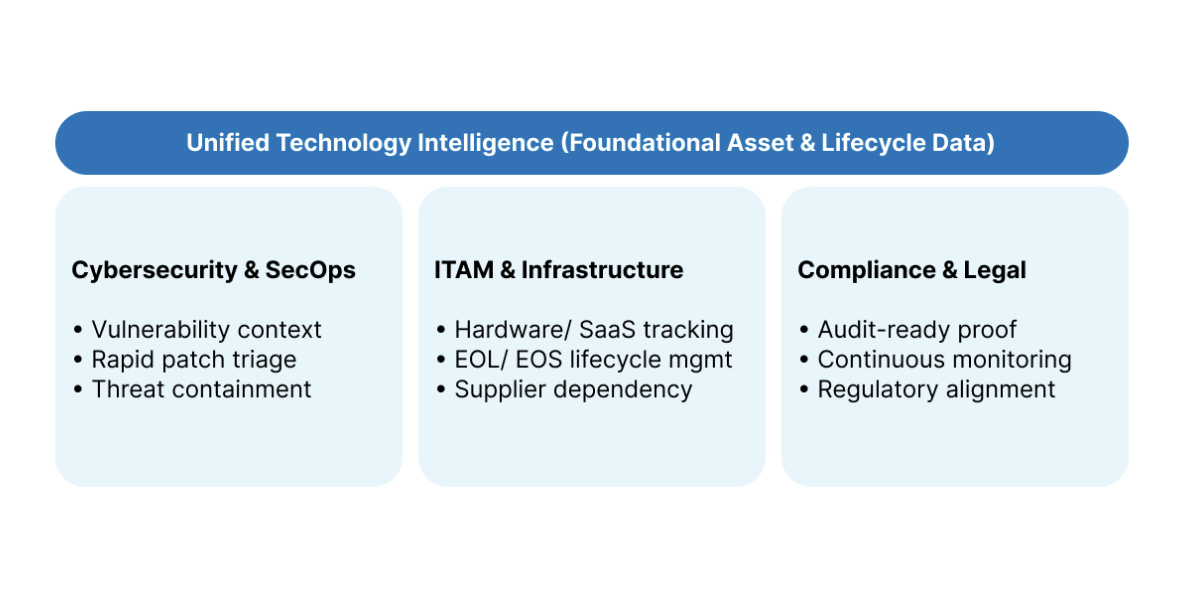
As NIST outlines in its SP 1800-5 guidance on IT asset management, having clear, unified asset visibility forms the foundation of enterprise security. Tying physical, virtual and cloud assets together gives leadership a dependable view of what exists and where it lives, giving security analysts the context they need to investigate threats and defend the organization.
How to prepare
- Treat your technology inventory as a compliance essential: Stop looking at your IT inventory as just an operational IT database. A complete, accurate view of your hardware, software and cloud assets is the bedrock of your entire compliance program.
- Enrich asset data with real operational context: Bring together raw hardware and software inventories and link them with business services, asset owners, vendor lifecycles and known security vulnerabilities.
- Map controls directly to specific assets: Stop treating compliance rules like abstract ideas. Connect specific statutory requirements, like data encryption, privileged access and logging, directly to the systems and workloads within their scope.
- Get your cross-functional teams onto one page: Break down the walls between security, infrastructure, legal and risk teams. When everyone works from the same reliable technology data, evaluating risk becomes faster, cleaner and far more accurate.
5. Overlapping reporting obligations test disconnected processes
When a major security incident strikes, stopping the bleeding and restoring backups is only your first hurdle.
Right behind the engineering response comes a wave of urgent legal questions: Does this event cross a regulatory notification line? What customer records or internal data were exposed? Were third-party vendors involved? And who internally is authorized to make the official reporting call?
These questions get messy when an organization is subject to multiple frameworks, each with its own definitions, triggers and deadlines.
In the United States, public companies answer to the Securities and Exchange Commission (SEC) rules on cybersecurity disclosure. Under these rules, domestic registrants must disclose a material cybersecurity incident on Form 8-K generally within four business days.
Keep in mind that the four-day clock does not start the second an analyst spots strange network traffic. The countdown starts once the organization officially determines that the incident is material. That determination requires swift, coordinated communication between technical responders, financial leaders and corporate legal counsel.
The SEC rules also require annual reporting covering your broader approach to cybersecurity risk management, strategy, and leadership governance.
Across the Atlantic, European regulations enforce their own aggressive reporting timelines. Under NIS2, covered entities face an early warning requirement within 24 hours of becoming aware of a significant incident, followed by detailed formal notifications. At the same time, the EU Cyber Resilience Act imposes strict reporting obligations on manufacturers of digital products to report actively exploited vulnerabilities and serious incidents to authorities within tight windows.
The reality is that there is no single, universal reporting timeline.
Instead, organizations face a tangled web of differing thresholds and deadlines that depend heavily on your industry, geography, and the nature of the breach. If your incident responders, risk managers, and legal counsel work in disconnected silos, that friction can cause you to miss mandatory reporting windows and face major regulatory penalties.
How to prepare
- Document all applicable incident reporting rules: Review your regulatory and contractual obligations (including the SEC, NIS2, CRA, GDPR, and PCI DSS) and document exactly what constitutes a reportable event, what the deadline is and who receives the notification.
- Establish clear internal escalation workflows: Clarify how security incidents get escalated from the technical operations floor to legal counsel and executive leadership. Make sure everyone knows who leads materiality discussions and who makes final reporting decisions.
- Give incident response teams immediate technical context: When an incident occurs, responders cannot afford to spend hours guessing which business processes rely on a compromised server, what software version it runs or which suppliers support it. They need that context instantly.
- Run tabletop simulation drills: Test your escalation paths and reporting protocols before a real crisis hits. Bring security, IT, risk, legal and executive teams together to work through realistic scenarios, ironing out friction points before real reporting clocks start ticking.
AI governance gets harder when AI moves from answering questions to taking action.
AI agents can interact with enterprise data, invoke tools and APIs and carry out multi-step workflows across different systems. That introduces a new layer of risk around identity and access control: Which agents can access sensitive resources? What actions can each agent take? And who is accountable for that access?
Least privilege becomes particularly important. Agents should have access only to the data, systems and actions required for their approved purpose rather than inheriting broad permissions simply because the person or team creating them already has that access.
The risk can also grow as agents connect to more systems. An agent with individually limited access to email, files, business applications and other tools may accumulate much broader capabilities when those permissions are combined. Current Microsoft security guidance warns that AI agents can experience permission creep, excessive aggregate privileges and overly broad tool access when identity and authorization controls are not designed carefully.
Ownership matters too. An agent’s business purpose, permissions and accountable owner can change over time, especially when employees change roles or leave the organization entirely. Without proper lifecycle management, orphaned agents can continue running in the background with persistent access to data they no longer need. Organizations therefore need lifecycle governance that makes it clear who is responsible for an agent, treats agents as managed identities and ensures ownership and access are reviewed, transferred or revoked when personnel depart.
6. AI agents create a new identity and access challenge
AI governance gets harder when AI moves from answering questions to taking action.
AI agents can interact with enterprise data, invoke tools and APIs and carry out multi-step workflows across different systems. That introduces a new layer of risk around identity and access control: Which agents can access sensitive resources? What actions can each agent take? And who is accountable for that access?
Least privilege becomes particularly important. Agents should have access only to the data, systems and actions required for their approved purpose rather than inheriting broad permissions simply because the person or team creating them already has that access.
The risk can also grow as agents connect to more systems. An agent with individually limited access to email, files, business applications and other tools may accumulate much broader capabilities when those permissions are combined. Current Microsoft security guidance warns that AI agents can experience permission creep, excessive aggregate privileges and overly broad tool access when identity and authorization controls are not designed carefully.
Ownership matters too. An agent’s business purpose, permissions and accountable owner can change over time, especially when employees change roles or leave the organization entirely. Without proper lifecycle management, orphaned agents can continue running in the background with persistent access to data they no longer need. Organizations therefore need lifecycle governance that makes it clear who is responsible for an agent, treats agents as managed identities and ensures ownership and access are reviewed, transferred or revoked when personnel depart.
| Human identity management | Autonomous AI agent governance |
| Employee onboarding | Scoped machine account |
| Role-based access | Hard least-privilege |
| HR-driven off boarding | Assigned business owner |
How to prepare
- Give AI agents distinct identities: Maintain visibility into which agent is accessing enterprise resources and make sure its activity can be attributed and audited.
- Apply least-privilege access: Give each agent only the data, tools and permissions required for its approved task and review those privileges as its responsibilities change.
- Assign clear ownership and manage offboarding: Every enterprise AI agent should have an accountable human owner responsible for its purpose and access. When an employee leaves the company or moves teams, include agent ownership and access permissions in standard offboarding processes so orphaned agents do not retain access to corporate data.
- Review agent access throughout its lifecycle: Reassess permissions when an agent’s purpose changes and remove access that is no longer needed.
- Keep an audit trail: Maintain sufficient visibility into agent identities and actions to support security investigations and compliance reviews.
7. Sustainability reporting puts IT data under greater scrutiny
IT compliance is increasingly connected to another source of enterprise reporting pressure: sustainability.
In the European Union, companies within the scope of the Corporate Sustainability Reporting Directive (CSRD) are required to disclose information about sustainability-related risks, opportunities and impacts using European Sustainability Reporting Standards (ESRS). The framework has continued to evolve as the EU refines and simplifies its sustainability reporting requirements.
For IT leaders, the important point is that sustainability reporting can create another demand for reliable operational data. As technology estates span physical hardware, data centers, cloud infrastructure and other services, organizations need confidence in the information feeding their sustainability reporting processes.
The challenge will sound familiar to compliance teams. Hardware inventories can become outdated. Cloud environments change constantly. Technology ownership is split between teams. Different data sources can produce different answers.
When technology information contributes to formal corporate reporting, inconsistent or incomplete data becomes more than an IT housekeeping problem. Organizations need data that can be traced, explained and governed consistently.
How to prepare
- Understand what sustainability requirements apply: Work with sustainability, finance and legal teams to establish which reporting requirements affect your organization.
- Identify the IT data used in reporting: Determine which technology-related information feeds your sustainability reporting processes and where that information originates.
- Improve asset data quality: Maintain reliable hardware and infrastructure information rather than depending solely on manually reconciled snapshots.
- Establish clear data ownership: Identify which teams are responsible for providing, validating and maintaining technology data used in sustainability reporting.
- Keep supporting evidence: Maintain the underlying data and methodology needed to explain how technology-related sustainability information was produced.
IT compliance checklist for 2027
Because every enterprise runs a unique technology stack and answers to different regulators, there is no universal, magic checklist that guarantees compliance.
However, addressing these practical checkpoints will put your team in a far stronger position heading into 2027:
- Inventory your technology estate: Maintain an accurate, up-to-date accounting of the hardware, installed software, cloud workloads and SaaS tools across your organization.
- Inventory AI systems and determine regulatory scope: Uncover where AI tools, models and features are deployed across departments, identify designated system owners and establish your organization’s legal classification (provider vs. deployer) under the EU AI Act.
- Govern AI agent identities, permissions and offboarding: Treat autonomous AI agents as distinct machine identities governed by least-privilege data access and embed agent ownership into standard employee offboarding so access is revoked or reassigned when personnel leave.
- Track asset lifecycles to catch end-of-life risks: Keep a close eye on vendor support dates to spot end-of-life and end-of-support hardware and software early, prioritizing remediation based on operational risk.
- Track relevant data locations: Connect applications and providers with information about where regulated data is stored, processed or accessed to ensure compliance with in-country data residency requirements and international transfer rules.
- Preserve historical context: Maintain auditable records of asset provenance, configuration changes, ownership transitions and lifecycle status over time rather than relying solely on today’s inventory.
- Connect IT assets directly to vulnerability data: Make sure your vulnerability management tools talk directly to your asset inventory so you can quickly see whether a newly disclosed CVE affects systems in your environment.
- Strengthen software supply chain transparency: Track component dependencies, ingest SBOMs where appropriate and review security expectations with your third-party software vendors.
- Link compliance controls to real infrastructure: Make sure your mandatory cybersecurity controls, such as identity-based access control, network segmentation, firewalls and encryption, are mapped directly to the systems they protect.
- Clarify applicable regulatory requirements: Take the time to figure out which compliance regulations actually apply to your operations (like NIS2, CRA, DORA or SEC rules) rather than relying on generic, surface-level guidance.
- Define incident reporting roles and escalation paths: Document who evaluates incident severity, who makes legal materiality calls and who owns communication with regulatory bodies.
- Move from static audits to continuous tracking: Stop relying on once-a-year snapshot audits in an enterprise environment that changes every single day. Implement continuous visibility that catches compliance drift in real time.
You can’t govern what you can’t see
The biggest IT compliance risks heading into 2027 share a fundamental truth.
Whether your team is dealing with AI governance, unsupported edge devices, software supply chain obligations, distributed security controls or high-stakes incident reporting deadlines, compliance breaks down when you do not have a reliable, current picture of the technology you run.
That does not mean asset visibility is a substitute for a compliance program. Visibility on its own will not draft policies, conduct risk assessments or manage legal reviews.
What it does is provide a dependable foundation. When your IT compliance, risk and security teams work from an accurate picture of your technology estate, they can evaluate risk realistically, apply controls where they matter and generate audit evidence that stands up to scrutiny.
This is where Technology Intelligence makes a real difference. At Flexera, Technology Intelligence brings together hardware and software inventory, vendor support lifecycles, supplier details, software bill of materials data and vulnerability intelligence into a single reliable view.
Meeting modern compliance demands cannot be solved by a single tool or dumped onto a single department. It takes active, coordinated work across IT asset management, cybersecurity, enterprise architecture, procurement and risk teams.
Heading into 2027, organizations do not need another isolated compliance dashboard or another unread policy document. They need clear, trustworthy insight into their technology environment so every stakeholder can make smarter, safer decisions.
Because the most dangerous compliance risk heading into 2027 might not be the next major regulation. It might simply be the technology already running inside your business that nobody is watching.
What are the biggest IT compliance risks for 2027?
Five major IT compliance risks for 2027 are weak AI governance, unsupported end-of-life technology, software supply-chain vulnerabilities, fragmented technology environments and overlapping incident-reporting requirements. Each risk becomes harder to manage when organizations lack accurate, current information about their technology estate.
How should organizations prepare for IT compliance in 2027?
Organizations should maintain an accurate technology inventory, identify AI systems and owners, track product support lifecycles, connect assets with vulnerability data, strengthen software supply-chain transparency and document incident escalation responsibilities. Compliance controls should also be mapped to the infrastructure and workloads they protect.
How does the EU AI Act affect IT compliance?
The EU AI Act creates risk-based requirements for organizations that build, market, deploy or operate AI systems. It includes rules for high-risk systems, user-facing and synthetic content transparency, and general-purpose AI models. Its reach can extend to providers and deployers outside Europe when an AI system’s output is used within the European Union.
Why is end-of-life software a compliance risk?
End-of-life software no longer receives routine security patches, bug fixes or vendor-supported vulnerability handling. This can leave organizations unable to apply or demonstrate important compliance controls, particularly when obsolete systems cannot support modern patching or identity and access controls.
What role does an SBOM play in IT compliance?
A Software Bill of Materials, or SBOM, lists the components, libraries and dependencies within a software product. It can help teams identify affected software when new vulnerabilities emerge, but it must be integrated into active vulnerability-management and remediation workflows rather than treated as static audit documentation.
Why does technology fragmentation make compliance harder?
Technology fragmentation spreads assets, identities and controls across public clouds, SaaS platforms, on-premises systems and remote endpoints. Without unified asset information, organizations may struggle to prove that controls are configured correctly, identify unsupported software or connect systems with accountable owners and suppliers.